
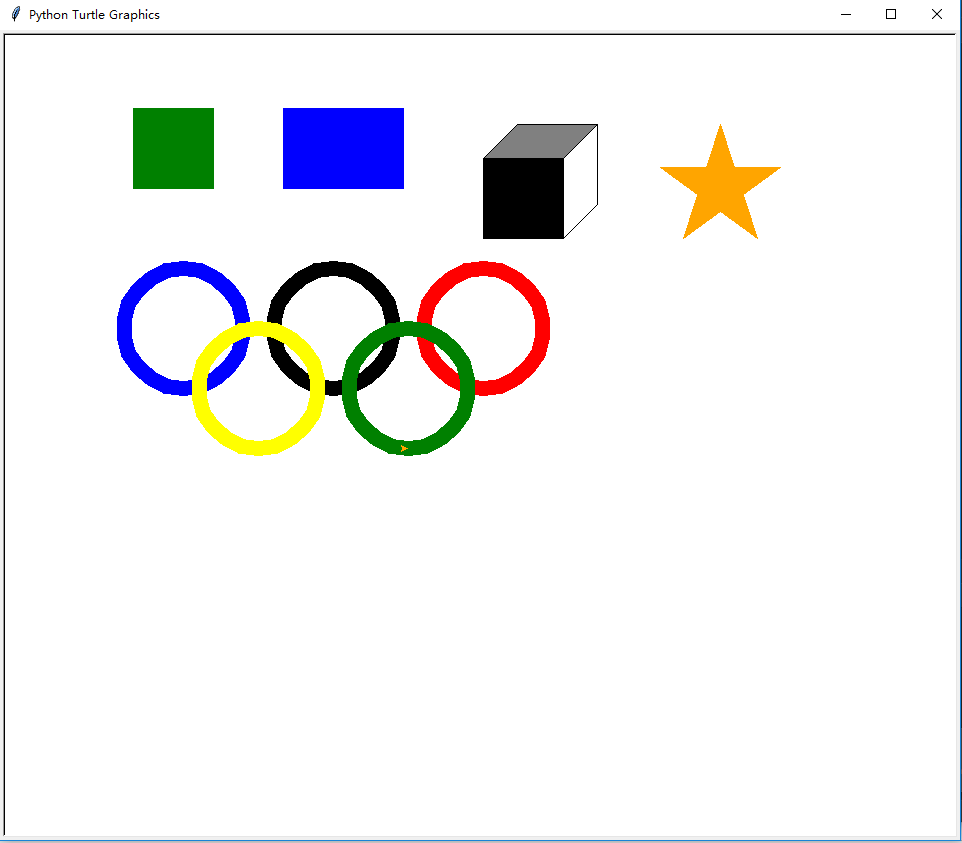
python3 turtle画正方形、矩形、正方体、五角星、奥运五环
python3 环境
turtle模块
分别画出
正方形、矩形、正方体、五角星、奥运五环
#!/usr/bin/env python

# -*- coding:utf-8 -*-

# Author:Hiuhung Wan

import turtle

turtle.screensize(400, 400)

#正方形

turtle.penup()

turtle.goto(-350,250)

turtle.pendown()

turtle.pencolor('green')

turtle.begin_fill()

turtle.fillcolor('green')

for i in range(4):

    turtle.forward(80)

    turtle.left(90)

turtle.end_fill()

#矩形

turtle.penup()

turtle.goto(-200, 250)

turtle.pendown()

turtle.pencolor('blue')

turtle.begin_fill()

turtle.fillcolor('blue')

for i in range(1, 5):

    if i % 2 == 1:

        n = 120

    elif i % 2 == 0:

        n = 80

    turtle.forward(n)

    turtle.left(90)

turtle.end_fill()

turtle.penup()

#正方体

x = 0

y = 200

n = 80

turtle.goto(x, y)

turtle.pendown()

turtle.pencolor('black')

turtle.begin_fill()

turtle.fillcolor('black')

for i in range(4):

    turtle.forward(n)

    turtle.left(90)

turtle.end_fill()

turtle.penup()

turtle.goto(x, y + n)

turtle.pendown()

turtle.fillcolor('gray')

turtle.begin_fill()

turtle.left(45)

turtle.forward(int(n * 0.6))   #上方左侧斜线

turtle.right(45)

turtle.forward(n)    #上方横线

turtle.left(360 - 135)

turtle.forward(int(n * 0.6))    ##上方右侧斜线

turtle.end_fill()

turtle.left(45)

turtle.penup()

turtle.goto(x + n, y)

turtle.pendown()

turtle.left(135)

turtle.forward(int(n * 0.6))

turtle.left(45)

turtle.forward(n)

turtle.right(90)   #方向还原,向左

turtle.penup()

#五角星

turtle.goto(x + 200, y)

turtle.pendown()

turtle.pencolor('orange')

turtle.begin_fill()

turtle.fillcolor('orange')

turtle.left(36)

for i in range(5):

    turtle.forward(120)

    turtle.left(180 - 36)

turtle.end_fill()

turtle.right(36)

turtle.penup()

# -----------------------------------------------------

#奥运五环

x = -300

y = 50

r = 60

#第一个圈,蓝色

turtle.goto(x, y)

turtle.pendown()

turtle.pensize(15)

turtle.pencolor('blue')

turtle.circle(r)

turtle.penup()

#第二个圈,黑色

turtle.goto(x + 2.5 * r , y)

turtle.pendown()

turtle.pensize(15)

turtle.pencolor('black')

turtle.circle(r)

turtle.penup()

#第三个圈,红色

turtle.goto(x + 2.5 * r * 2 , y)

turtle.pendown()

turtle.pensize(15)

turtle.pencolor('red')

turtle.circle(r)

turtle.penup()

#第四个圈,黄色

turtle.goto(x + (2.5 * r) * 0.5 , y - r)

turtle.pendown()

turtle.pensize(15)

turtle.pencolor('yellow')

turtle.circle(r)

turtle.penup()

#第五个圈,绿色

turtle.goto(x + (2.5 * r) * 0.5 + 2.5 * r, y - r)

turtle.pendown()

turtle.pensize(15)

turtle.pencolor('green')

turtle.circle(r)

turtle.penup()

turtle.done()
效果图:
python3 turtle画正方形、矩形、正方体、五角星、奥运五环的更多相关文章
- python3 turtle 画国际象棋棋盘
python3 turtle 画国际象棋棋盘 #!/usr/bin/env python # -*- coding:utf-8 -*- # Author:Hiuhung Wan import turt ...
- python3 turtle 画围棋棋盘
python3 环境 利用turtle模块画出 围棋棋盘 #!/usr/bin/env python # -*- coding:utf-8 -*- # Author:Hiuhung Wan impor ...
- 【Python】【demo实验29】【练习实例】【使用turtle画五角星】
原题: 使用turtle画五角星: 我的代码: #!/usr/bin/python # encoding=utf-8 # -*- coding: UTF-8 -*- from turtle impor ...
- Python3 turtle安装和使用教程
Python3 turtle安装和使用教程 Turtle库是Python语言中一个很流行的绘制图像的函数库,想象一个小乌龟,在一个横轴为x.纵轴为y的坐标系原点,(0,0)位置开始,它根据一组函数 ...
- HTML5之Canvas画正方形
HTML5之Canvas画正方形 1.设计源码 <!DOCTYPE html> <head> <meta charset="utf-8" /> ...
- 用div画三角/矩形/圆
1. 画三角 <!DOCTYPE html> <html> <head> <title></title> <meta charset= ...
- python运用turtle 画出汉诺塔搬运过程
python运用turtle 画出汉诺塔搬运过程 1.打开 IDLE 点击File-New File 新建立一个py文件 2.向py文件中输入如下代码 import turtle class Stac ...
- day 03 turtle 画鹅
turtle 画鹅 import turtle t=turtle turtle.speed(10) t. setup(800,600) #画头 turtle.penup() turtle.goto(0 ...
- *【Python】【demo实验31】【练习实例】【使用turtle画小猪佩奇】
如下图小猪佩奇: 要求使用turtle画小猪佩奇: 源码: # encoding=utf-8 # -*- coding: UTF-8 -*- # 使用turtle画小猪佩奇 from turtle i ...
随机推荐
- 高速改动android系统默认日期方法
高速改动android系统默认日期方法 在android系统的设备上,都有一个默认的開始日期,看过非常多设备,有些设备在没有联网的时候没有同步到系统时间的时候,竟然默认的还是1970年的日期.也见过有 ...
- C#实现窗口拖动时各个控件同比自己主动放缩大小
实现方式主要是利用panel控件为主题.对于每一个控件的大小位置和字体这几个属性进行记录. 然后依据窗口改变的大小同一时候放缩. 简要过程例如以下: 1 创建C#窗口程序项目. 2 Panel放置到 ...
- jquery12 queue() : 队列方法
<!DOCTYPE HTML> <html> <head> <meta http-equiv="Content-Type" content ...
- css相关用法
1. 2. 3.offset([coordinates]) 获取匹配元素在当前视口的相对偏移. 返回的对象包含两个整型属性:top 和 left,以像素计.此方法只对可见元素有效. a.获取当前元素的 ...
- Irrlicht 3D Engine 笔记系列 之 教程5- User Interface
作者:i_dovelemon 日期:2014 / 12 / 18 来源:CSDN 主题:GUI 引言 今天.博主学习了第五个教程. 这个教程解说了怎样使用Irrlicht内置的一个基础模块.GUI模块 ...
- JMS基础知识
JMS规范: jms的基本构件: 连接工厂(connectionFactory):客户用来创建连接的对象.比如:activeMQ提供的ActiveMQConnectionFactory. 连接(co ...
- 【Android 面试基础知识点整理】
针对Android面试中常见的一些知识点整理,Max 仅仅是个搬运工.感谢本文中引用文章的各位作者,给大家分享了这么多优秀文章.对于当中的解析,是原作者个人见解,有错误和不准确的地方,也请大家积极指正 ...
- c#中文字符串与byte数组互相转化
因为中文字符串一个字符占两个字节,所以不能用正常的方式与byte之间进行互相转化 中文字符串转成byte[] byte[] ping = Encoding.UTF8.GetBytes("你的 ...
- JavaScript学习总结(5)——Javascript面向(基于)对象编程
一.澄清概念 1.JS中"基于对象=面向对象" 2.JS中没有类(Class),但是它取了一个新的名字叫"原型对象",因此"类=原型对象" ...
- 处理async void 方法中无法捕捉异常信息
利用 NuGet库 Nito.AsyncEx 中的 AsyncContext类. 添加NuGet类库,使用AsyncContext AsyncContext.Run(Action action);