
C++目录遍历:使用第三方库boost.filesystem等
1. opencv 目录文件遍历
注释:2014 0814 这个代码是基于java的,Java使用托管代码进行目录管理,C++就不那么跨平台了.
原文链接:http://blog.csdn.net/zxlstudio/article/details/10100345
在做图像处理的时候,可能进行一个文件夹的所有文件的遍历。
使用c 的文件夹遍历方式,代码太难理解,而且如果在windows中使用还需要使用wchar_t宽字符。
opencv本身就有目录遍历的类库,非常方便,我以前还一直傻傻的使用c的方式进行遍历。
示例代码:非常简单的操作
#include "iostream"

#include "stdio.h"

#include "opencv\cv.h"

#include "opencv\highgui.h"

#include <opencv2\opencv.hpp>

using namespace std;

using namespace cv;

int main(int argc, char* argv[])

{

    string dir_path = "C:/Users/zxl/Desktop/XOXO/New folder/";

    Directory dir;

    vector<string> fileNames = dir.GetListFiles(dir_path, "*.jpg", false);

    for(int i=0; i < fileNames.size(); i++)

    {

        string fileName = fileNames[i];

        string fileFullName = dir_path + fileName;

        cout<<"file name:"<<fileName<<endl;

        cout<<"file paht:"<<fileFullName<<endl;

    }

    system("pause");

    return 0;

}
效果:
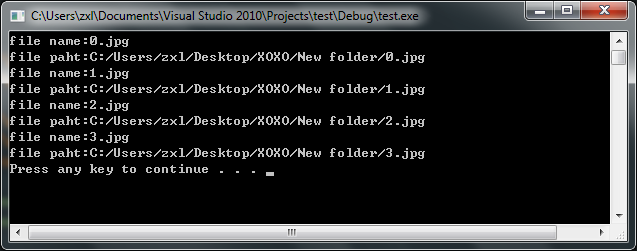
http://blog.chinaunix.net/uid-24462747-id-2980901.html
3..使用boost::filesystem实现目录遍历
http://blog.sina.com.cn/s/blog_48d4cf2d0100mx4o.html
下面的代码实现了深度优先和广度优先两种遍历方式,可以指定最大遍历深度,可以指定结果中是否包含子文件夹

======================================================================

#include <string>

#include <vector>

#include <deque>

#include <utility>

#include<boost/filesystem/operations.hpp>

#include<boost/filesystem/path.hpp>

class file_tool

{

public:

   enum traverse_order_t

    {

        DEPTH_FIRST = 1,

        BREADTH_FIRST =2,

    };

    enum { UNLIMITED_DEPTH =-1};

    static bool get_sub_files(conststd::string& path,std::vector<std::string>&files, int max_depth = UNLIMITED_DEPTH, bool include_sub_dirs =false, traverse_order_t order = BREADTH_FIRST)

    {

        using namespace std;

        namespace fs =boost::filesystem;

        typedefstd::pair<string,int> path_and_depth_t;

       deque<path_and_depth_t> qu;

        {

           fs::path root(path);

            if(!fs::exists(root) ||!fs::is_directory(root))

           {

               return false;

           }

            if(max_depth <= 0 &&max_depth != UNLIMITED_DEPTH)

           {

               return true;

           }

           fs::directory_iteratorend_iter;

            for(fs::directory_iteratorfile_itr(root); file_itr != end_iter; ++file_itr)

           {

              qu.push_back(path_and_depth_t(fs::system_complete(*file_itr).native_directory_string(),1));

           }

       }

        while (!qu.empty())

        {

           path_and_depth_t path_and_depth = (order == DEPTH_FIRST) ?qu.back() : qu.front();

           string& file_str(path_and_depth.first);

            int depth= path_and_depth.second;

            if (order== DEPTH_FIRST)

           {

               qu.pop_back();

           }

            else

           {

               qu.pop_front();

           }

           fs::path file(file_str);

            if(fs::exists(file))

           {

               if(fs::is_directory(file))

               {

                   if (include_sub_dirs)

                   {

                      files.push_back(file_str);

                   }

                   if (depth <max_depth || max_depth == UNLIMITED_DEPTH)

                   {

                       intnext_depth = depth + 1;

                      fs::directory_iteratorend_iter;

                       for(fs::directory_iteratorfile_itr(file); file_itr != end_iter; ++file_itr)

                      {

                         qu.push_back(path_and_depth_t(fs::system_complete(*file_itr).native_directory_string(),next_depth));

                      }

                   }

               }

               else

               {

                  files.push_back(file_str);

               }

           }

        }

        return true;

    }

};
4.使用boost filesystem递归遍历文件夹
原文链接:http://www.th7.cn/Program/cp/2012/02/21/60128.shtml
编译环境vc 9
#ifndef SCANALLFILES_H

#define SCANALLFILES_H

#include "boost/filesystem/operations.hpp"

#include "boost/filesystem/path.hpp"

#include <iostream>

using namespace std;

class ScanAllFiles{

public:

    static const vector<string>& scanFiles(const string&,vector<string>&); //方法一,自己写递归,用filesystem里的directory_iterator

    static const vector<string>& scanFilesUseRecursive(const string&,vector<string>&); //方法二,直接用boost的filesystem里的recursive_directory_iterator

};

//方法一,自己写递归

const vector<string>& ScanAllFiles::scanFiles(const string& rootPath,vector<string>& container=*(new vector<string>())){

    namespace fs = boost::filesystem;

    fs::path fullpath (rootPath, fs::native);

    vector<string> &ret = container;

    if(!fs::exists(fullpath)){return ret;}

    fs::directory_iterator end_iter;  /**无参构造函数是最后那个iterator的value 摘抄如下

*If the end of the directory elements is reached, the iterator becomes equal to the end iterator value. The constructor directory_iterator() with no arguments always constructs an end iterator object, which is the only legitimate iterator to be used for the end condition. The result of operator* on an end iterator is not defined. For any other iterator value a const directory_entry& is returned. The result ofoperator-> on an end iterator is not defined. For any other iterator value a const directory_entry* is returned.

*

**/

    for(fs::directory_iterator iter(fullpath);iter!=end_iter;iter++){

        try{

            if (fs::is_directory( *iter ) ){

                std::cout<<*iter << "is dir.whose parent path is " << iter->path().branch_path() << std::endl;

                ret.push_back(iter->path().string()); //递归前push_back进去一个

                ScanAllFiles::scanFiles(iter->path().string(),ret);//递归,把vector也传进去

            }else{

                ret.push_back(iter->path().string());

                std::cout << *iter << " is a file" << std::endl;

            }

        } catch ( const std::exception & ex ){

            std::cerr << ex.what() << std::endl;

            continue;

        }

    }

    return ret;

}

//方法二,直接用boost的filesystem里的recursive_directory_iterator

const vector<string>& ScanAllFiles::scanFilesUseRecursive(const string& rootPath,vector<string>& container=*(new vector<string>())){

    namespace fs = boost::filesystem;

    fs::path fullpath (rootPath, fs::native);

    vector<string> &ret = container;

    if(!fs::exists(fullpath)){return ret;}

    fs::recursive_directory_iterator end_iter;

    for(fs::recursive_directory_iterator iter(fullpath);iter!=end_iter;iter++){

        try{

            if (fs::is_directory( *iter ) ){

                std::cout<<*iter << "is dir" << std::endl;

                ret.push_back(iter->path().string());

                //ScanAllFiles::scanFiles(iter->path().string(),ret);

            }else{

                ret.push_back(iter->path().string());

                std::cout << *iter << " is a file" << std::endl;

            }

        } catch ( const std::exception & ex ){

            std::cerr << ex.what() << std::endl;

            continue;

        }

    }

    return ret;

}

#endif
5.我的代码:......
bool CCvMLP::loadFileList(const boost::filesystem::path &base_dir, const std::string &extension,

    std::vector<std::string> &FileList)

{

    if (!boost::filesystem::exists (base_dir) && !boost::filesystem::is_directory (base_dir))

        return true;

    boost::filesystem::directory_iterator it(base_dir);

    for (;

        it != boost::filesystem::directory_iterator ();

        ++it)

    {

        if (boost::filesystem::is_directory (it->status ()))

        {

            std::stringstream ss;

            ss << it->path ();

            loadFileList (it->path (), extension, FileList);

        }

        if (boost::filesystem::is_regular_file (it->status ()) && boost::filesystem::extension (it->path ()) == extension)

        {

            std::string Path;

            Path =base_dir.string();

            Path.append("/");

            Path.append(it->path().filename().string());

            FileList.push_back (Path);

        }

    }

    return (true);

}
6.我的代码-第二个版本
int loadFilelist(std::string  folder, const std::string  extension, std::vector<std::string>  &Filelist)

{

	//std::vector<std::string>  Filelist(0);

	Filelist.resize(0);

	Traverse(folder.c_str(), extension.c_str(), Filelist);

	//for ( auto ptr = Filelist.begin(); ptr != Filelist.end(); ++ptr )

	//{

	//}

	if (Filelist.size() > 0){

		for (int i = 0; i < Filelist.size(); ++i){

			std::string T = Filelist[i];

			std::string tF(folder);

			tF.append(T);

			Filelist[i] = tF;

		}

	}

	//return int32_t(1);

	return (1);

}

void Traverse( const char *pszPath, const char *extension, std::vector<std::string>& vctFileName )

{

	char szFind[MAX_PATH] = { 0 };

	char szFile[MAX_PATH] = { 0 };

	WIN32_FIND_DATAA FindFileData;

	//strcpy(szFind, pszPath);

	//strcpy_s(szFind, strlen(pszPath), pszPath);

	strcpy_s(szFind, 200, pszPath);

	//strcat(szFind, "//*.bmp");

	if (0){

		strcat_s(szFind, sizeof(szFind), "//*.bmp");

	}

	else{

		strcat_s(szFind, sizeof(szFind), "//*");

		strcat_s(szFind, sizeof(szFind), extension);

	}

	HANDLE  hFind = ::FindFirstFileA(szFind, &FindFileData);

	if (INVALID_HANDLE_VALUE == hFind)	{

		return;

	}

	while (TRUE)	{

		if (FindFileData.dwFileAttributes & FILE_ATTRIBUTE_DIRECTORY)	{

			//if(FindFileData.cFileName[0]!='.')

			//{

			//    strcpy(szFile,lpPath);

			//    strcat(szFile,"//");

			//    strcat(szFile,FindFileData.cFileName);

			//    Traverse(szFile);

			//}

		}

		else{

			//cout<<FindFileData.cFileName<<endl;

			vctFileName.push_back(FindFileData.cFileName);

		}

		if (!FindNextFileA(hFind, &FindFileData)){

			break;

		}

	}

	FindClose(hFind);

}
#include <windows.h>
C++目录遍历:使用第三方库boost.filesystem等的更多相关文章
- Dev-C++安装第三方库boost
Dev-C++安装第三方库boost 转 https://www.jianshu.com/p/111571e4d6f5?utm_source=oschina-app 之前鉴于codeblocks界面 ...
- [boost][filesystem] 扫描给定目录下所有项
Intro. Boost的filesystem可以用来扫描给定目录下的所有项. 实现 具体实现代码如下: 需要包含的头文件和使用的命名空间: #include <boost/filesystem ...
- boost::filesystem总结
boost::filesystem是Boost C++ Libraries中的一个模块,主要作用是处理文件(Files)和目录(Directories).该模块提供的类boost::filesyste ...
- Laravel composer自定义命令空间,方便引用第三方库
第一步:自定义目录 在app文件夹下新建Library目录,做为第三方库的目录 第二步: 修改composer.json文件 autoload节点下的psr-4自定义命名空间 规则: key: 命名空 ...
- CMAKE编译时如何自动下载第三方库并解压、安装到指定目录
GreatSQL社区原创内容未经授权不得随意使用,转载请联系小编并注明来源. 导语 在日常开发过程中难免会使用到第三方库或者需要将部分库分离另外存储,如果将库与代码放在一起难免会造成工程庞大,此时就可 ...
- Boost::filesystem 使用小笔记
今天拿起手要用C++写个小工具,从指定的目录递归遍历文件,然后做一下处理.又翻了一下boost的filesystem库.小结一下,希望能加深印象,免得下次又要查看文档. 1. path对象就是一个跨平 ...
- 基于QT开发的第三方库
基于Qt开发的第三方库 分类: Qt2014-02-12 11:34 1738人阅读 评论(0) 收藏 举报 QT第三方库 目录(?)[+] 文章来源:http://blog.csdn.net ...
- boost::filesystem经常使用使用方法具体解释
提示: filesystem库提供了两个头文件,一个是<boost/filesystem.hpp>,这个头文件包括基本的库内容.它提供了对文件系统的重要操作. 同一时候它定义了一个类pat ...
- 【Python基础】安装python第三方库
pip命令行安装(推荐) 打开cmd命令行 安装需要的第三方库如:pip install numpy 在安装python的相关模块和库时,我们一般使用“pip install 模块名”或者“pyth ...
随机推荐
- 8.在idea中配置maven
1.在IntelliJ IDEA中配置maven 打开-File-Settings 2.我们还可以在勾选一些其他选项 3.我们可以更新一下本地仓库和远程仓库,这个样在pom.xml文件中添加依赖jia ...
- springcloud 中文文档
spring cloud 中文文档:https://springcloud.cc/spring-cloud-dalston.html spring cloud 中文网:https://springcl ...
- 第二次训练 密码acmore
网址:http://acm.hust.edu.cn/vjudge/contest/view.action?cid=26733#overview 贪心全场!!!! A题: #include <io ...
- ExtJs之Ajax模式的表单数据加载
简单: <!DOCTYPE html> <html> <head> <title>ExtJs</title> <meta http-e ...
- J - Assign the task
J - Assign the task HDU - 3974 思路:一眼秒思路<(* ̄▽ ̄*)/ dfs序+线段树. 通过dfs序把树上问题转化成线段上的问题.然后用线段树解决. 错因:都 ...
- i386和x86-64区别通俗易懂版本(转)
x86架构首度出现在1978年推出的Intel 8086中央处理器,它是从Intel 8008处理器中发展而来的,而8008则是发展自Intel 4004的.Intel之后又推出了包括80186.80 ...
- 《简明 Python 教程》笔记
基础 字符串:python 中字符串可以用单引号.双引号和三个引号括起来,其中三个引号可以用来指定多行的字符串. print('hello'* 3) 连续打印 3 个 hello 格式化:print ...
- WindowsclientC/C++编程规范“建议”——函数
1 函数 1.1 代码行数控制在80行及以内 等级:[要求] 说明:每一个函数的代码行数控制应该控制在80行以内.假设超过这个限制函数内部逻辑一般能够拆分.假设试图超过这个标准.请列出理由. 但理由不 ...
- 图论-BFS解无权有向图最短路径距离
概述 本篇博客主要内容: 对广度优先搜索算法(Breadth-First-Search)进行介绍: 介绍用邻接表的存储结构实现一个图(附C++实现源代码): 介绍用BFS算法求解无权有向图(附C++实 ...
- java基础开发—jstl标签库
在DRP项目中.接触到了JSTL标签库. 在未使用Jstl之前,我们使用JSP脚本实现一些声明或是表达式任务,做一些业务相关操作时,须要在页面中嵌入大量的java代码.在DRP项目开发前期.使用jsp ...