
如何快糙好猛的使用libfacedetection库【最新版】
前言
最近已经很少看CSDN了。这一年多准备考研,基本上怕是不会再怎么上了。以前有一个http://blog.csdn.net/mr_curry/article/details/51804072 如何快糙好猛的使用Shiqi.Yu老师的公开人脸检测库(附源码)的BLOG,因为于老师的库已经更新了,所以重新写一下吧。
PS:这个库越来越强了,已经可以做人脸关键点检测了。关键点检测可以用于矫正人脸,再也不要用慢的要死的dlib啦~~
配置
五张图带你解决问题:(X64,Debug)
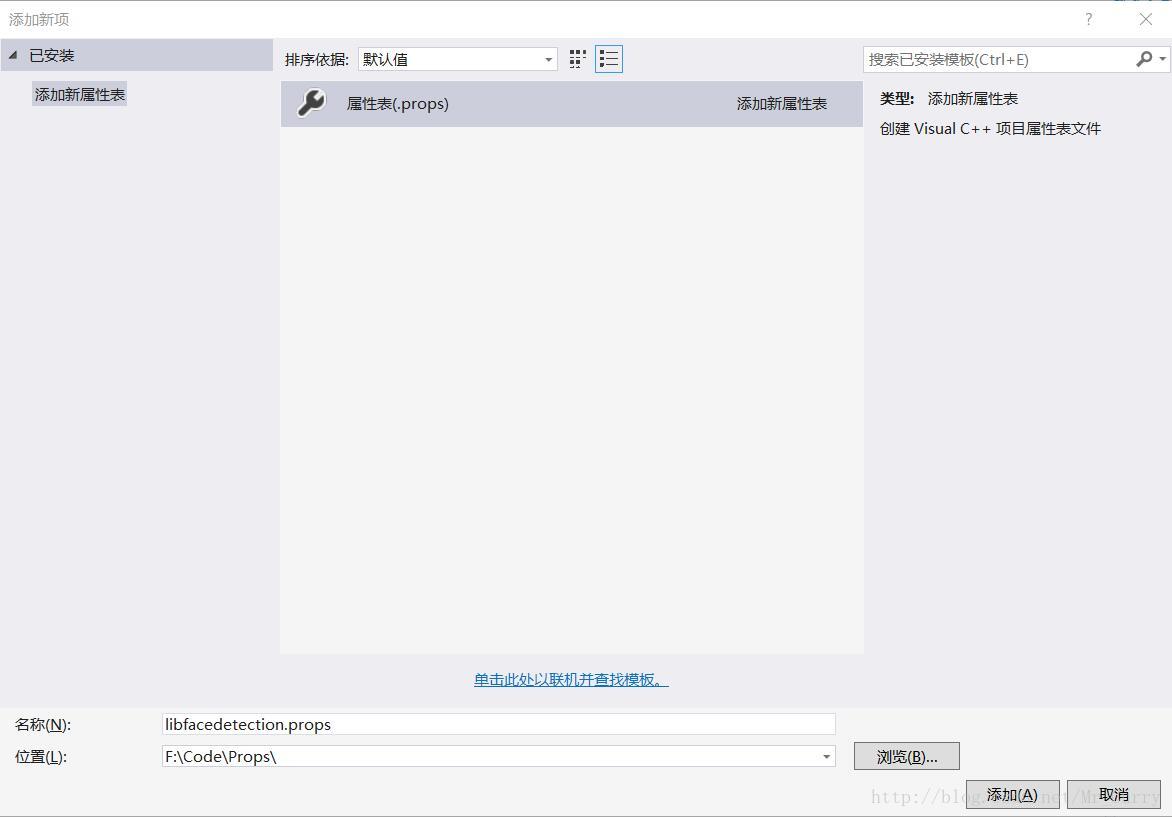
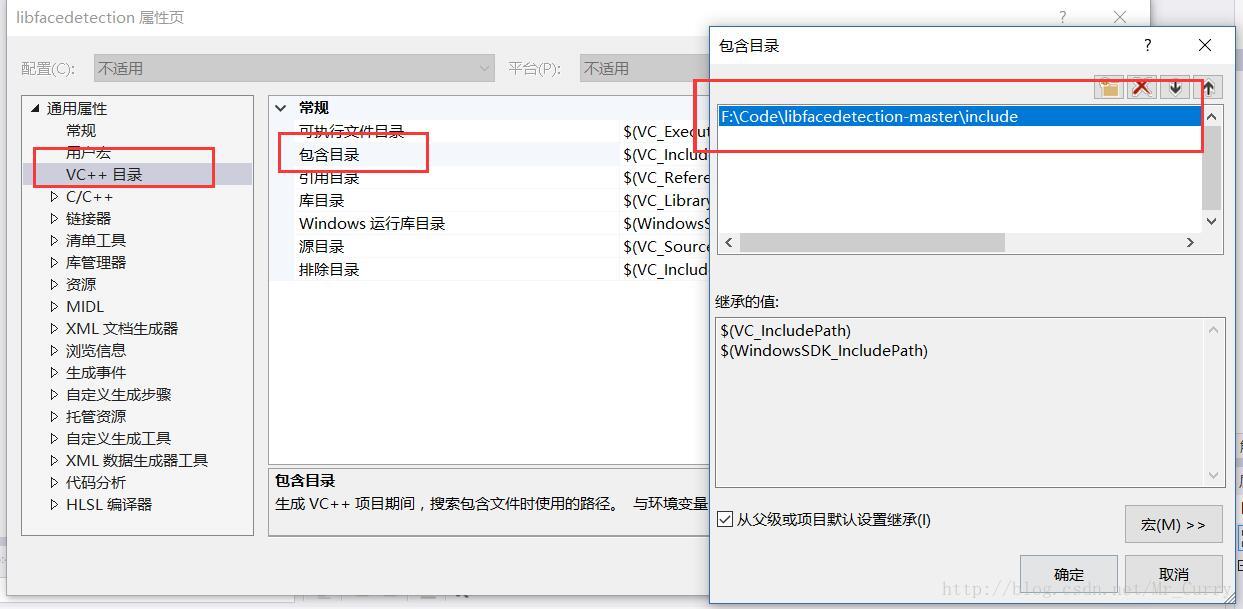
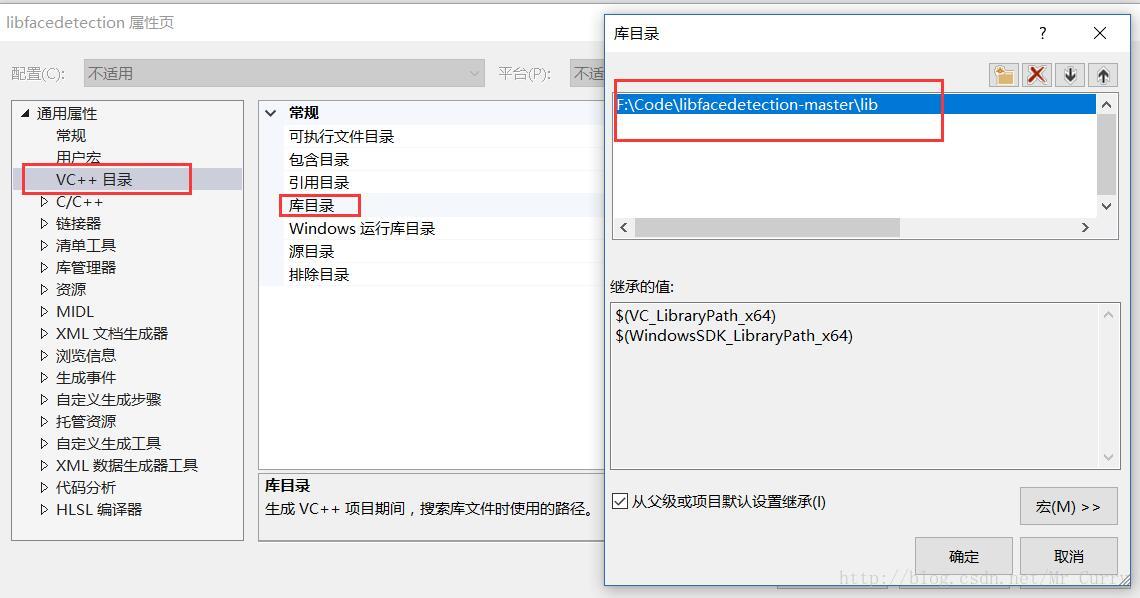
然后你需要把opencv的属性表也引进来:
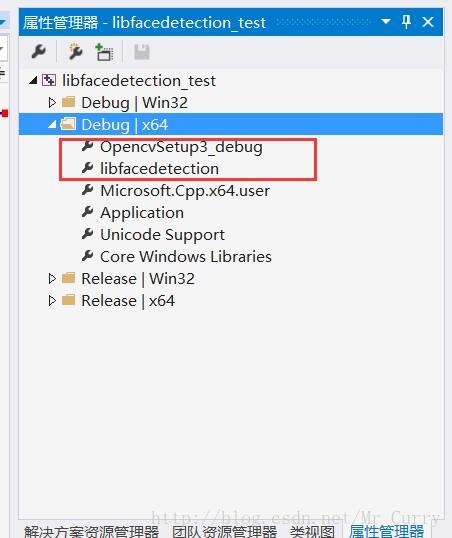
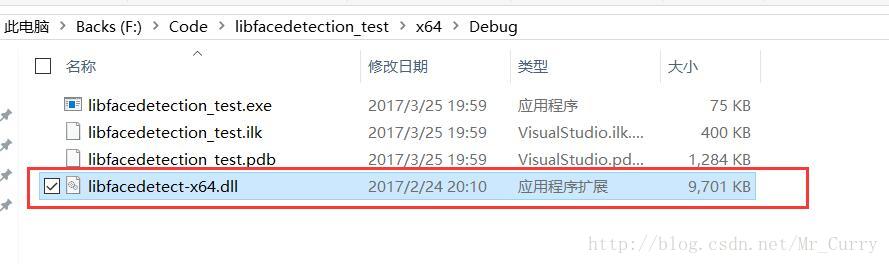
两个方法,加系统变量或者放到和exe同一个文件夹下。加了系统变量后重启一次才生效,所以这里就直接放咯
代码
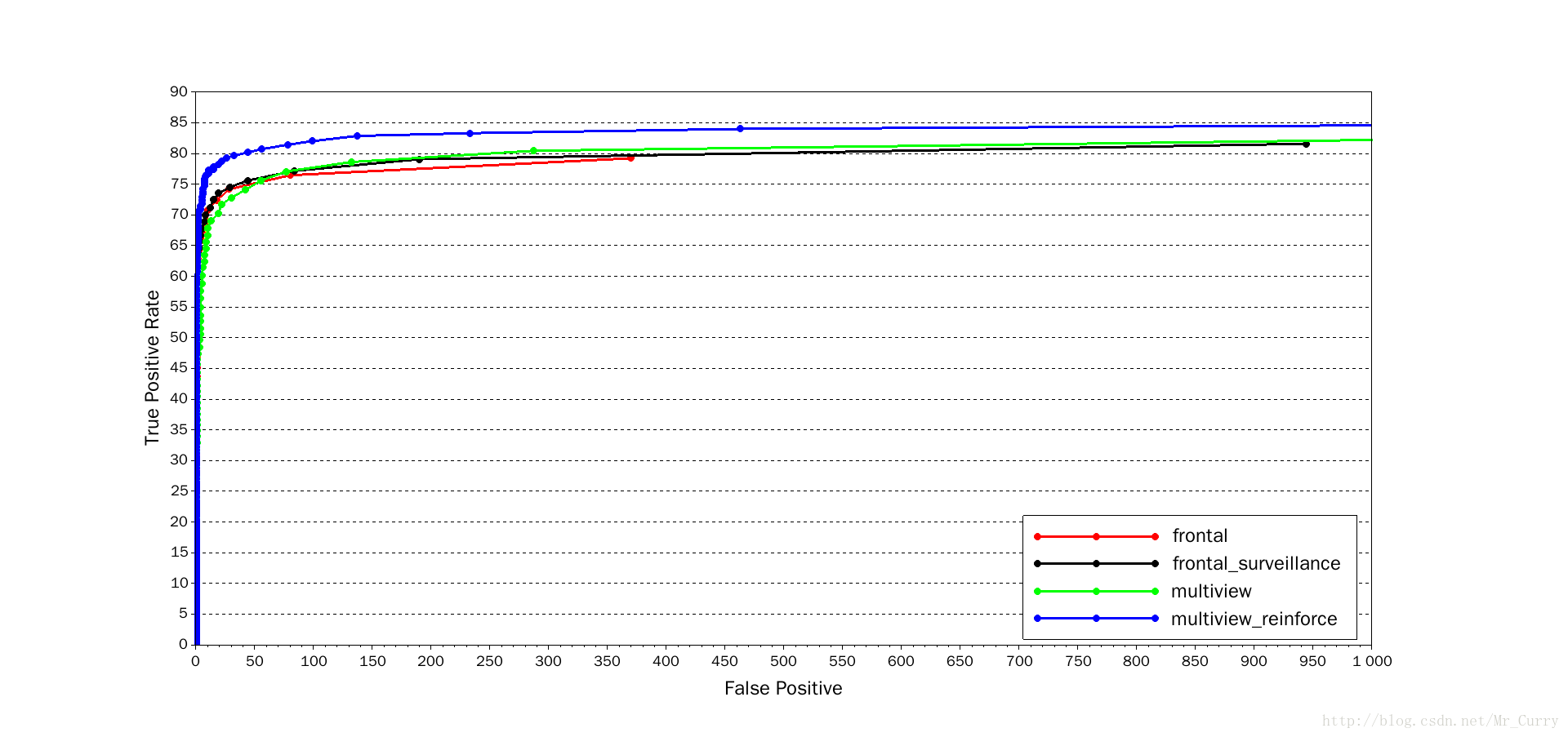
我们直接用FDDB上评测效果最好的函数:facedetect_multiview_reinforce
#include <opencv.hpp>

#include <facedetect-dll.h>

using namespace cv;

using namespace std;

//define the buffer size. Do not change the size!

#define DETECT_BUFFER_SIZE 0x20000

int main()

{

    int * pResults = NULL;

    //pBuffer is used in the detection functions.

    //If you call functions in multiple threads, please create one buffer for each thread!

    unsigned char * pBuffer = (unsigned char *)malloc(DETECT_BUFFER_SIZE);

    if (!pBuffer)

    {

        fprintf(stderr, "Can not alloc buffer.\n");

        return -1;

    }

    Mat src = imread("img.jpg");

    Mat gray;

    cvtColor(src, gray, CV_BGR2GRAY);

    int doLandmark = 1;// do landmark detection

    pResults = facedetect_multiview_reinforce(pBuffer, (unsigned char*)(gray.ptr(0)), gray.cols, gray.rows, (int)gray.step,

        1.2f, 2, 48, 0, doLandmark);

    //print the detection results

    for (int i = 0; i < (pResults ? *pResults : 0); i++)

    {

        short * p = ((short*)(pResults + 1)) + 142 * i;

        rectangle(src, Rect(p[0], p[1], p[2], p[3]), Scalar(0, 255, 0), 2);

        if (doLandmark)

        {

            for (int j = 0; j < 68; j++)

                circle(src, Point((int)p[6 + 2 * j], (int)p[6 + 2 * j + 1]), 1, Scalar(0, 0, 255),2);

        }

    }

    imshow("Show", src);

    waitKey(0);

}
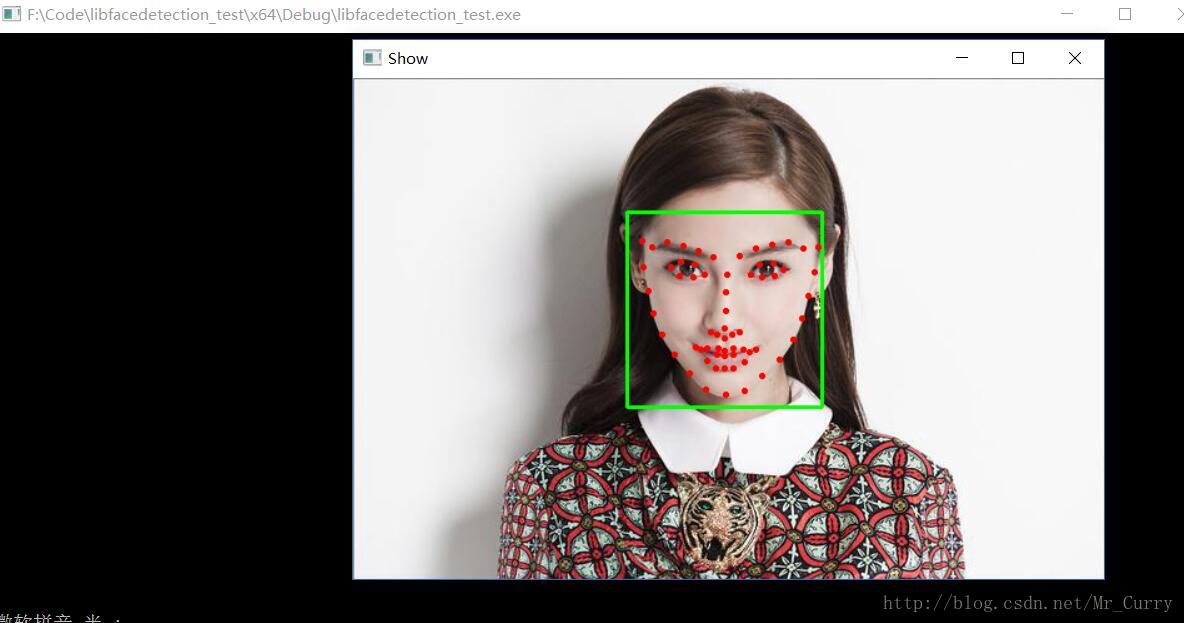
效果还是很赞:
视频流中的人脸检测代码就是用VideoCapture解析为Mat然后循环检测啊:
#include <opencv.hpp>

#include <facedetect-dll.h>

using namespace cv;

using namespace std;

//define the buffer size. Do not change the size!

#define DETECT_BUFFER_SIZE 0x20000

int main()

{

    int * pResults = NULL;

    //pBuffer is used in the detection functions.

    //If you call functions in multiple threads, please create one buffer for each thread!

    unsigned char * pBuffer = (unsigned char *)malloc(DETECT_BUFFER_SIZE);

    if (!pBuffer)

    {

        fprintf(stderr, "Can not alloc buffer.\n");

        return -1;

    }

    int doLandmark = 1;// do landmark detection

    VideoCapture cap(0);

    if (!cap.isOpened()){

        cout << "Please check your USB camera's interface num." << endl;

        return 0;

    }

    Mat src;

    while (true)

    {

        cap >> src;

        if (!src.empty()){

            Mat gray;

            cvtColor(src, gray, CV_BGR2GRAY);

            pResults = facedetect_multiview_reinforce(pBuffer, (unsigned char*)(gray.ptr(0)), gray.cols, gray.rows, (int)gray.step,

                1.2f, 2, 48, 0, 1);

            for (int i = 0; i < (pResults ? *pResults : 0); i++)

            {

                short * p = ((short*)(pResults + 1)) + 142 * i;

                rectangle(src, Rect(p[0], p[1], p[2], p[3]), Scalar(0, 255, 0), 2);

                if (doLandmark)

                {

                    for (int j = 0; j < 68; j++)

                        circle(src, Point((int)p[6 + 2 * j], (int)p[6 + 2 * j + 1]), 1, Scalar(0, 0, 255), 2);

                }

            }

            imshow("Show", src);

            waitKey(1);

        }

    }

}
如何快糙好猛的使用libfacedetection库【最新版】的更多相关文章
- 如何快糙好猛的使用Shiqi.Yu老师的公开人脸检测库(附源码)
前言 本次编写所用的库为于仕祺老师免费提供的人脸检测库.真心好用,识别率和识别速度完全不是Opencv自带的程序能够比拟的.将其配合Opencv的EigenFace算法,基本上可以形成一个小型的毕业设 ...
- 怎样快糙猛的开始搞Kaggle比赛
- SAP 出库单新版
*&---------------------------------------------------------------------* *& Report ZSDR045 ...
- 人脸识别-<转>
人脸检测库libfacedetection介绍 libfacedetection是于仕琪老师放到GitHub上的二进制库,没有源码,它的License是MIT,可以商用.目前只提供了windows 3 ...
- android 开发必用的开源库
LogReport: https://github.com/wenmingvs/LogReport, 崩溃日志上传框架 wcl-permission-demo:Android 6.0 - 动态权 ...
- Git学习笔记(三)远程库(GitHub)协同开发,fork和忽略特殊文件
远程库 远程库,通俗的讲就是不再本地的git仓库!他的工作方式和我们本地的一样,但是要使用他就需要先建立连接! 远程库有两种,一个是自己搭建的git服务器:另一种就是使用GitHub,这个网站就是提供 ...
- c协程库libco几点体会
https://www.cnblogs.com/dearplain/p/9820913.html 这里说的是Tencent开源的libco. libco的用途和依赖 主要还是c/c++服务端,相比li ...
- Dalvik模式下在Android so库文件.init段、.init_array段构造函数上下断点
本文博客地址:http://blog.csdn.net/qq1084283172/article/details/78244766 在前面的博客<在Android so文件的.init..ini ...
- php大力力 [037节] Iconfont-阿里巴巴矢量图标库
Iconfont-阿里巴巴矢量图标库 从此不求人:自主研发一套PHP前端开发框架 Iconfont-中国第一个最大且功能最全的矢量图标库,提供矢量图标下载.在线存储.格式转换等功能.阿里巴巴体验团队倾 ...
随机推荐
- stackFromBottom-listview 内容从底部开始填充
今天遇到了一个问题,就是listview虽然占满了整个屏幕,但是,当它的内容只有几条的时候,它会从底部开始显示,上面留有空白.后来进入xml发现,listview有个属性stackFromBottom ...
- 一个简单http请求的jmeter压测实战流程
1.新建线程组 2.创建http请求 注意:接口路径中的参数值要写变量 3.创建txt文件,存多个参数值 4.创建csv文件,在csv中上传txt文件 5.variable name填写txt中参数值 ...
- Hypervisor, computer system, and virtual processor scheduling method
A hypervisor calculates the total number of processor cycles (the number of processor cycles of one ...
- Android Material风格的应用(五)--CollapsingToolbar
Collapsing Toolbar Android Material风格的应用(一)--AppBar TabLayoutAndroid Material风格的应用(二)--RecyclerViewA ...
- 再记AE与AO的区别与联系
原文地址:转:ArcObjects与ArcEngine作者:梦游 ArcObjects(简称AO),一般都是指ArcGIS Desktop版本的组件开发集,即需要安装ArcGIS桌面版软件后才能安 ...
- Log4net.confager配置官方文档
http://logging.apache.org/log4net/release/config-examples.html
- LA 3026 - Period KMP
看题传送门:https://icpcarchive.ecs.baylor.edu/index.php?option=com_onlinejudge&Itemid=8&page=show ...
- 【BZOJ 2754】[SCOI2012]喵星球上的点名
[链接]h在这里写链接 [题意] n个人; 由姓和名组成.s1[i]和s2[i]; 有m个询问串. 问你第j个询问串,是否为某个人的姓或者名的子串. 如果是的话 ...
- C#实现自己主动升级(附源代码)
对于PC桌面应用程序而言,自己主动升级功能往往是不可缺少的. 而自己主动升级能够作为一个独立的C/S系统来开发,这样,就能够在不同的桌面应用中进行复用.本文将着重介绍OAUS的相关背景. ...
- 【t069】奇怪的迷宫
Time Limit: 1 second Memory Limit: 128 MB [问题描述] Mini现在站在迷宫的原点处,公主在[N,N],为了能最快地到达公主处救出公主,Mini希望能走一条最 ...