
thinkphp5项目--个人博客(一)
thinkphp5项目--个人博客(一)
项目地址
fry404006308/personalBlog: personalBlog
https://github.com/fry404006308/personalBlog
一、数据表创建

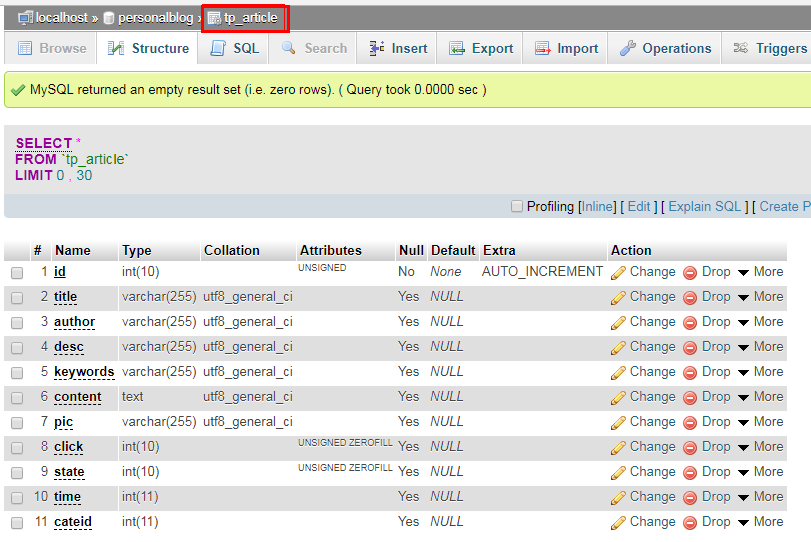
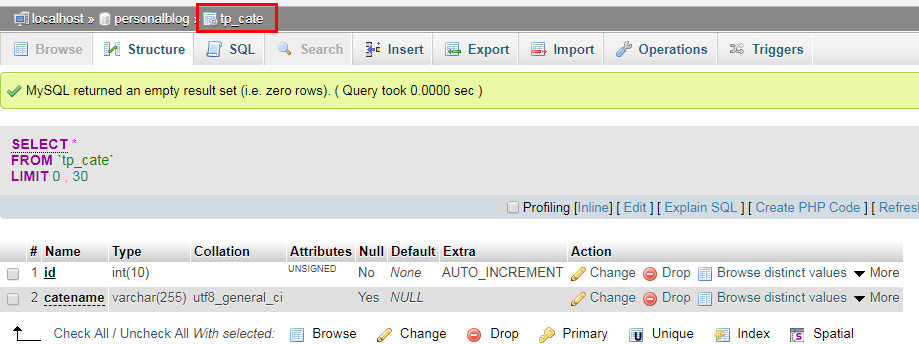
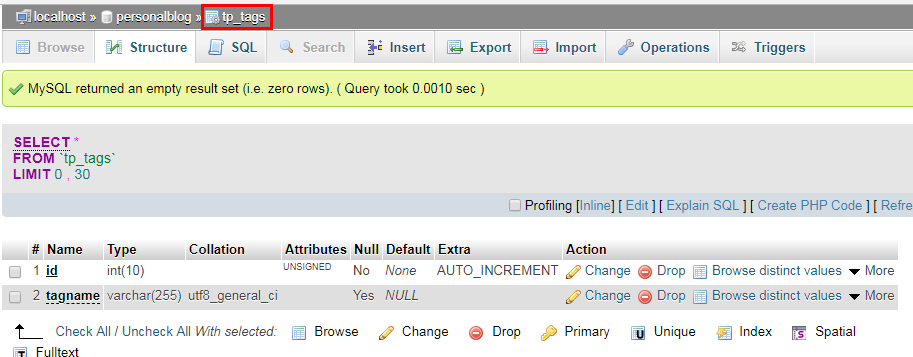
 /*

 Navicat MySQL Data Transfer

 Source Server         : localhost_3306

 Source Server Version : 50553

 Source Host           : localhost:3306

 Source Database       : personalblog

 Target Server Type    : MYSQL

 Target Server Version : 50553

 File Encoding         : 65001

 Date: 2018-04-09 04:27:03

 */

 DROP database IF EXISTS `personalBlog`;

 create database personalBlog character set utf8 collate utf8_general_ci;

 use personalBlog;

 SET FOREIGN_KEY_CHECKS=0;

 -- ----------------------------

 -- Table structure for tp_admin

 -- ----------------------------

 DROP TABLE IF EXISTS `tp_admin`;

 CREATE TABLE `tp_admin` (

   `id` int(10) unsigned NOT NULL AUTO_INCREMENT,

   `username` varchar(255) DEFAULT NULL COMMENT '管理员名称',

   `password` varchar(255) DEFAULT NULL COMMENT '管理员密码',

   PRIMARY KEY (`id`)

 ) ENGINE=MyISAM DEFAULT CHARSET=utf8;

 -- ----------------------------

 -- Records of tp_admin

 -- ----------------------------

 -- ----------------------------

 -- Table structure for tp_article

 -- ----------------------------

 DROP TABLE IF EXISTS `tp_article`;

 CREATE TABLE `tp_article` (

   `id` int(10) unsigned NOT NULL AUTO_INCREMENT COMMENT '文章id',

   `title` varchar(255) DEFAULT NULL COMMENT '文章标题',

   `author` varchar(255) DEFAULT NULL COMMENT '文章作者',

   `desc` varchar(255) DEFAULT NULL COMMENT '文章简介',

   `keywords` varchar(255) DEFAULT NULL COMMENT '文章的关键词',

   `content` text COMMENT '文章内容',

   `pic` varchar(255) DEFAULT NULL COMMENT '文章缩略图,是一个地址',

   `click` int(10) unsigned zerofill DEFAULT NULL COMMENT '点击数',

   `state` int(10) unsigned zerofill DEFAULT NULL COMMENT '文章状态 0:不推荐  1:推荐',

   `time` int(11) DEFAULT NULL COMMENT '文章发布时间,时间戳',

   `cateid` int(11) DEFAULT NULL COMMENT '文章所属的栏目',

   PRIMARY KEY (`id`)

 ) ENGINE=MyISAM DEFAULT CHARSET=utf8;

 -- ----------------------------

 -- Records of tp_article

 -- ----------------------------

 -- ----------------------------

 -- Table structure for tp_cate

 -- ----------------------------

 DROP TABLE IF EXISTS `tp_cate`;

 CREATE TABLE `tp_cate` (

   `id` int(10) unsigned NOT NULL AUTO_INCREMENT COMMENT '栏目id',

   `catename` varchar(255) DEFAULT NULL COMMENT '栏目名称',

   PRIMARY KEY (`id`)

 ) ENGINE=MyISAM DEFAULT CHARSET=utf8;

 -- ----------------------------

 -- Records of tp_cate

 -- ----------------------------

 -- ----------------------------

 -- Table structure for tp_tags

 -- ----------------------------

 DROP TABLE IF EXISTS `tp_tags`;

 CREATE TABLE `tp_tags` (

   `id` int(10) unsigned NOT NULL AUTO_INCREMENT COMMENT '标签id',

   `tagname` varchar(255) DEFAULT NULL COMMENT '标签名',

   PRIMARY KEY (`id`)

 ) ENGINE=MyISAM DEFAULT CHARSET=utf8;

 -- ----------------------------

 -- Records of tp_tags

 -- ----------------------------
sql创建数据库及表完整代码
二、前后台模板分离
拿后台举例
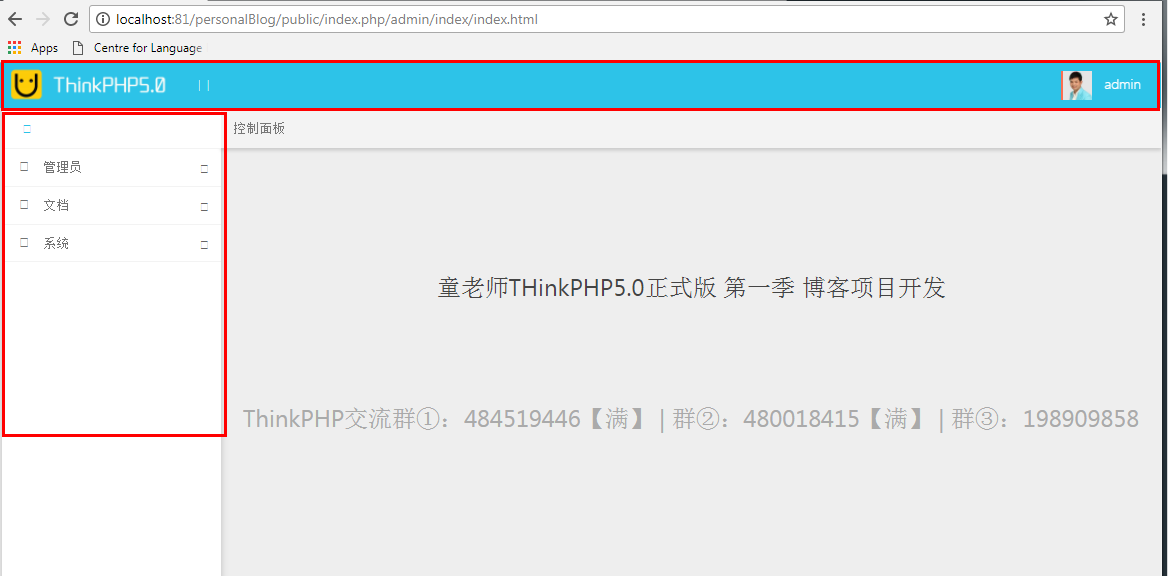
上面部分和左边的公共部分被放在了公共文件夹中
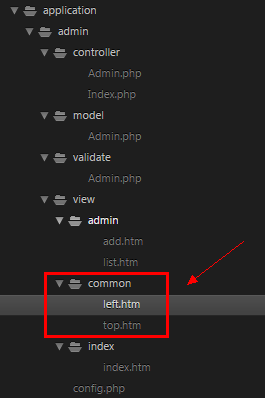
引用如下:
top部分
     <!-- 头部 -->

     {include file="common/top"}

     <!-- /头部 -->
left部分
             <!-- Page Sidebar -->

             {include file="common/left"}

             <!-- /Page Sidebar -->
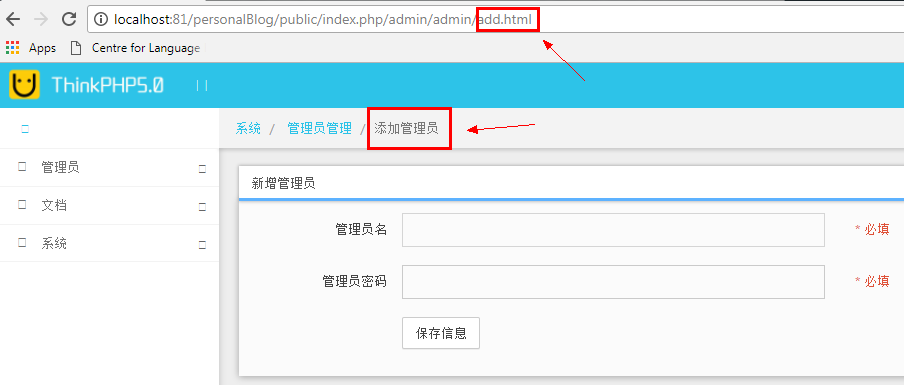
三、管理员添加
     public function add()

     {

         //判断是否为post方法提交

         if(request()->isPost()){

             // dump(input('post.'));

             // 如果提交消息成功,我们就添加消息到数据库

    //          // 服务器端对数据进行验证

    //          $validate = new Validate([

             //     'username' => 'require|max:25',

             //     'password' => 'require|min:32'

             // ]);

             // 1、接收传递过来的数据

             $data=[

                 'username'=>input('username'),

                 'password'=>md5(input('password')),

             ];

             $validate = Loader::validate('Admin');

             if(!$validate->scene('add')->check($data)){

                 $this->error($validate->getError()); die;

             }

    //          if (!$validate->check($data)) {

             //     dump($validate->getError());

             //     die;

             // }

             // if添加成功,就指向success页面

             if(Db::name('admin')->insert($data)){

                 return $this->success('添加管理员成功!!','lst');

             }else{

                 return $this->error('添加管理员失败!!');

             }

             return;

         }

         return view();

     }
四、数据验证及验证场景详解
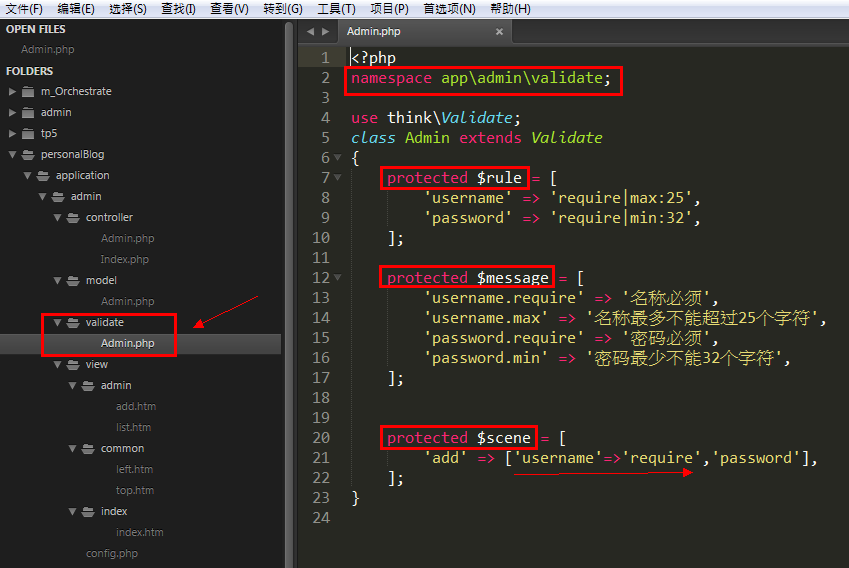
 use think\Validate;

     public function add()

     {

         //判断是否为post方法提交

         if(request()->isPost()){

             // dump(input('post.'));

             // 如果提交消息成功,我们就添加消息到数据库

    //          // 服务器端对数据进行验证

    //          $validate = new Validate([

             //     'username' => 'require|max:25',

             //     'password' => 'require|min:32'

             // ]);

             // 1、接收传递过来的数据

             $data=[

                 'username'=>input('username'),

                 'password'=>md5(input('password')),

             ];

             $validate = Loader::validate('Admin');

             if(!$validate->scene('add')->check($data)){

                 $this->error($validate->getError()); die;

             }

    //          if (!$validate->check($data)) {

             //     dump($validate->getError());

             //     die;

             // }

             // if添加成功,就指向success页面

             if(Db::name('admin')->insert($data)){

                 return $this->success('添加管理员成功!!','lst');

             }else{

                 return $this->error('添加管理员失败!!');

             }

             return;

         }

         return view();

     }
五、管理员列表及分页
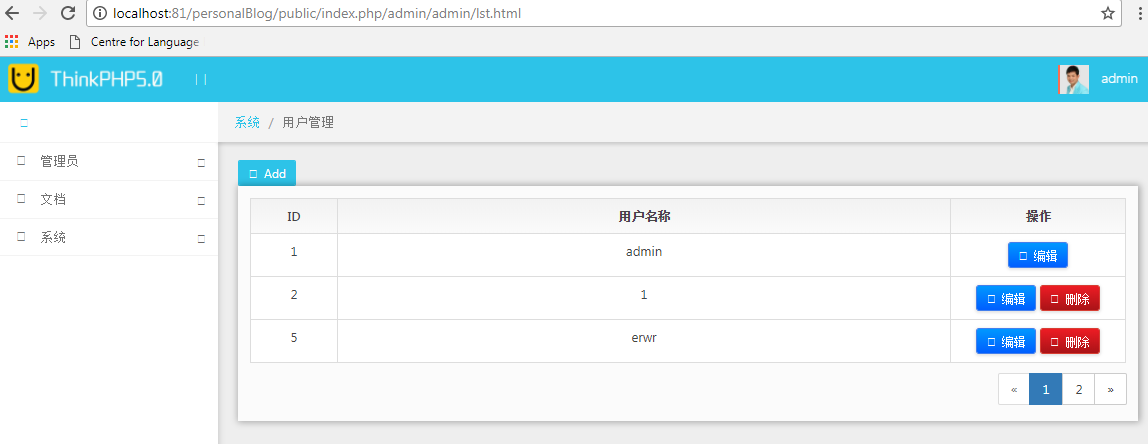
     public function lst()

     {

         // 分页输出列表 每页显示3条数据

         $list = AdminModel::paginate(3);

         $this->assign('list',$list);

         return view('list');

     }
 <body>

     <!-- 头部 -->

     {include file="common/top"}

     <!-- /头部 -->

     <div class="main-container container-fluid">

         <div class="page-container">

             <!-- Page Sidebar -->

             {include file="common/left"}

             <!-- /Page Sidebar -->

             <!-- Page Content -->

             <div class="page-content">

                 <!-- Page Breadcrumb -->

                 <div class="page-breadcrumbs">

                     <ul class="breadcrumb">

                                         <li>

                         <a href="{:url('index/index')}">系统</a>

                     </li>

                                         <li class="active">用户管理</li>

                                         </ul>

                 </div>

                 <!-- /Page Breadcrumb -->

                 <!-- Page Body -->

                 <div class="page-body">

 <button type="button" tooltip="添加用户" class="btn btn-sm btn-azure btn-addon" onClick="javascript:window.location.href = '{:url('admin/add')}'"> <i class="fa fa-plus"></i> Add

 </button>

 <div class="row">

     <div class="col-lg-12 col-sm-12 col-xs-12">

         <div class="widget">

             <div class="widget-body">

                 <div class="flip-scroll">

                     <table class="table table-bordered table-hover">

                         <thead class="">

                             <tr>

                                 <th class="text-center" width="10%">ID</th>

                                 <th class="text-center">用户名称</th>

                                 <th class="text-center" width="20%">操作</th>

                             </tr>

                         </thead>

                         <tbody>

                             {volist name="list" id="value"}

                             <tr>

                                 <td align="center">{$value.id}</td>

                                 <td align="center">{$value.username}</td>

                                 <td align="center">

                                     <a href="/admin/user/edit/id/6.html" class="btn btn-primary btn-sm shiny">

                                         <i class="fa fa-edit"></i> 编辑

                                     </a>

                                     {if condition="$value['id'] neq 1"}

                                     <a href="#" onClick="warning('确实要删除吗', '{:url('admin/del',array('id'=>$value['id']))}')" class="btn btn-danger btn-sm shiny">

                                         <i class="fa fa-trash-o"></i> 删除

                                     </a>

                                     {/if}

                                 </td>

                             </tr>

                             {/volist}

                                                     </tbody>

                     </table>

                     <div class="text-right" style="margin-top: 10px">

                         {$list->render()}

                     </div>

                 </div>

                 <div>

                                     </div>

             </div>

         </div>

     </div>

 </div>

                 </div>

                 <!-- /Page Body -->

             </div>

             <!-- /Page Content -->

         </div>

     </div>

         <!--Basic Scripts-->

     <script src="__PUBLIC__/style/jquery_002.js"></script>

     <script src="__PUBLIC__/style/bootstrap.js"></script>

     <script src="__PUBLIC__/style/jquery.js"></script>

     <!--Beyond Scripts-->

     <script src="__PUBLIC__/style/beyond.js"></script>

 </body>
分页之所以代码特别少是因为配置里面是有配置好了的
     //分页配置

     'paginate'               => [

         'type'      => 'bootstrap',

         'var_page'  => 'page',

         'list_rows' => 15,

     ],
六、模型
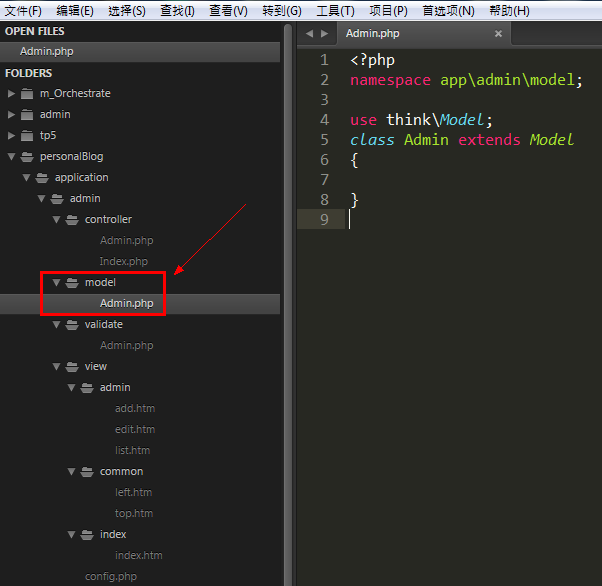
 <?php

 namespace app\admin\model;

 use think\Model;

 class Admin extends Model

 {

 }
控制器中
 use app\admin\model\Admin as AdminModel;

     public function lst()

     {

         // 分页输出列表 每页显示3条数据

         $list = AdminModel::paginate(3);

         $this->assign('list',$list);

         return view('list');

     }
thinkphp5项目--个人博客(一)的更多相关文章
- thinkphp5项目--个人博客(八)
thinkphp5项目--个人博客(八) 项目地址 fry404006308/personalBlog: personalBloghttps://github.com/fry404006308/per ...
- thinkphp5项目--个人博客(七)
thinkphp5项目--个人博客(七) 项目地址 fry404006308/personalBlog: personalBloghttps://github.com/fry404006308/per ...
- thinkphp5项目--个人博客(六)
thinkphp5项目--个人博客(六) 项目地址 fry404006308/personalBlog: personalBloghttps://github.com/fry404006308/per ...
- thinkphp5项目--个人博客(五)
thinkphp5项目--个人博客(五) 项目地址 fry404006308/personalBlog: personalBloghttps://github.com/fry404006308/per ...
- thinkphp5项目--个人博客(四)
thinkphp5项目--个人博客(四) 项目地址 fry404006308/personalBlog: personalBloghttps://github.com/fry404006308/per ...
- thinkphp5项目--个人博客(三)
thinkphp5项目--个人博客(三) 项目地址 fry404006308/personalBlog: personalBloghttps://github.com/fry404006308/per ...
- thinkphp5项目--个人博客(二)
thinkphp5项目--个人博客(二) 项目地址 fry404006308/personalBlog: personalBloghttps://github.com/fry404006308/per ...
- 2015-2016-2 《Java程序设计》项目小组博客
2015-2016-2 <Java程序设计>项目小组博客 1451 完+美 java项目 守望先疯 JavaGroup 07_10_20_22 FromBottomToTop L.G.Su ...
- 团队项目系列博客 —— 在路上(之wampserver 修改根目录以及配置多站点以及修改端口号)
团队项目系列博客 -- 在路上(之wampserver 修改根目录以及配置多站点以及修改端口号) 标签(空格分隔): wampserver php 参考:参考文献1.慕课网.知乎.github 一.w ...
随机推荐
- UNIX基础【UNIX入门经典】
最早在学校很流行.学生毕业以后就会为公司购买操作系统.导致UNIX流行 UNIX内核: Shell:sh csh ksh 其他组件:
- android启动第一个界面时即闪屏的核心代码(两种方式)
闪屏,就是SplashScreen,也能够说是启动画面,就是启动的时候,闪(展示)一下,持续数秒后.自己主动关闭. 第一种方式: android的实现很easy,使用Handler对象的postDe ...
- Android实现天气预报温度/气温折线趋势图
Android实现天气预报温度/气温折线趋势图 天气预报的APP应用中,难免会遇到绘制天气温度/气温,等关于数据趋势的折线或者曲线图,这类关于气温/温度的折线图,通常会有两条线.一条是高温线,一 ...
- Systemd启动图形界面过程
1 启动命令 systemctl isolate graphical.target 2 启动过程: 文件:/etc/systemd/system/graphical.target 来自:systemd ...
- shareSDK的初步使用(shareSDK中微信、qq等兼容问题,以及cocoapods支持架构冲突问题的解决)
第一次使用shareSDK来做第三方分享,可是.昨天一天都是在调试bug,一直错误不断! 先说下我的开发环境: xcode:5.1 真机调试:iPhone5s 我们都知道xcode5.1以后開始是支持 ...
- Light OJ 1317 Throwing Balls into the Baskets 概率DP
n个人 m个篮子 每一轮每一个人能够选m个篮子中一个扔球 扔中的概率都是p 求k轮后全部篮子里面球数量的期望值 依据全期望公式 进行一轮球数量的期望值为dp[1]*1+dp[2]*2+...+dp[ ...
- ubuntu 搜狗输入法的安装
本文主要解决的是,通过安装搜狗网站提供的*.deb安装文件,使用ctrl+shift/space无法切换搜狗输入法的问题. 搜狗输入法 for linux:搜狗输入法 for linux,这还不算完: ...
- web.xml配置详解(转载)
一.web.xml配置文件常用元素及其意义预览 1 <web-app> 2 3 <!--定义了WEB应用的名字--> 4 <display-name></di ...
- 基于Zepto移动端下拉加载(刷新),上拉加载插件开发
写在前面:本人水平有限,有什么分析不到位的还请各路大神指出,谢谢. 这次要写的东西是类似于<今日头条>的效果,下拉加载上啦加载,这次做的效果是简单的模拟,没有多少内容,下面是今日头条的移动 ...
- python 3.x 学习笔记10 (析构函数and继承)
1.类变量的用途:大家公用的属性,节省开销(内存) 2.析构函数 在实例释放和销毁的时候执行的,通常用于做一些收尾工作,如关闭一些数据库链接和打开的临时文件 3.私有方法两个下划线开头,声明该方法为私 ...