
SpringBoot之通过Maven将项目打包成ROOT.war-yellowcong
在项目中,我们通过maven的插件,将项目达成war包,然后通过jenkins,自动化部署项目。
核心的maven配置文件,下面这一段pom.xml的配置文件。
将项目打包成ROOT.war
<plugin>

                <groupId>org.apache.maven.plugins</groupId>

                <artifactId>maven-war-plugin</artifactId>

                <configuration>

                    <warName>ROOT</warName>

                    <archiveClasses>true</archiveClasses>

                </configuration>

            </plugin>
配置pom.xml
<project xmlns="http://maven.apache.org/POM/4.0.0"

    xmlns:xsi="http://www.w3.org/2001/XMLSchema-instance"

    xsi:schemaLocation="http://maven.apache.org/POM/4.0.0 http://maven.apache.org/xsd/maven-4.0.0.xsd">

    <modelVersion>4.0.0</modelVersion>

    <groupId>com.yellowcong</groupId>

    <artifactId>test</artifactId>

    <version>0.0.1-SNAPSHOT</version>

    <packaging>war</packaging>

    <name>dot</name>

    <url>http://maven.apache.org</url>

    <properties>

        <project.build.sourceEncoding>UTF-8</project.build.sourceEncoding>

        <fastjson.version>1.2.47</fastjson.version>

    </properties>

    <!-- 引用父类依赖 -->

    <parent>

        <groupId>org.springframework.boot</groupId>

        <artifactId>spring-boot-starter-parent</artifactId>

        <version>1.5.10.RELEASE</version>

    </parent>

    <dependencies>

        <!-- 添加spring-web的依赖,直接就可以使用springmvc了 -->

        <dependency>

            <groupId>org.springframework.boot</groupId>

            <artifactId>spring-boot-starter-web</artifactId>

        </dependency>

        <dependency>

            <groupId>org.springframework.boot</groupId>

            <artifactId>spring-boot-starter-test</artifactId>

            <scope>test</scope>

        </dependency>

        <dependency>

            <groupId>com.alibaba</groupId>

            <artifactId>fastjson</artifactId>

            <version>${fastjson.version}</version>

        </dependency>

        <!-- 添加热部署 -->

        <dependency>

            <groupId>org.springframework.boot</groupId>

            <artifactId>spring-boot-devtools</artifactId>

            <scope>provided</scope>

            <!--optional我没弄明白,都说必须为true,但我测试true,false,不加都可以 -->

            <optional>true</optional>

        </dependency>

        <dependency>

            <groupId>junit</groupId>

            <artifactId>junit</artifactId>

            <scope>test</scope>

        </dependency>

    </dependencies>

    <build>

        <plugins>

            <plugin>

                <groupId>org.apache.maven.plugins</groupId>

                <artifactId>maven-war-plugin</artifactId>

                <configuration>

                    <warName>ROOT</warName>

                    <archiveClasses>true</archiveClasses>

                </configuration>

            </plugin>

            <plugin>

                <groupId>org.apache.maven.plugins</groupId>

                <artifactId>maven-compiler-plugin</artifactId>

                <configuration>

                    <source>1.7</source>

                    <target>1.7</target>

                </configuration>

            </plugin>

        </plugins>

    </build>

</project>
执行编译
#清空并打包

mvn clean package
生成结果
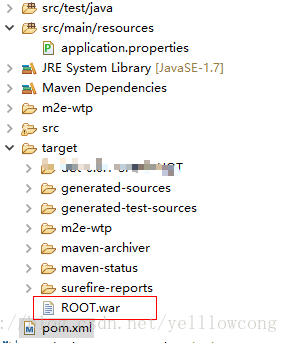
SpringBoot之通过Maven将项目打包成ROOT.war-yellowcong的更多相关文章
- SpringBoot简单(登录/显示/登出)工程下载 附带打包成ROOT.war文件并发布到tomcat里
下载地址:https://files.cnblogs.com/files/xiandedanteng/SessionShare20191226-1.zip 之前的工程仅能在Eclispe里跑起来,要把 ...
- springboot项目打包成jar/war包
springboot项目打包过程中包含第三方jar 开发IDE是IntelliJ IDEA,数据库是mysql,内置服务器tomcat. 打包步骤: 1. 确定项目调试运行没问题 2. 将第三方jar ...
- maven把项目打包成jar包后找不到velocity模板的bug
使用springmvc 开发时候要实现发送velcotiy模板邮件,在配置正常后,在本地测试正常后,使用maven打包成jar包后,报以下错误, Caused by: org.apache.veloc ...
- maven将自己的springboot项目打包成jar包后,作为工具包引入其他项目,找不到jar中的类
将springboot项目打包成jar包,作为工具包导入项目后,找不到jar中的类. 原因是:springboot项目使用了自动的打包插件. 原先的插件配置: <build> <pl ...
- 用gradle把springboot项目打包成jar
``` 用gradle把springboot项目打包成jar ```### build.gradle 中添加 buildscript { repositories { mavenLocal() mav ...
- (3)Maven快速入门_3在Eclipse中创建Maven项目打包成jar
Eclipse中创建Maven项目 new ---> maven project ----> next 如下 普通java项目 选择 如下 quickstart 创建项目 : 输入 G ...
- 怎么将maven项目打包成war包
问题:我在eclipse上能运行,然后我想将这个maven项目打包成war然后放到另外一台机子上(其实是手动放在tomcat的webapp目录中),提供外部访问.现在问题是,一直maven项目打包一直 ...
- SpringBoot项目打包成jar后,启动脚本
将springboot项目打包成jar后,上传至服务器,每次都需要手敲命令,重新部署项目,可将这些命令写入脚本中,直接运行. 启动脚本(start.sh): CUR_PATH=$(cd "$ ...
- 如何将maven项目打包成可执行的jar
如何将maven项目打包成可执行的jar 分类: maven2010-12-17 10:18 10411人阅读 评论(2) 收藏 举报 jarmavenassemblyjava 方法一:将项目及所依赖 ...
随机推荐
- vue父组件引用子组件方法显示undefined问题原因及解决方法
关于vue父组件引用子组件问题 1.首先导入子组件并且在components中定义子组件 2.引用子组件,并定义ref,ref定义的名称用于 this.$refs所调用的名称 3.调用子组件的方法 ( ...
- django-1-框架介绍
<<<python虚拟环境>>> 用django框架做web开发必须要用到python虚拟环境,而且一个虚拟环境只能创建一个django项目,如果创建多个djang ...
- reac实现控制输入框字符长度
reac实现控制输入框字符长度 代码思路:
- FROM使用子查询
FROM使用子查询 子查询结果充当一个临时表. //子查询形成的临时表字段为NO,NAME,SAL select no,name from( select empno no,e ...
- 一个简单搜索引擎的搭建过程(Solr+Nutch+Hadoop)
最近,因为未来工作的需要,我尝试安装部署了分布式爬虫系统Nutch,并配置了伪分布式的Hadoop来存储爬取的网页结果,用solr来对爬下来的网页进行搜索.我主要通过参考网上的相关资料进行安装部署的. ...
- struts.xml中出现extends undefined package struts-default解决的方法
在struts.xml中出现extends undefined package struts-default,经过查阅资料原来是由于没有联网的缘故. 这样解决:在myeclipse中关联本地的dtd文 ...
- hibernate配置数据库连接池三种用法
三种连接都是以连接MySQl为例. <!-- JDBC驱动程序 --> <property name="connection.driver_class">o ...
- c3p0在spring中的配置
在大家的开发和学习其中应该经经常使用到数据库的连接和使用,只是连接 的方式就有非常多种方式了,例如说用最最简单的JDBC 也好,还实用比 较复杂一点的就是数据库连接池.当然还有使用DBCP的连接的,各 ...
- iptables 防火墙 只允许某IP访问某端口、访问特定网站
iptables 防火墙 只允许某IP访问某端口.访问特定网站 1.先备份iptables /var/tmp 需要开80端口,指定IP和局域网 下面三行的意思: 先关闭所有的80端口 开启ip段192 ...
- MongoDB 系列(一) C# 类似EF语法简单封装
之前写过一篇关于MongoDB的封装 发现太过繁琐 于是打算从新写一篇简易版 1:关于MongoDB的安装请自行百度,进行权限认证的时候有一个小坑,3.0之后授权认证方式默认的SCRAM-SHA-1模 ...