
Android App 开机启动画面和开机自动启动APP程序设置
1、当前比较成熟一点的应用基本上都会在进入应用之显示一个启动界面
如腾讯微博

2、准备元素
需要开机启动的图片一张
3、新建Activity
AlphaAnimation动画:控制对象alpha水平的动画。这个动画可以通过改变alpha属性,达到渐进渐出的效果。
public class SplashActivity  extends Activity {

    @Override

    public void onCreate(Bundle savedInstanceState) {

        super.onCreate(savedInstanceState);

        final View view = View.inflate(this, R.layout.splash, null);

        setContentView(view);

        /** 设置透明度渐变动画 */

        AlphaAnimation aa = new AlphaAnimation(0.3f, 1.0f);

        aa.setDuration();//设置动画持续时间

        view.startAnimation(aa);  // 绑定动画效果

         aa.setAnimationListener(new Animation.AnimationListener() {

            @Override

            public void onAnimationEnd(Animation arg0) {

                //渐变动画结束后,执行此方法,跳转到主界面

                redirectTo();

            }

            @Override

            public void onAnimationRepeat(Animation animation) {

            }

            @Override

            public void onAnimationStart(Animation animation) {

            }

        });

    }

    private void redirectTo() {

        Intent intent = new Intent(this, index.class);

        startActivity(intent);

        finish();

    }

}
4、添加 layout 元素
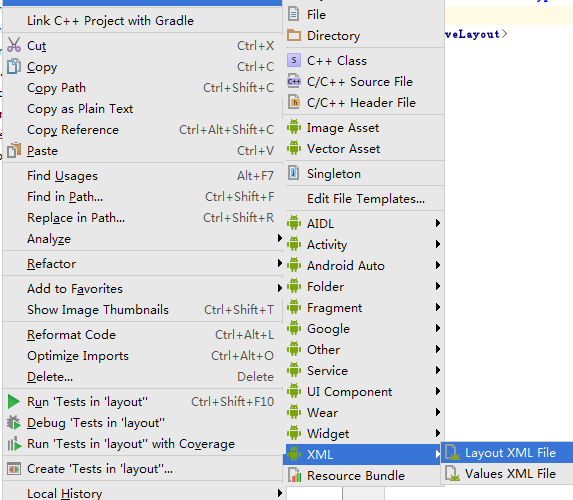
<?xml version="1.0" encoding="utf-8"?>

<RelativeLayout xmlns:android="http://schemas.android.com/apk/res/android"

    xmlns:tools="http://schemas.android.com/tools"

    android:layout_width="match_parent"

    android:layout_height="match_parent"

    tools:context=".SplashActivity" >

    <ImageView

        android:layout_width="match_parent"

        android:layout_height="match_parent"

        android:background="@drawable/ico"

        android:scaleType="fitCenter" />

</RelativeLayout>
5、设置 AndroidManifest.xml
5.1、设置开机启动页面
 <activity

            android:name=".SplashActivity"

            android:configChanges="keyboardHidden"

            android:label="@string/app_name"

            android:launchMode="singleTask"

            android:screenOrientation="portrait"

            android:theme="@android:style/Theme.NoTitleBar.Fullscreen" >

            <intent-filter>

                <action android:name="android.intent.action.MAIN" />

                <category android:name="android.intent.category.LAUNCHER" />

                <category android:name="android.intent.category.HOME"/>

                <category android:name="android.intent.category.DEFAULT" />

            </intent-filter>

        </activity>
5.2、设置安卓桌面状态(开机自动启动APP,需要厂家根据APP定制或者设置)
<category android:name="android.intent.category.HOME"/>

                <category android:name="android.intent.category.DEFAULT" />
Android App 开机启动画面和开机自动启动APP程序设置的更多相关文章
- Android定制:修改开机启动画面
转自:https://blog.csdn.net/godiors_163/article/details/72529210 引言 Android系统在按下开机键之后就会进入启动流程,这个过程本身需要一 ...
- 【Android】应用启动画面
几乎所有的Android应用程序都会有一个启动画面,展示自己的LOGO,本版信息,或者更人性化一点的,在很长的加载信息中,变换一些显示的文字等,让无聊的等待时间添加点调味剂. 具体实现来说,应该创建一 ...
- Xamarin(Android)制作启动画面
1.将启动图片保存到Drawable文件夹下 2.在Drawable文件夹下创建splashscreen.xml <?xml version="1.0" encoding=& ...
- 在iOS App 中添加启动画面
你可以认为你需要为启动画面编写代码,然而Apple 让你可以非常简单地在Xcode中完成.不需要编写代码,你仅需要在Xcode中进行一些配置. 1.什么是启动画面(Splash Screen)? 启动 ...
- Android如何配置init.rc中的开机启动进程(service)【转】
本文转载自:http://blog.csdn.net/qq_28899635/article/details/56289063 开篇:为什么写这篇文章 先说下我自己的情况,我是个普通的大四学生,之前在 ...
- android 之 启动画面的两种方法
现在,当我们打开任意的一个app时,其中的大部分都会显示一个启动界面,展示本公司的logo和当前的版本,有的则直接把广告放到了上面.启动画面的可以分为两种设置方式:一种是两个Activity实现,和一 ...
- Android应用启动画面
原文地址: [Android]应用启动画面 - 空客的日志 - 网易博客 http://blog.163.com/da7_1@126/blog/static/104072678201291921028 ...
- linux开机自启动设置,自定义开机启动模版,nginx开机自启动服务
/etc/init.d 目录,我们把shell脚本放在这个目录下来作为启动脚本 都是用来放服务脚本的,当Linux启动时,会寻找这些目录中的服务脚本,并根据脚本的run level确定不同的启动级别. ...
- ubuntu中将某一程序设置为开机启动项的方法
一.简要说明 Linux操作系统的引导加载程序(对个人电脑而言通常是LILO)开始,介绍Linux开机引导的步骤. 加载内核LILO启动之后,如果你选择了Linux作为准备引导的操作系统,第一个被加载 ...
随机推荐
- uva 524(Prime Ring Problem UVA - 524 )
dfs练习题,我素数打表的时候j=i了,一直没发现实际上是j=i*i,以后可记住了.还有最后一行不能有空格...昏迷了半天 我的代码(紫书上的算法) #include <bits/stdc++. ...
- The Forth Week
1.复制/etc/skel目录为/home/tuser1,要求/home/tuser1及其内部文件的属组和其它用户均没有任何访问权限. cp -r /etc/skell /home/tuser1 ; ...
- 第十节:pandas之loc()、iloc()与ix()索引
- ZOJ 3687 The Review Plan I
The Review Plan I Time Limit: 5000ms Memory Limit: 65536KB This problem will be judged on ZJU. Origi ...
- 暑假集训D18总结
考试 本来考试时以为能AK的,结果全是因为手贱啊= = T1 瞎XX贪心 我竟然当成了数学 还拍了半天以为是对的 T2 组合数学 太简单 半个小时直接A T3 最长上升(非下降?)子序列 考试25,加 ...
- Spring Boot开发HTTPS协议的REST接口
Spring Boot开发HTTP的REST接口流程在前文中已经描述过,见<SpringBoot开发REST接口>. 如需要支持HTTPS,只需要在如上基础上进行设置.修改/resourc ...
- HTML5:控件自动获得焦点
在HTML5中,页面打开后,需要指定的控件自动获得焦点很简单,只需要一个属性就可以实现 - autofocus. 示例如下: <input type="text" auto ...
- ipcs命令学习
参考这篇 http://blog.csdn.net/pyjfoot/article/details/7989097 ipcs -m -s -q 分别对应集中ipc ipcs -l 显示limits: ...
- gcc动态链接库so的制作和使用
http://blog.csdn.net/CSqingchen/article/details/51546784 参考: http://blog.sina.com.cn/s/blog_69e96b37 ...
- Application Framework层介绍
http://write.blog.csdn.net/postedithttp://write.blog.csdn.net/postedithttp://write.blog.csdn.net/pos ...