
spring boot + Thymeleaf开发web项目
“Spring boot非常适合Web应用程序开发。您可以轻松创建自包含的HTTP应用。web服务器采用嵌入式Tomcat,或者Jetty等。大多数情况下Web应用程序将使用
spring-bootstarter-web模块快速启动和运行。”
本例子通过显示用户列表展示如何使用spring boot和Thymeleaf开发web项目。
几点说明:
- Spring boot开发web项目,通常打成jar包,使用内置的web服务器 Tomcat、Jetty、undertow 来运行。
- 静态资源(css、js、图片等)默认放在resources/static下面。如果要修改默认存放目录,可以通过设置属性 spring.mvc.static-path-pattern来实现。
- 模板文件默认放在 templates目录下
- Spring boot支持使用模板来开发web应用,支持的模板类型包括
- FreeMarker
- Groovy
- Thymeleaf
- Mustache
Spring boot不建议使用jsp开发web。
本文使用Thymeleaf来作为模板引擎开发web项目。
Thymeleaf
Thymeleaf是一个Java模板引擎开发库,可以处理和生成HTML、XML、JavaScript、CSS和文本,在Web和非Web环境下都可以正常工作。
Thymeleaf可以跟Spring boot很好的集成。
Spring Boot+Thymeleaf开发web
创建spring boot项目
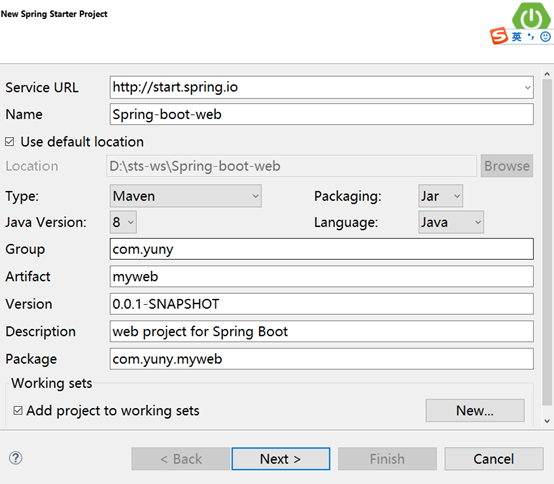
选择spring boot和依赖 ,注意需要的依赖包括web和Thymeleaf

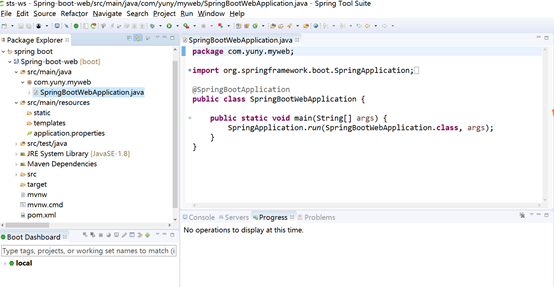
点击finish。创建的项目结构如下:
其中SpringBootWebApplication.java是自动生成的。是程序启动入口。
生成的POM.xml文件如下
<?xml version="1.0" encoding="UTF-8"?>

<project xmlns="http://maven.apache.org/POM/4.0.0" xmlns:xsi="http://www.w3.org/2001/XMLSchema-instance"

    xsi:schemaLocation="http://maven.apache.org/POM/4.0.0 http://maven.apache.org/xsd/maven-4.0.0.xsd">

    <modelVersion>4.0.0</modelVersion>

    <groupId>com.yuny</groupId>

    <artifactId>myweb</artifactId>

    <version>0.0.1-SNAPSHOT</version>

    <packaging>jar</packaging>

    <name>Spring-boot-web</name>

    <description>web project for Spring Boot</description>

    <parent>

        <groupId>org.springframework.boot</groupId>

        <artifactId>spring-boot-starter-parent</artifactId>

        <version>1.5.9.RELEASE</version>

        <relativePath/>

    </parent>

    <properties>

        <project.build.sourceEncoding>UTF-8</project.build.sourceEncoding>

        <project.reporting.outputEncoding>UTF-8</project.reporting.outputEncoding>

        <java.version>1.8</java.version>

    </properties>

    <dependencies>

        <dependency>

            <groupId>org.springframework.boot</groupId>

            <artifactId>spring-boot-starter-thymeleaf</artifactId>

        </dependency>

        <dependency>

            <groupId>org.springframework.boot</groupId>

            <artifactId>spring-boot-starter-web</artifactId>

        </dependency>

        <dependency>

            <groupId>org.springframework.boot</groupId>

            <artifactId>spring-boot-starter-test</artifactId>

            <scope>test</scope>

        </dependency>

    </dependencies>

    <build>

        <plugins>

            <plugin>

                <groupId>org.springframework.boot</groupId>

                <artifactId>spring-boot-maven-plugin</artifactId>

            </plugin>

        </plugins>

    </build>

</project>
增加实体User
public class User {

    private Integer id;

    private String name;

    private String age;

    private String address;

    //省略get和set方法、构造函数

}
增加UserController
@Controller

@RequestMapping("/user")

public class UserController {

    @RequestMapping("/{id}")

    public String  getUser(@PathVariable Integer id,Model model) {

        model.addAttribute("user",new User(id,"张三",20,"中国广州"));

        return "/user/detail";

    }

    @RequestMapping("/list")

    public String  listUser(Model model) {

        List<User> userList = new ArrayList<User>();

        for (int i = 0; i <10; i++) {

            userList.add(new User(i,"张三"+i,20+i,"中国广州"));

        }

        model.addAttribute("users", userList);

        return "/user/list";

    }

}
增加模版文件list.html,注意模版文件是放在tempplates目录下。本案例将文件放在/templates/user/下面。
<!DOCTYPE html>

<html xmlns:th="http://www.thymeleaf.org">

<head>

<meta charset="UTF-8" />

<title>Insert title here</title>

</head>

<body>

  <h2>用户列表</h2>

  <div>

     <ul>

         <li  th:each="user:${users}">

              <span th:text="${user.id}"></span>-

             <span th:text="${user.name}"></span>-

             <span th:text="${user.age}"></span>-

             <span th:text="${user.address}"></span>

         </li>

     </ul>

   </div>

</body>

</html>
启动
以application方式启动SpringBootWebApplication.java

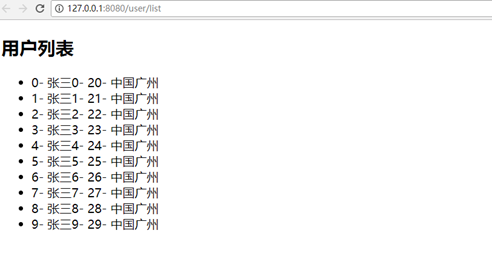
访问http://localhost:8080/user/list ,效果如下
总结
Spring boot开发web项目非常简单,对模版的支持也很到位。Thymeleaf模版引擎跟el表达式很相似,所以从jsp过度到使用Thymeleaf 并不是太难的事。
本文案例代码下载地址
https://github.com/junyanghuang/spring-boot-samples/tree/master/Spring-boot-web
spring boot + Thymeleaf开发web项目的更多相关文章
- Spring Boot快速开发Web项目
我们以前使用Spring框架的时候,需要首先在pom文件中增加对相关的的依赖,然后新建Spring相关的xml文件,而且往往那些xml文件还不会少.然后继续使用tomcat或者jetty作为容器来运行 ...
- Spring Boot构建的Web项目如何在服务端校验表单输入
本文首发于个人网站:Spring Boot构建的Web项目如何在服务端校验表单输入 这个例子用于演示在Spring Boot应用中如何验证Web 应用的输入,我们将会建立一个简单的Spring MVC ...
- 10个Spring Boot快速开发的项目,接私活利器(快速、高效)
本文为大家精选了 码云 上优秀的 Spring Boot 语言开源项目,涵盖了企业级系统框架.文件文档系统.秒杀系统.微服务化系统.后台管理系统等,希望能够给大家带来一点帮助:) 1.项目名称:分布式 ...
- spring boot之创建web项目并访问jsp页面
1,创建spring boot的web项目 刚创建好的项目路径如下: 2,pom中要有下面的依赖 <dependency> <groupId>org.springframewo ...
- 在Idea创建Spring Boot + MyBatis的web项目
创建步骤如下 选择Spring initializr 2. 修改group 与 atifact id,点击next 3. dependencies里面选择Web->Web , SQL -> ...
- Spring Boot部署之 web项目war包运行
传统的部署方式:将项目打成war包,放入tomcat 的webapps目录下面,启动tomcat,即可访问. 具体打war包流程: 1.pom.xml配置文件修改: 2.改造启动类,如果是war包发布 ...
- 使用Spring Boot开发Web项目
前面两篇博客中我们简单介绍了Spring Boot项目的创建.并且也带小伙伴们来DIY了一个Spring Boot自动配置功能,那么这些东西说到底最终还是要回归到Web上才能体现出它的更大的价值,so ...
- Spring Boot 的Maven多模块开发web项目使用外部容器进行部署
Spring Boot中自带有Tomcat容器,因此Spring Boot项目只需要运行main函数,就可以运行,但是以往的web项目,我们习惯于使用自己安装的Tomcat运行或者使用Tomcat.J ...
- Spring Boot 2.x基础教程:使用 Thymeleaf开发Web页面
通过本系列教程的前几章内容(API开发.数据访问).我们已经具备完成一个涵盖数据存储.提供HTTP接口的完整后端服务了.依托这些技能,我们已经可以配合前端开发人员,一起来完成一些前后端分离的Web项目 ...
随机推荐
- Could not resolve view with name '***' in servlet with name 'dispatcher'
今天在开发中遇到了一个问题,控制层使用的是SpringMVC框架. @RequestMapping("historyDetail") private String History( ...
- Java数据结构和算法(三)——冒泡、选择、插入排序算法
上一篇博客我们实现的数组结构是无序的,也就是纯粹按照插入顺序进行排列,那么如何进行元素排序,本篇博客我们介绍几种简单的排序算法. 1.冒泡排序 这个名词的由来很好理解,一般河水中的冒泡,水底刚冒出来的 ...
- PHP使用api的两种方法
1.用file_get_contents()函数 $params = array('key' => '8d284859d04cfeeea6b0771f754adb49', 'location' ...
- Python——Scrapy初学
Scrapy是一个为了爬取网站数据,提取结构性数据而编写的应用框架.可以应用在包括数据挖掘,信息处理或存储历史数据等一系列的程序中.Scrapy最初是为了页面抓取(更确切来说, 网络抓取)所设计的,也 ...
- android扫描网页二维码进行网页登录
转载请标明出处: http://www.cnblogs.com/dingxiansen/: 本文出自:丁先森-博客园 周六和朋友去网吧开黑,开机打开TGP,朋友那边开始输入账号密码,我看了他一眼low ...
- Struts 2 入门
Struts 2 入门: 一:Struts 2执行流程: 1 客户端发送请求: 2这个请求经过一系列的过滤器(Filter)(这些过滤器中有一个叫做ActionContextCleanUp的可选过滤 ...
- Bootstrap 开关(switch)使用整理
1.在JS里根据指定的 1或者0 或者其它值让按钮变成 on 或者 off (通常需要根据数据库查询的结果初始化开关的状态) (--开关插件包 bootstrap-switch.min.js) < ...
- Linux 链接详解(2)
可执行文件加载执行过程: 上一节我们说到ELF文件格式,静态库的符号解析和重定位的内容.这一节我们来分析一下可执行文件. 由上一节我们知道可执行文件也是ELF文件,当程序被加载器加载到内存时是按照EL ...
- 如何在仅主机模式下ping通网路上网
1 主机的控制面板,找到电脑的实际网卡,勾选,并选择VMware Network Adapter VMnet1 找到虚拟网卡VMware Virtual Ethernet Adapter for VM ...
- 关于ftp的学习:ftp很多人都会用。但会用,不代表我们真正了解它。
ftp.sftp.ftps,您是否是也跟我一样搞不清楚他们的真正意义.它们之间有关联吗(究竟是何种关联),有区别吗(区别倒地在哪里). 亦或是以为自己知道它们,可我们真的了解并认识它们了吗? 如果您被 ...