
012.Adding a New Field --【添加一个新字段】
索引:
Adding a New Field
添加一个新字段
2016-10-14 3 分钟阅读时长 作者
In this section you'll use Entity Framework Code First Migrations to add a new field to the model and migrate that change to the database.
在本节,我们将用EF的Code First 增加一个新字段并变更到数据库中.
When you use EF Code First to automatically create a database, Code First adds a table to the database to help track whether the schema of the database is in sync with the model classes it was generated from.
当你使用 EF Code First 自动的创建一个数据库,Code First将会向数据库增加一张表,他会自动追踪数据库结构的变化并同步结构的变化。
If they aren't in sync, EF throws an exception. This makes it easier to find inconsistent database/code issues.
如果他们未同步,EF会抛出异常。这使得代码与DB保持一致变得简单。
Adding a Rating Property to the Movie Model
给 Movie 模型添加一个等级字段
Open the Models/Movie.cs file and add a Rating property:
打开 Models/Movie.cs 文件,并添加 Rating 属性字段:
 public class Movie

 {

     public int ID { get; set; }

     public string Title { get; set; }

     [Display(Name = "Release Date")]

     [DataType(DataType.Date)]

     public DateTime ReleaseDate { get; set; }

     public string Genre { get; set; }

     public decimal Price { get; set; }

     public string Rating { get; set; }

 }
C# code
Build the app (Ctrl+Shift+B).
编译应用。
Because you've added a new field to the Movie class, you also need to update the binding white list so this new property will be included.
因为你在 Movie 类中新增了一个字段,你需要更新绑定,这样这个新字段才能被包含。
In MoviesController.cs, update the [Bind] attribute for both the Create and Edit action methods to include the Rating property:
在 MoviesController.cs 文件中,更新 Create 、 Edit 方法的 [Bind] ,以包含 Rating 属性字段:
[Bind("ID,Title,ReleaseDate,Genre,Price,Rating")]
C# Code
You also need to update the view templates in order to display, create and edit the new Rating property in the browser view.
你同样需要更新视图模板,以便在浏览器上显示,新建,编辑 Rating 字段。
Edit the /Views/Movies/Index.cshtml file and add a Rating field:
编辑 /Views/Movies/Index.cshtml 文件并增加 Rating 字段:
 <table class="table">

     <thead>

         <tr>

             <th>

                 @Html.DisplayNameFor(model => model.movies[0].Title)

             </th>

             <th>

                 @Html.DisplayNameFor(model => model.movies[0].ReleaseDate)

             </th>

             <th>

                 @Html.DisplayNameFor(model => model.movies[0].Genre)

             </th>

             <th>

                 @Html.DisplayNameFor(model => model.movies[0].Price)

             </th>

             <th>

                 @Html.DisplayNameFor(model => model.movies[0].Rating)

             </th>

             <th></th>

         </tr>

     </thead>

     <tbody>

         @foreach (var item in Model.movies)

         {

             <tr>

                 <td>

                     @Html.DisplayFor(modelItem => item.Title)

                 </td>

                 <td>

                     @Html.DisplayFor(modelItem => item.ReleaseDate)

                 </td>

                 <td>

                     @Html.DisplayFor(modelItem => item.Genre)

                 </td>

                 <td>

                     @Html.DisplayFor(modelItem => item.Price)

                 </td>

                 <td>

                     @Html.DisplayFor(modelItem => item.Rating)

                 </td>

                 <td>
HTML Code
Update the /Views/Movies/Create.cshtml with a Rating field.
更新 /Views/Movies/Create.cshtml 文件,增加 Rating 字段。
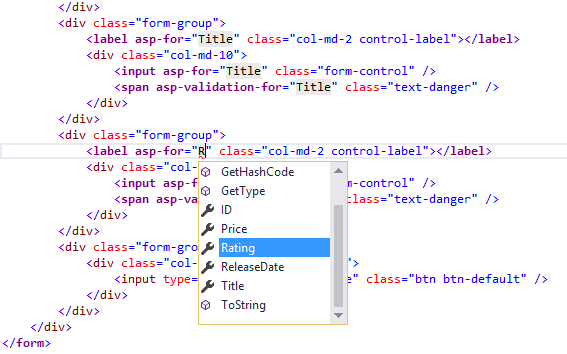
You can copy/paste the previous "form group" and let intelliSense help you update the fields.
你可以 复制、粘贴 前边的 "form group" ,并让智能提示帮助你完成字段的更新。
IntelliSense works with Tag Helpers.
智能提示使用 Tag Helpers 来完成工作。
Note: In the RTM verison of Visual Studio 2017 you need to install the Razor Language Services for Razor intelliSense.
笔记:现在已是 15.3.1 版本了,此句不翻译~
This will be fixed in the next release.
此句不翻译~
The app won't work until we update the DB to include the new field. If you run it now, you'll get the following SqlException:
在将 新字段包含到 DB之前 程序时不会正确运行的,他会抛出一个 SqlException 异常:
SqlException: Invalid column name 'Rating'.
TXT Code
You're seeing this error because the updated Movie model class is different than the schema of the Movie table of the existing database. (There's no Rating column in the database table.)
你将会看到错误,因为更新后的model不同于DB表的结构。
There are a few approaches to resolving the error:
下面是一些解决问题的方法:
1.Have the Entity Framework automatically drop and re-create the database based on the new model class schema.
让EF自动删除并基于 模型类 结构重建DB结构。
This approach is very convenient early in the development cycle when you are doing active development on a test database;
在早期的开发周期中,当你在一个测试库上开发时这是一个非常方便的做法;
it allows you to quickly evolve the model and database schema together.
他允许你让model与db结构一起快速迭代进化。
The downside, though, is that you lose existing data in the database — so you don't want to use this approach on a production database!
这么做的缺点是会丢失现存库中的所有数据,在生产上我们是不希望使用这种方法的!
Using an initializer to automatically seed a database with test data is often a productive way to develop an application.
使用初始化器来自动种植一些DB数据,是一种常使用的提高生产力的开发做法。
2.Explicitly modify the schema of the existing database so that it matches the model classes.
明确的更新已存在数据库的结构,让它匹配代码中的模型类。
The advantage of this approach is that you keep your data.
这种做法的优点是可以让你保持数据库中已存在的数据。
You can make this change either manually or by creating a database change script.
你可以人工的或使用脚本自动的来变更DB。
3.Use Code First Migrations to update the database schema.
使用Code First迁移来更新数据库结构。
For this tutorial, we'll use Code First Migrations.
在本教程中,我们会使用 Code First 迁移的做法。
Update the SeedData class so that it provides a value for the new column.
更新 SeedData 类,让它为新字段提供值。
A sample change is shown below, but you'll want to make this change for each new Movie.
如下是一个变更示例,你需要为每一个 new Movie 加上变化。
 new Movie

 {

     Title = "When Harry Met Sally",

     ReleaseDate = DateTime.Parse("1989-1-11"),

     Genre = "Romantic Comedy",

     Rating = "R",

     Price = 7.99M

 },
C# Code
Build the solution.
编译解决方案。
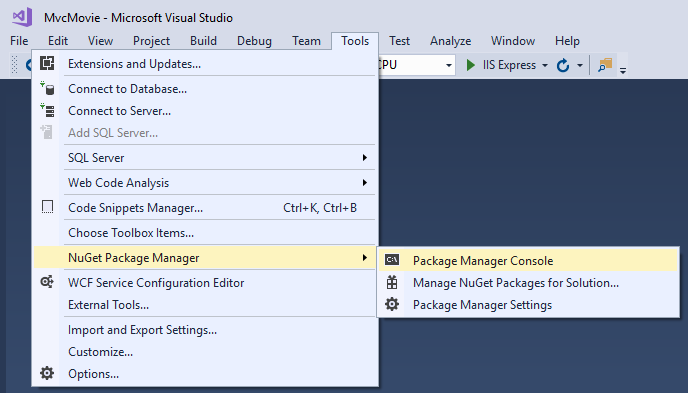
From the Tools menu, select NuGet Package Manager > Package Manager Console.
在 Tools 菜单,选择 NuGet Package Manager > Package Manager Console 子菜单:
In the PMC, enter the following commands:
在 PMC 中,键入以下命令:
 Add-Migration Rating

 Update-Database
Bash Code
The Add-Migration command tells the migration framework to examine the current Movie model with the current Movie DB schema and create the necessary code to migrate the DB to the new model.
Add-Migration 命令告诉 迁移框架 检查当前的 Movie 类并与DB结构做比较并创建出合适的代码更新数据库使其匹配新的model类。
The name "Rating" is arbitrary and is used to name the migration file.
"Rating" 是任意命名的,它被用来命名迁移文件名。
It's helpful to use a meaningful name for the migration file.
使用有意义的名字命名迁移文件是非常有益的。
If you delete all the records in the DB, the initialize will seed the DB and include the Rating field.
如果你删除了DB中的数据记录,初始化类将重新种植DB并包含 Rating 字段。
You can do this with the delete links in the browser or from SSOX.
你可以在浏览器上的删除链接或在 SSOX 管理器界面上这么做。
Run the app and verify you can create/edit/display movies with a Rating field.
运行程序并检查你可以对movie增删改查新的 Rating 字段。
You should also add the Rating field to the Edit, Details, and Delete view templates.
你同样应该在 Edit, Details, and Delete 视图模板上增加 Rating 字段。
蒙
2017-08-22 11:22 周二
012.Adding a New Field --【添加一个新字段】的更多相关文章
- Flink资料(6) -- 如何添加一个新的Operator
false false false false EN-US ZH-CN X-NONE /* Style Definitions */ table.MsoNormalTable {mso-style-n ...
- Mysql学习(一)添加一个新的用户并用golang操作Mysql
Mysql添加一个新的用户并赋予权限 添加一个自己的用户到mysql 首先我们需要先用root用户登录mysql,但是刚安装完没有密码,我们先跳过密码 ailumiyana@ailumiyana:~/ ...
- RK平台Android4.4 添加一个新的遥控器支持以及添加特殊按键【转】
本文转载自:http://blog.csdn.net/coding__madman/article/details/52904063 版权声明:本文为博主原创文章,未经博主允许不得转载. 瑞芯微平台 ...
- Linux 在添加一个新账号后却没有权限怎么办
当添加一个新账号后,我们可能会发现新账号sudo 时会报告不在sudoers中,使用su -s时输入密码后也会认证失败 上网搜索大部分都要求修改/etc/sudoers中的内容,但修改这个文件必须需要 ...
- 【IntelliJ IDEA】添加一个新的tomcat,tomcat启动无法访问欢迎页面,空白页,404
===================================第一部分,添加一个tomcat================================================== ...
- Android4.0 添加一个新的Android 键值
这里添加新的键值,不是毫无凭据凭空创造的一个键值,而是根据kernel中检测到的按键值,然后转化为Android所需要的数值: 以添加一个Linux键值为217,把它映射为android的键值Brow ...
- 【转】windows7的桌面右键菜单的“新建”子菜单,在注册表哪个位置,如何在“新建"里面添加一个新项
点击桌面,就会弹出菜单,然后在“新建”中就又弹出可以新建的子菜单栏.office与txt 的新建都是在这里面的.我想做的事情是:在右键菜单的“新建” 中添加一个“TQ文本”的新建项,然后点击它之后,桌 ...
- linux采用模块方法,添加一个新的设备
该文转载自:http://rangercyh.blog.51cto.com/1444712/521244 系统调用是操作系统内核和应用程序之间的接口,而设备驱动程序是操作系统内核和机器硬件之间的接口. ...
- 向Dialog中添加一个新的Menu
1.创建一个新的Menu,在资源管理视图中,右键Menu-->传入Menu 2.设计新Menu,ID为IDR_MENU1 3.在该Dialog的源文件中,找到CTest001Dlg::OnIni ...
随机推荐
- usaco training 4.1.2 Fence Rails 题解
Fence Rails题解 Burch, Kolstad, and Schrijvers Farmer John is trying to erect a fence around part of h ...
- Java电器商场小系统--简单的java逻辑
//商场类public class Goods { int no; //编号 String name; //商品名称 double price; //商品价格 int number; //商品数量 / ...
- Java的基本数据类型和运算
编码 ASCII--0~127 65-A 97-a 西欧码表---ISO-8859-1---0-255---1个字节 gb2312----0-65535---gbk---2个字节 Unicode编 ...
- 二叉树 java实现
class Node { private int data; // 其他数据 private int otherData; private Node left; private Node right; ...
- jvm学习002 虚拟机类加载过程以及主动引用和被动引用
虚拟机把描述类的数据从class文件加载到内存,并对数据进行校验,转换解析和初始化,最终形成可以被虚拟机直接使用的Java类型,这就是虚拟机的类加载机制. 类从被加载到虚拟机内存中开始,到卸载出内存为 ...
- 处理文本,提取数据的脚本-主要就是用sed
处理文本,提取数据的脚本 #! /bin/sh | sed 's/)<\/small><\/td><td>/\n/g' # 用换行符替换 # 删除带有分号的行 # ...
- 简单谈谈js中的MVC
MVC是什么? MVC是一种架构模式,它将应用抽象为3个部分:模型(数据).视图.控制器(分发器). 本文将用一个经典的例子todoList来展开(代码在最后). 一个事件发生的过程(通信单向流动): ...
- LCS 51Nod 1134 最长递增子序列
给出长度为N的数组,找出这个数组的最长递增子序列.(递增子序列是指,子序列的元素是递增的) 例如:5 1 6 8 2 4 5 10,最长递增子序列是1 2 4 5 10. Input 第1行:1个 ...
- (转)JAVA排序汇总
JAVA排序汇总 package com.softeem.jbs.lesson4; import java.util.Random; /** * 排序测试类 * * 排序算法的分类如下: * 1.插入 ...
- 浅谈 EF CORE 迁移和实例化的几种方式
出于学习和测试的简单需要,使用 Console 来作为 EF CORE 的承载程序是最合适不过的.今天笔者就将平时的几种使用方式总结成文,以供参考,同时也是给本人一个温故知新的机会.因为没有一个完整的 ...