
Springboot与Mybatis整合
最近自己用springboot和mybatis做了整合,记录一下:
1.先导入用到的jar包
     <dependency>

            <groupId>org.springframework.boot</groupId>

            <artifactId>spring-boot-starter-web</artifactId>

        </dependency>

        <dependency>

            <groupId>org.springframework.boot</groupId>

            <artifactId>spring-boot-starter-test</artifactId>

            <scope>test</scope>

        </dependency>

        <dependency>

            <groupId>mysql</groupId>

            <artifactId>mysql-connector-java</artifactId>

        </dependency>

        <dependency>

            <groupId>org.mybatis.generator</groupId>

            <artifactId>mybatis-generator-core</artifactId>

            <version>1.3.3</version>

        </dependency>

        <!-- 阿里数据源 -->

        <dependency>

          <groupId>com.alibaba</groupId>

          <artifactId>druid</artifactId>

          <version>${druid.version}</version>

        </dependency>

        <dependency>

          <groupId>org.mybatis</groupId>

          <artifactId>mybatis-spring</artifactId>

          <version>1.3.0</version>

        </dependency>

        <dependency>

          <groupId>org.mybatis</groupId>

          <artifactId>mybatis</artifactId>

          <version>3.4.0</version>

        </dependency>

        <dependency>

            <groupId>org.springframework</groupId>

            <artifactId>spring-tx</artifactId>

        </dependency>

        <dependency>

            <groupId>org.springframework</groupId>

            <artifactId>spring-jdbc</artifactId>

        </dependency>
2.配置配置文件(有些大家用不着的可以不配置)
spring.datasource.type=com.alibaba.druid.pool.DruidDataSource

spring.datasource.driver-class-name=com.mysql.jdbc.Driver

spring.datasource.url=jdbc:mysql://localhost:3306/test

spring.datasource.username=root

spring.datasource.password=

spring.datasource.initialSize=20

spring.datasource.minIdle=50

spring.datasource.maxActive=200

spring.datasource.maxWait=60000

spring.datasource.timeBetweenEvictionRunsMillis=60000

spring.datasource.minEvictableIdleTimeMillis=300000

spring.datasource.validationQuery=SELECT 1 FROM DUAL

spring.datasource.testWhileIdle=true

spring.datasource.testOnBorrow=false

spring.datasource.testOnReturn=false

spring.datasource.poolPreparedStatements=true

spring.datasource.maxPoolPreparedStatementPerConnectionSize=20

spring.datasource.filters=stat,log4j

spring.datasource.connectionProperties=druid.stat.mergeSql=true;druid.stat.slowSqlMillis=5000

#mybatis
mybatis.mapper-locations=classpath:/com/sxf/**/*Mapper.xml
mybatis.type-aliases-package=com.sxf.**.entity
3.解析数据源
package com.sxf.config;

import java.util.Properties;

import javax.sql.DataSource;

import org.springframework.beans.factory.annotation.Autowired;

import org.springframework.boot.web.servlet.FilterRegistrationBean;

import org.springframework.boot.web.servlet.ServletRegistrationBean;

import org.springframework.context.annotation.Bean;

import org.springframework.context.annotation.Configuration;

import org.springframework.core.env.Environment;

import com.alibaba.druid.pool.DruidDataSource;

import com.alibaba.druid.support.http.StatViewServlet;

import com.alibaba.druid.support.http.WebStatFilter;

@Configuration

public class DatasourceConfig {

    @Autowired

    private Environment env;

    @Bean

    public DataSource dataSource() {

        DruidDataSource druidDataSource = new DruidDataSource();

        druidDataSource.setDbType(env.getProperty("spring.datasource.type"));

        druidDataSource.setDriverClassName(env.getProperty("spring.datasource.driver-class-name"));

        druidDataSource.setUrl(env.getProperty("spring.datasource.url"));

        druidDataSource.setUsername(env.getProperty("spring.datasource.username"));

        druidDataSource.setPassword(env.getProperty("spring.datasource.password"));

        druidDataSource.setInitialSize(Integer.parseInt(env.getProperty("spring.datasource.initialSize")));

        druidDataSource.setMinIdle(Integer.parseInt(env.getProperty("spring.datasource.minIdle")));

        druidDataSource.setMaxActive(Integer.parseInt(env.getProperty("spring.datasource.maxActive")));

        druidDataSource.setMaxWait(Long.parseLong(env.getProperty("spring.datasource.maxWait")));

        // 配置间隔多久才进行一次检测,检测需要关闭的空闲连接,单位是毫秒

        druidDataSource.setTimeBetweenEvictionRunsMillis(

                Long.parseLong(env.getProperty("spring.datasource.timeBetweenEvictionRunsMillis")));

        // 配置一个连接在池中最小生存的时间,单位是毫秒

        druidDataSource.setMinEvictableIdleTimeMillis(

                Long.parseLong(env.getProperty("spring.datasource.minEvictableIdleTimeMillis")));

        druidDataSource.setValidationQuery(env.getProperty("spring.datasource.validationQuery"));

        druidDataSource.setTestWhileIdle(Boolean.getBoolean(env.getProperty("spring.datasource.testWhileIdle")));

        druidDataSource.setTestOnBorrow(Boolean.getBoolean(env.getProperty("spring.datasource.testOnBorrow")));

        druidDataSource.setTestOnReturn(Boolean.getBoolean(env.getProperty("spring.datasource.testOnReturn")));

        // 打开PSCache,并且指定每个连接上PSCache的大小

        druidDataSource.setPoolPreparedStatements(

                Boolean.getBoolean(env.getProperty("spring.datasource.poolPreparedStatements")));

        druidDataSource.setMaxPoolPreparedStatementPerConnectionSize(

                Integer.parseInt(env.getProperty("spring.datasource.maxPoolPreparedStatementPerConnectionSize")));

        // 配置监控统计拦截的filters,去掉后监控界面sql无法统计,'wall'用于防火墙

        // 通过connectProperties属性来打开mergeSql功能;慢SQL记录

        String cpStr = env.getProperty("spring.datasource.connectionProperties");

        if (null != cpStr) {

            Properties pro = new Properties();

            String[] kvArr = cpStr.split("\\;");

            if (null != kvArr && kvArr.length > 0) {

                for (String cp : kvArr) {

                    String[] arr = cp.split("\\=");

                    if (null != arr && arr.length == 2) {

                        pro.put(arr[0], arr[1]);

                    }

                }

            }

            druidDataSource.setConnectProperties(pro);

        }

        return druidDataSource;

    }

    @Bean

    public ServletRegistrationBean druidServlet() {

        return new ServletRegistrationBean(new StatViewServlet(), "/druid/*");

    }

}
这里配置@MapperScan扫描mybatis接口, 不需要在每个接口里面配置@Mapper
package com.sxf.config;

import org.apache.ibatis.session.SqlSessionFactory;

import org.mybatis.spring.SqlSessionFactoryBean;

import org.mybatis.spring.annotation.MapperScan;

import org.springframework.beans.factory.annotation.Autowired;

import org.springframework.context.annotation.Bean;

import org.springframework.context.annotation.Configuration;

import org.springframework.core.env.Environment;

import org.springframework.core.io.support.PathMatchingResourcePatternResolver;

import org.springframework.core.io.support.ResourcePatternResolver;

import org.springframework.jdbc.datasource.DataSourceTransactionManager;

import org.springframework.transaction.PlatformTransactionManager;

import org.springframework.transaction.annotation.EnableTransactionManagement;

@Configuration

@EnableTransactionManagement

@MapperScan(basePackages="com.sxf.**.mapper", sqlSessionFactoryRef = "sqlSessionFactory")

public class MyBatisConfig{

    @Autowired

    private DatasourceConfig dataSource;

    @Autowired

    private Environment env;

    @Bean(name = "sqlSessionFactory")

    public SqlSessionFactory sqlSessionFactoryBean() {

        SqlSessionFactoryBean bean = new SqlSessionFactoryBean();

        bean.setDataSource(dataSource.dataSource());

        bean.setTypeAliasesPackage(env.getProperty("type-aliases-package"));

        //添加XML目录

        ResourcePatternResolver resolver = new PathMatchingResourcePatternResolver();

        try {

//            bean.setConfigLocation(resolver.getResource(env.getProperty("mybatis.page-plugins-config")));

            bean.setMapperLocations(resolver.getResources(env.getProperty("mybatis.mapper-locations")));

            return bean.getObject();

        } catch(IllegalArgumentException e){

            e.printStackTrace();

             throw new RuntimeException(e);

        }catch (Exception e) {

            e.printStackTrace();

            e.getMessage();

            throw new RuntimeException(e);

        }

    }

    @Bean

    public PlatformTransactionManager annotationDrivenTransactionManager() {

        return new DataSourceTransactionManager(dataSource.dataSource());

    }

}
mybatis接口,不需要添加@Mapper
package com.sxf.profit.mapper;

import com.sxf.profit.entity.InviteCode;

public interface InviteCodeMapper {

    int deleteByPrimaryKey(Long id);

    int insert(InviteCode record);

    int insertSelective(InviteCode record);

    InviteCode selectByPrimaryKey(Long id);

    int updateByPrimaryKeySelective(InviteCode record);

    int updateByPrimaryKey(InviteCode record);

}
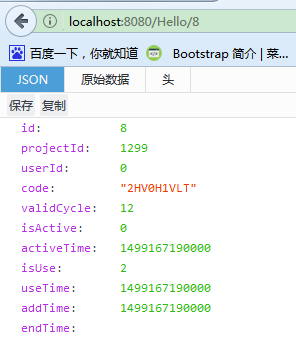
4.写个测试controller,测试成功
package com.sxf.controller;

import org.springframework.beans.factory.annotation.Autowired;

import org.springframework.web.bind.annotation.GetMapping;

import org.springframework.web.bind.annotation.PathVariable;

import org.springframework.web.bind.annotation.RestController;

import com.sxf.profit.entity.InviteCode;

import com.sxf.profit.mapper.InviteCodeMapper;

@RestController

public class InviteCodeController {

    @Autowired

    private InviteCodeMapper inviteCodeMapper;

    @GetMapping("/Hello/{id}")

    public InviteCode selectInviteCode(@PathVariable("id") Long id){

        return inviteCodeMapper.selectByPrimaryKey(id);

    }

}
成功!!!
Springboot与Mybatis整合的更多相关文章
- SpringBoot与Mybatis整合方式01(源码分析)
前言:入职新公司,SpringBoot和Mybatis都被封装了一次,光用而不知道原理实在受不了,于是开始恶补源码,由于刚开始比较浅,存属娱乐,大神勿喷. 就如网上的流传的SpringBoot与Myb ...
- 30分钟带你了解Springboot与Mybatis整合最佳实践
前言:Springboot怎么使用想必也无需我多言,Mybitas作为实用性极强的ORM框架也深受广大开发人员喜爱,有关如何整合它们的文章在网络上随处可见.但是今天我会从实战的角度出发,谈谈我对二者结 ...
- SpringBoot+Shiro+mybatis整合实战
SpringBoot+Shiro+mybatis整合 1. 使用Springboot版本2.0.4 与shiro的版本 引入springboot和shiro依赖 <?xml version=&q ...
- SpringBoot系列——MyBatis整合
前言 MyBatis官网:http://www.mybatis.org/mybatis-3/zh/index.html 本文记录springboot与mybatis的整合实例:1.以注解方式:2.手写 ...
- SpringBoot与Mybatis整合实例详解
介绍 从Spring Boot项目名称中的Boot可以看出来,SpringBoot的作用在于创建和启动新的基于Spring框架的项目,它的目的是帮助开发人员很容易的创建出独立运行的产品和产品级别的基于 ...
- spring-boot、mybatis整合
一.MyBatis 是一款优秀的持久层框架,它支持定制化 SQL.存储过程以及高级映射.MyBatis 避免了几乎所有的 JDBC 代码和手动设置参数以及获取结果集.MyBatis 可以使用简单的 X ...
- springBoot和MyBatis整合中出现SpringBoot无法启动时处理方式
在springBoot和Myatis 整合中出现springBoot无法启动 并且报以下错误 Description: Field userMapper in cn.lijun.control ...
- springboot+Druid+mybatis整合
一.添加Druid.MySQL连接池.mybatis依赖 <!--整合Druid--> <dependency> <groupId>com.alibaba</ ...
- SpringBoot与Mybatis整合的设置
Mybatis和Spring Boot的整合有两种方式: 第一种:使用mybatis官方提供的Spring Boot整合包实现,地址:https://github.com/mybatis/spring ...
随机推荐
- [Firewall] iptables Configuration
iptables usage: Add Rules: iptables -I INPUT -p tcp --dport -j ACCEPT iptables -I INPUT -p tcp --dpo ...
- 【Spring 核心】装配Bean(一) 自动化装配
Spring从两个角度实现自动化装配:组件扫描 (Spring自动发现应用上下文中所创建的bean)自动装配(autowiring)自动满足bean之间的依赖 组件扫描: package test.s ...
- jQuery事件对象
1.event.currentTarget 事件的监听者2.event.target 事件的目标3.event.delegateTarget 绑定了当前正在调用jQuery事件处理器的(当前事件的委托 ...
- 【技术分享】手把手教你使用PowerShell内置的端口扫描器
[技术分享]手把手教你使用PowerShell内置的端口扫描器 引言 想做端口扫描,NMAP是理想的选择,但是有时候NMAP并不可用.有的时候仅仅是想看一下某个端口是否开放.在这些情况下,PowerS ...
- 迈向angularjs2系列(8):angular cli和angular2种子项目
文章目录 1.angular cli快速搭建项目 2.angular2-seed 3.手动配置 题外话:如何更好的阅读本篇文章 一: angular cli的安装 Angular-cli(命令行界面, ...
- jQuery给表单设置值
<!DOCTYPE html> <html lang="en"> <head> <meta charset="UTF-8&quo ...
- Maven01——简介、安装配置、入门程序、项目构建和依赖管理
1 Maven的简介 1.1 什么是maven 是apache下的一个开源项目,是纯java开发,并且只是用来管理java项目的 Svn eclipse maven量级 1.2 Maven好处 同 ...
- ASP.NET Excel导入Sql Server数据库(转)
先看界面图 实现的基本思想: 1,先使用FileUpload控件fuload将Excel文件上传到服务器上得某一个文件夹. 2,使用OleDb将已经上传到服务器上的Excel文件读出来,这里将Exce ...
- Bash 脚本进阶,经典用法及其案例
前言:在linux中,Bash脚本是很基础的知识,大家可能一听脚本感觉很高大上,像小编当初刚开始学一样,感觉会写脚本的都是大神.虽然复杂的脚本是很烧脑,但是,当我们熟练的掌握了其中的用法与技巧,再多加 ...
- Lombok的使用
下面介绍几个我常用的 lombok 注解: @Data :注解在类上:提供类所有属性的 getting 和 setting 方法,此外还提供了equals.canEqual.has ...