
x01.AntWorld: An Python AI Game
1. 学习了一下 AI 五子棋,顺手改作 19 路的棋盘,便于围棋通用。render.py 主要修改如下:
# 常量部分:

IMAGE_PATH = 'img/'

StoneSize = 32

WIDTH = 650

HEIGHT = 732

ColSize = 33

RowSize = 34.44

H_Pad = (HEIGHT- RowSize * 19) / 2 + (RowSize - StoneSize) / 2 + 1

W_Pad = (WIDTH - ColSize * 19) / 2 + (ColSize - StoneSize) / 2 + 1

Pad = ColSize - StoneSize, RowSize - StoneSize

PIECE = StoneSize

# 坐标转换部分:

    def coordinate_transform_map2pixel(self, i, j):

        # 从 chessMap 里的逻辑坐标到 UI 上的绘制坐标的转换

        return j * (PIECE+Pad[0]) + W_Pad, i * (PIECE+Pad[1]) + H_Pad

    def coordinate_transform_pixel2map(self, x, y):

        # 从 UI 上的绘制坐标到 chessMap 里的逻辑坐标的转换

        i , j = int((y-H_Pad) / (PIECE+Pad[1])), int((x-W_Pad) / (PIECE+Pad[0]))

        if i < 0 or i >= N or j < 0 or j >= N:

            return None, None

        else:

            return i, j
2. 发现 pygame 还不错,便从网上搜索到《Beginning Game Development With Python And Pygame》,其中蚂蚁游戏的 AI 表现甚好,主要代码如下:
import pygame, os, sys

from pygame.locals import *

from random import randint

from pygame.math import Vector2

BaseDir = os.path.dirname(os.path.abspath(__file__))

ImgPath = BaseDir + '/res/'

ScreenSize = (640, 480)

NestLocation = (320, 240)

AntCount = 20

NestSize = 100.0

class State(object):

    def __init__(self, name):

        self.name = name

    def do_actions(self):

        pass

    def check_conditions(self):

        pass

    def entry_actions(self):

        pass

    def exit_actions(self):

        pass

class StateMachine(object):

    def __init__(self):

        self.states = {}

        self.active_state = None

    def add_state(self, state):

        self.states[state.name] = state

    def think(self):

        if self.active_state is None:

            return

        self.active_state.do_actions()

        new_state_name = self.active_state.check_conditions()

        if new_state_name is not None:

            self.set_state(new_state_name)

    def set_state(self, new_state_name):

        if self.active_state is not None:

            self.active_state.exit_actions()

        self.active_state = self.states[new_state_name]

        self.active_state.entry_actions()

class World(object):

    def __init__(self):

        self.entities = {}

        self.entity_id = 0

        self.background = pygame.surface.Surface(ScreenSize).convert()

        self.background.fill((255,255,255))

        pygame.draw.circle(self.background, (200,255,200), NestLocation, int(NestSize))

    def add_entity(self, entity):

        self.entities[self.entity_id] = entity

        entity.id = self.entity_id

        self.entity_id += 1

    def remove_entity(self, entity):

        del self.entities[entity.id]

    def get(self, entity_id):

        if entity_id in self.entities:

            return self.entities[entity_id]

        else:

            return None

    def process(self, time_passed):

        time_passed_seconds = time_passed / 1000.0

        entities = list(self.entities.values())

        for entity in entities:

            entity.process(time_passed_seconds)

    def render(self, surface):

        surface.blit(self.background, (0,0))

        for entity in self.entities.values():

            entity.render(surface)

    def got_close_entity(self, name, location, range=100.0):

        location = Vector2(*location)

        for entity in self.entities.values():

            if entity.name == name:

                distance = location.distance_to(entity.location)

                if distance < range:

                    return entity

        return None

class GameEntity(object):

    def __init__(self, world, name, image):

        self.world = world

        self.name = name

        self.image = image

        self.location = Vector2(0, 0)

        self.destination = Vector2(0, 0)

        self.speed = 0

        self.brain = StateMachine()

        self.id = 0

    def render(self, surface):

        x,y = self.location

        w,h = self.image.get_size()

        surface.blit(self.image, (x-w/2, y-h/2))

    def process(self, time_passed):

        self.brain.think()

        if self.speed > 0 and self.location != self.destination:

            vec_to_destination = self.destination - self.location

            distance_to_destination = vec_to_destination.length()

            travel_distance = min(distance_to_destination, time_passed * self.speed)

            self.location += travel_distance * vec_to_destination.normalize()

class Leaf(GameEntity):

    def __init__(self, world, image):

        GameEntity.__init__(self, world, "leaf", image)

class Spider(GameEntity):

    def __init__(self, world, image):

        GameEntity.__init__(self, world, "spider", image)

        self.dead_image = pygame.transform.flip(image, 0, 1)

        self.health = 25

        self.speed = 50.0 + randint(-20,20)

    def bitten(self):

        self.health -= 1

        if self.health <= 0:

            self.speed = 0

            self.image = self.dead_image

        self.speed = 140

    def render(self, surface):

        GameEntity.render(self, surface)

        x,y = self.location

        w,h = self.image.get_size()

        bar_x = x - 12

        bar_y = y + h/2

        surface.fill((255,0,0), (bar_x, bar_y, 25, 4))

        surface.fill((0,255,0), (bar_x, bar_y, self.health, 4))

    def process(self, time_passed):

        x,y = self.location

        if x > ScreenSize[0] + 2:

            self.world.remove_entity(self)

            return

        GameEntity.process(self, time_passed)

class Ant(GameEntity):

    def __init__(self, world, image):

        GameEntity.__init__(self, world, "ant", image)

        exploring_state = AntStateExploring(self)

        seeking_state = AntStateSeeking(self)

        delivering_state = AntStateDelivering(self)

        hunting_state = AntStateHunting(self)

        self.brain.add_state(exploring_state)

        self.brain.add_state(seeking_state)

        self.brain.add_state(delivering_state)

        self.brain.add_state(hunting_state)

        self.carry_image = None

    def carry(self, image):

        self.carry_image = image

    def drop(self, surface):

        if self.carry_image:

            x,y = self.location

            w,h = self.carry_image.get_size()

            surface.blit(self.carry_image, (x-w, y-h/2))

            self.carry_image = None

    def render(self, surface):

        GameEntity.render(self, surface)

        if self.carry_image:

            x,y = self.location

            w,h = self.carry_image.get_size()

            surface.blit(self.carry_image, (x-w, y-h/2))

class AntStateExploring(State):

    def __init__(self, ant):

        State.__init__(self, "exploring")

        self.ant = ant

    def random_destination(self):

        w,h = ScreenSize

        self.ant.destination = Vector2(randint(0, w), randint(0, h))

    def do_actions(self):

        if randint(1,20) == 1:

            self.random_destination()

    def check_conditions(self):

        leaf = self.ant.world.got_close_entity("leaf", self.ant.location)

        if leaf is not None:

            self.ant.leaf_id = leaf.id

            return "seeking"

        spider = self.ant.world.got_close_entity("spider", NestLocation, NestSize)

        if spider is not None:

            if self.ant.location.distance_to(spider.location) < 100:

                self.ant.spider_id = spider.id

                return "hunting"

        return None

    def entry_actions(self):

        self.ant.speed = 120 + randint(-30, 30)

        self.random_destination()

class AntStateSeeking(State):

    def __init__(self, ant):

        State.__init__(self, "seeking")

        self.ant = ant

        self.leaf_id = None

    def check_conditions(self):

        leaf = self.ant.world.get(self.ant.leaf_id)

        if leaf is None:

            return "exploring"

        if self.ant.location.distance_to(leaf.location) < 5:

            self.ant.carry(leaf.image)

            self.ant.world.remove_entity(leaf)

            return "delivering"

        return None

    def entry_actions(self):

        leaf = self.ant.world.get(self.ant.leaf_id)

        if leaf is not None:

            self.ant.destination = leaf.location

            self.ant.speed = 160 + randint(-20,20)

class AntStateDelivering(State):

    def __init__(self, ant):

        State.__init__(self, "delivering")

        self.ant = ant

    def check_conditions(self):

        if Vector2(*NestLocation).distance_to(self.ant.location) < NestSize:

            if randint(1, 10) == 1:

                self.ant.drop(self.ant.world.background)

                return "exploring"

        return None

    def entry_actions(self):

        self.ant.speed = 60

        random_offset = Vector2(randint(-20,20), randint(-20,20))

        self.ant.destination = Vector2(*NestLocation) + random_offset

class AntStateHunting(State):

    def __init__(self, ant):

        State.__init__(self, "hunting")

        self.ant = ant

        self.got_kill = False

    def do_actions(self):

        spider = self.ant.world.get(self.ant.spider_id)

        if spider is None:

            return

        self.ant.destination = spider.location

        if self.ant.location.distance_to(spider.location) < 15:

            if randint(1,5) == 1:

                spider.bitten()

                if spider.health <= 0:

                    self.ant.carry(spider.image)

                    self.ant.world.remove_entity(spider)

                    self.got_kill = True

    def check_conditions(self):

        if self.got_kill:

            return "delivering"

        spider = self.ant.world.get(self.ant.spider_id)

        if spider is None:

            return "exploring"

        if spider.location.distance_to(NestLocation) > NestSize * 3:

            return "exploring"

        return None

    def entry_actions(self):

        self.speed = 160 + randint(0,50)

    def exit_actions(self):

        self.got_kill = False

def run():

    pygame.init()

    screen = pygame.display.set_mode(ScreenSize, 0, 32)

    world = World()

    w,h = ScreenSize

    clock = pygame.time.Clock()

    ant_image = pygame.image.load(ImgPath + "ant.png").convert_alpha()

    leaf_image = pygame.image.load(ImgPath + "leaf.png").convert_alpha()

    spider_image = pygame.image.load(ImgPath + "spider.png").convert_alpha()

    for ant_nr in range(AntCount):

        ant = Ant(world, ant_image)

        ant.location = Vector2(randint(0,w), randint(0,h))

        ant.brain.set_state("exploring")

        world.add_entity(ant)

    while True:

        for e in pygame.event.get():

            if e.type == QUIT:

                return

        time_passed = clock.tick(30)

        if randint(1,10) == 1:

            leaf = Leaf(world, leaf_image)

            leaf.location = Vector2(randint(0,w), randint(0,h))

            world.add_entity(leaf)

        if randint(1,100) == 1:

            spider = Spider(world, spider_image)

            spider.location = Vector2(-50, randint(0,h))

            spider.destination = Vector2(w+50, randint(0,h))

            world.add_entity(spider)

        world.process(time_passed)

        world.render(screen)

        pygame.display.update()

if __name__ == '__main__':

    run()
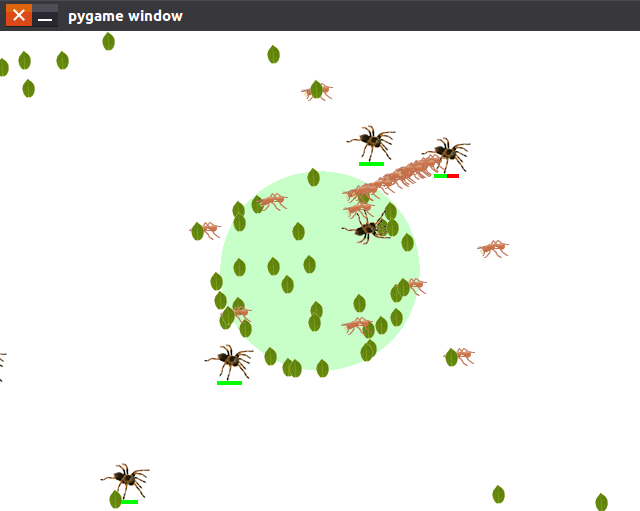
Ant world
运行效果图如下:
完整源代码下载:http://download.csdn.net/download/china_x01/10125074
x01.AntWorld: An Python AI Game的更多相关文章
- Flutter · Python AI 弹幕播放器来袭
AI智能弹幕(也称蒙版弹幕):弹幕浮在视频的上方却永远不会挡住人物.起源于哔哩哔哩的web端黑科技,而后分别实现在IOS和Android的app端,如今被用于短视频.直播等媒体行业,用户体验提升显著. ...
- python AI(numpy,matplotlib)
http://blog.csdn.net/ywjun0919/article/details/8692018 apt-cache policy python-numpy sudo apt-get in ...
- 转载 | Python AI 教学│k-means聚类算法及应用
关注我们的公众号哦!获取更多精彩哦! 1.问题导入 假如有这样一种情况,在一天你想去某个城市旅游,这个城市里你想去的有70个地方,现在你只有每一个地方的地址,这个地址列表很长,有70个位置.事先肯定要 ...
- python AI换脸 用普氏分析法(Procrustes Analysis)实现人脸对齐
1.图片效果 2.原代码 # !/usr/bin/python # -*- coding: utf-8 -*- # Copyright (c) 2015 Matthew Earl # # Permis ...
- 使用Python创建AI比你想象的轻松
使用 Python 创建 AI 比你想象的轻松 可能对AI领域,主要开发阶段,成就,结果和产品使用感兴趣.有数百个免费源和教程描述使用Python的AI.但是,没有必要浪费你的时间看他们.这里是一个详 ...
- 小白眼中的AI之~Numpy基础
周末码一文,明天见矩阵- 其实Numpy之类的单讲特别没意思,但不稍微说下后面说实际应用又不行,所以大家就练练手吧 代码裤子: https://github.com/lotapp/BaseCode ...
- python开发_zlib_完整版_博主推荐
''' python中的zlib模块提供了压缩和解压缩的方法 实现功能: 读取一个文件的内容,然后把该文件的内容以字符串的形式返回 然后对返回回来的字符串进行压缩处理,然后写入到另一个文件中 同时,也 ...
- Python基础简介
一.目前各种语言的应用:java, 可以把特别小的项目做大,并且开源库比较多,C: 用在最底层,例如编写操作系统,运行速率快,开发效率低,C++:常坐游戏引擎Python:AI(人工智能) 简单.明确 ...
- python通过人脸识别全面分析好友,一起看透你的“朋友圈”
微信:一个提供即时通讯服务的应用程序,更是一种生活方式,超过数十亿的使用者,越来越多的人选择使用它来沟通交流. 不知从何时起,我们的生活离不开微信,每天睁开眼的第一件事就是打开微信,关注着朋友圈里好友 ...
随机推荐
- IDL 创建数组
1.赋值创建 通过方括号[]赋值创建数组,示例代码如下 IDL> arr=[1,2,3] IDL> help,arr ARR INT = Array[3] IDL> arr=[[1, ...
- riot.js教程【一】简介
Riotjs简介 Riotjs是一款简单的.优雅的.组件化UI前端开发框架: 他支持自定义标签(custom tags),拥有令人愉悦的语法,优雅的API和非常小的体积: 为什么需要一个新的界面库 前 ...
- MySQL自定义函数用法详解-复合结构自定义变量/流程控制
自定义函数 (user-defined function UDF)就是用一个象ABS() 或 CONCAT()这样的固有(内建)函数一样作用的新函数去扩展MySQL. 所以UDF是对MySQL功能的一 ...
- Jfinal配置不得不注意的问题
问题摘要 使用jfinal mvc开发的时候,输出配置环境一定要注意,因为jfinal项目的依赖与log4j,等全部是在此目录下. 使用eclipse做演示一般有两种情况 1. WebContent\ ...
- Linux入门(11)——Ubuntu16.04安装texlive2016并配置texmaker和sublime text3
安装过程中需要调用 Perl 的模块 Digest::MD5 来检测 ISO 文件的完整性:升级过程中界面需要调用 Perl 的模块 Tk: sudo apt-get install libdiges ...
- eval函数的坑
开发工作中遇到这样一种情形,需要执行用户输入的php代码串,于是决定使用eval函数.coding大概示例如下: function getStr($str) { return strlen($str) ...
- js 判断当前是什么浏览器
function getExplorer() { var explorer = window.navigator.userAgent; //ie if (explorer.indexOf(" ...
- Java企业微信开发_Exception_02_java.security.InvalidKeyException: Illegal key size
今天换了重新装了一个jdk,然后运行昨天还好好的企业微信工程,结果启动的时候就给我报了这么个错: java.security.InvalidKeyException: Illegal key size ...
- 使用JS实现图片轮播滚动跑马灯效果
我的第一篇文章.哈哈.有点小鸡冻. 之前在百度搜索"图片轮播"."图片滚动",结果都是那种可以左右切换的.也是我们最常见的那种.可能是搜索 关键字的问题吧. ...
- ngRoute路径出现#!#解决方案
在做一个开源项目的时候,使用了"angular-route": "^1.6.4",发现设置了<a>标签的href后,点击后路径出现的不是#/,而是# ...