
TensorFlow简易学习[3]:实现神经网络
TensorFlow本身是分布式机器学习框架,所以是基于深度学习的,前一篇TensorFlow简易学习[2]:实现线性回归对只一般算法的举例只是为说明TensorFlow的广泛性。本文将通过示例TensorFlow如何创建、训练一个神经网络。
主要包括以下内容:
神经网络基础
基本激励函数
创建神经网络
神经网络简介
关于神经网络资源很多,这里推荐吴恩达的一个Tutorial。
基本激励函数
关于激励函数的作用,常有解释:不使用激励函数的话,神经网络的每层都只是做线性变换,多层输入叠加后也还是线性变换。因为线性模型的表达能力不够,激励函数可以引入非线性因素(ref1)。 关于如何选择激励函数,激励函数的优缺点等可参考已标识ref1, ref2。
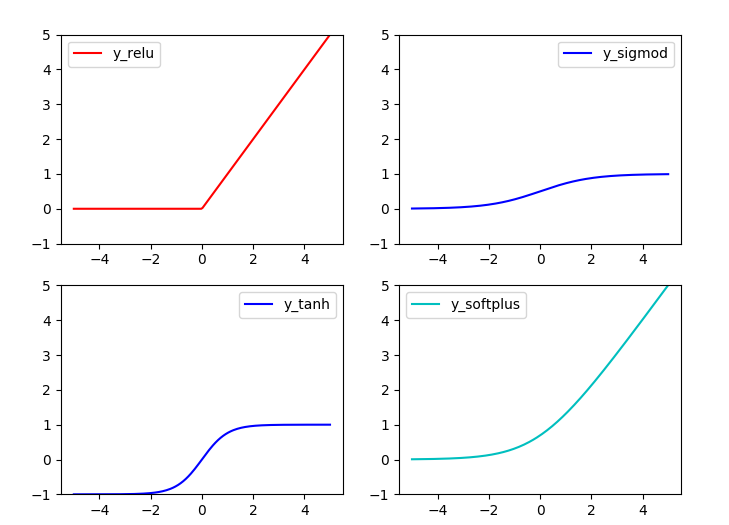
常用激励函数有(ref2): tanh, relu, sigmod, softplus
激励函数在TensorFlow代码实现:
#!/usr/bin/python

'''

Show the most used activation functions in Network

'''

import tensorflow as tf

import numpy as np

import matplotlib.pyplot as plt

x = np.linspace(-5, 5, 200)

#1. struct

#following are popular activation functions

y_relu = tf.nn.relu(x)

y_sigmod = tf.nn.sigmoid(x)

y_tanh = tf.nn.tanh(x)

y_softplus = tf.nn.softplus(x)

#2. session

sess = tf.Session()

y_relu, y_sigmod, y_tanh, y_softplus =sess.run([y_relu, y_sigmod, y_tanh, y_softplus])

# plot these activation functions

plt.figure(1, figsize=(8,6))

plt.subplot(221)

plt.plot(x, y_relu, c ='red', label = 'y_relu')

plt.ylim((-1, 5))

plt.legend(loc = 'best')

plt.subplot(222)

plt.plot(x, y_sigmod, c ='b', label = 'y_sigmod')

plt.ylim((-1, 5))

plt.legend(loc = 'best')

plt.subplot(223)

plt.plot(x, y_tanh, c ='b', label = 'y_tanh')

plt.ylim((-1, 5))

plt.legend(loc = 'best')

plt.subplot(224)

plt.plot(x, y_softplus, c ='c', label = 'y_softplus')

plt.ylim((-1, 5))

plt.legend(loc = 'best')

plt.show()
结果:
创建神经网络
创建层
定义函数用于创建隐藏层/输出层:
#add a layer and return outputs of the layer

def add_layer(inputs, in_size, out_size, activation_function=None):

    #1. initial weights[in_size, out_size]

    Weights = tf.Variable(tf.random_normal([in_size,out_size]))

    #2. bias: (+0.1)

    biases = tf.Variable(tf.zeros([1,out_size]) + 0.1)

    #3. input*Weight + bias

    Wx_plus_b = tf.matmul(inputs, Weights) + biases

    #4. activation

    if activation_function is None:

        outputs = Wx_plus_b

    else:

        outputs = activation_function(Wx_plus_b)

    return outputs
定义网络结构
此处定义一个三层网络,即:输入-单层隐藏层-输出层。可通过以上函数添加层数。网络为全连接网络。
# add hidden layer

l1 = add_layer(xs, 1, 10, activation_function=tf.nn.relu)

# add output layer

prediction = add_layer(l1, 10, 1, activation_function=None)
训练
利用梯度下降,训练1000次。
loss function: suqare error

loss = tf.reduce_mean(tf.reduce_sum(tf.square(ys - prediction), reduction_indices=[1]))

GD = tf.train.GradientDescentOptimizer(0.1)

train_step = GD.minimize(loss)
完整代码
#!/usr/bin/python

'''

Build a simple network

'''

import tensorflow as tf

import numpy as np

#1. add_layer

def add_layer(inputs, in_size, out_size, activation_function=None):

    #1. initial weights[in_size, out_size]

    Weights = tf.Variable(tf.random_normal([in_size,out_size]))

    #2. bias: (+0.1)

    biases = tf.Variable(tf.zeros([1,out_size]) + 0.1)

    #3. input*Weight + bias

    Wx_plus_b = tf.matmul(inputs, Weights) + biases

    #4. activation

    ## when activation_function is None then outlayer

    if activation_function is None:

        outputs = Wx_plus_b

    else:

        outputs = activation_function(Wx_plus_b)

    return outputs

##begin build network struct##

##network: 1 * 10 * 1

#2. create data

x_data = np.linspace(-1, 1, 300)[:, np.newaxis]

noise = np.random.normal(0, 0.05, x_data.shape)

y_data = np.square(x_data) - 0.5 + noise

#3. placehoder: waiting for the training data

xs = tf.placeholder(tf.float32, [None, 1])

ys = tf.placeholder(tf.float32, [None, 1])

#4. add hidden layer

h1 = add_layer(xs, 1, 10, activation_function=tf.nn.relu)

h2 = add_layer(h1, 10, 10, activation_function=tf.nn.relu)

#5. add output layer

prediction = add_layer(h2, 10, 1, activation_function=None)

#6. loss function: suqare error

loss = tf.reduce_mean(tf.reduce_sum(tf.square(ys - prediction), reduction_indices=[1]))

GD = tf.train.GradientDescentOptimizer(0.1)

train_step = GD.minimize(loss)

## End build network struct ###

## Initial the variables

if int((tf.__version__).split('.')[1]) < 12 and int((tf.__version__).split('.')[0]) < 1:

    init = tf.initialize_all_variables()

else:

    init = tf.global_variables_initializer()

## Session

sess = tf.Session()

sess.run(init)

# called in the visual

## Traing

for step in range(1000):

    #当运算要用到placeholder时,就需要feed_dict这个字典来指定输入

    sess.run(train_step, feed_dict={xs:x_data, ys:y_data})

    if i % 50 == 0:

        # to visualize the result and improvement

        try:

            ax.lines.remove(lines[0])

        except Exception:

            pass

        prediction_value = sess.run(prediction, feed_dict={xs: x_data})

        # plot the prediction

        lines = ax.plot(x_data, prediction_value, 'r-', lw=5)

        plt.pause(1)

sess.close()
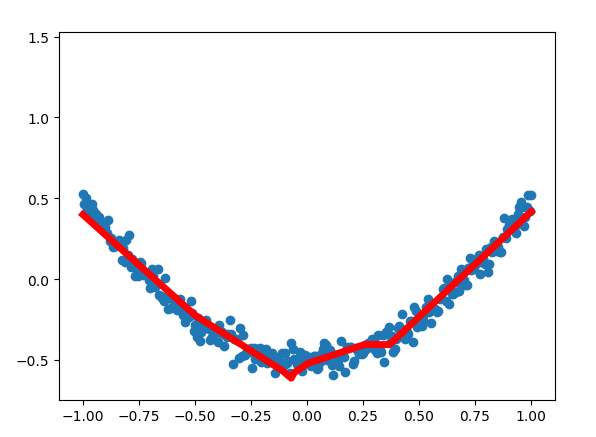
结果:
至此TensorFlow简易学习完结。
--------------------------------------
说明:本列为前期学习时记录,为基本概念和操作,不涉及深入部分。文字部分参考在文中注明,代码参考莫凡
TensorFlow简易学习[3]:实现神经网络的更多相关文章
- TensorFlow 深度学习笔记 卷积神经网络
Convolutional Networks 转载请注明作者:梦里风林 Github工程地址:https://github.com/ahangchen/GDLnotes 欢迎star,有问题可以到Is ...
- TensorFlow深度学习!构建神经网络预测股票价格!⛵
作者:韩信子@ShowMeAI 深度学习实战系列:https://www.showmeai.tech/tutorials/42 TensorFlow 实战系列:https://www.showmeai ...
- TensorFlow深度学习笔记 循环神经网络实践
转载请注明作者:梦里风林 Github工程地址:https://github.com/ahangchen/GDLnotes 欢迎star,有问题可以到Issue区讨论 官方教程地址 视频/字幕下载 加 ...
- TensorFlow简易学习[1]:基本概念和操作示例
简介 TensorFlow是一个实现机器学习算法的接口,也是执行机器学习算法的框架.使用数据流式图规划计算流程,可以将计算映射到不同的硬件和操作系统平台. 主要概念 TensorFlow的计算可以表示 ...
- TensorFlow简易学习[2]:实现线性回归
上篇介绍了TensorFlow基本概念和基本操作,本文将利用TensorFlow举例实现线性回归模型过程. 线性回归算法 线性回归算法是机器学习中典型监督学习算法,不同于分类算法,线性回归的输出是整个 ...
- TensorFlow深度学习实战---循环神经网络
循环神经网络(recurrent neural network,RNN)-------------------------重要结构(长短时记忆网络( long short-term memory,LS ...
- TensorFlow学习笔记——深层神经网络的整理
维基百科对深度学习的精确定义为“一类通过多层非线性变换对高复杂性数据建模算法的合集”.因为深层神经网络是实现“多层非线性变换”最常用的一种方法,所以在实际中可以认为深度学习就是深度神经网络的代名词.从 ...
- 深度学习之卷积神经网络CNN及tensorflow代码实例
深度学习之卷积神经网络CNN及tensorflow代码实例 什么是卷积? 卷积的定义 从数学上讲,卷积就是一种运算,是我们学习高等数学之后,新接触的一种运算,因为涉及到积分.级数,所以看起来觉得很复杂 ...
- 深度学习之卷积神经网络CNN及tensorflow代码实现示例
深度学习之卷积神经网络CNN及tensorflow代码实现示例 2017年05月01日 13:28:21 cxmscb 阅读数 151413更多 分类专栏: 机器学习 深度学习 机器学习 版权声明 ...
随机推荐
- Js全选 添加和单独删除
<!DOCTYPE html> <html lang="en"> <head> <meta charset="UTF-8&quo ...
- NopCommerce 3. Controller 分析
1. 继承关系,3个abstract类 System.Web.Mvc.Controller Nop.Web.Framework.Controllers.BaseController Nop.Admin ...
- Extjs6随笔(终篇)——内容总结
上个月和Extjs说byebye了,以后大概也没机会用了.之前的博客有点乱,大家看着比较麻烦,所以趁着我还没忘,在这里总结一下♪(^∇^*) 写了个demo,传到git上了,有需要可以自取.Extjs ...
- win10 uwp 改变鼠标
经常在应用需要修改光标,显示点击.显示输入,但是有些元素不是系统的,那么如何设置鼠标? 本文主要:UWP 设置光标,UWP 移动鼠标 设置光标 需要写一点代码来让程序比较容易看到,什么光标对于什么. ...
- 阻塞IO
服务端 from socket import * server = socket(AF_INET,SOCK_STREAM) server.bind(('127.0.0.1',8080)) server ...
- 量化投资:第8节 A股市场的回测
作者: 阿布 阿布量化版权所有 未经允许 禁止转载 abu量化系统github地址(欢迎+star) 本节ipython notebook 之前的小节回测示例都是使用美股,本节示例A股市场的回测. 买 ...
- HiveQL简单操作DDL
hive-2.1.1 DDL操作 Create/Drop/Alter/Use Database 创建数据库 //官方指导 CREATE (DATABASE|SCHEMA) [IF NOT EXISTS ...
- 如何透彻分析Java开发人员
第一部分:对于参加工作一年以内的同学.恭喜你,这个时候,你已经拥有了一份Java的工作. 这个阶段是你成长极快的阶段,而且你可能会经常加班.但是加班不代表你就可以松懈了,永远记得我说的那句话,从你入行 ...
- 423. Reconstruct Original Digits from English (leetcode)
Given a non-empty string containing an out-of-order English representation of digits 0-9, output the ...
- 25.Linux-Nor Flash驱动(详解)
1.nor硬件介绍: 从原理图中我们能看到NOR FLASH有地址线,有数据线,它和我们的SDRAM接口相似,能直接读取数据,但是不能像SDRAM直接写入数据,需要有命令才行 1.1其中我们2440的 ...