
How the Kernel Manages Your Memory
http://duartes.org/gustavo/blog/post/how-the-kernel-manages-your-memory/
After examining the virtual address layout of a process, we turn to the kernel and its mechanisms for managing user memory. Here is gonzo again:
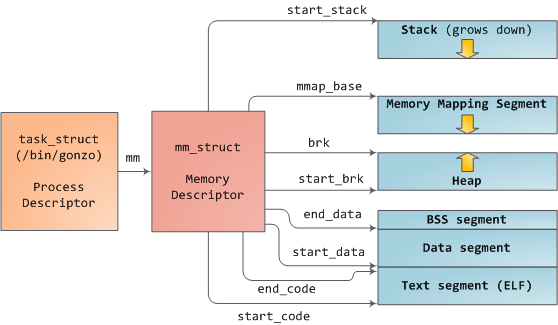
Linux processes are implemented in the kernel as instances of task_struct, the process descriptor. The mm field in task_struct points to the memory descriptor, mm_struct, which is an executive summary of a program’s memory. It stores the start and end of memory segments as shown above, the number of physical memory pages used by the process (rss stands for Resident Set Size), the amount of virtual address space used, and other tidbits. Within the memory descriptor we also find the two work horses for managing program memory: the set of virtual memory areas and thepage tables. Gonzo’s memory areas are shown below:
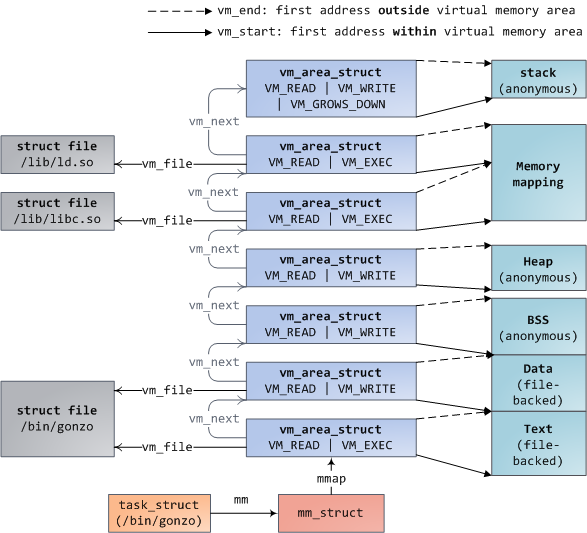
Each virtual memory area (VMA) is a contiguous range of virtual addresses; these areas never overlap. An instance of vm_area_struct fully describes a memory area, including its start and end addresses, flags to determine access rights and behaviors, and the vm_file field to specify which file is being mapped by the area, if any. A VMA that does not map a file is anonymous. Each memory segment above (e.g., heap, stack) corresponds to a single VMA, with the exception of the memory mapping segment. This is not a requirement, though it is usual in x86 machines. VMAs do not care which segment they are in.
A program’s VMAs are stored in its memory descriptor both as a linked list in the mmap field, ordered by starting virtual address, and as a red-black tree rooted at the mm_rb field. The red-black tree allows the kernel to search quickly for the memory area covering a given virtual address. When you read file /proc/pid_of_process/maps, the kernel is simply going through the linked list of VMAs for the process and printing each one.
In Windows, the EPROCESS block is roughly a mix of task_struct and mm_struct. The Windows analog to a VMA is the Virtual Address Descriptor, or VAD; they are stored in an AVL tree. You know what the funniest thing about Windows and Linux is? It’s the little differences.
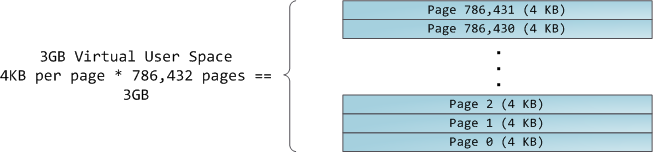
The 4GB virtual address space is divided into pages. x86 processors in 32-bit mode support page sizes of 4KB, 2MB, and 4MB. Both Linux and Windows map the user portion of the virtual address space using 4KB pages. Bytes 0-4095 fall in page 0, bytes 4096-8191 fall in page 1, and so on. The size of a VMA must be a multiple of page size. Here’s 3GB of user space in 4KB pages:
The processor consults page tables to translate a virtual address into a physical memory address. Each process has its own set of page tables; whenever a process switch occurs, page tables for user space are switched as well. Linux stores a pointer to a process’ page tables in the pgd field of the memory descriptor. To each virtual page there corresponds one page table entry (PTE) in the page tables, which in regular x86 paging is a simple 4-byte record shown below:

Linux has functions to read and set each flag in a PTE. Bit P tells the processor whether the virtual page is present in physical memory. If clear (equal to 0), accessing the page triggers a page fault. Keep in mind that when this bit is zero, the kernel can do whatever it pleases with the remaining fields. The R/W flag stands for read/write; if clear, the page is read-only. Flag U/S stands for user/supervisor; if clear, then the page can only be accessed by the kernel. These flags are used to implement the read-only memory and protected kernel space we saw before.
Bits D and A are for dirty and accessed. A dirty page has had a write, while an accessed page has had a write or read. Both flags are sticky: the processor only sets them, they must be cleared by the kernel. Finally, the PTE stores the starting physical address that corresponds to this page, aligned to 4KB. This naive-looking field is the source of some pain, for it limits addressable physical memory to 4 GB. The other PTE fields are for another day, as is Physical Address Extension.
A virtual page is the unit of memory protection because all of its bytes share the U/S and R/W flags. However, the same physical memory could be mapped by different pages, possibly with different protection flags. Notice that execute permissions are nowhere to be seen in the PTE. This is why classic x86 paging allows code on the stack to be executed, making it easier to exploit stack buffer overflows (it’s still possible to exploit non-executable stacks using return-to-libc and other techniques). This lack of a PTE no-execute flag illustrates a broader fact: permission flags in a VMA may or may not translate cleanly into hardware protection. The kernel does what it can, but ultimately the architecture limits what is possible.
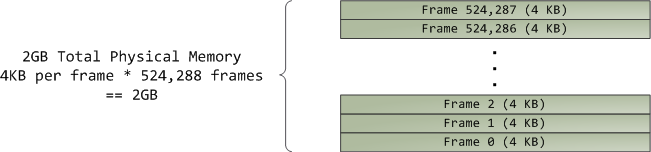
Virtual memory doesn’t store anything, it simply maps a program’s address space onto the underlying physical memory, which is accessed by the processor as a large block called thephysical address space. While memory operations on the bus are somewhat involved, we can ignore that here and assume that physical addresses range from zero to the top of available memory in one-byte increments. This physical address space is broken down by the kernel into page frames. The processor doesn’t know or care about frames, yet they are crucial to the kernel because the page frame is the unit of physical memory management. Both Linux and Windows use 4KB page frames in 32-bit mode; here is an example of a machine with 2GB of RAM:
In Linux each page frame is tracked by a descriptor and several flags. Together these descriptors track the entire physical memory in the computer; the precise state of each page frame is always known. Physical memory is managed with the buddy memory allocation technique, hence a page frame is free if it’s available for allocation via the buddy system. An allocated page frame might beanonymous, holding program data, or it might be in the page cache, holding data stored in a file or block device. There are other exotic page frame uses, but leave them alone for now. Windows has an analogous Page Frame Number (PFN) database to track physical memory.
Let’s put together virtual memory areas, page table entries and page frames to understand how this all works. Below is an example of a user heap:
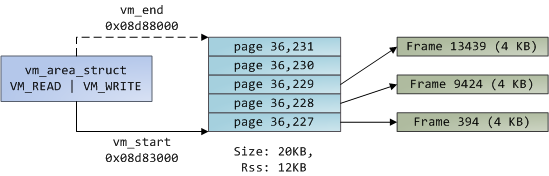
Blue rectangles represent pages in the VMA range, while arrows represent page table entries mapping pages onto page frames. Some virtual pages lack arrows; this means their corresponding PTEs have the Present flag clear. This could be because the pages have never been touched or because their contents have been swapped out. In either case access to these pages will lead to page faults, even though they are within the VMA. It may seem strange for the VMA and the page tables to disagree, yet this often happens.
A VMA is like a contract between your program and the kernel. You ask for something to be done (memory allocated, a file mapped, etc.), the kernel says “sure”, and it creates or updates the appropriate VMA. But it does not actually honor the request right away, it waits until a page fault happens to do real work. The kernel is a lazy, deceitful sack of scum; this is the fundamental principle of virtual memory. It applies in most situations, some familiar and some surprising, but the rule is that VMAs record what has been agreed upon, while PTEs reflect what has actually been done by the lazy kernel. These two data structures together manage a program’s memory; both play a role in resolving page faults, freeing memory, swapping memory out, and so on. Let’s take the simple case of memory allocation:
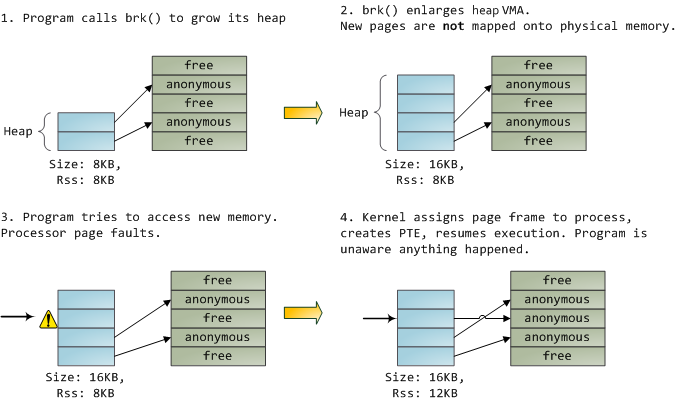
When the program asks for more memory via the brk() system call, the kernel simply updates the heap VMA and calls it good. No page frames are actually allocated at this point and the new pages are not present in physical memory. Once the program tries to access the pages, the processor page faults and do_page_fault() is called. It searches for the VMA covering the faulted virtual address using find_vma(). If found, the permissions on the VMA are also checked against the attempted access (read or write). If there’s no suitable VMA, no contract covers the attempted memory access and the process is punished by Segmentation Fault.
When a VMA is found the kernel must handle the fault by looking at the PTE contents and the type of VMA. In our case, the PTE shows the page is not present. In fact, our PTE is completely blank (all zeros), which in Linux means the virtual page has never been mapped. Since this is an anonymous VMA, we have a purely RAM affair that must be handled by do_anonymous_page(), which allocates a page frame and makes a PTE to map the faulted virtual page onto the freshly allocated frame.
Things could have been different. The PTE for a swapped out page, for example, has 0 in the Present flag but is not blank. Instead, it stores the swap location holding the page contents, which must be read from disk and loaded into a page frame by do_swap_page() in what is called a major fault.
This concludes the first half of our tour through the kernel’s user memory management. In the next post, we’ll throw files into the mix to build a complete picture of memory fundamentals, including consequences for performance.
How the Kernel Manages Your Memory的更多相关文章
- How The Kernel Manages Your Memory.内核是如何管理内存的
原文标题:How The Kernel Manages Your Memory 原文地址:http://duartes.org/gustavo/blog/ [注:本人水平有限,只好挑一些国外高手的精彩 ...
- Memory Allocation API In Linux Kernel && Linux Userspace、kmalloc vmalloc Difference、Kernel Large Section Memory Allocation
目录 . 内核态(ring0)内存申请和用户态(ring3)内存申请 . 内核态(ring0)内存申请:kmalloc/kfree.vmalloc/vfree . 用户态(ring3)内存申请:mal ...
- Linux kernel Programming - Allocating Memory
kmalloc #include <linux/slab.h> void *kmalloc(size_t size,int flags); void kfree(void *addr); ...
- 工作于内存和文件之间的页缓存, Page Cache, the Affair Between Memory and Files
原文作者:Gustavo Duarte 原文地址:http://duartes.org/gustavo/blog/post/what-your-computer-does-while-you-wait ...
- Page Cache, the Affair Between Memory and Files
Previously we looked at how the kernel manages virtual memory for a user process, but files and I/O ...
- 转:如何实现一个malloc
如何实现一个malloc 转载后排版效果很差,看原文! 任何一个用过或学过C的人对malloc都不会陌生.大家都知道malloc可以分配一段连续的内存空间,并且在不再使用时可以通过free释放掉. ...
- CPU与内存的那些事
下面是网上看到的一些关于内存和CPU方面的一些很不错的文章. 整理如下: 转: CPU的等待有多久? 原文标题:What Your Computer Does While You Wait 原文地址: ...
- What Your Computer Does While You Wait
转: CPU的等待有多久? 原文标题:What Your Computer Does While You Wait 原文地址:http://duartes.org/gustavo/blog/ [注:本 ...
- 转:CPU与内存的那些事
下面是网上看到的一些关于内存和CPU方面的一些很不错的文章. 整理如下: 转: CPU的等待有多久? 原文标题:What Your Computer Does While You Wait 原文地址: ...
随机推荐
- [King.yue]Ext中Grid得到选择行数据的方法总结
(1)grid.getStore().getRange(0,store.getCount()); //得到grid所有的行 (2)grid.getSelectionModel().getSele ...
- Loadrunner通过sitescope监控mysql
1. Loadrunner通过sitescope监控mysql 1.1. Sitescope下载 第一次在网上下载的是sitescope11.30,安装之后无法破解,所以最后卸载了,重新下载了si ...
- tar常用解包
(1)常见解压缩包 .tar解包 tar -xvf xxxx.tar 打包 tar -cvf xxxx .tar.bz2解包 bzip2 -d xxxx.tar.bz2 #会解压成. ...
- Bzoj 2006: [NOI2010]超级钢琴 堆,ST表
2006: [NOI2010]超级钢琴 Time Limit: 20 Sec Memory Limit: 552 MBSubmit: 2222 Solved: 1082[Submit][Statu ...
- HDU-4336 Card Collector 概率DP
题目链接:http://acm.hdu.edu.cn/showproblem.php?pid=4336 题意:买食品收集n个卡片,每个卡片的概率分别是pi,且Σp[i]<=1,求收集n个卡片需要 ...
- Java正则表达式测试用例
(1)对IP地址进行排序: public static void test_1() { String ip_str = "192.168.10.34 127.0.0.1 3.3.3.3 10 ...
- [Objective-c 基础 - 2.2] OC弱语法、类方法
A.OC弱语法 1.在运行的时候才会检查方法的声明和实现 2.没有声明只有实现的方法也能正常运行,只要在调用之前定义即可 3.类的声明必须存在,否则会出现运行时错误 B.类方法 1.是类名调用的方 ...
- Asp.Net底层解析
写的很好的一篇文章,但由于不能转载 所以把链接发在这里,以方便自己以后看 http://blog.csdn.net/mlcactus/article/details/8564347 http://ji ...
- 文件上传(FileUpload控件)
asp.net 文件上传,大文件上传. 新建一个asp.net页面,在工具栏里拖入 FileUpload 上传控件.一个按钮 Button ! ! ! 进入Button事件 //- ...
- jq向上无缝滚动
<!-- -------------摇奖排行榜--------------- --> <div class="Top_Record"> <div cl ...