
JSP学习笔记2
《JAVA遇见HTML——JSP篇》学习笔记(下)
1.Javabean
Javabeans就是符合某种规范的java类,使用Javabeans的好处是【解决代码的重复编写】,减少代码冗余,功能区分明确,提高代码的维护性。
设计原则(规范):1.公有类 2.属性私有 3.包含无参的共有构造方法 4.getter和setter方法封装属性
JSP动作元素(action element):
JSP动作元素为请求处理阶段提供信息。动作元素遵循XML语法,有一个包含元素名的开始标签,可以有属性,可选的内容、与开始标签匹配的结束标签。
第一类是与存取JavaBean有关,包括: <jsp:useBean> <jsp:setProperty> <jsp:getProperty>
<jsp:useBean id="标识符" class="实例化的类的完整名称" scope="作用范围" /> id可以理解为创建的类的对象的名字

<jsp:setProperty name="JavaBean实例名" property="*" /> (跟表单相关联)自动匹配所有属性

<jsp:setProperty name="JavaBean实例名" property="JavaBean属性名" /> (跟表单相关联)

<jsp:setProperty name="JavaBean实例名" property="JavaBean属性名" value="BeanValue" /> (手工设置)

<jsp:setProperty name="JavaBean实例名" property="JavaBean属性名" param="request对象中的参数名" /> (跟request参数相关联)URL地址栏传递

<jsp:getProperty name="" property="">
<body>

    <jsp:useBean id="myUser" class="com.po.User" scope="request" />

    <%--     <jsp:setProperty property="*" name="myUser"/> --%>

    <%--     <jsp:setProperty property="username" name="myUser"/> --%>

    <jsp:setProperty property="username" name="myUser" value="xiaobai"/>

    <jsp:setProperty property="password" param="pwd" name="myUser"/>

    用户名:<%=myUser.getUsername()%><br>

    密码:<%=myUser.getPassword()%>

</body>
javabean
Javabean四个作用域范围:
page,request,session,application
<jsp:getProperty>标签调用时,将会按照page、request、session和application的顺序来查找这个JavaBean实例,直至找到一个实例对象为止,如果在这4个范围内都找不到JavaBean实例,则抛出异常。
  <body>

    <jsp:useBean id="myUser" class="com.po.User" scope="page"></jsp:useBean>

    用户名:<jsp:getProperty property="username" name="myUser"/>

      密码:<jsp:getProperty property="password" name="myUser"/>

      <hr>

<%--       用户名:<%=((User)application.getAttribute("myUser")).getUsername() %> --%>

<%--       密码:<%=((User)application.getAttribute("myUser")).getPassword() %> --%>

<%--       用户名:<%=((User)session.getAttribute("myUser")).getUsername() %> --%>

<%--       密码:<%=((User)session.getAttribute("myUser")).getPassword() %> --%>

<%--       用户名:<%=((User)request.getAttribute("myUser")).getUsername() %> --%>

<%--       密码:<%=((User)request.getAttribute("myUser")).getPassword() %> --%>

    用户名:<%=((User)pageContext.getAttribute("myUser")).getUsername() %>

      密码:<%=((User)pageContext.getAttribute("myUser")).getPassword() %>

  </body>
testScope
Model1
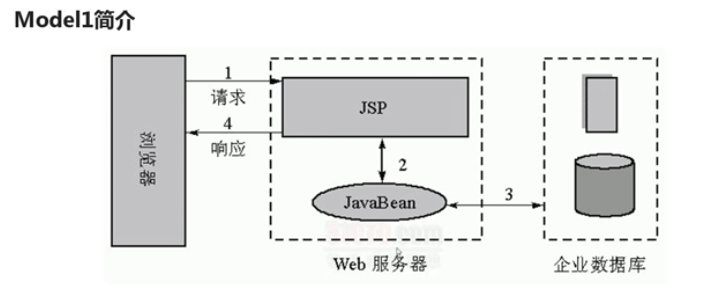
三层结构:界面层(jsp页面) 业务逻辑层(javabean) 数据层(数据库)
就是将业务逻辑封装起来而不是全部写在JSP界面。
package com.dao;

import com.po.Users;

public class UsersDao {

    public boolean usersLogin(Users u) {

        if ("admin".equals(u.getUsername()) && "admin".equals(u.getPassword()))

            return true;

        return false;

    }

}
com.dao;
<%@ page language="java" import="java.util.*" contentType="text/html; charset=utf-8"%>

<jsp:useBean id="loginUser" class="com.po.Users" scope="page"/>

<jsp:useBean id="userDao" class="com.dao.UsersDao" scope="page"/>

<jsp:setProperty property="*" name="loginUser"/>

<%

    String path = request.getContextPath();

    String basePath = request.getScheme()+"://"+request.getServerName()+":"+request.getServerPort()+path+"/";

    request.setCharacterEncoding("utf-8");

    if (userDao.usersLogin(loginUser)) {

        session.setAttribute("username", loginUser.getUsername());

        request.getRequestDispatcher("login_success.jsp").forward(request, response);

    } else {

        response.sendRedirect("login_failure.jsp");

    }

%>
dologin.jsp
2.JSP状态管理
HTTP协议的无状态性:无状态是指,当浏览器发送请求给服务器的时候,服务器会响应。但当同一个浏览器再次发送请求时,服务器不会知道是刚才那个浏览器。简单说就是服务器不会保存用户状态,不会记得客户端是否访问过,所以这就是无状态协议
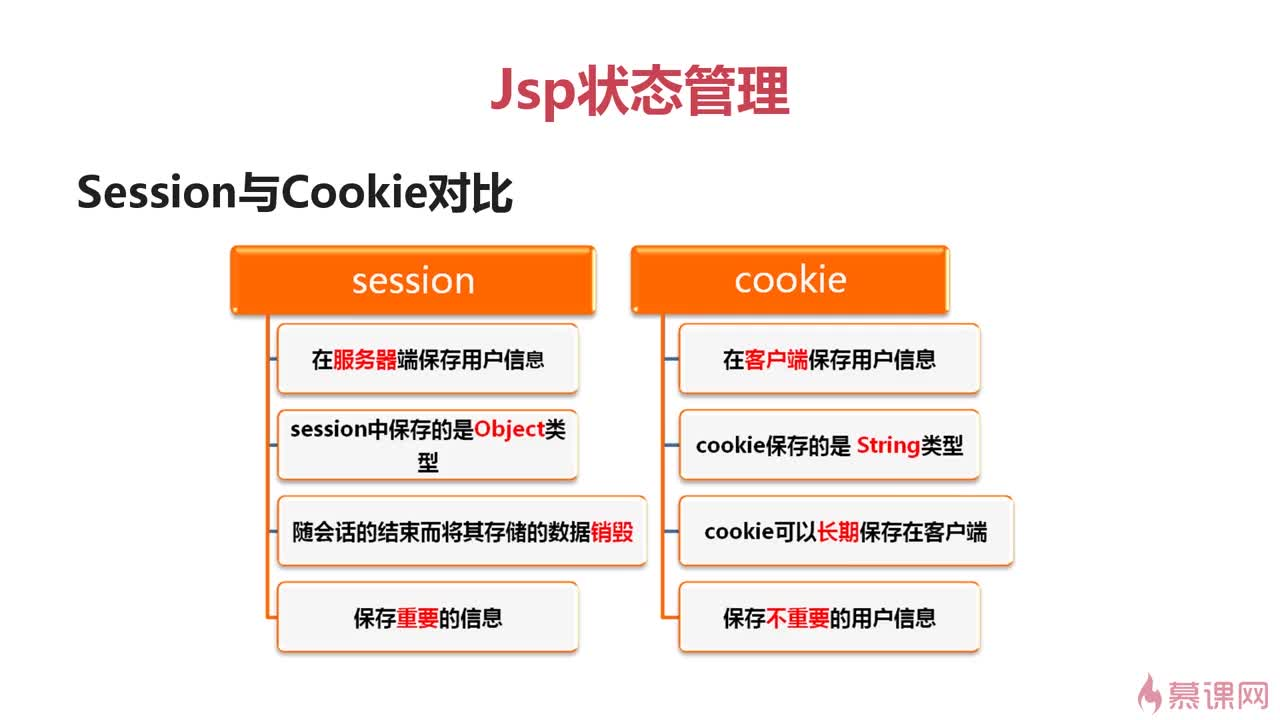
保存用户状态的两大机制:1.Session 2.Cookie
Cookie是文本信息,保存在客户端。
作用:1.保存用户对象的追踪; 2.保存用户网页浏览记录与习惯; 3.简化登录;
but有泄露用户隐私的风险
创建与使用Cookie:
创建Cookie对象: Cookie cookie=new Cookie(String key,Object value);

写入Cookie: response.addCookie(cookie);

读取Cookie: Cookie[] cookies=request.getCookies();

setMaxAge( expiry ) 设置cookie的有效期,以秒为单位

getMaxAge() 获取cookie的有效时间,以秒为单位

setValue(String value) 在cookie创建后,对cookie进行赋值

getValue() 获取cookie的值

getName() 获取cookie的名称
<%@page import="java.net.URLDecoder"%>

<%@ page language="java" import="java.util.*" contentType="text/html; charset=utf-8"%>

<%

String path = request.getContextPath();

String basePath = request.getScheme()+"://"+request.getServerName()+":"+request.getServerPort()+path+"/";

%>

<!DOCTYPE HTML PUBLIC "-//W3C//DTD HTML 4.01 Transitional//EN">

<html>

  <head>

    <base href="<%=basePath%>">

    <title>My JSP 'login.jsp' starting page</title>

    <meta http-equiv="pragma" content="no-cache">

    <meta http-equiv="cache-control" content="no-cache">

    <meta http-equiv="expires" content="0">

    <meta http-equiv="keywords" content="keyword1,keyword2,keyword3">

    <meta http-equiv="description" content="This is my page">

    <!--

    <link rel="stylesheet" type="text/css" href="styles.css">

    -->

  </head>

  <%

      request.setCharacterEncoding("utf-8");

      String username = "";

      String password = "";

      Cookie[] cookies = request.getCookies();

      if (cookies != null && cookies.length > 0) {

          for (Cookie c: cookies) {

              if ("username".equals(c.getName())) {

                  username = URLDecoder.decode(c.getValue(), "utf-8");

              }

              if ("password".equals(c.getName())) {

                  password = URLDecoder.decode(c.getValue(), "utf-8");

              }

          }

      }

   %>

  <body>

    <h1>用户登录</h1>

    <hr>

    <form name="loginForm" action="dologin.jsp" method="post">

        <table>

            <tr>

                <td>用户名:</td>

                <td><input type="text" name="username" value="<%=username%>"/></td>

            </tr>

            <tr>

                <td>密码:</td>

                <td><input type="password" name="password" value="<%=password%>"/></td>

            </tr>

            <tr>

                <td colspan="2"><input type="checkbox" name="isUseCookie" checked="checked"/>

                    十天内记住登录状态

                </td>

            </tr>

            <tr>

                <td colspan="2" align="center"><input type="submit" value="登录"/><input type="reset" value="取消"/></td>

            </tr>

        </table>

    </form>

  </body>

</html>
login.jsp
<%@ page language="java" import="java.util.*,java.net.*" contentType="text/html; charset=utf-8"%>

<%

String path = request.getContextPath();

String basePath = request.getScheme()+"://"+request.getServerName()+":"+request.getServerPort()+path+"/";

%>

<!DOCTYPE HTML PUBLIC "-//W3C//DTD HTML 4.01 Transitional//EN">

<html>

  <head>

    <base href="<%=basePath%>">

    <title>My JSP 'dologin.jsp' starting page</title>

    <meta http-equiv="pragma" content="no-cache">

    <meta http-equiv="cache-control" content="no-cache">

    <meta http-equiv="expires" content="0">

    <meta http-equiv="keywords" content="keyword1,keyword2,keyword3">

    <meta http-equiv="description" content="This is my page">

    <!--

    <link rel="stylesheet" type="text/css" href="styles.css">

    -->

  </head>

  <body>

      <h1>登录成功</h1>

      <hr>

      <br>

      <%

          request.setCharacterEncoding("utf-8");

          String[] isUserCookies = request.getParameterValues("isUseCookie");

          if (isUserCookies != null && isUserCookies.length > 0) {

              //使用URLEncoder解决无法在Cookie当中保存中文字符串问题

              String username = URLEncoder.encode(request.getParameter("username"),"utf-8");

              String password = URLEncoder.encode(request.getParameter("password"),"utf-8");

              Cookie usernameCookie = new Cookie("username", username);

              Cookie passwordCookie = new Cookie("password", password);

              usernameCookie.setMaxAge(864000);//10 days

              passwordCookie.setMaxAge(864000);

              response.addCookie(usernameCookie);

              response.addCookie(passwordCookie);

          } else {

              Cookie[] cookies = request.getCookies();

              if (cookies != null && cookies.length > 0) {

                  for (Cookie c: cookies) {

                      if (c.getName().equals("username") || c.getName().equals("password")) {

                          c.setMaxAge(0);

                          response.addCookie(c);

                      }

                  }

              }

          }

       %>

       <a href="users.jsp" target="_blank">查看用户信息</a>

  </body>

</html>
dologin.jsp
<%@ page language="java" import="java.util.*, java.net.*" contentType="text/html; charset=utf-8"%>

<%

String path = request.getContextPath();

String basePath = request.getScheme()+"://"+request.getServerName()+":"+request.getServerPort()+path+"/";

%>

<!DOCTYPE HTML PUBLIC "-//W3C//DTD HTML 4.01 Transitional//EN">

<html>

  <head>

    <base href="<%=basePath%>">

    <title>My JSP 'users.jsp' starting page</title>

    <meta http-equiv="pragma" content="no-cache">

    <meta http-equiv="cache-control" content="no-cache">

    <meta http-equiv="expires" content="0">

    <meta http-equiv="keywords" content="keyword1,keyword2,keyword3">

    <meta http-equiv="description" content="This is my page">

    <!--

    <link rel="stylesheet" type="text/css" href="styles.css">

    -->

  </head>

    <body>

    <h1>用户信息</h1>

    <hr>

    <%

      request.setCharacterEncoding("utf-8");

      String username="";

      String password = "";

      Cookie[] cookies = request.getCookies();

      if(cookies!=null&&cookies.length>0)

      {

           for(Cookie c:cookies)

           {

              if(c.getName().equals("username"))

              {

                   username = URLDecoder.decode(c.getValue(),"utf-8");

              }

              if(c.getName().equals("password"))

              {

                   password = URLDecoder.decode(c.getValue(),"utf-8");

              }

           }

      }

    %>

    <BR>

    <BR>

    <BR>

         用户名:<%=username %><br>

         密码:<%=password %><br>

  </body>

</html>
users.jsp
Cookie和Session的区别
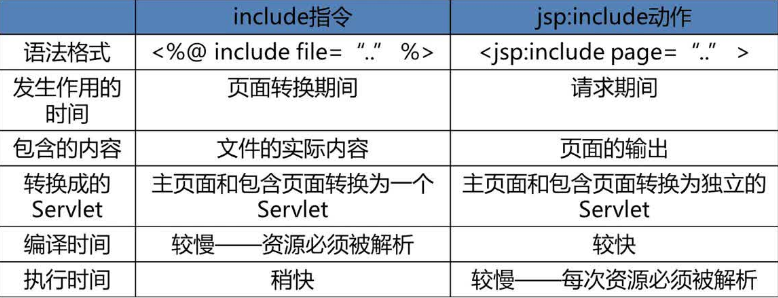
3.JSP指令与动作
include指令: <%@ include file="URL"%>
include动作: <jsp:include page="URL" flush="true|false" /> flush是否从缓冲区读取。
(ps:import里面不要加分号 ~~~>_<~~~
forward动作: <jsp:forward page="URL" />
等同于: request.getRequestDispatcher("/url").forward(request,response);
param动作: <jsp:param name="参数名" value="参数值">
常常与<jsp:forward>一起使用,作为其子标签,可以复制给已有参数,也可以添加新的参数。
<jsp:forward page="user.jsp">

    <jsp:param value="admin@123.net" name="email"/>

    <jsp:param value="xiaoshagua" name="username"/>

</jsp:forward>
tomcat高版本:response.addCookie(cookie)会报java.lang.IllegalArgumentException;因为Cookie对象的构造函数的两个字符串参数:Cookie名字和Cookie值都不能包含空白字符以及下列字符:[ ] ( ) < > = , " / ? @ : 具体改detials.jsp中的,将+“,”改为加"#";
package dao;

import java.sql.*;

import java.util.ArrayList;

import entity.Items;

import util.DBHelper;

// 商品的业务逻辑类

public class ItemsDAO {

    // 展示所有商品信息

    public ArrayList<Items> getAllItems() {

        Connection conn = null;

        PreparedStatement stmt = null;

        ResultSet rs = null;

        ArrayList<Items> list = new ArrayList<Items>();

        try {

            conn = DBHelper.getConnection();

            String sql = "Select * from items;";

            stmt = conn.prepareStatement(sql);

            rs = stmt.executeQuery();

            while (rs.next()) {

                Items items = new Items();

                items.setId(rs.getInt("id"));

                items.setName(rs.getString("name"));

                items.setCity(rs.getString("city"));

                items.setNumber(rs.getInt("number"));

                items.setPicture(rs.getString("picture"));

                items.setPrice(rs.getInt("price"));

                list.add(items); // 商品加入集合

            }

            return list;

        } catch (Exception ex) {

            ex.printStackTrace();

            return null;

        } finally {

            try {

                if (rs != null) rs.close();

                if (stmt != null) stmt.close();

            } catch (SQLException ex) {

                ex.printStackTrace();

            }

        }

    }

    public Items getItemById(int id) {

        Connection conn = null;

        PreparedStatement stmt = null;

        ResultSet rs = null;

        try {

            conn = DBHelper.getConnection();

            String sql = "Select * from items where id = ?;";

            stmt = conn.prepareStatement(sql);

            stmt.setInt(1, id);

            rs = stmt.executeQuery();

            if (rs.next()) {

                Items items = new Items();

                items.setId(rs.getInt("id"));

                items.setName(rs.getString("name"));

                items.setCity(rs.getString("city"));

                items.setNumber(rs.getInt("number"));

                items.setPicture(rs.getString("picture"));

                items.setPrice(rs.getInt("price"));

                return items;

            }

            return null;

        } catch (Exception ex) {

            ex.printStackTrace();

            return null;

        } finally {

            try {

                if (rs != null) rs.close();

                if (stmt != null) stmt.close();

            } catch (SQLException ex) {

                ex.printStackTrace();

            }

        }

    }

    //最近浏览的商品细信息

    public ArrayList<Items> getViewList(String list) {

        ArrayList<Items> itemlist = new ArrayList<Items>();

        if (list != null && list.length() > 0) {

            String arr[] = list.split("#");

            for (int i = arr.length-1; i >= 0 && i >= arr.length-5; i--) {

                int id = Integer.parseInt(arr[i]);

                itemlist.add(getItemById(id));

            }

            return itemlist;

        }

        return null;

    }

    public static void main(String[] args) {

        ItemsDAO i = new ItemsDAO();

        i.getViewList("1#4#6");

    }

}
ItemsDAO
<%@ page language="java" import="java.util.*" contentType="text/html; charset=utf-8"%>
<%@ page import="dao.ItemsDAO" %>
<%@ page import="entity.Items" %>
<%
String path = request.getContextPath();
String basePath = request.getScheme()+"://"+request.getServerName()+":"+request.getServerPort()+path+"/";
%> <!DOCTYPE HTML PUBLIC "-//W3C//DTD HTML 4.01 Transitional//EN">
<html>
<head>
<base href="<%=basePath%>"> <title>My JSP 'index.jsp' starting page</title>
<meta http-equiv="pragma" content="no-cache">
<meta http-equiv="cache-control" content="no-cache">
<meta http-equiv="expires" content="0">
<meta http-equiv="keywords" content="keyword1,keyword2,keyword3">
<meta http-equiv="description" content="This is my page">
<!--
<link rel="stylesheet" type="text/css" href="styles.css">
-->
<style type="text/css">
div{
float:left;
margin: 10px;
}
div dd{
margin:0px;
font-size:10pt;
}
div dd.dd_name
{
color:blue;
}
div dd.dd_city
{
color:#000;
}
</style>
</head> <body>
<h1>商品展示</h1>
<hr>
<center>
<table width="750" height="60" cellpadding="0" cellspacing="0" border="0">
<tr>
<td>
<!-- 商品循环开始 -->
<%
ItemsDAO itemsDAO = new ItemsDAO();
ArrayList<Items> list = itemsDAO.getAllItems();
if (list != null && list.size() > 0)
for (int i = 0; i < list.size(); i++) {
Items item = list.get(i);
%> <div>
<dl>
<dt>
<a href="details.jsp?id=<%=item.getId() %>"><img src="data:images/<%=item.getPicture()%>" width="120" height="90" border="1"/></a>
</dt>
<dd class="dd_name"><a href="details.jsp?id=<%=item.getId() %>"><%=item.getName() %></a></dd>
<dd class="dd_city">产地:<%=item.getCity() %> 价格:¥<%=item.getPrice() %></dd>
</dl>
</div> <%
}
%>
</table>
</center>
</body>
</html>
index.jsp
<%@ page language="java" import="java.util.*" contentType="text/html; charset=utf-8" %>
<%@ page import="entity.Items"%>
<%@ page import="dao.ItemsDAO"%>
<%
String path = request.getContextPath();
String basePath = request.getScheme()+"://"+request.getServerName()+":"+request.getServerPort()+path+"/";
%> <!DOCTYPE HTML PUBLIC "-//W3C//DTD HTML 4.01 Transitional//EN">
<html>
<head>
<base href="<%=basePath%>"> <title>My JSP 'details.jsp' starting page</title> <meta http-equiv="pragma" content="no-cache">
<meta http-equiv="cache-control" content="no-cache">
<meta http-equiv="expires" content="0">
<meta http-equiv="keywords" content="keyword1,keyword2,keyword3">
<meta http-equiv="description" content="This is my page">
<!--
<link rel="stylesheet" type="text/css" href="styles.css">
-->
<style type="text/css">
div{
float:left;
margin-left: 30px;
margin-right:30px;
margin-top: 5px;
margin-bottom: 5px;
}
div dd{
margin:0px;
font-size:10pt;
}
div dd.dd_name
{
color:blue;
}
div dd.dd_city
{
color:#000;
}
</style>
</head> <body>
<h1>商品详情</h1>
<hr>
<center>
<table width="750" height="60" cellpadding="0" cellspacing="0" border="0">
<tr>
<!-- 商品详情 -->
<%
ItemsDAO itemDao = new ItemsDAO();
Items item = itemDao.getItemById(Integer.parseInt(request.getParameter("id")));
if(item!=null)
{
%>
<td width="70%" valign="top">
<table>
<tr>
<td rowspan="4"><img src="data:images/<%=item.getPicture()%>" width="200" height="160"/></td>
</tr>
<tr>
<td><B><%=item.getName() %></B></td>
</tr>
<tr>
<td>产地:<%=item.getCity()%></td>
</tr>
<tr>
<td>价格:<%=item.getPrice() %>¥</td>
</tr>
</table>
</td>
<%
} else {
out.print("null!");
}
%>
<!-- 循环结束 --> <%
String list = "";
// 从客户端获取Cookie集合
Cookie[] cookies = request.getCookies();
// 遍历 是否存在ListViewCookie
if (cookies != null && cookies.length > 0) {
for (Cookie c: cookies) {
if (c.getName().equals("ListViewCookie")) {
list = c.getValue();
}
}
} list += request.getParameter("id") + "#";
// 浏览记录过多清零
String arr[] = list.split("#");
if (arr != null && arr.length >= 1000) {
list = "";
}
// 存在同名的Cookie会覆盖前一个
Cookie cookie = new Cookie("ListViewCookie", list);
response.addCookie(cookie); %>
<!-- 浏览过的商品 -->
<td width="30%" bgcolor="#EEE" align="center">
<br>
<b>您浏览过的商品</b><br>
<!-- 循环开始 -->
<%
ArrayList<Items> itemlist = itemDao.getViewList(list);
if (itemlist != null && itemlist.size() > 0) {
for (Items i: itemlist) { %>
<div>
<dl>
<dt>
<a href="details.jsp?id=<%=i.getId()%>"><img src="data:images/<%=i.getPicture() %>" width="120" height="90" border="1"/></a>
</dt>
<dd class="dd_name"><%=i.getName() %></dd>
<dd class="dd_city">产地:<%=i.getCity() %> 价格:<%=i.getPrice() %> ¥ </dd>
</dl>
</div>
<!-- 循环结束 -->
<%
}
}
%>
</td>
</tr>
</table>
</center>
</body>
</html>
details
JSP学习笔记2的更多相关文章
- JSP学习笔记
JSP学习笔记 Jsp网页主要分为Elements与Template Data两部分. Template Data:JSP Container不处理的部分,例如HTML内容 Elements:必须经由 ...
- JSP学习笔记(三):简单的Tomcat Web服务器
注意:每次对Tomcat配置文件进行修改后,必须重启Tomcat 在E盘的DATA文件夹中创建TomcatDemo文件夹,并将Tomcat安装路径下的webapps/ROOT中的WEB-INF文件夹复 ...
- java web jsp学习笔记--概述-常用语法,指令,动作元素,隐式对象,域对象
JSP学习笔记 1.什么是jsp JSP全称是Java Server Pages,它和servle技术一样,都是SUN公司定义的一种用于开发动态web资源的技术.JSP/Servlet规范.JS ...
- JSP 学习笔记1
JSP 学习笔记 JSP是Servlet的一种特殊形式,每个JSP页面就是一个Servlet实例--JSP页面有系统编译成Servlet,Servlet再负责响应用户请求. 1.JSP注释 < ...
- jsp学习笔记:mvc开发模式
jsp学习笔记:mvc开发模式2017-10-12 22:17:33 model(javabe)与view层交互 view(视图层,html.jsp) controller(控制层,处理用户提交的信息 ...
- (转) jsp学习笔记
fromhttp://www.cnblogs.com/tao975/p/4445070.html 什么是JSP JSP的优势 JSP的劣势 JSP与PHP的比较 JSP工作原理 JSP的九大内置对象 ...
- 重温JSP学习笔记--三大指令九大内置对象
最近在温习javaweb的相关基础知识,鉴于我弄丢了记满了整整一本的笔记,决定以后把笔记和一些学习上的心得以及碰到的一些问题统统都放在网上,今天看了一下jsp的相关基础,以下是笔记: JSP三大指令: ...
- 重温JSP学习笔记--与日期数字格式化有关的jstl标签库
上一篇笔记写的主要是JSTL的core标签库,如果想对一些数字或者日期做一些操作或者在网页上显示指定格式的数字或日期,jstl还提供了另一个fmt标签库,这里简单介绍一下: 第一步,导入标签库: &l ...
- 重温JSP学习笔记--JSTL标签库
以前写jsp的时候对jstl标签库是有些抵触的,因为我觉得嵌入java代码的方式几乎无往不利,没有必要使用标签库,不过这次复习还是好好地学习了一下,发现这个还是很有用处的,用得好能省不少事,JSTL是 ...
随机推荐
- linux踢人命令 pkill踢人用法
首先使用who命令查看在线用户,然后踢人. 强制踢人命令格式:pkill -kill -t tty 解释: pkill -kill -t 踢人命令 tty 所踢用户的TTY或者pts/x(x代表数字) ...
- ANDROID_MARS学习笔记_S01_010日期时间控件
1.xml <RelativeLayout xmlns:android="http://schemas.android.com/apk/res/android" xmlns: ...
- 启用了不安全的HTTP方法
安全风险: 可能会在Web 服务器上上载.修改或删除Web 页面.脚本和文件. 可能原因: Web 服务器或应用程序服务器是以不安全的方式配置的. 修订建议: 如果 ...
- C 可变参数(C与指针实例)
偶尔我们需要设计一些函数,它们的参数数目不是固定的,这样我们需要用到可变参数列表. 可变参数列表是通过宏来实现的,定义于stdarg.h头文件. 具体内容在<C与指针> ; ...
- Android之AndroidManifest.xml文件解析
转自:Android学习笔记之AndroidManifest.xml文件解析 一.关于AndroidManifest.xml AndroidManifest.xml 是每个android程序中必须的文 ...
- javascript里的post和get有什么区别
FORM中的get post方法区别Form中的get和post方法,在数据传输过程中分别对应了HTTP协议中的GET和POST方法.二者主要区别如下: 1.Get是用来从服务器上获得数据,而Post ...
- Oracle DBA常用SQL
监控SQL 1.监控事例的等待: select event,sum(decode(wait_time,0,0,1)) prev, sum(decode(wait_time,0,1,0)) curr,c ...
- Spring-Data-JPA学习
Spring-Data-JPA结构图 网址: http://blog.sina.com.cn/s/blog_667ac0360102ecsf.html
- Hibernate中的query.setFirstResult(),query.setMaxResults();
一.query.scroll()和query.setFirstResult(),query.setMaxResults();这两种方法都可以取到一定范围内的数据,用来数据分页显示.那么两者区别,以及两 ...
- Linux SocketCan client server demo hacking
/*********************************************************************** * Linux SocketCan client se ...