
Android(java)学习笔记110:ScrollView用法
1. 理论部分
(1)ScrollView和HorizontalScrollView是为控件或者布局添加滚动条
(2)上述两个控件只能有一个孩子,但是它并不是传统意义上的容器
(3)上述两个控件可以互相嵌套
(4)滚动条的位置现在的实验结果是:可以由layout_width和layout_height设定
(5)ScrollView用于设置垂直滚动条,HorizontalScrollView用于设置水平滚动条:需要注意的是,有一个属性是 scrollbars 可以设置滚动条的方向:但是ScrollView设置成horizontal是和设置成none是效果同,HorizontalScrollView设置成vertical和none的效果同。
代码实践:
 <?xml version="1.0" encoding="utf-8"?>

 <ScrollView xmlns:android="http://schemas.android.com/apk/res/android"

     android:id="@+id/mScrollView"

     android:layout_width="fill_parent"

     android:layout_height="wrap_content"

     android:scrollbars="vertical" >

     <LinearLayout

         android:layout_width="fill_parent"

         android:layout_height="wrap_content"

         android:orientation="vertical" >

         <LinearLayout

             android:layout_width="fill_parent"

             android:layout_height="fill_parent"

             android:orientation="horizontal" >

             <Button

                 android:id="@+id/openNetCard"

                 android:layout_width="wrap_content"

                 android:layout_height="wrap_content"

                 android:layout_weight="1"

                 android:text="打开无线网卡" />

             <Button

                 android:id="@+id/closeNetCard"

                 android:layout_width="wrap_content"

                 android:layout_height="wrap_content"

                 android:layout_weight="1"

                 android:text="关闭无线网卡" />

             <Button

                 android:id="@+id/checkNetCardState"

                 android:layout_width="wrap_content"

                 android:layout_height="wrap_content"

                 android:layout_weight="1"

                 android:text="检查网卡状态" />

         </LinearLayout>

         <LinearLayout

             android:layout_width="fill_parent"

             android:layout_height="fill_parent"

             android:orientation="horizontal" >

             <Button

                 android:id="@+id/scan"

                 android:layout_width="wrap_content"

                 android:layout_height="wrap_content"

                 android:layout_weight="1"

                 android:text="扫描网络" />

             <Button

                 android:id="@+id/getScanResult"

                 android:layout_width="wrap_content"

                 android:layout_height="wrap_content"

                 android:layout_weight="1"

                 android:text="扫描结果" />

         </LinearLayout>

         <LinearLayout

             android:layout_width="fill_parent"

             android:layout_height="fill_parent"

             android:orientation="horizontal" >

             <Button

                 android:id="@+id/connect"

                 android:layout_width="wrap_content"

                 android:layout_height="wrap_content"

                 android:layout_weight="1"

                 android:text="连接Wifi" />

             <Button

                 android:id="@+id/disconnect"

                 android:layout_width="wrap_content"

                 android:layout_height="wrap_content"

                 android:layout_weight="1"

                 android:text="断开Wifi" />

             <Button

                 android:id="@+id/checkNetWorkState"

                 android:layout_width="wrap_content"

                 android:layout_height="wrap_content"

                 android:layout_weight="1"

                 android:text="Wifi连接状态" />

         </LinearLayout>

         <TextView

             android:id="@+id/scanResult"

             android:layout_width="fill_parent"

             android:layout_height="wrap_content" />

     </LinearLayout>

 </ScrollView>
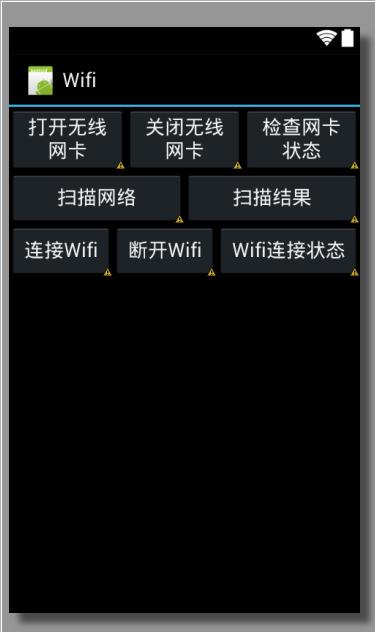
布局图如下:
……
public void onCreate(Bundle savedInstanceState) {
super.onCreate(savedInstanceState);
setContentView(R.layout.main);
}
……
Android(java)学习笔记110:ScrollView用法的更多相关文章
- Android开发学习笔记-SharedPreferences的用法
SharedPreferences介绍: 做软件开发应该都知道,很多软件会有配置文件,里面存放这程序运行当中的各个属性值,由于其配置信息并不多,如果采用数据库来存放并不划算,因为数据库连接跟操作等 ...
- 《Java学习笔记(第8版)》学习指导
<Java学习笔记(第8版)>学习指导 目录 图书简况 学习指导 第一章 Java平台概论 第二章 从JDK到IDE 第三章 基础语法 第四章 认识对象 第五章 对象封装 第六章 继承与多 ...
- Android动画学习笔记-Android Animation
Android动画学习笔记-Android Animation 3.0以前,android支持两种动画模式,tween animation,frame animation,在android3.0中 ...
- Android 数字签名学习笔记
Android 数字签名学习笔记 在Android系统中,所有安装到系统的应用程序都必有一个数字证书,此数字证书用于标识应用程序的作者和在应用程序之间建立信任关系,如果一个permission的pro ...
- Java学习笔记4
Java学习笔记4 1. JDK.JRE和JVM分别是什么,区别是什么? 答: ①.JDK 是整个Java的核心,包括了Java运行环境.Java工具和Java基础类库. ②.JRE(Java Run ...
- java学习笔记之基础篇
java选择语句之switch //switch可以用于等值判断 switch (e) //int ,或则可以自动转化成int 的类型,(byte char short)枚举jdk 7中可以防止字 ...
- 0028 Java学习笔记-面向对象-Lambda表达式
匿名内部类与Lambda表达式示例 下面代码来源于:0027 Java学习笔记-面向对象-(非静态.静态.局部.匿名)内部类 package testpack; public class Test1{ ...
- 0013 Java学习笔记-面向对象-static、静态变量、静态方法、静态块、单例类
static可以修饰哪些成员 成员变量---可以修饰 构造方法---不可以 方法---可以修饰 初始化块---可以修饰 内部类(包括接口.枚举)---可以修饰 总的来说:静态成员不能访问非静态成员 静 ...
- 20145330第六周《Java学习笔记》
20145330第六周<Java学习笔记> . 这周算是很忙碌的一周.因为第六周陆续很多实验都开始进行,开始要准备和预习的科目日渐增多,对Java分配的时间不知不觉就减少了,然而第十和十一 ...
- Java学习笔记:语言基础
Java学习笔记:语言基础 2014-1-31 最近开始学习Java,目的倒不在于想深入的掌握Java开发,而是想了解Java的基本语法,可以阅读Java源代码,从而拓展一些知识面.同时为学习An ...
随机推荐
- Android应用性能优化笔记(java代码优化)
Java代码优化 缓存结果: 如果计算代价过高,最好把过去的结果缓存起来. 伪代码如下: result=cache.get(n); //输入参数n作为键 if(result==nul ...
- HttpComponents 学习的两个重要文档
httpcore-tutorial-simplified-chinese httpclient-tutorial-simplified-chinese
- webSocket vnc rfb
- Tomcat线程池,更符合大家想象的可扩展线程池
因由 说起线程池,大家可能受连接池的印象影响,天然的认为,它应该是一开始有core条线程,忙不过来了就扩展到max条线程,闲的时候又回落到core条线程,如果还有更高的高峰,就放进一个缓冲队列里缓冲一 ...
- 第二百五十一天 how can I 坚持
hadoop,namenote和datanode.namenode如果要是在启动时加载到内存,会不会对内存的要求比较高呢. edits-->fsimage. secondnamenode,那么n ...
- java命令行运行jar里的main类
一般运行包含manifest的jar包,可以使用 java -jar <jar-file-name>.jar 如果jar里没有 manifest,则可以使用 java -cp foo.ja ...
- Angularjs 初始化框架
bindJQuery(); publishExternalAPI(angular); jqLite(document).ready(function() { angularInit(document, ...
- Autofac实例生命周期
1.默认,每次请求都会返回一个实例 builder.RegisterType<X>().InstancePerDependency(); 2.Per Lifetime Scope:这个作用 ...
- MEF 编程指南(八):过滤目录
当使用子容器的时候,基于特定的标准(Specific Criteria)过滤目录是很必要的.比如,基于部件构造策略的过滤器是很常见的.下面的代码片段演示了如何构建的特殊途径(Particular Ap ...
- redis list 使用
参考:http://redis.cn/commands.html#list BLPOP key [key ...] timeout删除,并获得该列表中的第一元素,或阻塞,直到有一个可用 BRPOP k ...