
.Net (MVC) 随机生成验证码
以前一直对C#的GDI画图部分知识点不怎么用所以忘得差不多了,这两天正好公司要做一个博客系统,其中一个需求就是留言时为了防止恶意攻击必须填写验证码,正好借着这个机会复习了一下,以下是实现代码,写的比较简单。
View 层
 @{

     ViewBag.Title = "Home Page";

 }

 <div class="row">

      <h1>test</h1>

     <div class="col-lg-12">

         @using(Html.BeginForm("Index","Home", FormMethod.Post, new {@id="form",@enctype = "multipart/form-data" }))

         {

             <div class="form-group">

                 <input type="file" name="file"/>

                 <input type="file" name="files" />

                 <button>提交</button>

             </div>

             <div class="form-group">

                 <div class="col-lg-1">

                     <input type="text" class="col-lg-3"/>

                 </div>

                 <div class="col-lg-3">

                     <img id="img" onclick="CheckCode()" src="/Home/GetValidateCode" style="height:30px;width:110px" title="点击更换" alt="点击更换" />

                     <a href="javascript:void(0)" onclick="CheckCode()">点击更换</a>

                 </div>

             </div>

         }

     </div>

 </div>

 @section scripts{

 <script>

     $(function () {

         $("#img").click(function () {

             CheckCode()

         })

     })

     function CheckCode() {

         $("#img").attr("src", "/Home/GetValidateCode?date="+new Date());

     }

 </script>

 }
Controller 层
 /// <summary>

         /// View页面请求获得验证码

         /// </summary>

         public void GetValidateCode()

         {

             //获取随机生成的编码

             string ValiDateCode = GetValiDateCode();

             Session["Key"] = ValiDateCode;

             byte[] bytes = GetValidateCode(ValiDateCode);

             Response.ClearContent();

             Response.ContentType = "image/Gif";

             Response.BinaryWrite(bytes);

             // 也可以用MVC 的FileResult

             //return File(bytes, @"image/jpeg");

         }

         /// <summary>

         /// 生成验证码方法

         /// </summary>

         /// <param name="ValiDateCode"></param>

         /// <returns></returns>

         public static byte[] GetValidateCode(string ValiDateCode)

         {

             Bitmap img = new Bitmap((int)Math.Ceiling(ValiDateCode.Length * 12.6), );   //创建 Bitmap对象

             Graphics graphics = Graphics.FromImage(img);                                  //创建 Graphics 对象

             graphics.Clear(Color.White);                                                  //清空图片背景色

             Random random = new Random();                                                 //创建 Random 实例

             for (int i = ; i <= ; i++)

             {

                 int x1 = random.Next(img.Width);

                 int x2 = random.Next(img.Width);

                 int y1 = random.Next(img.Height);

                 int y2 = random.Next(img.Height);

                 graphics.DrawLine(new Pen(Color.Silver),x1, y1, x2, y2);                  //在图片上画噪点线

             }

             Font font = new Font("Arial", ,(FontStyle.Bold));

             //创建 Brush 对象, LinearGradientBrush实现字体渐变效果  LinearGradientBrush(Rectangle rectangle,Color color1,Color color2,float angle, bool isAngleScaleable)

             LinearGradientBrush linear = new LinearGradientBrush(new Rectangle(, , img.Width, img.Height), Color.Gray, Color.Blue, 1.4f, true);

             graphics.DrawString(ValiDateCode, font, linear, , );                        //绘制生成的验证码,

             graphics.DrawRectangle(new Pen(Color.Silver), , , img.Width - , img.Height - );

             MemoryStream stream = new MemoryStream();                                     //创建 流对象

             img.Save(stream, ImageFormat.Jpeg);                                           //将图像以特定的格式保存到流对象中

             return stream.ToArray();

         }

         /// <summary>

         /// 获取随机生成的验证码

         /// </summary>

         /// <returns></returns>

         private static string GetValiDateCode()

         {

             string[] letter = new string[] { "a", "b", "c", "d", "e", "f", "g", "h", "i", "j", "k", "i", "m", "n", "o", "p", "Q" };

             Random random = new Random();

             StringBuilder result = new StringBuilder();

             for (int i = ; i <= ; i++)

             {

                 if (i %  == )

                 {

                     result.Append(letter[random.Next(, )]);

                 }

                 else

                 {

                     result.Append(random.Next(, ));

                 }

             }

             return result.ToString();

         }
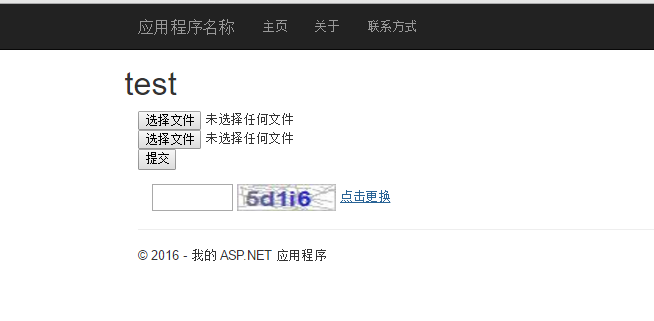
效果图:
.Net (MVC) 随机生成验证码的更多相关文章
- Python随机生成验证码的两种方法
Python随机生成验证码的方法有很多,今天给大家列举两种,大家也可以在这个基础上进行改造,设计出适合自己的验证码方法方法一:利用range Python随机生成验证码的方法有很多,今天给大家列举两种 ...
- Android锁定EditText内容和随机生成验证码
昨天写了个小Demo,实现了随机生成验证码,和锁定EditText两个小功能,先看一下效果图: 锁定EditText在我们不须要用户编辑EditText内容的时候能够用到,实现还是非常easy的,一行 ...
- 随机生成验证码及python中的事务
1.随机生成验证码 # import random # print(random.random()) #-1的小数 # print(random.randint(,)) #包括1和3 # print( ...
- js随机生成验证码以及随机颜色
Javascript通过Math.random()随机生成验证码. 代码如下: <!DOCTYPE html><html> <head> <meta char ...
- 随机生成验证码(JS)
效果展示 实现原理 1. html:一般就是一个div: <div id="code"></div> ,样式根据需求设计. 2. JS:1)将所有的验证码所 ...
- php随机生成验证码代码
<?php session_start(); //产生一个随机的字符串验证码 $checkcode=""; for ($i=0;$i<4;$i++){ $checkco ...
- js随机生成验证码及其颜色
今天迎来了2018年第一场雪,这个美好的日子,总的写点什么纪念一下,在这里写了一个在js中使用Math.random()函数,随机生成四位数的验证码及其验证码换颜色. js代码如下: var arra ...
- Djaingo 随机生成验证码(PIL)
基础: https://www.cnblogs.com/wupeiqi/articles/5812291.html 实例: https://www.cnblogs.com/6324TV/p/88112 ...
- java随机生成验证码
package com.yuyuchen.util; import java.awt.Color; import java.awt.Font; import java.awt.Graphics; im ...
随机推荐
- CentOS 使用yum命令安装出现错误提示”could not retrieve mirrorlist http://mirrorlist.centos.org ***”
刚安装完CentOS,使用yum命令安装一些常用的软件,使用如下命令:yum –y install gcc. 提示如下错误信息: Loaded plugins: fastestmirror, refr ...
- 关于C#中文本模板(.tt)的简单应用
这两天做项目突遇 .tt文件,之前没有接触过,so查询学习做笔记,帮助记忆和后来者. 在项目添加中点击选择文本模板 下面贴出代码,做了简单的注释 <#@ template debug=" ...
- PHP安装环境,服务器不支持curl_exec的解决办法
转自:http://jingyan.baidu.com/article/00a07f38909c6b82d028dc83.html windows下开启方法: 拷贝PHP目录中的libeay32.dl ...
- AllocateHwnd is not Thread-Safe
http://www.thedelphigeek.com/2007/06/allocatehwnd-is-not-thread-safe.html http://gp.17slon.com/gp/fi ...
- 深入理解Oracle索引(25):一招鲜、吃遍天之单字段索引创建思路
本文较短.不过实用性很好.还是记录之. ㈠ 先别看SQL语句.看执行计划.挑出走全表扫的表 ㈡ 回头看SQL语句.分析上述表的约束字段有哪些.检查各个约束字段的索引是否存在 ㈢ 选择 ...
- codechef Arranging Cup-cakes题解
Arranging Cup-cakes Our Chef is catering for a big corporate office party and is busy preparing diff ...
- Codeforces Round #307 (Div. 2) A. GukiZ and Contest 水题
A. GukiZ and Contest Time Limit: 20 Sec Memory Limit: 256 MB 题目连接 http://codeforces.com/contest/551/ ...
- asp.net 获取url
string url = Request.Url.ToString(); this.ImageLogo.ImageUrl = "http://" + Request.Url.Aut ...
- 制作简易计算器处理结果Servlet
ResultServlet.java: package com.you.servlet; import java.io.IOException; import java.io.PrintWriter; ...
- C语言待研究问题
1.内存分配 变量的静态分配和静态变量的区别: 变量的静态分配和动态分配 2.堆和栈的区别 3.CPU的并发性 4.变量和参数的区别