
Mybatis+Springmvc+Spring整合常用的配置文件
1.创建web项目
2.导入mabatis spring springnvc 需要的jar包
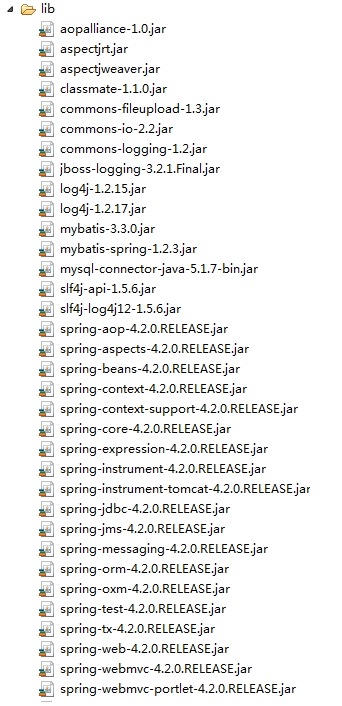
3.创建mybatis,spring,springmvc的配置文件
(1)web.xml配置文件
<?xml version="1.0" encoding="UTF-8"?>
<web-app version="2.5"
xmlns="http://java.sun.com/xml/ns/javaee"
xmlns:xsi="http://www.w3.org/2001/XMLSchema-instance"
xsi:schemaLocation="http://java.sun.com/xml/ns/javaee
http://java.sun.com/xml/ns/javaee/web-app_2_5.xsd">
<!-- 告知javaEE容器,有哪些内容需要添加到上下文中去 -->
<context-param>
<param-name>contextConfigLocation</param-name>
<param-value>
/WEB-INF/classes/applicationContext.xml,
<!-- /WEB-INF/classes/mvc-servlet.xml -->
</param-value>
</context-param>
<!-- 加载LOG4J -->
<context-param>
<param-name>log4jConfigLocation</param-name>
<param-value>/WEB-INF/log4j.xml</param-value>
</context-param>
<context-param>
<param-name>log4jRefreshInterval</param-name>
<param-value>60000</param-value>
</context-param>
<!-- 动态设置项目的运行路径 -->
<context-param>
<param-name>webAppRootKey</param-name>
<param-value>ssm.root</param-value>
</context-param>
<!-- 配置静态资源 -->
<servlet-mapping>
<servlet-name>default</servlet-name>
<url-pattern>/static/*</url-pattern>
</servlet-mapping>
<!-- 配置springmvc的前端控制器 -->
<servlet>
<servlet-name>mvc</servlet-name>
<servlet-class>org.springframework.web.servlet.DispatcherServlet</servlet-class>
<!-- 默认情况下:DispatcherServlet会寻找WEB-INF下,命名规范为[servlet-name]-servlet.xml文件。如:在上例中,它就会找/WEB-INF/spring-servlet.xml
如果需要修改,需要在web.xml中的<servlet>标记中增加 <init-param>。。。 </init-param>:-->
<init-param>
<param-name>contextConfigLocation</param-name>
<param-value>/WEB-INF/classes/mvc-servlet.xml</param-value>
</init-param>
</servlet>
<servlet-mapping>
<servlet-name>mvc</servlet-name>
<url-pattern>/</url-pattern>
</servlet-mapping>
<!-- spring框架提供的字符集过滤器 -->
<!-- spring Web MVC框架提供了org.springframework.web.filter.CharacterEncodingFilter用于解决POST方式造成的中文乱码问题 -->
<filter>
<filter-name>encodingFilter</filter-name>
<filter-class>org.springframework.web.filter.CharacterEncodingFilter</filter-class>
<init-param>
<param-name>encoding</param-name>
<param-value>UTF-8</param-value>
</init-param>
<!-- force强制,促使 -->
<init-param>
<param-name>forceEncoding</param-name>
<param-value>true</param-value>
</init-param>
</filter>
<filter-mapping>
<filter-name>encodingFilter</filter-name>
<url-pattern>/*</url-pattern>
</filter-mapping>
<!-- 登录过滤器-->
<filter>
<filter-name>loginFilter</filter-name>
<filter-class>com.cy.ssm.filter.LoginFilter</filter-class>
</filter>
<filter-mapping>
<filter-name>loginFilter</filter-name>
<url-pattern>/*</url-pattern>
</filter-mapping>
<!-- 监听器 -->
<listener>
<listener-class>org.springframework.web.context.ContextLoaderListener</listener-class>
</listener>
<listener>
<listener-class>org.springframework.web.util.Log4jConfigListener</listener-class>
</listener>
<welcome-file-list>
<welcome-file>index.jsp</welcome-file>
</welcome-file-list>
</web-app>
(2)mabatis配置文件
<?xml version="1.0" encoding="UTF-8"?>

<!DOCTYPE configuration PUBLIC "-//mybatis.org/DTD Config 3.0//EN"

    "http://mybatis.org/dtd/mybatis-3-config.dtd" >

<configuration>

</configuration>

(3)springmvc配置文件(servlet.xml)
<?xml version="1.0" encoding="UTF-8"?>
<beans xmlns="http://www.springframework.org/schema/beans"
xmlns:xsi="http://www.w3.org/2001/XMLSchema-instance" xmlns:context="http://www.springframework.org/schema/context"
xmlns:mvc="http://www.springframework.org/schema/mvc"
xsi:schemaLocation="http://www.springframework.org/schema/beans
http://www.springframework.org/schema/beans/spring-beans-3.0.xsd
http://www.springframework.org/schema/context http://www.springframework.org/schema/context/spring-context-3.0.xsd
http://www.springframework.org/schema/mvc
http://www.springframework.org/schema/mvc/spring-mvc-3.0.xsd">
<!-- 启动注解,注册服务,如验证框架、全局类型转换器-->
<mvc:annotation-driven/>
<!-- 启动自动扫描 -->
<context:component-scan base-package="com.cy.ssm">
<!-- 制定扫包规则 ,只扫描使用@Controller注解的JAVA类 -->
<context:include-filter type="annotation" expression="org.springframework.stereotype.Controller"/>
</context:component-scan>
<!-- 配置视图解析器 -->
<!--
prefix和suffix:查找视图页面的前缀和后缀(前缀[逻辑视图名]后缀),
比如传进来的逻辑视图名为WEB-INF/jsp/hello,则该该jsp视图页面应该存放在“WEB-INF/jsp/hello.jsp”; -->
<bean class="org.springframework.web.servlet.view.UrlBasedViewResolver">
<property name="viewClass" value="org.springframework.web.servlet.view.JstlView"></property>
<property name="prefix" value="/"></property> <!-- 我这里的视图直接放在WebRoot下的 -->
<property name="suffix" value=".jsp"></property>
</bean>
</beans>
(4)spring配置文件(applicationContext.xml)
<?xml version="1.0" encoding="UTF-8"?>
<beans xmlns="http://www.springframework.org/schema/beans"
xmlns:xsi="http://www.w3.org/2001/XMLSchema-instance" xmlns:context="http://www.springframework.org/schema/context"
xmlns:aop="http://www.springframework.org/schema/aop" xmlns:tx="http://www.springframework.org/schema/tx"
xsi:schemaLocation="http://www.springframework.org/schema/beans
http://www.springframework.org/schema/beans/spring-beans-3.0.xsd
http://www.springframework.org/schema/aop
http://www.springframework.org/schema/aop/spring-aop-3.0.xsd
http://www.springframework.org/schema/tx
http://www.springframework.org/schema/tx/spring-tx-3.1.xsd
http://www.springframework.org/schema/context
http://www.springframework.org/schema/context/spring-context-4.2.xsd">
<!-- 开启自动扫包 -->
<context:component-scan base-package="com.cy.ssm">
<!--制定扫包规则,不扫描@Controller注解的JAVA类,其他的还是要扫描 -->
<context:exclude-filter type="annotation" expression="org.springframework.stereotype.Controller"/>
</context:component-scan>
<!-- 启动AOP支持 -->
<aop:aspectj-autoproxy/>
<!-- 引入外部数据源配置信息 -->
<bean class="org.springframework.beans.factory.config.PropertyPlaceholderConfigurer">
<property name="locations">
<value>classpath:datasource.properties</value>
</property>
</bean>
<!-- 配置数据源 -->
<bean id="dataSource" class="org.springframework.jdbc.datasource.DriverManagerDataSource">
<property name="driverClassName" value="${jdbc.driver}"></property>
<property name="url" value="${jdbc.url}"></property>
<property name="username" value="${jdbc.username}"></property>
<property name="password" value="${jdbc.password}"></property>
</bean>
<!-- 配置Session工厂 -->
<bean id="sqlSessionFactory" class="org.mybatis.spring.SqlSessionFactoryBean">
<property name="dataSource" ref="dataSource"></property>
<!-- 加载mybatis.cfg.xml文件 -->
<property name="configLocation" value="classpath:mybatis.cfg.xml"></property>
<!-- 自动扫描需要定义类别名的包,将包内的JAVA类的类名作为类别名 -->
<property name="typeAliasesPackage" value="com.cy.ssm.beans"></property>
</bean>
<!-- 自动扫描所有的Mapper接口与文件 -->
<bean class="org.mybatis.spring.mapper.MapperScannerConfigurer">
<property name="basePackage" value="com.cy.ssm.mapper"></property>
</bean>
<!-- 配置事务管理器 -->
<bean id="txManager"
class="org.springframework.jdbc.datasource.DataSourceTransactionManager">
<property name="dataSource" ref="dataSource"></property>
</bean>
<!-- 定义个通知,指定事务管理器 -->
<tx:advice id="txAdvice" transaction-manager="txManager">
<tx:attributes>
<tx:method name="delete*" propagation="REQUIRED" read-only="false"
rollback-for="java.lang.Exception" />
<tx:method name="save*" propagation="REQUIRED" read-only="false"
rollback-for="java.lang.Exception" />
<tx:method name="insert*" propagation="REQUIRED" read-only="false"
rollback-for="java.lang.Exception" />
<tx:method name="update*" propagation="REQUIRED" read-only="false"
rollback-for="java.lang.Exception" />
<tx:method name="load*" propagation="SUPPORTS" read-only="true"/>
<tx:method name="find*" propagation="SUPPORTS" read-only="true"/>
<tx:method name="search*" propagation="SUPPORTS" read-only="true"/>
<tx:method name="select*" propagation="SUPPORTS" read-only="true"/>
<tx:method name="get*" propagation="SUPPORTS" read-only="true"/>
</tx:attributes>
</tx:advice>
<aop:config>
<!-- 配置一个切入点 -->
<aop:pointcut id="serviceMethods" expression="execution(* com.cy.ssm.service.impl.*ServiceImpl.*(..))" />
<aop:advisor advice-ref="txAdvice" pointcut-ref="serviceMethods" />
</aop:config>
</beans>
Mybatis+Springmvc+Spring整合常用的配置文件的更多相关文章
- mybatis与spring整合(基于配置文件)
本文主要介绍了如何将mybatis和spring整合在一起使用,本人使用的是mybatis3.05 + spring3.1.0M2 ,使用dbcp作为数据库连接池. 1.编写数据访问接口(UserDa ...
- Mybatis+SpringMVC+Spring整合
1,先添加spring支持: applicationContext.xml 配在WEBINF下,四个命名空间:aop,context,tx,p 配Listener:ContextLoaderList ...
- Spring+SpringMVC+MyBatis深入学习及搭建(九)——MyBatis和Spring整合
转载请注明出处:http://www.cnblogs.com/Joanna-Yan/p/6964162.html 前面讲到:Spring+SpringMVC+MyBatis深入学习及搭建(八)--My ...
- Mybatis第五篇【Mybatis与Spring整合】
Mybatis与Spring整合 既然我们已经学了Mybatis的基本开发了,接下来就是Mybatis与Spring的整合了! 以下使用的是Oracle数据库来进行测试 导入jar包 aopallia ...
- Mybatis和Spring整合&逆向工程
Mybatis和Spring整合&逆向工程Mybatis和Spring整合mybatis整合Spring的思路目的就是将在SqlMapConfig.xml中的配置移植到Spring的appli ...
- 手写Mybatis和Spring整合简单版示例窥探Spring的强大扩展能力
Spring 扩展点 **本人博客网站 **IT小神 www.itxiaoshen.com 官网地址****:https://spring.io/projects/spring-framework T ...
- MyBatis学习(四)MyBatis和Spring整合
MyBatis和Spring整合 思路 1.让spring管理SqlSessionFactory 2.让spring管理mapper对象和dao. 使用spring和mybatis整合开发mapper ...
- Mybatis与Spring整合,使用了maven管理项目,作为初学者觉得不错,转载下来
转载自:http://www.cnblogs.com/xdp-gacl/p/4271627.html 一.搭建开发环境 1.1.使用Maven创建Web项目 执行如下命令: mvn archetype ...
- mybatis与spring整合时读取properties问题的解决
在学习mybatis与spring整合是,想从外部引用一个db.properties数据库配置文件,在配置文件中使用占位符进行引用,如下: <context:property-placehold ...
随机推荐
- ASE "黄金点游戏"
问题定义 黄金点游戏是源于经济学家Richar Thaler构思的在1997年伦敦金融时报进行了一次公开竞猜活动.MSRA-ASE课程的第一次结对编程中,我们写了一个AI Bot来与大家玩儿这个游戏. ...
- 解决java compiler level does not match the version of the installed java project facet问题
在编写项目的时候是,后来有改java写法,将工程改成了jdk1.7,后来工程就有了一个红叉,但是代码,文件里没有任何问题,也可以运行,不知道是什么原因,后来在problems里才知道是:java co ...
- MySQL--18 报错总结
报错1: 报错原因:MySQL的socket文件目录不存在. 解决方法: 创建MySQL的socket文件目录 mkdir /application/mysql-5.6.38/tmp 报错2: 报错原 ...
- Springmvc上传过程中遇到的错误
问题1: org.springframework.web.util.NestedServletException: Handler processing failed; nested exceptio ...
- HDU 6686 Rikka with Travels 树的直径
题意:定义两点之间的距离为从一个点到另一个点经过的点数之和(包括这两个点),设二元组(x, y)为两条不相交的路径,一条长度为x,一条长度为y,问二元组(x, y)出现了多少次? 思路:直接上jls的 ...
- Linux数据库还原备份
Xtrabackup是一个对InnoDB做数据备份的工具,支持在线热备份(备份时不影响数据读写),是商业备份工具InnoDBHotbackup的一个很好的替代品. https://www.percon ...
- count(1)、count(*)、count(字段)的区别
count(1)和count(*): 都为统计所有记录数,包括null 执行效率上:当数据量1W+时count(*)用时较少,1w以内count(1)用时较少 count(字段): 统计字段列的行数, ...
- hibernate 5原生sql查询测试学习代码
基本查询 import java.util.List; import org.hibernate.SQLQuery; import org.hibernate.Session; import org. ...
- JS中数据结构之栈
1.栈的基本介绍 栈是一种高效的数据结构,因为数据只能在栈顶添加或删除,所以这样的操作很快,而且容易实现. 栈是一种特殊的列表,栈内的元素只能通过列表的一端访问,这一端称为栈顶.栈被称为一种后入先出( ...
- 【BZOJ1396】识别子串(后缀自动机,线段树)
题意: 一行,一个由小写字母组成的字符串S,长度不超过10^5 思路:论文题 设p为自动机上的合法结点,r为右端点,len=st[fa[p]]]+1 位置[r-st[p]+1,r-len+1]与r-i ...