
es之java索引操作
1.7.1: 创建索引
/**

 * 创建索引

 * */

@Test

public void createIndex(){

    // 创建索引

    CreateIndexResponse blog2 = client.admin().indices().prepareCreate("blog2").get();

    System.out.println(blog2.toString());

}
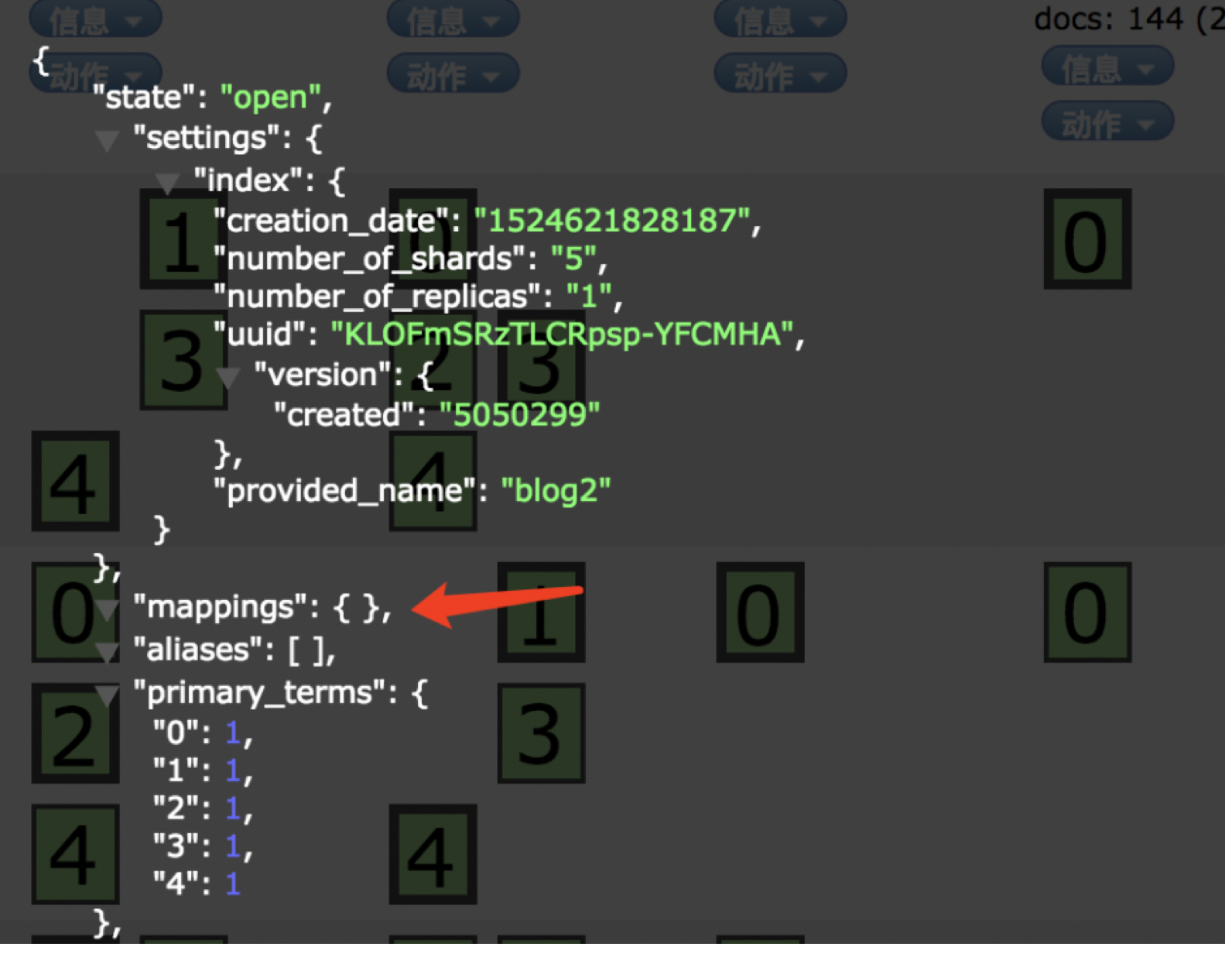
默认创建好索引,mappings为空
1.7.2: 删除索引
/**

 * 删除索引

 * */

@Test

public void deleteIndex(){

    // 删除索引

    client.admin().indices().prepareDelete("blog2").get();

}
1.7.3:索引的映射操作
为什么要进行手动的映射?
在实际生产中经常会出现精度损失的现象,往往就是因为没有进行正确的索引映射或者压根就没进行索引映射
Elasticsearch最开始索引文档A,其中的一个字段是一个数字,是整数;通过自动类型猜测,并设置类型为整型(integer)或者长整型;
然后在索引另一个文档B,B文档在同一个字段中存储的是浮点型;那么这个时候elasticsearch就会把B文档中的小数删除,保留整数部分;
这样就会导致数据的不准确!
如果你习惯SQL数据库,或许知道,在存入数据前,需要创建模式来描述数据(schmal);尽管elasticsearch是一个无模式的搜索引擎,可以即时算出数据结构;
但是我们仍然认为由自己控制并定义结构是更好的;而且在实际的生产中,我们也是自己创建映射;
注意:注意创建mapping的时候,索引必须提前存在

{

"settings":{

   "nshards":3,

   "number_of_repli umber_of_cas":1

},

"mappings":{

   "dahan":{

       "dynamic":"strict",

       "properties":{

           "studentNo":{"type": "string", "store": true},

           "name":{"type": "string","store": true,"index" : "analyzed","analyzer": "ik_max_word"},

           "male":{"type": "string","store": true},

           "age":{"type": "integer","store": true},

           "birthday":{"type": "string","store": true},

           "classNo":{"type": "string","store": true},

           "address":{"type": "string","store": true,"index" : "analyzed","analyzer": "ik_max_word"},

           "isLeader": {"type": "boolean", "index": "not_analyzed"}

       }

    }

}
1):创建索引
/**
* 创建索引
* */
@Test
public void createIndex(){
CreateIndexResponse blog2 = client.admin().indices().prepareCreate("sanguo").get();
System.out.println(blog2.toString());
}
2):通过代码创建索引配置信息(有错的情况)
/**
* Created by angel;
*/
public class CreateMappings {
public static void main(String[] args) throws UnknownHostException {
TransportClient client = null;
Map<String, Integer> map = new HashMap<String, Integer>();
map.put("number_of_shards", 3);
map.put("number_of_replicas", 1);
Settings settings = Settings.builder()
.put("cluster.name", "cluster")
.build();
client = new PreBuiltTransportClient(settings)
.addTransportAddress(new InetSocketTransportAddress(InetAddress.getByName("hadoop01"), 9300));
System.out.println("========连接成功=============");
XContentBuilder builder = null;
try {
builder = jsonBuilder()
.startObject()
.startObject("dahan").field("dynamic", "true")
.startObject("properties")
.startObject("studentNo").field("type", "string").field("store", "yes").endObject()
.startObject("name").field("type", "string").field("store", "yes").field("analyzer", "ik_max_word").endObject()//.field("analyzer", "ik")
.startObject("male").field("type", "string").field("store", "yes").endObject()//.field("analyzer", "ik")
.startObject("age").field("type", "integer").field("store", "yes").endObject()
.startObject("birthday").field("type", "string").field("store", "yes").endObject()
.startObject("classNo").field("type", "string").field("store", "yes").endObject()
.startObject("address").field("type", "string").field("store", "yes").field("analyzer", "ik_max_word").endObject()
.startObject("isLeader").field("type", "boolean").field("store", "yes").field("index", "not_analyzed").endObject()
.endObject()
.endObject()
.endObject();
PutMappingRequest mapping = Requests.putMappingRequest("sanguo")
.type("dahan")
.source(builder);
UpdateSettingsRequest updateSettingsRequest = new UpdateSettingsRequest();
updateSettingsRequest.settings(map);
client.admin().indices().updateSettings(updateSettingsRequest).actionGet();
client.admin().indices().putMapping(mapping).get();
} catch (Exception e) {
e.printStackTrace();
}
}
}
如果有同学学习的比较扎实,那么会记住以下内容:
当索引不存在的时候,可以指定副本数和分片数
当索引存在的时候,只能指定副本数
所以,我们在构建索引的时候就要指定确定的分片和副本:
1):创建索引的时候直接指定索引的shard数和副本数
/**
* 创建索引
* */
@Test
public void createIndex(){
// 创建索引
Map<String, Integer> map = new HashMap<String, Integer>();
map.put("number_of_shards", 3);
map.put("number_of_replicas", 1);
CreateIndexResponse blog2 = client.admin().indices().prepareCreate("sanguo").setSettings(map).get();
System.out.println(blog2.toString());
}
2):然后在创建映射信息的时候,就可以忽略掉分片数和副本数了。直接进行索引的映射:
/**
* Created by angel;
*/
public class CreateMappings {
public static void main(String[] args) throws UnknownHostException {
TransportClient client = null;
Settings settings = Settings.builder()
.put("cluster.name", "cluster")
.build();
client = new PreBuiltTransportClient(settings)
.addTransportAddress(new InetSocketTransportAddress(InetAddress.getByName("hadoop01"), 9300));
System.out.println("========连接成功=============");
XContentBuilder builder = null;
try {
builder = jsonBuilder()
.startObject()
.startObject("dahan").field("dynamic", "true")
.startObject("properties")
.startObject("studentNo").field("type", "string").field("store", "yes").endObject()
.startObject("name").field("type", "string").field("store", "yes").field("analyzer", "ik_max_word").endObject()//.field("analyzer", "ik")
.startObject("male").field("type", "string").field("store", "yes").endObject()//.field("analyzer", "ik")
.startObject("age").field("type", "integer").field("store", "yes").endObject()
.startObject("birthday").field("type", "string").field("store", "yes").endObject()
.startObject("classNo").field("type", "string").field("store", "yes").endObject()
.startObject("address").field("type", "string").field("store", "yes").field("analyzer", "ik_max_word").endObject()
.startObject("isLeader").field("type", "boolean").field("store", "yes").field("index", "not_analyzed").endObject()
.endObject()
.endObject()
.endObject();
PutMappingRequest mapping = Requests.putMappingRequest("sanguo")
.type("dahan")
.source(builder);
client.admin().indices().putMapping(mapping).get();
} catch (Exception e) {
e.printStackTrace();
}
}
}
es之java索引操作的更多相关文章
- ES入门三部曲:索引操作,映射操作,文档操作
ES入门三部曲:索引操作,映射操作,文档操作 一.索引操作 1.创建索引库 #语法 PUT /索引名称 { "settings": { "属性名": " ...
- 008-elasticsearch5.4.3【二】ES使用、ES客户端、索引操作【增加、删除】、文档操作【crud】
一.ES使用,以及客户端 1.pom引用 <dependency> <groupId>org.elasticsearch.client</groupId> < ...
- es之java分页操作
按照一般的查询流程来说,如果我想查询前10条数据: · 1 客户端请求发给某个节点 · 2 节点转发给个个分片,查询每个分片上的前10条 · 3 结果返回给节点,整合数据,提取前10条 · 4 返回给 ...
- elasticsearch java 索引操作
1.添加maven依赖 <dependency> <groupId>org.elasticsearch</groupId> <artifactId>el ...
- ElasticSearch 获取es信息以及索引操作
检查集群的健康情况 GET /_cat/health?v green:每个索引的primary shard和replica shard都是active状态的yellow:每个索引的primary sh ...
- Elasticsearch必知必会的干货知识二:ES索引操作技巧
该系列上一篇文章<Elasticsearch必知必会的干货知识一:ES索引文档的CRUD> 讲了如何进行index的增删改查,本篇则侧重讲解说明如何对index进行创建.更改.迁移.查询配 ...
- ElasticSearch+Kibana 索引操作
ElasticSearch+Kibana 索引操作 一 前言 ElasticiSearch 简介 ElasticSearch是一个基于Lucene的搜索服务器.它提供了一个分布式多用户能力的全文搜索引 ...
- ES系列十五、ES常用Java Client API
一.简介 1.先看ES的架构图 二.ES支持的客户端连接方式 1.REST API http请求,例如,浏览器请求get方法:利用Postman等工具发起REST请求:java 发起httpClien ...
- 【ELK】4.spring boot 2.X集成ES spring-data-ES 进行CRUD操作 完整版+kibana管理ES的index操作
spring boot 2.X集成ES 进行CRUD操作 完整版 内容包括: ============================================================ ...
随机推荐
- 十、Zabbix-自动关联模板
之前的文章中,我们实现了自动注册,自动分组:并且创建了模板,监控项,触发器.为的就是能够实现主机自动被期望的监控项监控到.接下来我们只要能让自动注册的主机能够自动连接到我们设置好的模板,就可以实现自动 ...
- 语言I—2019秋作业02
这个作业属于那个课程 这个作业要求在哪里 我在这个课程的目标是 这个作业在那个具体方面帮助我实现目标 参考文献 C语言程序设计I https://edu.cnblogs.com/campus/zswx ...
- [转帖]IDC发布2018下半年中国公有云市场报告
IDC发布2018下半年中国公有云市场报告:AWS以6.4%的份额名列第四 http://www.itpub.net/2019/05/06/1793/ 电信的公有云 好像是用的 华为的技术. AWS在 ...
- dp基础√
1.重叠子问题 2.能从小问题推到大问题 Dp: 设计状态+状态转移 状态: 1.状态表示: 是对当前子问题的解的局面集合的一种(充分的)描述.(尽量简洁qwq) ◦ 对于状态的表示 ...
- python3—廖雪峰之练习(二)
函数的参数练习 请定义一个函数quadratic(a, b, c), 接收3个参数,返回一元二次方程 : $ ax^2+b+c=0 $ 的两个解 提示:计算平方根可以调用math.sqrt()函数: ...
- Linux菜狗入门(不停更新)
资料来源:<腾讯课堂> 1, 计算机硬件包括CPU,内存,硬盘,声卡等等 2, 没有安装操作系统的计算机,通常被称为裸机 如果想在裸机上运行自己所编写的程序,就必须用机器语言书写程序 如果 ...
- getopt_long函数解析命令行参数
转载:http://blog.csdn.net/hcx25909/article/details/7388750 每一天你都在使用大量的命令行程序,是不是感觉那些命令行参数用起来比较方便,他们都是使用 ...
- 6-2 如何读写json数据
通过查看help(json.dump)和help(json.dumps)帮助信息,dump是将转换格式到文件对象,而dumps转换格式到字符串. 一.Json.dumps() Json.dumps() ...
- 【学习总结】快速上手Linux玩转典型应用-目录
内容链接 慕课网:快速上手Linux玩转典型应用 目录 第1章-课程介绍 第2章-linux简介 第3章-CentOS的安装 第4章-准备工作 第5章-远程连接SSH专题 第6章-linux常用命令讲 ...
- webpack 中如何使用 vue
1. 安装vue的包: cnpm i vue -S 2. 由于 在 webpack 中,推荐使用 .vue 这个组件模板文件定义组件,所以,需要安装 能解析这种文件的 loader cnpm i vu ...