
c3p0连接池快速入门
为什么要使用连接池,这些基本也不用说那么多
以下为快速入门案例
包目录结构
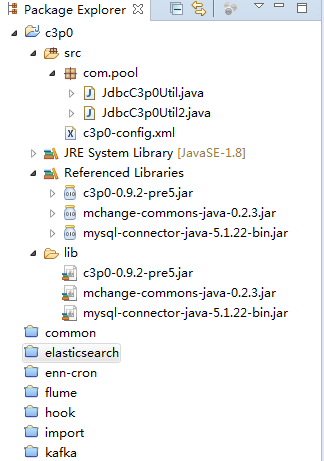
配置文件c3p0-config.xml
<c3p0-config>
<!-- 默认配置,如果没有指定自己的,则使用这个配置 -->
<default-config>
<property name="checkoutTimeout">30000</property>
<property name="idleConnectionTestPeriod">30</property>
<property name="initialPoolSize">10</property>
<property name="maxIdleTime">30</property>
<property name="maxPoolSize">100</property>
<property name="minPoolSize">10</property>
<property name="maxStatements">200</property>
<user-overrides user="test-user">
<property name="maxPoolSize">10</property>
<property name="minPoolSize">1</property>
<property name="maxStatements">0</property>
</user-overrides>
</default-config>
<!-- 命名的配置 -->
<named-config name="mytest">
<property name="driverClass">com.mysql.jdbc.Driver</property>
<property name="jdbcUrl">jdbc:mysql://localhost:3306/kafka2hive?useUnicode=true&characterEncoding=UTF-8</property>
<property name="user">root</property>
<property name="password">123456</property>
<!-- 如果池中数据连接不够时一次增长多少个 -->
<property name="acquireIncrement">5</property>
<property name="initialPoolSize">20</property>
<property name="minPoolSize">10</property>
<property name="maxPoolSize">40</property>
<property name="maxStatements">0</property>
<property name="maxStatementsPerConnection">5</property>
</named-config>
</c3p0-config>
JdbcC3p0Util
public class JdbcC3p0Util {
    private static ComboPooledDataSource dataSource;
    static{
        try {
            dataSource = new ComboPooledDataSource();
            dataSource.setDriverClass("com.mysql.jdbc.Driver");
            dataSource.setJdbcUrl("jdbc:mysql://localhost:3306/kafka2hive");
            dataSource.setUser("root");
            dataSource.setPassword("123456");
            // * 最大连接数
            dataSource.setMaxPoolSize(50);
            // * 最小连接数
            dataSource.setMinPoolSize(10);
            // * 每次增长的个数
            dataSource.setAcquireIncrement(5);
        } catch (PropertyVetoException e) {
            e.printStackTrace();
        }
    }
    public static Connection getConnection() throws SQLException{
        return dataSource.getConnection();
    }

    public static void main(String[] args) throws Exception {
        System.out.println(getConnection());
    }

}
JdbcC3p0Util2
public class JdbcC3p0Util2 {
    private static ComboPooledDataSource dataSource;
    static{
        dataSource = new ComboPooledDataSource("mytest");  //c3p0-config.xml <named-config name="mytest"> 配置名称
    }
    public static Connection getConnection() throws SQLException{
        return dataSource.getConnection();
    }
    public static void main(String[] args) throws Exception {
        System.out.println(getConnection());
    }

}
根据自己业务场景使用,推荐使用第二种!!
c3p0连接池快速入门的更多相关文章
- C3P0连接池参数配置说明
C3P0连接池参数配置说明 created by cjk on 2017.8.15 常用配置 initialPoolSize:连接池初始化时创建的连接数,default : 3(建议使用) minPo ...
- c3p0连接池]
<c3p0-config> <!-- 默认配置 --> <default-config> <property name="jdbcUrl" ...
- c3p0连接池获得的Connection执行close方法后是否真的销毁Connection对象?
问题描述: jfinal做的api系统中,在正常调用接口一段时间后,突然再调用接口的时候,该请求无响应api系统后台也无错误信息 (就是刚开始接口调用是正常的,突然就无响应了) 于是啊,就开始找错误. ...
- C3P0连接池在hibernate和spring中的配置
首先为什么要使用连接池及为什么要选择C3P0连接池,这里就不多说了,目前C3P0连接池还是比较方便.比较稳定的连接池,能与spring.hibernate等开源框架进行整合. 一.hibernate中 ...
- C3P0连接池问题,APPARENT DEADLOCK!!! Creating emergency..... [问题点数:20分,结帖人lovekong]
采用c3p0连接池,每次调试程序,第一次访问时(Tomcat服务器重启后再访问)都会出现以下错误,然后连接库需要很长时间,最终是可以连上的,之后再访问就没问题了,请高手们会诊一下,希望能帮小弟解决此问 ...
- HQL查询及Hibernate对c3p0连接池的支持
//HQL查询 // auto-import要设置true,如果是false,写HQL时要指定类的全名 //查询全部列 Query query = session.createQuery(" ...
- C3P0连接池详解及配置
C3P0连接池详解及配置 本人使用的C3P0的jar包是:c3p0-0.9.1.jar <bean id = "dataSource" class = "com.m ...
- 使用c3p0连接池
首先我们需要知道为什么要使用连接池:因为jdbc没有保持连接的能力,一旦超过一定时间没有使用(大约几百毫秒),连接就会被自动释放掉,每次新建连接都需要140毫秒左右的时间而C3P0连接池会池化连接,随 ...
- C3P0连接池详细配置
C3P0连接池详细配置 转自http://msq.javaeye.com/blog/60387 <c3p0-config> <default-config> <!--当连 ...
随机推荐
- shell字符串拼接
name="Shell" url="http://c.biancheng.net/shell/" str1=$name$url #中间不能有空格 str2=&q ...
- CF1260C Infinite Fence 题解(扩欧)
题目地址 CF1260C 题目大意 现有\(10^{100}\)块木板需要涂漆,第x块如果是x是a的倍数,则涂一种颜色,是b的倍数,则涂另一种颜色.如果既是a又是b的倍数,那么两种颜色都可以涂:如果连 ...
- eclipse把函数内容折叠的方法
eclipse 将方法折叠要先启动折叠功能启用方法:Ctrl+ / (小键盘) 或者:右键点击行号左边的空白,弹出的选项中,选择“Folding”下的“Enable Folding”这样启动foldi ...
- HTML中的marquee标签实现滚动效果
一.标签<marquee>简介 通过开始标签<marquee>和结束标签</marquee>的共同配合而实现滚动效果,<marquee>滚动的内容< ...
- p6spy工具的使用
p6spy工具的使用.1.导入p6spy的jar包2.配导p6spy.porpert3.改写mybatis.xml(配置jdbc)
- Nginx动静分离-tomcat
一.动静分离 1.通过中间件将动态请求和静态请求分离. 2.为什么? 分离资源,减少不必要的请求消耗,减少请求延时. 3.场景 还可以利用php,fastcgi,python 等方式 处理动态请求 # ...
- (18)C++项目练习一(功能会不断扩展)--------【聊天工具】
1.准备使用Qt和C++做一个远程(基于互联网的)聊天工具,需要实现以下功能 (1)多对多聊天功能 (2)文件传输功能 (3)注册.登录功能 (4)加好友.同意好友功能 (5)好友列表.黑名单功能(分 ...
- RedisTemplate访问Redis数据结构(五)——ZSet
Redis 有序集合和无序集合一样也是string类型元素的集合,且不允许重复的成员.不同的是每个元素都会关联一个double类型的分数.有序集合的成员是唯一的,但分数(score)却可以重复.red ...
- [BZOJ2244]:拦截导弹(DP+CDQ分治+树状数组)
题目传送门 题目描述 某国为了防御敌国的导弹袭击,发展出一种导弹拦截系统.但是这种导弹拦截系统有一个缺陷:虽然它的第一发炮弹能够到达任意的高度.并且能够拦截任意速度的导弹,但是以后每一发炮弹都不能高于 ...
- IO 输入输出流
1) 数据流: 一组有序,有起点和终点的字节的数据序列.包括输入流和输出流.