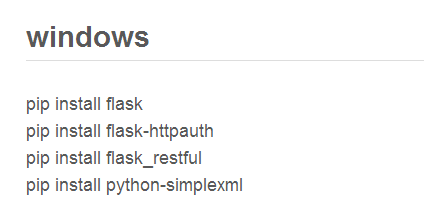
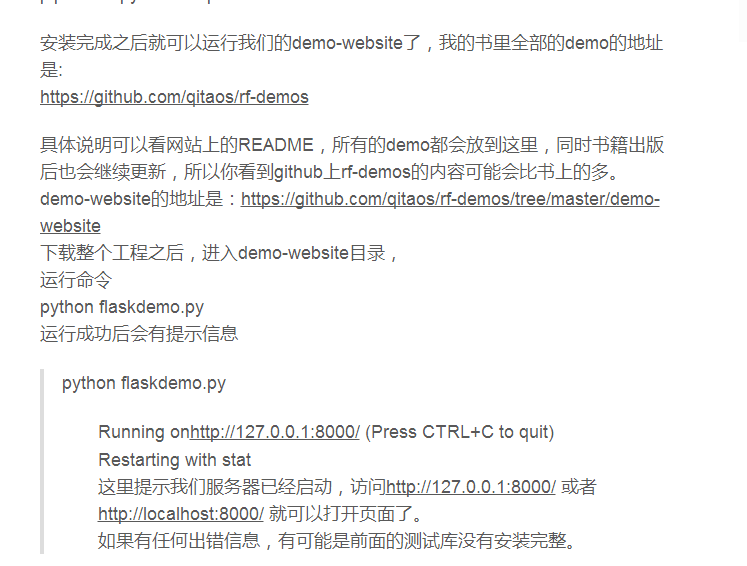
搭建项目:转自  http://chuansong.me/n/1858477

A、请求方式为get请求

  方式一:导入RequestsLibrary库,get request    [ alias | uri | headers=None | json=None | params=None | allow_redirects=None | timeout=None ]

create session             api                  http://localhost:8000
${resp}=                    get request     api                                users/1
log                               ${resp.content}

  方式二:导入requests库, requests.get    Arguments:[ url | params=None | **kwargs ]

${resp1}=               requests.get                   http://localhost:8000/users/1
log                           ${resp1.content}

  第三:如果接口只有登录后才可发送请求,在创建session的时候加上用户名和密码即可,以列表的形式传入即可

create session    Arguments:

[ alias | url | headers={} | cookies=None | auth=None | timeout=None | proxies=None | verify=False | debug=0 | max_retries=3 | backoff_factor=0.1 | disable_warnings=0 ]

${auth}                                                                          create list                                       ok                                     python
create session                                                                  api                                                http://localhost:8000                                                                      ${auth}
${resp}=                                                                       get request                                     api                                     401
log                                                                                 ${resp.content}
should be equal as strings                                                 ${resp.status_code}                           200

B、请求方式为post请求

  方式一:导入RequestsLibrary库   Post request             Arguments:[ alias | uri | data=None | params=None | headers=None | files=None | allow_redirects=None | timeout=None ]

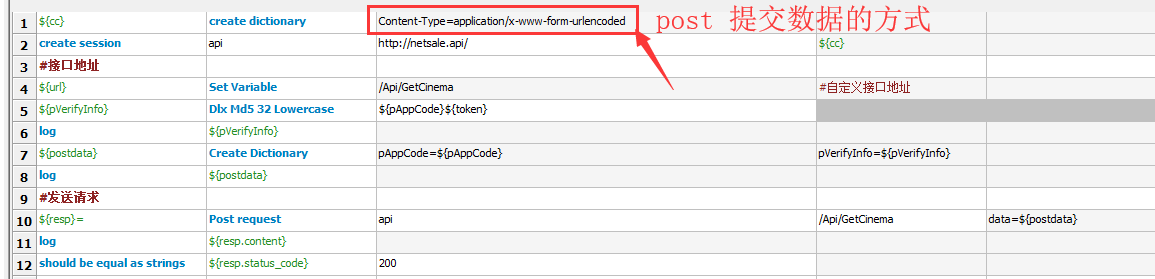
${cc}                                                          create dictionary                                    Content-Type=application/x-www-form-urlencoded

create session                                            api                                                          http://netsale.api/                                                         ${cc}

${url}                                                         Set Variable                                            /Api/GetCinema                                                              #自定义接口地址

#md5加密
${pVerifyInfo}                                           Md5 32 Lowercase                                  ${pAppCode}${token}

${postdata}                                             Create Dictionary                                     pAppCode=${pAppCode}                                              pVerifyInfo=${pVerifyInfo}

#发送请求
${resp}=                                                 Post request                                             api                                                                                 /Api/GetCinema                                data=${postdata}
log                                                           ${resp.content}
should be equal as strings                      ${resp.status_code}                                200

  方式二:导入requests库, request.Post 

${url}                                                         Set Variable                                            http://netsale.api/Api/GetCinema                                                              #自定义接口地址

#md5加密
${pVerifyInfo}                                           Md5 32 Lowercase                                  ${pAppCode}${token}

${postdata}                                             Create Dictionary                                     pAppCode=${pAppCode}                                              pVerifyInfo=${pVerifyInfo}

#发送请求
${resp}=                                                 request.Post                                             ${url}                                                                             ${postdata}
log                                                           ${resp.content}
should be equal as strings                      ${resp.status_code}                                200

C、针对返回字符串操作

#json格式化
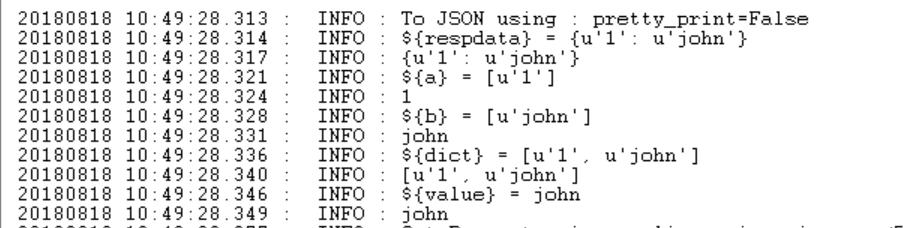
${respdata}                                             to json                                     ${resp.content}
log                                                          ${respdata}
${a}                                                       get dictionary keys                     ${respdata}
log                                                          ${a[0]}
${b}                                                       get dictionary values                   ${respdata}
log ${b[0]}
${dict}                                                    get dictionary items                    ${respdata}
log                                                          ${dict}
${value}                                                 get from dictionary                     ${respdata}                     1
log                                                          ${value}

十九、RF接口测试汇总(一)的更多相关文章

  1. Android进阶(十九)AndroidAPP开发问题汇总(三)

    Android进阶(十九)AndroidAPP开发问题汇总(三) Java解析XML的几种方式: http://inotgaoshou.iteye.com/blog/1012188 从线程返回数据的两 ...

  2. 第三百二十九节,web爬虫讲解2—urllib库爬虫—ip代理—用户代理和ip代理结合应用

    第三百二十九节,web爬虫讲解2—urllib库爬虫—ip代理 使用IP代理 ProxyHandler()格式化IP,第一个参数,请求目标可能是http或者https,对应设置build_opener ...

  3. 无废话ExtJs 入门教程十九[API的使用]

    无废话ExtJs 入门教程十九[API的使用] extjs技术交流,欢迎加群(201926085) 首先解释什么是 API 来自百度百科的官方解释:API(Application Programmin ...

  4. Python之路【第十九章】:Django进阶

    Django路由规则 1.基于正则的URL 在templates目录下创建index.html.detail.html文件 <!DOCTYPE html> <html lang=&q ...

  5. Bootstrap <基础二十九>面板(Panels)

    Bootstrap 面板(Panels).面板组件用于把 DOM 组件插入到一个盒子中.创建一个基本的面板,只需要向 <div> 元素添加 class .panel 和 class .pa ...

  6. Bootstrap <基础十九>分页

    Bootstrap 支持的分页特性.分页(Pagination),是一种无序列表,Bootstrap 像处理其他界面元素一样处理分页. 分页(Pagination) 下表列出了 Bootstrap 提 ...

  7. Web 开发人员和设计师必读文章推荐【系列二十九】

    <Web 前端开发精华文章推荐>2014年第8期(总第29期)和大家见面了.梦想天空博客关注 前端开发 技术,分享各类能够提升网站用户体验的优秀 jQuery 插件,展示前沿的 HTML5 ...

  8. Web 前端开发精华文章集锦(jQuery、HTML5、CSS3)【系列十九】

    <Web 前端开发精华文章推荐>2013年第七期(总第十九期)和大家见面了.梦想天空博客关注 前端开发 技术,分享各种增强网站用户体验的 jQuery 插件,展示前沿的 HTML5 和 C ...

  9. Python之路【第十九篇】:爬虫

    Python之路[第十九篇]:爬虫   网络爬虫(又被称为网页蜘蛛,网络机器人,在FOAF社区中间,更经常的称为网页追逐者),是一种按照一定的规则,自动地抓取万维网信息的程序或者脚本.另外一些不常使用 ...

随机推荐

  1. 初探html-9 链接

    HTML 链接 HTML 使用超级链接与网络上的另一个文档相连.几乎可以在所有的网页中找到链接.点击链接可以从一张页面跳转到另一张页面. 尝试一下 - 实例 <!DOCTYPE html> ...

  2. QQ第三方登陆

    第一步 引入第三方登陆类,实例化,调用类中方法getInstance()跳转到授权页面 第二步 登陆成功的回调方法,qq_return则是登陆成功会获取到的数据的处理方法 qq_return方法: 本 ...

  3. laravel-admin 表单提交报错

    Method App\Admin\Controllers\GoodsSpecController::store does not exist. Method App\Admin\Controllers ...

  4. 被弃用的php函数以及用来替代的函数

    下面列举了部分被弃用的函数: call_user_method()(使用 call_user_func() 替代) call_user_method_array() (使用 call_user_fun ...

  5. qt常用技巧

    发布程序:windeployqt hello.exe QString乱码问题,在字符串前加u8

  6. Web Service Demo

    有了Web Service的一些基础,具体如何实现,通过亲自写一个Demo来理解一下. 1.创建一个空的Web项目 2.在Web项目下ADD一个Web Service 3.在Web service中写 ...

  7. 安装php多进程模块pcntl

    在使用函数pcntl_fork()时报错  Fatal error: Uncaught Error: Call to undefined function pcntl_fork()....,原因是没有 ...

  8. AI应该享有与动物一样的权利吗?

    全世界的大学都在进行人工智能(AI)的重大研究,艾伦研究所(Allen Institute)等组织以及Google和Facebook等高科技公司.可能的结果是,我们很快将拥有与小鼠或狗一样高的认知能力 ...

  9. Windows 2012 R2 DataCenter服务器 重启之后,其他加域电脑无法访问域账户

    需在域控服务器重启,服务Kerberos Key

  10. Codeforces Round #568 (Div. 2) B. Email from Polycarp

    链接: https://codeforces.com/contest/1185/problem/B 题意: Methodius received an email from his friend Po ...