
使用zipkin2在SpringCloud2.0环境下追踪服务调用情况
1.目的:
使用zipkin2.0在Spring Cloud 2.0环境下,追踪服务调用情况。
2.所需组件:
zipkin2.0,Spring Cloud 2.0,Eureka Server,Eureka Client.
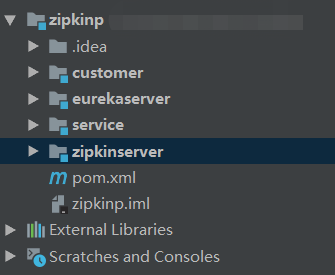
3.项目整体组成
如下图所示:
4.详细介绍及配置:
zipkinp的pom配置为:
<?xml version="1.0" encoding="UTF-8"?>

<project xmlns="http://maven.apache.org/POM/4.0.0"

         xmlns:xsi="http://www.w3.org/2001/XMLSchema-instance"

         xsi:schemaLocation="http://maven.apache.org/POM/4.0.0 http://maven.apache.org/xsd/maven-4.0.0.xsd">

    <modelVersion>4.0.</modelVersion>

    <groupId>com.****</groupId>

    <artifactId>zipkin-p</artifactId>

    <version>1.0-SNAPSHOT</version>

    <packaging>pom</packaging>

    <modules>

        <module>customer</module>

        <module>eurekaserver</module>

        <module>service</module>

    </modules>

    <parent>

        <groupId>org.springframework.boot</groupId>

        <artifactId>spring-boot-starter-parent</artifactId>

        <version>2.0..RELEASE</version>

    </parent>

    <properties>

        <project.build.sourceEncoding>UTF-</project.build.sourceEncoding>

        <project.reporting.outputEncoding>UTF-</project.reporting.outputEncoding>

        <java.version>1.8</java.version>

        <zipkin-version>2.11.</zipkin-version>

    </properties>

    <dependencyManagement>

        <dependencies>

            <dependency>

                <groupId>org.springframework.cloud</groupId>

                <artifactId>spring-cloud-starter-zipkin</artifactId>

                <version>2.0..RELEASE</version>

            </dependency>

            <!--            <dependency>

                            <artifactId>parent</artifactId>

                            <groupId>io.zipkin.zipkin2</groupId>

                            <version>${zipkin-version}</version>

                            <scope>import</scope>

                        </dependency>-->

            <dependency>

                <groupId>io.zipkin.java</groupId>

                <artifactId>zipkin-server</artifactId>

                <version>${zipkin-version}</version>

            </dependency>

            <dependency>

                <groupId>io.zipkin.java</groupId>

                <artifactId>zipkin-autoconfigure-ui</artifactId>

                <version>${zipkin-version}</version>

            </dependency>

        </dependencies>

    </dependencyManagement>

</project>
zipkinserver项目的pom文件配置如下:
<?xml version="1.0" encoding="UTF-8"?>

<project xmlns="http://maven.apache.org/POM/4.0.0" xmlns:xsi="http://www.w3.org/2001/XMLSchema-instance"

         xsi:schemaLocation="http://maven.apache.org/POM/4.0.0 https://maven.apache.org/xsd/maven-4.0.0.xsd">

    <modelVersion>4.0.</modelVersion>

    <parent>

        <groupId>com.****</groupId>

        <artifactId>zipkin-p</artifactId>

        <version>1.0-SNAPSHOT</version>

    </parent>

    <groupId>com.****</groupId>

    <artifactId>zipkinserver</artifactId>

    <version>0.0.-SNAPSHOT</version>

    <name>zipkinserver</name>

    <packaging>jar</packaging>

    <description>Demo project for Spring Boot</description>

    <properties>

        <java.version>1.8</java.version>

    </properties>

    <dependencies>

        <dependency>

            <groupId>org.springframework.boot</groupId>

            <artifactId>spring-boot-starter-web</artifactId>

        </dependency>

        <dependency>

            <groupId>org.springframework.cloud</groupId>

            <artifactId>spring-cloud-starter-netflix-eureka-client</artifactId>

            <version>2.0..RELEASE</version>

        </dependency>

        <dependency>

                <groupId>io.zipkin.java</groupId>

                <artifactId>zipkin-server</artifactId>

        </dependency>

        <dependency>

            <groupId>io.zipkin.java</groupId>

            <artifactId>zipkin-autoconfigure-ui</artifactId>

        </dependency>

    </dependencies>

    <build>

        <plugins>

            <plugin>

                <groupId>org.springframework.boot</groupId>

                <artifactId>spring-boot-maven-plugin</artifactId>

            </plugin>

        </plugins>

    </build>

</project>
配置完成后,在启动类,配置如下:
import org.springframework.boot.SpringApplication;

import org.springframework.boot.autoconfigure.SpringBootApplication;

import org.springframework.cloud.client.discovery.EnableDiscoveryClient;

import zipkin2.server.internal.EnableZipkinServer;

@EnableZipkinServer

@EnableDiscoveryClient

@SpringBootApplication

public class ZipkinserverApplication {

    public static void main(String[] args) {

        SpringApplication.run(ZipkinserverApplication.class, args);

    }

}
之后,配置yaml文件:
server:

  port: 9411

eureka:

  instance:

    prefer-ip-address: true

    hostname: localhost

  client:

    service-url:

      defaultZone: http://admin:123456@localhost:8888/eureka/

spring:

  application:

    name: zipkinserver
配置eurekaserver项目,pom及启动类的配置如下:
<?xml version="1.0" encoding="UTF-8"?>

<project xmlns="http://maven.apache.org/POM/4.0.0" xmlns:xsi="http://www.w3.org/2001/XMLSchema-instance"

         xsi:schemaLocation="http://maven.apache.org/POM/4.0.0 https://maven.apache.org/xsd/maven-4.0.0.xsd">

    <modelVersion>4.0.</modelVersion>

    <parent>

        <groupId>com.****</groupId>

        <artifactId>zipkin-p</artifactId>

        <version>1.0-SNAPSHOT</version>

    </parent>

    <groupId>com.****</groupId>

    <artifactId>eurekaserver</artifactId>

    <version>0.0.-SNAPSHOT</version>

    <name>eurekaserver</name>

    <description>Demo project for Spring Boot</description>

    <dependencies>

        <dependency>

            <groupId>org.springframework.boot</groupId>

            <artifactId>spring-boot-starter-web</artifactId>

        </dependency>

        <dependency>

            <groupId>org.springframework.cloud</groupId>

            <artifactId>spring-cloud-starter-netflix-eureka-server</artifactId>

            <version>2.0..RELEASE</version>

        </dependency>

        <dependency>

            <groupId>org.springframework.boot</groupId>

            <artifactId>spring-boot-starter-test</artifactId>

        </dependency>

        <dependency>

            <groupId>org.springframework.cloud</groupId>

            <artifactId>spring-cloud-starter-zipkin</artifactId>

        </dependency>

    </dependencies>

    <build>

        <plugins>

            <plugin>

                <groupId>org.springframework.boot</groupId>

                <artifactId>spring-boot-maven-plugin</artifactId>

            </plugin>

        </plugins>

    </build>

</project>
import org.springframework.boot.SpringApplication;

import org.springframework.boot.autoconfigure.SpringBootApplication;

import org.springframework.cloud.netflix.eureka.server.EnableEurekaServer;

@EnableEurekaServer

@SpringBootApplication

public class EurekaserverApplication {

    public static void main(String[] args) {

        SpringApplication.run(EurekaserverApplication.class, args);

    }

}
配置完成后,配置yaml文件:
server:

  port: 8888

eureka:

  instance:

    hostname: localhost

    lease-expiration-duration-in-seconds: 60

    lease-renewal-interval-in-seconds: 20

  client:

    registerWithEureka: false

    fetchRegistry: false

    serviceUrl:

      defaultZone: http://admin:123456@${eureka.instance.hostname}:${server.port}/eureka/

    healthcheck:

      enabled: true

spring:

  application:

    name: euraka-server

management:

  endpoint:

    health:

      enabled: true

login:

  user:

    name: admin

    password: 123456
至此Eureka配置完成,剩下配置service及customer项目,先看service项目:
<?xml version="1.0" encoding="UTF-8"?>

<project xmlns="http://maven.apache.org/POM/4.0.0" xmlns:xsi="http://www.w3.org/2001/XMLSchema-instance"

         xsi:schemaLocation="http://maven.apache.org/POM/4.0.0 https://maven.apache.org/xsd/maven-4.0.0.xsd">

    <modelVersion>4.0.0</modelVersion>

    <parent>

        <groupId>com.****</groupId>

        <artifactId>zipkin-p</artifactId>

        <version>1.0-SNAPSHOT</version>

    </parent>

    <groupId>com.****</groupId>

    <artifactId>service</artifactId>

    <version>0.0.1-SNAPSHOT</version>

    <name>service</name>

    <description>Demo project for Spring Boot</description>

    <dependencies>

        <dependency>

            <groupId>org.springframework.boot</groupId>

            <artifactId>spring-boot-starter-web</artifactId>

        </dependency>

        <dependency>

            <groupId>org.springframework.cloud</groupId>

            <artifactId>spring-cloud-starter-netflix-eureka-client</artifactId>

            <version>2.0.1.RELEASE</version>

        </dependency>

        <dependency>

            <groupId>org.springframework.cloud</groupId>

            <artifactId>spring-cloud-starter-zipkin</artifactId>

        </dependency>

    </dependencies>

    <build>

        <plugins>

            <plugin>

                <groupId>org.springframework.boot</groupId>

                <artifactId>spring-boot-maven-plugin</artifactId>

            </plugin>

        </plugins>

    </build>

</project>
import org.springframework.boot.SpringApplication;

import org.springframework.boot.autoconfigure.SpringBootApplication;

import org.springframework.cloud.client.discovery.EnableDiscoveryClient;

@EnableDiscoveryClient

@SpringBootApplication

public class ServiceApplication {

    public static void main(String[] args) {

        SpringApplication.run(ServiceApplication.class, args);

    }

}
eureka:

  client:

    serviceUrl:

      defaultZone: http://admin:123456@localhost:8888/eureka/

server:

  port: 8001

spring:

  application:

    name: user-service

  zipkin:

    base-url: http://localhost:9411

  sleuth:

    sampler:

      percentage: 1.0
业务代码为:
@RestController

@RequestMapping("/home")

public class homeController {

    @RequestMapping(value = "/hello", method = RequestMethod.GET)

    public String hello()

    {

        return "Hello,this is the service response.";

    }

}
customer项目配置为:
<?xml version="1.0" encoding="UTF-8"?>

<project xmlns="http://maven.apache.org/POM/4.0.0" xmlns:xsi="http://www.w3.org/2001/XMLSchema-instance"

         xsi:schemaLocation="http://maven.apache.org/POM/4.0.0 https://maven.apache.org/xsd/maven-4.0.0.xsd">

    <modelVersion>4.0.0</modelVersion>

    <parent>

        <groupId>com.****</groupId>

        <artifactId>zipkin-p</artifactId>

        <version>1.0-SNAPSHOT</version>

    </parent>

    <groupId>com.****</groupId>

    <artifactId>customer</artifactId>

    <version>0.0.1-SNAPSHOT</version>

    <name>customer</name>

    <description>Demo project for Spring Boot</description>

    <dependencies>

        <dependency>

            <groupId>org.springframework.boot</groupId>

            <artifactId>spring-boot-starter-web</artifactId>

        </dependency>

        <dependency>

            <groupId>org.springframework.cloud</groupId>

            <artifactId>spring-cloud-starter-netflix-eureka-client</artifactId>

            <version>2.0.1.RELEASE</version>

        </dependency>

        <dependency>

            <groupId>org.springframework.cloud</groupId>

            <artifactId>spring-cloud-starter-zipkin</artifactId>

        </dependency>

        <dependency>

            <groupId>org.springframework.boot</groupId>

            <artifactId>spring-boot-starter-test</artifactId>

        </dependency>

        <dependency>

            <groupId>org.springframework.cloud</groupId>

            <artifactId>spring-cloud-starter-openfeign</artifactId>

            <version>2.0.1.RELEASE</version>

        </dependency>

    </dependencies>

    <build>

        <plugins>

            <plugin>

                <groupId>org.springframework.boot</groupId>

                <artifactId>spring-boot-maven-plugin</artifactId>

            </plugin>

        </plugins>

    </build>

</project>
import org.springframework.boot.SpringApplication;

import org.springframework.boot.autoconfigure.SpringBootApplication;

import org.springframework.cloud.client.discovery.EnableDiscoveryClient;

import org.springframework.cloud.openfeign.EnableFeignClients;

@EnableDiscoveryClient

@SpringBootApplication

@EnableFeignClients

public class CustomerApplication {

    public static void main(String[] args) {

        SpringApplication.run(CustomerApplication.class, args);

    }

}
业务代码为:
@Component

public class helloHystrix implements service {

    @Override

    public String hello() {

        return null;

    }

}
@FeignClient(value = "${service.request.name}", fallback = helloHystrix.class)

public interface service extends BaseService {

    @RequestMapping(method = RequestMethod.GET, value = path + "/home/hello")

    String hello();

}
@RestController

@RequestMapping("/home")

public class homeController {

    @Autowired

    private service service;

    @RequestMapping(value = "/hello", method = RequestMethod.GET)

    public String hello()

    {

        String x = service.hello();

        return "返回:"+x;

    }

}
eureka:

  client:

    serviceUrl:

      defaultZone: http://admin:123456@localhost:8888/eureka/

server:

  port: 8002

spring:

  application:

    name: customer

  zipkin:

    base-url: http://localhost:9411

  sleuth:

    sampler:

      percentage: 1.0

service:

  request:

    name: USER-SERVICE
5.运行及结果
全部完成后,启动4个项目,在8888端口查看3个项目的启动情况,之后打开9411端口,查看追踪页面,报如下错误:
This application has no explicit mapping for /error, so you are seeing this as a fallback.

Sun Sep 15 22:19:00 CST 2019

There was an unexpected error (type=Internal Server Error, status=500).

Prometheus requires that all meters with the same name have the same set of tag keys. There is already an existing meter containing tag keys [method, status, uri]. The meter you are attempting to register has keys [exception, method, status, uri].
经过查询,发现是zipkinserver项目缺失配置所致,在配置文件中添加配置即可:
management:

  metrics:

    web:

      server:

        auto-time-requests: false
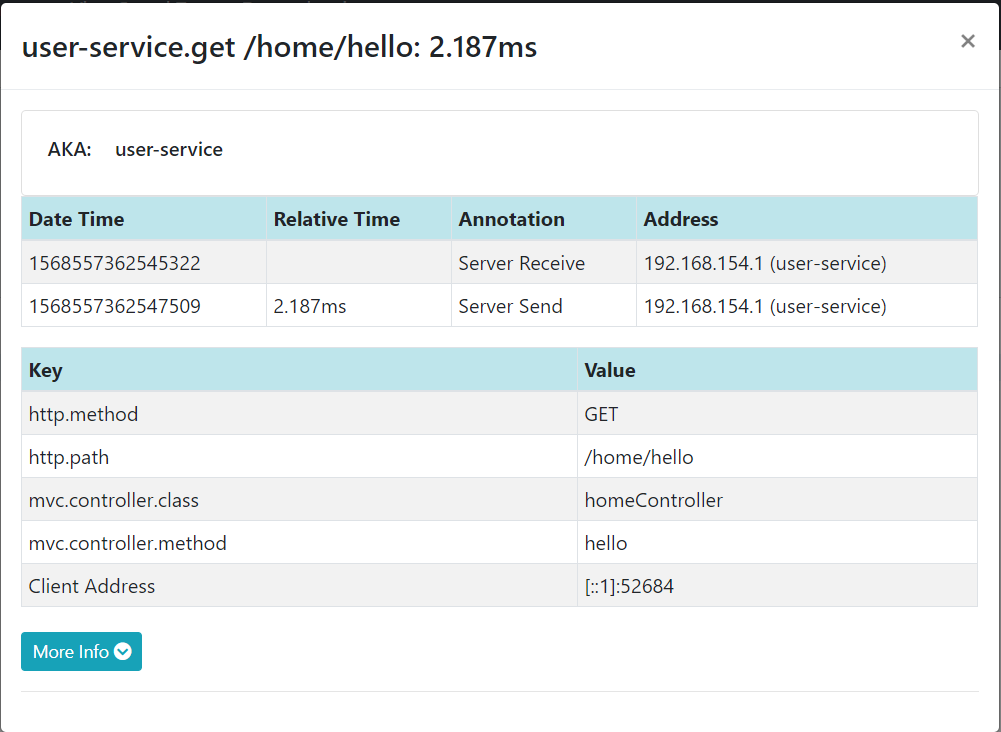
重启后,查看结果,一切正常。
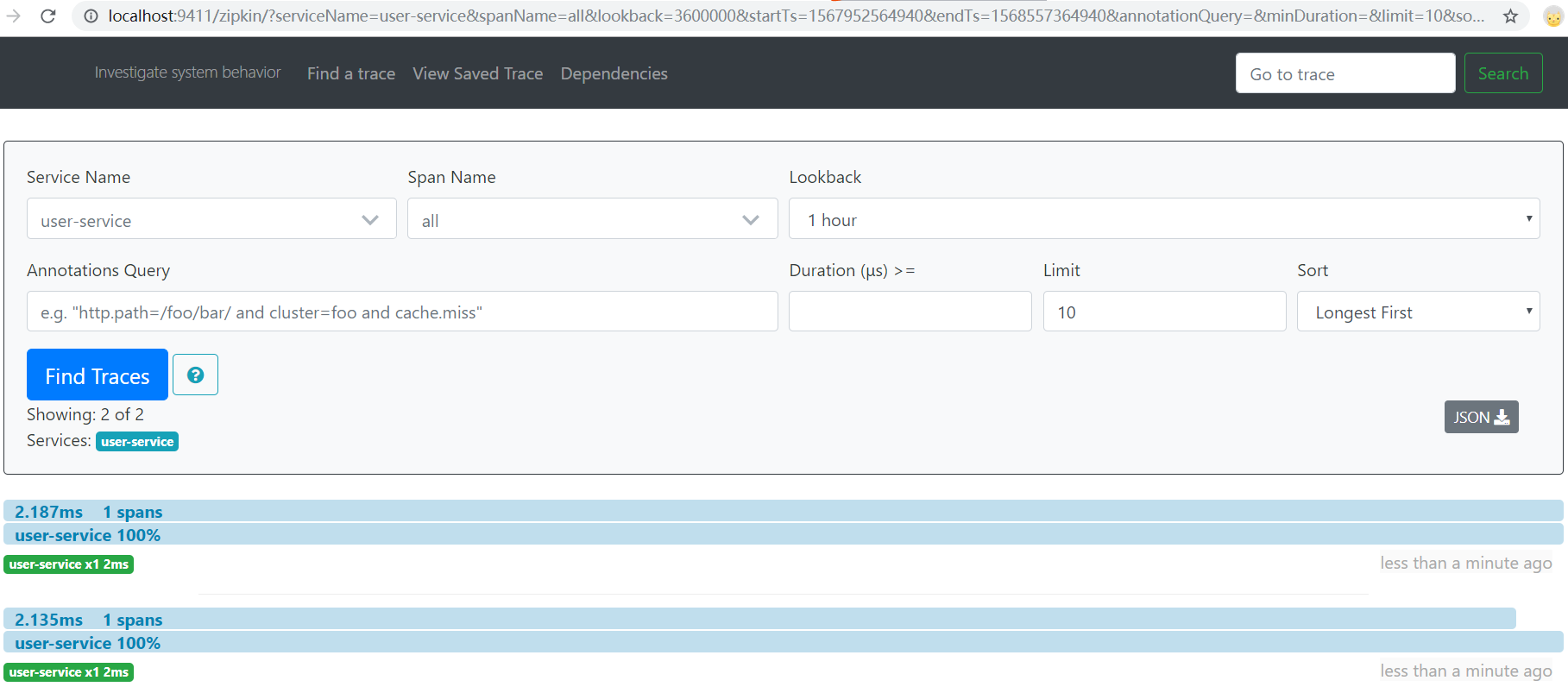 、
、
使用zipkin2在SpringCloud2.0环境下追踪服务调用情况的更多相关文章
- [VS2015].NET4.0环境下使用.NET2.0程序集,使用sqlite时报异常 出现“混合模式程序集异常”
在.net 4.0环境下使用sqlite时报异常 混合模式程序集是针对“v2.0.50727”版的运行时生成的,在没有配置其他信息的情况下,无法在 4.0 运行时中加载该程序集其调用的方法是从sqli ...
- VB6.0环境下的CATIA二次开发简介
CATIA作为CAD/CAE/CAM/PDM一体化的软件,广泛用于航空航天.汽车.船舶及电子工业,尤其在航空航天业,有八成以上厂商使用CATIA的市场[11].然而由于使用习惯和使用的侧重点不用,功能 ...
- Windows-Server-2008、IIS7.0环境下配置伪静态化
在Windows-Server-2008.IIS7.0环境下配置伪静态化 首先,是IIS7.0的配置,由于Windows Server 2008操作系统默认的IIS版本为 ...
- Window环境下,PHP调用Python脚本
参考 php调用python脚本*** php 调用 python脚本的方法 解决办法:php提供了许多调用其他脚本或程序的方法,比如exec/system/popen/proc_open/passt ...
- 微服务架构 | 10.1 使用 Sleuth 追踪服务调用链
目录 前言 1. Sleuth 基础知识 1.1 Sleuth 原理 2. 在服务中使用 Sleuth 追踪 2.1 引入 pom.xml 依赖文件 2.2 查看日志信息 最后 前言 参考资料: &l ...
- VC++6.0环境下调试c语言代码的方法和步骤_附图
1.C语言程序四步开发步骤 (1)编辑.可以用任何一种编辑软件将在纸上编写好的C语言程序输入计算机,并将C语言源程序文件*.c以纯文本文件形式保存在计算机的磁盘上(不能设置字体.字号等). (2)编译 ...
- 转 Visual C++6.0 与matlab联合编程(2)----Visual C++6.0 环境下编译和调试MEX文件
我的最初想法是利用matlab的mex命令调用C++程序生成动态链接库的,但是测试程序(文中另附)通过了,自己的实际应用程序却没有过.还是把方法贴在这儿,以便自己以后进行整理. http://shij ...
- 多网卡环境下Eureka服务注册IP选择问题
一.问题场景 服务器上分别配置了eth0, eth1和eth2三块网卡,只有eth1的地址可供其它机器访问,eth0和eth2的 IP 无效.在这种情况下,服务注册时Eureka Client会自动选 ...
- Linux环境下Gitblit服务搭建及秘钥配置
一.安装gitblit服务 1.下载地址 https://pan.baidu.com/s/1wQ3TEE_gw5xZvyFPZB9xFg 2.上传至linux服务器并解压缩 tar xvf gitbl ...
随机推荐
- deep_learning_Function_tensorflow_reshape()
numpy.reshape(a, newshape, order='C')[source],参数`newshape`是啥意思? 根据Numpy文档(https://docs.scipy.org/doc ...
- service与pod关联
当我们创建pod时,仅仅是创建了pod,要为其创建rc(ReplicationController),他才会有固定的副本,然后为其创建service,集群内部才能访问该pod,使用 NodePort ...
- zabbix 4 自带 php、httpd漏洞升级
Zabbix 自带的 PHP 5.4.apache httpd 2.4.6扫描出安全漏洞,需要进行升级. PHP # php -v PHP 5.4.16 (cli) (built: Apr 12 20 ...
- Centos 7 Samba服务安装
Centos 7 Samba服务安装搭建Samba服务器是为了实现Linux共享目录之后,在Windows可以直接访问该共享目录. 查看是已安装samba包: rpm -qa | grep samba ...
- java8学习之groupingBy源码分析
继续接着上一次[http://www.cnblogs.com/webor2006/p/8366083.html]来分析Collectors中的各种收集器的实现, 对里它里面有个groupingby() ...
- java8学习之比较器深入
继续接着上次[http://www.cnblogs.com/webor2006/p/8331498.html]的比较器进行探究,上次排序采用是的利用Collections.sort()进行的,下面采用 ...
- 配置Nexus为maven的私服
1.配置Nexus为maven的私服 第一种方式:在项目的POM中如下配置 <repositories> <repository> <id>nexus_public ...
- 清北学堂提高组突破营考试T1
题目如下: (想要作弊的后几届神仙们我劝你们还是别黈了,这个题如果你们不会只能证明你们上错班了). 好,题目看完了,发现是一道大模拟(%你)题,于是我们按照题目说的做: #include<ios ...
- mysql innodb存储引擎 锁 事务
以下内容翻译自mysql5.6官方手册. InnoDB是一种通用存储引擎,可平衡高可靠性和高性能.在MySQL 5.6中,InnoDB是默认的MySQL存储引擎.除非已经配置了不同的默认存储引擎, ...
- jdk8流list转Map
/** * */ package com.chuanglan.demo; import java.util.ArrayList; import java.util.Arrays; import jav ...