
一、WebApi模型验证
一、新建项目
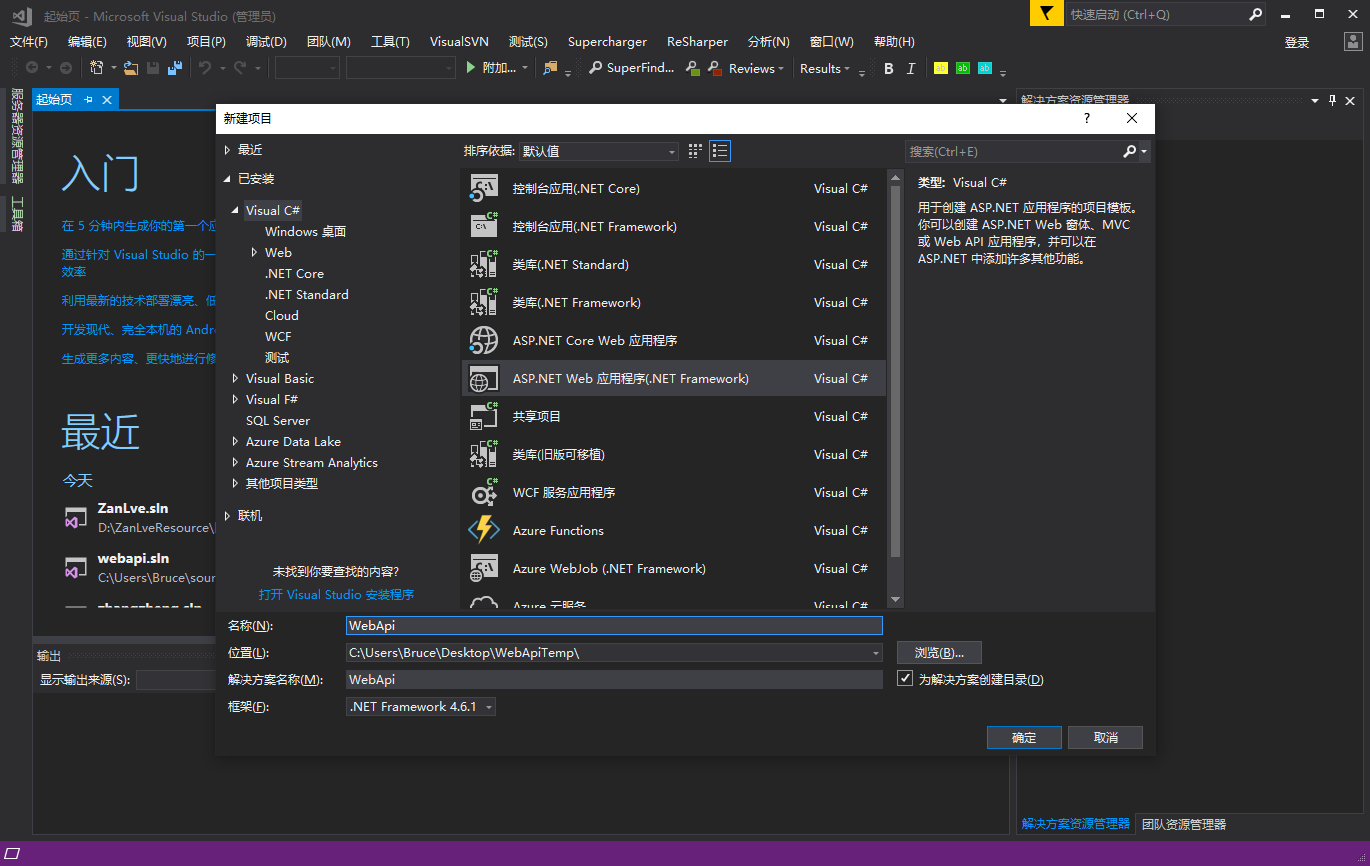
选择空的项目webapi
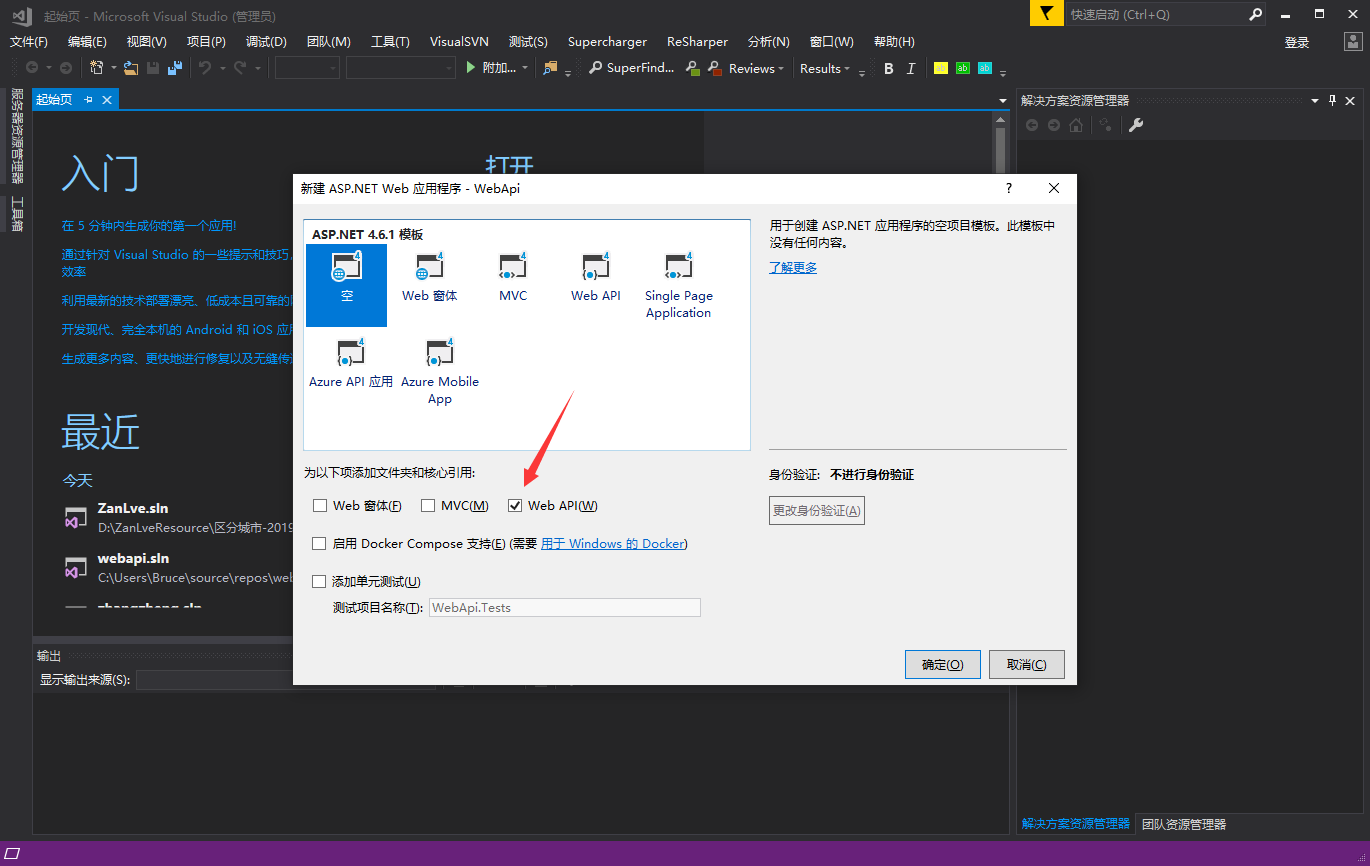
查看启动端口

创建控制器
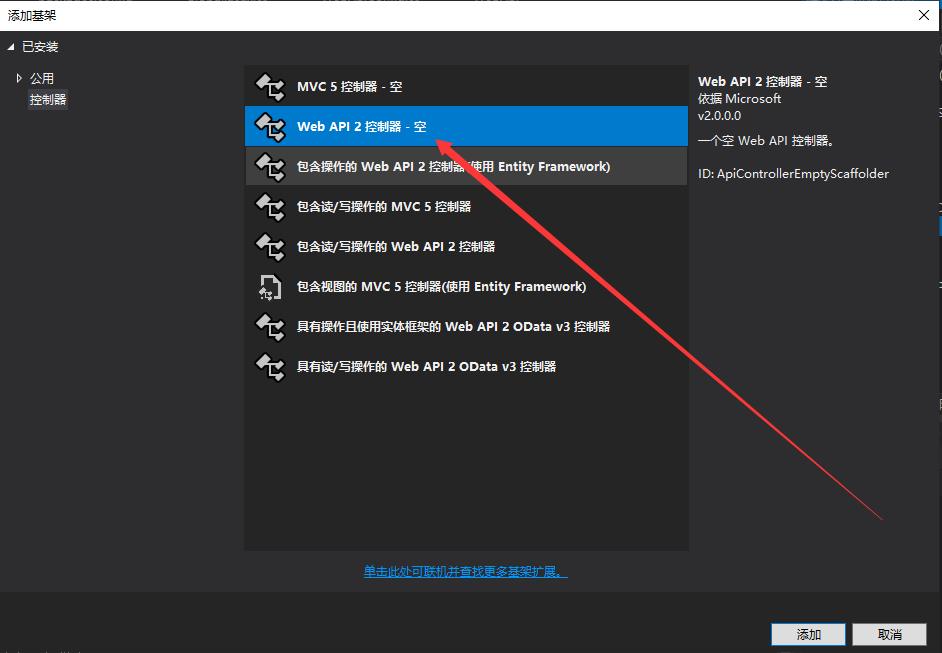

添加方法
    public class VerifController : ApiController

    {

        public IHttpActionResult GetList()

        {

            dynamic data = new { name = "李白", age =  };

            return Json(data);

        }

    }
测试访问(网页get方式)

二、数据注解方式(模型验证其实还有直接判断方法)
1、创建数据Model
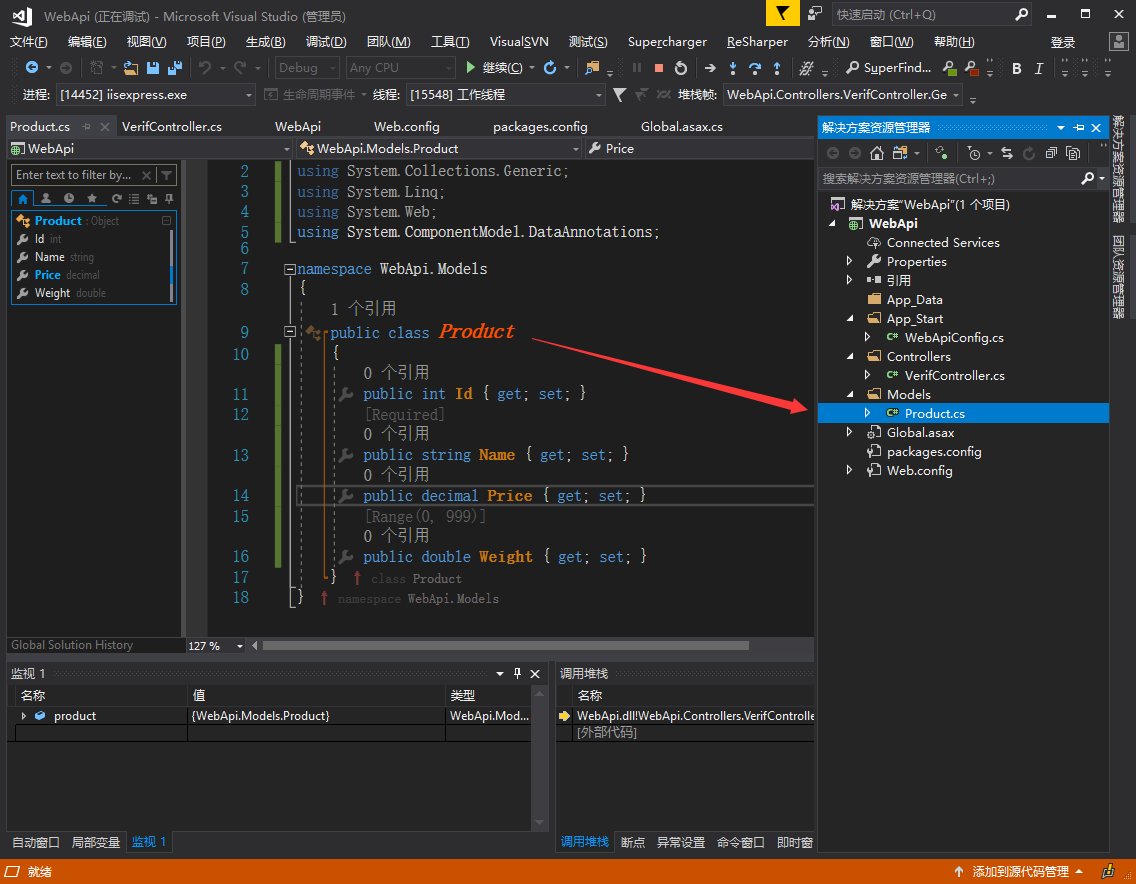
2、Model几种注解方式
using System;

using System.Collections.Generic;

using System.Linq;

using System.Web;

using System.ComponentModel.DataAnnotations;

namespace WebApi.Models

{

    public class Product

    {

        public int Id { get; set; }

        [Required]

        public string Name { get; set; }

        [Range(, )]

        public int Price { get; set; }

        [Required]

        public string Weight { get; set; }

    }

}
3、更改控制器代码
using System;

using System.Collections.Generic;

using System.Linq;

using System.Net;

using System.Net.Http;

using System.Web.Http;

using WebApi.Models;

namespace WebApi.Controllers

{

    public class VerifController : ApiController

    {

        [HttpPost]

        public HttpResponseMessage GetList(Product product)

        {

            if (ModelState.IsValid)

            {

                // Do something with the product (not shown).

                return new HttpResponseMessage(HttpStatusCode.OK);

            }

            else

            {

                return Request.CreateErrorResponse(HttpStatusCode.BadRequest, ModelState);

            }

        }

    }

}
注意:必须Post,反正一般提交的数据都是Post的形式。
4、postman测试

结果如下:

4、自定义提示信息(通过过滤器方式)
1、控制器里面处理验证
建议你使用动作过滤器进行模型验证,所以你不需要太在意如何在你的api控制器中进行验证:

using System;

using System.Collections.Generic;

using System.Linq;

using System.Net;

using System.Net.Http;

using System.Web.Http;

using WebApi.Filters;

using WebApi.Models;

namespace WebApi.Controllers

{

    public class VerifController : ApiController

    {

        [HttpPost]

        public HttpResponseMessage GetList(Product product)

        {

            if (ModelState.IsValid)

            {

                return Request.CreateResponse(HttpStatusCode.Created);

            }

            else

            {

                // the code below should probably be refactored into a GetModelErrors

                // method on your BaseApiController or something like that

                var errors = new List<string>();

                foreach (var state in ModelState)

                {

                    foreach (var error in state.Value.Errors)

                    {

                        errors.Add(error.ErrorMessage);

                    }

                }

                return Request.CreateResponse(HttpStatusCode.Forbidden, errors);

            }

        }

    }

}
2、过滤器创建

完整代码:
using System;

using System.Collections.Generic;

using System.Linq;

using System.Net;

using System.Net.Http;

using System.Web;

using System.Web.Http.Controllers;

using System.Web.Http.Filters;

namespace WebApi.Filters

{

    public class ValidateModelAttribute:ActionFilterAttribute

    {

        public override void OnActionExecuting(HttpActionContext actionContext)

        {

            if (actionContext.ModelState.IsValid == false)

            {

                actionContext.Response = actionContext.Request.CreateErrorResponse(

                    HttpStatusCode.BadRequest, actionContext.ModelState);

            }

        }

    }

}
注意:如果模型验证失败,则此过滤器返回包含验证错误的HTTP响应。在这种情况下,不会调用控制器操作。
关于几个引用
图一

图二

图三

图四

但是这样还是不能完全自定义格式:

using System;

using System.Collections.Generic;

using System.Linq;

using System.Net;

using System.Net.Http;

using System.Text;

using System.Web;

using System.Web.Http.Controllers;

using System.Web.Http.Filters;

using Newtonsoft.Json;

namespace WebApi.Filters

{

    public class ValidateModelAttribute:ActionFilterAttribute

    {

        public override void OnActionExecuting(HttpActionContext actionContext)

        {

            if (actionContext.ModelState.IsValid == false)

            {

                var response = actionContext.Response = actionContext.Response ?? new HttpResponseMessage();

                var ModelState= actionContext.ModelState;

                var errors = new List<string>();

                foreach (var state in ModelState)

                {

                    foreach (var error in state.Value.Errors)

                    {

                        errors.Add(error.ErrorMessage);

                    }

                }

                var content = new

                {

                    success = false,

                    errs = errors

                };

                string strs = JsonConvert.SerializeObject(content);

                response.Content = new StringContent(strs, Encoding.UTF8, "application/json");

                return;

            }

        }

    }

}
使用方式
1、将此过滤器应用于所有Web API控制器,请在配置期间将过滤器的实例添加到HttpConfiguration.Filters集合:
public static class WebApiConfig

{

    public static void Register(HttpConfiguration config)

    {

        config.Filters.Add(new ValidateModelAttribute());

        // ...

    }

}
2、另一种选择是将过滤器设置为各个控制器或控制器操作的属性:
public class ProductsController : ApiController

{

    [ValidateModel]

    public HttpResponseMessage Post(Product product)

    {

        // ...

    }

}
官网案例:

一、WebApi模型验证的更多相关文章
- webapi - 模型验证
本次要和大家分享的是webapi的模型验证,讲解的内容可能不单单是做验证,但都是围绕模型来说明的:首先来吐槽下,今天下午老板为自己买了套新办公家具,看起来挺好说明老板有钱,不好的是我们干技术的又成了搬 ...
- ASP.NET Core - 实现自定义WebApi模型验证
Framework时代 在Framework时代,我们一般进行参数验证的时候,以下代码是非常常见的 [HttpPost] public async Task<JsonResult> Sav ...
- 一、WebApi模型验证实践项目使用
一.启语 前面我们说到,模型验证的原理(包含1.项目创建,2.模型创建,3.走通测试模型验证,4.在过滤器中处理返回json格式(非控制器内))-完全是新手理解使用的,新番理解 通常情况下,对于那些经 ...
- .Net Core WebApi 模型验证无效时报400
问题 模型验证无效时,没有进入到接口里,而是直接报400 Bad Request,非常不友好. 环境 SDK:.Net Core 2.2.401 开发工具:VS2017 step 1 创建接口 /// ...
- 在asp.net WebAPI 中 使用Forms认证和ModelValidata(模型验证)
一.Forms认证 1.在webapi项目中启用Forms认证 Why:为什么要在WebAPI中使用Forms认证?因为其它项目使用的是Forms认证. What:什么是Forms认证?它在WebAP ...
- .Net高级进阶,WebApi和MVC进行模型验证的时候,教你如何自由控制需要进行验证的字段?
现在,你有一个MVC架构的web项目,你要完成一个注册功能. 前台传了3个值到你的控制器,分别是账号.密码.邮箱. 如图:现在你要在控制器里面判断,账号名称.密码.邮箱不能为空,并且名称和密码不超过1 ...
- webapi Model Validation 模型验证
通常情况下,对于那些经常为别人提供数据接口的开发人员来说,对于调用方传递过来的参数都会有验证处理.例如: if (string.IsNullOrEmpty(entity.Name)) { //当姓名为 ...
- WebAPI ModelValidata(模型验证)——DataAnnotations 解析
爱做一个新的项目,在该项目中的 WebAPI 中对数据的验证用到了 ModelValidata, 以前也没有用到过,也不是很熟悉,在查看了一些资料和代码后稍有了解,这里记录下来. 这里主要介绍的是 S ...
- ASP.NET Core 2.2 WebApi 系列【八】统一返回格式(返回值、模型验证、异常)
现阶段,基本上都是前后端分离项目,这样一来,就需要前后端配合,没有统一返回格式,那么对接起来会很麻烦,浪费时间.我们需要把所有接口及异常错误信息都返回一定的Json格式,有利于前端处理,从而提高了工作 ...
随机推荐
- java8-Stream集合操作快速上手
java8-Stream集合操作快速上手 目录 Stream简介 为什么要使用Stream 实例数据源 Filter Map FlatMap Reduce Collect Optional 并发 ...
- Linux下安装Python,以及环境变量的配置
1.安装环境 centos7 + vmware + xshell 2.安装Python3 2.1下载Python资源包 网址:https://www.python.org/downloads/re ...
- JAVA学习笔记--ClassLoader
仅先摘要书中内容以记之,后续也许需要更深入的去探索.先推荐篇博文http://blog.csdn.net/xyang81/article/details/7292380 6.9 初始化和类装载 在许多 ...
- [BZOJ] 最长距离
问题描述 windy 有一块矩形土地,被分为 NM 块 11 的小格子. 有的格子含有障碍物.如果从格子 A 可以走到格子 B,那么两个格子的距离就为两个格子中心的欧几里德距离.如果从格子 A 不可以 ...
- OC中保存自定义类型对象的持久化方法
OC中如果要将自定义类型的对象保存到文件中,必须进行以下三个条件: 想要把存放自定义类型的数组进行 持久化(就是将内存中的临时数据以文件<数据库等>的形式写到磁盘上)必须满足: 1. 自定 ...
- Jira插件安装
以下操作需要反编译 1.反编译的jar包 1)E:\JIRA安装路径\atlassian-jira\WEB-INF\atlassian-bundled-plugins\atlassian-univer ...
- 11:如何解决Maven的Jar版本冲突问题
右键 Exclude,排除冲突包
- 使用tinymce编辑器从word保持原格式复制粘贴的办法
官网地址http://ueditor.baidu.com Git 地址 https://github.com/fex-team/ueditor 参考博客地址 http://blog.ncmem.com ...
- php面试专题---Mysql索引原理及SQL优化
php面试专题---Mysql索引原理及SQL优化 一.总结 一句话总结: 注意:只写精品 1.为表设置索引要付出代价 是什么? 存储空间:一是增加了数据库的存储空间 修改插入变动索引时间:二是在插入 ...
- python 数字系列-无穷大与NaN
无穷大与NaN 问题 你想创建或测试正无穷.负无穷或NaN(非数字)的浮点数. 解决方案 Python并没有特殊的语法来表示这些特殊的浮点值,但是可以使用 float() 来创建它们.比如: > ...