
零代码教你安装部署Stable Diffusion 3,一键生成高质量图像
本文分享自华为云社区《重磅!【支持中文】stable-diffusion-3安装部署教程-SD3 来了》,作者:码上开花_Lancer。
正如承诺的那样,Stability AI在6月12日正式开源了Stable Diffusion 3(Medium版本)!不愧是AI生图领域的“开源英雄”。最近一段时间,正当所有人都在为OpenAI发布Sora狂欢时,Stability AI更是推出了Stable Diffusion 3的技术报告。这两项技术不约而同都采用了Diffusion Transformer的架构设计。

值得注意的是,Stable Diffusion 3的强大性能其实并不仅限于Diffusion Transformer在架构上所带来的增益,其在提示词、图像质量、文字拼写方面的能力都得到了极大的提升。那么究竟是什么让Stable Diffusion 3如此强大?今天我们就从Stable Diffusion 3的技术报告中解读stable diffusion 3强大背后的技术原理。
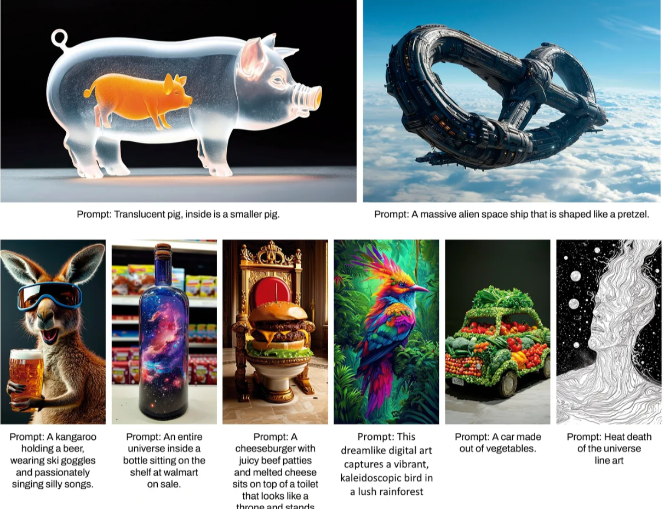
接下来就讲讲,怎么在本地部署最新的Stable Diffusion 3,大致分为以下几步(开始操作前,请确保你有“畅通”的网络):
一、前期准备
1.登录华为云官方账号:

点击右上角“控制台”,搜索栏输入“ModelArts”
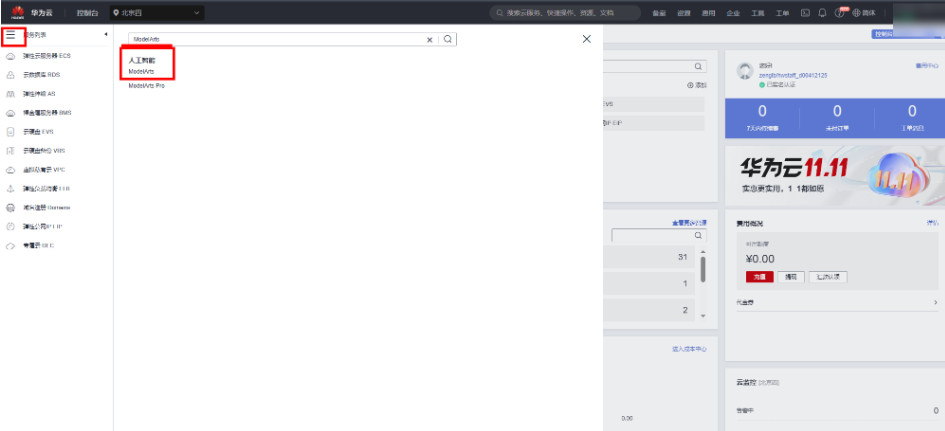
点击“开发环境”-“notebook”,“创建”:

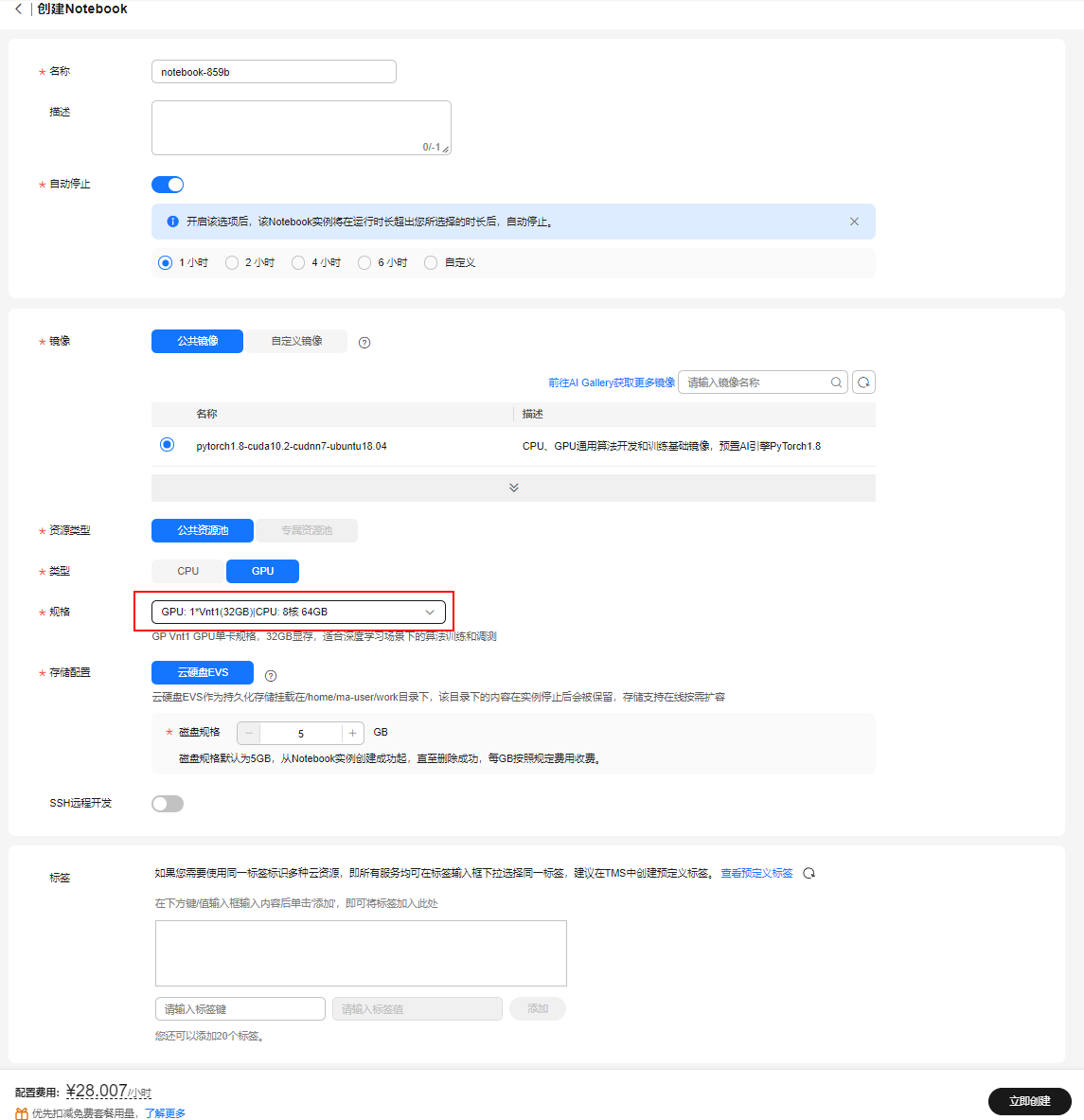
进入创建notebook,名称“notebook-LangChain”,选择GPU规格,“GPU: 1*T4(16GB)|CPU: 8核 32GB”,点击“立即创建”,磁盘规格选择“50G”,点击“创建”
点击返回“任务中心”,点击notebook进入
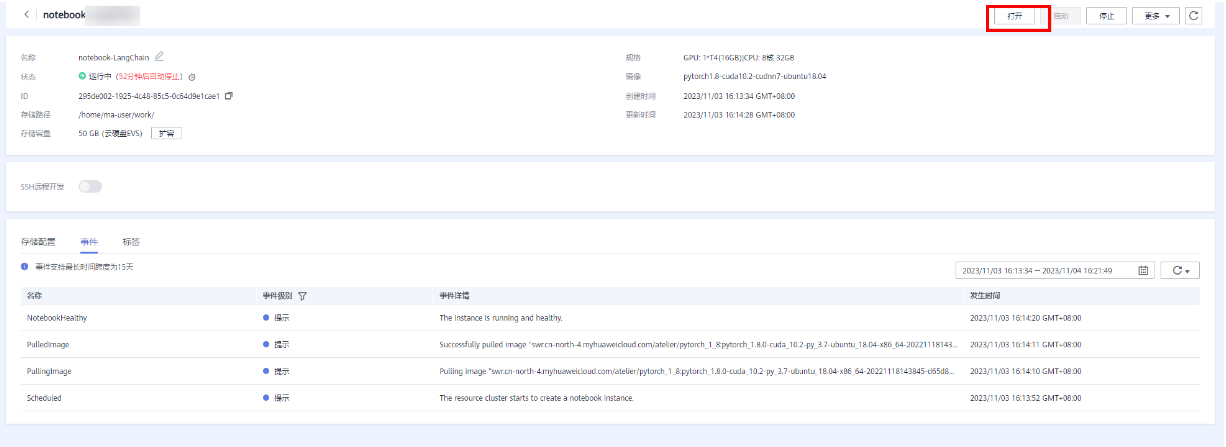
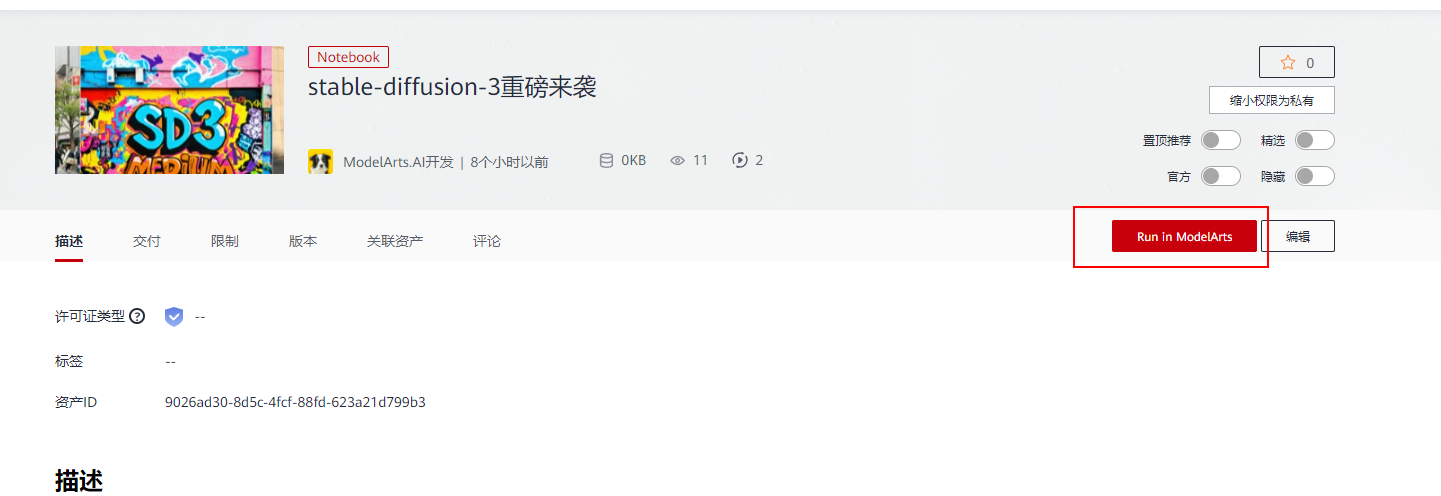
以上步骤是从ModelArts上自己创建notebook,也可以直接点击案例进入体验--stable-diffusion-3重磅来袭。
二、下载模型
[Stable Diffusion 3 Medium](https://stability.ai/news/stable-diffusion-3-medium) 是一种多模态扩散转换器 (MMDiT) 文本到图像模型,其特点是在图像质量、排版、复杂提示理解和资源效率方面大大提高了性能。有关更多技术细节,请参阅[研究报告](https://stability.ai/news/stable-diffusion-3-research-paper)。

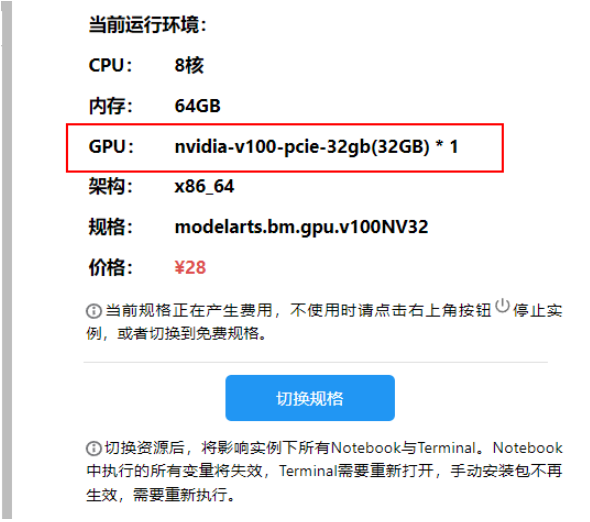
本案例需使用 Pytorch-2.0.1 GPU-V100 及以上规格运行
点击Run in ModelArts,将会进入到ModelArts CodeLab中,这时需要你登录华为云账号,如果没有账号,则需要注册一个,且要进行实名认证,参考[《如何创建华为云账号并且实名认证》](https://bbs.huaweicloud.com/blogs/427460) 即可完成账号注册和实名认证。 登录之后,等待片刻,即可进入到CodeLab的运行环境
出现 Out Of Memory ,请检查是否为您的参数配置过高导致,修改参数配置,重启kernel或更换更高规格资源进行规避
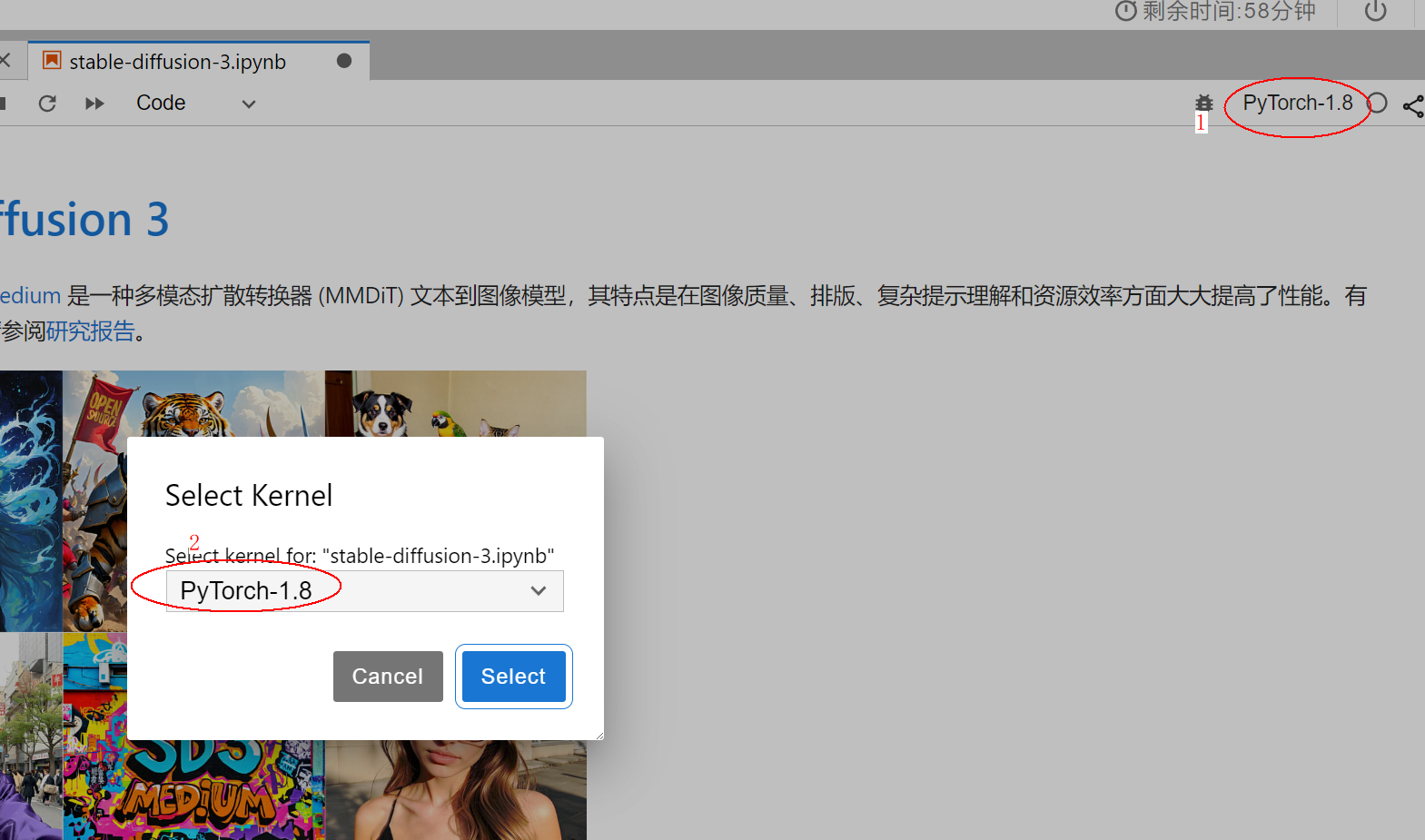
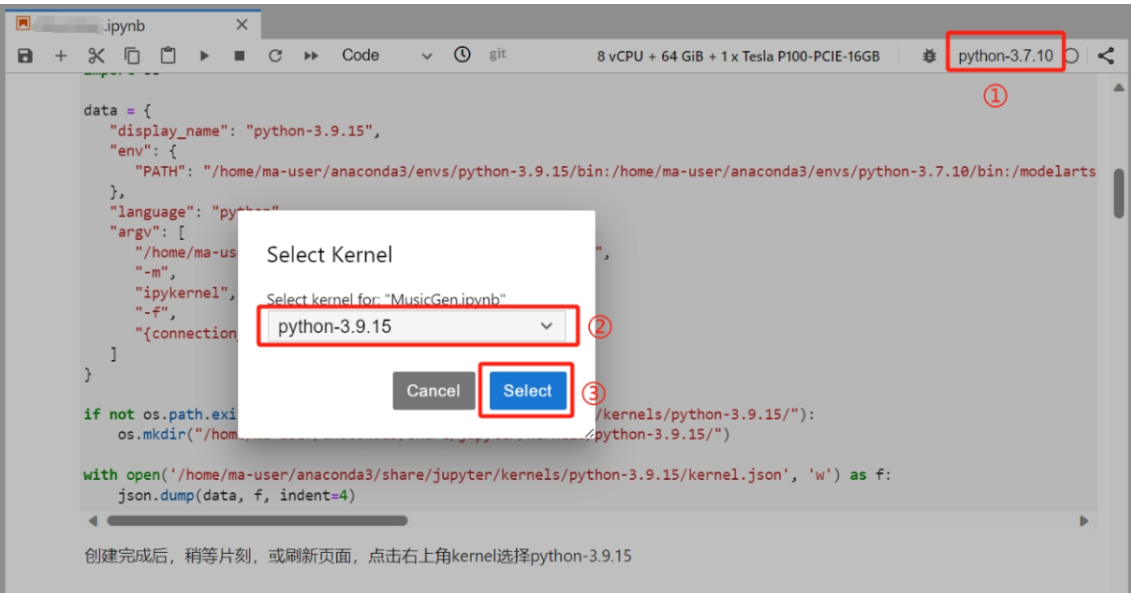
首先切换kernrl,
1. 下载代码和模型
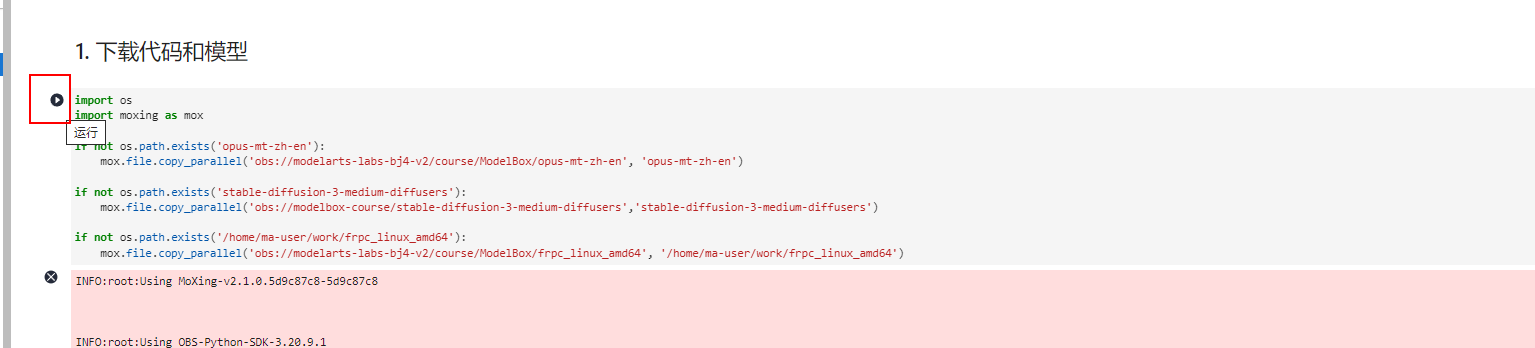
import os

import moxing as mox

if not os.path.exists('opus-mt-zh-en'):

    mox.file.copy_parallel('obs://modelarts-labs-bj4-v2/course/ModelBox/opus-mt-zh-en', 'opus-mt-zh-en')

if not os.path.exists('stable-diffusion-3-medium-diffusers'):

    mox.file.copy_parallel('obs://modelbox-course/stable-diffusion-3-medium-diffusers','stable-diffusion-3-medium-diffusers')

if not os.path.exists('/home/ma-user/work/frpc_linux_amd64'):

    mox.file.copy_parallel('obs://modelarts-labs-bj4-v2/course/ModelBox/frpc_linux_amd64', '/home/ma-user/work/frpc_linux_amd64')
INFO:root:Using MoXing-v2.1.0.5d9c87c8-5d9c87c8
INFO:root:Using OBS-Python-SDK-3.20.9.1
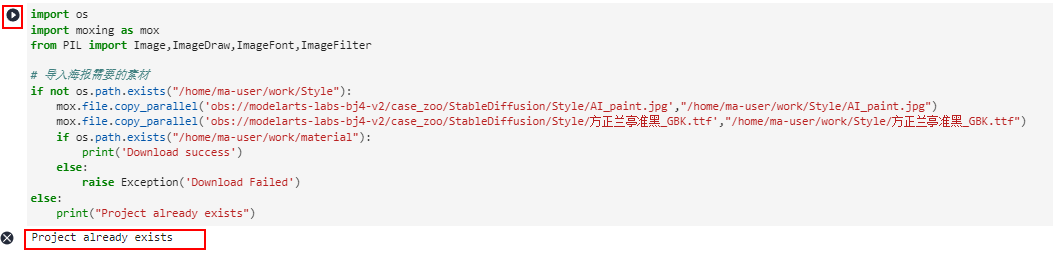
import os

import moxing as mox

from PIL import Image,ImageDraw,ImageFont,ImageFilter

# 导入海报需要的素材

if not os.path.exists("/home/ma-user/work/Style"):

    mox.file.copy_parallel('obs://modelarts-labs-bj4-v2/case_zoo/StableDiffusion/Style/AI_paint.jpg',"/home/ma-user/work/Style/AI_paint.jpg")

    mox.file.copy_parallel('obs://modelarts-labs-bj4-v2/case_zoo/StableDiffusion/Style/方正兰亭准黑_GBK.ttf',"/home/ma-user/work/Style/方正兰亭准黑_GBK.ttf")

    if os.path.exists("/home/ma-user/work/material"):

        print('Download success')

    else:

        raise Exception('Download Failed')

else:

    print("Project already exists")
Project already exists
2. 配置运行环境
本案例依赖Python-3.9.15及以上环境,因此我们首先创建虚拟环境:
!/home/ma-user/anaconda3/bin/conda clean -i

!/home/ma-user/anaconda3/bin/conda create -n python-3.9.15 python=3.9.15 -y --override-channels --channel https://mirrors.tuna.tsinghua.edu.cn/anaconda/pkgs/main

!/home/ma-user/anaconda3/envs/python-3.9.15/bin/pip install ipykernel
/home/ma-user/anaconda3/lib/python3.7/site-packages/requests/__init__.py:91: RequestsDependencyWarning: urllib3 (1.26.12) or chardet (3.0.4) doesn't match a supported versi
RequestsDependencyWarning)
/home/ma-user/anaconda3/lib/python3.7/site-packages/requests/__init__.py:91: RequestsDependencyWarning: urllib3 (1.26.12) or chardet (3.0.4) doesn't match a supported version!
RequestsDependencyWarning)
Collecting package metadata (current_repodata.json): done
Solving environment: failed with repodata from current_repodata.json, will retry with next repodata source.
Collecting package metadata (repodata.json): done
Solving environment: done
[2K [90m━━━━━━━━━━━━━━━━━━━━━━━━━━━━━━━━━━━━━━[0m [32m808.2/808.2 kB[0m [31m11.1 MB/s[0m eta [36m0:00:00[0m00:01[0m
[?25hCollecting jupyter-client>=6.1.12 (from ipykernel)
Successfully installed asttokens-2.4.1 comm-0.2.2 debugpy-1.8.2 decorator-5.1.1 exceptiongroup-1.2.1 executing-2.0.1 importlib-metadata-8.0.0 ipykernel-6.29.5 ipython-8.18.1 jedi-0.19.1 jupyter-client-8.6.2 jupyter-core-5.7.2 matplotlib-inline-0.1.7 nest-asyncio-1.6.0 packaging-24.1 parso-0.8.4 pexpect-4.9.0 platformdirs-4.2.2 prompt-toolkit-3.0.47 psutil-6.0.0 ptyprocess-0.7.0 pure-eval-0.2.2 pygments-2.18.0 python-dateutil-2.9.0.post0 pyzmq-26.0.3 six-1.16.0 stack-data-0.6.3 tornado-6.4.1 traitlets-5.14.3 typing-extensions-4.12.2 wcwidth-0.2.13 zipp-3.19.2
import json

import os

data = {

   "display_name": "python-3.9.15",

   "env": {

      "PATH": "/home/ma-user/anaconda3/envs/python-3.9.15/bin:/home/ma-user/anaconda3/envs/python-3.7.10/bin:/modelarts/authoring/notebook-conda/bin:/opt/conda/bin:/usr/local/nvidia/bin:/usr/local/cuda/bin:/usr/local/sbin:/usr/local/bin:/usr/sbin:/usr/bin:/sbin:/bin:/home/ma-user/modelarts/ma-cli/bin:/home/ma-user/modelarts/ma-cli/bin:/home/ma-user/anaconda3/envs/PyTorch-1.8/bin"

   },

   "language": "python",

   "argv": [

      "/home/ma-user/anaconda3/envs/python-3.9.15/bin/python",

      "-m",

      "ipykernel",

      "-f",

      "{connection_file}"

   ]

}

if not os.path.exists("/home/ma-user/anaconda3/share/jupyter/kernels/python-3.9.15/"):

    os.mkdir("/home/ma-user/anaconda3/share/jupyter/kernels/python-3.9.15/")

with open('/home/ma-user/anaconda3/share/jupyter/kernels/python-3.9.15/kernel.json', 'w') as f:

    json.dump(data, f, indent=4)
创建完成后,稍等片刻,或刷新页面,点击右上角kernel选择python-3.9.15
查看Python版本
!python -V
Python 3.9.15
查看GPU型号,至少需要32GB显存
!nvidia-smi
Wed Jul 10 23:52:26 2024
+-----------------------------------------------------------------------------+
| NVIDIA-SMI 470.57.02 Driver Version: 470.57.02 CUDA Version: 11.4 |
|-------------------------------+----------------------+----------------------+
| GPU Name Persistence-M| Bus-Id Disp.A | Volatile Uncorr. ECC |
| Fan Temp Perf Pwr:Usage/Cap| Memory-Usage | GPU-Util Compute M. |
| | | MIG M. |
|===============================+======================+======================|
| 0 Tesla V100-PCIE... On | 00000000:00:0D.0 Off | 0 |
| N/A 30C P0 25W / 250W | 0MiB / 32510MiB | 0% Default |
| | | N/A |
+-------------------------------+----------------------+----------------------+
+-----------------------------------------------------------------------------+
| Processes: |
| GPU GI CI PID Type Process name GPU Memory |
| ID ID Usage |
|=============================================================================|
| No running processes found |
+-----------------------------------------------------------------------------+
安装SD3依赖包
!pip install --upgrade pip

!pip install torch==2.0.1 torchvision==0.15.2 torchaudio==2.0.2

!pip install diffusers transformers sentencepiece accelerate protobuf gradio spaces

!cp /home/ma-user/work/frpc_linux_amd64 /home/ma-user/anaconda3/envs/python-3.9.15/lib/python3.9/site-packages/gradio/frpc_linux_amd64_v0.2

!chmod +x /home/ma-user/anaconda3/envs/python-3.9.15/lib/python3.9/site-packages/gradio/frpc_linux_amd64_v0.2
 Looking in indexes: http://repo.myhuaweicloud.com/repository/pypi/simple

    Requirement already satisfied: pip in /home/ma-user/anaconda3/envs/python-3.9.15/lib/python3.9/site-packages (24.0)

    Collecting pip

      Downloading http://repo.myhuaweicloud.com/repository/pypi/packages/e7/54/0c1c068542cee73d8863336e974fc881e608d0170f3af15d0c0f28644531/pip-24.1.2-py3-none-any.whl (1.8 MB)

    [2K     [90m━━━━━━━━━━━━━━━━━━━━━━━━━━━━━━━━━━━━━━━━[0m [32m1.8/1.8 MB[0m [31m28.5 MB/s[0m eta [36m0:00:00[0m00:01[0m

    [?25hInstalling collected packages: pip

      Attempting uninstall: pip

        Found existing installation: pip 24.0

        Uninstalling pip-24.0:

          Successfully uninstalled pip-24.0

    Successfully installed pip-24.1.2

    Successfully installed accelerate-0.32.1 aiofiles-23.2.1 altair-5.3.0 annotated-types-0.7.0 anyio-4.4.0 attrs-23.2.0 click-8.1.7 contourpy-1.2.1 cycler-0.12.1 diffusers-0.29.2 dnspython-2.6.1 email_validator-2.2.0 fastapi-0.111.0 fastapi-cli-0.0.4 ffmpy-0.3.2 fonttools-4.53.1 fsspec-2024.6.1 gradio-4.37.2 gradio-client-1.0.2 h11-0.14.0 httpcore-1.0.5 httptools-0.6.1 httpx-0.27.0 huggingface-hub-0.23.4 importlib-resources-6.4.0 jsonschema-4.23.0 jsonschema-specifications-2023.12.1 kiwisolver-1.4.5 markdown-it-py-3.0.0 matplotlib-3.9.1 mdurl-0.1.2 numpy-1.26.4 orjson-3.10.6 pandas-2.2.2 protobuf-5.27.2 psutil-5.9.8 pydantic-2.8.2 pydantic-core-2.20.1 pydub-0.25.1 pyparsing-3.1.2 python-dotenv-1.0.1 python-multipart-0.0.9 pytz-2024.1 pyyaml-6.0.1 referencing-0.35.1 regex-2024.5.15 rich-13.7.1 rpds-py-0.19.0 ruff-0.5.1 safetensors-0.4.3 semantic-version-2.10.0 sentencepiece-0.2.0 shellingham-1.5.4 sniffio-1.3.1 spaces-0.28.3 starlette-0.37.2 tokenizers-0.19.1 tomlkit-0.12.0 toolz-0.12.1 tqdm-4.66.4 transformers-4.42.3 typer-0.12.3 tzdata-2024.1 ujson-5.10.0 uvicorn-0.30.1 uvloop-0.19.0 watchfiles-0.22.0 websockets-11.0.3
3. 生成单张图像
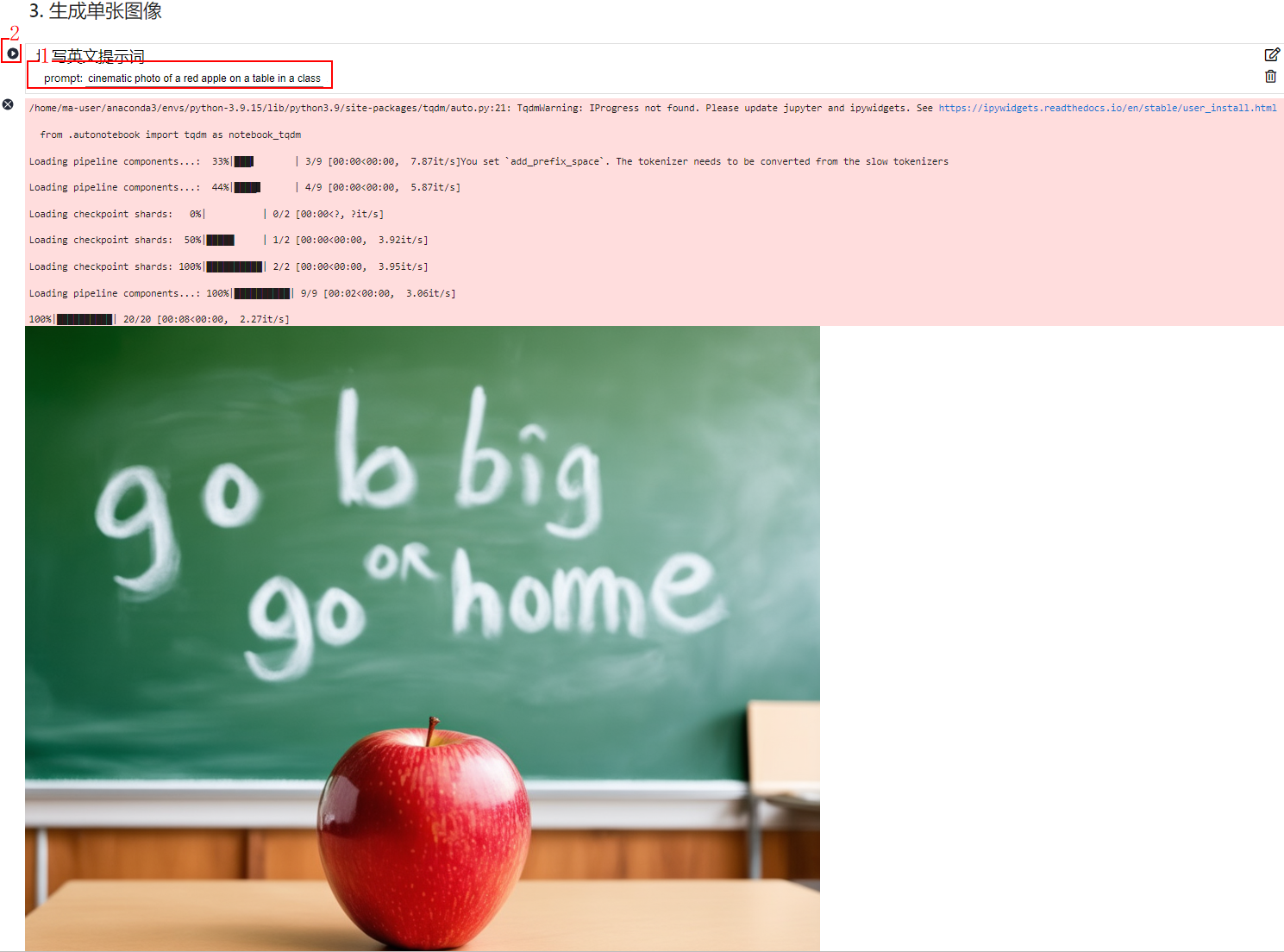
#@title 填写英文提示词

import torch

from diffusers import StableDiffusion3Pipeline

# 清理 GPU 缓存

torch.cuda.empty_cache()

# 确保使用半精度浮点数

torch_dtype = torch.float16

# 尝试减少推理步骤

num_inference_steps = 20

# 调整引导比例

guidance_scale = 5.0

# 定义 Prompt

prompt = "cinematic photo of a red apple on a table in a classroom, on the blackboard are the words go big or go home written in chalk" #@param {type:"string"}

# 加载模型并将其移动到 GPU

pipe = StableDiffusion3Pipeline.from_pretrained("stable-diffusion-3-medium-diffusers", torch_dtype=torch_dtype).to("cuda")

# 根据提供的 Prompt 生成图像

image = pipe(prompt=prompt, num_inference_steps=num_inference_steps, guidance_scale=guidance_scale).images[0]

# 定义保存图像的路径

save_path = '/home/ma-user/work/your_generated_image.png'

# 保存图像到指定路径

image.save(save_path)

# 如果需要在本地查看图像,可以使用 show 方法

image.show()

prompt = "cinematic photo of a red apple on a table in a classroom, on the blackboard are the words go big or go home written in chalk" #@param {type:"string"}
  /home/ma-user/anaconda3/envs/python-3.9.15/lib/python3.9/site-packages/tqdm/auto.py:21: TqdmWarning: IProgress not found. Please update jupyter and ipywidgets. See https://ipywidgets.readthedocs.io/en/stable/user_install.html

      from .autonotebook import tqdm as notebook_tqdm

    Loading pipeline components...:  33%|███▎      | 3/9 [00:00<00:00,  7.87it/s]You set `add_prefix_space`. The tokenizer needs to be converted from the slow tokenizers

    Loading pipeline components...:  44%|████▍     | 4/9 [00:00<00:00,  5.87it/s]

    Loading checkpoint shards:   0%|          | 0/2 [00:00<?, ?it/s][A

    Loading checkpoint shards:  50%|█████     | 1/2 [00:00<00:00,  3.92it/s][A

    Loading checkpoint shards: 100%|██████████| 2/2 [00:00<00:00,  3.95it/s][A

    Loading pipeline components...: 100%|██████████| 9/9 [00:02<00:00,  3.06it/s]

    100%|██████████| 20/20 [00:08<00:00,  2.27it/s]

注意:
出现 Out Of Memory ,尝试重启 kernel 再次运行
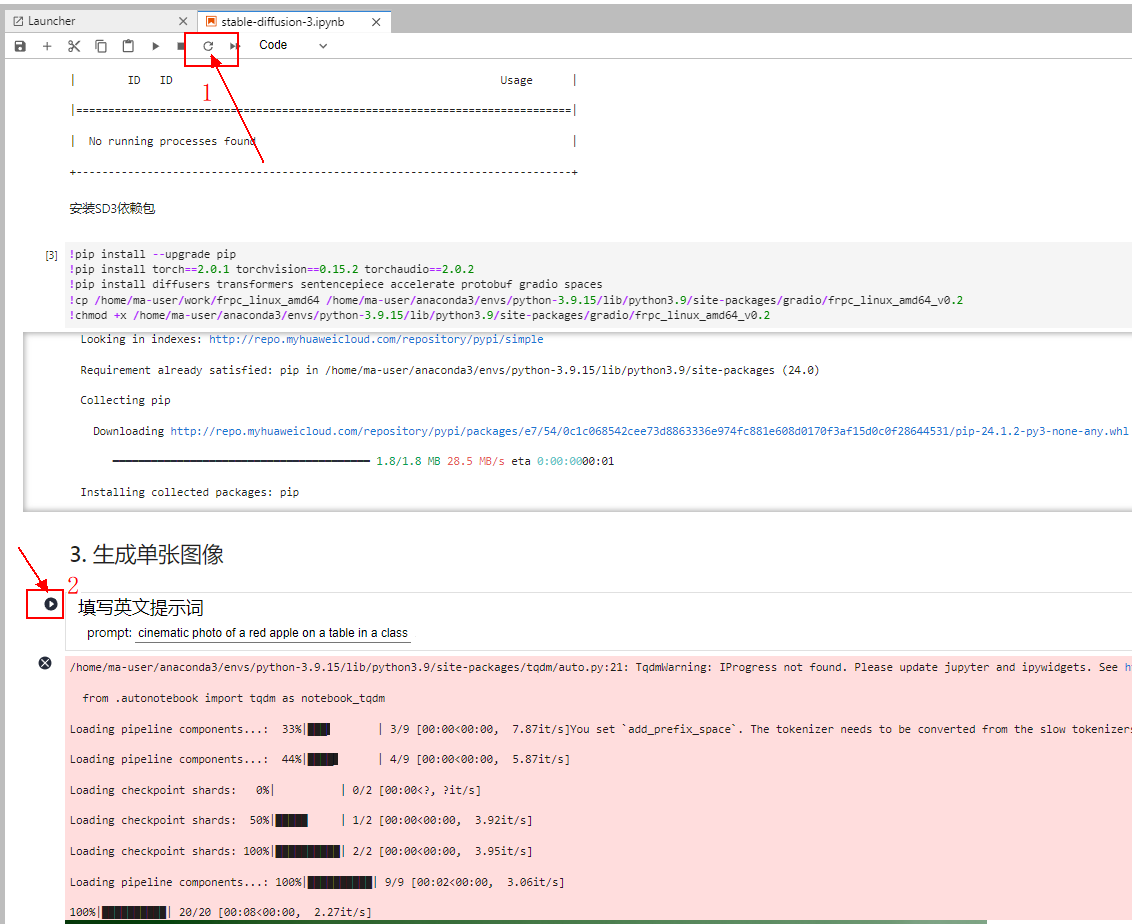
4.填写作品名称和作者姓名

#@title 填写作品名称和作者姓名

from PIL import Image, ImageDraw, ImageFont, ImageFilter

def gen_poster(img, txt1, txt2, path, zt):

    # 定义字体和颜色

    font1 = ImageFont.truetype(zt, 30)

    font2 = ImageFont.truetype(zt, 25)

    # 创建一个可以在图像上绘制的 Draw 对象

    img_draw = ImageDraw.Draw(img)

    # 在图像上绘制文本

    img_draw.text((180, 860), txt1, font=font1, fill='#961900')

    img_draw.text((130, 903), txt2, font=font2, fill='#252b3a')

    # 保存图像

    img.save(path)

# 定义模板图像路径和字体路径

template_img = "/home/ma-user/work/Style/AI_paint.jpg"

zt = r"/home/ma-user/work/Style/方正兰亭准黑_GBK.ttf"

# 打开模板图像

temp_image = Image.open(template_img).convert("RGBA")

# 打开生成的图像

image_path = "/home/ma-user/work/your_generated_image.png"  # 替换为你生成的图像路径

image = Image.open(image_path)

# 计算新的大小以适应模板图像的宽度,同时保持图片的原始比例

width_ratio = temp_image.width / image.width

new_height = int(image.height * width_ratio)

new_size = (temp_image.width, new_height)

# 调整生成的图像大小,使用 LANCZOS 重采样算法

image = image.resize(new_size, Image.Resampling.LANCZOS)

# 粘贴调整大小后的图像到模板上

# 假设图像粘贴的起始点是 (40, 266)

temp_image.paste(image, (40, 266))

# 定义作品名称和作者姓名

title_char = "苹果" #@param {type:"string"}

author_char = "ModelArts" #@param {type:"string"}

# 定义保存海报的路径

savepath = '/home/ma-user/work/AI_paint_output.png'  # 确保路径正确,并且有写权限

# 调用函数生成海报

gen_poster(temp_image, title_char, author_char, savepath, zt)

# 使用 Image.open 来打开并显示生成的海报

Image.open(savepath).show()

5. 运行Gradio应用
with gr.Blocks(css=css) as demo:

    gr.HTML("""<h1 align="center">Stable Diffusion 3</h1>""")

    with gr.Column(elem_id="col-container"):

        with gr.Row():

            prompt = gr.Text(

                label="提示词",

                show_label=False,

                max_lines=1,

                placeholder="请输入中文提示词",

                container=False,

            )

            run_button = gr.Button("生成", scale=0)

        result = gr.Image(label="Result", show_label=False)

        with gr.Accordion("更多参数", open=False):

            negative_prompt = gr.Text(

                label="负面提示词",

                max_lines=1,

                placeholder="请输入负面提示词",

            )

            seed = gr.Slider(

                label="Seed",

                minimum=0,

                maximum=MAX_SEED,

                step=1,

                value=0,

            )

            randomize_seed = gr.Checkbox(label="随机种子", value=True)

            with gr.Row():

                width = gr.Slider(

                    label="宽",

                    minimum=256,

                    maximum=MAX_IMAGE_SIZE,

                    step=64,

                    value=1024,

                )

                height = gr.Slider(

                    label="高",

                    minimum=256,

                    maximum=MAX_IMAGE_SIZE,

                    step=64,

                    value=1024,

                )

            with gr.Row():

                guidance_scale = gr.Slider(

                    label="Guidance scale",

                    minimum=0.0,

                    maximum=10.0,

                    step=0.1,

                    value=5.0,

                )

                num_inference_steps = gr.Slider(

                    label="迭代步数",

                    minimum=1,

                    maximum=50,

                    step=1,

                    value=28,

                )

    gr.on(

        triggers=[run_button.click, prompt.submit, negative_prompt.submit],

        fn = infer,

        inputs = [prompt, negative_prompt, seed, randomize_seed, width, height, guidance_scale, num_inference_steps],

        outputs = [result, seed]

    )

demo.launch(share=True)
Writing demo.py
运行Gradio应用,运行成功后点击 Running on public URL后的网页链接即可体验!
!python demo.py
Loading pipeline components...: 56%|███████▏ | 5/9 [00:02<00:01, 2.28it/s]You set `add_prefix_space`. The tokenizer needs to be converted from the slow tokenizers
Loading pipeline components...: 67%|████████▋ | 6/9 [00:02<00:01, 2.61it/s]
Loading checkpoint shards: 0%| | 0/2 [00:00<?, ?it/s][A
Loading checkpoint shards: 50%|█████████ | 1/2 [00:00<00:00, 3.54it/s][A
Loading checkpoint shards: 100%|██████████████████| 2/2 [00:00<00:00, 3.53it/s][A
Loading pipeline components...: 100%|█████████████| 9/9 [00:03<00:00, 2.83it/s]
/home/ma-user/anaconda3/envs/python-3.9.15/lib/python3.9/site-packages/torch/_utils.py:776: UserWarning: TypedStorage is deprecated. It will be removed in the future and UntypedStorage will be the only storage class. This should only matter to you if you are using storages directly. To access UntypedStorage directly, use tensor.untyped_storage() instead of tensor.storage()
return self.fget.__get__(instance, owner)()
/home/ma-user/anaconda3/envs/python-3.9.15/lib/python3.9/site-packages/transformers/models/marian/tokenization_marian.py:175: UserWarning: Recommended: pip install sacremoses.
warnings.warn("Recommended: pip install sacremoses.")
Hardware accelerator e.g. GPU is available in the environment, but no `device` argument is passed to the `Pipeline` object. Model will be on CPU.
Running on local URL: http://127.0.0.1:7860
Running on public URL: https://9c48446865ca38cc99.gradio.live
This share link expires in 72 hours. For free permanent hosting and GPU upgrades, run `gradio deploy` from Terminal to deploy to Spaces (https://huggingface.co/spaces)
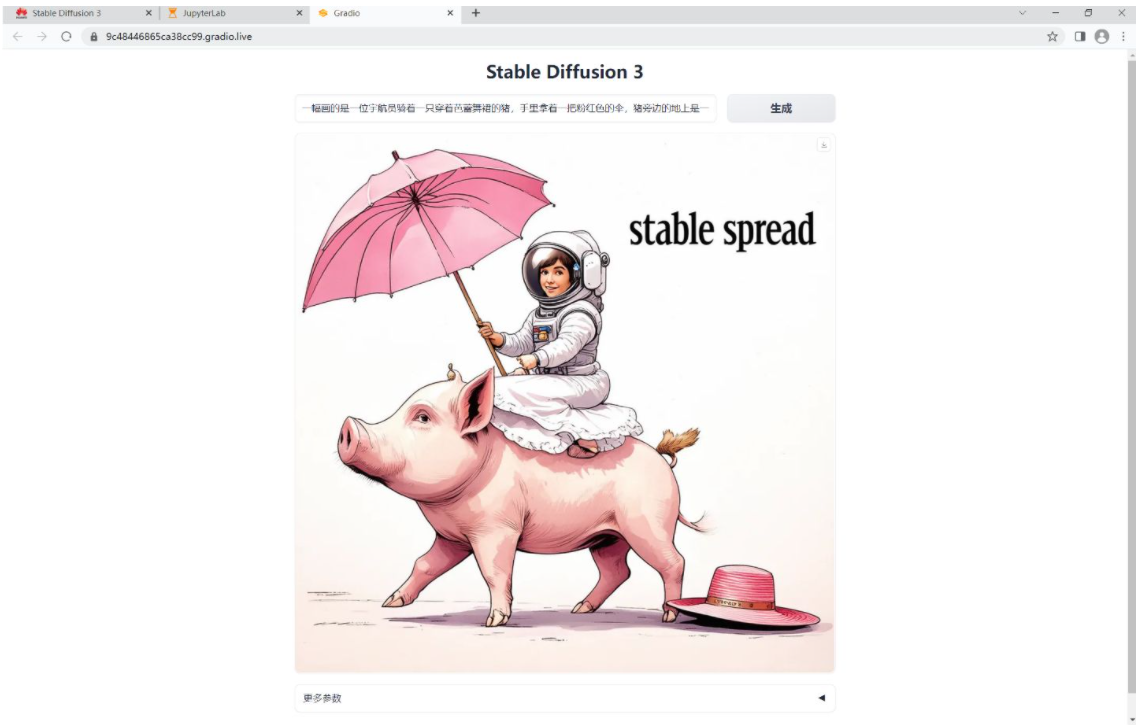
一幅画的是一位宇航员骑着一只穿着芭蕾舞裙的猪,手里拿着一把粉红色的伞,猪旁边的地上是一只戴着大礼帽的知更鸟,角落里写着“稳定扩散”的字样。
A picture of an astronaut riding on a pig in a ballet dress with a pink umbrella next to a big hat on the ground, with the word “stable spread” in the corner.
出现 Out Of Memory ,尝试重启 kernel 再次运行
浏览器打开local URL: http://127.0.0.1:7860 地址,
运行界面:
三、其他案例展示:
Prompt: cinematic photo of a red apple on a table in a classroom, on the blackboard are the words "go big or go home" written in chalk
提示:教室里的桌子上有一个红苹果的电影照片,黑板上用粉笔写着“要么做大,要么回家”

Prompt: a painting of an astronaut riding a pig wearing a tutu holding a pink umbrella, on the ground next to the pig is a robin bird wearing a top hat, in the corner are the words "stable diffusion"
提示:一幅画的是一位宇航员骑着一只穿着芭蕾舞裙的猪,手里拿着一把粉红色的伞,猪旁边的地上是一只戴着大礼帽的知更鸟,角落里写着“稳定扩散”的字样。

Prompt: Three transparent glass bottles on a wooden table. The one on the left has red liquid and the number 1. The one in the middle has blue liquid and the number 2. The one on the right has green liquid and the number 3.
提示:三个透明玻璃瓶放在木桌上。左边的是红色液体和数字1。中间有蓝色液体和数字2。右边的是绿色液体和数字3。

参考:
官网:Stable Diffusion 3 — Stability AI
案例:stable-diffusion-3重磅来袭 (huaweicloud.com)
零代码教你安装部署Stable Diffusion 3,一键生成高质量图像的更多相关文章
- 基于Docker安装的Stable Diffusion使用CPU进行AI绘画
基于Docker安装的Stable Diffusion使用CPU进行AI绘画 由于博主的电脑是为了敲代码考虑买的,所以专门买的高U低显,i9配核显,用Stable Diffusion进行AI绘画的话倒 ...
- Kingbase V8R6集群安装部署案例---脚本在线一键扩容
案例说明: KingbaseES V8R6支持图形化方式在线扩容,但是在一些生产环境,在服务器不支持图形化界面的情况下 ,只能通过脚本命令行的方式执行集群的部署或在线扩容. Tips: Kingbas ...
- Wix 安装部署教程(十六) -- 自动生成多语言文件
因为持续集成需要,所有项目编译完之后生成一个多语言的安装包.之前生成mst文件都是手动操作,而且mst文件必须每次重新和新的安装包“关联”,否则中文的安装包去调用英文的资源的时候就会报类似于“类型转换 ...
- Kubernetes1.91(K8s)安装部署过程(三)--创建高可用etcd集群
这里的etcd集群复用我们测试的3个节点,3个node都要安装并启动,注意修改配置文件 1.TLS认证文件分发:etcd集群认证用,除了本机有,分发到其他node节点 scp ca.pem kuber ...
- Kingbase V8R6集群安装部署案例---脚本在线一键缩容
案例说明: KingbaseES V8R6支持图形化方式在线缩容,但是在一些生产环境,在服务器不支持图形化界面的情况下 ,只能通过脚本命令行的方式执行集群的部署或在线缩容. Tips: Kingb ...
- 在英特尔 CPU 上加速 Stable Diffusion 推理
前一段时间,我们向大家介绍了最新一代的 英特尔至强 CPU (代号 Sapphire Rapids),包括其用于加速深度学习的新硬件特性,以及如何使用它们来加速自然语言 transformer 模型的 ...
- OpenStack Keystone安装部署流程
之前介绍了OpenStack Swift的安装部署,采用的都是tempauth认证模式,今天就来介绍一个新的组件,名为Keystone. 1. 简介 本文将详细描述Keystone的安装部署流程,并给 ...
- 升讯威微信营销系统开发实践:(4)源代码结构说明 与 安装部署说明( 完整开源于 Github)
GitHub:https://github.com/iccb1013/Sheng.WeixinConstruction因为个人精力时间有限,不会再对现有代码进行更新维护,不过微信接口比较稳定,经测试至 ...
- Docker安装部署Rancher
# 一.Rancher简介 [Rancher](https://www.cnrancher.com/rancher/)是一个开源的企业级容器管理平台.通过Rancher,企业再也不必自己使用一系列的开 ...
- crudapi零代码开发平台应用场景和成功案例
应用场景 在前面文章中,已经介绍了crudapi主要功能和使用方式,本文主要介绍crudapi应用场景以及具体的使用方式. 概要 crudapi属于产品级的零代码平台,无需编程,通过配置自动生成cru ...
随机推荐
- OpenStack 的 SR-IOV 虚拟机热迁移
目录 文章目录 目录 前言列表 前言 SR-IOV Pass-through 虚拟机热迁移的问题 基于 macvtap 层的 SR-IOV 虚拟机热迁移 Workaround SR-IOV Pass- ...
- HTML——超链接标签
一.超链接标签的基本使用 超链接是浏览者和服务器的交互的主要手段,也叫超级链接或a链接,是网页中指向一个目标的连接关系,这个目标可以是网页.网页中的具体位置.图片.邮件地址.文件.应用程序等. 超链接 ...
- WPF加载GIF的五种方式(Storyboard / WpfAnimatedGif / ImageAnimator / PictureBox / MediaElement)
部分内容参考博文WPF 如何显示gif 一.使用Storyboard 效果: (1)页面xaml: <Window x:Class="PlayGifDemo.StoryboardWin ...
- 怎么使用Stable diffusion中的models
Stable diffusion中的models Stable diffusion model也可以叫做checkpoint model,是预先训练好的Stable diffusion权重,用于生成特 ...
- mysql通过binlog来恢复被删除的数据库
binlog日志 查询: MariaDB [(none)]> show variables like 'log_bin'; +---------------+-------+ | Variabl ...
- ChatTTS,语气韵律媲美真人的开源TTS模型,文字转语音界的新魁首,对标微软Azure-tts
前两天 2noise 团队开源了ChatTTS项目,并且释出了相关的音色模型权重,效果确实非常惊艳,让人一听难忘,即使摆在微软的商业级项目Azure-tts面前,也是毫不逊色的. ChatTTS是专门 ...
- INFINI Labs 产品更新 | Easysearch 新增跨集群复制 (CCR)、支持快照生命周期管理 (SLM) 功能等
INFINI Labs 产品重量级更新!!!本次更新了很多亮点功能,如 Easysearch 新增跨集群复制 (CCR).支持快照生命周期管理 (SLM) 功能等:支持多集群.跨版本的搜索基础设施统一 ...
- #define 用法解法
宏的优点是能整理代码 缺点是宏替换来的代码需要人工解除宏后才能暴漏源代码 改底层时候是需要解一解的 它可以做到main函数中只有一个宏字母 这个宏定义时候,定义成了几个函数的源代码 所以main里面就 ...
- 加入域 " " 时出现了以下错误
加入域 " " 时出现了以下错误: 因为文件共享不安全,所以你不能连接到文件共享.此共享需要过时的 SMB1 协议,而此协议是不安全的,可能会使你的系统遭受攻击. 你的系统需要 S ...
- 玩转Zabbix智能告警:降噪、排班、认领、升级、IM协同
Zabbix作为一款流行的企业级监控工具,可以监控各种网络设备和服务的状态,并提供强大的告警功能,能够在出现异常情况时及时通知管理员.以下是Zabbix的一些特点: 支持多种监控方式,包括SNMP.J ...