
Spring Boot自动运行之 CommandLineRunner、ApplicationRunner和@PostConstruct
在使用Spring Boot开发的工作中,我们经常会需要遇到一种功能需求,比如在服务启动时候,去加载一些配置,去请求一下其他服务的接口。Spring Boot给我们提供了三种常用的实现方法:

第一种是实现CommandLineRunner接口,

第二种是实现ApplicationRunner接口

第三种是使用注解:@PostConstruct
1、CommandLineRunner
1、CommandLineRunner执行的时间节点是在Application完成初始化工作之后。

2、CommandLineRunner在有多个实现的时候,可以使用@order注解指定执行先后顺序。

3、源码在:org.springframework.boot.SpringApplication#run(),可以看看
我们先看一下CommandLineRunner的源码:
package org.springframework.boot;

@FunctionalInterface

public interface CommandLineRunner {

    void run(String... args) throws Exception;

}
SpringApplication源码:
public ConfigurableApplicationContext run(String... args) {

        StopWatch stopWatch = new StopWatch();

        stopWatch.start();

        DefaultBootstrapContext bootstrapContext = this.createBootstrapContext();

        ConfigurableApplicationContext context = null;

        this.configureHeadlessProperty();

        SpringApplicationRunListeners listeners = this.getRunListeners(args);

        listeners.starting(bootstrapContext, this.mainApplicationClass);

        try {

            ApplicationArguments applicationArguments = new DefaultApplicationArguments(args);

            ConfigurableEnvironment environment = this.prepareEnvironment(listeners, bootstrapContext, applicationArguments);

            this.configureIgnoreBeanInfo(environment);

            Banner printedBanner = this.printBanner(environment);

            context = this.createApplicationContext();

            context.setApplicationStartup(this.applicationStartup);

            this.prepareContext(bootstrapContext, context, environment, listeners, applicationArguments, printedBanner);

            this.refreshContext(context);

            this.afterRefresh(context, applicationArguments);

            stopWatch.stop();

            if (this.logStartupInfo) {

                (new StartupInfoLogger(this.mainApplicationClass)).logStarted(this.getApplicationLog(), stopWatch);

            }

            listeners.started(context);

            this.callRunners(context, applicationArguments);

        } catch (Throwable var10) {

            this.handleRunFailure(context, var10, listeners);

            throw new IllegalStateException(var10);

        }

        try {

            listeners.running(context);

            return context;

        } catch (Throwable var9) {

            this.handleRunFailure(context, var9, (SpringApplicationRunListeners)null);

            throw new IllegalStateException(var9);

        }

    }
callRunners方法源码:
private void callRunners(ApplicationContext context, ApplicationArguments args) {

        List<Object> runners = new ArrayList();

        runners.addAll(context.getBeansOfType(ApplicationRunner.class).values());

        runners.addAll(context.getBeansOfType(CommandLineRunner.class).values());

        AnnotationAwareOrderComparator.sort(runners);

        Iterator var4 = (new LinkedHashSet(runners)).iterator();

        while(var4.hasNext()) {

            Object runner = var4.next();

            if (runner instanceof ApplicationRunner) {

                this.callRunner((ApplicationRunner)runner, args);

            }

            if (runner instanceof CommandLineRunner) {

                this.callRunner((CommandLineRunner)runner, args);

            }

        }

    }
我们写一个例子实现:
import org.springframework.boot.CommandLineRunner;

import org.springframework.core.annotation.Order;

import org.springframework.stereotype.Component;

import java.util.Arrays;

@Component

@Order(1)

public class CommandLineRunnerTest implements CommandLineRunner {

    @Override

    public void run(String... args) throws Exception {

        System.out.println("----CommandLineRunnerTest1 start---"+ Arrays.toString(args));

    }

}
2、ApplicationRunner
ApplicationRunner跟CommandLineRunner是区别是在run方法里接收的参数不同,CommandLineRuner接收的参数是String... args,而ApplicationRunner的run方法的参数是ApplicationArguments
看看ApplicationRunner的源码:
package org.springframework.boot;

@FunctionalInterface

public interface ApplicationRunner {

    void run(ApplicationArguments args) throws Exception;

}
我们写一个例子实现:
import org.springframework.boot.ApplicationArguments;

import org.springframework.boot.ApplicationRunner;

import org.springframework.core.annotation.Order;

import org.springframework.stereotype.Component;

import java.util.List;

import java.util.Set;

@Component

@Order(1)

public class ApplicationRunnerTest implements ApplicationRunner {

    @Override

    public void run(ApplicationArguments args) throws Exception {

        System.out.println("---ApplicationRunnerTest start----");

        List<String> nonOptionArgs = args.getNonOptionArgs();

        System.out.println("[非选项参数]>>> " + nonOptionArgs);

        Set<String> optionNames = args.getOptionNames();

        for(String optionName: optionNames) {

            System.out.println("[选项参数]>>> name:" + optionName

                    + ";value:" + args.getOptionValues(optionName));

        }

    }

}
3、@PostConstruct
@PostConstruct是在javaEE5的时候引入的,它并不是Spring提供的,但是Spring有对@PostConstruct的实现。并且是在对象加载完之后执行。
先看注解源码
@Documented

@Retention (RUNTIME)

@Target(METHOD)

public @interface PostConstruct {

}
我们写一个例子实现:
import org.springframework.stereotype.Component;

import javax.annotation.PostConstruct;

@Component

public class PostConstructTest {

    @PostConstruct

    public void start(){

        System.out.println("---PostConstruct start---");

    }

}
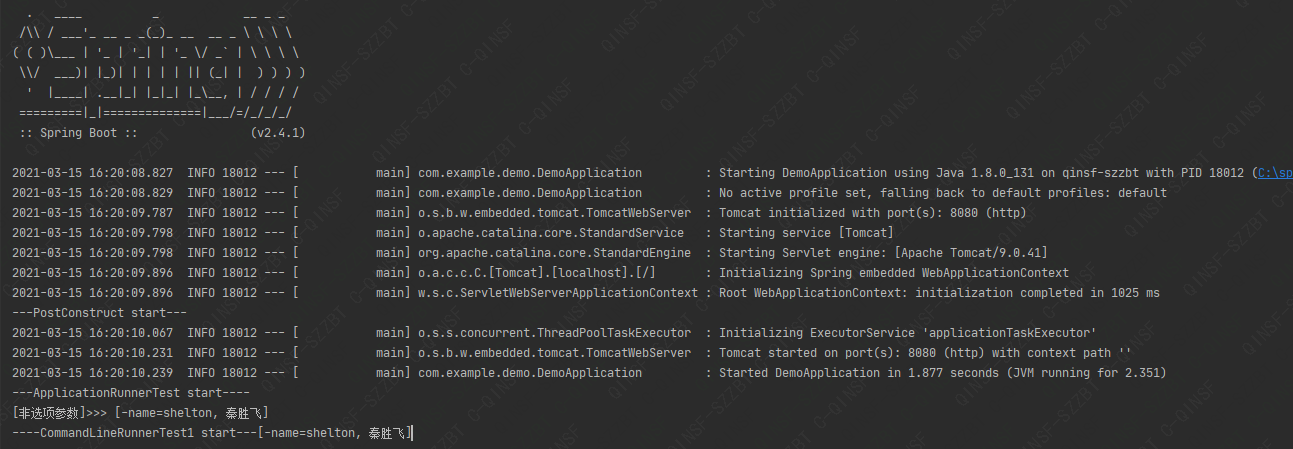
运行代码输出结果 :
5、源码
https://gitee.com/Qinux/command-line-runner-demo.git
微信公众号:一凡码农

欢迎交流
Spring Boot自动运行之 CommandLineRunner、ApplicationRunner和@PostConstruct的更多相关文章
- Spring Boot自动配置与Spring 条件化配置
SpringBoot自动配置 SpringBoot的自动配置是一个运行时(应用程序启动时)的过程,简化开发时间,无需浪费时间讨论具体的Spring配置,只需考虑如何利用SpringBoot的自动配置即 ...
- Spring Boot自动配置原理、实战
Spring Boot自动配置原理 Spring Boot的自动配置注解是@EnableAutoConfiguration, 从上面的@Import的类可以找到下面自动加载自动配置的映射. org.s ...
- Spring Boot自动配置
Spring Boot自动配置原理 Spring Boot的自动配置注解是@EnableAutoConfiguration, 从上面的@Import的类可以找到下面自动加载自动配置的映射. org.s ...
- Spring boot 自动配置自定义配置文件
示例如下: 1. 新建 Maven 项目 properties 2. pom.xml <project xmlns="http://maven.apache.org/POM/4 ...
- Spring Boot 自动装配(二)
目录 目录 前言 1.起源 2.Spring Boot 自动装配实现 2.1.@EnableAutoConfiguration 实现 2.1.1. 获取默认包扫描路径 2.1.2.获取自动装配的组件 ...
- Spring Boot自动配置原理(转)
第3章 Spring Boot自动配置原理 3.1 SpringBoot的核心组件模块 首先,我们来简单统计一下SpringBoot核心工程的源码java文件数量: 我们cd到spring-boot- ...
- Spring Boot自动配置如何工作
通过使用Mongo和MySQL DB实现的示例,深入了解Spring Boot的@Conditional注释世界. 在我以前的文章“为什么选择Spring Boot?”中,我们讨论了如何创建Sprin ...
- Spring Boot 自动配置的原理、核心注解以及利用自动配置实现了自定义 Starter 组件
本章内容 自定义属性快速入门 外化配置 自动配置 自定义创建 Starter 组件 摘录:读书是读完这些文字还要好好用心去想想,写书也一样,做任何事也一样 图 2 第二章目录结构图 第 2 章 Spr ...
- Spring Boot 自动配置之@Conditional的使用
Spring Boot自动配置的"魔法"是如何实现的? 转自-https://sylvanassun.github.io/2018/01/08/2018-01-08-spring_ ...
- 将Spring Boot项目运行在Docker上
将Spring Boot项目运行在Docker上 一.使用Dockerfile构建Docker镜像 1.1Dockerfile常用指令 1.1.1ADD复制文件 1.1.2ARG设置构建参数 1.1. ...
随机推荐
- 全脸 苦思设计了半年的注册中心,与spring cloud 的做法 基本一致
早知道不去自己思考设计了,害死了不少脑细胞,物理层的东西,所有设计者的思路 都基本一致: 没有必要每个微服务都要做一次安全校验,一个物理集群,一个网关: 网关校验token后,把用户信息 保存到 ht ...
- CF1834
A 给出一个由 \(1,-1\) 组成的序列.一次操作可以让一个数变相反. 要多少次操作,才能让整个序列和非负且积等于 \(1\). 大 氵题. B 定义两个数 \(A,B\) 有一个价值:每一位上的 ...
- VMware全版本下载工具
有很多小伙伴想下载适合自己的虚拟机版本,但是官网全是英文看不懂 百度找的还怕带病毒 这里栀煜单独制作了个工具,内置vm9 10 11 12 14 15 16 17版本的虚拟机下载地址,都是官方版 不是 ...
- 【LGR-156-Div.3】洛谷网校 8 月普及组月赛 I & MXOI Round 1 & 飞熊杯 #2(同步赛)
[LGR-156-Div.3]洛谷网校 8 月普及组月赛 I & MXOI Round 1 & 飞熊杯 #2(同步赛) \(T1\) luogu P9581 宝箱 \(100pts\) ...
- Shiro-00-shiro 概览
RBAC RBCA RBCA zh_CN Shiro Apache Shiro 是一个强大且易于使用的 Java 安全框架,负责执行身份验证.授权.加密和会话管理. 通过 Shiro 的易于理解的 A ...
- 使用winhex查看FAT16格式结构
winhex介绍 winhex可以直接查看磁盘二进制信息, 可以比较直观地查看到各种文件系统格式的区别. winhex使用 查看硬盘要管理员权限, 即启动的时候要用邮件管理员权限启动 点击Tools- ...
- Linux下csv转Excel xlsx文件保持身份证号后三位不被省略
在Win下, 可以用Excel 或 WPS Spreadsheet里面的Data->Import, 将csv内容正确导入. 但是在Linux下, WPS的Spreadsheet不提供Data-& ...
- java.lang.System快速指南
1.介绍 在本教程中,我们将快速了解java.lang.System类及其特性和核心功能. 2.IO 系统类是java.lang的一部分,它的一个主要特性是让我们能够访问标准的I/O流. 简单地说,它 ...
- Spring boot集成log4j2
spring boot默认使用的是logback作为日志框架,那如何使用log4j2呢?下面就给大家介绍一下集成步骤: 此处我使用的是spring boot 2.1.2 1.新建一个spring bo ...
- 文件的拓展及文件函数,定义函数及函数参数---day09
1.文件的拓展模式 utf-8 编码格式下,默认一个中文三个字节,一个英文或符号占用一个字节 read() 功能:读取字符的个数(里面的参数代表字符个数) seek() 功能:调整指针的位置(里面的参 ...