
git与gitee码云
1.git分支
在前面我们基本了解Git的使用方法,这一节我们看下GIt重要概念【分支】
背景

例如于超老师在开发一个同性交友网站,刚写到登录功能,代码还没写完,今天先睡觉了,所以就commit提交到本地仓库了。

假如这会另一个程序员张三不知道,还直接对这个代码继续开发,这就乱套了。

讲道理,应该这么玩:

1. 分别给于超老师添加一个分支 yuchao,张三一个分支  zhangsan

2. 这俩人基于自己的分支环境去写代码,进行版本提交,却能互不影响

3. 最后将这2人的代码进行合并即可(需要考虑可能存在冲突,手动解决)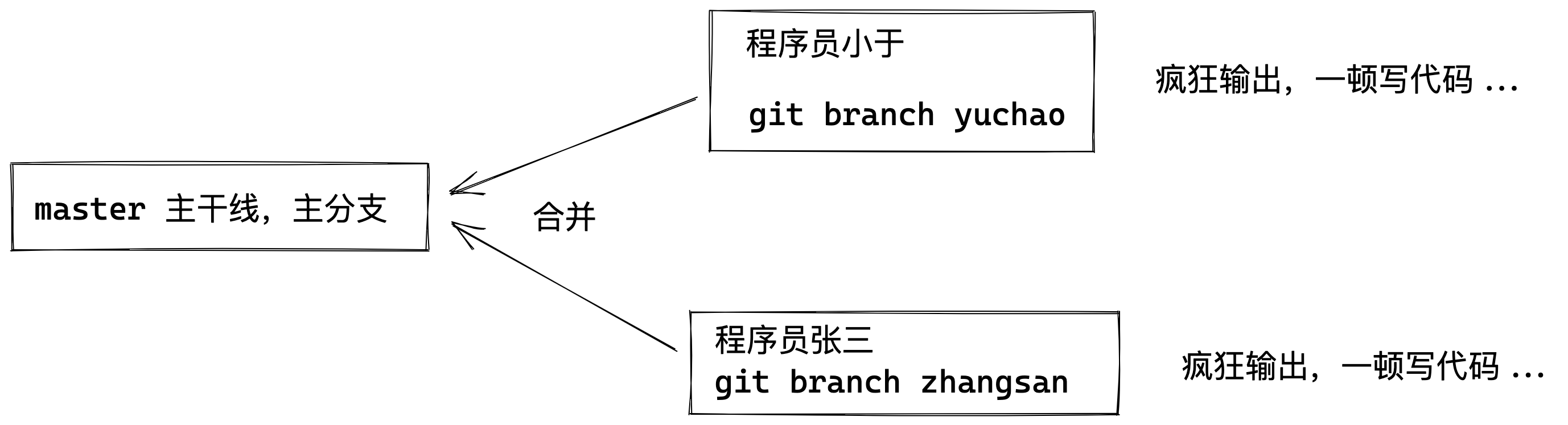
1.1 分支命令实践
默认版本仓库只有一个分支,master
查看当前我们在哪一个分支,有星星就是你在哪

此例的意思就是,我们有一个叫做 master 的分支,并且该分支是当前分支。

当你执行 git init 的时候,默认情况下 Git 就会为你创建 master 分支。

如果我们要手动创建一个分支。执行 git branch (branchname) 即可。

[root@www.yuchaoit.cn /home/yuchao/learn_git]#git branch

* master
创建分支
[root@www.yuchaoit.cn /home/yuchao/learn_git]#git branch yuchao

[root@www.yuchaoit.cn /home/yuchao/learn_git]#

[root@www.yuchaoit.cn /home/yuchao/learn_git]#git branch

* master

  yuchao
切换分支
1.进入到yuchao分支

[root@www.yuchaoit.cn /home/yuchao/learn_git]#git checkout yuchao

Switched to branch 'yuchao'

[root@www.yuchaoit.cn /home/yuchao/learn_git]#git branch

  master

* yuchao
yuchao分支下写代码
这里就是公司里的多个程序员,如何开发同一套系统的流程了。
[root@www.yuchaoit.cn /home/yuchao/learn_git]#ls

hello.sh  laoliu.sh

[root@www.yuchaoit.cn /home/yuchao/learn_git]#

[root@www.yuchaoit.cn /home/yuchao/learn_git]#vim hello_world.sh

[root@www.yuchaoit.cn /home/yuchao/learn_git]#git add .[root@www.yuchaoit.cn /home/yuchao/learn_git]#git commit -m 'yuchao 打印了一句话'

[yuchao 164de7b] yuchao 打印了一句话 1 file changed, 1 insertion(+) create mode 100644 hello_world.sh[root@www.yuchaoit.cn /home/yuchao/learn_git]#[root@www.yuchaoit.cn /home/yuchao/learn_git]#lshello.sh  hello_world.sh  laoliu.sh[root@www.yuchaoit.cn /home/yuchao/learn_git]#git branch  master* yuchao[root@www.yuchaoit.cn /home/yuchao/learn_git]#git status# On branch yuchaonothing to commit, working directory clean
切换到master分支
[root@www.yuchaoit.cn /home/yuchao/learn_git]#git checkout  master

Switched to branch 'master'[root@www.yuchaoit.cn /home/yuchao/learn_git]#lshello.sh  laoliu.sh[root@www.yuchaoit.cn /home/yuchao/learn_git]#git branch

* master

  yuchao
你此时只有切到yuchao分支,才能看到代码文件
[root@www.yuchaoit.cn /home/yuchao/learn_git]#git checkout yuchao

Switched to branch 'yuchao'

[root@www.yuchaoit.cn /home/yuchao/learn_git]#ls

hello.sh  hello_world.sh  laoliu.sh
合并分支
合并yuchao分支的代码到master主干线上来
1.回到master主干分支

[root@www.yuchaoit.cn /home/yuchao/learn_git]#git checkout master

Switched to branch 'master'

[root@www.yuchaoit.cn /home/yuchao/learn_git]#

[root@www.yuchaoit.cn /home/yuchao/learn_git]#git merge yuchao

Updating 049a22f..164de7b

Fast-forward

 hello_world.sh | 1 +

 1 file changed, 1 insertion(+)

 create mode 100644 hello_world.sh

[root@www.yuchaoit.cn /home/yuchao/learn_git]#ls

hello.sh  hello_world.sh  laoliu.sh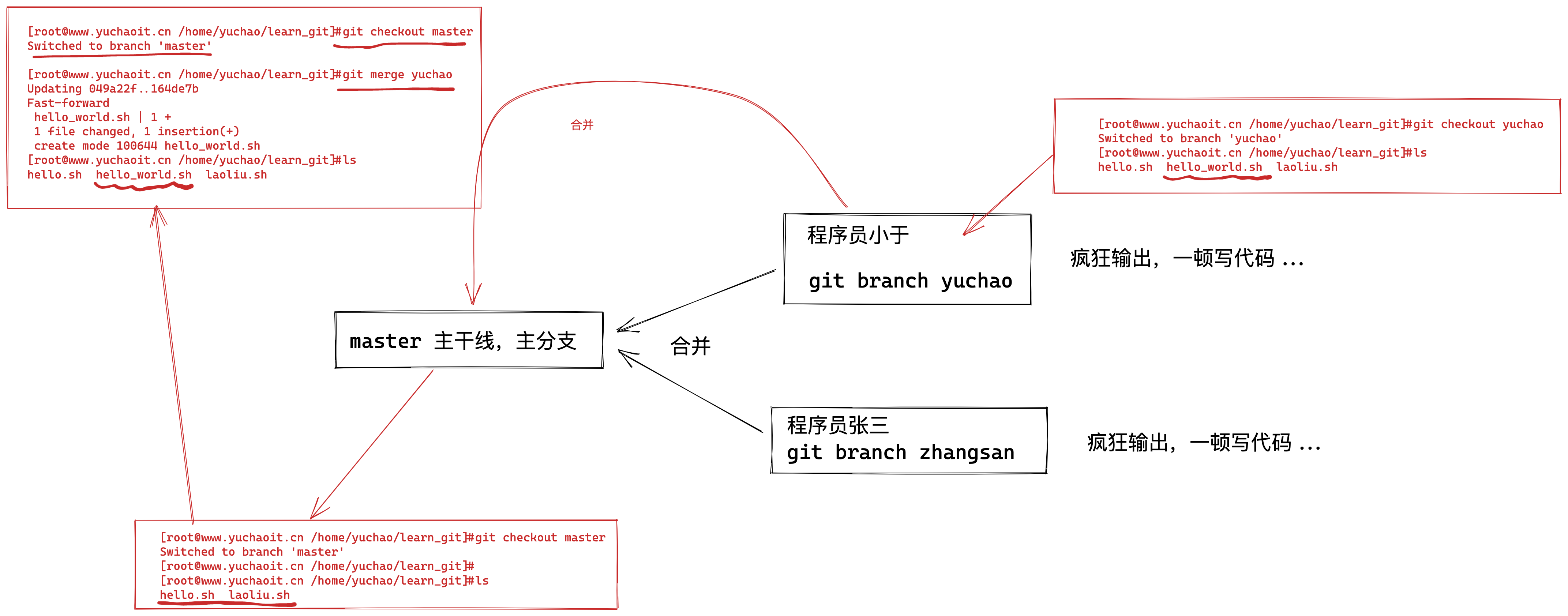
分支冲突
这里是新添加了一个文件,合并数据还好,如果是同一个文件,且同一行数据的修改,岂不是GG?
1.再创建一个分支,zhangsan,搞破坏,且提交代码到版本仓库
创建且切换分支

[root@www.yuchaoit.cn /home/yuchao/learn_git]#git checkout -b zhangsan

Switched to a new branch 'zhangsan'

[root@www.yuchaoit.cn /home/yuchao/learn_git]#

[root@www.yuchaoit.cn /home/yuchao/learn_git]#

[root@www.yuchaoit.cn /home/yuchao/learn_git]#

[root@www.yuchaoit.cn /home/yuchao/learn_git]#echo "我是zhangsan,我就是来搞破坏的,你想咋地吧" >> laoliu.sh

[root@www.yuchaoit.cn /home/yuchao/learn_git]#ls

hello.sh  hello_world.sh  laoliu.sh

[root@www.yuchaoit.cn /home/yuchao/learn_git]#cat laoliu.sh

加油啊兄弟们,胜利的曙光就要看到了!!

好的超哥,我一定相信自己,加油努力,给自己一个满意的结果!!

兄弟们,git工具,一般是开发人员用的多,我们运维一般也就是上传,下载代码而已了。

我是zhangsan,我就是来搞破坏的,你想咋地吧

[root@www.yuchaoit.cn /home/yuchao/learn_git]#git commit -m 'zhangsan 搞破坏'

[zhangsan 8396a73] zhangsan 搞破坏

1 file changed, 1 insertion(+)

[root@www.yuchaoit.cn /home/yuchao/learn_git]#git log --oneline

8396a73 zhangsan 搞破坏

164de7b yuchao 打印了一句话

049a22f v1 hello.sh

e9547df v3 就玩三次吧

9a3bd4d v2 添加了第二行数据

fb118ba first commit with line 1
2.切换回master分支,别合并,先修改同一个文件,注意提交到版本仓库
[root@www.yuchaoit.cn /home/yuchao/learn_git]#git checkout master

Switched to branch 'master'

[root@www.yuchaoit.cn /home/yuchao/learn_git]#

[root@www.yuchaoit.cn /home/yuchao/learn_git]#vim laoliu.sh

[root@www.yuchaoit.cn /home/yuchao/learn_git]#

[root@www.yuchaoit.cn /home/yuchao/learn_git]#

[root@www.yuchaoit.cn /home/yuchao/learn_git]#cat laoliu.sh  -n

     1    加油啊兄弟们,胜利的曙光就要看到了!!

     2    好的超哥,我一定相信自己,加油努力,给自己一个满意的结果!!

     3

     4    兄弟们,git工具,一般是开发人员用的多,我们运维一般也就是上传,下载代码而已了。

     5    兄弟们,我是master,我在第5行写了一句话

[root@www.yuchaoit.cn /home/yuchao/learn_git]#

[root@www.yuchaoit.cn /home/yuchao/learn_git]#git add .

[root@www.yuchaoit.cn /home/yuchao/learn_git]#

[root@www.yuchaoit.cn /home/yuchao/learn_git]#

[root@www.yuchaoit.cn /home/yuchao/learn_git]#git commit -m 'master 也修改了laoliu.sh'

[master 5be8816] master 也修改了laoliu.sh

 1 file changed, 1 insertion(+)

[root@www.yuchaoit.cn /home/yuchao/learn_git]#

[root@www.yuchaoit.cn /home/yuchao/learn_git]#git status

# On branch master

nothing to commit, working directory clean

[root@www.yuchaoit.cn /home/yuchao/learn_git]#git log --oneline -4

5be8816 master 也修改了laoliu.sh

164de7b yuchao 打印了一句话

049a22f v1 hello.sh

e9547df v3 就玩三次吧
3.试试这回合并代码呢?master和zhangsan修改了同一行数据
[root@www.yuchaoit.cn /home/yuchao/learn_git]#

[root@www.yuchaoit.cn /home/yuchao/learn_git]#git merge zhangsan

Auto-merging laoliu.sh

CONFLICT (content): Merge conflict in laoliu.sh

Automatic merge failed; fix conflicts and then commit the result.

[root@www.yuchaoit.cn /home/yuchao/learn_git]#

[root@www.yuchaoit.cn /home/yuchao/learn_git]#

[root@www.yuchaoit.cn /home/yuchao/learn_git]#git status

# On branch master

# You have unmerged paths.

#   (fix conflicts and run "git commit")

#

# Unmerged paths:

#   (use "git add <file>..." to mark resolution)

#

#    both modified:      laoliu.sh

#

no changes added to commit (use "git add" and/or "git commit -a")

[root@www.yuchaoit.cn /home/yuchao/learn_git]#

[root@www.yuchaoit.cn /home/yuchao/learn_git]#

[root@www.yuchaoit.cn /home/yuchao/learn_git]#cat laoliu.sh

加油啊兄弟们,胜利的曙光就要看到了!!

好的超哥,我一定相信自己,加油努力,给自己一个满意的结果!!

兄弟们,git工具,一般是开发人员用的多,我们运维一般也就是上传,下载代码而已了。

<<<<<<< HEAD

兄弟们,我是master,我在第5行写了一句话

=======

我是zhangsan,我就是来搞破坏的,你想咋地吧

>>>>>>> zhangsan
很明显,这里报错了,出现了冲突
4.手工解决冲突即可
这时候你作为技术老大,决定哪一行有用,哪一行没用,还是都保留。

git使用`<<<<<<<<<,=========,>>>>>>>>`符号分割冲突的内容,手动删除这些符号,并修改成你想要的内容

修改结果如下

[root@www.yuchaoit.cn /home/yuchao/learn_git]#cat laoliu.sh

加油啊兄弟们,胜利的曙光就要看到了!!

好的超哥,我一定相信自己,加油努力,给自己一个满意的结果!!

兄弟们,git工具,一般是开发人员用的多,我们运维一般也就是上传,下载代码而已了。

兄弟们,我是master,我在第5行写了一句话

我是zhangsan,我就是来搞破坏的,你想咋地吧

[root@www.yuchaoit.cn /home/yuchao/learn_git]#

提交新版本即可

[root@www.yuchaoit.cn /home/yuchao/learn_git]#git commit -m 'master fix both modified laoliu.sh'

[master 07f7d81] master fix both modified laoliu.sh

[root@www.yuchaoit.cn /home/yuchao/learn_git]#git status

# On branch master

nothing to commit, working directory clean

[root@www.yuchaoit.cn /home/yuchao/learn_git]#

[root@www.yuchaoit.cn /home/yuchao/learn_git]#

[root@www.yuchaoit.cn /home/yuchao/learn_git]#git log --oneline -3

07f7d81 master fix both modified laoliu.sh

5be8816 master 也修改了laoliu.sh

8396a73 zhangsan 搞破坏
1.2 删除分支
注意不能删除当前分支

删除其他即可

[root@www.yuchaoit.cn /home/yuchao/learn_git]#git checkout master

Already on 'master'

[root@www.yuchaoit.cn /home/yuchao/learn_git]#

[root@www.yuchaoit.cn /home/yuchao/learn_git]#git branch

* master

  yuchao

  zhangsan

[root@www.yuchaoit.cn /home/yuchao/learn_git]#

[root@www.yuchaoit.cn /home/yuchao/learn_git]#

[root@www.yuchaoit.cn /home/yuchao/learn_git]#git branch -d yuchao zhangsan

Deleted branch yuchao (was 164de7b).

Deleted branch zhangsan (was 8396a73).

[root@www.yuchaoit.cn /home/yuchao/learn_git]#

[root@www.yuchaoit.cn /home/yuchao/learn_git]#git branch

* master
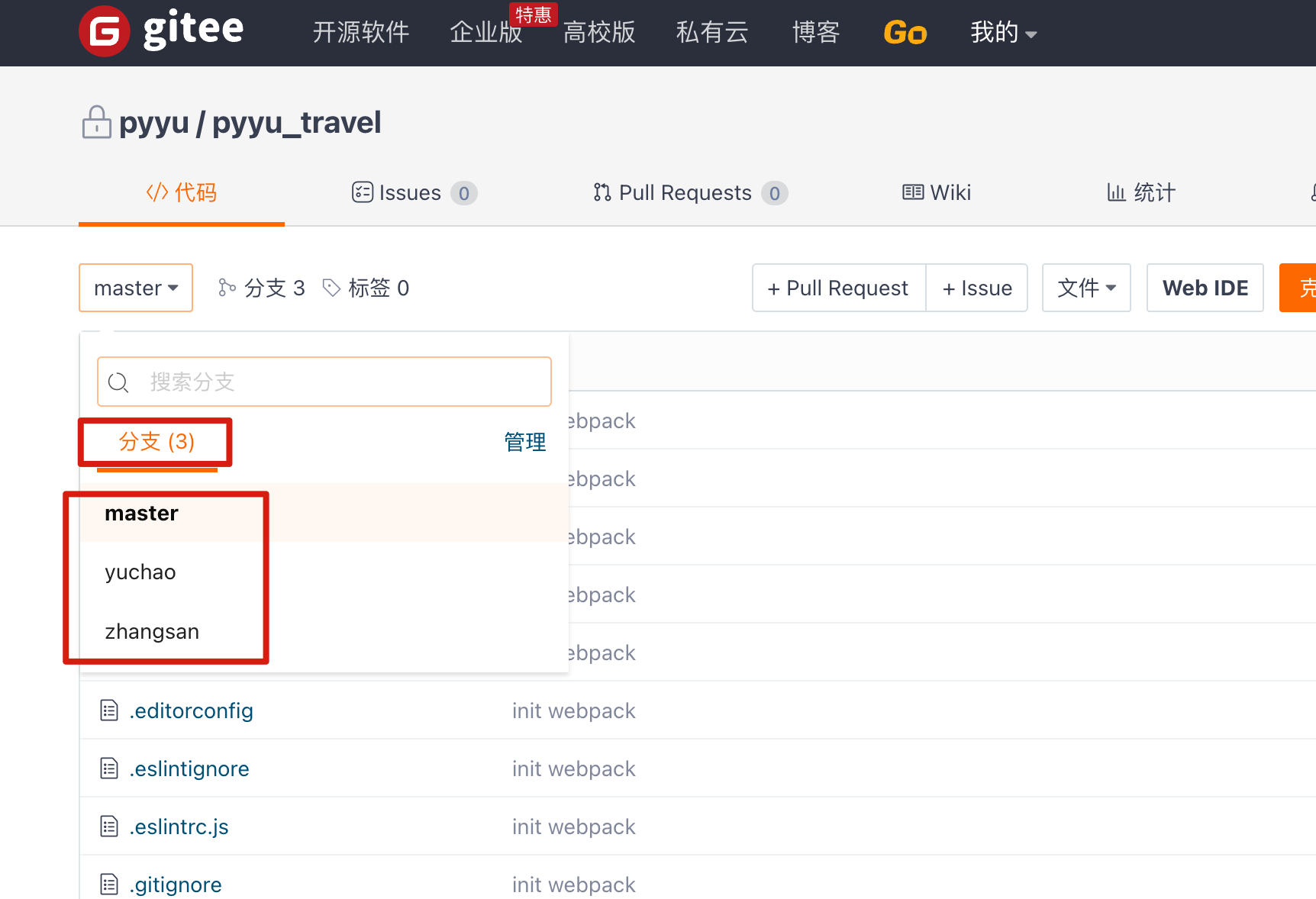
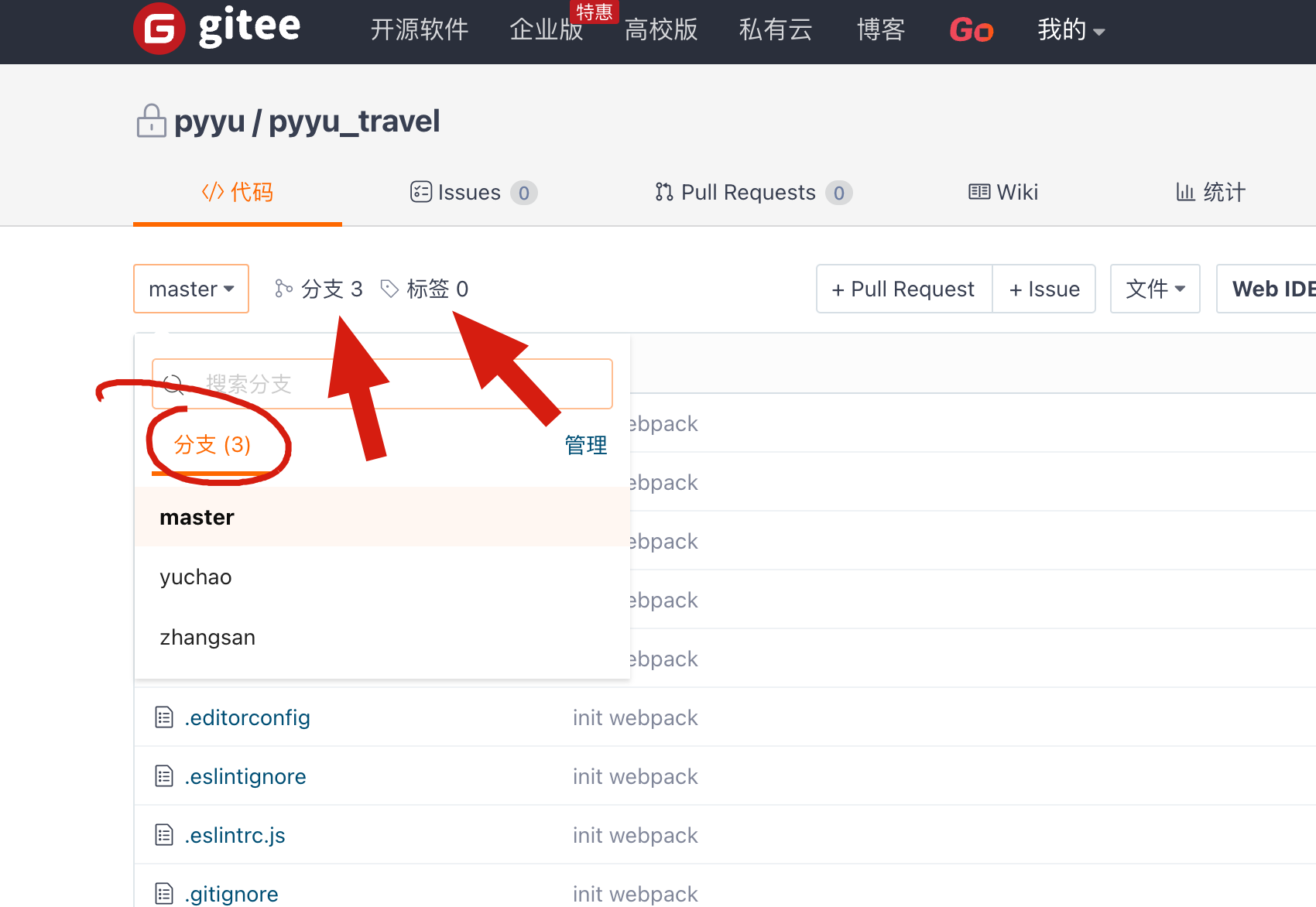
1.3 码云的分支
2.git标签
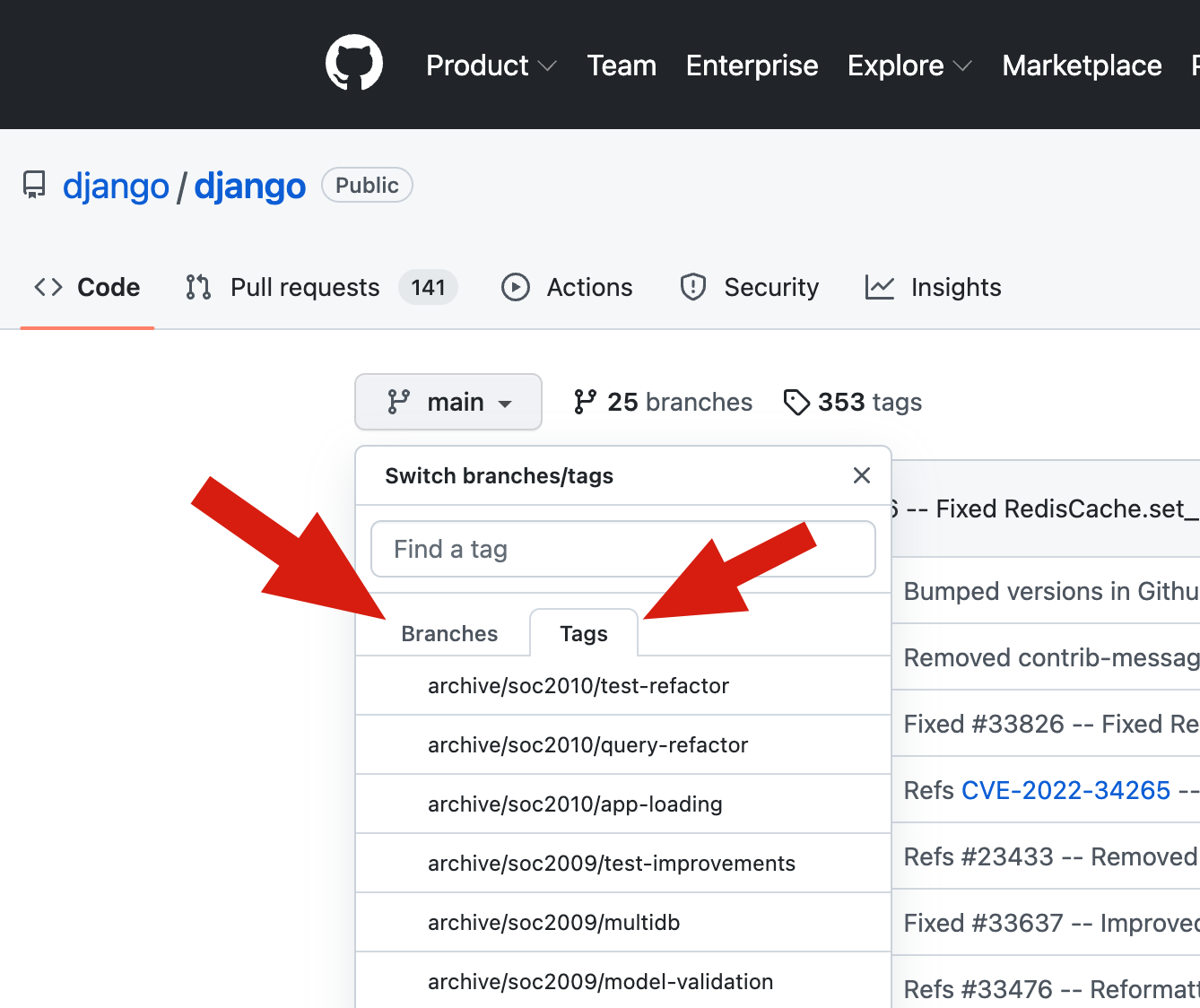
Git仓库内的数据发生变化时,我们经常会打上一个类似于软件版本的标签tag,这样通过标签就可以把版本库中的某个版本给记录下来,便于以后我们可以将特定的数据取出来。
2.1 为啥用git标签功能
git不是已经有commit了吗,可以附加提交信息,为什么还要tag呢?
开发小王:请吧上周一发布的版本打包发布,commit_id是3f6cccf0708525b58fe191c80325b73a54adee99
运维小于:你这什么乱七八糟的数字,,,太难找了,请你换个方法
开发小王换了个方式:请吧上周一发布的版本打包,版本号是v1.2,按照tag v1.2,查找commit 记录就行了!
所以tag就是一个容易记住的名字,和某个commit记录绑定在一起。
官网

https://git-scm.com/book/zh/v2/Git-%E5%9F%BA%E7%A1%80-%E6%89%93%E6%A0%87%E7%AD%BE

因此tag和branch一般会配合使用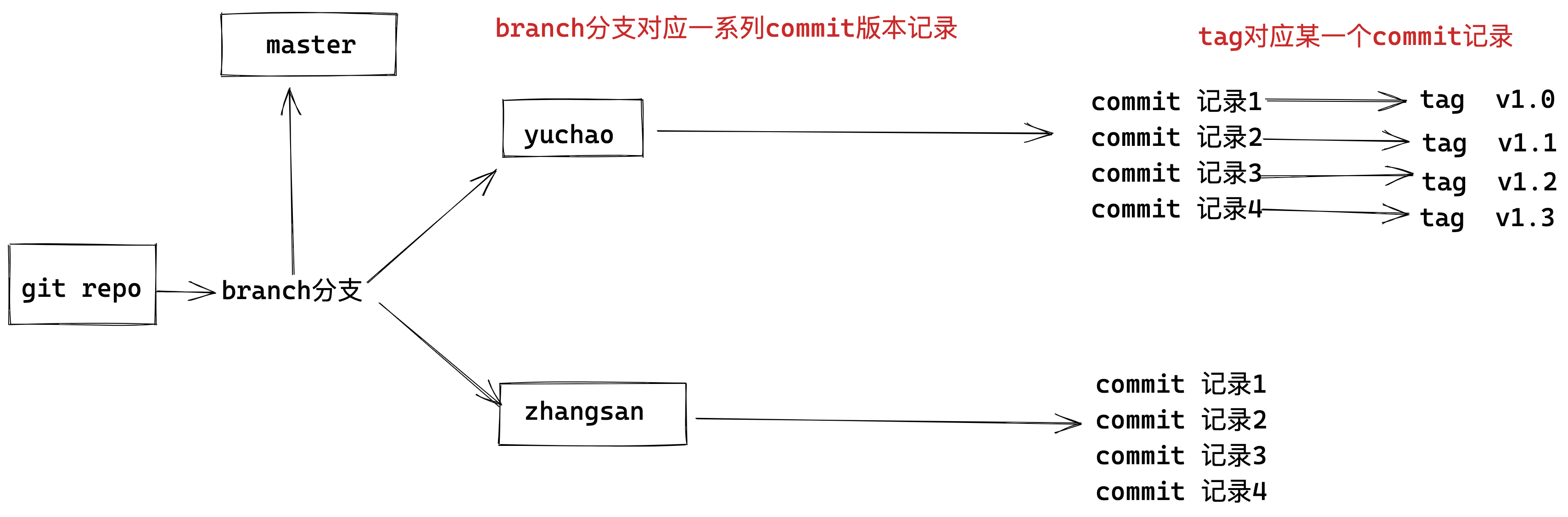
2.2 tag标签实践
对当前提交的代码创建标签,-a标签名称,-m标签描述。
1. 对当前以存在的commit 进行打标签

[root@www.yuchaoit.cn /home/yuchao/learn_git]#git log --oneline

07f7d81 master fix both modified laoliu.sh

5be8816 master 也修改了laoliu.sh

8396a73 zhangsan 搞破坏

164de7b yuchao 打印了一句话

049a22f v1 hello.sh

e9547df v3 就玩三次吧

9a3bd4d v2 添加了第二行数据

fb118ba first commit with line 1

2. 可以给当前最新的一个commit记录打标签

[root@www.yuchaoit.cn /home/yuchao/learn_git]#git tag -a 'v1.0' -m '修复了支付功能'

[root@www.yuchaoit.cn /home/yuchao/learn_git]#

[root@www.yuchaoit.cn /home/yuchao/learn_git]#

3.查看tag列表

[root@www.yuchaoit.cn /home/yuchao/learn_git]#git tag

v1.0

4.查看当前tag对应哪个commit

[root@www.yuchaoit.cn /home/yuchao/learn_git]#git show v1.0

tag v1.0

Tagger: pyyu <yc_uuu@163.com>

Date:   Thu Jul 7 17:48:30 2022 +0800

修复了支付功能

commit 07f7d816bf052773c3f2ead1f3cc91299ede9e34

Merge: 5be8816 8396a73

Author: pyyu <yc_uuu@163.com>

Date:   Wed Jul 6 20:24:08 2022 +0800

    master fix both modified laoliu.sh

diff --cc laoliu.sh

index ca3bfc4,c0b43f0..77e26ae

--- a/laoliu.sh

+++ b/laoliu.sh

@@@ -2,4 -2,4 +2,5 @@@

  好的超哥,我一定相信自己,加油努力,给自己一个满意的结果!!

  兄弟们,git工具,一般是开发人员用的多,我们运维一般也就是上传,下载代码而已了。

 +兄弟们,我是master,我在第5行写了一句话

+ 我是zhangsan,我就是来搞破坏的,你想咋地吧

[root@www.yuchaoit.cn /home/yuchao/learn_git]#

[root@www.yuchaoit.cn /home/yuchao/learn_git]#git log --oneline

07f7d81 master fix both modified laoliu.sh

5be8816 master 也修改了laoliu.sh

8396a73 zhangsan 搞破坏

164de7b yuchao 打印了一句话

049a22f v1 hello.sh

e9547df v3 就玩三次吧

9a3bd4d v2 添加了第二行数据

fb118ba first commit with line 1

5.查看标签列表,有哪些标签

[root@www.yuchaoit.cn /home/yuchao/learn_git]#git tag -l

v1.0

6.给指定的commit记录,打上标签

[root@www.yuchaoit.cn /home/yuchao/learn_git]#git tag -a 'v4' 8396a73  -m '张三你想干什么?'

7.查看tag且显示注释

[root@www.yuchaoit.cn /home/yuchao/learn_git]#git tag -l -n

v1.0            修复了支付功能

v4              张三你想干什么?

8.删除tag

[root@www.yuchaoit.cn /home/yuchao/learn_git]#git tag -d v4

Deleted tag 'v4' (was 60cade7)

[root@www.yuchaoit.cn /home/yuchao/learn_git]#git tag -d v1.0

Deleted tag 'v1.0' (was 2da278c)

[root@www.yuchaoit.cn /home/yuchao/learn_git]#

[root@www.yuchaoit.cn /home/yuchao/learn_git]#git tag -l
3.git远程仓库
3.1 github

由于一堵墙,你可能是访问不了的,或者太慢
3.2 码云Gitee
git是一个分布式版本控制系统,同一个git仓库可以分布在不同的机器上,但是开发团队必须保证在同一个网络中,且必须有一个项目的原始版本,通常的办法就是让一台电脑充当服务器的角色,每天24小时开机,其他每个人都可以在这台"服务器"仓库里克隆一份代码到自己的电脑上。
并且也可以把各自的代码提交到代码仓库里,也能从代码仓库拉取别人的提交。
这样的代码仓库服务器,我们可以自由的搭建,也可以选择使用免费的托管平台。
Git代码托管平台,首先推荐的是Github,世界范围内的开发者都在使用Github托管代码,可以找到大量优秀的开源项目,缺点就是访问可能会卡一点。
其次选择的就是Gitee,国内的代码托管平台,以及自建Gitlab服务器。
Gitee 提供免费的 Git 仓库,还集成了代码质量检测、项目演示等功能。
对于团队协作开发,Gitee 还提供了项目管理、代码托管、文档管理的服务。
官网地址
https://gitee.com/
3.3 码云创建空仓库
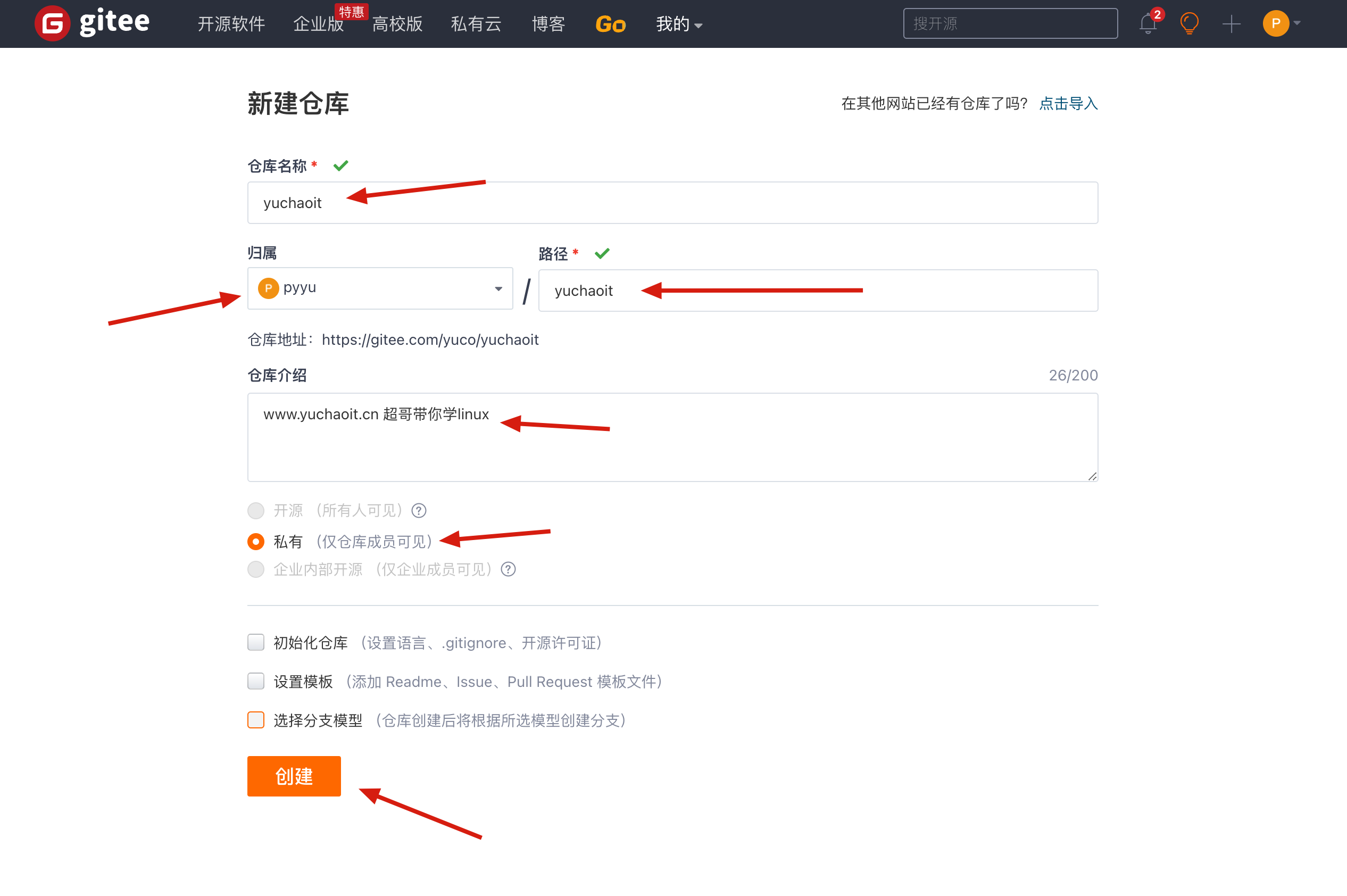
创建完毕空仓库后,页面出现如下仓库使用方式,我们可以选择HTTPS和SSH两种协议和该仓库通信。
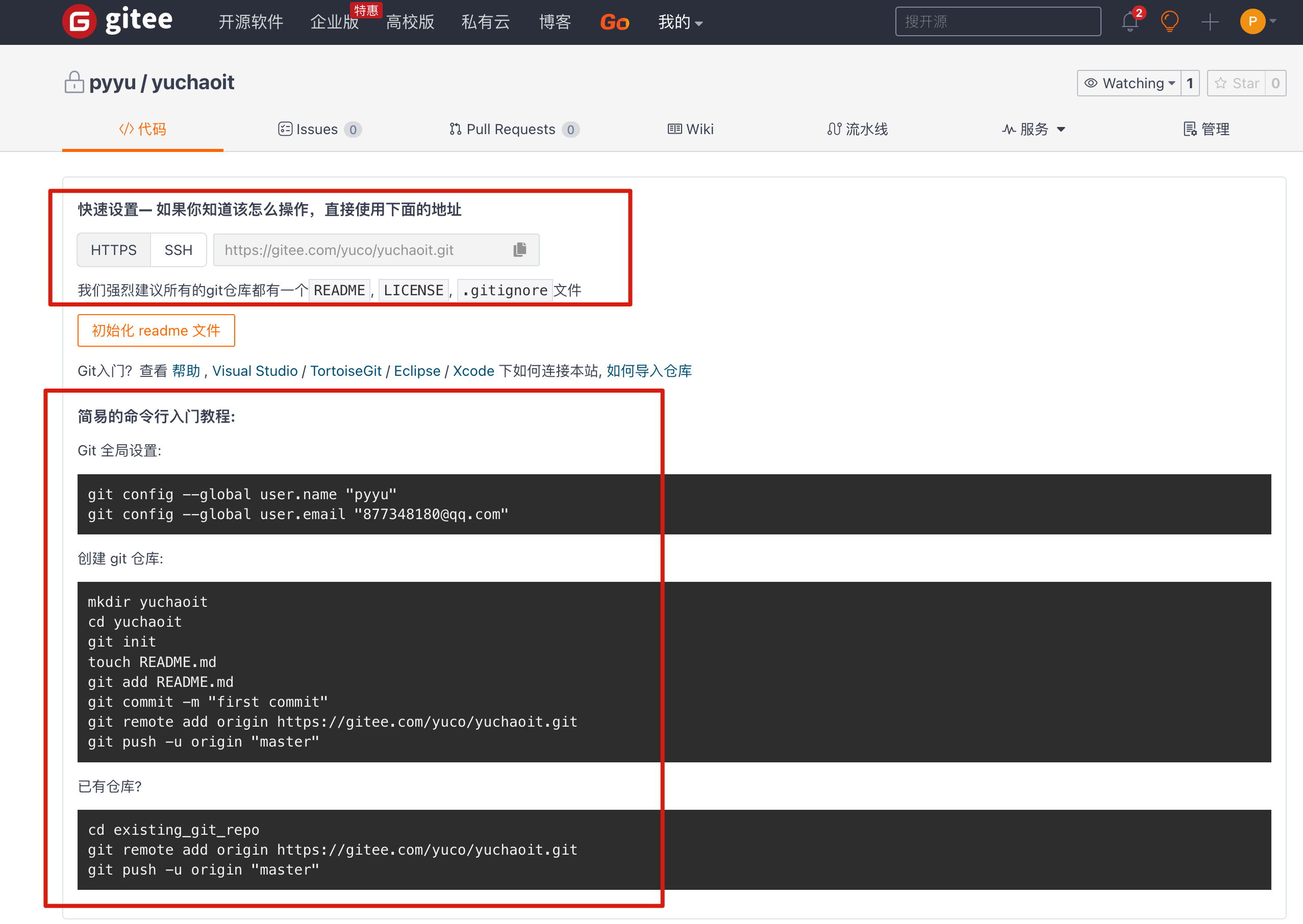
到这里,我们仓库就已经创建好了,接着就是要将本地客户端和服务端连接起来,存在于两种情况
- 本地已经有一个git仓库了
- 本地还没有git仓库
3.4 配置你的笔记本和码云仓库关联
以有了local repo(https需要输入账密)
采用https协议
# 进入你自己的本地仓库,也就是有 .git的目录

[root@www.yuchaoit.cn /home/yuchao/learn_git]#git remote add origin https://gitee.com/yuco/yuchaoit.git

# 推送代码

[root@www.yuchaoit.cn /home/yuchao/learn_git]#git push -u origin "master"

Username for 'https://gitee.com': 877348180@qq.com

Password for 'https://877348180@qq.com@gitee.com':

Counting objects: 24, done.

Compressing objects: 100% (20/20), done.

Writing objects: 100% (24/24), 2.23 KiB | 0 bytes/s, done.

Total 24 (delta 8), reused 0 (delta 0)

remote: Powered by GITEE.COM [GNK-6.3]

To https://gitee.com/yuco/yuchaoit.git

 * [new branch]      master -> master

Branch master set up to track remote branch master from origin.

3. 查看远程仓库的信息

[root@www.yuchaoit.cn /home/yuchao/learn_git]#git remote -v

origin    https://gitee.com/yuco/yuchaoit.git (fetch)

origin    https://gitee.com/yuco/yuchaoit.git (push)

4.删除远程仓库的地址信息,也就是断开你local repo 和 码云repo的关系了

[root@www.yuchaoit.cn /home/yuchao/learn_git]#git remote remove origin

[root@www.yuchaoit.cn /home/yuchao/learn_git]#

[root@www.yuchaoit.cn /home/yuchao/learn_git]#git remote -v

5.重新设置即可

git remote add origin https://gitee.com/yuco/yuchaoit.git
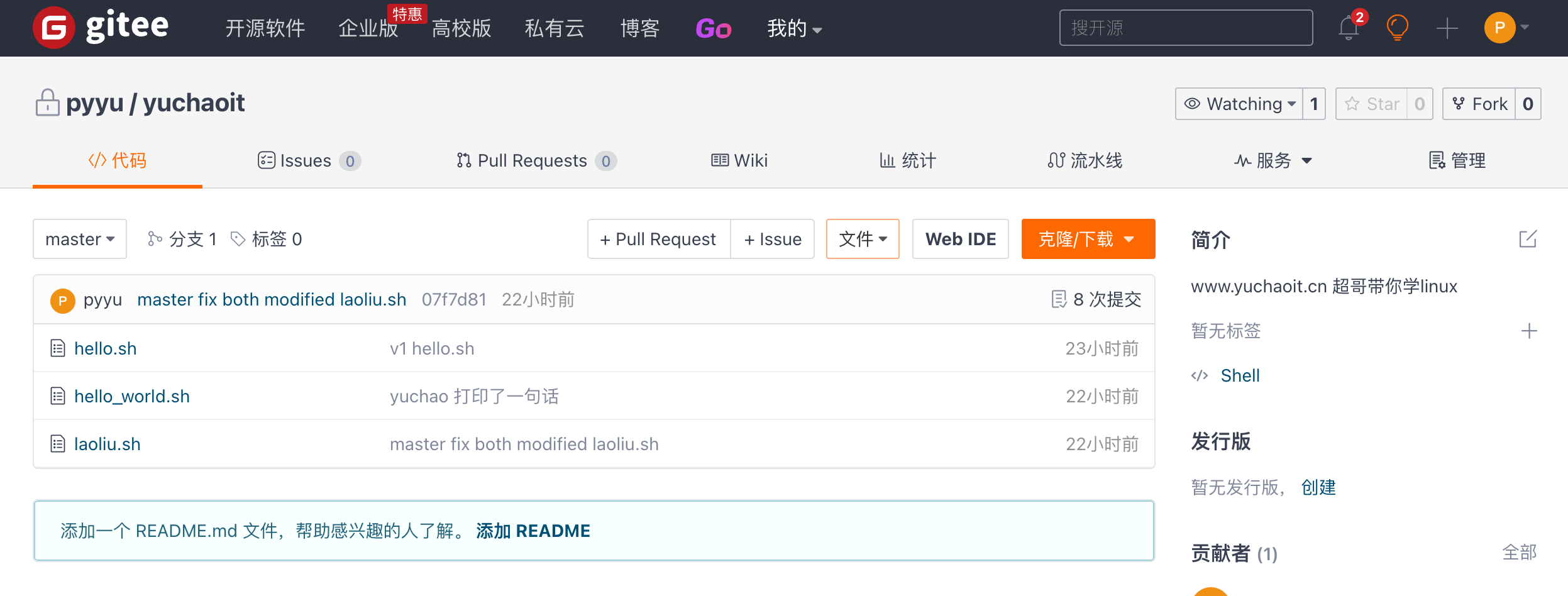
查看你推送上去的数据
3.5 配置ssh免密推送代码
可以直接访问地址

https://gitee.com/profile/sshkeys
我们要在客户端生成key,结合gitee实现无密码登录,在linux和windows均可以使用ssh-keygen命令生成,需要注意的是在windows下只能生成rsa加密方式的key。
ssh-keygen 一路回车到底即可

[root@www.yuchaoit.cn /home/yuchao/learn_git]#cat ~/.ssh/id_rsa.pub
修改远程仓库的别名,改为git协议
[root@www.yuchaoit.cn /home/yuchao/learn_git]#git remote -v

origin    https://gitee.com/yuco/yuchaoit.git (fetch)

origin    https://gitee.com/yuco/yuchaoit.git (push)

修改orgin别名的地址

git@gitee.com:yuco/yuchaoit.git

[root@www.yuchaoit.cn /home/yuchao/learn_git]#git remote  set-url origin git@gitee.com:yuco/yuchaoit.git

[root@www.yuchaoit.cn /home/yuchao/learn_git]#

[root@www.yuchaoit.cn /home/yuchao/learn_git]#git remote -v

origin    git@gitee.com:yuco/yuchaoit.git (fetch)

origin    git@gitee.com:yuco/yuchaoit.git (push)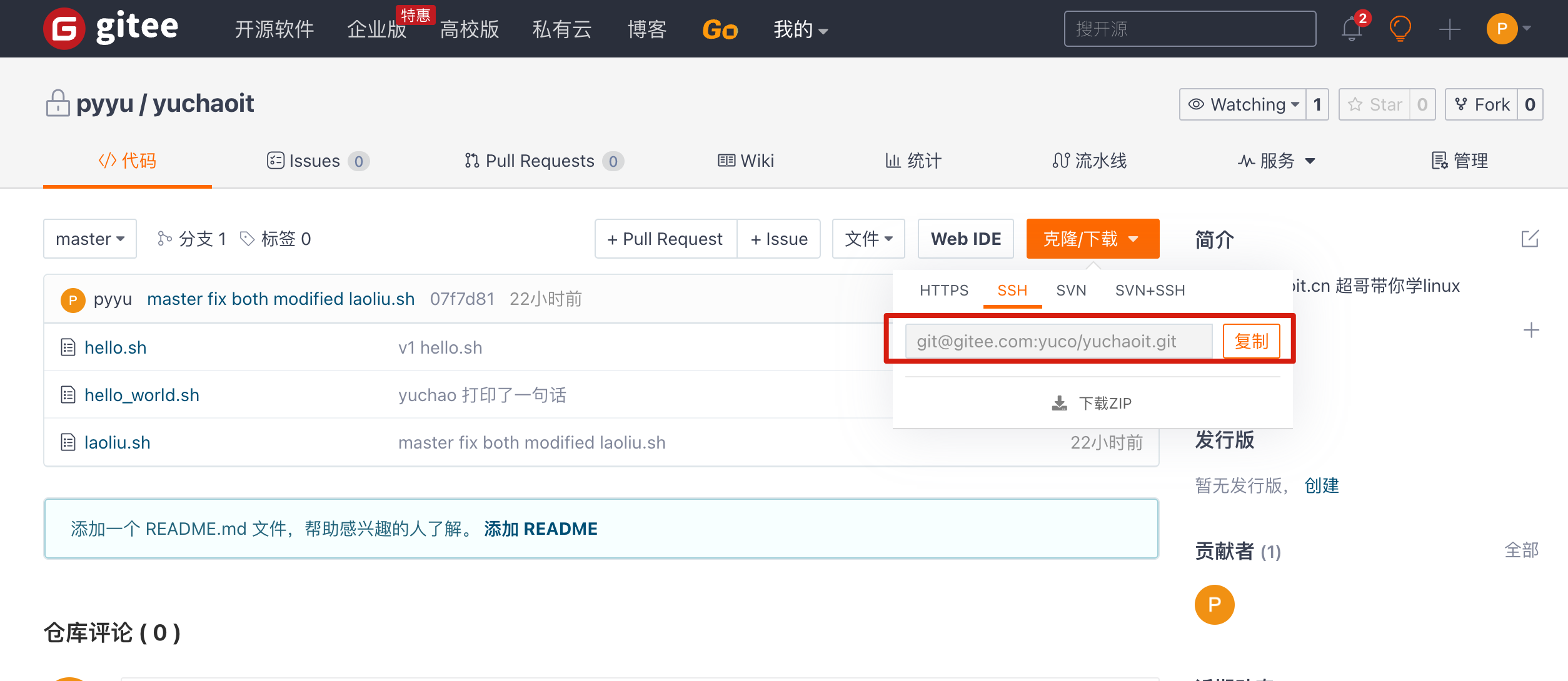
测试加点代码,加上tag,然后再推送试试
[root@www.yuchaoit.cn /home/yuchao/learn_git]#git status

# On branch master

nothing to commit, working directory clean

[root@www.yuchaoit.cn /home/yuchao/learn_git]#

[root@www.yuchaoit.cn /home/yuchao/learn_git]#ll

total 12

-rw-r--r-- 1 root root  33 Jul  6 20:07 hello.sh

-rw-r--r-- 1 root root  53 Jul  6 20:14 hello_world.sh

-rw-r--r-- 1 root root 384 Jul  6 20:23 laoliu.sh

[root@www.yuchaoit.cn /home/yuchao/learn_git]#

[root@www.yuchaoit.cn /home/yuchao/learn_git]#echo "你看这个灯,它又大又亮" > 吴亦凡^C

[root@www.yuchaoit.cn /home/yuchao/learn_git]#

[root@www.yuchaoit.cn /home/yuchao/learn_git]#

[root@www.yuchaoit.cn /home/yuchao/learn_git]#echo '鸡你太美 嘿嘿嘿' > caixukun.log

[root@www.yuchaoit.cn /home/yuchao/learn_git]#git add .

[root@www.yuchaoit.cn /home/yuchao/learn_git]#

[root@www.yuchaoit.cn /home/yuchao/learn_git]#git commit -m '两年半练习生来也'

[master 37e1511] 两年半练习生来也

 1 file changed, 1 insertion(+)

 create mode 100644 caixukun.log

 [root@www.yuchaoit.cn /home/yuchao/learn_git]#git tag -a 'v1' -m '第一版菜徐琨'

 推送数据

 [root@www.yuchaoit.cn /home/yuchao/learn_git]#git push origin master
3.6 克隆远程仓库
除了我们可以在本地创建目录,写代码,通过git管理版本,最后提交到远程仓库外,还有一种玩法。
也就是直接下载、克隆远程仓库中的源代码。
一种是直接克隆公开的源代码。

还有一种克隆私有的源代码,就需要账号密码验证了。
克隆公开仓库
克隆堡垒机jumpserver的源码

[root@www.yuchaoit.cn /home/yuchao]#pwd

/home/yuchao

[root@www.yuchaoit.cn /home/yuchao]#ls

learn_git

[root@www.yuchaoit.cn /home/yuchao]#git clone git@gitee.com:fit2cloud-feizhiyun/Jumpserver.git

Cloning into 'Jumpserver'...

remote: Enumerating objects: 73544, done.

remote: Counting objects: 100% (7202/7202), done.

remote: Compressing objects: 100% (2866/2866), done.

remote: Total 73544 (delta 4976), reused 6070 (delta 3979), pack-reused 66342

Receiving objects: 100% (73544/73544), 63.46 MiB | 13.86 MiB/s, done.

Resolving deltas: 100% (51447/51447), done.

[root@www.yuchaoit.cn /home/yuchao]#ls

Jumpserver  learn_git

[root@www.yuchaoit.cn /home/yuchao/Jumpserver]#git log --oneline -3

8ab4f6f docs: 添加 pr 提示说明

5a37540 docs: 修改贡献提示

1c1d507 Create CONTRIBUTING.md

[root@www.yuchaoit.cn /home/yuchao/Jumpserver]#git remote -v

origin    git@gitee.com:fit2cloud-feizhiyun/Jumpserver.git (fetch)

origin    git@gitee.com:fit2cloud-feizhiyun/Jumpserver.git (push)
克隆自己公司的代码
1.运维小王克隆代码到本地

git clone git@gitee.com:yuco/yuchaoit.git

[root@www.yuchaoit.cn /home/xiaowang01]#git clone git@gitee.com:yuco/yuchaoit.git

Cloning into 'yuchaoit'...

remote: Enumerating objects: 27, done.

remote: Counting objects: 100% (27/27), done.

remote: Compressing objects: 100% (22/22), done.

Receiving objects: 100% (27/27), done.

remote: Total 27 (delta 9), reused 0 (delta 0), pack-reused 0

Resolving deltas: 100% (9/9), done.

[root@www.yuchaoit.cn /home/xiaowang01]#ls

yuchaoit

[root@www.yuchaoit.cn /home/xiaowang01]#cd yuchaoit/

[root@www.yuchaoit.cn /home/xiaowang01/yuchaoit]#ls

caixukun.log  hello.sh  hello_world.sh  laoliu.sh

2. 创建分支,写代码

[root@www.yuchaoit.cn /home/xiaowang01/yuchaoit]#git checkout -b xiaowang

Switched to a new branch 'xiaowang'

[root@www.yuchaoit.cn /home/xiaowang01/yuchaoit]#

[root@www.yuchaoit.cn /home/xiaowang01/yuchaoit]#echo "我是小王,我写了点shell代码" > xiaowang.sh

[root@www.yuchaoit.cn /home/xiaowang01/yuchaoit]#

[root@www.yuchaoit.cn /home/xiaowang01/yuchaoit]#git add .

[root@www.yuchaoit.cn /home/xiaowang01/yuchaoit]#

[root@www.yuchaoit.cn /home/xiaowang01/yuchaoit]#git commit -m '小王写了个脚本'

[xiaowang a801b50] 小王写了个脚本

 1 file changed, 1 insertion(+)

 create mode 100644 xiaowang.sh

 3.推送到代码仓库(xiaowang分支)

 [root@www.yuchaoit.cn /home/xiaowang01/yuchaoit]#git push -u origin xiaowang

Counting objects: 4, done.

Compressing objects: 100% (2/2), done.

Writing objects: 100% (3/3), 334 bytes | 0 bytes/s, done.

Total 3 (delta 1), reused 0 (delta 0)

remote: Powered by GITEE.COM [GNK-6.3]

remote: Create a pull request for 'xiaowang' on Gitee by visiting:

remote:     https://gitee.com/yuco/yuchaoit/pull/new/yuco:xiaowang...yuco:master

To git@gitee.com:yuco/yuchaoit.git

 * [new branch]      xiaowang -> xiaowang

Branch xiaowang set up to track remote branch xiaowang from origin.
合并分支
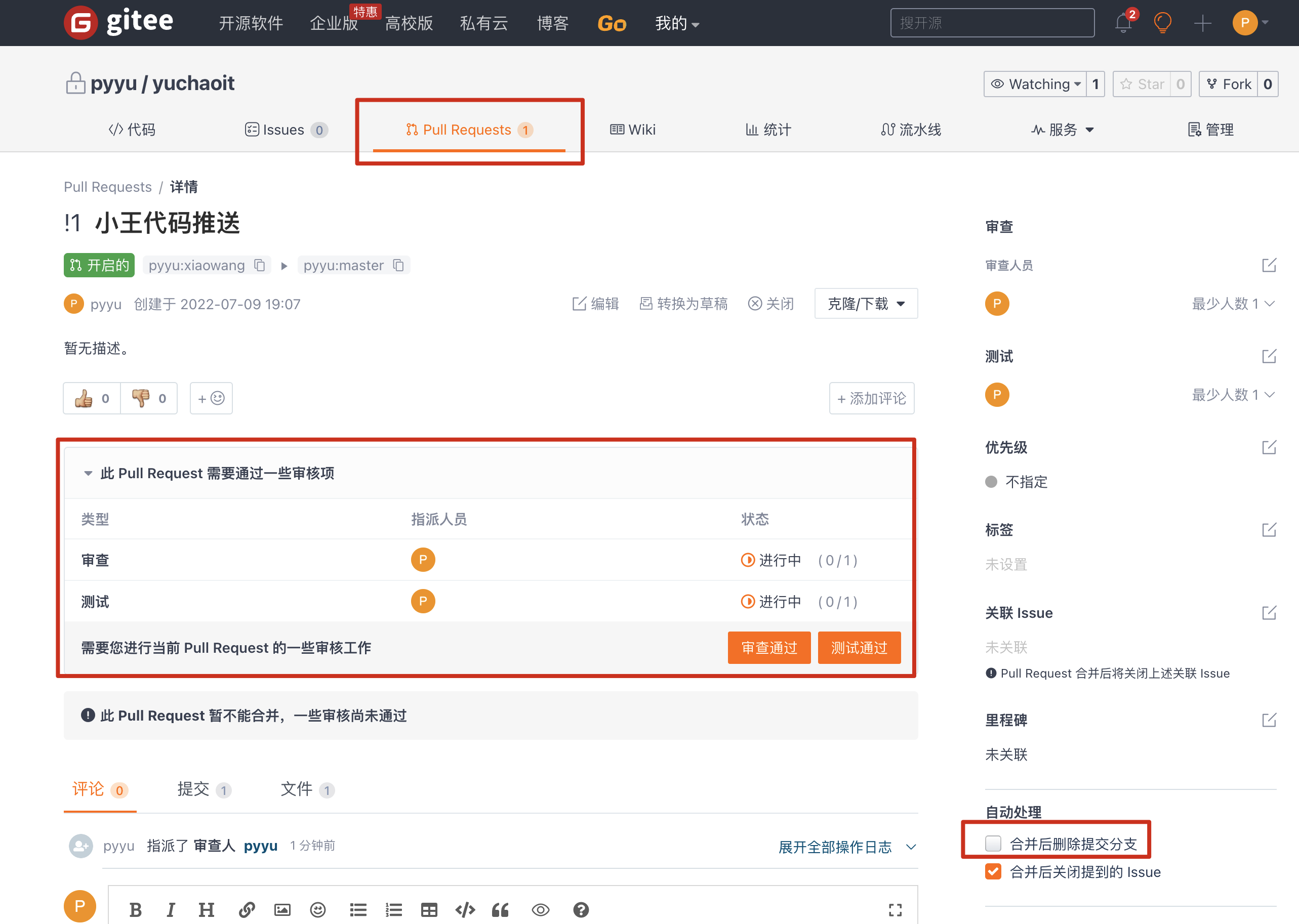
1.网页端合并操作,创建合并的请求
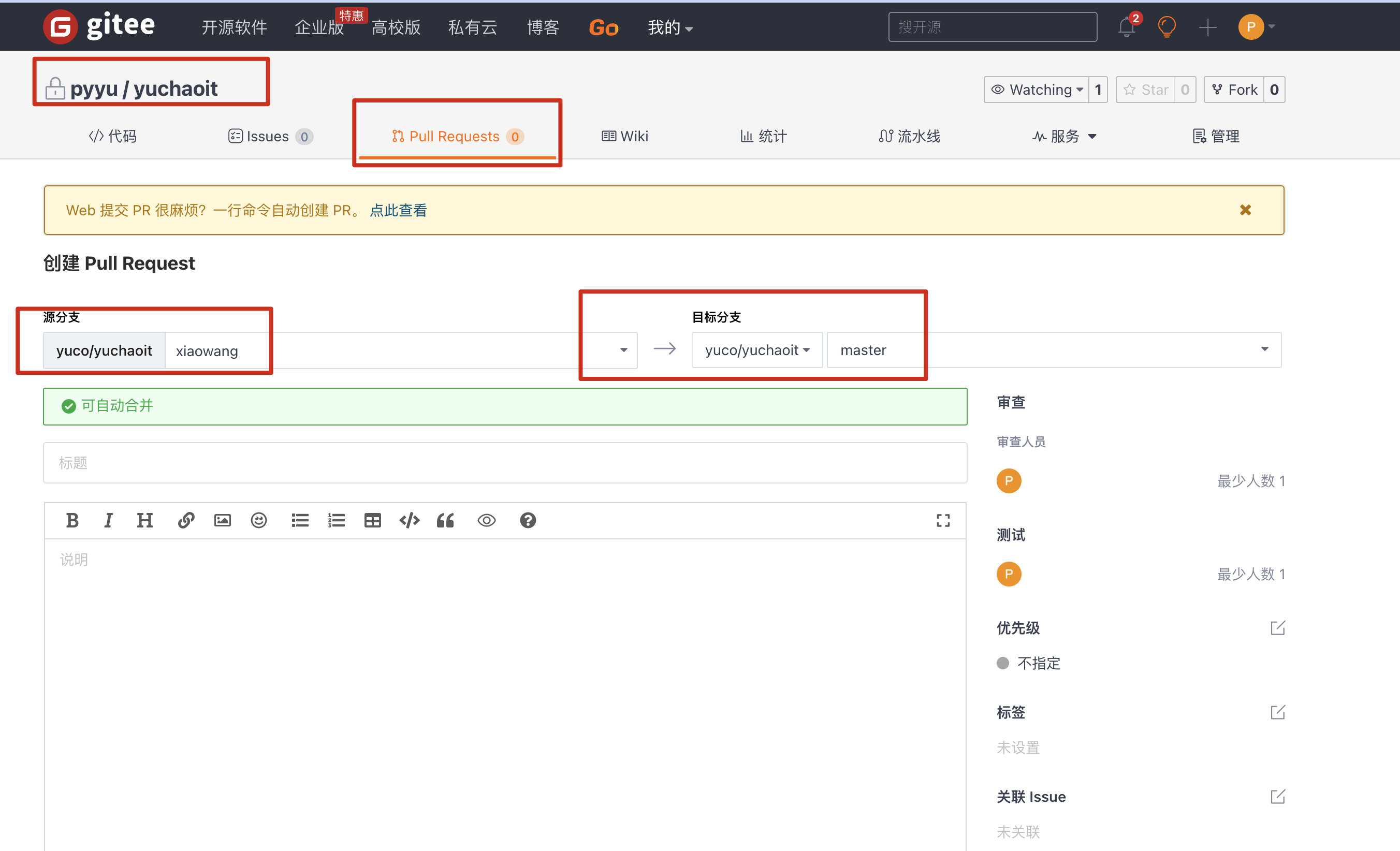
2.审查提交请求
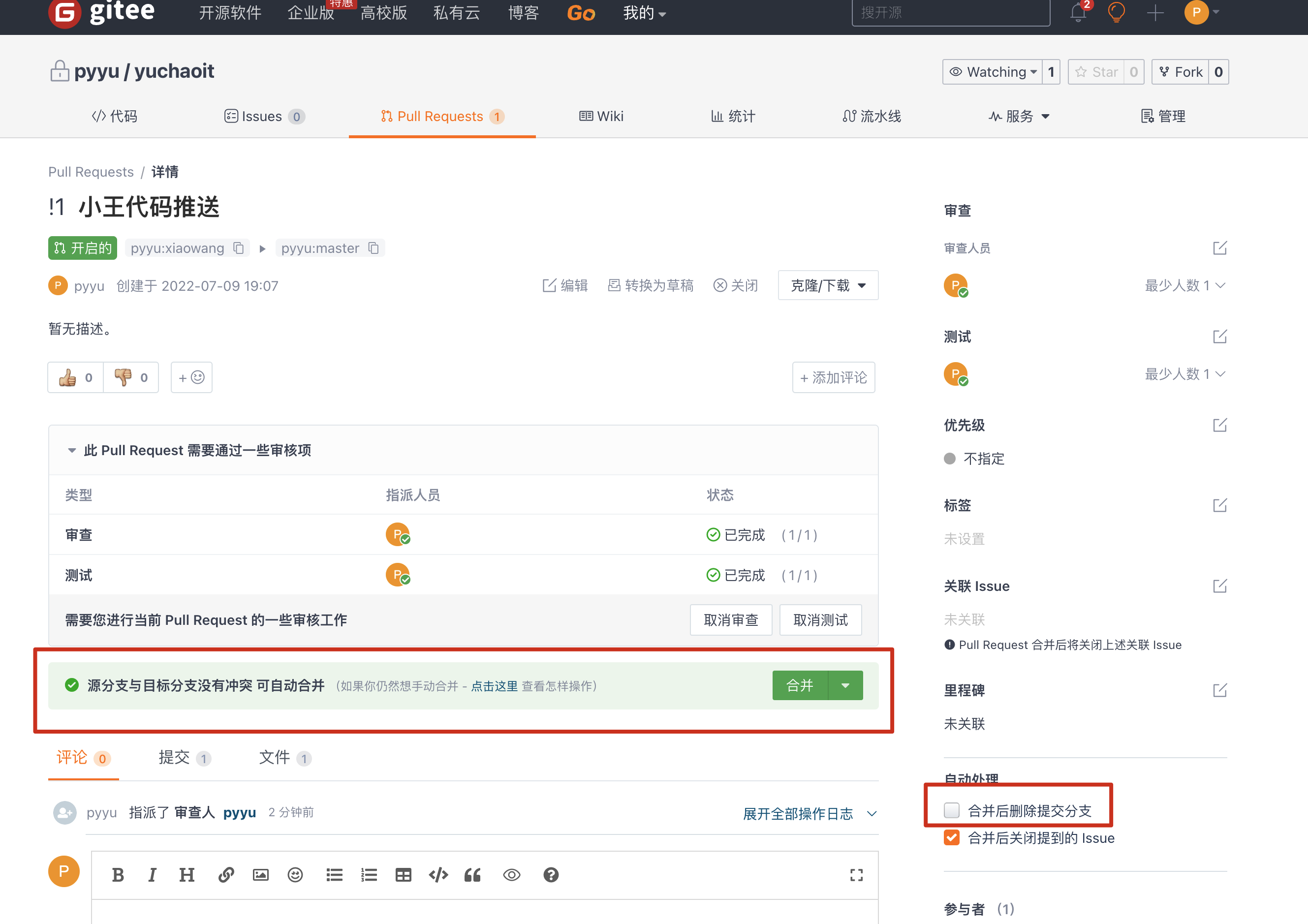
3.点击合并,且删除分支
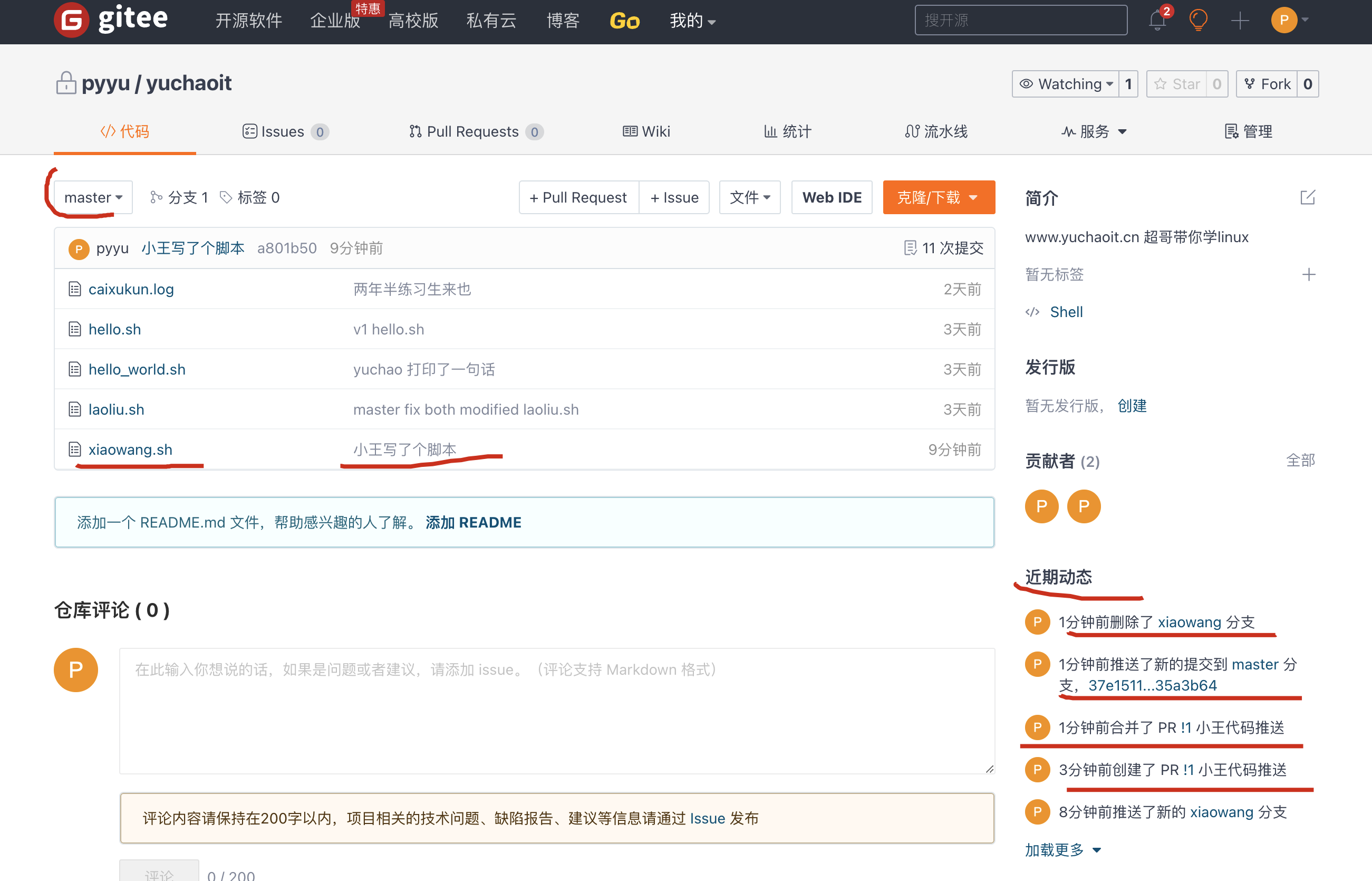
4.完成合并,分支的代码就被合并到主干线了
git与gitee码云的更多相关文章
- git同步代码至github和gitee(码云)
注:本文出自博主 Chloneda:个人博客 | 博客园 | Github | Gitee | 知乎 本文源链接:https://www.cnblogs.com/chloneda/p/git-to-g ...
- 使用Git GUI工具 上传本地仓库到 gitee码云仓库
前言: 网上关于git的命令操作与使用很多教程和博客,在使用git工具时我发现有一个 git Gui 可视化工具,我觉得十分的亲切,由于我之前一直是使用svn作为版本控制管理工具,都是可视化操作,使用 ...
- Ubuntu上Git的简单配置及使用(使用的代码托管平台为gitee码云)
目录 1.关于gitee 2.Ubuntu下Git的下载及配置 3.使用Git连接到远程的Gitee仓库 4.常用命令 1.关于gitee Gitee(码云) 是 OSCHINA.NET 推出的代码托 ...
- 配置同时使用 Gitlab、Github、Gitee(码云) 共存的开发环境
首先确认已安装Git,可以通过 git –version 命令可以查看当前安装的版本. Mac OSX 中都已经安装了Git.但是,Git的版本未必是最新的. 可以通过命令 git clone htt ...
- 使用Git Bash在码云上上传和下载代码
前提是在码云上已经新建一个空的项目 1.新建一个目录,存放下载下来的项目,我在D盘新建了一个"gitspace"文件夹,用来存放下载下来的项目 2.进入刚刚新建的文件夹,即进入&q ...
- Git的使用--码云
Git的使用--码云 进入码云官网:https://gitee.com/ 注册or登录账号进入gitee页面(页面结构大同小异). 点击右上角加号--新建仓库,用于存放项目代码 创建项目需要注意的选项 ...
- Git学习与码云实战
Git学习与码云实战 一.Git安装 概述: Git是一个开源的分布式版本控制系统,可以有效.高速的处理从很小到非常大的项目版本管理,是目前使用范围最广的版本管理工具. 下载安装: 下载地址:http ...
- 第一次Git使用以及码云(Gitee)
下载安装Git,官网下载地址https://git-scm.com/downloads,我用的是Win10版,下载好后一路默认安装,安装时会给你自动添加环境变量,完成后打开cmd,输入git --ve ...
- Python集成开发环境Pycharm+Git+Gitee(码云)
********************************************************************* 本文主要介绍集成开发环境的配置过程,方便多人协作办公.代码版 ...
- git系列之---码云gitee 添加SHH公钥
公钥 很多服务器都是需要认证的,SHH 认证是其中的一种:在客户端生成公钥,把生成的公钥添加到服务器,你以后连接服务器的时候就不用每次都输入用户名和密码了:很多git服务器都是用ssh认证方式,你需要 ...
随机推荐
- 如何可视化编写和编排你的 K8s 任务
简介: 通过任务调度 SchedulerX 来调度你的 K8s 任务,能够降低学习成本,加快开发效率,让你的任务失败可报警,出问题可排查,打造云原生可观测体系下的可视化 K8s 任务. 作者:学仁 ...
- 从 Flink Forward Asia 2021,看Flink未来开启新篇章
简介:本文将对FFA Keynote议题作一些简单的归纳总结,感兴趣的小伙伴们可以在FFA官网[2]找到相关主题视频观看直播回放. 作者 | 梅源(Yuan Mei) 来源 | 阿里技术公众号 ...
- [GPT] Unable to negotiate with xx.xx.xx.xx port 22: no matching host key type found. Their offer: ssh-rsa,ssh-dss
这个错误通常发生在 SSH 客户端无法找到与 SSH服务器 匹配的主机密钥类型时. 这可能是因为SSH服务器配置为使用SSH客户端不支持的主机密钥类型. 要解决此问题,您需要将缺少的主机密钥类型添 ...
- WPF 已知问题 某些设备上的应用在 WindowChromeWorker 抛出 System.OverflowException 异常
准确来说,这个不算是 WPF 的问题,而是系统等的问题.在某些设备上的使用了 WindowChrome 功能的 WPF 应用,将在运行过程,在 WindowChromeWorker 类里面抛出 Sys ...
- 阿里云OSS文件上传几种方法(主要是前端)
目录 零.准备 一.服务端签名后直传 1. 阿里云控制台配置 2. 后端接口开发(PHP) 3. 前端获取签名后上传 二.使用STS临时凭证进行上传 1. 后端接口开发(node) 2. 前端获取临时 ...
- 内网隧道利器Pritunl
一.简介 pritunl是分布式企业内网服务器安全工具,具备web管理界面,有开源版本和收费版本,开源版本功能受限,一般小公司用免费版本就够用了 #官方网站 https://pritunl.com/ ...
- Mac安装mysql5.7
1.下载文件(访问就直接下载了) http://dev.mysql.com/get/Downloads/MySQL-5.7/mysql-5.7.10-osx10.10-x86_64.dmg 2.打开下 ...
- 2019年最新前端面试题,js程序设计题
都说机会是留给有准备的人的. 一年之计在于春,面对众多的前端技术,需要时刻充电自己. 我现在整理一些前端js面试程序题. 1.判断一个字符串中出现最多的字符,并计算出现的次数? 2.用css伪类实现下 ...
- CSS样式(第三篇)
<div class="box1"> <div class="line"></div> <div class=&q ...
- C 语言编程 — 数据类型转换
目录 文章目录 目录 前文列表 数据类型转换 隐式(自动)类型转换 常用的算术转换 显式(强制)类型转换 前文列表 <程序编译流程与 GCC 编译器> <C 语言编程 - 基本语法& ...