
deepspeed 训练多机多卡报错 ncclSystemError Last error
最近在搞分布式训练大模型,踩了两个晚上的坑今天终于爬出来了
我们使用 2台 8*H100
遇到过
错误1
10.255.19.85: ncclSystemError: System call (e.g. socket, malloc) or external library call failed or device error.
10.255.19.85: Last error:
10.255.19.85: socketStartConnect: Connect to 127.0.0.1<34273> failed : Software caused connection abort
错误2
10.255.19.82: torch.distributed.DistBackendError: [7] is setting up NCCL communicator and retrieving ncclUniqueId from [0] via c10d key-value store by key '0', but store->get('0') got error: Connection reset by
错误3
10.255.19.85: ncclInternalError: Internal check failed.
10.255.19.85: Last error:
10.255.19.85: Bootstrap : no socket interface found
其实这三个错误都是一个问题导致的,就是网卡配置的问题
这是之前的配置
hostfile
10.255.19.82 slots=8

10.255.19.85 slots=8
fine-tune.sh
hostfile="/data2/xinyuuliu/Baichuan2-main/fine-tune/hostfile"

export NCCL_SOCKET_IFNAME=enp194s0f0

# export MASTER_ADDR=10.255.19.82   # 主节点的IP地址

# export MASTER_PORT=29500

# --include localhost:0,1,2,3,4,5,6,7

export NCCL_DEBUG=INFO

# export NCCL_IB_TIMEOUT=22

# export NCCL_IB_GID_INDEX=3

# export NCCL_IB_TC=128

# export NCCL_IB_DISABLE=1

deepspeed --master_addr 10.255.19.82 --master_port 29500 --hostfile=$hostfile fine-tune.py  \

    --report_to "none" \

    --data_path "/data2/xinyuuliu/Baichuan2-main/fine-tune/data/全网评价总结训练数据.json" \

    --model_name_or_path "/data1/xinyuuliu/Baichuan2-13B-Chat" \

    --output_dir "output_lora_summary" \

    --model_max_length  10000\

    --num_train_epochs 10 \

    --per_device_train_batch_size 4 \

    --gradient_accumulation_steps 1 \

    --save_strategy epoch \

    --learning_rate 2e-4 \

    --lr_scheduler_type constant \

    --adam_beta1 0.9 \

    --adam_beta2 0.98 \

    --adam_epsilon 1e-8 \

    --max_grad_norm 1.0 \

    --weight_decay 1e-4 \

    --warmup_ratio 0.0 \

    --logging_steps 1 \

    --gradient_checkpointing True \

    --deepspeed ds_config.json \

    --bf16 True \

    --tf32 True \

    --use_lora True \

    # --load_lora_path /data2/xinyuuliu/Baichuan2-main/fine-tune/output_lora4_1_1/checkpoint-7516

    # --use_NEFT True

    # --use_frozen True

 #"/data2/xinyuuliu/baichuan2_7B"
修改后之后的配置
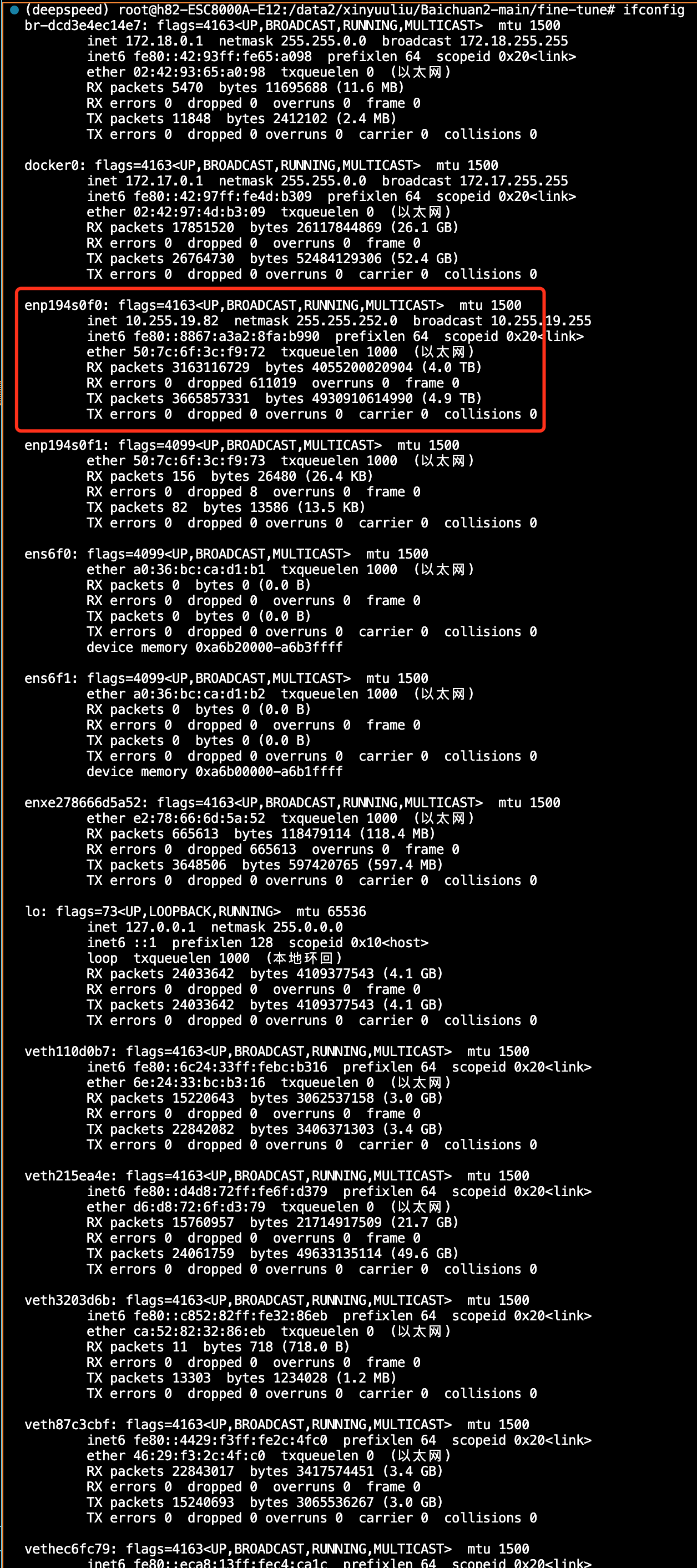
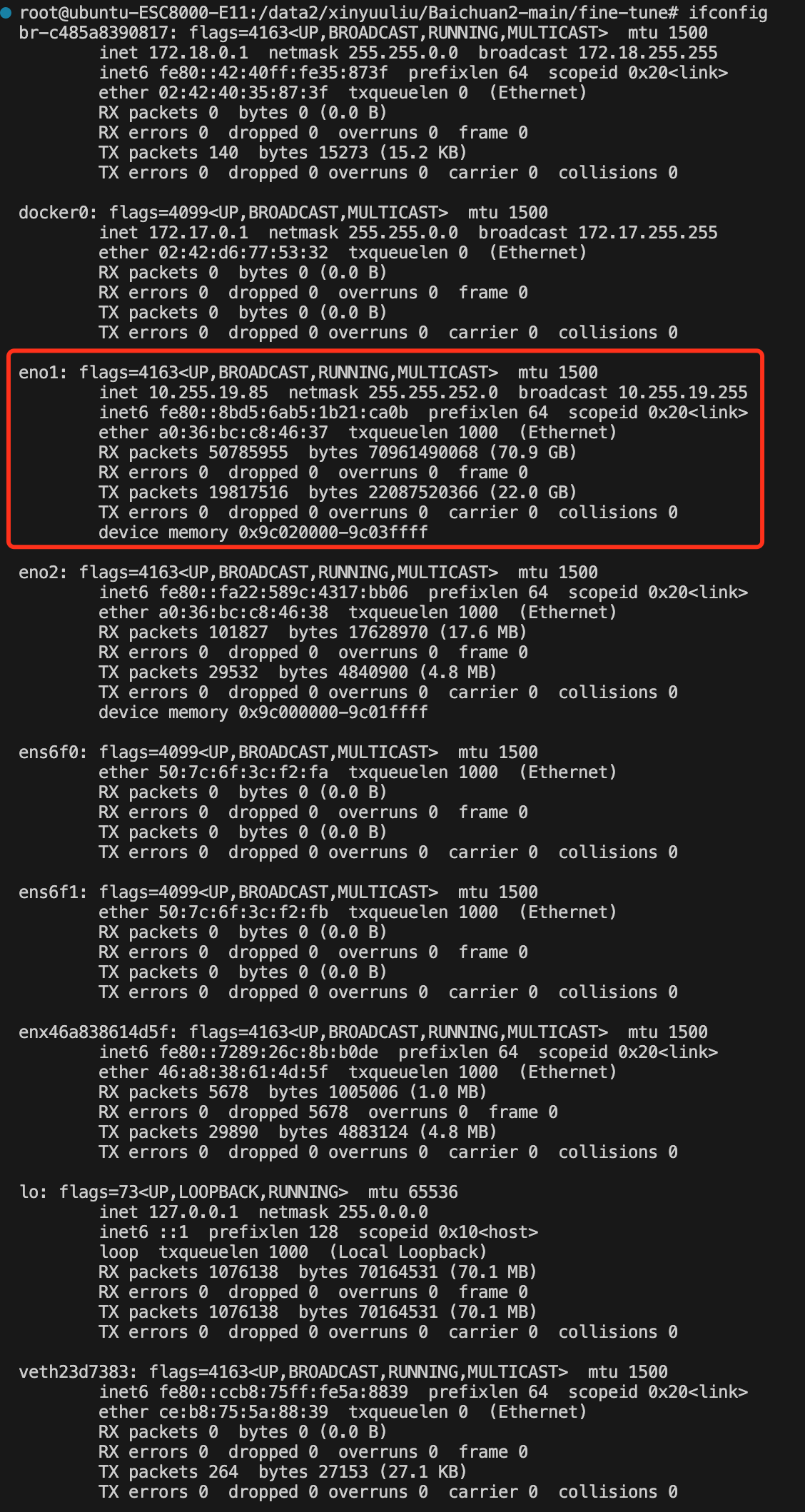
问题主要出现在 NCCL_SOCKET_IFNAME 这个环境变量,这个环境变量会被携带到其他机器上,但是网卡的名称是不一样的,尤其我的两台机器包含很多的网卡,因此,我们配置的时候需要把那些没用的虚拟网卡屏蔽掉,只留下需要的
解决方法,这个要根据实际情况来改,英伟达官方写法如下,屏蔽显卡用^开头
export NCCL_SOCKET_IFNAME=^br-c485a8390817,docker0,eno2,ens6f0,ens6f1,enx46a838614d5f,lo,veth23d7383,br-dcd3e4ec14e7,enp194s0f1,ens6f0,ens6f1,enxe278666d5a52,veth110d0b7,veth215ea4e,veth3203d6b,veth87c3cbf,vethec6fc79,virbr0

我的网卡太多了,之前一直以为环境变量在 /etc/profile 下配置各自的就行,
然后再source /etc/profile,结果发现不对,从机也都指向了主机的网卡,没办法建立socket
hostfile="/data2/xinyuuliu/Baichuan2-main/fine-tune/hostfile"

export NCCL_SOCKET_IFNAME=^br-c485a8390817,docker0,eno2,ens6f0,ens6f1,enx46a838614d5f,lo,veth23d7383,br-dcd3e4ec14e7,enp194s0f1,ens6f0,ens6f1,enxe278666d5a52,veth110d0b7,veth215ea4e,veth3203d6b,veth87c3cbf,vethec6fc79,virbr0

# export NCCL_SOCKET_IFNAME=enp194s0f0

# export MASTER_ADDR=10.255.19.82   # 主节点的IP地址

# export MASTER_PORT=29500

# --include localhost:0,1,2,3,4,5,6,7

export NCCL_DEBUG=INFO

# export NCCL_IB_TIMEOUT=22

# export NCCL_IB_GID_INDEX=3

# export NCCL_IB_TC=128

# export NCCL_IB_DISABLE=1

deepspeed --master_addr 10.255.19.82 --master_port 29500 --hostfile=$hostfile fine-tune.py  \

    --report_to "none" \

    --data_path "/data2/xinyuuliu/Baichuan2-main/fine-tune/data/全网评价总结训练数据.json" \

    --model_name_or_path "/data1/xinyuuliu/Baichuan2-13B-Chat" \

    --output_dir "output_lora_summary" \

    --model_max_length  10000\

    --num_train_epochs 10 \

    --per_device_train_batch_size 4 \

    --gradient_accumulation_steps 1 \

    --save_strategy epoch \

    --learning_rate 2e-4 \

    --lr_scheduler_type constant \

    --adam_beta1 0.9 \

    --adam_beta2 0.98 \

    --adam_epsilon 1e-8 \

    --max_grad_norm 1.0 \

    --weight_decay 1e-4 \

    --warmup_ratio 0.0 \

    --logging_steps 1 \

    --gradient_checkpointing True \

    --deepspeed ds_config.json \

    --bf16 True \

    --tf32 True \

    --use_lora True \

    # --load_lora_path /data2/xinyuuliu/Baichuan2-main/fine-tune/output_lora4_1_1/checkpoint-7516

    # --use_NEFT True

    # --use_frozen True

 #"/data2/xinyuuliu/baichuan2_7B"
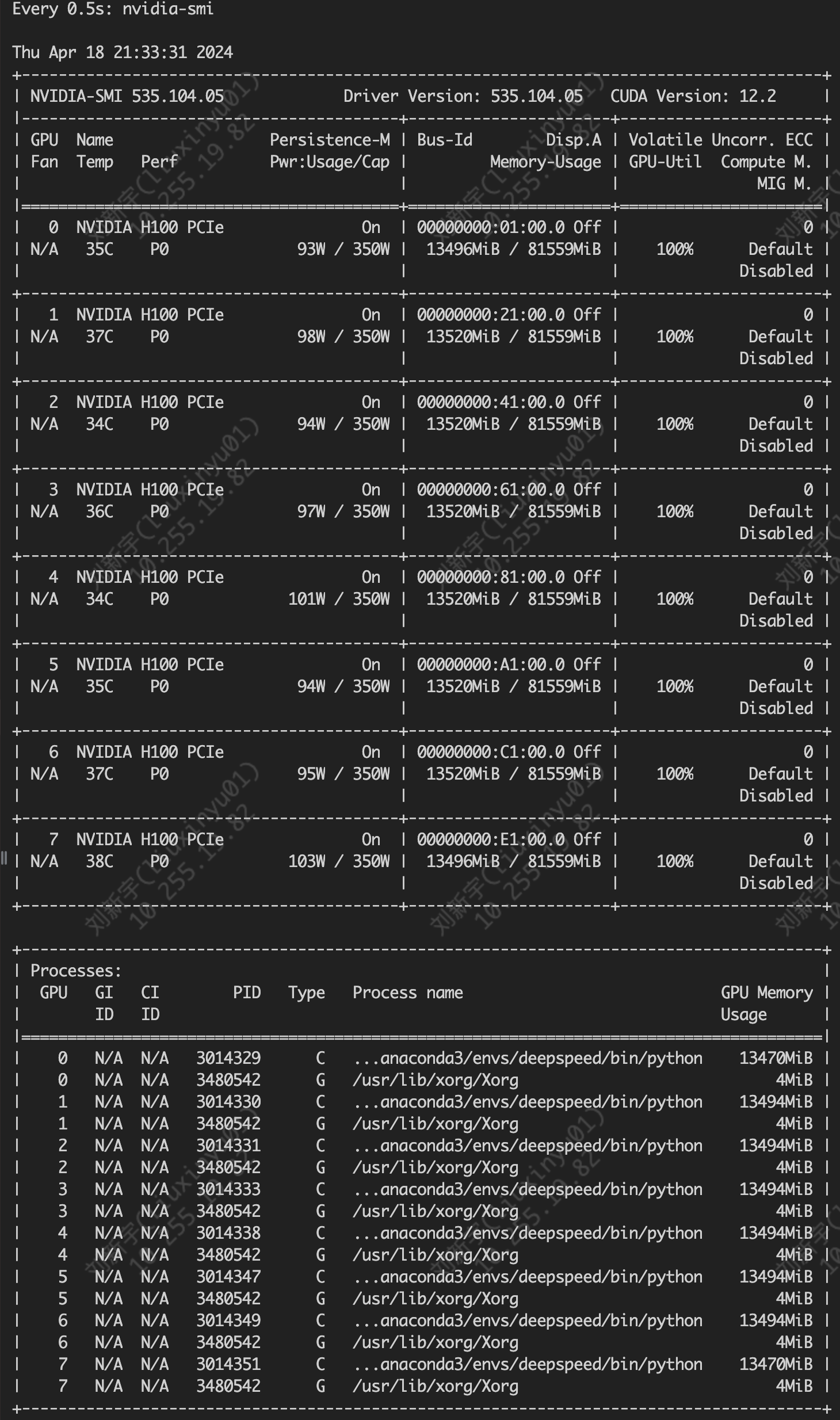
修改后成功跑起16*H100,爽歪歪

deepspeed 训练多机多卡报错 ncclSystemError Last error的更多相关文章
- cordova-ios 升级到4.4.0 无法真机跑iOS8 报错: dyld`dyld_fatal_error: -> 0x120085088 <+0>: brk #0x3
项目进入测试阶段,马上要上线了,同事拿了自己的iOS8系统5s跑真机,无缘无故报错,之前跑她的手机完全没有问题的.Xcode 8.x中最低部署版本是iOS8.0,按理说完全能够跑真机的. 但是报了一个 ...
- http报错之return error code:401 unauthorized
http报错之return error code:401 unauthorized 依据HTTP返回码所表示的意思应该是未授权,没有输入账号和password,因此解决方法就直接在HTTP包里面 ...
- 支付宝 报错 rsa_private read error : private key is NULL解决方法
原因: 真机调试IOS支付宝功能GDB出现 rsa_private read error : private key is NULL提示 调试iOS 支付宝SDK的时候,执行demo.把 Partn ...
- 配置MySQL主从复制报错Last_IO_Error: Fatal error: The slave I/O thread stops because master and slave have equal MySQL server ids; these ids must be different for replication to work
配置MySQL主从复制报错 ``` Last_IO_Error: Fatal error: The slave I/O thread stops because master and slave ha ...
- VS经常报错的link error 2019
VS经常报错的link error 2019 原因如下: 可能是找得到头文件,但是相关的dll或者lib找不到,需要在配置里面添加相应的库文件. project=>configuration.. ...
- 解决FPDF报错:FPDF error: Not a JPEG file / FPDF error: Not a PNG file
最近有个项目需要用到FPDF,但是输出的时候报错: FPDF error: Not a JPEG file: http://***/data/attachment/forum/201603/19/10 ...
- Heka 编译安装后 运行报错 panic: runtime error: cgo argument has Go pointer to Go pointer
Heka 编译安装后 运行报错 panic: runtime error: cgo argument has Go pointer to Go pointer 解决办法: 1. Start heka ...
- PHP编译安装报错:configure: error: mcrypt.h not found. Please reinstall libmcrypt
我是在CentOS6.5安装php5.5.28这个版本,PHP编译代码如下: ./configure --prefix=/usr/local/php --with-config-file-path=/ ...
- mysql启动报错 mysql InnoDB: Error: could not open single-table tablespace file
mysql启动不成功,报错 mysql InnoDB: Error: could not open single-table tablespace file innodb_force_recovery ...
- xtrabackup备份MySQL报错:InnoDB: Error number 24 means 'Too many open files'
xtrabackup备份MySQL报错:InnoDB: Error number 24 means 'Too many open files' 1.使用xtrabackup备份MySQL时出现如下报错 ...
随机推荐
- Sagas论文原文读后总结
一.引子 分布式事务组件seata最近社区很活跃,刚好公司有对接seata的计划.刚好借此机会,彻底了解下seata的价值.其中有一个比较特殊的模式叫SAGA模式,听起来就很懵逼,按照官网的介绍起源于 ...
- Window快速切换工作目录命令
原文: Window命令行快速切换工作目录命令 - Stars-One的杂货小窝 以往,在cmd命令行里,如果是当前在C盘,想切换到D盘的某个文件夹,得这样写: cd D:/temp D: PS: D ...
- springMVC之对象中的基本类型数据绑定遇到的问题
最进在开发关于SpringMVC框架的项目时,发现个数据绑定的问题,如果这个实体对象里的字段类型为long.int.double时,客户端就报400语法错误 源代码: controller: @Req ...
- Ubuntu下安装Android Studio
一.系统环境 二.安装源文件 Android Studio 4.2.2:android-studio-ide-202.7486908-linux.tar.gz Java SE Development ...
- live555使用NDK21编译出arm64-v8a和armeabi-v7a
一.编译环境 ubuntu环境 NDK21,下载地址链接 live555源码live555源码 二.编写编译脚本 环境和源码弄好后,就可以开始进行编写编译脚本 1 编写arm64-v8a脚本 将下载好 ...
- CentOS 安装后必需所做的初始化操作
CentOS 安装后必需所做的初始化操作 #关闭SELinux sed -i '/^SELINUX=/c SELINUX=disabled' /etc/selinux/config #关闭防火墙 sy ...
- 【虚拟仿真】3DCAT虚拟仿真在化工安全方面的应用
随着中国经济的快速发展,石油化工企业的生产事故也在频繁发生.国家目前对生产安全的重视程度提高到前所未有的高度.企业也在安全管理上做了许多工作,如:进行安全培训,制定安全手册等.但这些方式的效果不明显, ...
- python高级技术(死锁、递归锁、信号量、Event事件、进程池、线程池、协程)
一 死锁和递归锁(了解) 进程也有死锁与递归锁,使用方法类似 所谓死锁: 是指两个或两个以上的进程或线程在执行过程中,因争夺资源而造成的一种互相等待的现象,若无外力作用,它们都将无法推进下去. 此时称 ...
- csproj技巧,以及使用其他类库冲突,以及引入第三方UI方式
1.在项目中我们经常写 string? Message{get;set;} 明明是引用类型,它底下还是会出现波浪线,我们可以打开csproj 找到Nullable将它改为disable,或者删除,它默 ...
- c# webBrowser中操作网页元素全攻略
1.获取非input控件的值: webBrowser1.Document.All["控件ID"].InnerText; 或webBrowser1.Document.GetEleme ...