
FTP工具FileZilla&WinSCP与FTP类库FluentFTP
一、FileZilla
Filezilla分为client和server。其中FileZilla Server是Windows平台下一个小巧的第三方FTP服务器软件,系统资源也占用非常小,可以让你快速简单的建立自己的FTP服务器。
打开FileZilla,进行如下操作
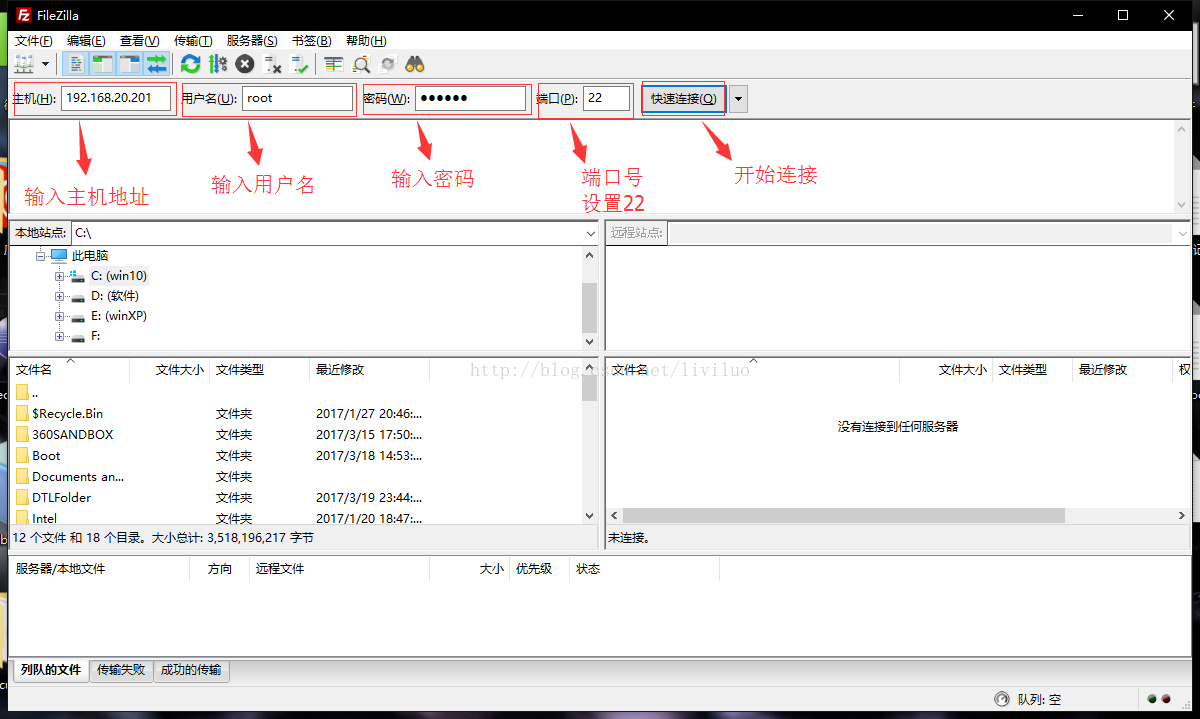

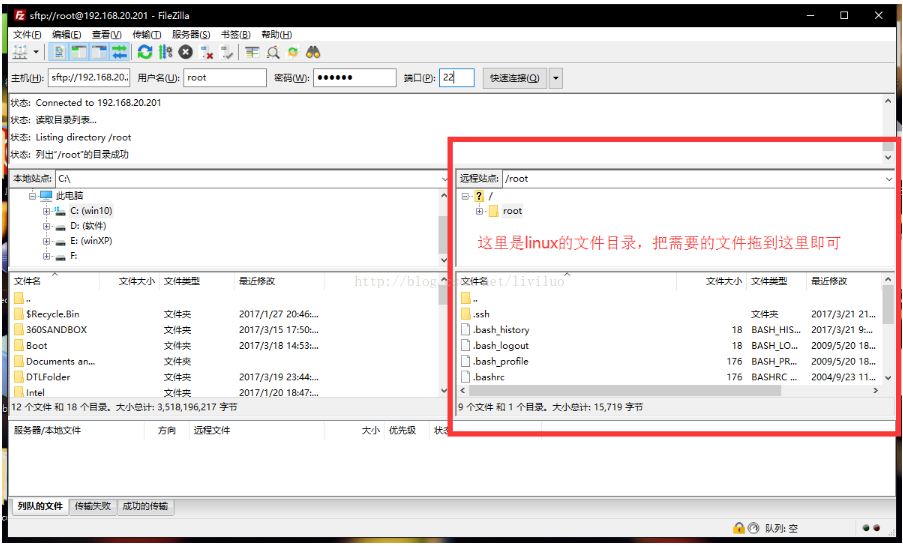
下图红色区域就是linux系统的文件目录,可以直接把windows下的文件直接拖拽进去。
二、WinSCP
跟FileZilla一样,也是一款十分方便的文件传输工具。WinSCP是连接Windows和Linux的。
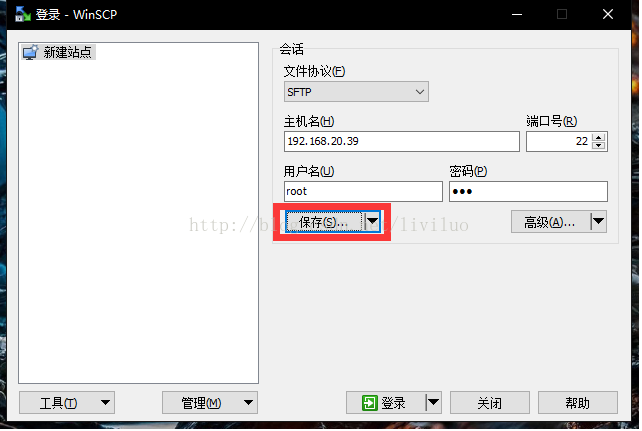
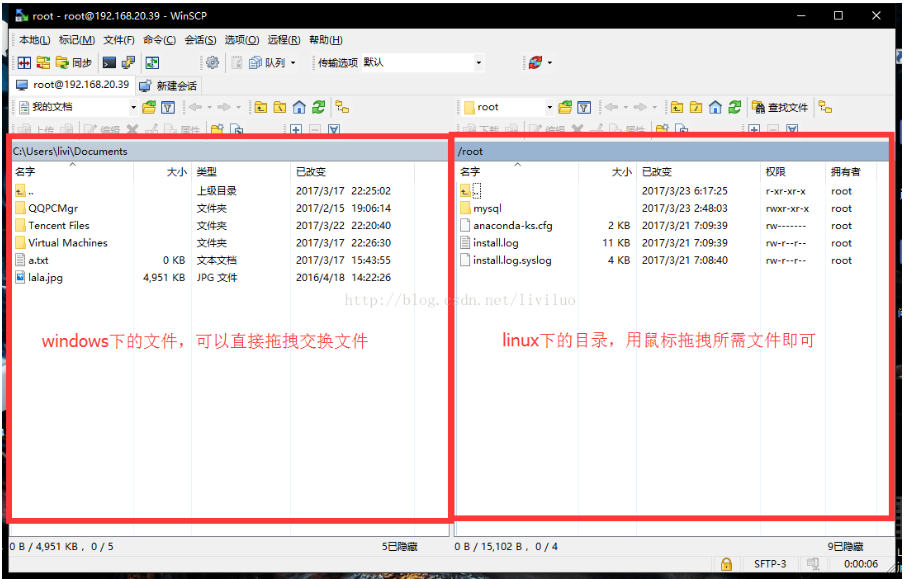
WinSCP .NET Assembly and SFTP
https://winscp.net/eng/docs/library#csharp
// Setup session options

SessionOptions sessionOptions = new SessionOptions

{

    Protocol = Protocol.Sftp,

    HostName = "example.com",

    UserName = "user",

    Password = "mypassword",

    SshHostKeyFingerprint = "ssh-rsa 2048 xxxxxxxxxxx...="

};

using (Session session = new Session())

{

    // Connect

    session.Open(sessionOptions);

    // Upload files

    TransferOptions transferOptions = new TransferOptions();

    transferOptions.TransferMode = TransferMode.Binary;

    TransferOperationResult transferResult;

    transferResult =  session.PutFiles(@"d:\toupload\*", "/home/user/", false, transferOptions);

    // Throw on any error

    transferResult.Check();

    // Print results

    foreach (TransferEventArgs transfer in transferResult.Transfers)

    {

        Console.WriteLine("Upload of {0} succeeded", transfer.FileName);

    }

}
三、FluentFTP
FluentFTP是一款老外开发的基于.Net的支持FTP及的FTPS 的FTP类库,FluentFTP是完全托管的FTP客户端,被设计为易于使用和易于扩展。它支持文件和目录列表,上传和下载文件和SSL / TLS连接。
它底层由Socket实现,可以连接到Unix和Windows IIS建立FTP的服务器,
github:https://github.com/robinrodricks/FluentFTP
举例:
// create an FTP client

FtpClient client = new FtpClient("123.123.123.123");

// if you don't specify login credentials, we use the "anonymous" user account

client.Credentials = new NetworkCredential("david", "pass123");

// begin connecting to the server

client.Connect();

// get a list of files and directories in the "/htdocs" folder

foreach (FtpListItem item in client.GetListing("/htdocs")) {

    // if this is a file

    if (item.Type == FtpFileSystemObjectType.File){

        // get the file size

        long size = client.GetFileSize(item.FullName);

    }

    // get modified date/time of the file or folder

    DateTime time = client.GetModifiedTime(item.FullName);

    // calculate a hash for the file on the server side (default algorithm)

    FtpHash hash = client.GetHash(item.FullName);

}

// upload a file

client.UploadFile(@"C:\MyVideo.mp4", "/htdocs/big.txt");

// rename the uploaded file

client.Rename("/htdocs/big.txt", "/htdocs/big2.txt");

// download the file again

client.DownloadFile(@"C:\MyVideo_2.mp4", "/htdocs/big2.txt");

// delete the file

client.DeleteFile("/htdocs/big2.txt");

// delete a folder recursively

client.DeleteDirectory("/htdocs/extras/");

// check if a file exists

if (client.FileExists("/htdocs/big2.txt")){ }

// check if a folder exists

if (client.DirectoryExists("/htdocs/extras/")){ }

// upload a file and retry 3 times before giving up

client.RetryAttempts = 3;

client.UploadFile(@"C:\MyVideo.mp4", "/htdocs/big.txt", FtpExists.Overwrite, false, FtpVerify.Retry);

// disconnect! good bye!

client.Disconnect();
对FluentFTP部分操作封装类
public class FtpFileMetadata

{

    public long FileLength { get; set; }

    public string MD5Hash { get; set; }

    public DateTime LastModifyTime { get; set; }

}

public class FtpHelper

{

    private FtpClient _client = null;

    private string _host = "127.0.0.1";

    private int _port = 21;

    private string _username = "Anonymous";

    private string _password = "";

    private string _workingDirectory = "";

    public string WorkingDirectory

    {

        get

        {

            return _workingDirectory;

        }

    }

    public FtpHelper(string host, int port, string username, string password)

    {

        _host = host;

        _port = port;

        _username = username;

        _password = password;

    }

    public Stream GetStream(string remotePath)

    {

        Open();

        return _client.OpenRead(remotePath);

    }

    public void Get(string localPath, string remotePath)

    {

        Open();

        _client.DownloadFile(localPath, remotePath, true);

    }

    public void Upload(Stream s, string remotePath)

    {

        Open();

        _client.Upload(s, remotePath, FtpExists.Overwrite, true);

    }

    public void Upload(string localFile, string remotePath)

    {

        Open();

        using (FileStream fileStream = new FileStream(localFile, FileMode.Open))

        {

            _client.Upload(fileStream, remotePath, FtpExists.Overwrite, true);

        }

    }

    public int UploadFiles(IEnumerable<string> localFiles, string remoteDir)

    {

        Open();

        List<FileInfo> files = new List<FileInfo>();

        foreach (var lf in localFiles)

        {

            files.Add(new FileInfo(lf));

        }

        int count = _client.UploadFiles(files, remoteDir, FtpExists.Overwrite, true, FtpVerify.Retry);

        return count;

    }

    public void MkDir(string dirName)

    {

        Open();

        _client.CreateDirectory(dirName);

    }

    public bool FileExists(string remotePath)

    {

        Open();

        return _client.FileExists(remotePath);

    }

    public bool DirExists(string remoteDir)

    {

        Open();

        return _client.DirectoryExists(remoteDir);

    }

    public FtpListItem[] List(string remoteDir)

    {

        Open();

        var f = _client.GetListing();

        FtpListItem[] listItems = _client.GetListing(remoteDir);

        return listItems;

    }

    public FtpFileMetadata Metadata(string remotePath)

    {

        Open();

        long size = _client.GetFileSize(remotePath);

        DateTime lastModifyTime = _client.GetModifiedTime(remotePath);

        return new FtpFileMetadata()

        {

            FileLength = size,

            LastModifyTime = lastModifyTime

        };

    }

    public bool TestConnection()

    {

        return _client.IsConnected;

    }

    public void SetWorkingDirectory(string remoteBaseDir)

    {

        Open();

        if (!DirExists(remoteBaseDir))

            MkDir(remoteBaseDir);

        _client.SetWorkingDirectory(remoteBaseDir);

        _workingDirectory = remoteBaseDir;

    }

    private void Open()

    {

        if (_client == null)

        {

            _client = new FtpClient(_host, new System.Net.NetworkCredential(_username, _password));

            _client.Port = 21;

            _client.RetryAttempts = 3;

            if (!string.IsNullOrWhiteSpace(_workingDirectory))

            {

                _client.SetWorkingDirectory(_workingDirectory);

            }

        }

    }

}
FTP工具FileZilla&WinSCP与FTP类库FluentFTP的更多相关文章
- linuxMint下安装ftp工具--filezilla
windows下ftp工具有好多,linux下推荐用filezilla 安装filezilla很简单,安装完后,使用方式和windows下面一样. 第一种方式: 直接去filezilla官网下载软件包 ...
- FTP工具-FileZilla安装使用教程
1.首先,百度搜索“FileZilla”,进入官网,下载地址:https://www.filezilla.cn/download/client ,根据自己电脑配置去下载 2.下载本地,双击运行安装程 ...
- Mac 10.12安装FTP工具FileZilla
说明:在Windows估计用的比较多,在Linux基本不用了,CRT和Xshell基本可以完成上传. 下载: (链接: https://pan.baidu.com/s/1bpaxmeN 密码: uuw ...
- Mac / Windows 下的 FTP 工具filezilla
https://filezilla-project.org/download.php?platform=osx
- Serv-U设置被动模式(FTP工具)
FTP服务器在公司内网,通过端口映射把21端口映射出去. 公司一些机器也在各个省的机房内网.好在这些机器可以访问公网.由于各个地区的机器托管在各个地区机房. 我有公司防火墙的权限,可以做防火墙上做端口 ...
- 远程登录工具 —— filezilla(FTP vs. SFTP)、xshell、secureCRT
filezilla:是一个免费开源的 FTP 软件,分为客户端版本和服务器版本,具备所有的 FTP 软件功能. 支持的协议:FTP & SFTP(Secure File Transfer Pr ...
- window环境下使用filezilla server搭建ftp服务器
前言 在做项目的时候,需要提供ftp服务,开始的时候使用微软自动的iss上的ftp服务,一段时间后发现无法自定义用户,只能使用系统的用户,使用起来很不方便,在权限管理方面也是不太好.所以换用了file ...
- Java操作FTP工具类(实例详解)
这里使用Apache的FTP jar 包 没有使用Java自带的FTPjar包 工具类 package com.zit.ftp; import java.io.File; import java.i ...
- c#FTP应用---FileZilla Server
一.下载Filezilla Server 官网网址:https://filezilla-project.org FileZilla Server是目前稍有的免费FTP服务器软件,比起Serv-U F ...
随机推荐
- mysql5.0版本下载地址
http://dev.mysql.com/downloads/mysql/5.0.html Other Downloads: Windows (x86, 32-bit), ZIP Archive 5. ...
- C# 从Excel 批量导入数据库
最近遇到了关于 C# MVC 批量添加数据的问题,解决后就自己写了一个未完成的小Demo 不管什么编程语言都会提供操作Excel文件的方式,C#操作Excel主要有以下几种方式: 1.Excel 说 ...
- 图片切换(timer控件与ImagesList结合使用)
private void Form3_Load(object sender, EventArgs e) { //打开窗体的时候显示第一张图片 this.pictureBox1.Image = this ...
- DUBBO监控,设置接口调用数据的上报周期
目录 DUBBO监控,设置接口调用数据的上报周期 dubbo已有的监控方案 针对已有方案的改进 DUBBO监控,设置接口调用数据的上报周期 dubbo是目前比较好用的,用来实现soa架构的一个工具,d ...
- JSP学习笔记(3)-JSP内置对象
有些对象不用声明就可以在JSP页面的Java程序片和表达式部分使用,这些对象就是JSP的内置对象. JSP常用的内置对象有request,response,session,application,o ...
- AJAX异步的 JavaScript
什么是AJAX: AJAX = Asynchronous JavaScript and XML(异步的 JavaScript 和 XML). AJAX 不是新的编程语言,而是一种使用现有标准的新方法. ...
- Exam E05-001 Information Storage and Management Version 3 Exam
Emc 考试 e05-001信息存储和管理版本3考试 [总问题:171] 哪种 emc 产品提供软件定义的存储基础架构的自动监视和报告? A. viprSrmB. 斯纳普内C. 阿瓦马尔D. 快速副总 ...
- 洛谷P2973 [USACO10HOL]赶小猪(高斯消元 期望)
题意 题目链接 Sol 设\(f[i]\)表示炸弹到达\(i\)这个点的概率,转移的时候考虑从哪个点转移而来 \(f[i] = \sum_{\frac{f(j) * (1 - \frac{p}{q}) ...
- 在生产环境中安全执行更新删除SQL脚本的技巧
今天在生产环境上解决问题,由于广发银行的管理制度是开发公司是不允许确生产环境的,所以我们只能把要更新的语句发给运营中心,由运营中心的投产人员执行,我们则在旁边看着:在他执行的时候发现了一个很有趣的技巧 ...
- OAuth2学习笔记
参考:https://aaronparecki.com/oauth-2-simplified/ 1.角色定义 应用程序(客户) 需要获取用户的账号信息,获得相关权限. API服务器 资源服务器就是AP ...