
linux系统编程之进程(五):exec系列函数(execl,execlp,execle,execv,execvp)使用
本节目标:
- exec替换进程映像
- exec关联函数组(execl、execlp、execle、execv、execvp)
一,exec替换进程映像
在进程的创建上Unix采用了一个独特的方法,它将进程创建与加载一个新进程映象分离。这样的好处是有更多的余地对两种操作进行管理。
当我们创建了一个进程之后,通常将子进程替换成新的进程映象,这可以用exec系列的函数来进行。当然,exec系列的函数也可以将当前进程替换掉。
例如:在shell命令行执行ps命令,实际上是shell进程调用fork复制一个新的子进程,在利用exec系统调用将新产生的子进程完全替换成ps进程。
二,exec系列函数(execl、execlp、execle、execv、execvp)
包含头文件<unistd.h>
功能:
用exec函数可以把当前进程替换为一个新进程,且新进程与原进程有相同的PID。exec名下是由多个关联函数组成的一个完整系列,
头文件<unistd.h>
extern char **environ;
原型:
int execl(const char *path, const char *arg, ...);
int execlp(const char *file, const char *arg, ...);
int execle(const char *path, const char *arg, ..., char * const envp[]);
int execv(const char *path, char *const argv[]);
int execvp(const char *file, char *const argv[]);
参数:
path参数表示你要启动程序的名称包括路径名
arg参数表示启动程序所带的参数,一般第一个参数为要执行命令名,不是带路径且arg必须以NULL结束
返回值:成功返回0,失败返回-1
注:上述exec系列函数底层都是通过execve系统调用实现:
#include <unistd.h>
int execve(const char *filename, char *const argv[],char *const envp[]);
DESCRIPTION:
execve() executes the program pointed to by filename. filename must be
either a binary executable, or a script starting with a line of the form
以上exec系列函数区别:
1,带l 的exec函数:execl,execlp,execle,表示后边的参数以可变参数的形式给出且都以一个空指针结束。
示例:
#include <stdio.h>

#include <stdlib.h>

#include <unistd.h>

int main(void)

{

    printf("entering main process---\n");

    execl("/bin/ls","ls","-l",NULL);

    printf("exiting main process ----\n");

    return 0;

}

利用execl将当前进程main替换掉,所有最后那条打印语句不会输出
2,带 p 的exec函数:execlp,execvp,表示第一个参数path不用输入完整路径,只有给出命令名即可,它会在环境变量PATH当中查找命令
示例:
当不带p但没给出完整路径时:
#include <stdio.h>

#include <stdlib.h>

#include <unistd.h>

int main(void)

{

    printf("entering main process---\n");

    execl("/bin/ls","ls","-l",NULL);

    printf("exiting main process ----\n");

    return 0;

}
结果:
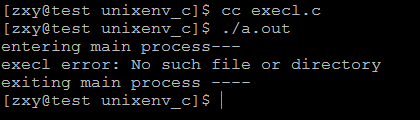
结果显示找不到,所有替换不成功,main进程继续执行
现在带p:
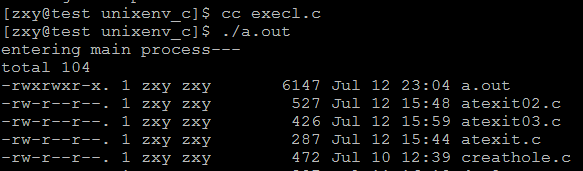
替换成功
3,不带 l 的exec函数:execv,execvp表示命令所需的参数以char *arg[]形式给出且arg最后一个元素必须
是NULL
示例:
#include <stdio.h>

#include <stdlib.h>

#include <unistd.h>

int main(void)

{

    printf("entering main process---\n");

    int ret;

    char *argv[] = {"ls","-l",NULL};

    ret = execvp("ls",argv);

    if(ret == -1)

        perror("execl error");

    printf("exiting main process ----\n");

    return 0;

}
结果:
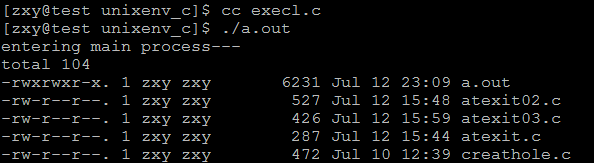
进程替换成功
4,带 e 的exec函数:execle表示,将环境变量传递给需要替换的进程
从上述的函数原型中我们发现:
extern char **environ;
此处的environ是一个指针数组,它当中的每一个指针指向的char为“XXX=XXX”
environ保存环境信息的数据可以env命令查看:
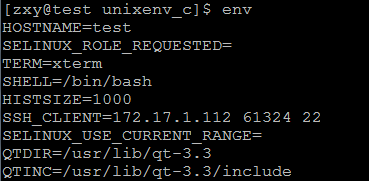
它由shell进程传递给当前进程,再由当前进程传递给替换的新进程
示例:execle.c
#include <stdio.h>

#include <stdlib.h>

#include <unistd.h>

int main(int argc, char *argv[])

{

    //char * const envp[] = {"AA=11", "BB=22", NULL};

    printf("Entering main ...\n");

    int ret;

    ret =execl("./hello", "hello", NULL);

    //execle("./hello", "hello", NULL, envp);

    if(ret == -1)

        perror("execl error");

    printf("Exiting main ...\n");

    return 0;

}
hello.c
#include <unistd.h>

#include <stdio.h>

extern char** environ;

int main(void)

{

    printf("hello pid=%d\n", getpid());

    int i;

    for (i=0; environ[i]!=NULL; ++i)

    {

        printf("%s\n", environ[i]);

    }

    return 0;

}
结果:
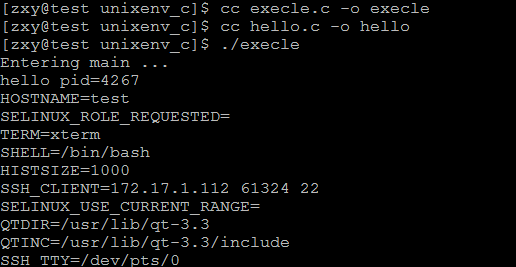
可知原进程确实将环境变量信息传递给了新进程
那么现在我们可以利用execle函数自己给的需要传递的环境变量信息:
示例程序:execle.c
#include <stdio.h>

#include <stdlib.h>

#include <unistd.h>

int main(int argc, char *argv[])

{

    char * const envp[] = {"AA=11", "BB=22", NULL};

    printf("Entering main ...\n");

    int ret;

    //ret =execl("./hello", "hello", NULL);

    ret =execle("./hello", "hello", NULL, envp);

    if(ret == -1)

        perror("execl error");

    printf("Exiting main ...\n");

    return 0;

}
hello.c
#include <unistd.h>

#include <stdio.h>

extern char** environ;

int main(void)

{

    printf("hello pid=%d\n", getpid());

    int i;

    for (i=0; environ[i]!=NULL; ++i)

    {

        printf("%s\n", environ[i]);

    }

    return 0;

}
结果:

确实将给定的环境变量传递过来了
三,fcntl()函数中的FD_CLOEXEC标识在exec系列函数中的作用
#include <unistd.h>
#include <fcntl.h>
int fcntl(int fd, int cmd, ... /* arg */ );
File descriptor flags
The following commands manipulate the flags associated with a file
descriptor. Currently, only one such flag is defined: FD_CLOEXEC, the
close-on-exec flag. If the FD_CLOEXEC bit is 0, the file descriptor
will remain open across an execve(2), otherwise it will be closed.
//如果FD_CLOEXEC标识位为0,则通过execve调用后fd依然是打开的,否则为关闭的
F_GETFD (void)
Read the file descriptor flags; arg is ignored.
F_SETFD (long)
Set the file descriptor flags to the value specified by arg.
如:fcntl(fd, F_SETFD, FD_CLOEXEC);
测试示例:
#include <stdio.h>

#include <stdlib.h>

#include <unistd.h>

#include <fcntl.h>

int main(int argc, char *argv[])

{

    printf("Entering main ...\n");

    int ret = fcntl(1, F_SETFD, FD_CLOEXEC);

    if (ret == -1)

        perror("fcntl error");

    int val;

    val =execlp("ls", "ls","-l", NULL);

    if(val == -1)

        perror("execl error");

    printf("Exiting main ...\n");

    return 0;

}
结果:
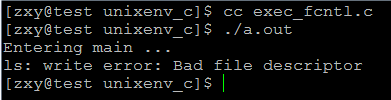
1关闭(标准输出关闭)ls -l无法将结果显示在标准输出
linux系统编程之进程(五):exec系列函数(execl,execlp,execle,execv,execvp)使用的更多相关文章
- exec系列函数(execl,execlp,execle,execv,execvp)使用
本节目标: exec替换进程映像 exec关联函数组(execl.execlp.execle.execv.execvp) 一,exec替换进程映像 在进程的创建上Unix采用了一个独特的方法,它将进程 ...
- linux系统编程之进程(五)
今天继续学习系统编程,学习的主题还是进程,今天主要讨论的是守护进程相关的概念,开始进入正题: 什么是守护进程: 守护进程的创建步骤: 在描述它之前,首先得先了解两个概念:进程组.会话期: ...
- Linux系统编程_8_进程控制之fork_wait_waitpid函数
fork函数: #include <unistd.h> pid_t fork(void); fork用来创建一个子进程: 特点: fork调用后会返回两次,子进程返回0,父进 ...
- linux系统编程之进程(三)
今天继续学习进程相关的东东,继上节最后简单介绍了用exec函数替换进程映像的用法,今天将来深入学习exec及它关联的函数,话不多说,正式进入正题: exec替换进程映象: 对于fork()函数,它 ...
- linux系统编程之进程(一)
今天起,开始学习linux系统编程中的另一个新的知识点----进程,在学习进程之前,有很多关于进程的概念需要了解,但是,概念是很枯燥的,也是让人很容易迷糊的,所以,先抛开这些抽象的概念,以实际编码来熟 ...
- Linux系统编程(9)—— 进程之进程控制函数exec系列函数
在Linux中,并不存在exec()函数,exec指的是一组函数,一共有6个,分别是: #include <unistd.h> extern char **environ; int exe ...
- Linux系统编程——Daemon进程
目录 Daemon进程介绍 前提知识 Daemon进程的编程规则 Daemon进程介绍 Daemon运行在后台也称作"后台服务进程". 它是没有控制终端与之相连的进程.它独立与控制 ...
- linux系统编程之进程(二):进程生命周期与PCB(进程控制块)
本节目标: 进程状态变迁 进程控制块 进程创建 进程撤消 终止进程的五种方法 一,进程状态变迁 进程的三种基本状态 就绪(Ready)状态 当进程已分配到除CPU以外的所有必要的资源,只要获得处理机便 ...
- linux系统编程之进程(六):父进程查询子进程的退出,wait,waitpid
本节目标: 僵进程 SIGCHLD wait waitpid 一,僵尸进程 当一个子进程先于父进程结束运行时,它与其父进程之间的关联还会保持到父进程也正常地结束运行,或者父进程调用了wait才告终止. ...
随机推荐
- 修改默认的inout输入框背景颜色
https://www.cnblogs.com/beileixinqing/p/6119690.html
- jsonp 原理
1 json width padding(内填充); 2.计算机文件的属性 并不是以 文件的后缀名确定的,后缀名只是给人看的: 3.script 标签获取数据后 并不能直接使用: 4.尽可能 少声明 ...
- centos7 jenkins 安装
前提: 安装了 jdk ,我的是jdk8 第一步: https://jenkins.io/download/ 下载 可以下载 rpm文件, 标红处, 也可以下载war包(Generic Java pa ...
- SOA和微服务到底是什么关系
本文原创,原文地址为:http://www.cnblogs.com/fengzheng/p/5847441.html SOA和微服务到底是什么关系? 说实话,我确实不明白SOA和微服务到底有什么本质上 ...
- Centos 安装golang beego
刚开始用go和beego,真的还好多不懂~希望对看到的朋友有帮助~ 本人环境:centos 6.3x86_64 1.我在机器上创建了一个用户zww(useradd zww),登录zww(su zww) ...
- js数组类型判断与数据类型判断回顾
判断一个对象是否是数组方法有多种: 一.Array.isArray()函数 在ECMAScript5中可以通过Array.isArray()来做这件事: Array.isArray({}); //fa ...
- How to read very large text files fast
Question Does anyone know the fastest way to read large text files (10Mb) into a string.Readln is ju ...
- System.Data.SqlClient.SqlError: 尚未备份数据库的日志尾部
SQL还原时出现下面的错误,System.Data.SqlClient.SqlError: 尚未备份数据库 "***" 的日志尾部.如果该日志包含您不希望丢失的工作,请使用 BAC ...
- conductor任务域
任务域 任务域有助于支持任务开发.这个想法是相同的“任务定义”可以在不同的“域”中实现.域名开发人员控制的任意名称.因此,当工作流程启动时,调用者可以在工作流中的所有任务中指定哪些任务需要在特定域中运 ...
- EasuyUI前后台传参
package com.cn.eport.util; import java.util.List; import java.util.Map; public class PageHelper impl ...