
datagrid在MVC中的运用10-勾选
本文体验与勾选有关的特性。
需要加载的books.json
展开{

  "total": 4,

  "rows": [

    {

      "productid": "FI-SW-01",

      "productname": "Koi",

      "unitcost": 10.00,

      "status": "P",

      "listprice": 36.50,

      "attr1": "Large",

      "itemid": "EST-1",

      "checked": true

    },

    {

      "productid": "K9-DL-01",

      "productname": "Dalmation",

      "unitcost": 12.00,

      "status": "P",

      "listprice": 18.50,

      "attr1": "Spotted Adult Female",

      "itemid": "EST-10",

      "checked": true

    },

    {

      "productid": "RP-SN-01",

      "productname": "Rattlesnake",

      "unitcost": 12.00,

      "status": "P",

      "listprice": 38.50,

      "attr1": "Venomless",

      "itemid": "EST-11",

      "checked": true

    },

    {

      "productid": "RP-SN-01",

      "productname": "Rattlesnake",

      "unitcost": 12.00,

      "status": "P",

      "listprice": 26.50,

      "attr1": "Rattleless",

      "itemid": "EST-12",

      "checked": false

    }

  ]

}
视图
展开@{

    ViewBag.Title = "Index";

    Layout = "~/Views/Shared/_Layout.cshtml";

}

<link href="~/Content/themes/default/easyui.css" rel="stylesheet" />

<link href="~/Content/themes/icon.css" rel="stylesheet" />

<input type="button" id="ButtonGetCheck" value="Get Checked"/>

<table id="tt"></table>

@section scripts

{

    <script src="~/Scripts/jquery.easyui.min.js"></script>

    <script src="~/Scripts/easyui-lang-zh_CN.js"></script>

    <script type="text/javascript">

        $(function() {

            initData();

        });

        function initData() {

            $('#tt').datagrid({

                title: 'Checkbox selection on DataGrid',

                url: 'books.json',

                method: 'get', //默认是post,不允许对静态文件访问

                width: '700',

                rownumbers: true,

                columns: [[

                    { field: 'ck', checkbox: true },

                    { field: 'productid', title: 'productid' },

                    { field: 'productname', title: 'productname' },

                    { field: 'unitcost', title: 'unitcost' },

                    { field: 'status', title: 'status' },

                    { field: 'listprice', title: 'listprice' },

                    {field: 'itemid', title: 'itemid'}

                ]],

                singleSelect: false, //允许选择多行

                selectOnCheck: true,//true勾选会选择行,false勾选不选择行, 1.3以后有此选项

                checkOnSelect: true //true选择行勾选,false选择行不勾选, 1.3以后有此选项

            });

        }

    </script>

}
注意:
如果没有设置 method: 'get',就会报错,因为默认不能以post方式访问静态文件books.json。
效果: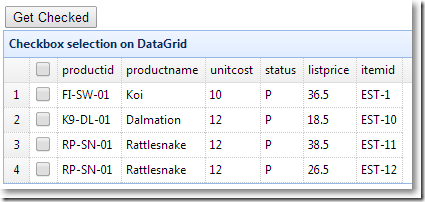
以上没有把books.json中"checked": true的行设置为选中。
设置每行属性checked为true的行选中
onLoadSuccess: function(data) {
if (data) {
$.each(data.rows, function(index, item) {
if (item.checked) {
$('#tt').datagrid('checkRow', index);
}
});
}
}
.csharpcode, .csharpcode pre
{
font-size: small;
color: black;
font-family: consolas, "Courier New", courier, monospace;
background-color: #ffffff;
/*white-space: pre;*/
}
.csharpcode pre { margin: 0em; }
.csharpcode .rem { color: #008000; }
.csharpcode .kwrd { color: #0000ff; }
.csharpcode .str { color: #006080; }
.csharpcode .op { color: #0000c0; }
.csharpcode .preproc { color: #cc6633; }
.csharpcode .asp { background-color: #ffff00; }
.csharpcode .html { color: #800000; }
.csharpcode .attr { color: #ff0000; }
.csharpcode .alt
{
background-color: #f4f4f4;
width: 100%;
margin: 0em;
}
.csharpcode .lnum { color: #606060; }
效果: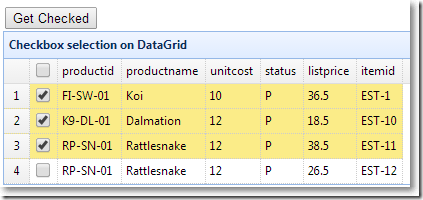
获取选中行的值
$(function() {
initData();
$('#ButtonGetCheck').click(function() {
var checkedItems = $('#tt').datagrid('getChecked');
var names = [];
$.each(checkedItems, function(index, item) {
names.push(item.productname);
});
console.log(names.join(","));
});
});
.csharpcode, .csharpcode pre
{
font-size: small;
color: black;
font-family: consolas, "Courier New", courier, monospace;
background-color: #ffffff;
/*white-space: pre;*/
}
.csharpcode pre { margin: 0em; }
.csharpcode .rem { color: #008000; }
.csharpcode .kwrd { color: #0000ff; }
.csharpcode .str { color: #006080; }
.csharpcode .op { color: #0000c0; }
.csharpcode .preproc { color: #cc6633; }
.csharpcode .asp { background-color: #ffff00; }
.csharpcode .html { color: #800000; }
.csharpcode .attr { color: #ff0000; }
.csharpcode .alt
{
background-color: #f4f4f4;
width: 100%;
margin: 0em;
}
.csharpcode .lnum { color: #606060; }
效果: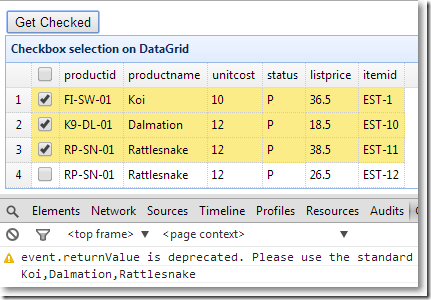
/Customer/Index 视图
展开$('#tt').datagrid({

                url: '@Url.Action("GetData","Customer")',

                width: 730,

                height: 400,

                title: 'Customer列表',

                fitColumns: true,

                rownumbers: true, //是否加行号

                pagination: true, //是否显式分页

                pageSize: 15, //页容量,必须和pageList对应起来,否则会报错

                pageNumber: 2, //默认显示第几页

                pageList: [15, 30, 45],//分页中下拉选项的数值

                columns: [[

                    //CustomerID,CompanyName,ContactName,ContactTitle,Country,Region,Address,Fax,Phone,City

                    {field: 'ck', checkbox: true},

                    { field: 'CustomerID', title: '编号',sortable: true },

                    { field: 'CompanyName', title: '客户名称', sortable: true },

                    { field: 'ContactName', title: '联系人名称', sortable: true },

                    { field: 'ContactTitle', title: '职位', sortable: true },

                    { field: 'Address', title: '地址', sortable: true },

                    { field: 'City', title: '城市名称', sortable: true },

                    { field: 'Region', title: '区域' },

                    { field: 'Country', title: '国家' },

                    { field: 'Phone', title: '电话', sortable: true },

                    { field: 'Fax', title: '传真', sortable: true }

                ]],

                queryParams: params, //搜索json对象

                sortName: 'CustomerID', //初始排序字段

                sortOrder: 'asc' //初始排序方式

            });
效果: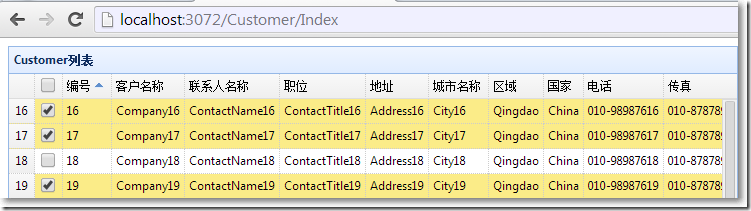
可见,默认状态下:
可以多选
勾选会选择行
选中行会勾选
datagrid在MVC中的运用10-勾选的更多相关文章
- datagrid在MVC中的运用01-基本属性并实现分页
本文体验jQuery EasyUI的datagrid在MVC中的应用.主要涉及到: ※ datagrid的基本属性和方法 ※ datagrid分页在前后台的实现 最终效果: 与视图显示对应的view ...
- datagrid在MVC中的运用05-加入时间搜索条件,枚举填充下拉框
本文主要来体验在搜索区域增加更多的搜索条件,主要包括: ※ 使用jQuery ui的datepicker显示时间,设置显示格式.样式. ※ 设置jQuery ui的onClose事件,使开始和结束时间 ...
- jQuery 判断多个 input checkbox 中至少有一个勾选
html ( 使用 TP 标签 ) : <volist name="health_tag" id="htag"> <input type=&q ...
- UNITY5 为什么Inspector视图中脚本前面的勾选框没了
结果发现了一个奇葩的问题..凡事脚本没有勾选项的,都是因为你的脚本没有Start方法..如果你想让勾选框显示出来,把如下方法加入即可,不信你可以试试.嘿嘿.
- Unity3D研究院之为什么Inspector视图中脚本前面的勾选框没了
我一个同事刚问我为啥有时候脚本的勾选项没有了?有时候不想让某条脚本执行,可以直接在编辑器中点掉勾选按钮即可.如下图所示 以前我也遇到过这个问题,但是一直都没怎么注意,因为一般情况下也用不到.今天刚好有 ...
- datagrid在MVC中的运用07-实现Master-Detail(使用PartialView)
本文主要体验用jQuery Easyui的datagrid来实现Master-Detail主次表.谢谢Kevin的博文,助我打开了思路. 主表显示所有的Category,当点击主表的展开按钮,显示该C ...
- jQuery EasyUI DataGrid在MVC中的运用-基本属性并实现分页
※ datagrid的基本属性和方法 ※ datagrid分页在前后台的实现 最终效果: 与视图显示对应的view model public class Book public strin ...
- datagrid在MVC中的运用09-实现排序
本文体验datagrid的排序. □ 思路 当点击datagrid的标题,视图传递给Controller的Form Data类似这样:page=1&rows=10&sort=Custo ...
- datagrid在MVC中的运用02-结合搜索
本文接着上一篇,来体验给datagrid加上搜索功能.主要涉及到: ※ 把一个div与datagrid相关起来 ※ datagrid接收查询参数 ※ 查询参数的封装 效果图: 查询参数封装 分页相关的 ...
随机推荐
- (二)Mybatis项目配置
第一节:environments Mybatis支持多个环境,可以任意配置 <environments default="development"> <envir ...
- PHP5.6中php-fpm的配置、启动、关闭和重启
转:http://blog.csdn.net/field_yang/article/details/52401994 该文主要讲述:如何配置PHP-fpm.常见报错解决方法和php-fpm的启动.关闭 ...
- Ninject中调用webapi卡住的情况解决
过年这两天在家做项目,把mvc升级到了5.1,webapi升级到了2.1,忽然发现一个问题,在某些页面上ajax调用webapi时会发现卡死现象,CPU也没有被占用,就是网页一些在加载也不报错,经过2 ...
- 用 Java 实现一个插入排序算法
有一个已经有序的数据序列,要求在这个已经排好的数据序列中插入一个数,但要求插入后此数据序列仍然有序,这个时候就要用到一种新的排序方法:插入排序法.插入排序的基本操作就是将一个数据插入到已经排好序的有序 ...
- ubuntu16.04编译安装mysql5.7
1.安装编译依赖 sudo apt-get install make cmake gcc g++ bison libncurses5-dev build-essential 2.下载mysql5.7源 ...
- 有了这套flex页面布局方案,页面什么的,那都不是事。
一.CSS3弹性盒子弹性盒子是CSS3的一种新布局模式.CSS3 弹性盒( Flexible Box 或 flexbox),是一种当页面需要适应不同的屏幕大小以及设备类型时确保元素拥有恰当的行为的布局 ...
- 磁盘备份工具dcfldd
磁盘备份工具dcfldd dcfldd是Kali Linux自带的一款磁盘备份工具.该工具是dd工具的增强版,更适合渗透测试和安全领域.dcfldd提供实时哈希校验功能,确保数据的安全.同时,它还 ...
- Centos7 如何减少/home分区,扩大/root分区
把/home内容备份,然后将/home文件系统所在的逻辑卷删除,扩大/root文件系统,新建/home:tar cvf /tmp/home.tar /home #备份/home umount /hom ...
- win32创建窗口函数(windows程序内部运行机制)
利用win32创建窗口函数,主要操作步骤为: 1.设计一个窗口类 2.注册窗口类 3.创建窗口 4.显示及窗口更新 5.消息循环 6.窗口过程函数 (1)设计一个窗口类 设计窗口类,这样的类型已经 ...
- luoguP4555 [国家集训队]最长双回文串 manacher算法
不算很难的一道题吧.... 很容易想到枚举断点,之后需要处理出以$i$为开头的最长回文串的长度和以$i$为结尾的最长回文串的长度 分别记为$L[i]$和$R[i]$ 由于求$R[i]$相当于把$L[i ...