
Ubuntu16安装GPU版本TensorFlow(个人笔记本电脑)
想着开始学习tf了怎么能不用GPU,网上查了一下发现GeForce GTX确实支持GPU运算,所以就尝试部署了一下,在这里记录一下,避免大家少走弯路。
使用个人笔记本电脑thinkpadE570,内存4G,显卡GeForce GTX 950M
前期电脑已经安装win0+Ubuntu16双系统,thinkpad安装win0+Ubuntu16配置参照这里(本人为了方便)
安装顺序为:
(1)安装NVIDIA Driver
安装电脑对应的显卡驱动,安装完成能够在程序中找到NVIDIA。和windows驱动类似,不再赘述。
文件(GTX950):NVIDIA-Linux-x86_64-390.48.run
(2)安装CUDA,CUDA(Compute Unified Device Architecture),是英伟达公司推出的一种基于新的并行编程模型和指令集架构的通用计算架构,它能利用英伟达GPU的并行计算引擎,比CPU更高效的解决许多复杂计算任务。
不推荐sudo apt-get install nvidia-375安装,国内速度太慢,建议下载安装包,官网地址,选择选择runfile下载,
文件(GTX950):cuda_8.0.61_375.26_linux-run
(3)安装cuDNN,NVIDIA cuDNN是用于深度神经网络的GPU加速库。
直接下载同样非常慢,还需要注册,这里采用百度网盘上的,地址。
文件(GTX950):cudnn-8.0-linux-x64-v6.0.tgz
(4)安装gpu版本TensorFlow,下载地址,github地址:https://github.com/tensorflow/tensorflow
文件(GTX950):tf_nightly_gpu-1.head-cp27-none-linux_x86_64.whl
开始安装:
首先查看显卡信息
$sudo lshw -numeric -C display
description: 3D controller
product: GM107M [GeForce GTX 950M] [10DE:139A]
vendor: NVIDIA Corporation [10DE]
physical id: 0
bus info: pci@0000:01:00.0
version: a2
width: 64 bits
clock: 33MHz
capabilities: pm msi pciexpress bus_master cap_list
configuration: driver=nvidia latency=0
resources: irq:136 memory:f1000000-f1ffffff memory:c0000000-cfffffff memory:d0000000-d1ffffff ioport:d000(size=128)
$ ubuntu-drivers devices
== /sys/devices/pci0000:00/0000:00:1c.0/0000:01:00.0 ==
modalias : pci:v000010DEd0000139Asv000017AAsd0000505Cbc03sc02i00
vendor : NVIDIA Corporation
model : GM107M [GeForce GTX 950M]
driver : nvidia-361 - distro non-free
driver : nvidia-384 - third-party non-free recommended
driver : xserver-xorg-video-nouveau - distro free builtin
(1)安装驱动
sudo apt-get install nvidia-384
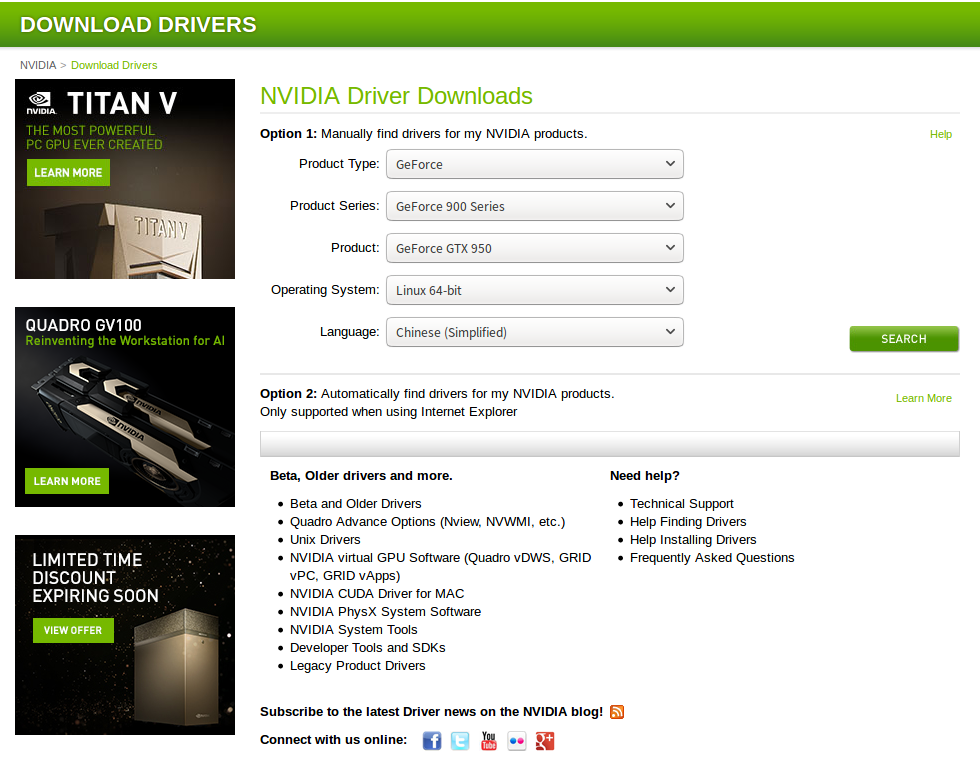
如果速度慢,官网下载,地址
选择合适的版本,然后用安装包安装。E570版本。
(2)安装CUDA
$ sudo sh cuda_8.0.61_375.26_linux-run --override然后安装引导界面,交互界面,开始的Install NVIDIA Accelerated Graphics Driver for Linux-x86_64 367.48?选择n,因为你已经安装驱动了。
Using more to view the EULA.

End User License Agreement

--------------------------

Preface

-------

The following contains specific license terms and conditions

for four separate NVIDIA products. By accepting this

agreement, you agree to comply with all the terms and

conditions applicable to the specific product(s) included

herein.

NVIDIA CUDA Toolkit

Description

The NVIDIA CUDA Toolkit provides command-line and graphical

tools for building, debugging and optimizing the performance

of applications accelerated by NVIDIA GPUs, runtime and math

libraries, and documentation including programming guides,

user manuals, and API references. The NVIDIA CUDA Toolkit

License Agreement is available in Chapter .

Default Install Location of CUDA Toolkit

Windows platform:

Do you accept the previously read EULA?

accept/decline/quit: accept

Install NVIDIA Accelerated Graphics Driver for Linux-x86_64 367.48?

(y)es/(n)o/(q)uit: n

Install the CUDA 8.0 Toolkit?

(y)es/(n)o/(q)uit: y

Enter Toolkit Location

 [ default is /usr/local/cuda-8.0 ]:

Do you want to install a symbolic link at /usr/local/cuda?

(y)es/(n)o/(q)uit: y

Install the CUDA 8.0 Samples?

(y)es/(n)o/(q)uit: y

Enter CUDA Samples Location

 [ default is /home/kinny ]:

Installing the CUDA Toolkit in /usr/local/cuda-8.0 ...

Missing recommended library: libXmu.so

Installing the CUDA Samples in /home/kinny ...

Copying samples to /home/kinny/NVIDIA_CUDA-.0_Samples now...

Finished copying samples.

===========

= Summary =

===========

Driver:   Not Selected

Toolkit:  Installed in /usr/local/cuda-8.0

Samples:  Installed in /home/kinny, but missing recommended libraries

Please make sure that

 -   PATH includes /usr/local/cuda-8.0/bin

 -   LD_LIBRARY_PATH includes /usr/local/cuda-8.0/lib64, or, add /usr/local/cuda-8.0/lib64 to /etc/ld.so.conf and run ldconfig as root

To uninstall the CUDA Toolkit, run the uninstall script in /usr/local/cuda-8.0/bin

Please see CUDA_Installation_Guide_Linux.pdf in /usr/local/cuda-8.0/doc/pdf for detailed information on setting up CUDA.

***WARNING: Incomplete installation! This installation did not install the CUDA Driver. A driver of version at least 361.00 is required for CUDA 8.0 functionality to work.

To install the driver using this installer, run the following command, replacing <CudaInstaller> with the name of this run file:

    sudo <CudaInstaller>.run -silent -driver

Logfile is /tmp/cuda_install_17494.log
加入环境变量:
export PATH="$PATH:/usr/local/cuda-8.0/bin"

export LD_LIBRARY_PATH="/usr/local/cuda-8.0/lib64"

$ nvidia-smi
Tue May   ::

+-----------------------------------------------------------------------------+

| NVIDIA-SMI 384.111                Driver Version: 384.111                   |

|-------------------------------+----------------------+----------------------+

| GPU  Name        Persistence-M| Bus-Id        Disp.A | Volatile Uncorr. ECC |

| Fan  Temp  Perf  Pwr:Usage/Cap|         Memory-Usage | GPU-Util  Compute M. |

|===============================+======================+======================|

|     GeForce GTX 950M    Off  | ::00.0 Off |                  N/A |

| N/A   43C    P5    N/A /  N/A |    342MiB /  2002MiB |      %      Default |

+-------------------------------+----------------------+----------------------+

+-----------------------------------------------------------------------------+

| Processes:                                                       GPU Memory |

|  GPU       PID   Type   Process name                             Usage      |

|=============================================================================|

|                G   /usr/lib/xorg/Xorg                            49MiB |

|                G   /usr/lib/xorg/Xorg                           129MiB |

|                G   compiz                                       114MiB |

|                G   fcitx-qimpanel                                 8MiB |

|                G   /usr/lib/firefox/firefox                       1MiB |

+-----------------------------------------------------------------------------+
安装成功!
(3)安装cuDNN
$ tar xvzf cudnn-8.0-linux-x64-v6..tgz

$ sudo cp cuda/include/cudnn.h /usr/local/cuda/include

$ sudo cp cuda/lib64/libcudnn* /usr/local/cuda/lib64

$ sudo chmod a+r /usr/local/cuda/include/cudnn.h /usr/local/cuda/lib64/libcudnn*
(4)安装TensorFlow
pip install wheel

sudo pip install tf_nightly_gpu-.head-cp27-none-linux_x86_64.whl

export LD_LIBRARY_PATH="$LD_LIBRARY_PATH:/usr/local/cuda/lib64:/usr/local/cuda/extras/CUPTI/lib64"

export CUDA_HOME=/usr/local/cuda
搞定!
(5) 错误处理
zh@zh-ThinkPad-E570:~$ python

Python 2.7. (default, Nov  , ::)

[GCC 5.4. ] on linux2

Type "help", "copyright", "credits" or "license" for more information.

>>> import tensorflow

Traceback (most recent call last):

  File "<stdin>", line , in <module>

  File "/usr/local/lib/python2.7/dist-packages/tensorflow/__init__.py", line , in <module>

    from tensorflow.python import *

  File "/usr/local/lib/python2.7/dist-packages/tensorflow/python/__init__.py", line , in <module>

    from tensorflow.python import pywrap_tensorflow

  File "/usr/local/lib/python2.7/dist-packages/tensorflow/python/pywrap_tensorflow.py", line , in <module>

    raise ImportError(msg)

ImportError: Traceback (most recent call last):

  File "/usr/local/lib/python2.7/dist-packages/tensorflow/python/pywrap_tensorflow.py", line , in <module>

    from tensorflow.python.pywrap_tensorflow_internal import *

  File "/usr/local/lib/python2.7/dist-packages/tensorflow/python/pywrap_tensorflow_internal.py", line , in <module>

    _pywrap_tensorflow_internal = swig_import_helper()

  File "/usr/local/lib/python2.7/dist-packages/tensorflow/python/pywrap_tensorflow_internal.py", line , in swig_import_helper

    _mod = imp.load_module('_pywrap_tensorflow_internal', fp, pathname, description)

ImportError: libcusolver.so.8.0: cannot open shared object file: No such file or directory

Failed to load the native TensorFlow runtime.

See https://www.tensorflow.org/install/install_sources#common_installation_problems

for some common reasons and solutions.  Include the entire stack trace

above this error message when asking for help.
环境变量的问题,
zh@zh-ThinkPad-E570:~$ echo $LD_LIBRARY_PATH

”:/usr/local/cuda/lib64”

zh@zh-ThinkPad-E570:~$ sudo ldconfig /usr/local/cuda/lib64
ok!
Ubuntu16安装GPU版本TensorFlow(个人笔记本电脑)的更多相关文章
- Ubuntu 16安装GPU版本tensorflow
pre { direction: ltr; color: rgb(0, 0, 0) } pre.western { font-family: "Liberation Mono", ...
- ubuntu 18.04 64bit如何安装GPU版本tensorflow
注:笔者的ubuntu18.04 64bit已经安装好了显卡驱动,因此没有此步操作 1.获取cuda(https://developer.nvidia.com/cuda-downloads,选择ubu ...
- tensorflow 安装GPU版本,个人总结,步骤比较详细【转】
本文转载自:https://blog.csdn.net/gangeqian2/article/details/79358543 手把手教你windows安装tensorflow的教程参考另一篇博文ht ...
- 禁用GPU版本TensorFlow,切换到CPU版本TensorFlow。
#禁用gpu版本TensorFlow,因为CUDA号码从0开始,这里直接让CUDA使用-1的GPU,自然就无法使用gpu了. 代码前面加入: import osos.environ["CUD ...
- 安装GPU版本的tensorflow填过的那些坑!---CUDA说再见!
那些坑,那些说不出的痛! --------回首安装的过程,真的是填了一个坑又出现了一坑的感觉.记录下了算是自己的笔记也能给需要的人提供一点帮助. 1 写在前面的话 其实在装GPU版本的tensorfl ...
- ubuntu+anaconda+python安装各版本tensorflow
一.安装anaconda 1.去官网下载anaconda linux版本即可 选择合适的版本下载即可 2.安装Aanconda: 打开终端(Ctrl+Alt+t)进入到下载的目录一般在home 下的D ...
- Win10下Anaconda3安装CPU版本TensorFlow并使用Pycharm开发
环境:windows10 软件:Anaconda3 1.安装Anaconda 选择相应的Anaconda进行安装,下载地址点击这里,下载对应系统版本的Anaconda3. 运行 开始菜单->An ...
- Windows10安装GPU版本的Tensorflow
本人电脑配置(公司的)gtx1080ti,下载的的cuda8.0,cudnn6.0,python3.5.3安装完成后,安装tensorflow 1.pip install tensorflow-gpu ...
- Win10 64bit下安装GPU版Tensorflow+Keras
Tensorflow和Keras都是支持Python接口的,所以本文中说的都是搭建一个Python的深度学习环境. Keras是对Tensorflow或者Theano的再次封装,也就是以Tensorf ...
随机推荐
- (转)Python - 字符串对齐
https://zhuanlan.zhihu.com/p/33923344-----------Python小知识:用format格式化输出字符串 版权声明:本文为博主原创文章,未经博主允许不得转载. ...
- Java之IO(三)ByteArrayInputStream和ByteArrayOutputStream
转载请注明源出处:http://www.cnblogs.com/lighten/p/6972297.html 1.前言 这组输入输出流比较特殊,一般的流指定都是磁盘IO和网络IO,从文件中读取数据或者 ...
- [转]asp.net core中的View Component
解读ASP.NET 5 & MVC6系列(14):View Component http://www.cnblogs.com/TomXu/p/4496486.html
- 用css实现在横线中间插入文字
在一些登录或者注册界面中常常可看到,一个大框框上面的横线中有插入文字,大概示意图如下: 这种现象其实是相对位置作用的结果,可以通过相对定位,是某元素恰好出现在div的边框上. position: re ...
- ABP实战--分页排序
待完成... public async Task<DatatablesResultDto<TaskDto>> GetList(KeywordDatatablesRequestD ...
- Java 获取汉字串首字母并大写和获取汉字的全拼,英文字符不变
在开发中我们难免会遇到需要提出汉字中的拼音的首字母.提出汉字的拼音,接着便介绍一个工具类 pinyin4j.jar,首先需要下载 jar 包. Pinyin4j是一个功能强悍的汉语拼音工具包,是sou ...
- 匿名函数、闭包、lambda表达式、Block
C#有lambda.匿名函数,js有匿名函数.闭包,OC中有block,看到这是不是心中有一万个草泥马在跑,不过它们这些都是换汤不换药,不同语言名字不一样. 从功能性上说lambda和closure( ...
- 自动化部署MySQL 5.6 步骤 制作到ftp共享,永远使用
首先需要搭建ftpserver yum install vsftpd service vsftpd start 这样ftp服务就起来了,这里只是简单的使用,所以没有使用配置文件.这样我们只要将需要的文 ...
- [转]SQL Server中用While循环替代游标(Cursor)的解决方案
本文转自:https://www.cnblogs.com/SunnyZhu/p/5719184.html By行处理数据,推荐2种方式: 1.游标 2.While循环 我们来了解下这两种方案处理1w行 ...
- .net core iis 502.5
<Project Sdk="Microsoft.NET.Sdk.Web"> <PropertyGroup> <TargetFramework>n ...