
[转载]Require.js Example – Setup Time 2 Minutes
http://www.sitepoint.com/require-js-setup-time-2-minutes/
Setup Require.js in just 2 minutes. or download the code below and have it already working.
What is Require.js?
RequireJS is a JavaScript file and module loader. It is optimized for in-browser use, but it can be used in other JavaScript environments, like Rhino and Node. Using a modular script loader like RequireJS will improve the speed and quality of your code.
- Speed – Asynchronous JavaScript Loading.
- Manage JavaScript dependencies such as jQuery plugins.
- File Structure your web app files.
- When you get good you can code modules which do specific web app stuff.
- Removes the need for including 100 script tags in your HTML.
- Can be easily integrate with build scripts.
Does it work?
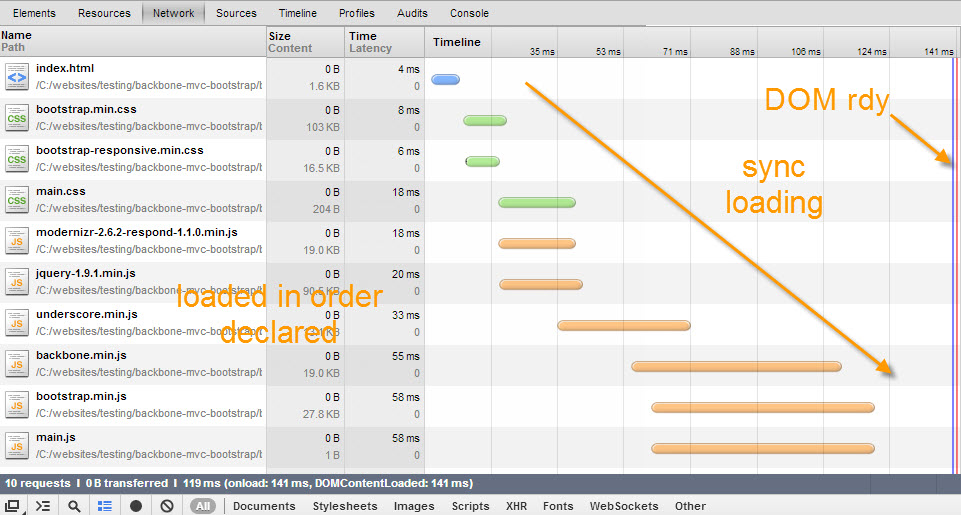
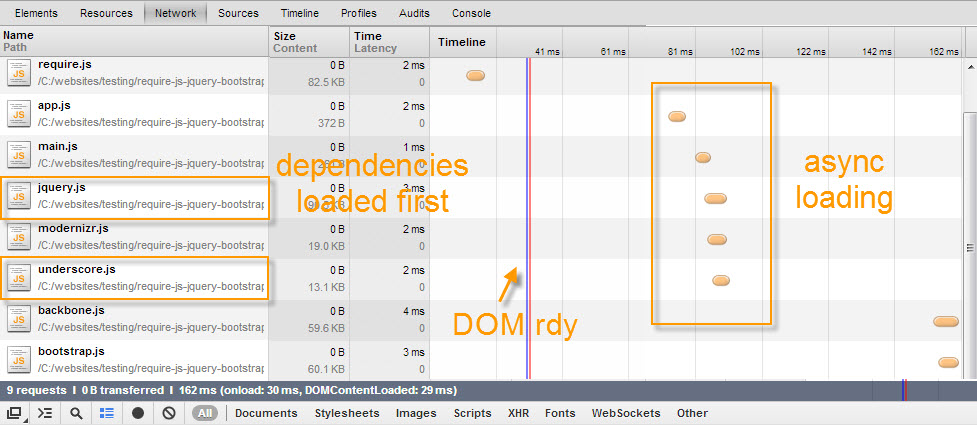
Yes. Screenshot below was taken from my dev with chrome dev tools open (disabling cache) so is naturally fast but amazingly even here you can see a performance increase.
Web App Scructure
This is a very basic structure you can use for a web app.
- root/
- index.html
- js
- vendor
- [External JavaScript Files & jQuery Plugins]
- app
- main.js
- [your modules and web app JavaScript files]
- app.js
- vendor
- css
- img
HTML Before:
The normal way to load scripts… modernizr goes in the head, the rest in the body.
|
1
2
3
4
5
6
7
8
9
10
11
12
13
14
15
16
|
< !DOCTYPE html><head> <title>My Web App</title> <link rel="stylesheet" href="app/css/main.css"/> <script src="app/js/vendor/modernizr-2.6.2-respond-1.1.0.min.js"></script></head><body> <div id="main" class="container"></div> <script src="app/js/vendor/jquery-1.9.1.min.js"></script> <script src="app/js/vendor/underscore.min.js"></script> <script src="app/js/vendor/backbone.min.js"></script> <script src="app/js/vendor/bootstrap.min.js"></script> <script src="app/js/main.js"></script></body> |
HTML After:
Require.js goes in the head. Nice and neat.
|
1
2
3
4
5
6
7
8
9
10
11
|
< !DOCTYPE html><head> <title>My Web App</title> <link rel="stylesheet" href="app/css/main.css"/> <script data-main="js/app" src="js/vendor/require.js"></script></head><body> <div id="main" class="container"></div></body> |
app.js
This file contains the config for require.js. If you change the directory structure this needs to match. I’m showing you the shim version, you can also load jQuery from a CDN.
|
1
2
3
4
5
6
7
8
9
10
11
12
13
14
15
16
|
// Place third party dependencies in the lib folder//// Configure loading modules from the lib directory,requirejs.config({ "baseUrl": "js/vendor", "paths": { "app": "../app" }, "shim": { "backbone": ["jquery", "underscore"], "bootstrap": ["jquery"] }});// Load the main app module to start the apprequirejs(["app/main"]); |
main.js
This file contains the web app dependencies and once loaded you can start your app using whatever framework you like such as Backbone or Angular.
|
1
2
3
4
5
6
7
8
9
10
11
12
13
14
15
16
17
|
//Load Web App JavaScript Dependencies/Pluginsdefine([ "jquery", "modernizr", "underscore", "backbone", "bootstrap"], function($){ $(function() { //do stuff console.log('required plugins loaded...'); });}); |
Still can’t get it working?
[转载]Require.js Example – Setup Time 2 Minutes的更多相关文章
- require.js学习笔记(内容属于转载总结)
<script data-main="src/app" src="src/lib/require.js"></script> backb ...
- 转载 r.js打包经验
例子1 先是HTML页面 <!DOCTYPE html> <html> <head> <title>My App</tit ...
- Javascript模块化编程(三):require.js的用法 作者: 阮一峰
声明:转载自阮一峰的网络日志 这个系列的第一部分和第二部分,介绍了Javascript模块原型和理论概念,今天介绍如何将它们用于实战. 我采用的是一个非常流行的库require.js. 一.为什么要用 ...
- js模块化开发——require.js的用法详细介绍(含jsonp)
RequireJS的目标是鼓励代码的模块化,它使用了不同于传统<script>标签脚本加载步骤.可以用它回事.优化代码,但其主要的目的还是为了代码的模块化.它鼓励在使用脚本以moudle ...
- require.js模块化写法
模块化 模块就是实现特定功能的一组方法.只要把不同的函数(以及记录状态的变量)简单地放在一起,就算是一个模块. 下述两种写法等价 exports 对象是当前模块的导出对象,用于导出模块公有方法和属性. ...
- javascript模块化编程库require.js的用法
随着javascript的兴起,越来越多的公司开始将JS模块化,以增加开发的效率和减少重复编写代码的.更是为了能更加容易的维护日后的代码,因为现在的随着人们对交互效果的越来越强烈的需求,我们的JS代码 ...
- jQuery 对AMD的支持(Require.js中如何使用jQuery)
AMD 模块 AMD(异步模块定义,Asynchronous Module Definition)格式总体的目标是为现在的开发者提供一个可用的模块化 JavaScript 的解决方案. AMD 模块格 ...
- require.js 简洁入门
原文地址:http://blog.sae.sina.com.cn/archives/4382 前言 提到require.js大多数人会说提到模块化开发,AMD等等,其实require.js并没有这么多 ...
- require.js 最佳实践【转】
https://www.cnblogs.com/digdeep/p/4607131.html require.js是一个js库,相关的基础知识,前面转载了两篇博文:Javascript模块化编程(re ...
随机推荐
- SQL语句中的output用法
private void button2_Click(object sender, RoutedEventArgs e) { using (SqlConnection conn = new SqlCo ...
- PHP-时间函数
1.时间格式化函数date(format,timestamp) format 时间格式 timestamp 时间戳 下面列出了一些常用于日期的字符: d - 表示月里的某天(01-31) m - 表示 ...
- ACM数论之旅3---最大公约数gcd和最小公倍数lcm(苦海无边,回头是岸( ̄∀ ̄))
gcd(a, b),就是求a和b的最大公约数 lcm(a, b),就是求a和b的最小公倍数 然后有个公式 a*b = gcd * lcm ( gcd就是gcd(a, b), ( •̀∀•́ ) ...
- Android 去掉标题全屏显示
自己测试时出现无法实现去掉标题和全屏功能.最后发现只要public class SocketActivity extends Activity {} 而不能用ActionBarActivity. 先介 ...
- springcloud微服务实战:Eureka+Zuul+Feign/Ribbon+Hystrix Turbine+SpringConfig+sleuth+zipkin
相信现在已经有很多小伙伴已经或者准备使用springcloud微服务了,接下来为大家搭建一个微服务框架,后期可以自己进行扩展.会提供一个小案例: 服务提供者和服务消费者 ,消费者会调用提供者的服务,新 ...
- Spring(1):Spring简介
一句话概括: Spring是一种轻量级控制反转IoC和面向切面AOP的容器框架 初衷: 使用接口编程而不是类 为javabean提供一个更好的应用配置框架 javabean是一种规范而不是技术.是指符 ...
- jsp中的下载链接
1.下载链接jsp界面(a链接直接链文件可以看出文件在服务器中的路径,用servlet处理的链接则看不出) <%@ page language="java" contentT ...
- 013 BIO、NIO、AIO的区别
作者:nnngu GitHub:https://github.com/nnngu 博客园:http://www.cnblogs.com/nnngu 简书:https://www.jianshu.com ...
- The Bells are Ringing UVALive - 4060(枚举求解)
输出整数N,使得 t1 <= N 统计有多少组t1,t2,t3,满足:1<t1<t2<t3<=1000000,t3-t1<=25,且t1,t2,t3的最小公倍数 ...
- 【刷题】BZOJ 1458 士兵占领
Description 有一个M * N的棋盘,有的格子是障碍.现在你要选择一些格子来放置一些士兵,一个格子里最多可以放置一个士兵,障碍格里不能放置士兵.我们称这些士兵占领了整个棋盘当满足第i行至少放 ...