
Intellij-插件安装-安装CodeGenerator插件并且添加Builder模板
Intellij IDEA 2018.1.2版本
CodeGenerator插件地址:https://github.com/lotabout/CodeGenerator/releases
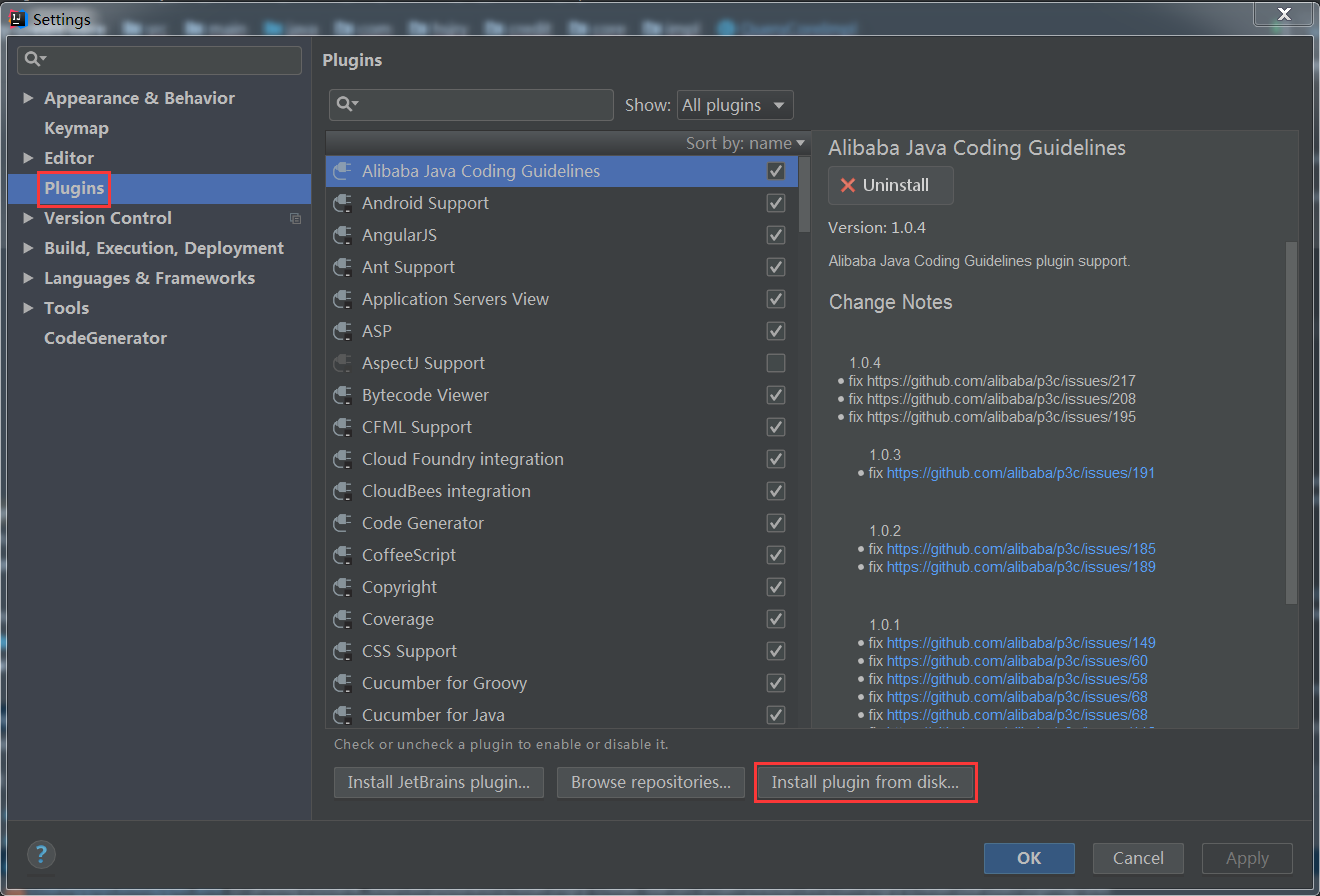
步骤一:安装插件
下载CodeGenerator.jar到本地磁盘,打开Intellij安装插件的界面进行安装
步骤二:添加Builder模式的模板
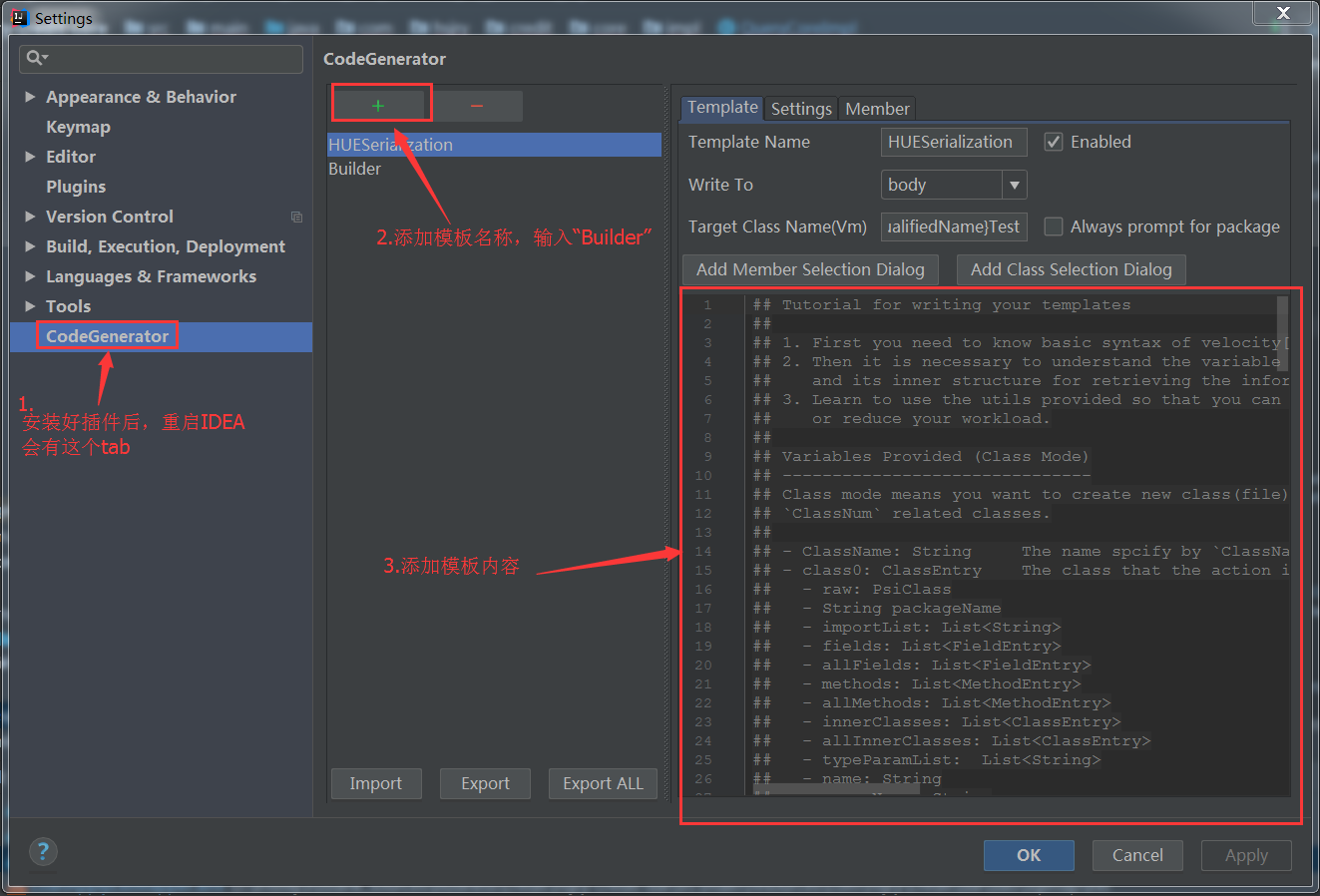
## Tutorial for writing your templates

##

## 1. First you need to know basic syntax of velocity[1].

## 2. Then it is necessary to understand the variable that CodeGenerator provides

##    and its inner structure for retrieving the information you need for generating code.

## 3. Learn to use the utils provided so that you can ask for further information

##    or reduce your workload.

##

## Variables Provided (Class Mode)

## -------------------------------

## Class mode means you want to create new classes(file).

##

## - ClassName: String     The name spcified by `Target Class Name`

## - PackageName: String   The package name specified by `Target Class Name`

## - class0: ClassEntry    The class that the action is triggered upon

##   - raw: PsiClass

##   - String packageName

##   - importList: List<String>

##   - fields: List<FieldEntry>

##   - allFields: List<FieldEntry>

##   - methods: List<MethodEntry>

##   - allMethods: List<MethodEntry>

##   - innerClasses: List<ClassEntry>

##   - allInnerClasses: List<ClassEntry>

##   - typeParamList:  List<String>

##   - name: String

##   - superName: String

##   - superQualifiedName: String

##   - qualifiedName: String

##   - typeParams: int

##   - hasSuper: boolean

##   - deprecated: boolean

##   - enum: boolean

##   - exception: boolean

##   - abstract: boolean

##   - implementNames: String[]

##   - isImplements(String): bool

##   - isExtends(String): bool

##   - matchName(String): bool

##

## - class1: ClassEntry    The first selected class, where `1` is the postfix

##                         you specify in pipeline

##   ...

##

## - MemberEntry (FieldEntry/MethodEntry common properties)

##    - raw: PsiField(for field), PsiMethod(for method)

##    - name: String

##    - accessor: String

##    - array: boolean

##    - nestedArray: boolean

##    - collection: boolean

##    - map: boolean

##    - primitive: boolean

##    - string: boolean

##    - primitiveArray: boolean

##    - objectArray: boolean

##    - numeric: boolean

##    - object: boolean

##    - date: boolean

##    - set: boolean

##    - list: boolean

##    - stringArray: boolean

##    - calendar: boolean

##    - typeName: String

##    - typeQualifiedName: String

##    - type: String

##    - boolean: boolean

##    - long: boolean

##    - float: boolean

##    - double: boolean

##    - void: boolean

##    - notNull: boolean

##    - char: boolean

##    - byte: boolean

##    - short: boolean

##    - modifierStatic: boolean

##    - modifierPublic: boolean

##    - modifierProtected: boolean

##    - modifierPackageLocal: boolean

##    - modifierPrivate: boolean

##    - modifierFinal: boolean

##

## - FieldEntry

##   - constant: boolean

##   - modifierTransient: boolean

##   - modifierVolatile: boolean

##   - enum: boolean

##   - matchName(String): bool

##

## - MethodEntry

##   - methodName: String

##   - fieldName: String

##   - modifierAbstract: boolean

##   - modifierSynchronzied: boolean

##   - modifierSynchronized: boolean

##   - returnTypeVoid: boolean

##   - getter: boolean

##   - deprecated: boolean

##   - matchName(String): bool

##

## Variables for Body Mode

## -----------------------

## - class0: ClassEntry         The current class

## - fields: List<FieldEntry>   All selected fields

## - methods: List<MethodEntry> All selected methods

## - members: List<MemberEntry> selected fields+methods

## - parentMethod: MethodEntry  The nearest method that surround the current cursor

##

## Utilities

## ---------

## - settings: CodeStyleSettings settings of code style

## - project: Project            The project instance, normally used by Psi related utilities

## - helper: GenerationHelper

## - StringUtil: Class

## - NameUtil: Class

## - PsiShortNamesCache: Class   utility to search classes

## - PsiJavaPsiFacade: Class     Java specific utility to search classes

## - GlobalSearchScope: Class    class to create search scopes, used by above utilities

## - EntryFactory: Class         EntryFactory.of(...) to turn PsiXXX to XXXEntry.

##

## Other feature

## -------------

## - Auto import.      If the generated code contains full qualified name, Code Generator will try to

##                     import the packages automatically and shorten the name.

##                     For example `java.util.List<>` -> `List<>`

##

## References

## ----------

## - Velocity syntax: http://velocity.apache.org/engine/1.7/user-guide.html

public static class Builder {

private ${class0.name} instance = new ${class0.name}();

private Builder() {}

public static Builder getInstance() {

return new Builder();

}

public static Builder getInstance(${class0.name} instance) {

            Builder builder = new Builder();

            builder.instance = instance;

            return builder;

        }

#if ( $members.size() > 0 )

    #foreach( $member in $members )

    #set($name = $StringUtil.capitalizeWithJavaBeanConvention($StringUtil.sanitizeJavaIdentifier($helper.getPropertyName($member.element, $project))))

    public Builder add${name}(${member.type} ${member.accessor}) {

    this.instance.set${name}(${member.accessor});

    return this;

    }

    #end

#end

public ${class0.name} build() {

return this.instance;

}

}
参考:
【1】个人博客,http://www.littlefisher.site/2018/04/02/Eclipse%E8%BD%ACIDEA%E6%8C%87%E5%8D%97/
Intellij-插件安装-安装CodeGenerator插件并且添加Builder模板的更多相关文章
- IntelliJ IDEA lombok插件的安装和使用
IntelliJ IDEA是一款非常优秀的集成开发工具,功能强大,而且插件众多.lombok是开源的代码生成库,是一款非常实用的小工具,我们在编辑实体类时可以通过lombok注解减少getter.se ...
- IntelliJ IDEA - 热部署插件JRebel 安装使用教程
IntelliJ IDEA - JRebel 安装使用教程 JRebel 能做什么? JRebel 是一款热部署插件.当你的 Java-web 项目在 tomcat 中 run/debug 的时候 , ...
- 在IntelliJ IDEA14中安装go语言插件
go语言的集成开发环境仍不成熟,试用了liteide,感觉很不适应,弹出菜单对程序员的干扰太大.所以就试大牌的IntelliJ IDEA,这工具本来是JAVA开发阵营的,不过它已经变为一个非常强大的支 ...
- 安装IntelliJ IDEA热部署tomcat插件JreBel
最近试着使用IntelliJ IDEA这款IDE,网上说它是最好用的java开发工具~但奈何国内ecilpse市场占有率实在稳固,所以国内这个工具也就少数人在使用 当然使用起来跟ecilpse还是有很 ...
- Intellij idea 离线安装activiti工作流插件
想在Intellij idea上安装一个activiti插件玩玩,由于网络环境原因,不能使用网上已有的在线搜索acti bpm并安装的方式.也在网上找了好久没找到离线安装的方式.自己摸索了一下装好了, ...
- 详述 IntelliJ IDEA 插件的安装及使用方法
首先,进入插件安装界面: Mac:IntelliJ IDEA -> Preferences -> Plugins; Windows:File -> Settings -> Pl ...
- IntelliJ IDEA 中安装junit插件
1.在Intellij IDEA 中安装了 Junit,TestNG插件,首先检查一下intellij IDEA 是否在安装时默认安装了这两个插件,检查方法 打开 settings -->Plu ...
- 十五、详述 IntelliJ IDEA 插件的安装及使用方法
正文 首先,进入插件安装界面: Mac:IntelliJ IDEA -> Preferences -> Plugins; Windows:File -> Settings -> ...
- 详述IntelliJ IDEA插件的安装及使用方法(图解)
intellij idea是一款非常优秀的软件开发工具,它拥有这强大的插件体系,可以帮助开发者完成很多重量级的功能.今天,我们来学习一下如何安装和卸载intellij idea的插件. Intelli ...
随机推荐
- IntelliJ IDEA 2017版 spring-boot 实现jpa基本部署,通过实体类自动建立数据库
一.添加Spring Boot JPA-Hibernate步骤 1.在pom.xml添加mysql,spring-data-jpa依赖 2.在application.properties文件 ...
- Java中BufferedReader和scanner
Scanner 和BufferedReader同样能实现将键盘输入的数据送入程序, import java.io.*;import java.util.Scanner;public class C { ...
- hB
function Coef = LowPassHb(Fs,Fpass,Apass,n) % -- Fs sample frequency % -- Fpass % -- Apass(dB) % -- ...
- C/C++的Name Mangling
C语言 函数 1.void __CALLTYPE f();2.int __CALLTYPE f();3.int __CALLTYPE f(int);4.double __CALLTYPE f(int, ...
- (最小生成树) Jungle Roads -- POJ -- 1251
链接: http://poj.org/problem?id=1251 Time Limit: 1000MS Memory Limit: 10000K Total Submissions: 2177 ...
- codeforces 678C. Joty and Chocolate(容斥) 2016-10-15 21:49 122人阅读 评论(0) 收藏
C. Joty and Chocolate time limit per test 1 second memory limit per test 256 megabytes input standar ...
- Android-Java-进程与线程
1.进程:什么是进程: Mac操作系统,Windows操作系统 ...... 等等,都是由多个进程来运行(系统进程,普通进程,等) 操作系统最小的控制单元是进程,一个应用就是一个进程 进程 全称为:操 ...
- linux系统编程之信号(四):alarm和可重入函数
一,alarm() 在将可重入函数之前我们先来了解下alarm()函数使用: #include <unistd.h> unsigned int alarm(unsigned int sec ...
- LinkServer--访问远程数据表三种方式
在TSQL中访问远程数据库有三种方式:1.OPENROWSET2.OPENDATASOURCE3.LinkServer 在使用openrowset/opendatasource前搜先要启用Ad Hoc ...
- asp.net core mvc 管道之中间件
asp.net core mvc 管道之中间件 http请求处理管道通过注册中间件来实现各种功能,松耦合并且很灵活 此文简单介绍asp.net core mvc中间件的注册以及运行过程 通过理解中间件 ...