
[翻译] ALMoviePlayerController
ALMoviePlayerController
ALMoviePlayerController is a drop-in replacement for MPMoviePlayerController that exposes the UI elements and allows for maximum customization.
ALMoviePlayerController是MPMoviePlayerController的子类,允许你进行最大程度的定制.
Preview
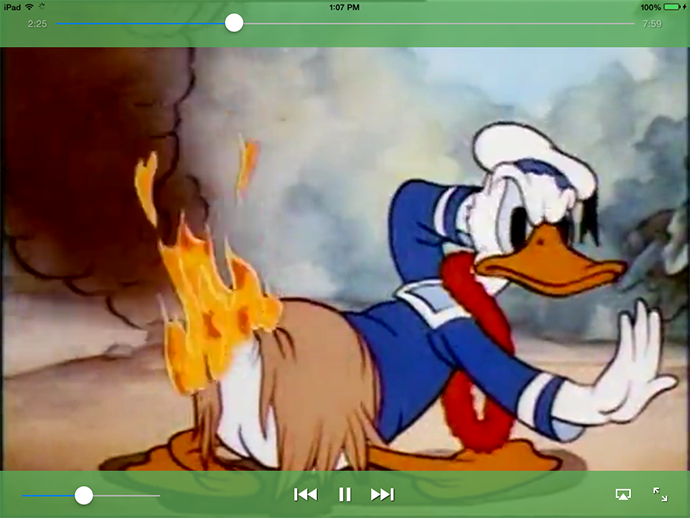
ALMoviePlayerController on iPad, iOS 7.0
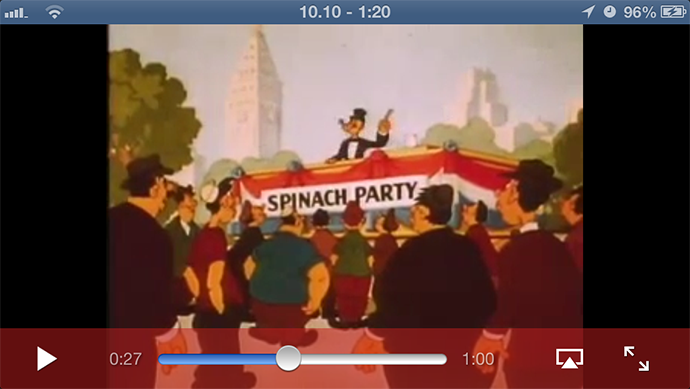
ALMoviePlayerController on iPhone, iOS 6.1
Features
- Drop-in replacement for
MPMoviePlayerController 继承自MPMoviePlayerController - Many different customization options, or you can go with the stock Apple look
- Portrait and landscape support 支持横竖屏
- Universal (iPhone and iPad) support 支持语言全球化
- iOS 5.0 - iOS 7 support 支持iOS5 - iOS7
- Lightweight, stable component with small memory footprint 轻量级
Installation
Installation is easy. 安装很简单
Cocoapods
- Add
pod 'ALMoviePlayerController', '~>0.3.0'to your Podfile 将ALMoviePlayerController添加到你的Podfile当中 #import <ALMoviePlayerController/ALMoviePlayerController.h>in your view of choice 将<ALMoviePlayerController/ALMoviePlayerController.h>导入到你的头文件中
Manually
- Download the ZIP from Github and copy the ALMoviePlayerController directory to your project 下载ZIP包
- Link the
QuartzCore.frameworkandMediaPlayer.frameworklibrary in your project's Build Phases 链接上QuartzCore.framework 与 MediaPlayer.framework #import "ALMoviePlayerController.h"in your view of choice 导入"ALMoviePlayerController.h"即可
Tested Environments
ALMoviePlayerController has been tested to work on iOS 5.0, 5.1 and 6.0 (simulator), and iOS 6.1 and 7.0 (device). ALMoviePlayerController requires that ARC be enabled.
ALMoviePlayerController在iOS5.0,iOS5.1以及6.0,7.0上测试过,ALMoviePlayerController需要开启ARC.
Example Usage
The process is as follows:
使用流程:
- Create an
ALMoviePlayerControllermovie player and assign yourself as its delegate 创建出实例对象并设置好代理 - Create the
ALMoviePlayerControlscontrols (and optionally customize) 创建出ALMoviePlayerControls(可选) - Assign the controls to the movie player 将控制器赋值给播放器
- Set the movie player's
contentURL, which will start playing the movie 设置好电影播放的文件URL地址,用以控制电影开始播放 - On device rotation, adjust movie player frame if it's not in fullscreen (when in fullscreen, rotation is handled automatically)
- Implement
ALMoviePlayerControllerdelegate methods 实现ALMoviePlayerController代理方法
In code:
@property (nonatomic, strong) ALMoviePlayerController *moviePlayer;

//...

// create a movie player

self.moviePlayer = [[ALMoviePlayerController alloc] initWithFrame:self.view.frame];

self.moviePlayer.delegate = self; //IMPORTANT!

// create the controls

ALMoviePlayerControls *movieControls = [[ALMoviePlayerControls alloc] initWithMoviePlayer:self.moviePlayer style:ALMoviePlayerControlsStyleDefault];

// optionally customize the controls here...

/*

[movieControls setBarColor:[UIColor colorWithRed:195/255.0 green:29/255.0 blue:29/255.0 alpha:0.5]];

[movieControls setTimeRemainingDecrements:YES];

[movieControls setFadeDelay:2.0];

[movieControls setBarHeight:100.f];

[movieControls setSeekRate:2.f];

 */

// assign the controls to the movie player

[self.moviePlayer setControls:movieControls];

// add movie player to your view

[self.view addSubview:self.moviePlayer.view];

//set contentURL (this will automatically start playing the movie)

[self.moviePlayer setContentURL:[NSURL URLWithString:@"http://archive.org/download/WaltDisneyCartoons-MickeyMouseMinnieMouseDonaldDuckGoofyAndPluto/WaltDisneyCartoons-MickeyMouseMinnieMouseDonaldDuckGoofyAndPluto-HawaiianHoliday1937-Video.mp4"]];
On rotation:
if (!self.moviePlayer.isFullscreen) {

    [self.moviePlayer setFrame:frame];

    //"frame" is whatever the movie player's frame should be at that given moment

}
Note: you MUST use [ALMoviePlayerController setFrame:] to adjust frame, NOT[ALMoviePlayerController.view setFrame:]
Delegate methods
@required

- (void)moviePlayerWillMoveFromWindow;
@optional

- (void)movieTimedOut;
Note: moviePlayerWillMoveFromWindow is required for fullscreen mode to work properly. It should be used to re-add the movie player to your view controller's view (because during the transition to fullscreen, it was moved to [[UIApplication sharedApplication] keyWindow].
Your code might look something like this:
- (void)moviePlayerWillMoveFromWindow {

    if (![self.view.subviews containsObject:self.moviePlayer.view])

        [self.view addSubview:self.moviePlayer.view];

    [self.moviePlayer setFrame:frame];

}
Controls Properties
ALMoviePlayerControls has the following editable properties:
/**

 The style of the controls. Can be changed on the fly.

 Default value is ALMoviePlayerControlsStyleDefault

 */

@property (nonatomic, assign) ALMoviePlayerControlsStyle style;

/**

 The state of the controls.

 */

@property (nonatomic, readonly) ALMoviePlayerControlsState state;

/**

 The color of the control bars.

 Default value is black with a hint of transparency.

 */

@property (nonatomic, strong) UIColor *barColor;

/**

 The height of the control bars.

 Default value is 70.f for iOS7+ and 50.f for previous versions.

 */

@property (nonatomic, assign) CGFloat barHeight;

/**

 The amount of time that the controls should stay on screen before automatically hiding.

 Default value is 5 seconds.

 */

@property (nonatomic, assign) NSTimeInterval fadeDelay;

/**

 The rate at which the movie should fastforward or rewind.

 Default value is 3x.

 */

@property (nonatomic, assign) float seekRate;

/**

 Should the time-remaining number decrement as the video plays?

 Default value is NO.

 */

@property (nonatomic) BOOL timeRemainingDecrements;

/**

 Are the controls currently showing on screen?

 */

@property (nonatomic, readonly, getter = isShowing) BOOL showing;
Controls Styles
typedef enum {

    /** Controls will appear in a bottom bar */

    ALMoviePlayerControlsStyleEmbedded,

    /** Controls will appear in a top bar and bottom bar */

    ALMoviePlayerControlsStyleFullscreen,

    /** Controls will appear as ALMoviePlayerControlsStyleFullscreen when in fullscreen and ALMoviePlayerControlsStyleEmbedded at all other times */

    ALMoviePlayerControlsStyleDefault,

    /** Controls will not appear */

    ALMoviePlayerControlsStyleNone,

} ALMoviePlayerControlsStyle;
Suggestions?
If you have any suggestions, let me know! If you find any bugs, please open a new issue.
Contact Me
You can reach me anytime at the addresses below. If you use the library, feel free to give me a shoutout on Twitter to let me know how you like it. I'd love to hear your thoughts.
Github: alobi
Twitter: @lobi4nco
Email: anthony@lobian.co
Credits & License
ALMoviePlayerController is developed and maintained by Anthony Lobianco (@lobi4nco). Licensed under the MIT License. Basically, I would appreciate attribution if you use it.
Enjoy!
(⌐■_■)
[翻译] ALMoviePlayerController的更多相关文章
- 《Django By Example》第五章 中文 翻译 (个人学习,渣翻)
书籍出处:https://www.packtpub.com/web-development/django-example 原作者:Antonio Melé (译者@ucag注:大家好,我是新来的翻译, ...
- 《Django By Example》第四章 中文 翻译 (个人学习,渣翻)
书籍出处:https://www.packtpub.com/web-development/django-example 原作者:Antonio Melé (译者注:祝大家新年快乐,这次带来<D ...
- [翻译]开发文档:android Bitmap的高效使用
内容概述 本文内容来自开发文档"Traning > Displaying Bitmaps Efficiently",包括大尺寸Bitmap的高效加载,图片的异步加载和数据缓存 ...
- 【探索】机器指令翻译成 JavaScript
前言 前些时候研究脚本混淆时,打算先学一些「程序流程」相关的概念.为了不因太枯燥而放弃,决定想一个有趣的案例,可以边探索边学. 于是想了一个话题:尝试将机器指令 1:1 翻译 成 JavaScript ...
- 《Django By Example》第三章 中文 翻译 (个人学习,渣翻)
书籍出处:https://www.packtpub.com/web-development/django-example 原作者:Antonio Melé (译者注:第三章滚烫出炉,大家请不要吐槽文中 ...
- 《Django By Example》第二章 中文 翻译 (个人学习,渣翻)
书籍出处:https://www.packtpub.com/web-development/django-example 原作者:Antonio Melé (译者注:翻译完第一章后,发现翻译第二章的速 ...
- 《Django By Example》第一章 中文 翻译 (个人学习,渣翻)
书籍出处:https://www.packtpub.com/web-development/django-example 原作者:Antonio Melé (译者注:本人目前在杭州某家互联网公司工作, ...
- 【翻译】Awesome R资源大全中文版来了,全球最火的R工具包一网打尽,超过300+工具,还在等什么?
0.前言 虽然很早就知道R被微软收购,也很早知道R在统计分析处理方面很强大,开始一直没有行动过...直到 直到12月初在微软技术大会,看到我软的工程师演示R的使用,我就震惊了,然后最近在网上到处了解和 ...
- ASP.NET MVC with Entity Framework and CSS一书翻译系列文章之第一章:创建基本的MVC Web站点
在这一章中,我们将学习如何使用基架快速搭建和运行一个简单的Microsoft ASP.NET MVC Web站点.在我们马上投入学习和编码之前,我们首先了解一些有关ASP.NET MVC和Entity ...
随机推荐
- java将list转为树形结构的方法
目录 1.通过转化成json封装数据 2.通过java8 stream转换 1.通过转化成json封装数据 原始数据如下 [ { "name":"甘肃省", & ...
- for in可遍历原型链上扩展的属性,Object.keys() 只遍历自身属性
一.for in 1.使用 for in 循环遍历对象的属性时,原型链上的所有属性都将被访问: Object.prototype.say="cgl"; // 修改Object.pr ...
- 未能加载“xxx”程序集
找到程序集名称,去项目文件中查找是否拥有.
- thinkphp 查询单个“年-月-日” FROM_UNIXTIME
*时间格式转换,使datetimepicker.js 能够搜索 查询 单个 年月日而不需是区间 查询. //另起一行看转换结果 select *,FROM_UNIXTIME(CreateTime,'% ...
- MyEclipse设置选中单词其它同名单词前景色和背景色
General->Editors->Annotations->Occurrences
- __block和__weak修饰符的区别
block下循环引用的问题 __block本身并不能避免循环引用,避免循环引用需要在block内部把__block修饰的obj置为nil __weak可以避免循环引用,但是其会导致外部对象释放了之后, ...
- Access restriction: The type BASE64Encoder is not accessible due to restrict(转载)
Access restriction: The type BASE64Encoder is not accessible due to restrict 2011年11月18日 20:47:06 阅读 ...
- Myeclipse默认编码设置
Myeclipse默认编码设置 由于编码问题的出现,我们就必须明确自己在Myeclipse所写的各种文件是按照什么格式来进行编码的.所以只有知己知彼,才能bug少出. 对于刚接触MyEclipse的不 ...
- wcf和webapi(转)
WCF 1.这个也是基于SOAP的,数据格式是XML 2.这个是Web Service(ASMX)的进化版,可以支持各种各样的协议,像TCP,HTTP,HTTPS,Named Pipes, MSMQ. ...
- time模块,计算时间差
计算当前时间与所输入的时间的时间差 #1 计算当前时间的时间戳时间 t_now = time.time() # 计算以前的时间的时间戳时间 t_before = input('请输入时间(例如:200 ...