
Linux tree命令详解
tree: 查看目录结构
tree常见命令参数
usage: tree [-adfghilnpqrstuvxACDFNS] [-H baseHREF] [-T title ] [-L level [-R]]

        [-P pattern] [-I pattern] [-o filename] [--version] [--help] [--inodes]

        [--device] [--noreport] [--nolinks] [--dirsfirst] [--charset charset]

        [--filelimit #] [<directory list>]

  -a            All files are listed.

  -d            List directories only.

  -l            Follow symbolic links like directories.

  -f            Print the full path prefix for each file.

  -i            Don't print indentation lines.

  -q            Print non-printable characters as '?'.

  -N            Print non-printable characters as is.

  -p            Print the protections for each file.

  -u            Displays file owner or UID number.

  -g            Displays file group owner or GID number.

  -s            Print the size in bytes of each file.

  -h            Print the size in a more human readable way.

  -D            Print the date of last modification.

  -F            Appends '/', '=', '*', or '|' as per ls -F.

  -v            Sort files alphanumerically by version.

  -r            Sort files in reverse alphanumeric order.

  -t            Sort files by last modification time.

  -x            Stay on current filesystem only.

  -L level      Descend only level directories deep.

  -A            Print ANSI lines graphic indentation lines.

  -S            Print with ASCII graphics indentation lines.

  -n            Turn colorization off always (-C overrides).

  -C            Turn colorization on always.

  -P pattern    List only those files that match the pattern given.

  -I pattern    Do not list files that match the given pattern.

  -H baseHREF   Prints out HTML format with baseHREF as top directory.

  -T string     Replace the default HTML title and H1 header with string.

  -R            Rerun tree when max dir level reached.

  -o file       Output to file instead of stdout.

  --inodes      Print inode number of each file.

  --device      Print device ID number to which each file belongs.

  --noreport    Turn off file/directory count at end of tree listing.

  --nolinks     Turn off hyperlinks in HTML output.

  --dirsfirst   List directories before files.

  --charset X   Use charset X for HTML and indentation line output.

  --filelimit # Do not descend dirs with more than # files in them.
常用的命令展示
查看某一个目录的文件结构
[root@localhost ~]# tree /home/omc/ftl
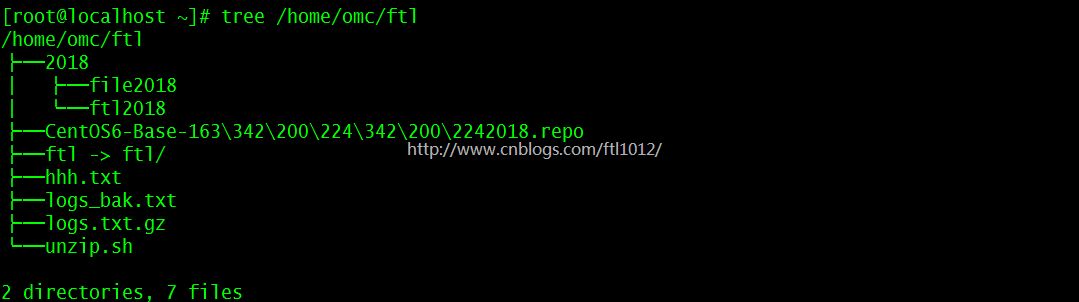
只显示一层目录
[root@localhost ~]# tree -L 1  -d /home/omc/ftl

[root@localhost ~]# tree -Ld 1 /home/omc/ftl      【效果同上】

利用find只查找一层目录
[root@localhost ~]# findfind /home/omc/ftl -maxdepth 1 -type d 最大深度为1

Linux tree命令详解的更多相关文章
- linux shell 脚本攻略学习16--wc命令详解,tree命令详解
在文本处理的工作中,统计文件的行数,单词数和字符数非常有用.而对于开发人员本身来说,统计LOC(line of code ,代码行数)是一件重要的工作.linux中有什么命令可以帮助我们做统计呢?没错 ...
- CentOS tree命令详解
inux下tree命令详解---linux以树状图逐级列出目录的内容命令 ############################################################### ...
- linux awk命令详解
linux awk命令详解 简介 awk是一个强大的文本分析工具,相对于grep的查找,sed的编辑,awk在其对数据分析并生成报告时,显得尤为强大.简单来说awk就是把文件逐行的读入,以空格为默认分 ...
- linux cat 命令详解
linux cat 命令详解 http://linux.chinaunix.net/techdoc/system/2007/11/16/972467.shtml adb shell su //这个不一 ...
- 【初级】linux rm 命令详解及使用方法实战
rm:删除命令 前言: windows中的删除命令大家都不陌生,linux中的删除命令和windows中有一个共同特点,那就是危险,前两篇linux mkdir 命令详解及使用方法实战[初级]中我们就 ...
- Linux netstat命令详解
Linux netstat命令详解 一 简介 Netstat 命令用于显示各种网络相关信息,如网络连接,路由表,接口状态 (Interface Statistics),masquerade 连接,多 ...
- linux grep命令详解
linux grep命令详解 简介 grep (global search regular expression(RE) and print out the line,全面搜索正则表达式并把行打印出来 ...
- Linux chmod命令详解
Linux chmod命令详解 chmod----改变一个或多个文件的存取模式(mode) chmod [options] mode files 只能文件属主或特权用户才能使用该功能来改变文件 ...
- 【转发】linux yum命令详解
linux yum命令详解 yum(全 称为 Yellow dog Updater, Modified)是一个在Fedora和RedHat以及SUSE中的Shell前端软件包管理器.基於RPM包管理, ...
随机推荐
- mysql 导出数据到csv文件的命令
1.导出本地数据库数据到本地文件 mysql -A service_db -h your_host -utest -ptest mysql> select * from t_apps where ...
- php里的二进制安全
二进制安全功能(binary-safe function)是指在一个二进制文件上所执行的不更改文件内容的功能或者操作.这能够保证文件不会因为某些操作而遭到损坏.二进制数据是按照一串0和 1的形式编码的 ...
- js / jquery 获取和设置 FCK Editor 的值
开发中遇到 通过 $("#content").val(); 或者 document.getElementById("content"); 并不能获取到 id 为 ...
- *** Terminating app due to uncaught exception 'NSUnknownKeyException', reason: '[<WKWebViewConfiguration 0x1701bcd20> setValue:forUndefinedKey:]: this class is not key value coding-compliant for the k
问题描述: ionic项目,windows下正常,打包android可正常运行: 因为需要打包到iPhone (ios 11.0.1)上测试,将代码拿到Mac OS环境下(重新npm install. ...
- clipboard.js实现复制功能
项目地址:https://github.com/zenorocha/clipboard.js 现代化的“复制到剪切板”插件.不包含 Flash.gzip 压缩后仅 3kb. 为什么使用它 复制文字到剪 ...
- solr+tomcat整合
一.solr安装 http://archive.apache.org/dist/lucene/solr/ 这个地址有各个版本的 这次我使用的是5.5.4版本和tomcat8 版本5.5.4已经内置了j ...
- Java集合--概述
目录 Java集合--概述 摘要 图示 正文 Java集合--概述 摘要 本文主要介绍集合的整体概念,并作为接下来Java集合实现类讲解的索引. 图示 这是在网上看到了这样一张图,感觉很清晰, ...
- Differences between page and segment
https://techdifferences.com/difference-between-paging-and-segmentation-in-os.html how does paging so ...
- html 里面的 role 属性是什么意义和用途
使用role属性告诉辅助设备(如屏幕阅读器)这个元素所扮演的角色,属于WAI-ARIA. 例如点击的按钮,就是role="button":会让这个元素可点击:本质上是增强语义性,当 ...
- python学习之老男孩python全栈第九期_day014知识点总结
# 迭代器和生成器# 迭代器 # 双下方法:很少直接调用的方法,一般情况下,是通过其他语法触发的# 可迭代的 --> 可迭代协议:含有__iter__的方法( '__iter__' in dir ...