
Android开发学习之浅谈显示Intent和隐式Intent
Intent寻找目标组件的两种方式:
- 显式Intent:通过指定Intent组件名称来实现的,它一般用在知道目标组件名称的前提下,一般是在相同的应用程序内部实现的。
- 隐式Intent:通过Intent Filter来实现的,它一般用在没有明确指出目标组件名称的前提下,一般是用于在不同应用程序之间。
一.显式Intent
一般情况下,一个Android应用程序中需要多个屏幕,即是多个Activity类,并且在这些Activity之间进行切换通过Intent机制来实现的。在同一个应用程序中切换Activity时,我们通常都知道要启动的Activity具体是哪一个,因此常用显式的Intent来实现的。
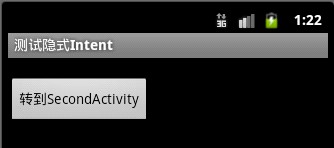
下面的例子是在同一应用程序中MainActivity启动SecondActivity,下面的代码中,主要是为“转到SecondActivity”按钮添加了OnClickListener,使得按钮被点击时执行onClick()方法,onClick()方法中则利用了Intent机制,来启动SecondActivity,关键的代码是22~25行。
main.xml
- <?xmlversion="1.0"encoding="utf-8"?>
- <LinearLayoutxmlns:android="http://schemas.android.com/apk/res/android"
- android:orientation="vertical"
- android:layout_width="fill_parent"
- android:layout_height="fill_parent"
- >
- <TextView
- android:layout_width="fill_parent"
- android:layout_height="wrap_content"
- android:text="@string/hello1"
- />
- <Button
- android:id="@+id/btn"
- android:layout_width="wrap_content"
- android:layout_height="wrap_content"
- android:text="转到SecondActivity"
- />
- </LinearLayout>
second.xml
- <?xmlversion="1.0"encoding="utf-8"?>
- <LinearLayoutxmlns:android="http://schemas.android.com/apk/res/android"
- android:orientation="vertical"
- android:layout_width="fill_parent"
- android:layout_height="fill_parent"
- >
- <TextView
- android:layout_width="fill_parent"
- android:layout_height="wrap_content"
- android:text="@string/hello2"
- />
- <Button
- android:id="@+id/secondBtn"
- android:layout_width="wrap_content"
- android:layout_height="wrap_content"
- android:text="返回"
- />
- </LinearLayout>
MainActivity.java
- package com.android.test.activity;
- import android.app.Activity;
- import android.content.Intent;
- import android.os.Bundle;
- import android.view.View;
- import android.view.View.OnClickListener;
- import android.widget.Button;
- publicclass MainActivity extends Activity {
- private Button btn;
- @Override
- publicvoid onCreate(Bundle savedInstanceState) {
- super.onCreate(savedInstanceState);
- setContentView(R.layout.main);
- btn = (Button)findViewById(R.id.btn);
- //响应按钮btn事件
- btn.setOnClickListener(new OnClickListener() {
- @Override
- publicvoid onClick(View v) {
- //显示方式声明Intent,直接启动SecondActivity
- Intent it = new Intent(MainActivity.this,SecondActivity.class);
- //启动Activity
- startActivity(it);
- }
- });
- }
- }
SecondActivity.java
- package com.android.test.activity;
- import android.app.Activity;
- import android.content.Intent;
- import android.os.Bundle;
- import android.view.View;
- import android.view.View.OnClickListener;
- import android.widget.Button;
- publicclass SecondActivity extends Activity {
- private Button secondBtn;
- @Override
- protectedvoid onCreate(Bundle savedInstanceState) {
- super.onCreate(savedInstanceState);
- setContentView(R.layout.second);
- secondBtn=(Button)findViewById(R.id.secondBtn);
- //响应按钮secondBtn事件
- secondBtn.setOnClickListener(new OnClickListener() {
- @Override
- publicvoid onClick(View v) {
- //显示方式声明Intent,直接启动MainActivity
- Intent intent = new Intent(SecondActivity.this,MainActivity.class);
- //启动Activity
- startActivity(intent);
- }
- });
- }
- }
AndroidManifest.xml清单文件,16~18行为SecondActivity在清单文件里的声明
- <?xmlversion="1.0"encoding="utf-8"?>
- <manifestxmlns:android="http://schemas.android.com/apk/res/android"
- package="com.android.test.activity"
- android:versionCode="1"
- android:versionName="1.0">
- <uses-sdkandroid:minSdkVersion="10"/>
- <applicationandroid:icon="@drawable/icon"android:label="@string/app_name">
- <activityandroid:name=".MainActivity"
- android:label="@string/app_name">
- <intent-filter>
- <actionandroid:name="android.intent.action.MAIN"/>
- <categoryandroid:name="android.intent.category.LAUNCHER"/>
- </intent-filter>
- </activity>
- <activityandroid:name=".SecondActivity"
- android:label="@string/app_name">
- </activity>
- </application>
- </manifest>
效果图:


二.隐式Intent
下面是同一应用程序中的Activity切换的例子,需要AndroidManifest.xml中增加Activity的声明,并设置对应的Intent Filter和Action,才能被Android的应用程序框架所匹配。
MainActivity.java
- package com.android.change.activity;
- import android.app.Activity;
- import android.content.Intent;
- import android.os.Bundle;
- import android.view.View;
- import android.view.View.OnClickListener;
- import android.widget.Button;
- publicclass MainActivity extends Activity {
- private Button btn;
- @Override
- publicvoid onCreate(Bundle savedInstanceState) {
- super.onCreate(savedInstanceState);
- setContentView(R.layout.main);
- btn = (Button) findViewById(R.id.btn);
- // 响应按钮btn事件
- btn.setOnClickListener(new OnClickListener() {
- @Override
- publicvoid onClick(View v) {
- // 实例化Intent
- Intent it = new Intent();
- //设置Intent的Action属性
- it.setAction("com.android.activity.MY_ACTION");
- // 启动Activity
- startActivity(it);
- }
- });
- }
- }
SecondActivity.java
- package com.android.change.activity;
- import android.app.Activity;
- import android.os.Bundle;
- publicclass SecondActivity extends Activity {
- @Override
- protectedvoid onCreate(Bundle savedInstanceState) {
- super.onCreate(savedInstanceState);
- setContentView(R.layout.second);
- }
- }
main.xml
- <?xmlversion="1.0"encoding="utf-8"?>
- <LinearLayoutxmlns:android="http://schemas.android.com/apk/res/android"
- android:orientation="vertical"
- android:layout_width="fill_parent"
- android:layout_height="fill_parent"
- >
- <TextView
- android:layout_width="fill_parent"
- android:layout_height="wrap_content"
- />
- <Button
- android:id="@+id/btn"
- android:layout_width="wrap_content"
- android:layout_height="wrap_content"
- android:text="转到SecondActivity"
- />
- </LinearLayout>
seond.xml
- <?xmlversion="1.0"encoding="utf-8"?>
- <LinearLayoutxmlns:android="http://schemas.android.com/apk/res/android"
- android:orientation="vertical"
- android:layout_width="fill_parent"
- android:layout_height="fill_parent"
- >
- <TextView
- android:layout_width="fill_parent"
- android:layout_height="wrap_content"
- android:text="@string/second"
- />
- </LinearLayout>
AndroidManifest.xml文件的18,19行修改了Intent Filter,这样SecondActivity才能够接收到MainActivity发送的Intent。因为在MainActivity的Intent发送的动作为"com.android.activity.MY_ACTION",而在18行里,SecondActivity设置的Action也为"com.android.activity.MY_ACTION",这样就能进行匹配。
- <?xmlversion="1.0"encoding="utf-8"?>
- <manifestxmlns:android="http://schemas.android.com/apk/res/android"
- package="com.android.change.activity"
- android:versionCode="1"
- android:versionName="1.0">
- <uses-sdkandroid:minSdkVersion="10"/>
- <applicationandroid:icon="@drawable/icon"android:label="@string/app_name">
- <activityandroid:name=".MainActivity"
- android:label="@string/app_name">
- <intent-filter>
- <actionandroid:name="android.intent.action.MAIN"/>
- <categoryandroid:name="android.intent.category.LAUNCHER"/>
- </intent-filter>
- </activity>
- <activityandroid:name=".SecondActivity">
- <intent-filter>
- <actionandroid:name = "com.android.activity.MY_ACTION"/>
- <categoryandroid:name = "android.intent.category.DEFAULT"/>
- </intent-filter>
- </activity>
- </application>
- </manifest>
效果图:
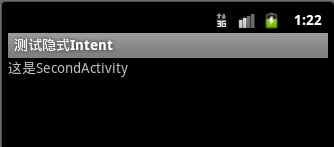
对于显示Intent,Android不需要再去做解析,因为目标组件很明确。Android需要解析的是隐式Intent,通过解析,将Intent映射给可以处理该Intent的Activity,Service等。Intent的解析机制主要是通过查找已经注册在AndroidManifest.xml中的所有IntentFilter以及其中定义的Intent,最终找到匹配的Intent。
Android开发学习之浅谈显示Intent和隐式Intent的更多相关文章
- Android -- 两个activity界面的切换, 显示Intent 和 隐式Intent,putExtra传递数据
1. 两个Activity之间可以通过Intent切换, 包括显示Intent 和 隐式Intent. 实例代码 MainActivity.java public class MainActivity ...
- 显式Intent 和隐式 Intent 的区别
显式 Intent : 在知道目标组件名称的前提下,去调用Intent.setComponent().Intent.setClassName()或Intent.setClass()方法或者在new I ...
- Android开发学习笔记:浅谈显示Intent和隐式Intent
原创作品,允许转载,转载时请务必以超链接形式标明文章 原始出处 .作者信息和本声明.否则将追究法律责任.http://liangruijun.blog.51cto.com/3061169/655132 ...
- 在Android中Intent的概念及应用(一)——显示Intent和隐式Intent
Intent寻找目标组件的两种方式: 显式Intent:通过指定Intent组件名称来实现的,它一般用在知道目标组件名称的前提下,一般是在相同的应用程序内部实现的. 隐式Intent:通过Intent ...
- 【Android】6.0 添加Menu菜单组件、Intent启动活动、显式Intent、隐式Intent
1.0 在helloworld项目基础上创建活动SecondActivity: 2.0 其中main.xml: <?xml version="1.0" encoding=&q ...
- 2018.7.9 Android—显式Intent和隐式Intent的区别
1:都是用来在一个activity中启动另外一个activity 2:显示Intent直接指明要启动activity的定义,即activity.class:隐式intent通过在androidmani ...
- 显式Intent和隐式Intent
http://blog.csdn.net/qs_csu/article/details/7995966 对于明确指出了目标组件名称的Intent,我们称之为“显式Intent”. 对于没有明确指出目标 ...
- android开发学习---layout布局、显示单位和如何进行单元测试
一.五大布局(layout) android中的用五大布局:LinearLayout (线性布局).AbsoluteLayout(绝对布局).RelativeLayout(相对布局).TableLay ...
- 从0系统学Android-2.4隐式Intent
本系列文章,参考<第一行代码>,作为个人笔记 更多内容:更多精品文章分类 使用隐式 Intent 相对于显示 Intent ,隐式 Intent 比较含蓄.这种方式不明确指出我们想要启动哪 ...
随机推荐
- Spark一个简单案例
Spark是一个类似Map-Reduce的集群计算框架,用于快速进行数据分析. 在这个应用中,我们以统计包含"the"字符的行数为案例,.为建立这个应用,我们使用 Spark 1. ...
- Android中XML解析-PULL解析
前面写了两篇XML解析的Dom和SAX方式,Dom比较符合思维方式,SAX事件驱动注重效率,除了这两种方式以外也可以使用Android内置的Pull解析器解析XML文件. Pull解析器的运行方式与 ...
- C#中HTML和UBB互相转换的代码
C#中HTML和UBB互相转换的代码html转UBB的还不是很完美,有空修改,一些代码来自百度谷歌 private string DoHtmlToUBB(string _Html) { ...
- C# 开发者代码审查清单
这是为C#开发者准备的通用性代码审查清单,可以当做开发过程中的参考.这是为了确保在编码过程中,大部分通用编码指导原则都能注意到.对于新手和缺乏经验(0到3年工作经验)的开发者,参考这份清单编码会很帮助 ...
- 8个对程序员来说有用的jQuery小贴士和技巧
1) 禁用鼠标右键单击 jQuery程序员可以使用此代码在网页上禁用鼠标右键点击. 1 2 3 4 5 6 7 8 9 10 $(document).ready(function() { // ...
- IOS Xib使用——为控制器添加Xib文件
Xib文件是一个轻量级的用来描述局部界面的文件,它与StoryBoard类似,都是使用Interface Bulider工具进行编辑.但是StoryBoard是重量级的,它是用来描述整个软件的多个界面 ...
- Android GUI之Window、WindowManager
通过前几篇的文章(查看系列文章:http://www.cnblogs.com/jerehedu/p/4607599.html#gui ),我们清楚了Activity实际上是将视图的创建和显示交给了Wi ...
- 自己定义带三角形箭头的TextView
<?xml version="1.0" encoding="utf-8"? > <resources> <declare ...
- EOSS V3.0 企业运营支撑系统(基于RBAC原理的权限管理)
一:EOSS 功能介绍 其于用户,角色,权限,菜单的一套“简约实用”的权限管理系统,可在其基础之上,快速进行二次开发. 一个用户可以选择多个角色. 一个角色可以选择多个权限. 一个菜单可以有无限级子菜 ...
- 2017.8.30 elasticsearch-sql的安装与使用
参考来自: http://blog.csdn.net/u012307002/article/details/52837756 https://github.com/NLPchina/elasticse ...