
Android开发学习之浅谈显示Intent和隐式Intent
Intent寻找目标组件的两种方式:
- 显式Intent:通过指定Intent组件名称来实现的,它一般用在知道目标组件名称的前提下,一般是在相同的应用程序内部实现的。
- 隐式Intent:通过Intent Filter来实现的,它一般用在没有明确指出目标组件名称的前提下,一般是用于在不同应用程序之间。
一.显式Intent
一般情况下,一个Android应用程序中需要多个屏幕,即是多个Activity类,并且在这些Activity之间进行切换通过Intent机制来实现的。在同一个应用程序中切换Activity时,我们通常都知道要启动的Activity具体是哪一个,因此常用显式的Intent来实现的。
下面的例子是在同一应用程序中MainActivity启动SecondActivity,下面的代码中,主要是为“转到SecondActivity”按钮添加了OnClickListener,使得按钮被点击时执行onClick()方法,onClick()方法中则利用了Intent机制,来启动SecondActivity,关键的代码是22~25行。
main.xml
- <?xmlversion="1.0"encoding="utf-8"?>
- <LinearLayoutxmlns:android="http://schemas.android.com/apk/res/android"
- android:orientation="vertical"
- android:layout_width="fill_parent"
- android:layout_height="fill_parent"
- >
- <TextView
- android:layout_width="fill_parent"
- android:layout_height="wrap_content"
- android:text="@string/hello1"
- />
- <Button
- android:id="@+id/btn"
- android:layout_width="wrap_content"
- android:layout_height="wrap_content"
- android:text="转到SecondActivity"
- />
- </LinearLayout>
second.xml
- <?xmlversion="1.0"encoding="utf-8"?>
- <LinearLayoutxmlns:android="http://schemas.android.com/apk/res/android"
- android:orientation="vertical"
- android:layout_width="fill_parent"
- android:layout_height="fill_parent"
- >
- <TextView
- android:layout_width="fill_parent"
- android:layout_height="wrap_content"
- android:text="@string/hello2"
- />
- <Button
- android:id="@+id/secondBtn"
- android:layout_width="wrap_content"
- android:layout_height="wrap_content"
- android:text="返回"
- />
- </LinearLayout>
MainActivity.java
- package com.android.test.activity;
- import android.app.Activity;
- import android.content.Intent;
- import android.os.Bundle;
- import android.view.View;
- import android.view.View.OnClickListener;
- import android.widget.Button;
- publicclass MainActivity extends Activity {
- private Button btn;
- @Override
- publicvoid onCreate(Bundle savedInstanceState) {
- super.onCreate(savedInstanceState);
- setContentView(R.layout.main);
- btn = (Button)findViewById(R.id.btn);
- //响应按钮btn事件
- btn.setOnClickListener(new OnClickListener() {
- @Override
- publicvoid onClick(View v) {
- //显示方式声明Intent,直接启动SecondActivity
- Intent it = new Intent(MainActivity.this,SecondActivity.class);
- //启动Activity
- startActivity(it);
- }
- });
- }
- }
SecondActivity.java
- package com.android.test.activity;
- import android.app.Activity;
- import android.content.Intent;
- import android.os.Bundle;
- import android.view.View;
- import android.view.View.OnClickListener;
- import android.widget.Button;
- publicclass SecondActivity extends Activity {
- private Button secondBtn;
- @Override
- protectedvoid onCreate(Bundle savedInstanceState) {
- super.onCreate(savedInstanceState);
- setContentView(R.layout.second);
- secondBtn=(Button)findViewById(R.id.secondBtn);
- //响应按钮secondBtn事件
- secondBtn.setOnClickListener(new OnClickListener() {
- @Override
- publicvoid onClick(View v) {
- //显示方式声明Intent,直接启动MainActivity
- Intent intent = new Intent(SecondActivity.this,MainActivity.class);
- //启动Activity
- startActivity(intent);
- }
- });
- }
- }
AndroidManifest.xml清单文件,16~18行为SecondActivity在清单文件里的声明
- <?xmlversion="1.0"encoding="utf-8"?>
- <manifestxmlns:android="http://schemas.android.com/apk/res/android"
- package="com.android.test.activity"
- android:versionCode="1"
- android:versionName="1.0">
- <uses-sdkandroid:minSdkVersion="10"/>
- <applicationandroid:icon="@drawable/icon"android:label="@string/app_name">
- <activityandroid:name=".MainActivity"
- android:label="@string/app_name">
- <intent-filter>
- <actionandroid:name="android.intent.action.MAIN"/>
- <categoryandroid:name="android.intent.category.LAUNCHER"/>
- </intent-filter>
- </activity>
- <activityandroid:name=".SecondActivity"
- android:label="@string/app_name">
- </activity>
- </application>
- </manifest>
效果图:


二.隐式Intent
下面是同一应用程序中的Activity切换的例子,需要AndroidManifest.xml中增加Activity的声明,并设置对应的Intent Filter和Action,才能被Android的应用程序框架所匹配。
MainActivity.java
- package com.android.change.activity;
- import android.app.Activity;
- import android.content.Intent;
- import android.os.Bundle;
- import android.view.View;
- import android.view.View.OnClickListener;
- import android.widget.Button;
- publicclass MainActivity extends Activity {
- private Button btn;
- @Override
- publicvoid onCreate(Bundle savedInstanceState) {
- super.onCreate(savedInstanceState);
- setContentView(R.layout.main);
- btn = (Button) findViewById(R.id.btn);
- // 响应按钮btn事件
- btn.setOnClickListener(new OnClickListener() {
- @Override
- publicvoid onClick(View v) {
- // 实例化Intent
- Intent it = new Intent();
- //设置Intent的Action属性
- it.setAction("com.android.activity.MY_ACTION");
- // 启动Activity
- startActivity(it);
- }
- });
- }
- }
SecondActivity.java
- package com.android.change.activity;
- import android.app.Activity;
- import android.os.Bundle;
- publicclass SecondActivity extends Activity {
- @Override
- protectedvoid onCreate(Bundle savedInstanceState) {
- super.onCreate(savedInstanceState);
- setContentView(R.layout.second);
- }
- }
main.xml
- <?xmlversion="1.0"encoding="utf-8"?>
- <LinearLayoutxmlns:android="http://schemas.android.com/apk/res/android"
- android:orientation="vertical"
- android:layout_width="fill_parent"
- android:layout_height="fill_parent"
- >
- <TextView
- android:layout_width="fill_parent"
- android:layout_height="wrap_content"
- />
- <Button
- android:id="@+id/btn"
- android:layout_width="wrap_content"
- android:layout_height="wrap_content"
- android:text="转到SecondActivity"
- />
- </LinearLayout>
seond.xml
- <?xmlversion="1.0"encoding="utf-8"?>
- <LinearLayoutxmlns:android="http://schemas.android.com/apk/res/android"
- android:orientation="vertical"
- android:layout_width="fill_parent"
- android:layout_height="fill_parent"
- >
- <TextView
- android:layout_width="fill_parent"
- android:layout_height="wrap_content"
- android:text="@string/second"
- />
- </LinearLayout>
AndroidManifest.xml文件的18,19行修改了Intent Filter,这样SecondActivity才能够接收到MainActivity发送的Intent。因为在MainActivity的Intent发送的动作为"com.android.activity.MY_ACTION",而在18行里,SecondActivity设置的Action也为"com.android.activity.MY_ACTION",这样就能进行匹配。
- <?xmlversion="1.0"encoding="utf-8"?>
- <manifestxmlns:android="http://schemas.android.com/apk/res/android"
- package="com.android.change.activity"
- android:versionCode="1"
- android:versionName="1.0">
- <uses-sdkandroid:minSdkVersion="10"/>
- <applicationandroid:icon="@drawable/icon"android:label="@string/app_name">
- <activityandroid:name=".MainActivity"
- android:label="@string/app_name">
- <intent-filter>
- <actionandroid:name="android.intent.action.MAIN"/>
- <categoryandroid:name="android.intent.category.LAUNCHER"/>
- </intent-filter>
- </activity>
- <activityandroid:name=".SecondActivity">
- <intent-filter>
- <actionandroid:name = "com.android.activity.MY_ACTION"/>
- <categoryandroid:name = "android.intent.category.DEFAULT"/>
- </intent-filter>
- </activity>
- </application>
- </manifest>
效果图:
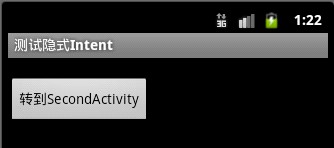
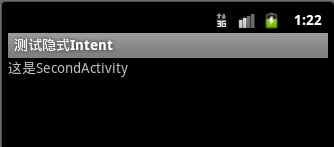
对于显示Intent,Android不需要再去做解析,因为目标组件很明确。Android需要解析的是隐式Intent,通过解析,将Intent映射给可以处理该Intent的Activity,Service等。Intent的解析机制主要是通过查找已经注册在AndroidManifest.xml中的所有IntentFilter以及其中定义的Intent,最终找到匹配的Intent。
Android开发学习之浅谈显示Intent和隐式Intent的更多相关文章
- Android -- 两个activity界面的切换, 显示Intent 和 隐式Intent,putExtra传递数据
1. 两个Activity之间可以通过Intent切换, 包括显示Intent 和 隐式Intent. 实例代码 MainActivity.java public class MainActivity ...
- 显式Intent 和隐式 Intent 的区别
显式 Intent : 在知道目标组件名称的前提下,去调用Intent.setComponent().Intent.setClassName()或Intent.setClass()方法或者在new I ...
- Android开发学习笔记:浅谈显示Intent和隐式Intent
原创作品,允许转载,转载时请务必以超链接形式标明文章 原始出处 .作者信息和本声明.否则将追究法律责任.http://liangruijun.blog.51cto.com/3061169/655132 ...
- 在Android中Intent的概念及应用(一)——显示Intent和隐式Intent
Intent寻找目标组件的两种方式: 显式Intent:通过指定Intent组件名称来实现的,它一般用在知道目标组件名称的前提下,一般是在相同的应用程序内部实现的. 隐式Intent:通过Intent ...
- 【Android】6.0 添加Menu菜单组件、Intent启动活动、显式Intent、隐式Intent
1.0 在helloworld项目基础上创建活动SecondActivity: 2.0 其中main.xml: <?xml version="1.0" encoding=&q ...
- 2018.7.9 Android—显式Intent和隐式Intent的区别
1:都是用来在一个activity中启动另外一个activity 2:显示Intent直接指明要启动activity的定义,即activity.class:隐式intent通过在androidmani ...
- 显式Intent和隐式Intent
http://blog.csdn.net/qs_csu/article/details/7995966 对于明确指出了目标组件名称的Intent,我们称之为“显式Intent”. 对于没有明确指出目标 ...
- android开发学习---layout布局、显示单位和如何进行单元测试
一.五大布局(layout) android中的用五大布局:LinearLayout (线性布局).AbsoluteLayout(绝对布局).RelativeLayout(相对布局).TableLay ...
- 从0系统学Android-2.4隐式Intent
本系列文章,参考<第一行代码>,作为个人笔记 更多内容:更多精品文章分类 使用隐式 Intent 相对于显示 Intent ,隐式 Intent 比较含蓄.这种方式不明确指出我们想要启动哪 ...
随机推荐
- Android安卓手机游戏开发
成都传智播客Java培训,免费学Android安卓手机游戏开发,安卓android开发课程包括Android安卓应用开发和Android安卓游戏开发两个方向,可是偏向游戏开发. 依据"199 ...
- @Java虚拟机之对象访问
建立对象是为了使用对象,我们的java程序需要通过栈上的reference数据来操作堆上的具体对象. 对象访问会涉及到Java栈.Java堆.方法区这三个内存区域. 如下面这句代码: Object o ...
- 第二章 Jackson属性名转换+属性忽略
@Data @JsonIgnoreProperties(ignoreUnknown = true) public class MyRecord { private boolean succeed; p ...
- Java使用jxl.jar包写Excel文件的最适合列宽问题基本实现
以前用jxl.jar包,读写过Excel文件.也没有注意最适合列宽的问题,但是jxl.jar没有提供最适合列宽的功能,上次用到写了一下,可以基本实现最适合列宽. 注意,这个只是基本可以实现,基本针对中 ...
- EventBus 事件总线 原理 MD
Markdown版本笔记 我的GitHub首页 我的博客 我的微信 我的邮箱 MyAndroidBlogs baiqiantao baiqiantao bqt20094 baiqiantao@sina ...
- navigator.geolocation在IOS10系统中无法定位问题
在使用地图需要定位的朋友都可能遇到这个问题,参考的文章说的是用百度地图,我用的是腾讯地图,但是其中的原理差不多.所以谢谢这些提供资源的大神们. if (navigator.geolocation) { ...
- 理解JavaScript模仿块作用域
1.JS没有块作用域 在C和Java中,一对大括号{}决定一个作用域,比如for循环.在js中,变量可以在函数任何一处定义,并且忽略重复定义.变量初始化之前使用,值永远是undefined. func ...
- Windows批处理命令初了解
批处理文件时无格式的文本文件,它包含一条或多条命令.它的文件扩展名为.bat或.cmd.使用批处理文件可以简化日常重复性任务.其帮助:命令 /? eg:echo /? Ctrl+c组合键来强行终止一个 ...
- web中的水晶报表 "出现通信错误。将停止打印"
被这个问题快折腾死,死活都找不到原因,找了一堆解答,无外乎这几种情况,但都不管用 在Page_Init中绑定数据.无效. activex控件的版本,我试过10.2.0.1146等多个版本的dll,10 ...
- Grunt学习一:使用grunt创建jquery plugin.
下载安装github客户端. http://windows.github.com 打开github客户端. 登录后,点击左上角的加号,可以创建一个Repository. (也可以点击Clone,将 ...