
Part 20 Create custom service in AngularJS
Whenever the case changes from lower to upper, a single space character should be inserted. This means the string "AngularVideoTutorial" should be converted to"Angular Video Tutorial". 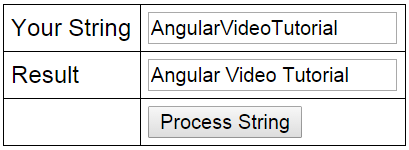
Let us first see, how to achieve this without using a custom service.
HtmlPage1.html :
<!DOCTYPE html>

<html xmlns="http://www.w3.org/1999/xhtml">

<head>

    <title></title>

    <script src="Scripts/angular.js"></script>

    <script src="Scripts/Script.js"></script>

    <link href="Styles.css" rel="stylesheet" />

</head>

<body ng-app="myModule">

    <div ng-controller="myController">

        <table>

            <tr>

                <td>Your String</td>

                <td><input type="text" ng-model="input" /> </td>

            </tr>

            <tr>

                <td>Result</td>

                <td><input type="text" ng-model="output" /></td>

            </tr>

            <tr>

                <td></td>

                <td>

                    <input type="button" ng-click="transformString(input)"

                           value="Process String" />

                </td>

            </tr>

        </table>

    </div>

</body>

</html>
Script.js : Notice, all the logic to insert a space when the case changes is in the controller. There are 2 problems with this
1. The controller is getting complex
2. This logic cannot be reused in another controller. If you have to use this logic in another controller, we will have to duplicate this same code with in that controller.
When we use our own custom service to encapsulate this logic, both of these problems go away. The custom service can be injected into any controller where you need this logic.
var app = angular

        .module("myModule", [])

        .controller("myController", function ($scope) {

            $scope.transformString = function (input) {

                if (!input)

                    return input;

                var output = "";

                for (var i = 0; i < input.length; i++) {

                    if (i > 0 && input[i] == input[i].toUpperCase()) {

                        output = output + " ";

                    }

                    output = output + input[i];

                }

                $scope.output = output;

            };

        });
Now let's create a custom service. Here are the steps
1. Add a JavaScript file to the Scripts folder in the project. Name it stringService.js.
2. Copy and paste the following code. Notice we are using the factory method to create and register the service with Angular.
app.factory('stringService', function () {

    return {

        processString: function (input) {

            if (!input)

                return input;

            var output = "";

            for (var i = 0; i < input.length; i++) {

                if (i > 0 && input[i] == input[i].toUpperCase()) {

                    output = output + " ";

                }

                output = output + input[i];

            }

            return output;

        }

    };

});
3. Copy and paste the following code in Script.js. Notice that we have injected stringService into the controller function.
var app = angular

        .module("myModule", [])

        .controller("myController", function ($scope, stringService) {

            $scope.transformString = function (input) {

                $scope.output = stringService.processString(input);

            };

        });
4. On HtmlPage1.html, only one change is required and that is to reference the stringService.js script file
Part 20 Create custom service in AngularJS的更多相关文章
- How to Create Custom Filters in AngularJs
http://www.codeproject.com/Tips/829025/How-to-Create-Custom-Filters-in-AngularJs Introduction Filter ...
- [转]How to Create Custom Filters in AngularJs
本文转自:http://www.codeproject.com/Tips/829025/How-to-Create-Custom-Filters-in-AngularJs Introduction F ...
- Part 13 Create a custom filter in AngularJS
Custom filter in AngularJS 1. Is a function that returns a function 2. Use the filter function to cr ...
- Deploy custom service on non hadoop node with Apache Ambari
1 I want to deploy a custom service onto non hadoop nodes using Apache Ambari. I have created a cu ...
- Part 17 Consuming ASP NET Web Service in AngularJS using $http
Here is what we want to do1. Create an ASP.NET Web service. This web service retrieves the data from ...
- create custom launcher icon 细节介绍
create custom launcher icon 是创建你的Android app的图标 点击下一步的时候,出现的界面就是创建你的Android的图标 Foreground: ” Foregro ...
- 配置ssh框架启动tomcat服务器报异常Unable to create requested service [org.hibernate.engine.jdbc.env.spi.JdbcEnvironment]
在Spring中配置jdbc时,引用的是dbcp.jar包,在db.properties配置文件中,使用了之前的properties配置文件的用户名username(MySql用户名) 然后在启动服务 ...
- Unable to create requested service org.hibernate.cache.spi.RegionFactory
hibernate 4.3.11+struts2.3.28.1+spring 4.2.5,在搭框架的时候,报的这个错误: Unable to create requested service org. ...
- Unable to create requested service [org.hibernate.engine.jdbc.env.spi.JdbcEnvironment]
使用hibernate的时候,报出这个错误Unable to create requested service [org.hibernate.engine.jdbc.env.spi.JdbcEnvir ...
随机推荐
- python读Excel方法(xlrd)
在我们做平常工作或自动化测试中都会遇到操作excel,Python处理exc相当顺手,如何通过python操作excel,当然python操作excel的库有很多,比如pandas,xlwt/xlrd ...
- Spring MVC面试复习整理
Spring MVC Spring MVC 是Spring Framework 提供的 web 组件 它的实现基于 MVC 的设计模式:Model(模型层).View(视图层).Controller( ...
- Vulnhub实战-JIS-CTF_VulnUpload靶机👻
Vulnhub实战-JIS-CTF_VulnUpload靶机 下载地址:http://www.vulnhub.com/entry/jis-ctf-vulnupload,228/ 你可以从上面地址获取靶 ...
- captcha_trainer 验证码识别-训练 使用记录
captcha_trainer 验证码识别-训练 使用记录 在爬数据的时候,网站出现了验证码,那么我们就得去识别验证码了.目前有两种方案 接入打码平台(花钱,慢) 自己训练(费时,需要GPU环境,快) ...
- Java(22)常用API一
1 API 1.1 API概述 什么是API API (Application Programming Interface) :应用程序编程接口 java中的API 指的就是 JDK 中提供的 ...
- ClickHouse 存算分离架构探索
背景 ClickHouse 作为开源 OLAP 引擎,因其出色的性能表现在大数据生态中得到了广泛的应用.区别于 Hadoop 生态组件通常依赖 HDFS 作为底层的数据存储,ClickHouse 使用 ...
- 一个小众搞笑的xss漏洞练习平台
XSS是当今网络安全事件中数量最多的攻击方式,虽然其危害性不高,但主要和其他攻击手段相结合,以实现一个复杂的攻击场景.那么,XSS是什么? XSS全称跨站脚本(Cross Site Scripting ...
- 解决el-checkbox-group 的v-model无法绑定对象数组
elementUI官方文档中el-checkbox-group组件绑定的都为一维数组,真实业务中数据绑定往往是多个键值对的对象数组,本文主要解决这个问题. 如下代码: <el-checkbox- ...
- pycharm运行测试程序提示no tests were found
转载: https://blog.csdn.net/qq_33834328/article/details/75095078
- TStor-OneCOS ,主打专一海量对象场景
谁能与你厮守终身 生活在21世纪,最常见的事莫过于更新换代了,找一款能长久适用的产品,是很多人都希望拥有的,特别是针对于云服务产品,而对象·混合云存储新增 TStor-OneCOS 就是这样一款可以 ...