
【计理01组30号】Java 实现日记写作软件
项目分析
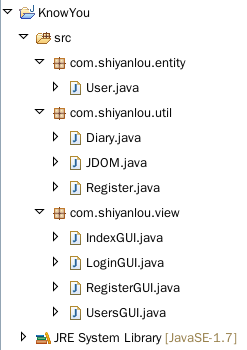
代码设计
com.shiyanlou.entity
User.java
package com.shiyanlou.entity;

public class User {

    private String ID;

    private String name;

    private String passwd;

    public String getName() {

        return name;

    }

    public void setID(String iD) {

        ID = iD;

    }

    public String getID() {

        return ID;

    }

    public void setName(String name) {

        this.name = name;

    }

    public String getPasswd() {

        return passwd;

    }

    public void setPasswd(String passwd) {

        this.passwd = passwd;

    }

}
com.shiyanlou.util
Diary.java
package com.shiyanlou.util;

import java.io.BufferedReader;

import java.io.BufferedWriter;

import java.io.File;

import java.io.FileReader;

import java.io.FileWriter;

import java.io.IOException;

import javax.swing.text.Document;

public class Diary {

    public static void addDiary(String pathname, String title, String txt) {

        File dirfile = new File(pathname);

        BufferedWriter bufw = null;

        dirfile.mkdirs();

        File file = new File(dirfile, title + ".ky");

        try {

            bufw = new BufferedWriter(new FileWriter(file, true));

            bufw.write(txt);

        } catch (IOException e) {

            // TODO Auto-generated catch block

            e.printStackTrace();

        } finally {

            if (bufw != null) {

                try {

                    bufw.close();

                } catch (IOException e) {

                    // TODO Auto-generated catch block

                    e.printStackTrace();

                }

            }

        }

    }

    public static void read(File file, Document doc) {

        try (BufferedReader bufr = new BufferedReader(new FileReader(file));) {

            String txt = null;

            String line = System.getProperty("line.separator");

            while ((txt = bufr.readLine()) != null) {

                doc.insertString(doc.getLength(), txt + line, null);

            }

        } catch (Exception e1) {

            // TODO Auto-generated catch block

            e1.printStackTrace();

        }

    }

}
JDOM.java
package com.shiyanlou.util;

import java.io.File;

import java.io.FileOutputStream;

import java.io.IOException;

import java.util.ArrayList;

import java.util.Iterator;

import java.util.List;

import java.util.Map;

import java.util.TreeMap;

import org.jdom2.Attribute;

import org.jdom2.Document;

import org.jdom2.Element;

import org.jdom2.JDOMException;

import org.jdom2.input.SAXBuilder;

import org.jdom2.output.XMLOutputter;

public class JDOM {

    public static String write(String n, String p, String id) {

        // TODO Auto-generated method stub

        String path = "/home/shiyanlou/Desktop/UserInfo.xml";

        File file = new File(path);

        SAXBuilder saxBuilder = new SAXBuilder();

        Document doc;

        try {

            doc = saxBuilder.build(file);

            Element root = doc.getRootElement(); //\u5F97\u5230\u6839\u5143\u7D20

            Element user = new Element("User"); //\u5EFA\u7ACBUser\u5143\u7D20

            Element name = new Element("name");//\u5EFA\u7ACBname\u5143\u7D20

            Element passwd = new Element("passwd");//\u5EFA\u7ACBpasswd\u5143\u7D20

            if (checkID(id, root)) {

                user.setAttribute(new Attribute("id", id));

                name.setText(n);

                passwd.setText(p);

                user.addContent(name);

                user.addContent(passwd);

                root.addContent(user);

                XMLOutputter out = new XMLOutputter();

                out.output(doc, new FileOutputStream(file));

                return "Successful registration";//\u8FD4\u56DE\u6CE8\u518C\u6210\u529F

            } else

                return "ID already exists, please input again";

        } catch (JDOMException e) {

            // TODO Auto-generated catch block

            e.printStackTrace();

        } catch (IOException e) {

            // TODO Auto-generated catch block

            e.printStackTrace();

        }

        return "ERROR";

    }

    public static boolean checkID(String id, Element root) {

        boolean flag = true;

        @SuppressWarnings("unchecked")

        List<Element> list = root.getChildren("User");

        Iterator<Element> it = list.iterator();

        while (it.hasNext()) {

            Element e = (Element) it.next();

            if (e.getAttributeValue("id").equals(id)) {

                flag = false;

            }

        }

        return flag;

    }

    public static String read(String id, String passwd) {

        String path = "/home/shiyanlou/Desktop/UserInfo.xml";

        File file = new File(path);

        SAXBuilder saxBuilder = new SAXBuilder();

        try {

            Document doc = saxBuilder.build(file);

            Element root = doc.getRootElement();

            String info = getPasswd(root).get(id);

            if (info == null) {

                return "User does not exist!!";

            }

            String[] buf = info.split("/");

            if (buf[0].equals(passwd)) {

                return "Successful landing/" + buf[1];

            }

        } catch (JDOMException e) {

            // TODO Auto-generated catch block

            e.printStackTrace();

        } catch (IOException e) {

            // TODO Auto-generated catch block

            e.printStackTrace();

        }

        return "Wrong password!!";

    }

    @SuppressWarnings("unchecked")

private static Map<String, String> getPasswd(Element root) {

        Map<String, String> map = new TreeMap<String, String>();//\u5B58\u8D2E\u7528\u6237\u4FE1\u606F

        List<Element> list = new ArrayList<Element>();

        list = root.getChildren("User");

        Iterator<Element> it = list.iterator();

        while (it.hasNext()) {

            Element e = it.next();

            String id = e.getAttributeValue("id");

            String passwd = e.getChildText("passwd");

            String name = e.getChildText("name");

            map.put(id, getInfo(passwd, id));

        }

        return map;

    }

    private static String getInfo(String passwd, String name) {

        return passwd + "/" + name;

    }

}
Register.java
package com.shiyanlou.util;

import com.shiyanlou.entity.User;

public class Register {

    static User user = new User();

    public static String checkName(String name) {

        user.setName(name);

        return null;

    }

    public static String checkID(String ID) {

        if (ID.matches("\\d{1,8}")) {

            user.setID(ID);

            return null;

        } else

            return "ID not conform to the rules";

    }

    public static String checkPasswd(String passwd) {

        if (passwd.matches("\\d{6,15}")) {

            user.setPasswd(passwd);

            return null;

        } else

            return "Password not conform to the rules";

    }

    public static String register(String name,String passwd,String ID) {

        user.setName(name);

        user.setPasswd(passwd);

        user.setID(ID);

        return (JDOM.write(user.getName(), user.getPasswd(),

                user.getID()));

    }

}
com.shiyanlou.view
IndexGUl.java
package com.shiyanlou.view;

import java.awt.EventQueue;

import java.awt.Font;

import java.awt.event.KeyAdapter;

import java.awt.event.KeyEvent;

import java.awt.event.MouseAdapter;

import java.awt.event.MouseEvent;

import javax.swing.JButton;

import javax.swing.JFrame;

import javax.swing.JLabel;

import javax.swing.JPanel;

import javax.swing.border.EmptyBorder;

public class IndexGUI extends JFrame {

    private JPanel contentPane;

    private static IndexGUI frame;

    public static void main(String[] args) {

        init();

    }

    public static void init()

    {

        EventQueue.invokeLater(new Runnable() {

            public void run() {

                try {

                    frame = new IndexGUI();

                    frame.setVisible(true);

                } catch (Exception e) {

                    e.printStackTrace();

                }

            }

        });

    }

    public IndexGUI() {

        setTitle("KnowYou");

        setDefaultCloseOperation(JFrame.EXIT_ON_CLOSE);

        setBounds(100, 100, 650, 400);

        contentPane = new JPanel();

        contentPane.setBorder(new EmptyBorder(5, 5, 5, 5));

        setContentPane(contentPane);

        contentPane.setLayout(null);

        JLabel lblNewLabel = new JLabel("Welcome to use KnowYou");

        lblNewLabel.setBounds(132, 74, 386, 35);

        lblNewLabel.setFont(new Font("Ubuntu", Font.BOLD | Font.ITALIC, 30));

        contentPane.add(lblNewLabel);

        JButton login = new JButton("Login");

        login.addMouseListener(new MouseAdapter() {

            @Override

            public void mouseClicked(MouseEvent e) {

                event_Login();

            }

        });

        login.addKeyListener(new KeyAdapter() {

            @Override

            public void keyPressed(KeyEvent e) {

                if(e.getKeyCode()==KeyEvent.VK_ENTER)

                {

                    event_Login();

                }

            }

        });

        login.setBounds(65, 263, 124, 45);

        contentPane.add(login);

        JButton register = new JButton("Sign Up");

        register.addMouseListener(new MouseAdapter() {

            @Override

            public void mouseClicked(MouseEvent e) {

                event_register();

            }

        });

        register.addKeyListener(new KeyAdapter() {

            @Override

            public void keyPressed(KeyEvent e) {

                if(e.getKeyCode()==KeyEvent.VK_ENTER)

                {

                    event_register();

                }

            }

        });

        register.setBounds(489, 263, 109, 45);

        contentPane.add(register);

    }

    private void event_Login()

    {

        setVisible(false);

        new LoginGUI().loginGUI();

    }

    private void event_register()

    {

        setVisible(false);

        new RegisterGUI().registerGUI();

    }

}
LoginGUl.java
package com.shiyanlou.view;

import java.awt.EventQueue;

import java.awt.Font;

import java.awt.event.KeyAdapter;

import java.awt.event.KeyEvent;

import java.awt.event.MouseAdapter;

import java.awt.event.MouseEvent;

import javax.swing.JButton;

import javax.swing.JFrame;

import javax.swing.JLabel;

import javax.swing.JOptionPane;

import javax.swing.JPanel;

import javax.swing.JPasswordField;

import javax.swing.JTextField;

import javax.swing.border.EmptyBorder;

import com.shiyanlou.util.JDOM;

public class LoginGUI extends JFrame {

    private static final long serialVersionUID = 4994949944841194839L;

    private JPanel contentPane;

    private JTextField IDtxt;

    private JLabel Passwdlabel;

    private JPasswordField passwordField;

    private JButton login;

    private JButton back;

    /**

     * Launch the application.

     * @return

     */

    public void loginGUI() {

        EventQueue.invokeLater(new Runnable() {

            public void run() {

                try {

                    LoginGUI frame = new LoginGUI();

                    frame.setVisible(true);

                } catch (Exception e) {

                    e.printStackTrace();

                }

            }

        });

    }

    /**

     * Create the frame.

     */

    public LoginGUI() {

        setDefaultCloseOperation(JFrame.EXIT_ON_CLOSE);

        setBounds(100, 100, 650, 400);

        contentPane = new JPanel();

        contentPane.setBorder(new EmptyBorder(5, 5, 5, 5));

        setContentPane(contentPane);

        contentPane.setLayout(null);

        JLabel IDlabel = new JLabel("Please input ID");

        IDlabel.setBounds(68, 170, 100, 39);

        contentPane.add(IDlabel);

        IDtxt = new JTextField();

        IDtxt.setBounds(220, 179, 126, 21);

        contentPane.add(IDtxt);

        IDtxt.setColumns(10);

        Passwdlabel = new JLabel("Please input password");

        Passwdlabel.setBounds(68, 219, 150, 50);

        contentPane.add(Passwdlabel);

        passwordField = new JPasswordField();

        passwordField.setBounds(220, 234, 126, 21);

        contentPane.add(passwordField);

        login = new JButton("login");

        login.addMouseListener(new MouseAdapter() {

            @Override

            public void mouseClicked(MouseEvent e) {

                event_login();

            }

        });

        login.addKeyListener(new KeyAdapter() {

            public void keyPressed(KeyEvent e)

            {

                if(e.getKeyCode()==KeyEvent.VK_ENTER)

                {

                    event_login();

                }

            }

        });

        login.setBounds(239, 310, 93, 23);

        contentPane.add(login);

        back = new JButton("BACK");

        back.addMouseListener(new MouseAdapter() {

            @Override

            public void mouseClicked(MouseEvent e) {

                 IndexGUI.init();

                 setVisible(false);

            }

        });

        back.setBounds(507, 310, 93, 23);

        contentPane.add(back);

        JLabel label = new JLabel("Welcome to use KnowYou");

        label.setFont(new Font("Ubuntu", Font.BOLD | Font.ITALIC, 30));

        label.setBounds(142, 54, 386, 35);

        contentPane.add(label);

    }

    private void event_login()

    {

        String id=IDtxt.getText();

        String passwd=new String(passwordField.getPassword());

        String flag=JDOM.read(id, passwd);

        if(flag.contains("Successful landing"))

        {

            String[] bufs=flag.split("/");

            String name=bufs[1];

            JOptionPane.showMessageDialog(contentPane, "Welcome: "+name,"Welcome",JOptionPane.PLAIN_MESSAGE);

            UsersGUI.init(name);

            setVisible(false);

        }

       else

       {

     JOptionPane.showMessageDialog(contentPane,flag,"ERROR",JOptionPane.ERROR_MESSAGE);

       }

     }

}
RegisterGUl.java
package com.shiyanlou.view;

import java.awt.EventQueue;

import java.awt.Font;

import java.awt.event.ActionEvent;

import java.awt.event.ActionListener;

import java.awt.event.MouseAdapter;

import java.awt.event.MouseEvent;

import javax.swing.JButton;

import javax.swing.JFrame;

import javax.swing.JLabel;

import javax.swing.JOptionPane;

import javax.swing.JPanel;

import javax.swing.JTextField;

import javax.swing.border.EmptyBorder;

import com.shiyanlou.util.Register;

public class RegisterGUI extends JFrame {

    private static final long serialVersionUID = 3250371445038102261L;

    private JPanel contentPane;

    private JTextField nametext;

    private JTextField IDtext;

    private JTextField passwdtext;

    /**

     * Launch the application.

     */

    public void registerGUI() {

        EventQueue.invokeLater(new Runnable() {

            public void run() {

                try {

                    RegisterGUI frame = new RegisterGUI();

                    frame.setVisible(true);

                } catch (Exception e) {

                    e.printStackTrace();

                }

            }

        });

    }

    /**

     * Create the frame.

     */

    public RegisterGUI() {

        setDefaultCloseOperation(JFrame.EXIT_ON_CLOSE);

        setBounds(100, 100, 650, 400);

        contentPane = new JPanel();

        contentPane.setBorder(new EmptyBorder(5, 5, 5, 5));

        setContentPane(contentPane);

        contentPane.setLayout(null);

        JLabel namelabel = new JLabel("Please input user name");

        namelabel.setBounds(102, 91, 151, 23);

        contentPane.add(namelabel);

        JLabel IDlabel = new JLabel("Please input user ID");

        IDlabel.setBounds(102, 160, 151, 23);

        contentPane.add(IDlabel);

        JLabel passwdlaber = new JLabel("Please input user password");

        passwdlaber.setBounds(102, 224, 163, 23);

        contentPane.add(passwdlaber);

        nametext = new JTextField();

        nametext.setBounds(271, 92, 92, 21);

        contentPane.add(nametext);

        nametext.setColumns(10);

        IDtext = new JTextField();

        IDtext.setBounds(271, 161, 92, 21);

        contentPane.add(IDtext);

        IDtext.setColumns(8);

        passwdtext = new JTextField();

        passwdtext.setBounds(271, 225, 92, 21);

        contentPane.add(passwdtext);

        passwdtext.setColumns(10);

        JButton register = new JButton("Sign Up");

        register.addMouseListener(new MouseAdapter() {

            public void mouseClicked(MouseEvent e) {

                register.addMouseListener(new MouseAdapter() {

                    public void mouseClicked(MouseEvent e) {

                        String name = nametext.getText();

                        String ID = IDtext.getText();

                        String passwd = passwdtext.getText();

                       if (Register.checkID(ID) == null) {

                        if (Register.checkPasswd(passwd) == null) {

                        String srt = Register.register(name, passwd, ID);

                        JOptionPane.showMessageDialog(contentPane,srt,"information", JOptionPane.PLAIN_MESSAGE);

                        setVisible(false);

                        new IndexGUI().init();

                        } else {

                        JOptionPane.showMessageDialog(contentPane,Register.checkPasswd(passwd), "ERROR", JOptionPane.ERROR_MESSAGE);

                        }

                        } else {

                        JOptionPane.showMessageDialog(contentPane,Register.checkID(ID), "ERROR",

                 JOptionPane.ERROR_MESSAGE);

                                }

                        }

                        });

            }

        });

        register.setBounds(321, 305, 93, 23);

        contentPane.add(register);

        JButton back = new JButton("BACK");  //\u8FD4\u56DE\u6309\u94AE

        back.addMouseListener(new MouseAdapter() {

            @Override

            public void mouseClicked(MouseEvent e) {

                IndexGUI.init();

                setVisible(false);

            }

        });

        back.setBounds(531, 305, 93, 23);

        contentPane.add(back);

        JLabel label = new JLabel("Welcome to use KnowYou");

        label.setFont(new Font("Ubuntu", Font.BOLD | Font.ITALIC, 30));

        label.setBounds(143, 26, 374, 35);

        contentPane.add(label);

        JLabel lblNewLabel = new JLabel("(There are 1 to 8 numbers)");

        lblNewLabel.setBounds(373, 164, 163, 15);

        contentPane.add(lblNewLabel);

        JLabel lblNewLabel_1 = new JLabel("(There are 6 to 15 numbers)");

        lblNewLabel_1.setBounds(373, 228, 163, 15);

        contentPane.add(lblNewLabel_1);

    }

}
UsersGUl.java
package com.shiyanlou.view;

import java.awt.Color;

import java.awt.EventQueue;

import java.awt.Font;

import java.awt.event.ActionEvent;

import java.awt.event.ActionListener;

import java.awt.event.MouseAdapter;

import java.awt.event.MouseEvent;

import java.io.File;

import javax.swing.JButton;

import javax.swing.JEditorPane;

import javax.swing.JFileChooser;

import javax.swing.JFrame;

import javax.swing.JInternalFrame;

import javax.swing.JLabel;

import javax.swing.JOptionPane;

import javax.swing.JPanel;

import javax.swing.JTabbedPane;

import javax.swing.JTextField;

import javax.swing.JTextPane;

import javax.swing.border.EmptyBorder;

import javax.swing.filechooser.FileNameExtensionFilter;

import com.shiyanlou.util.Diary;

public class UsersGUI extends JFrame {

    private JPanel contentPane;

    private JTextField textField;

    private JFileChooser chooser;

    private static String pathname;

    public static void init(String path) { //\u521D\u59CB\u5316\u65B9\u6CD5

        pathname = path;

        EventQueue.invokeLater(new Runnable() {

            public void run() {

                try {

                    UsersGUI frame = new UsersGUI();

                    frame.setVisible(true);

                } catch (Exception e) {

                    e.printStackTrace();

                }

            }

        });

    }

    /**

     * Create the frame.

     */

    public UsersGUI() {

        setDefaultCloseOperation(JFrame.EXIT_ON_CLOSE);

        setBounds(100, 100, 600, 400);

        contentPane = new JPanel();

        contentPane.setBorder(new EmptyBorder(5, 5, 5, 5));

        setContentPane(contentPane);

        contentPane.setLayout(null);

        JTabbedPane tabbedPane = new JTabbedPane(JTabbedPane.TOP);

        tabbedPane.setToolTipText("KonwYou");

        tabbedPane.setBounds(0, 0, 574, 67);

        contentPane.add(tabbedPane);

        final JPanel panel = new JPanel();

        tabbedPane.addTab("Management Journal", null, panel, null);

        chooser = new JFileChooser(".\\"+pathname);

        FileNameExtensionFilter filter=new FileNameExtensionFilter("Allowed","ky");

        chooser.setFileFilter(filter);

        JButton readButton = new JButton("Read the diary");

        readButton.addMouseListener(new MouseAdapter() {

            @Override

            public void mouseClicked(MouseEvent e) {

                int value = chooser.showOpenDialog(panel);

                JInternalFrame internalFrame_Read = new JInternalFrame("Read the diary", false, true, false, false);

                internalFrame_Read.setBounds(0, 77, 584, 275);

                contentPane.add(internalFrame_Read);

                internalFrame_Read.getContentPane().setLayout(null);

                JTextPane txtDiary = new JTextPane();

                txtDiary.setBounds(0, 0, 568, 246);

                internalFrame_Read.getContentPane().add(txtDiary);

                javax.swing.text.Document doc=txtDiary.getDocument();

                txtDiary.setBackground(Color.GREEN);

                txtDiary.setEditable(false);

                if (value == JFileChooser.APPROVE_OPTION) {

                       File file = chooser.getSelectedFile();

                    if(file.exists()) {

                    	Diary.read(file, doc);

                        internalFrame_Read.setVisible(true);

                    }

                }

            }

        });

        panel.add(readButton);

        JButton addButton = new JButton("Create a diary");//\u65B0\u5EFA\u6309\u94AE

        addButton.addMouseListener(new MouseAdapter() {

            @Override

            public void mouseClicked(MouseEvent e) {

                final JInternalFrame internalFrame_Write = new JInternalFrame("Create a diary",false, true, false, false);

                internalFrame_Write.setBounds(0, 77, 584, 275);

                contentPane.add(internalFrame_Write);

                   internalFrame_Write.getContentPane().setLayout(null);

                textField = new JTextField();

                textField.setBounds(76, 0, 492, 21);

                internalFrame_Write.getContentPane().add(textField);

                textField.setColumns(10);

                JLabel label = new JLabel("Title");

                label.setFont(new Font("\u6977\u4F53", Font.PLAIN, 12));

                   label.setBounds(46, 3, 52, 15);

                   internalFrame_Write.getContentPane().add(label);

                final JEditorPane editorPane = new JEditorPane();

                editorPane.setBounds(0, 31, 568, 179);

                internalFrame_Write.getContentPane().add(editorPane);

                JButton save = new JButton("SAVE");

                save.setBounds(465, 213, 93, 23);

                save.addMouseListener(new MouseAdapter() {

                    public void mouseClicked(MouseEvent e) {

                        String title = textField.getText();

                        String txt = editorPane.getText();

                        Diary.addDiary(pathname, title, txt);

                        internalFrame_Write.setVisible(false);

                    }

                });

                internalFrame_Write.getContentPane().add(save);

                internalFrame_Write.setVisible(true);

            }

        });

        panel.add(addButton);

        JButton delButton = new JButton("Delete");

        delButton.addActionListener(new ActionListener() {

            public void actionPerformed(ActionEvent e) {

                File file=null;

                int value=chooser.showOpenDialog(panel);

                if(value==JFileChooser.APPROVE_OPTION)

                {

                    file=chooser.getSelectedFile();

                    int x=JOptionPane.showConfirmDialog(panel,"Confirm delete?","Please confirm",JOptionPane.OK_CANCEL_OPTION,JOptionPane.QUESTION_MESSAGE);

                    if(file.exists())

                    {

                        if(x==JOptionPane.OK_OPTION) {

                            file.delete();

                            JOptionPane.showMessageDialog(panel, "Delete Success!","information", JOptionPane.PLAIN_MESSAGE);

                        }

                    }

                }

            }

        });

        panel.add(delButton);

        JButton back = new JButton("BACK");

        back.addActionListener(new ActionListener() {

            public void actionPerformed(ActionEvent e) {

                IndexGUI.init();

                setVisible(false);

            }

        });

        panel.add(back);

    }

}
要点解析
XML文档
需要对应着 User 类来设计一个 XML 文档,用于持久化存储用户信息。
什么是 XML
- XML 指可扩展标记语言(EXtensible Markup Language)
- XML 是一种标记语言,很类似 HTML
- XML 的设计宗旨是传输数据,而非显示数据
- XML 标签没有被预定义。您需要自行定义标签。
- XML 被设计为具有自我描述性。
- XML 是 W3C 的推荐标准
创建 XML 文件
在桌面空白处右键点击,选择从模版创建一个空文件。

文件名可以填写为 UserInfo.xml。
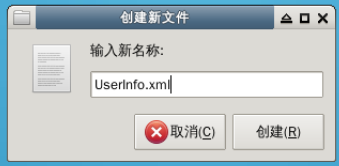
创建完成后可以在桌面上找到这个 UserInfo.xml 文件。
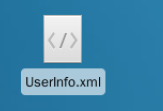
右键点击该文件,用 gedit 编辑器打开它。

编辑 XML 文件
在编辑器中输入 XML 文件的信息和项目中会用到的标签 Users。
<?xml version="1.0" encoding="UTF-8"?> <Users></Users>
编辑完成后,点击保存按钮保存该文件,然后关闭编辑器。 UserInfo.xml 如图:

以上就完成了我们保存用户信息的 xml 文档。
JDOM
JDOM 是一种使用 XML(标准通用标记语言下的一个子集) 的独特 Java 工具包。它的设计包含 Java 语言的语法乃至语义。
JDOM 的用法
要使用 JDOM 解析 XML 文件,需要下载 JDOM 的包,实验中使用的是 jdom-1.1。解压之后,将 lib 文件夹下的 *.jar 文件以及 build 文件夹下的 jdom.jar 拷贝到工程文件夹下,然后就可以使用 JDOM 操作 XML 文件了。
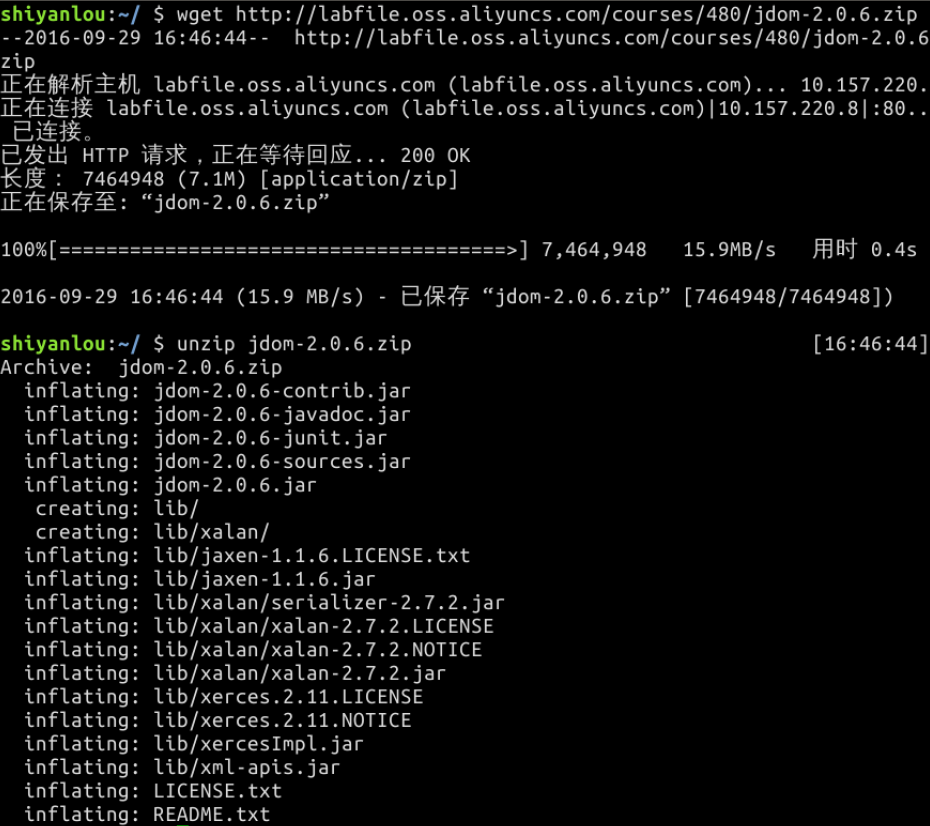
在实验环境中下载 jdom 可以使用下面的方式,打开 Xfce 终端,输入命令:
$ wget https://labfile.oss.aliyuncs.com/courses/480/jdom-2.0.6.zip $ unzip jdom-2.0.6.zip
JDOM 的具体实现
首先需要将 JDOM 的 jar 包导入到我们的工程中。
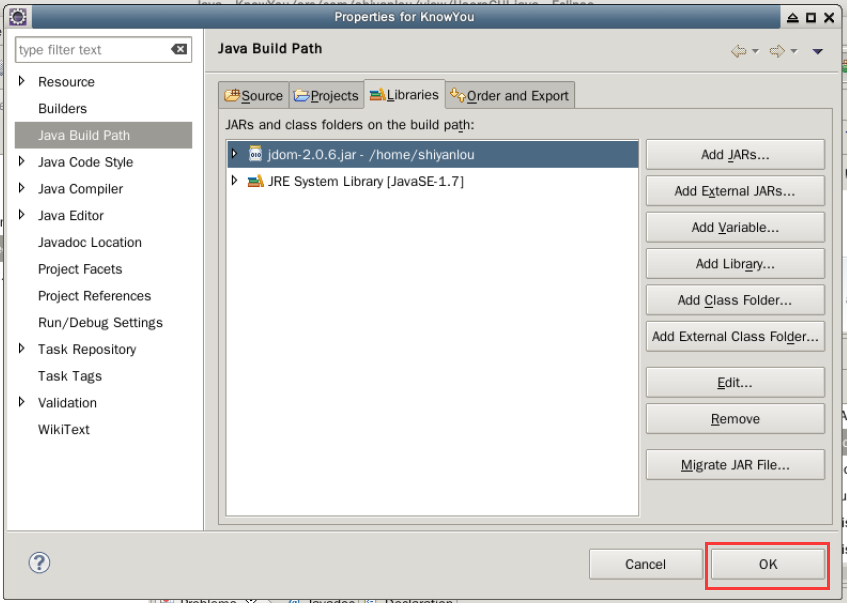
右键点击项目目录,选择 Properties 进入项目属性设置。

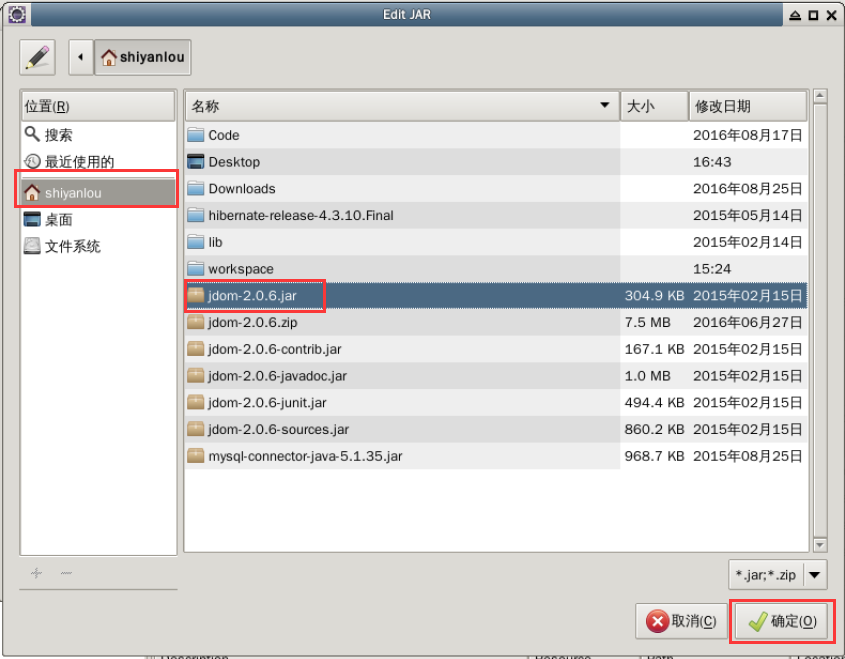
在 Java Build Path 设置项里切换到 Libraries 选项卡,然后点击右侧的 Add External JARs... 按钮。

在弹出的 JAR Selection 对话框中选择 Shiyanlou 目录下刚解压的 JDOM 相关包 jdom-2.0.6.jar,然后点击 确定 按钮完成添加。
最后在属性页点击 OK 完成设置。
接下来就需要对 JDOM 类进行编辑。
在类 JDOM.java中,主要包含了两个方法,write() 和 read() 方法,分别用于将用户信息写入到 xml 文档中和读出用户信息。
【计理01组30号】Java 实现日记写作软件的更多相关文章
- 【计理01组08号】SSM框架整合
[计理01组08号]SSM框架整合 数据库准备 本次课程使用 MySQL 数据库.首先启动 mysql : sudo service mysql start 然后在终端下输入以下命令,进入到 MySQ ...
- 【计理01组03号】Java基础知识
简单数据类型的取值范围 byte:8 位,1 字节,最大数据存储量是 255,数值范围是 −128 ~ 127. short:16 位,2 字节,最大数据存储量是 65536,数值范围是 −32768 ...
- 【计理01组04号】JDK基础入门
java.lang包 java.lang包装类 我们都知道 java 是一门面向对象的语言,类将方法和属性封装起来,这样就可以创建和处理相同方法和属性的对象了.但是 java 中的基本数据类型却不是面 ...
- 【计理05组01号】R 语言基础入门
R 语言基本数据结构 首先让我们先进入 R 环境下: sudo R 赋值 R 中可以用 = 或者 <- 来进行赋值 ,<- 的快捷键是 alt + - . > a <- c(2 ...
- 玩玩微信公众号Java版之七:自定义微信分享
前面已经学会了微信网页授权,现在微信网页的功能也可以开展起来啦! 首先,我们先来学习一下分享,如何在自己的页面获取分享接口及让小伙伴来分享呢? 今天的主人公: 微信 JS-SDK, 对应官方链接为:微 ...
- 微信公众号Java接入demo
微信公众号Java接入demo 前不久买了一台服务,本来是用来当梯子用的,后来买了一个域名搭了一个博客网站,后来不怎么在上面写博客一直闲着,最近申请了一个微信公众号就想着弄点什么玩玩.周末没事就鼓捣了 ...
- 8月30号周五香港接单ING~~化妆品只加10元!!!!!!
8月30号周五香港接单ING~~化妆品只加10元!!!!!! 8月30号周五香港接单ING~~化妆品只加10元!!!!!!
- java面试题—精选30道Java笔试题解答(二)
摘要: java面试题-精选30道Java笔试题解答(二) 19. 下面程序能正常运行吗() public class NULL { public static void haha(){ System ...
- 【笔试题】精选30道Java笔试题解答
转自于:精选30道Java笔试题解答 精选30道Java笔试题解答 1. 下面哪些是Thread类的方法() A. start() B. run() C. exit() D. getPriority( ...
随机推荐
- 5.14-HTTP间通信
1.社长社员通信WEBSOCKET WebSocket 是一种标准协议,用于在客户端和服务端之间进行双向数据传输.但它跟 HTTP 没什么关系,它是一种基于 TCP 的一种独立实现. 以前客户端想知道 ...
- Spring Boot Starter 和 ABP Module
Spring Boot 和 ABP 都是模块化的系统,分别是Java 和.NET 可以对比的框架.模块系统是就像乐高玩具一样,一块一块零散积木堆积起一个精彩的世界.每种积木的形状各不相同,功能各不相同 ...
- golang中的并发安全和锁
1. 并发安全 package main import ( "fmt" "sync" ) var ( sum int wg sync.WaitGroup ) f ...
- 3D建模服务提供更高效、专业的能力,“筑”力开发者
3D建模服务(3D Modeling Kit)是HMS Core在图形图像领域又一技术开放.3D建模产品的定位就是要做快速.简洁.低成本的3D制作能力,并陆续开放给有3D模型.动画游戏制作等能力诉求的 ...
- 什么是iptables?
目录 一:iptables 1.iptables简介 2.什么是防火墙? 3.防火墙种类 二:iptables基本介绍 1.解析内容 三:iptables流程(讲解) 1.流入本机 2.解析(流入本机 ...
- redis一主两从搭建
一主两从搭建: 主配: daemonize yes port 6379 logfile ./redis6379.log dir ./ bind 10.131.156.170 从1配: daemoniz ...
- SQL 语句实战演练
1 创建数据库.删除数据库 备注:关键字不一定要大写. CREATE DATABASE sql_testDROP DATABASE sql_test 2 新建表 CREATE TABLE `emp` ...
- Python Study Note 1
Learn The First Day OF Operation Notes
- GDB死锁调试
1.测试代码 代码中开启两个线程,加锁后轮流输出数据,其中一个线程误将pthread_mutex_unlock(),写成pthread_mutex_lock()代码如下: int g_tickets ...
- String存放位置
简介 字符串在不同的JDK版本中,存放的位置不同,创建方式不同,存放的位置也不同. 存放位置 JDK1.7以下,无论何种方法创建String对象,位置都位于方法区. JDK1.8及1.8以上,new ...