
Android View post 方法
解析View.post方法。分析一下这个方法的流程。
说起post方法,我们很容易联想到Handler的post方法,都是接收一个Runnable对象。那么这两个方法有啥不同呢?
Handler的post方法
先来简单看一下Handler的post(Runnable)方法。这个方法是将一个Runnable加到消息队列中,并且会在这个handler关联的线程里执行。
下面是关联的部分源码。可以看到传入的Runnable对象,装入Message后,被添加进了queue队列中。
Handler 有关的部分源码
    // android.os Handler 有关的部分源码

    public final boolean post(@NonNull Runnable r) {

        return sendMessageDelayed(getPostMessage(r), 0);

    }

    private static Message getPostMessage(Runnable r) {

        Message m = Message.obtain();

        m.callback = r;

        return m;

    }

    public final boolean sendMessageDelayed(@NonNull Message msg, long delayMillis) {

        if (delayMillis < 0) {

            delayMillis = 0;

        }

        return sendMessageAtTime(msg, SystemClock.uptimeMillis() + delayMillis);

    }

    public boolean sendMessageAtTime(@NonNull Message msg, long uptimeMillis) {

        MessageQueue queue = mQueue;

        if (queue == null) {

            RuntimeException e = new RuntimeException(

                    this + " sendMessageAtTime() called with no mQueue");

            Log.w("Looper", e.getMessage(), e);

            return false;

        }

        return enqueueMessage(queue, msg, uptimeMillis);

    }

    private boolean enqueueMessage(@NonNull MessageQueue queue, @NonNull Message msg,

            long uptimeMillis) {

        msg.target = this;

        msg.workSourceUid = ThreadLocalWorkSource.getUid();

        if (mAsynchronous) {

            msg.setAsynchronous(true);

        }

        return queue.enqueueMessage(msg, uptimeMillis);

    }
具体流程,可以看handler介绍
View的post方法
我们直接跟着post的源码走。
public boolean post(Runnable action) {

    final AttachInfo attachInfo = mAttachInfo;

    if (attachInfo != null) {

        return attachInfo.mHandler.post(action);

    }

    // Postpone the runnable until we know on which thread it needs to run.

    // Assume that the runnable will be successfully placed after attach.

    getRunQueue().post(action);

    return true;

}

private HandlerActionQueue getRunQueue() {

    if (mRunQueue == null) {

        mRunQueue = new HandlerActionQueue();

    }

    return mRunQueue;

}
可以看到一开始就查询是否有attachInfo,如果有,则用attachInfo.mHandler来执行这个任务。
如果没有attachInfo,则添加到View自己的mRunQueue中。确定运行的线程后,再执行任务。
post(Runnable action)的返回boolean值,如果为true,表示任务被添加到消息队列中了。
如果是false,通常表示消息队列关联的looper正在退出。
那么我们需要了解AttachInfo和HandlerActionQueue。
AttachInfo
AttachInfo是View的静态内部类。View关联到父window后,用这个类来存储一些信息。
AttachInfo存储的一部分信息如下:
WindowId mWindowIdwindow的标志View mRootView最顶部的viewHandler mHandler这个handler可以用来处理任务
HandlerActionQueue
当View还没有handler的时候,拿HandlerActionQueue来缓存任务。HandlerAction是它的静态内部类,存储Runnable与延时信息。
public class HandlerActionQueue {

    private HandlerAction[] mActions;

    public void post(Runnable action)

    public void executeActions(Handler handler)

    // ...

    private static class HandlerAction {

        final Runnable action;

        final long delay;

        // ...

    }

}
View的mRunQueue
将任务(runnable)排成队。当View关联上窗口并且有handler后,再执行这些任务。
/**

 * Queue of pending runnables. Used to postpone calls to post() until this

 * view is attached and has a handler.

 */

private HandlerActionQueue mRunQueue;
这个mRunQueue里存储的任务啥时候被执行?我们关注dispatchAttachedToWindow方法。
void dispatchAttachedToWindow(AttachInfo info, int visibility) {

    // ...

    // Transfer all pending runnables.

    if (mRunQueue != null) {

        mRunQueue.executeActions(info.mHandler);

        mRunQueue = null;

    }

    // ...

}
这个方法里调用了mRunQueue.executeActions。
executeActions(Handler handler)方法实际上是用传入的handler处理队列中的任务。
而这个dispatchAttachedToWindow会被ViewGroup中被调用。
或者是ViewRootImpl中调用
host.dispatchAttachedToWindow(mAttachInfo, 0);
小结
View的post方法,实际上是使用了AttachInfo的handler。
如果View当前还没有AttachInfo,则把任务添加到了View自己的HandlerActionQueue队列中,然后在dispatchAttachedToWindow中把任务交给传入的AttachInfo的handler。也可以这样认为,View.post用的就是handler.post。
我们在获取View的宽高时,会利用View的post方法,就是等View真的关联到window再拿宽高信息。
流程图归纳如下
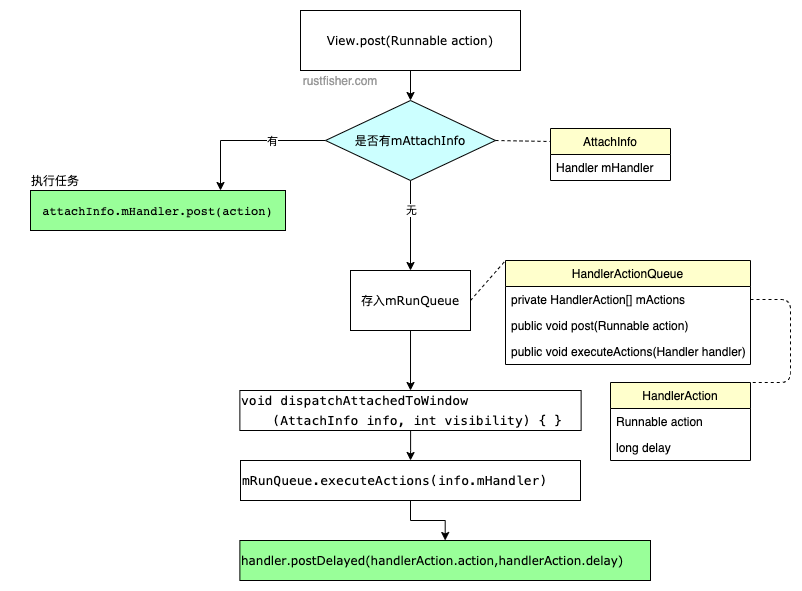
更多请参见Android合集的最近更新
Android View post 方法的更多相关文章
- [转]Android View.onMeasure方法的理解
转自:http://blog.sina.com.cn/s/blog_61fbf8d10100zzoy.html Android View.onMeasure方法的理解 View在屏幕上显示出来要先经过 ...
- Android View.onMeasure方法的理解
View在屏幕上显示出来要先经过measure(计算)和layout(布局).1.什么时候调用onMeasure方法? 当控件的父元素正要放置该控件时调用.父元素会问子控件一个问题,“你想要用多大地方 ...
- [转载]Android View.onMeasure方法的理解
2013-12-18 10:56:28 转载自http://blog.sina.com.cn/s/blog_61fbf8d10100zzoy.html View在屏幕上显示出来要先经过measure( ...
- Android View.onMeasure方法的理解(转载)
一下内容转载自http://blog.sina.com.cn/s/blog_61fbf8d10100zzoy.html View在屏幕上显示出来要先经过measure(计算)和layout(布局).1 ...
- Android View各种尺寸位置相关的方法探究
Android View各种尺寸位置相关的方法探究 本来想做一个View间的碰撞检测之类的. 动手做了才发现不是想象的那么简单. 首先,写好了碰撞检测的工具类如下: package com.mengd ...
- Android View中的控件和监听方法...
PS:居然三天没写博客了...今天补上...东西虽多,但是都是一些基础...代码多了一些,有人可能会这样问,粘这么多代码有毛用..其实对于一个Android的初学者来说,一个完整的代码是最容易帮助理解 ...
- Android view中的requestLayout和invalidate方法
Android view中的requestLayout和invalidate方法 requestLayout:当view确定自身已经不再适合现有的区域时,该view本身调用这个方法要求parent v ...
- android view的setVisibility方法值的意思
android view的setVisibility方法值的意思 有三个值 visibility One of VISIBLE, INVISIBLE, or GONE. 常量值为0,意思是可见的 常 ...
- Android编程动态创建视图View的方法
在Android开 发中,在Activity中关联视图View是一般使用setContentView方法,该方法一种参数是使用XML资源直接创 建:setContentView (int layout ...
随机推荐
- ant的copy标签使用方法
对于ant里拷贝用的标签的用法,此文(来自 http://electiger.blog.51cto.com/112940/39575 )讲得很好,注意其中黑体字部分,今天被这个问题耽误了20分钟. A ...
- Http协议中的CharacterEncoding、Content-Encoding和Transfer-Encoding
https://www.cnblogs.com/jinzhiming/p/5765672.html https://www.jianshu.com/p/e918a65b617f https://www ...
- Django3使用WebSocket实现WebShell
前言 最近工作中需要开发前端操作远程虚拟机的功能,简称WebShell. 基于当前的技术栈为react+django,调研了一会发现大部分的后端实现都是django+channels来实现websoc ...
- [ES6深度解析]12:Classes
我们将讨论一个老问题:在JavaScript中创建对象的构造函数. 存在的问题 假设我们想要创建最典型的面向对象设计的示例:Circle类.假设我们正在为一个简单的Canvas库编写一个Circle. ...
- 求字符串长度之递归与非递归的C语言实现
在上一篇中介绍了字符串拷贝的递归与非递归的实现,这里就不在赘述递归原理. 递归求字符串长度_strlen: 1 int _strlen(const char *src) 2 { 3 if( src = ...
- 辗转相除 求最大公约数!or 最小公倍数
求最大公约数和最小公倍数的经典算法--辗转相除法描述如下: 若要求a,b两数的最大公约数和最小公倍数,令a为a.b中较大数,b为较小数,算法进一步流程: while(b不为0) { temp=a%b: ...
- MySQL常用权限操作
MySQL常用权限操作 ** ubuntu mysql 8.0.21修改root密码 ** 1.查看默认安装密码: sudo cat /etc/mysql/debian.cnf 2. 登录mysql ...
- 使用dom4j工具:XMLWriter写出文件(五)
package dom4j_write; import java.io.File; import java.io.FileOutputStream; import java.io.OutputStre ...
- Python的GPU编程实例——近邻表计算
技术背景 GPU加速是现代工业各种场景中非常常用的一种技术,这得益于GPU计算的高度并行化.在Python中存在有多种GPU并行优化的解决方案,包括之前的博客中提到的cupy.pycuda和numba ...
- mybatis gengeator一键生成