
JspSmartUpload 简略使用
JspSmartUpload 简略中文API文档
链接:https://blog.csdn.net/weixin_43670802/article/details/105143830PDF课件 链接:
https://pan.baidu.com/s/1tP4dJV8ZnsoW0BfklahRWw
提取码: 3k5w
我遇到的问题
- 上传文件为中文名问题(在实际服务器使用时依旧不可用)
设置前端表单页面**内容显示编码(ContentType Charset、Meta Charset)**为GBK或GB2312
后端request设置字符集编码为GBK或GB2312,与前端页面一致。 - 下载文件为中文名问题
我利用修改Tomcat服务器配置解决。
在Server.xml 文件 Connector监听节点中添加属性:URIEncoding=“UTF-8”
支持中文的编码。
也可以使用
smartUpload.downloadFile(filePath,null,URLEncoder.encode(key,"utf-8"));
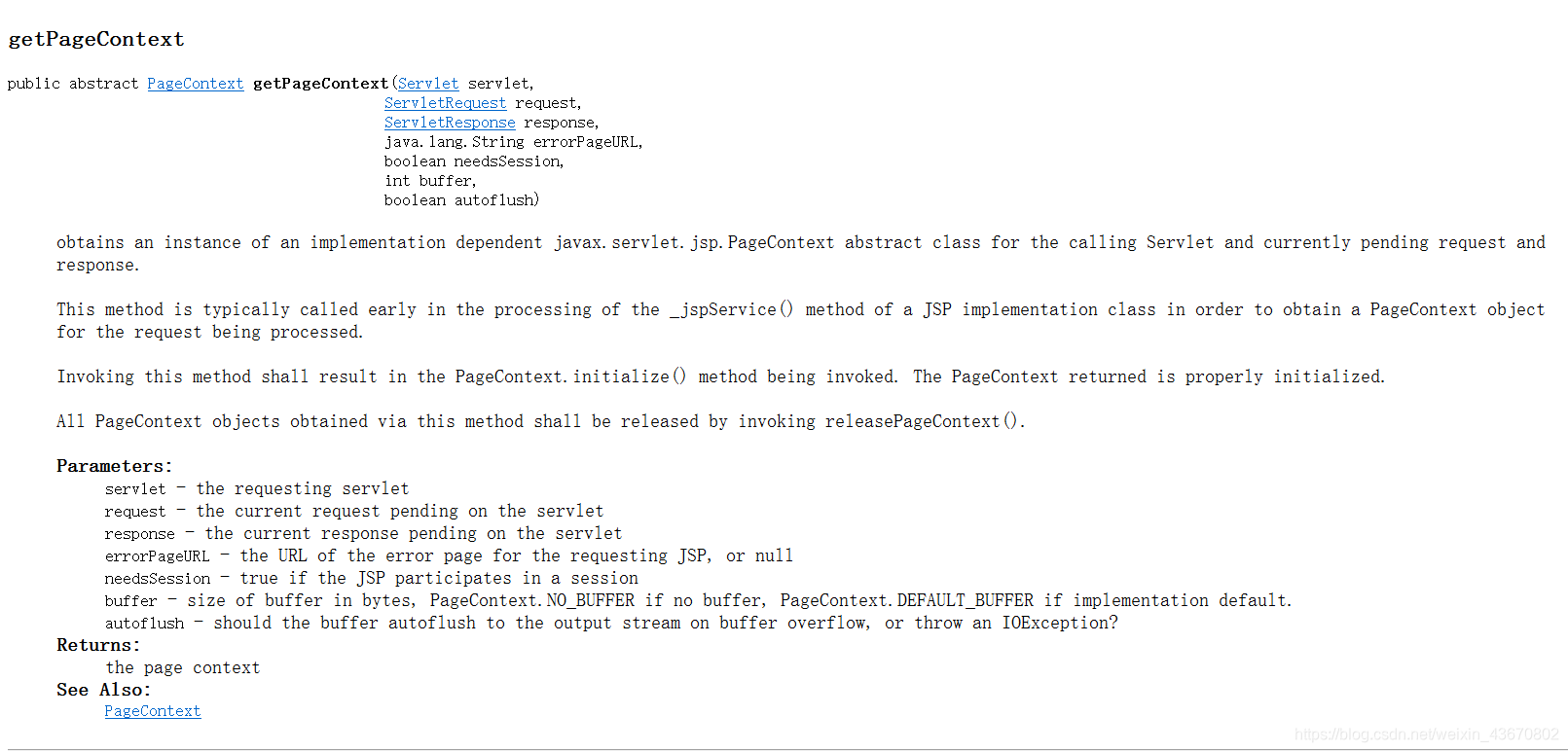
- Servlet中获取PageContext对象问题。
//获取PageContext对象

PageContext pageContext = JspFactory.getDefaultFactory().getPageContext(this, request, response, null, true, JspWriter.DEFAULT_BUFFER, true);
- 中文URL问题
我采用URLEncoder与URLDecoder二次编码解码解决。
思维导图

链接: https://pan.baidu.com/s/1TfsuqQ4lqmScZQ6be8aiTA 提取码: uxvh
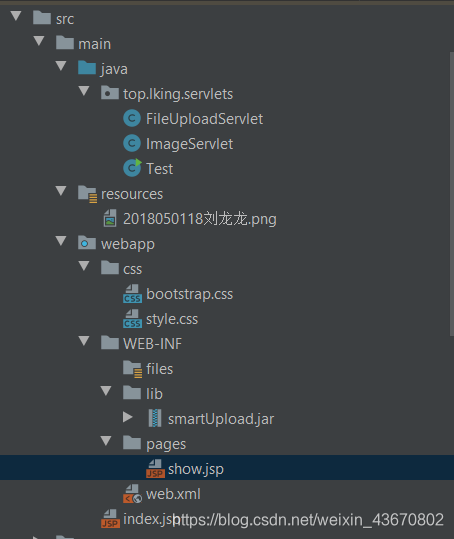
项目结构
前端
<%@ page import="java.util.UUID"  contentType="text/html;charset=gbk" pageEncoding="gbk" %><%--

  By: Jason.

  Date: 3/24/2020 6:17 PM

--%>

<%

    response.setHeader("Pragma","No-cache");

    response.setHeader("Cache-Control","no-cache");

    response.setDateHeader("Expires",-10);

%>

<!DOCTYPE html>

<html lang="en">

<head>

    <meta charset="GBK">

    <title>超级小白龙的自建云盘Beta版.</title>

    <!-- 引入 Bootstrap -->

    <link href="<%=request.getContextPath()+"/css/bootstrap.css"%>" rel="stylesheet">

    <link rel="stylesheet" type="text/css" href="<%=request.getContextPath()+"/css/style.css"%>">

</head>

<body>

<div class="page_box">

    <form action="<%=request.getContextPath()+"/upload.do"%>" method="post" enctype="multipart/form-data">

        <h1 class="form-control">哎呦!客官,您可来啦!</h1>

        <label for="id_file_1" class="btn btn-default">文件一</label>

<%--        <label for="id_file_2" class="btn btn-default">文件二</label>--%>

<%--        <label for="id_file_3" class="btn btn-default">文件三</label>--%>

        <input id="id_file_1"  style="display: none;" type="file" name="file_1"/>

<%--        <input id="id_file_2"  style="display: none;" type="file" name="file_2"/>--%>

<%--        <input id="id_file_3"  style="display: none;" type="file" name="file_3"/>--%>

        <input type="hidden" name="me" value="帅帅的我"/>

        <%-- 防止表单重复提交 --%>

        <input type="hidden" name="token" value="<%=UUID.randomUUID().toString()%>"/>

        <p><input class="btn btn-primary" style="margin-top: 10px" type="submit" value="上传"/></p>

    </form>

</div>

</body>

</html>
后端
package top.lking.servlets;

import com.jspsmart.upload.SmartUpload;

import com.jspsmart.upload.SmartUploadException;

import javax.servlet.ServletException;

import javax.servlet.annotation.WebServlet;

import javax.servlet.http.HttpServlet;

import javax.servlet.http.HttpServletRequest;

import javax.servlet.http.HttpServletResponse;

import javax.servlet.http.HttpSession;

import javax.servlet.jsp.JspFactory;

import javax.servlet.jsp.JspWriter;

import javax.servlet.jsp.PageContext;

import java.io.File;

import java.io.IOException;

import java.net.URLEncoder;

/**

 * @author Jason

 * @version 1.0

 * @date 3/24/2020 8:57 AM

 * @describe:

 */

@WebServlet("/upload.do")

public class FileUploadServlet extends HttpServlet {

    @Override

    protected void doGet(HttpServletRequest req, HttpServletResponse resp) throws ServletException, IOException {

        //super.doGet(req, resp);

        doPost(req,resp);

    }

    @Override

    protected void doPost(HttpServletRequest request, HttpServletResponse response) throws ServletException, IOException {

        //SmartUpload 仅支持GBK或GB2312编码

        request.setCharacterEncoding("gbk");

        //设置响应内容类型,告诉浏览器类型与编码

        response.setContentType("text/html;charset=utf-8");

        try {

        //新建SmartUpload实例

        SmartUpload smartUpload = new SmartUpload();

        //获取PageContext对象

        PageContext pageContext = JspFactory.getDefaultFactory().getPageContext(this, request, response, null, true, JspWriter.DEFAULT_BUFFER, true);

        //初始化该实例

        smartUpload.initialize(pageContext);

        //设置允许的上传类型----如果不符合规则,抛异常

        smartUpload.setAllowedFilesList("png,jpg,jpeg");

        //设置拒绝的上传类型----如果不符合规则,抛异常---(允许与拒绝的类型仅调用即可)

        //smartUpload.setDeniedFilesList("txt,doc,mp3,mp4");

        //设置单个文件上传的最大字节大小--1MB

        smartUpload.setMaxFileSize(1024*1024);

        //设置总文件最大字节大小(设置了单个最大大小,这个便无需调用)--3M

        smartUpload.setTotalMaxFileSize(1024*1024*3);

            //将表单数据加载上传至内存------------获取数据前必须先加载上传至内存

            smartUpload.upload();

        //表单重复提交处理

        //获取会话对象Session

        HttpSession session=request.getSession(true);

        String session_token=(String)session.getAttribute("token");

        String form_token=smartUpload.getRequest().getParameter("token");

        System.out.println(form_token);

        System.out.println(session_token);

        //如果表单令牌不为空且与session中的令牌匹配--即表单重复提交

        if((form_token!=null&&form_token.equals(session_token))||form_token==null){

            //转发至展示页面(注意:在客户端无法直接访问到的,所以服务器端转发)

            request.getRequestDispatcher("/WEB-INF/pages/show.jsp").forward(request,response);

        }else {

            System.out.println("我执行了!");

            //设置本次令牌

            session.setAttribute("token",form_token);

            //test

            //resp.getWriter().println("正在上传,请稍后···");

                //test

                //Thread.sleep(3000);

                //获取文件保存路径

                String filePathStr=this.getServletContext().getRealPath("/").replace("\\","/")+"/WEB-INF/files";

                //构造文件目录对象

                File filePath=new File(filePathStr);

                //判断是否存在

                if(!filePath.exists())

                    //创建一些列目录

                    filePath.mkdirs();

                //将上传文件加载上传至内存后直接保存入文件

                //smartUpload.uploadInFile();

                //获取上传文件集合

                com.jspsmart.upload.Files files=smartUpload.getFiles();

                //获取表单隐藏信息

                String hiddenLabel=smartUpload.getRequest().getParameter("me");

                //保存入Session

                session.setAttribute("files",files);

                session.setAttribute("hiddenLabel",hiddenLabel);

                //将文件从内存写入硬盘

                smartUpload.save(filePath.getAbsolutePath());

                //转发至展示页面(注意:在客户端无法直接访问到的,所以服务器端转发)

                request.getRequestDispatcher("/WEB-INF/pages/show.jsp").forward(request,response);

            }

        }catch (Exception e){

        e.printStackTrace();

        response.getWriter().println("请不要不按规则来!");

         }

    }

}
package top.lking.servlets;

import com.jspsmart.upload.SmartUpload;

import javax.servlet.ServletException;

import javax.servlet.ServletOutputStream;

import javax.servlet.annotation.WebServlet;

import javax.servlet.http.HttpServlet;

import javax.servlet.http.HttpServletRequest;

import javax.servlet.http.HttpServletResponse;

import javax.servlet.jsp.JspFactory;

import javax.servlet.jsp.JspWriter;

import java.io.BufferedOutputStream;

import java.io.FileInputStream;

import java.io.IOException;

import java.io.InputStream;

import java.io.OutputStream;

import java.net.URLDecoder;

import java.net.URLEncoder;

/**

 * @author Jason

 * @version 1.0

 * @date 3/24/2020 10:38 PM

 * @describe:

 */

@WebServlet("/image/translate.do")

public class ImageServlet extends HttpServlet {

    @Override

    protected void doGet(HttpServletRequest req, HttpServletResponse resp) throws ServletException, IOException {

        doPost(req,resp);

    }

    @Override

    protected void doPost(HttpServletRequest request, HttpServletResponse response) throws ServletException, IOException {

        //设置请求编码--仅针对Post请求

        //request.setCharacterEncoding("utf-8");

        //获取文件名--并通过前端二次编码,后端二次解码 解决中文名问题

        String downloadSign=request.getParameter("download");

        //采用两次编码并且两次解码

        //Tomcat在getParameter时已经自动解码一次,下面我手动解码

        String key=URLDecoder.decode(request.getParameter("key"),"utf-8");

        //测试

        System.out.println("我的名字:"+key);

        //---------------不使用插件下载-------------------

        if(downloadSign!=null){

            //设置响应头-附件

            response.setHeader("Content-Disposition","attachment;filename="+URLEncoder.encode(key,"utf-8"));

        }

        //设置响应信息MIME类型

        response.setContentType("image/png");

        //InputStream inputStream=this.getServletContext().getClassLoader().getResourceAsStream("/WEB-INF/files/2018050118刘龙龙.png");

        String path=request.getServletContext().getRealPath("/WEB-INF/files/"+key).replace("\\","/");

        //InputStream inputStream=Thread.currentThread().getContextClassLoader().getResourceAsStream(path);

        //test

        System.out.println(path);

        InputStream inputStream=new FileInputStream(path);

        byte[] bytes=new byte[1024];

        BufferedOutputStream bufferedOutputStream=new BufferedOutputStream(response.getOutputStream());

        int len=-1;

        while((len=inputStream.read(bytes))!=-1){

            bufferedOutputStream.write(bytes,0,len);

        }

        inputStream.close();

        //---------------不使用插件下载-------------------

        //----------------使用插件下载--------------------

//        try {

//            //实例对象

//            SmartUpload smartUpload = new SmartUpload();

//            //初始化

//            smartUpload.initialize(JspFactory.getDefaultFactory().getPageContext(this, request, response, null, false, JspWriter.DEFAULT_BUFFER, false));

//

//

//            //下载

//            //使用类加载器获取,不方便动态获取静态资源

//            //String tempPath=ImageServlet.class.getClassLoader().getResource(key).getPath();

//            //System.out.println(tempPath);

//            //smartUpload.downloadFile(URLDecoder.decode(tempPath,"gbk"));

//            String directoryPath=request.getServletContext().getRealPath("/WEB-INF/files/").replace("\\","/");

//            //转码一下

//            //String filePath=directoryPath+URLDecoder.decode(key,"gbk");

//            String filePath=directoryPath+key;

//            //测试

//            System.out.println(filePath);

//            //判断是否是下载

//            if(downloadSign!=null){

//                //附件下载

//                //设置响应头-附件

//                //response.setHeader("Content-Disposition","attachment;filename=image.png");

//

//                //smartUpload.setContentDisposition("attachment;filename="+key);

//                smartUpload.setContentDisposition(null);

//

//            }else{

//

//                //內镶

//                smartUpload.setContentDisposition("inline");

//            }

//            smartUpload.downloadFile(filePath,null,URLEncoder.encode(key,"utf-8"));

//        }catch (Exception e){

//            response.setContentType("text/html;charset=utf-8");

//

//

//            response.getWriter().println("好了,我崩了,你开心了?");

//

//        }

    }

}
数据显示
<%@ page import="com.jspsmart.upload.Files" %>

<%@ page import="java.util.Enumeration" %>

<%@ page import="com.jspsmart.upload.File" %>

<%@ page import="java.net.URLEncoder" %><%--

  By: Jason.

  Date: 3/24/2020 5:06 PM

--%>

<%@ page contentType="text/html;charset=utf-8" language="java" pageEncoding="UTF-8" %>

<%

    Files files=(Files)session.getAttribute("files");

    Enumeration<File> enumeration=files.getEnumeration();

%>

<html>

<head>

    <title>老子还真帅!</title>

    <!-- 引入 Bootstrap -->

    <link href="<%=request.getContextPath()+"/css/bootstrap.css"%>" rel="stylesheet">

    <link rel="stylesheet" type="text/css" href="<%=request.getContextPath()+"/css/style.css"%>">

</head>

<body>

        <h1>您上传的文件</h1>

        <%

            for (;enumeration.hasMoreElements();){

                File file=enumeration.nextElement();

                if (!file.isMissing()){

                %>

                <div class="show_box">

                        <%-- 二次编码,我的中文URL处理编码:utf-8  Tomcat默认解码编码:utf-8--%>

                <img src="<%=request.getContextPath()%>/image/translate.do?key=<%=URLEncoder.encode(URLEncoder.encode(file.getFileName(),"utf-8"),"utf-8")%>"/>

                            <%-- 二次编码,我的中文URL处理编码:utf-8  Tomcat默认解码编码:utf-8--%>

                <p><a href="<%=request.getContextPath()%>/image/translate.do?key=<%=URLEncoder.encode(URLEncoder.encode(file.getFileName(),"utf-8"),"utf-8")%>&download=1"><input type="button" class="btn btn-primary" value="下载"/></a><a href="<%=request.getContextPath()%>/"><input type="button" class="btn" value="返回"/></a></p>

                </div>

                <%

                        }else{

                            response.sendRedirect("/");

                        }

            }

        %>

</body>

</html>
注:小白笔记,如果存在错误之处请在评论区指出,谢谢各位。
JspSmartUpload 简略使用的更多相关文章
- JspSmartUpload 简略中文API文档
感谢原文作者:~数字人生~ 原文链接:https://www.cnblogs.com/mycodelife/archive/2009/04/26/1444132.html 一.JspSmartUplo ...
- dede 简略标题调用标签
一.简略标题调用标签: 1.{dede:field.shorttitle/} 不可以在{dede:arclist}标签中套用,一般放在网页titile处; 2.[field:shorttitle/] ...
- Win7+Docker(boo2docker)搭建php开发环境简略
之所以称谓简略 是不准备配图的意思 嘿嘿! 步骤1: 到docker官网下载Docker Toolbox,并完全安装 步骤2: 安装完成后,运行在桌面新生成的快捷方式:Docker Quickstar ...
- 对InvokeAction简略分析了解验证失败为什么Action还会继续执行
一.前言 有些同学使用AuthorizationFilter来进行用户是否登录验证,如果未登录就跳到登录页. 很简单的一个场景,但是有些同学会发现虽然验证失败了,但是整个Action还会执行一遍. 于 ...
- 十个Flex/Air疑难杂症及解决方案简略
十个Flex/Air疑难杂症及解决方案简略 转自http://blog.sban.us/40.html 最近去一家台企,对方给我出了十道“难道”:在TileList中如果選擇檔過多,會出現捲軸,當拖動 ...
- MyEclipse------如何添加jspsmartupload.jar+文件上传到服务器
下载地址:http://download.csdn.net/detail/heidan2006/182263 如何添加jspsmartupload.jar:右键“Web”工程->properti ...
- 织梦dedecms简略标题调用标签用法指南
我们在使用织梦DEDECMS建站过程中,为了使调用的文章标题简短且相对完整(原文标题太长),只好使用了调用简略标题这个方法,使标题显示为简短标题,指向标题时显示完整的标题.并获得文章静态地址链接 下面 ...
- HammerDB数据库压力工具使用简略步骤
欢迎转载,转载请标明出处:http://blog.csdn.net/notbaron/article/details/38879681 HammerDB数据库压力工具使用简略步骤 尽管没有图,可是文字 ...
- Intel CPU命名规则的简略解析
Intel的CPU命名规则一直不是特别清楚,而网上的很多解读是不准确,甚至是错误的,应该以官方文档为准.所以我在查阅官方资料的基础上,以一种简明扼要的方式记录下来.值得说明的是,这个解析只是简略的,一 ...
随机推荐
- 解决vue生产环境app.js或vendor文件过大问题
1.去掉多余的库 将不必要的库卸载掉 npm uninstall xxx 举个例子:例如moment库文件是很大的,在前端可以用js的 new Date实现获取日期,或者可以其他库代替,也可以将mom ...
- [opencv]图像预处理方案及方式
像识别中,图像质量的好坏直接影响识别算法的设计与效果精度,那么除了能在算法上的优化外,预处理技术在整个项目中占有很重要的因素,然而人们往往忽略这一点. 图像预处理,将每一个文字图像分检出来交给识别模块 ...
- nginx 安装配置及使用 启动权限拒绝问题
安装 yum install -y nginx 查看安装的路径 whereis nginx 可能会有所不同 需要根据自己的查看 执行目录:/usr/sbin/nginx 模块所在目录:/usr/lib ...
- Windows下安装配置jdk
1.jdk安装 从官网获取jdk安装包后, 双击图形化安装,一路next即可. 2.配置JavaHome 打开计算机->系统属性->高级系统设置->环境变量 在系统变量下面添JAVA ...
- CSS基础 背景图片的相关属性
属性名: background-size: 宽度 高度; 属性值 说明 数字+px 简单方便,常用 百分比 相当于盒子自身的百分比,如:百分百,就是就算是图片变形也要显示 contain 动比例缩放, ...
- minio文件上传与下载
目录 一.minio简介 二.minio安装 一.java中使用 一.minio简介 MinIO 是在 GNU Affero 通用公共许可证 v3.0 下发布的高性能对象存储. 它是与 Amazon ...
- Python 使用timeit模块计算时间复杂度时系统报“invalid syntax”错误
最近在看算法相关的文档 在时间复杂度环节 遇到一个实例: 导入timeit模块后,通过Timer定时器计算两种不同处理方法的时间复杂度 错误代码及报错如下图所示: 仔细查阅 发现from__main_ ...
- spring cloud --- Ribbon 客户端负载均衡 + RestTemplate ---心得【无熔断器】
spring boot 1.5.9.RELEASE spring cloud Dalston.SR1 1.前言 了解了 eureka 服务注册与发现 的3大角色 ,会使用RestTem ...
- Go语言命名规范
一.变量命名规范 变量命名一般采用驼峰式,当遇到特有名词(缩写或简称,如DNS)的时候,特有名词根据是否私有全部大写或小写.例子: var apiClient var URLString 二.常量命名 ...
- java下拉框转换公共方法
1. 下拉框实例类 import org.apache.commons.beanutils.PropertyUtils; import org.apache.commons.lang3.Boolean ...