
JspSmartUpload 简略使用
JspSmartUpload 简略中文API文档
链接:https://blog.csdn.net/weixin_43670802/article/details/105143830PDF课件 链接:
https://pan.baidu.com/s/1tP4dJV8ZnsoW0BfklahRWw
提取码: 3k5w
我遇到的问题
- 上传文件为中文名问题(在实际服务器使用时依旧不可用)
设置前端表单页面**内容显示编码(ContentType Charset、Meta Charset)**为GBK或GB2312
后端request设置字符集编码为GBK或GB2312,与前端页面一致。 - 下载文件为中文名问题
我利用修改Tomcat服务器配置解决。
在Server.xml 文件 Connector监听节点中添加属性:URIEncoding=“UTF-8”
支持中文的编码。
也可以使用
smartUpload.downloadFile(filePath,null,URLEncoder.encode(key,"utf-8"));
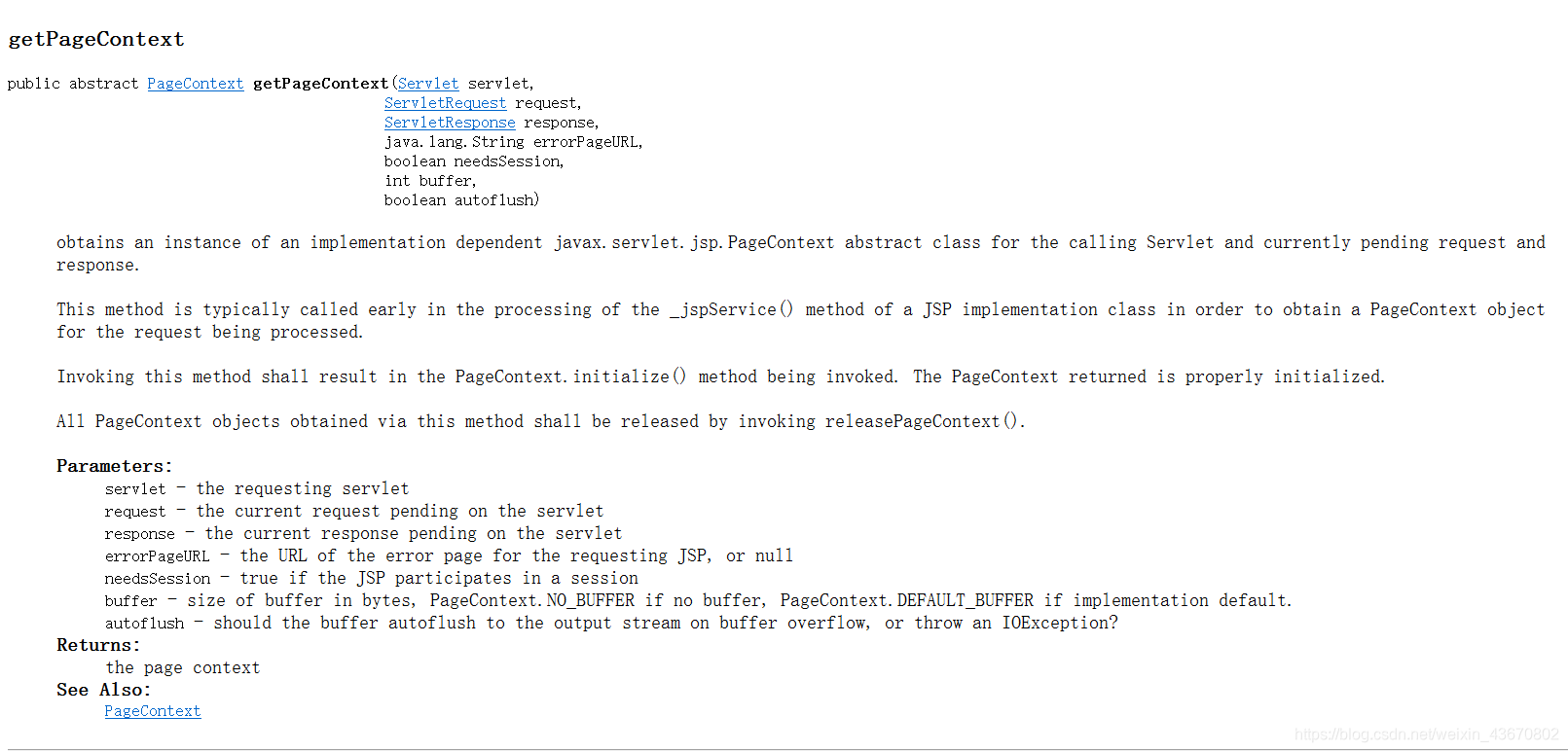
- Servlet中获取PageContext对象问题。
//获取PageContext对象

PageContext pageContext = JspFactory.getDefaultFactory().getPageContext(this, request, response, null, true, JspWriter.DEFAULT_BUFFER, true);
- 中文URL问题
我采用URLEncoder与URLDecoder二次编码解码解决。
思维导图

链接: https://pan.baidu.com/s/1TfsuqQ4lqmScZQ6be8aiTA 提取码: uxvh
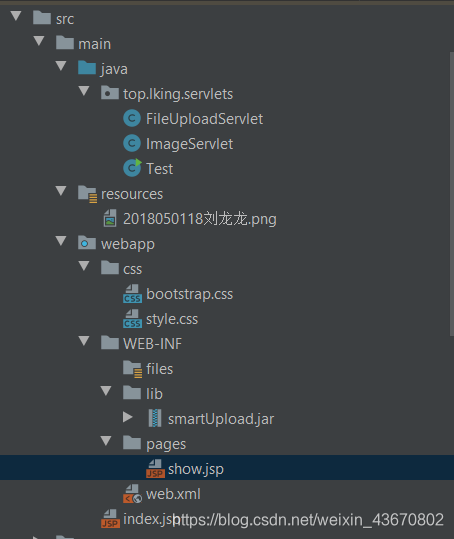
项目结构
前端
<%@ page import="java.util.UUID"  contentType="text/html;charset=gbk" pageEncoding="gbk" %><%--

  By: Jason.

  Date: 3/24/2020 6:17 PM

--%>

<%

    response.setHeader("Pragma","No-cache");

    response.setHeader("Cache-Control","no-cache");

    response.setDateHeader("Expires",-10);

%>

<!DOCTYPE html>

<html lang="en">

<head>

    <meta charset="GBK">

    <title>超级小白龙的自建云盘Beta版.</title>

    <!-- 引入 Bootstrap -->

    <link href="<%=request.getContextPath()+"/css/bootstrap.css"%>" rel="stylesheet">

    <link rel="stylesheet" type="text/css" href="<%=request.getContextPath()+"/css/style.css"%>">

</head>

<body>

<div class="page_box">

    <form action="<%=request.getContextPath()+"/upload.do"%>" method="post" enctype="multipart/form-data">

        <h1 class="form-control">哎呦!客官,您可来啦!</h1>

        <label for="id_file_1" class="btn btn-default">文件一</label>

<%--        <label for="id_file_2" class="btn btn-default">文件二</label>--%>

<%--        <label for="id_file_3" class="btn btn-default">文件三</label>--%>

        <input id="id_file_1"  style="display: none;" type="file" name="file_1"/>

<%--        <input id="id_file_2"  style="display: none;" type="file" name="file_2"/>--%>

<%--        <input id="id_file_3"  style="display: none;" type="file" name="file_3"/>--%>

        <input type="hidden" name="me" value="帅帅的我"/>

        <%-- 防止表单重复提交 --%>

        <input type="hidden" name="token" value="<%=UUID.randomUUID().toString()%>"/>

        <p><input class="btn btn-primary" style="margin-top: 10px" type="submit" value="上传"/></p>

    </form>

</div>

</body>

</html>
后端
package top.lking.servlets;

import com.jspsmart.upload.SmartUpload;

import com.jspsmart.upload.SmartUploadException;

import javax.servlet.ServletException;

import javax.servlet.annotation.WebServlet;

import javax.servlet.http.HttpServlet;

import javax.servlet.http.HttpServletRequest;

import javax.servlet.http.HttpServletResponse;

import javax.servlet.http.HttpSession;

import javax.servlet.jsp.JspFactory;

import javax.servlet.jsp.JspWriter;

import javax.servlet.jsp.PageContext;

import java.io.File;

import java.io.IOException;

import java.net.URLEncoder;

/**

 * @author Jason

 * @version 1.0

 * @date 3/24/2020 8:57 AM

 * @describe:

 */

@WebServlet("/upload.do")

public class FileUploadServlet extends HttpServlet {

    @Override

    protected void doGet(HttpServletRequest req, HttpServletResponse resp) throws ServletException, IOException {

        //super.doGet(req, resp);

        doPost(req,resp);

    }

    @Override

    protected void doPost(HttpServletRequest request, HttpServletResponse response) throws ServletException, IOException {

        //SmartUpload 仅支持GBK或GB2312编码

        request.setCharacterEncoding("gbk");

        //设置响应内容类型,告诉浏览器类型与编码

        response.setContentType("text/html;charset=utf-8");

        try {

        //新建SmartUpload实例

        SmartUpload smartUpload = new SmartUpload();

        //获取PageContext对象

        PageContext pageContext = JspFactory.getDefaultFactory().getPageContext(this, request, response, null, true, JspWriter.DEFAULT_BUFFER, true);

        //初始化该实例

        smartUpload.initialize(pageContext);

        //设置允许的上传类型----如果不符合规则,抛异常

        smartUpload.setAllowedFilesList("png,jpg,jpeg");

        //设置拒绝的上传类型----如果不符合规则,抛异常---(允许与拒绝的类型仅调用即可)

        //smartUpload.setDeniedFilesList("txt,doc,mp3,mp4");

        //设置单个文件上传的最大字节大小--1MB

        smartUpload.setMaxFileSize(1024*1024);

        //设置总文件最大字节大小(设置了单个最大大小,这个便无需调用)--3M

        smartUpload.setTotalMaxFileSize(1024*1024*3);

            //将表单数据加载上传至内存------------获取数据前必须先加载上传至内存

            smartUpload.upload();

        //表单重复提交处理

        //获取会话对象Session

        HttpSession session=request.getSession(true);

        String session_token=(String)session.getAttribute("token");

        String form_token=smartUpload.getRequest().getParameter("token");

        System.out.println(form_token);

        System.out.println(session_token);

        //如果表单令牌不为空且与session中的令牌匹配--即表单重复提交

        if((form_token!=null&&form_token.equals(session_token))||form_token==null){

            //转发至展示页面(注意:在客户端无法直接访问到的,所以服务器端转发)

            request.getRequestDispatcher("/WEB-INF/pages/show.jsp").forward(request,response);

        }else {

            System.out.println("我执行了!");

            //设置本次令牌

            session.setAttribute("token",form_token);

            //test

            //resp.getWriter().println("正在上传,请稍后···");

                //test

                //Thread.sleep(3000);

                //获取文件保存路径

                String filePathStr=this.getServletContext().getRealPath("/").replace("\\","/")+"/WEB-INF/files";

                //构造文件目录对象

                File filePath=new File(filePathStr);

                //判断是否存在

                if(!filePath.exists())

                    //创建一些列目录

                    filePath.mkdirs();

                //将上传文件加载上传至内存后直接保存入文件

                //smartUpload.uploadInFile();

                //获取上传文件集合

                com.jspsmart.upload.Files files=smartUpload.getFiles();

                //获取表单隐藏信息

                String hiddenLabel=smartUpload.getRequest().getParameter("me");

                //保存入Session

                session.setAttribute("files",files);

                session.setAttribute("hiddenLabel",hiddenLabel);

                //将文件从内存写入硬盘

                smartUpload.save(filePath.getAbsolutePath());

                //转发至展示页面(注意:在客户端无法直接访问到的,所以服务器端转发)

                request.getRequestDispatcher("/WEB-INF/pages/show.jsp").forward(request,response);

            }

        }catch (Exception e){

        e.printStackTrace();

        response.getWriter().println("请不要不按规则来!");

         }

    }

}
package top.lking.servlets;

import com.jspsmart.upload.SmartUpload;

import javax.servlet.ServletException;

import javax.servlet.ServletOutputStream;

import javax.servlet.annotation.WebServlet;

import javax.servlet.http.HttpServlet;

import javax.servlet.http.HttpServletRequest;

import javax.servlet.http.HttpServletResponse;

import javax.servlet.jsp.JspFactory;

import javax.servlet.jsp.JspWriter;

import java.io.BufferedOutputStream;

import java.io.FileInputStream;

import java.io.IOException;

import java.io.InputStream;

import java.io.OutputStream;

import java.net.URLDecoder;

import java.net.URLEncoder;

/**

 * @author Jason

 * @version 1.0

 * @date 3/24/2020 10:38 PM

 * @describe:

 */

@WebServlet("/image/translate.do")

public class ImageServlet extends HttpServlet {

    @Override

    protected void doGet(HttpServletRequest req, HttpServletResponse resp) throws ServletException, IOException {

        doPost(req,resp);

    }

    @Override

    protected void doPost(HttpServletRequest request, HttpServletResponse response) throws ServletException, IOException {

        //设置请求编码--仅针对Post请求

        //request.setCharacterEncoding("utf-8");

        //获取文件名--并通过前端二次编码,后端二次解码 解决中文名问题

        String downloadSign=request.getParameter("download");

        //采用两次编码并且两次解码

        //Tomcat在getParameter时已经自动解码一次,下面我手动解码

        String key=URLDecoder.decode(request.getParameter("key"),"utf-8");

        //测试

        System.out.println("我的名字:"+key);

        //---------------不使用插件下载-------------------

        if(downloadSign!=null){

            //设置响应头-附件

            response.setHeader("Content-Disposition","attachment;filename="+URLEncoder.encode(key,"utf-8"));

        }

        //设置响应信息MIME类型

        response.setContentType("image/png");

        //InputStream inputStream=this.getServletContext().getClassLoader().getResourceAsStream("/WEB-INF/files/2018050118刘龙龙.png");

        String path=request.getServletContext().getRealPath("/WEB-INF/files/"+key).replace("\\","/");

        //InputStream inputStream=Thread.currentThread().getContextClassLoader().getResourceAsStream(path);

        //test

        System.out.println(path);

        InputStream inputStream=new FileInputStream(path);

        byte[] bytes=new byte[1024];

        BufferedOutputStream bufferedOutputStream=new BufferedOutputStream(response.getOutputStream());

        int len=-1;

        while((len=inputStream.read(bytes))!=-1){

            bufferedOutputStream.write(bytes,0,len);

        }

        inputStream.close();

        //---------------不使用插件下载-------------------

        //----------------使用插件下载--------------------

//        try {

//            //实例对象

//            SmartUpload smartUpload = new SmartUpload();

//            //初始化

//            smartUpload.initialize(JspFactory.getDefaultFactory().getPageContext(this, request, response, null, false, JspWriter.DEFAULT_BUFFER, false));

//

//

//            //下载

//            //使用类加载器获取,不方便动态获取静态资源

//            //String tempPath=ImageServlet.class.getClassLoader().getResource(key).getPath();

//            //System.out.println(tempPath);

//            //smartUpload.downloadFile(URLDecoder.decode(tempPath,"gbk"));

//            String directoryPath=request.getServletContext().getRealPath("/WEB-INF/files/").replace("\\","/");

//            //转码一下

//            //String filePath=directoryPath+URLDecoder.decode(key,"gbk");

//            String filePath=directoryPath+key;

//            //测试

//            System.out.println(filePath);

//            //判断是否是下载

//            if(downloadSign!=null){

//                //附件下载

//                //设置响应头-附件

//                //response.setHeader("Content-Disposition","attachment;filename=image.png");

//

//                //smartUpload.setContentDisposition("attachment;filename="+key);

//                smartUpload.setContentDisposition(null);

//

//            }else{

//

//                //內镶

//                smartUpload.setContentDisposition("inline");

//            }

//            smartUpload.downloadFile(filePath,null,URLEncoder.encode(key,"utf-8"));

//        }catch (Exception e){

//            response.setContentType("text/html;charset=utf-8");

//

//

//            response.getWriter().println("好了,我崩了,你开心了?");

//

//        }

    }

}
数据显示
<%@ page import="com.jspsmart.upload.Files" %>

<%@ page import="java.util.Enumeration" %>

<%@ page import="com.jspsmart.upload.File" %>

<%@ page import="java.net.URLEncoder" %><%--

  By: Jason.

  Date: 3/24/2020 5:06 PM

--%>

<%@ page contentType="text/html;charset=utf-8" language="java" pageEncoding="UTF-8" %>

<%

    Files files=(Files)session.getAttribute("files");

    Enumeration<File> enumeration=files.getEnumeration();

%>

<html>

<head>

    <title>老子还真帅!</title>

    <!-- 引入 Bootstrap -->

    <link href="<%=request.getContextPath()+"/css/bootstrap.css"%>" rel="stylesheet">

    <link rel="stylesheet" type="text/css" href="<%=request.getContextPath()+"/css/style.css"%>">

</head>

<body>

        <h1>您上传的文件</h1>

        <%

            for (;enumeration.hasMoreElements();){

                File file=enumeration.nextElement();

                if (!file.isMissing()){

                %>

                <div class="show_box">

                        <%-- 二次编码,我的中文URL处理编码:utf-8  Tomcat默认解码编码:utf-8--%>

                <img src="<%=request.getContextPath()%>/image/translate.do?key=<%=URLEncoder.encode(URLEncoder.encode(file.getFileName(),"utf-8"),"utf-8")%>"/>

                            <%-- 二次编码,我的中文URL处理编码:utf-8  Tomcat默认解码编码:utf-8--%>

                <p><a href="<%=request.getContextPath()%>/image/translate.do?key=<%=URLEncoder.encode(URLEncoder.encode(file.getFileName(),"utf-8"),"utf-8")%>&download=1"><input type="button" class="btn btn-primary" value="下载"/></a><a href="<%=request.getContextPath()%>/"><input type="button" class="btn" value="返回"/></a></p>

                </div>

                <%

                        }else{

                            response.sendRedirect("/");

                        }

            }

        %>

</body>

</html>
注:小白笔记,如果存在错误之处请在评论区指出,谢谢各位。
JspSmartUpload 简略使用的更多相关文章
- JspSmartUpload 简略中文API文档
感谢原文作者:~数字人生~ 原文链接:https://www.cnblogs.com/mycodelife/archive/2009/04/26/1444132.html 一.JspSmartUplo ...
- dede 简略标题调用标签
一.简略标题调用标签: 1.{dede:field.shorttitle/} 不可以在{dede:arclist}标签中套用,一般放在网页titile处; 2.[field:shorttitle/] ...
- Win7+Docker(boo2docker)搭建php开发环境简略
之所以称谓简略 是不准备配图的意思 嘿嘿! 步骤1: 到docker官网下载Docker Toolbox,并完全安装 步骤2: 安装完成后,运行在桌面新生成的快捷方式:Docker Quickstar ...
- 对InvokeAction简略分析了解验证失败为什么Action还会继续执行
一.前言 有些同学使用AuthorizationFilter来进行用户是否登录验证,如果未登录就跳到登录页. 很简单的一个场景,但是有些同学会发现虽然验证失败了,但是整个Action还会执行一遍. 于 ...
- 十个Flex/Air疑难杂症及解决方案简略
十个Flex/Air疑难杂症及解决方案简略 转自http://blog.sban.us/40.html 最近去一家台企,对方给我出了十道“难道”:在TileList中如果選擇檔過多,會出現捲軸,當拖動 ...
- MyEclipse------如何添加jspsmartupload.jar+文件上传到服务器
下载地址:http://download.csdn.net/detail/heidan2006/182263 如何添加jspsmartupload.jar:右键“Web”工程->properti ...
- 织梦dedecms简略标题调用标签用法指南
我们在使用织梦DEDECMS建站过程中,为了使调用的文章标题简短且相对完整(原文标题太长),只好使用了调用简略标题这个方法,使标题显示为简短标题,指向标题时显示完整的标题.并获得文章静态地址链接 下面 ...
- HammerDB数据库压力工具使用简略步骤
欢迎转载,转载请标明出处:http://blog.csdn.net/notbaron/article/details/38879681 HammerDB数据库压力工具使用简略步骤 尽管没有图,可是文字 ...
- Intel CPU命名规则的简略解析
Intel的CPU命名规则一直不是特别清楚,而网上的很多解读是不准确,甚至是错误的,应该以官方文档为准.所以我在查阅官方资料的基础上,以一种简明扼要的方式记录下来.值得说明的是,这个解析只是简略的,一 ...
随机推荐
- Python Revisited Day10 (进程与线程)
目录 10.1 使用多进程模块 10.2 将工作分布到多个线程 <Python 3 程序开发指南>学习笔记 有俩种方法可以对工作载荷进行分布,一种是使用多进程,另一种是使用多线程. 10. ...
- python pip 第三方包高速下载--换源
更换pip镜像源 使用前注意HTTP(S) !!!!!!!!!! 官方镜像源 https://pypi.python.org/simple/ https://pypi.tuna.tsinghua.ed ...
- Net 实现自定义Aop
引言 何为AOP,在软件开发中,总是听到这个AOP这个词语,但是何为AOP呢,AOP全称是Aspect Oriented Programming,中文译为面向切面编程,什么意思呢,即我们的应用程序在运 ...
- MySQL约束和数据类型
约束条件 约束条件就是在给字段加一些约束,使该字段存储的值更加符合我们的预期. 常用约束条件如下: UNSIGNED :无符号,值从0开始,无负数 ZEROFILL:零填充,当数据的显示长度不够的时候 ...
- react组件性能优化PureComponent
首先我们使用react组件会配合connect来连接store获取state,那么只要store中的state发生改变组件就会重新渲染,所以性能不高,一般我们可以使用shouldComponentUp ...
- MASA Framework - 整体设计思路
源起 年初我们在找一款框架,希望它有如下几个特点: 学习成本低 只需要学.Net每年主推的技术栈和业务特性必须支持的中间件,给开发同学减负,只需要专注业务就好 个人见解:一款好用的框架应该是补充,而不 ...
- Linux环境下的Docker的安装和部署、学习-一
CentOS Docker 安装Docker支持以下的CentOS版本:CentOS 7 (64-bit)CentOS 6.5 (64-bit) 或更高的版本 前提条件目前,CentOS 仅发行版本中 ...
- Nginx 反向代理解决跨域问题分析
当你遇到跨域问题,不要立刻就选择复制去尝试.请详细看完这篇文章再处理 .我相信它能帮到你. 分析前准备: 前端网站地址:http://localhost:8080 服务端网址:http://local ...
- 阐述JDBC操作数据库的步骤
1. 加载驱动. Class.forName("oracle.jdbc.driver.OracleDriver"); (注意:加载驱动在JDBC 4.0中是可以省略的,自动从类路径 ...
- go面试题-基础类
go基础类 1. go优势 * 天生支持并发,性能高 * 单一的标准代码格式,比其它语言更具可读性 * 自动垃圾收集比java和python更有效,因为它与程序同时执行 go数据类型 int stri ...