
Spring Cloud分区发布实践(2) 微服务
我们准备一下用于查询姓名的微服务.
首先定义一下服务的接口, 新建一个空的Maven模块hello-remotename-core, 里面新建一个类:
public interface RemoteNameService {

    String readName(int id) ;

}
接下来的微服务都实现这个简单的接口作为示范.
然后创建一个服务模块hello-remotename, 依然使用 Spring Initializr, 选择 "Spring Web", "Eureka Discovery Client" 2个模块.
其中的pom文件如下:
<?xml version="1.0" encoding="UTF-8"?>

<project xmlns="http://maven.apache.org/POM/4.0.0" xmlns:xsi="http://www.w3.org/2001/XMLSchema-instance"

         xsi:schemaLocation="http://maven.apache.org/POM/4.0.0 https://maven.apache.org/xsd/maven-4.0.0.xsd">

    <modelVersion>4.0.0</modelVersion>

    <parent>

        <groupId>com.cnscud.betazone</groupId>

        <artifactId>betazone-root</artifactId>

        <version>0.0.1-SNAPSHOT</version>

        <relativePath/> <!-- lookup parent from repository -->

    </parent>

    <artifactId>hello-remotename</artifactId>

    <version>0.0.1-SNAPSHOT</version>

    <name>hello-remotename</name>

    <description>Demo project for Spring Boot</description>

    <dependencies>

        <dependency>

            <groupId>com.cnscud.betazone</groupId>

            <artifactId>hello-remotename-core</artifactId>

            <version>0.0.1-SNAPSHOT</version>

        </dependency>

        <dependency>

            <groupId>org.springframework.boot</groupId>

            <artifactId>spring-boot-starter-web</artifactId>

        </dependency>

        <dependency>

            <groupId>org.springframework.cloud</groupId>

            <artifactId>spring-cloud-starter-netflix-eureka-client</artifactId>

        </dependency>

    </dependencies>

</project>
此模块依赖接口模块, 用于实现接口. 然后我们实现一个服务的Controller, 如下:
package com.cnscud.betazone.helloremotename.controller;

import com.cnscud.betazone.helloremotename.core.service.RemoteNameService;

import org.slf4j.Logger;

import org.slf4j.LoggerFactory;

import org.springframework.beans.factory.annotation.Autowired;

import org.springframework.core.env.Environment;

import org.springframework.stereotype.Controller;

import org.springframework.web.bind.annotation.PathVariable;

import org.springframework.web.bind.annotation.RequestMapping;

import org.springframework.web.bind.annotation.RestController;

import java.net.Inet4Address;

import java.net.InetAddress;

import java.net.UnknownHostException;

import java.util.HashMap;

import java.util.Map;

@RestController

@RequestMapping("remote")

public class RemoteNameServiceController implements RemoteNameService {

    private static Logger logger = LoggerFactory.getLogger(RemoteNameServiceController.class);

    @Autowired

    Environment environment;

    final static String defaultName = "guest";

    static Map<Integer, String> names = new HashMap<>();

    static {

        names.put(1, "Felix");

        names.put(2, "World");

        names.put(3, "Sea");

        names.put(4, "Sky");

        names.put(5, "Mountain");

    }

    @Override

    @RequestMapping("/id/{id}")

    public String readName(@PathVariable("id") int id) {

        if( names.get(id) == null ) {

            return defaultName + getServerName();

        }

        else

        {

            return names.get(id) + getServerName();

        }

    }

    public String readServicePort() {

        return environment.getProperty("local.server.port");

    }

    public String readServiceIp() {

        InetAddress localHost = null;

        try {

            localHost = Inet4Address.getLocalHost();

        }

        catch (UnknownHostException e) {

            logger.error(e.getMessage(), e);

        }

        return localHost.getHostAddress();  // 返回格式为:xxx.xxx.xxx

    }

    public String getServerName() {

        return " [remotename: " + readServiceIp() + ":" + readServicePort() + "]";

    }

}
RemoteNameServiceController实现了RemoteNameService 接口, 为了后续方便区分是哪个实例在服务, 返回的信息里增加了IP和端口信息.
然后声明application.yml, 在9001端口启动
server:

  port: 9001

spring:

  application:

    name: betazone-hello-remotename

eureka:

  instance:

    prefer-ip-address: true

    metadata-map:

      zone: main #服务区域

  client:

    register-with-eureka: true

    fetch-registry: true

    service-url:

      defaultZone: http://localhost:8001/eureka/

logging:

  level:

    org.springframework.cloud: debug
可以看到, 此实例端口为9001, 服务区域zone设置为 main.
然后在复制一个为 application-beta.yml, 修改如下
server:

  port: 9002

spring:

  application:

    name: betazone-hello-remotename

eureka:

  instance:

    prefer-ip-address: true

    metadata-map:

      zone: beta #服务区域

  client:

    register-with-eureka: true

    fetch-registry: true

    service-url:

      defaultZone: http://localhost:8001/eureka/

logging:

  level:

    org.springframework.cloud: debug
此实例设置端口为9002, 服务区域为 beta.
启动第一个Application, 然后复制配置, 修改profile为beta , 启动第二个实例.
此时去Eureka查看, 可以看到betazone-hello-remotename有2个服务, 使用xml查看 http://localhost:8001/eureka/apps , 可以看到不同的metadata.
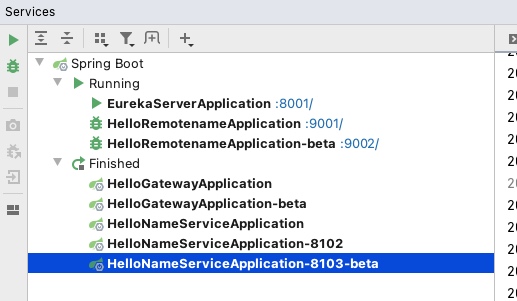
点击访问 http://localhost:9001/remote/id/2 或 http://localhost:9002/remote/id/2 则可以看到我们刚刚运行的服务.
项目代码: https://github.com/cnscud/javaroom/tree/main/betazone2/hello-remotename
接下来我们看看使用gateway代理服务的效果...
Spring Cloud分区发布实践(2) 微服务的更多相关文章
- Spring Cloud分区发布实践(6)--灰度服务-根据Header选择实例区域
此文是一个完整的例子, 包含可运行起来的源码. 此例子包含以下部分: 网关层实现自定义LoadBalancer, 根据Header选取实例 服务中的Feign使用拦截器, 读取Header Feign ...
- Spring Cloud分区发布实践(1) 环境准备
最近研究了一下Spring Cloud里面的灰度发布, 看到各种各样的使用方式, 真是纷繁复杂, 眼花缭乱, 不同的场景需要不同的解决思路. 那我们也来实践一下最简单的场景: 区域划分: 服务分为be ...
- Spring Cloud分区发布实践(4) FeignClient
上面看到直接通过网关访问微服务是可以实现按区域调用的, 那么微服务之间调用是否也能按区域划分哪? 下面我们使用FeignClient来调用微服务, 就可以配合LoadBalancer实现按区域调用. ...
- Spring Cloud分区发布实践(3) 网关和负载均衡
注意: 因为涉及到配置测试切换, 中间环节需按此文章操作体验, 代码仓库里面的只有最后一步的代码 准备好了微服务, 那我们就来看看网关+负载均衡如何一起工作 新建一个模块hello-gateway, ...
- Spring Cloud分区发布实践(5)--定制ServiceInstanceListSupplier
现在我们简单地来定制二个 ServiceInstanceListSupplier, 都是zone-preference的变种. 为了方便, 我重新调整了一下项目的结构, 把一些公用的类移动到hello ...
- 基于Spring Cloud和Netflix OSS构建微服务,Part 2
在上一篇文章中,我们已使用Spring Cloud和Netflix OSS中的核心组件,如Eureka.Ribbon和Zuul,部分实现了操作模型(operations model),允许单独部署的微 ...
- 今天介绍一下自己的开源项目,一款以spring cloud alibaba为核心的微服务架构项目,为给企业与个人提供一个零开发基础的微服务架构。
LaoCat-Spring-Cloud-Scaffold 一款以spring cloud alibab 为核心的微服务框架,主要目标为了提升自己的相关技术,也为了给企业与个人提供一个零开发基础的微服务 ...
- spring cloud 入门,看一个微服务框架的「五脏六腑」
Spring Cloud 是一个基于 Spring Boot 实现的微服务框架,它包含了实现微服务架构所需的各种组件. 注:Spring Boot 简单理解就是简化 Spring 项目的搭建.配置.组 ...
- 使用 Spring Cloud Stream 构建消息驱动微服务
相关源码: spring cloud demo 微服务的目的: 松耦合 事件驱动的优势:高度解耦 Spring Cloud Stream 的几个概念 Spring Cloud Stream is a ...
随机推荐
- Java字符串比较(3种方法)以及对比 C++ 时的注意项
字符串比较是常见的操作,包括比较相等.比较大小.比较前缀和后缀串等.在 Java 中,比较字符串的常用方法有 3 个:equals() 方法.equalsIgnoreCase() 方法. compar ...
- Typescript学习总结
typescript(以下简称TS)出来也有好长时间了,下面记录一下学习心得. 首先学这门语言前,请确保有以下基础知识: 扎实的javascript基础知识 es6的基础知识 面向对象编程的概念(没有 ...
- 第11章 PADS功能使用技巧(1)-最全面
一.如何走蛇形线? 蛇形线是布线过程中常用的一种走线方式,其主要目的是为了调节延时满足系统时序设计要求,但是设计者应该有这样的认识:蛇形线会破坏信号质量,改变传输延时,布线时要尽量避免使用,因此一块P ...
- Redis热点key优化
热门新闻事件或商品通常会给系统带来巨大的流量,对存储这类信息的Redis来说却是一个巨大的挑战.以Redis Cluster为例,它会造成整体流量的不均知,个别节点出现OPS过大的情况,极端情况下热点 ...
- Blazor Server 和 WebAssembly 应用程序入门指南
翻译自 Waqas Anwar 2021年3月12日的文章 <A Beginner's Guide To Blazor Server and WebAssembly Applications&g ...
- 移动端touch、click、tap的区别
一.click 与tap比较 click与tap都会出发点击事件,但是在手机web端,click会有200-300ms延迟,所以一般用tap(轻击)代替click作为点击事件.singleTap 和 ...
- 基于Redis的分布式锁设计
前言 基于Redis的分布式锁实现,原理很简单嘛:检测一下Key是否存在,不存在则Set Key,加锁成功,存在则加锁失败.对吗?这么简单吗? 如果你真这么想,那么你真的需要好好听我讲一下了.接下来, ...
- [心得笔记]spring常用的三种依赖注入方式
一.目前使用最广泛的 @Autowired:自动装配 基于@Autowired的自动装配,默认是根据类型注入,可以用于构造器.接口.方法注入,使用方式如下: @Autowired 构造方法.方法.接口 ...
- Linux date 获取时间
获取当前日期: ubuser@ubuser-OptiPlex-7010:~$ date +%Y_%m_%d2020_12_16 获取当前时间: ubuser@ubuser-OptiPlex-7010: ...
- 《PHP设计模式大全》系列分享专栏
<PHP设计模式大全>已整理成PDF文档,点击可直接下载至本地查阅https://www.webfalse.com/read/201739.html 文章 php设计模式介绍之编程惯用法第 ...