
JavaIO——内存操作流、打印流
我们之前所做的都是对文件进行IO处理,实则我们也可以对内存进行IO处理。我们将发生在内存中的IO处理称为内存流。
内存操作流也可分为两类:字节内存流和字符内存流。
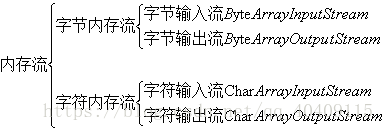
(1)ByteArrayInputStream 和 ByteArrayOutputStream
构造函数:
public class ByteArrayOutputStream extends OutputStream
public class ByteArrayInputStream extends InputStream
(2)CharArrayInputStream 和 CharArrayOutputStream
构造函数:
public class CharArrayWriter extends Writer
public class CharArrayReader extends Reader
由此我们可以得出内存流的继承关系:
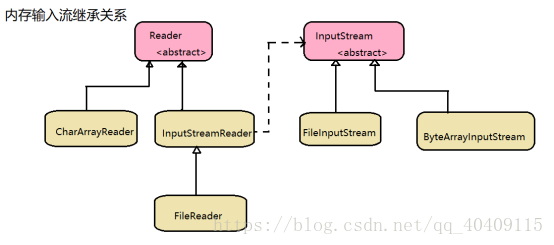
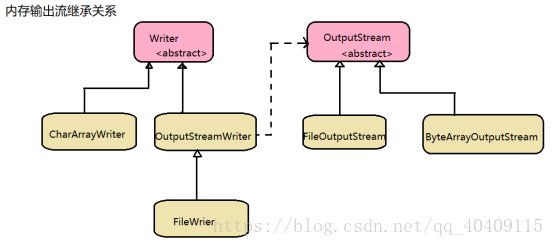
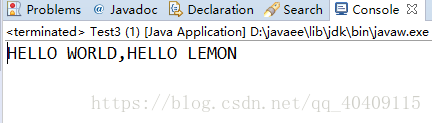
利用内存流实现大小写转换:
-
package myIO;
-
-
import java.io.ByteArrayInputStream;
-
import java.io.ByteArrayOutputStream;
-
import java.io.IOException;
-
import java.io.InputStream;
-
import java.io.OutputStream;
-
-
/*通过内存流实现大小写转换
-
* */
-
public class Test3 {
-
public static void main(String[] args) throws IOException {
-
String string = "hello world,hello lemon";
-
//实例化InputStream对象,进行实例化时应将需要操作的数据保存在内存中,读取的将是设置的内容
-
InputStream inputStream = new ByteArrayInputStream(string.getBytes());
-
//实例化OutputStream对象
-
OutputStream outputStream = new ByteArrayOutputStream();
-
int temp= 0;
-
//判断是否读完
-
while((temp = inputStream.read())!=-1) {
-
//对每个字节进行处理,处理之后存在于OutputStream类中
-
//进行大小写转换
-
outputStream.write(Character.toUpperCase(temp));
-
}
-
//直接对outputStream对象进行输出
-
System.out.println(outputStream);
-
//关闭流
-
inputStream.close();
-
outputStream.close();
-
-
}
-
}
(2)内存流的操作
内存流有个很小的功能就是实现两个文件的合并操作(对很小的文件而言)。
内存流最核心的就是:将所有OutputStream输出的程序保存在了程序中,所以可以利用这一特征来进行处理。
-
/*
-
* 实现两个文件的合并处理
-
* */
-
public class Test3{
-
public static void main(String[] args) throws IOException {
-
String singal = File.separator;
-
//指明要合并两个文件的地址
-
File[] files = new File[] {
-
-
new File("C:"+singal+"Users"+singal+"lenovo"+singal+"Desktop"+singal+"Test1.txt")
-
,new File("C:"+singal+"Users"+singal+"lenovo"+singal+"Desktop"+singal+"Test2.txt")};
-
String[] data = new String[2];
-
for(int i = 0 ;i <files.length;i++) {
-
data[i] = readFile(files[i]);
-
}
-
StringBuffer stringBuffer = new StringBuffer();
-
String contentA [] = data[0].split(" ") ;
-
String contentB [] = data[1].split(" ") ;
-
for (int i = 0; i < contentA.length ; i++) {
-
stringBuffer.append(contentA[i]).append("(").append(contentB[i]).append(")").append(" ") ;
-
}
-
System.out.println(stringBuffer);
-
}
-
//读取文件内容,使用File对象因为其包含完整的路径信息
-
public static String readFile(File file) throws IOException {
-
if(file.exists()) {
-
InputStream inputStream = new FileInputStream(file);
-
//没有向上转型,因为后续要使用toByteArray()方法
-
ByteArrayOutputStream byteArrayOutputStream = new ByteArrayOutputStream();
-
int temp = 0;
-
byte[] data = new byte[10];
-
while((temp = inputStream.read(data))!=-1) {
-
//将数据保存在byteArrayOutputStream
-
byteArrayOutputStream.write(data,0,temp);
-
}
-
byteArrayOutputStream.close();
-
inputStream.close();
-
return new String(byteArrayOutputStream.toByteArray());
-
}
-
return null;
-
}
-
}
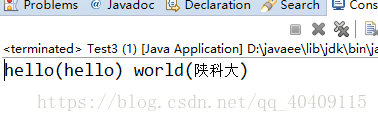
2、打印流
打印流的本质是解决OutputStream的缺陷,因为若想将非二进制的数据通过程序向终端目标直接输出信息的话,OutputStream有如下缺陷:所有的数据都要转换成字节数组,若要输出int、double更是不方便。
(1)进行简单打印流的设计
-
/*
-
* 设计简单打印流
-
* */
-
class PrintDesign{
-
private OutputStream outputStream;
-
//构造函数
-
//有外部传入要输出的目的终端
-
public PrintDesign(OutputStream outputStream) {
-
super();
-
this.outputStream = outputStream;
-
}
-
//实现输出的功能(传入参数为字符串)
-
public void print(String string) throws IOException {
-
this.outputStream.write(string.getBytes());
-
}
-
//实现换行功能
-
public void println(String string) throws IOException {
-
this.print(string+"\r\n");
-
}
-
//传入参数为int
-
public void print(int data) throws IOException {
-
this.print(String.valueOf(data));
-
}
-
public void println(int data) throws IOException {
-
this.print(String.valueOf(data)+"\r\n");
-
}
-
}
-
public class Test3{
-
public static void main(String[] args) throws IOException {
-
String singal = File.separator;
-
PrintDesign printDesign = new PrintDesign(new FileOutputStream(
-
new File("C:"+singal+"Users"+singal+"lenovo"+singal+"Desktop"+singal+"Test1.txt")));
-
printDesign.println("姓名:");
-
printDesign.print("lemon");
-
printDesign.println("年龄:");
-
printDesign.print(20);
-
}
-
}
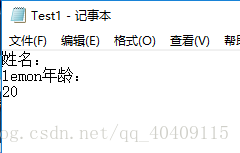
我们可以发现经过简单的处理使得OutputStream的功能变得更加强大了,其实我们所做的工作只不过是对OutputStream做了一个封装而已。实则java中提供有专门的打印流处理类:字节打印流rintStream、字符打印流PrintWriter.
(2)认识打印流处理类
字节打印流:public class PrintStream extends FilterOutputStream
构造函数:public PrintStream(OutputStream out)
字符打印流:public class PrintWriter extends Writer
构造函数:public PrintWriter(OutputStream out)
public PrintWriter (Writer out)
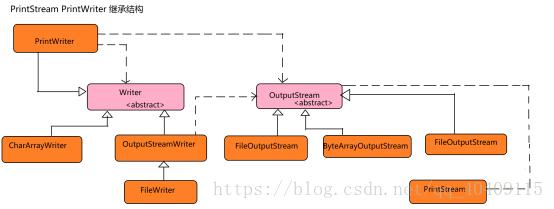
打印流的设计模式属于装饰者设计模式:核心是某个类的功能,但是为了得到更好的操作效果,让其支持的功能更多一些。
(3)打印流的使用
在后续的应用中字符打印流(PrintWriter)引用比较对,因为它可以接收Writer和OutputStream两种类型的参数;而字节打印流(PrintStream)只可接收OutputStream类型的参数。
-
/*
-
* 字符打印流的使用
-
* */
-
public class Test3{
-
public static void main(String[] args) throws FileNotFoundException {
-
String singal = File.separator;
-
PrintWriter printWriter = new PrintWriter(
-
new File("C:"+singal+"Users"+singal+"lenovo"+singal+"Desktop"+singal+"Test1.txt"));
-
printWriter.print("班级:");
-
printWriter.println("数学152");
-
printWriter.println("年龄:");
-
printWriter.println(20);
-
printWriter.close();
-
-
}
-
}
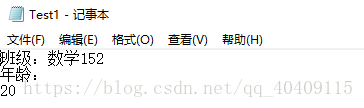
(4)格式化输出
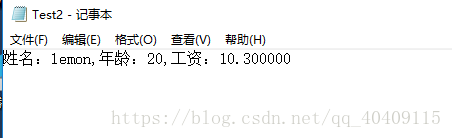
我们在C语言遇到一个printf()函数,这个函数在输出的时候可以使用一些占位符,例如:字符串(%s)、数字(%d)、小数 (%f)、字符(%c)等。从JDK1.5开始,PrintStream类中也追加了此种操作。
格式化输出:public PrintStream printf(String format, Object ... args)
-
/*
-
* 格式化输出
-
* */
-
public class Test3{
-
public static void main(String[] args) throws FileNotFoundException {
-
String name = "lemon";
-
int age = 20;
-
double salary = 10.3;
-
String singal = File.separator;
-
PrintStream printStream = new PrintStream(new FileOutputStream(
-
new File("C:"+singal+"Users"+singal+"lenovo"+singal+"Desktop"+singal+"Test2.txt")));
-
printStream.printf("姓名:%s,年龄:%d,工资:%f",name,age,salary);
-
printStream.close();
-
}
-
}
JavaIO——内存操作流、打印流的更多相关文章
- IO流的Properties集合,序列化流与反序列化流,打印流及commons-IO
内容介绍 Properties集合 序列化流与反序列化流 打印流 commons-IO Properties类 Properties类介绍 Properties 类表示了一个持久的属性集.Proper ...
- Java API —— IO流(数据操作流 & 内存操作流 & 打印流 & 标准输入输出流 & 随机访问流 & 合并流 & 序列化流 & Properties & NIO)
1.操作基本数据类型的流 1) 操作基本数据类型 · DataInputStream:数据输入流允许应用程序以与机器无关方式从底层输入流中读取基本 Java 数据类型.应用程序可以使用数据输出 ...
- 6.5(java学习笔记)其他流(字节数组流,数据流,对象流,打印流)
一.字节数组流 之前使用输入输出流的操作的对象是文件,而这里字节数组流操作的对象是内存,内存可以看做是一个字节数组. 使用字节数组流读写就可以看做是从内存A到内存B的读写,对象时内存即字节数组. 1. ...
- java 转换流 打印流 数据流
转换流 InputStreamReader 和 OutputStreamWriter处理流用于将字节流转化成字符流,字符流与字节流之间的桥梁InputStreamReader 的作用是把 InputS ...
- Properties-转换流-打印流-序列化和反序列化-Commons-IO工具类
一.Properties 类(java.util) 概述:Properties 是一个双列集合;Properties 属于map的特殊的孙子类;Properties 类没有泛型,propert ...
- JAVA笔记12__字节、字符缓冲流/打印流/对象流/
/** * !!:以后写流的时候一定要加入缓冲!! * 对文件或其它目标频繁的读写操作,效率低,性能差. * 缓冲流:好处是能更高效地读写信息,原理是将数据先缓冲起来,然后一起写入或读取出来. * * ...
- python3 subprocess 内存操作视频转换流格式
import subprocessout = open('./tmp/sss.mp4','rb').read()p = subprocess.Popen(["./ffmpeg",& ...
- 021.10 IO流 打印流
内容:PrintStream:字节流 PrintWriter:字符流 PrintStream public static void main(String[] args) throws IOEx ...
- 34 io流-- 打印流和对象流
概述 io流分为字符流和字节流,具体分类相见下图 字符流:char 一些基本文本的数据传输 字节流:byte 图片.视频等用文本查看器查看不了的文件都是二进制文件,只能用字节流传输,使用字符流cp的看 ...
随机推荐
- TDengine在浙商银行微服务监控中的实践
作者:楼永红 王轩宇|浙商银行 浙商银行股份有限公司(简称"浙商银行")是 12 家全国性股份制商业银行之一,总部设在浙江杭州,全国第13家"A+H"上市 ...
- 原生css实现fullPage的整屏滚动贴合
目录 1,前言 2,效果展示 3,属性说明 3.1 scroll-snap-type 3.2,scroll-snap-align 4,实际使用 4.1,兼容性 1,前言 今天摸鱼的时候,发现一个很有意 ...
- {% csrf_token %} 原理和作用 (踩坑必看)
本博客已暂停更新,请转自新博客 https://www.whbwiki.com/320.html 继续阅读 简介 在django中我们需要在templates的form中加入{%csrf_token% ...
- uni-app map组件关于marker标记点动态设置的问题
marker是Array类型,赋值的时候只能对整个数组进行更改赋值,不能只改变内部的对象,亲测Vue.$set()也不行 this.marker = [ { latitude: 39.90, long ...
- git push超过100M文件处理方法
git push超过100M文件处理方法 github 会在你上传文件大于50M的时候,给予警告 ; 大于100M的时候给出 server reject(拒绝上传) 解决方法 保持单个文件在 100 ...
- css 按钮悬停效霓虹灯特效
css 按钮悬停效霓虹灯特效 <!DOCTYPE html> <html lang="en"> <head> <meta charset=
- easyui comboBox的多选框之疑难杂症——逗号篇
提笔写正文之前,首先要再次提醒一下自己,因为总是记不住,以至大神同事们都开始用"嫌弃"的眼光看自己了-- 记得使用easyui中的combobox吗?效果是酱紫滴: ...
- MySQl安装图形界面
对于mysql的图形界面有很多个:1.MySQL GUI Tools MySQL GUI Tools是一个可视化界面的MySQL数据库管理控制台,提供了四个非常好用的图形化应用程序,方便数据库管理和数 ...
- Ubuntu文件系统结构
/bin: bin是Binary的缩写.存放系统中最常用的可执行文件(二进制). /boot: 这里存放的是linux内核和系统启动文件,包括Grub.lilo启动器程序. /dev: dev是Dev ...
- 发布项目到maven中央仓库
https://www.xiaominfo.com/2017/04/25/swagger-bootstrap-ui-issue-maven-central/?tdsourcetag=s_pcqq_ai ...