
MyBatis - 1.入门
- MyBatis 是支持定制化 SQL、存储过程以及高级映射的优秀的持久层框架。
- MyBatis 避免了几乎所有的 JDBC 代码和手动设置参数以及获取结果集。
- MyBatis可以使用简单的XML或注解用于配置和原始映射,将接口和Java的POJO(Plain Old Java Objects,普通的Java对象)映射成数据库中的记录.
为什么要使用MyBatis?
- MyBatis是一个半自动化的持久化层框架。
- JDBC
- SQL夹在Java代码块里,耦合度高导致硬编码内伤
- 维护不易且实际开发需求中sql是有变化,频繁修改的情况多见
- Hibernate和JPA
- 长难复杂SQL,对于Hibernate而言处理也不容易
- 内部自动生产的SQL,不容易做特殊优化。
- 基于全映射的全自动框架,大量字段的POJO进行部分映射时比较困难。导致数据库性能下降。
- 对开发人员而言,核心sql还是需要自己优化
- sql和java编码分开,功能边界清晰,一个专注业务、一个专注数据。
去哪里找MyBatis?
• MyBatis下载地址:https://github.com/mybatis/mybatis-3
1.入门
1.1.创建SQL
USE `db_mybatis`;

CREATE TABLE `tbl_employee` (

  `id` int(11) NOT NULL AUTO_INCREMENT,

  `last_name` varchar(255) DEFAULT NULL,

  `gender` char(1) DEFAULT NULL,

  `email` varchar(255) DEFAULT NULL,

  PRIMARY KEY (`id`)

) ENGINE=InnoDB AUTO_INCREMENT=2 DEFAULT CHARSET=utf8;

/*Data for the table `tbl_employee` */

insert  into `tbl_employee`(`id`,`last_name`,`gender`,`email`) values

(1,'tom','0','tom@guigu.com');
1.2.导入jar包和创建使用类
mybatis-3.2.8.jar
mysql-connector-java-8.0.12.jar
log4j-1.2.17.jar(可不用)
package com.tangge.model;

public class employee {

    private int id;

    private String lastName;

    private String email;

    private char gender;

    public int getId() {

        return id;

    }

    public String getLastName() {

        return lastName;

    }

    public String getEmail() {

        return email;

    }

    public char getGender() {

        return gender;

    }

    public void setLastName(String lastName) {

        this.lastName = lastName;

    }

    public void setEmail(String email) {

        this.email = email;

    }

    public void setGender(char gender) {

        this.gender = gender;

    }

    @Override

    public String toString() {

        return "employee{" +

                "id=" + id +

                ", lastName='" + lastName + '\'' +

                ", email='" + email + '\'' +

                ", gender=" + gender +

                '}';

    }

}
1.3.配置文件
1.3.1 全局配置
(1)扩展 db.properties
drivername=com.mysql.cj.jdbc.Driver

url = jdbc:mysql://localhost:3306/db_mybatis?serverTimezone = GMT

user = root

pass = 123
(2)mybatis-config.xml
<?xml version="1.0" encoding="UTF-8"?>

<!DOCTYPE configuration PUBLIC "-//mybatis.org//DTD Config 3.0//EN"

  "http://mybatis.org/dtd/mybatis-3-config.dtd">

<configuration>

  <properties resource="db.properties"/>

  <environments default="development">

    <environment id="development">

      <transactionManager type="JDBC"></transactionManager>

      <dataSource type="POOLED">

        <property name="driver" value="${drivername}"/>

        <property name="url" value="${url}"/>

        <property name="username" value="${user}"/>

        <property name="password" value="${pass}"/>

      </dataSource>

    </environment>

  </environments>

  <!--SQL映射文件(EmplyoeeMapper.xml)注册到全局配置文件(mybatis-config.xml)中-->

  <mappers>

    <mapper resource="EmplyoeeMapper.xml"/>

  </mappers>

</configuration>
1.3.2 SQL映射配置
EmplyoeeMapper.xml
<?xml version="1.0" encoding="UTF-8" ?>

<!DOCTYPE mapper

  PUBLIC "-//mybatis.org//DTD Mapper 3.0//EN"

  "http://mybatis.org/dtd/mybatis-3-mapper.dtd">

<!--

namespace:命名空间

-->

<mapper namespace="com.tangge.employeeMapper">

  <!--

    id:唯一标识

    resultType:返回值类型

    #{id}:从传递过来的参数取出id值

  -->

  <select id="selectEmployee" resultType="com.tangge.model.employee">

    select `id`,  `last_name`  lastName,  `gender`,  `email` from tbl_employee where id = #{id}

  </select>

</mapper>
1.4.测试
限写一个util
/**

 * 1.根据XML创建一个 SqlSessionFactory

 **/

public class SqlSessionFactoryUtil {

    private static SqlSessionFactory sqlSessionFactory;

    public static SqlSessionFactory getSqlSessionFactory() {

        if (sqlSessionFactory == null) {

            InputStream inputStream = null;

            try {

                inputStream = Resources.getResourceAsStream("mybatis-config.xml");

                sqlSessionFactory = new SqlSessionFactoryBuilder().build(inputStream);

            } catch (IOException e) {

                e.printStackTrace();

            }

        }

        return sqlSessionFactory;

    }

}
测试
public class test {

    public static void main(String[] args) {

        test();

    }

    /**

     * 1.根据XML配置文件创建一个 SqlSessionFactory

     *  数据源一些环境信息

     * 2.SQL 映射文件;配置每一个SQL,以及SQL封装规则等。

     * 3.将SQL映射文件注册在全局配置文件中。

     * 4.写代码:

     *      1.根据全局配置文件得到 SqlSessionFactory

     *      2.使用SqlSession工厂,获取SqlSession对象使用它执行增删改查

     *      一个SqlSession就是代表和数据库的一次会话,用完关闭

     *      3.使用SQL 唯一标识告诉MyBatis执行那个SQL。sql保存在映射文件。

     */

    public static void test() {

        SqlSessionFactory sqlSessionFactory = SqlSessionFactoryUtil.getSqlSessionFactory();

        //获取 SqlSession,能直接执行已经映射的SQL语句

        SqlSession session = sqlSessionFactory.openSession();

        try {

            /**

             * selectOne(String statement, Object parameter);

             * @param statement 与要使用的语句匹配的唯一标识符。

             * @param parameter 要传递给语句的参数对象。

             */

            employee employee = session.selectOne("com.tangge.employeeMapper.selectEmployee",1);

            System.out.println(employee);

			//employee{id=1, lastName='tom', email='tom@guigu.com', gender=0}

        } finally {

            session.close();

        }

    }
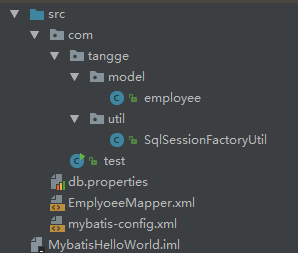
文件结构:
2.接口式编程
创建接口
package com.tangge.Mapper;

import com.tangge.model.employee;

public interface employeeMapper {

    public employee getEmployeeById(int id);

}
修改 EmplyoeeMapper.xml
<?xml version="1.0" encoding="UTF-8" ?>

<!DOCTYPE mapper

  PUBLIC "-//mybatis.org//DTD Mapper 3.0//EN"

  "http://mybatis.org/dtd/mybatis-3-mapper.dtd">

<!--

namespace:命名空间,指定为接口的全类名

-->

<!--<mapper namespace="com.tangge.employeeMapper">-->

<mapper namespace="com.tangge.Mapper.employeeMapper">

  <!--

    id:唯一标识

    resultType:返回值类型

    #{id}:从传递过来的参数取出id值

  -->

  <select id="selectEmployee" resultType="com.tangge.model.employee">

    select `id`,  `last_name`  lastName,  `gender`,  `email` from tbl_employee where id = #{id}

  </select>

  <!--接口方式:

    id:接口方法名 ,resultType:返回类型

  -->

  <select id="getEmployeeById" resultType="com.tangge.model.employee">

    select `id`,  `last_name`  lastName,  `gender`,  `email` from tbl_employee where id = #{id}

  </select>

</mapper>
测试
public static void testInterface() {

        //1.获取 SqlSessionFactory

        SqlSessionFactory sqlSessionFactory = SqlSessionFactoryUtil.getSqlSessionFactory();

        //2.获取 SqlSession,能直接执行已经映射的SQL语句

        SqlSession session = sqlSessionFactory.openSession();

        try {

            //3.获取接口实现类

            //会为接口自动创建代理对象,代理对象自动执行SQL操作

            employeeMapper mapper = session.getMapper(employeeMapper.class);

            employee employee = mapper.getEmployeeById(1);

            System.out.println(employee);

            //employee{id=1, lastName='tom', email='tom@guigu.com', gender=0}

        } finally {

            session.close();

        }

    }
MyBatis - 1.入门的更多相关文章
- MyBatis学习总结(一)——MyBatis快速入门
一.Mybatis介绍 MyBatis是一个支持普通SQL查询,存储过程和高级映射的优秀持久层框架.MyBatis消除了几乎所有的JDBC代码和参数的手工设置以及对结果集的检索封装.MyBatis可以 ...
- MyBatis快速入门
一.Mybatis介绍 MyBatis是一个支持普通SQL查询,存储过程和高级映射的优秀持久层框架.MyBatis消除了几乎所有的JDBC代码和参数的手工设置以及对结果集的检索封装.MyBatis可以 ...
- MyBatis学习总结(一)——MyBatis快速入门(转载)
本文转载自http://www.cnblogs.com/jpf-java/p/6013537.html MyBatis是一个支持普通SQL查询,存储过程和高级映射的优秀持久层框架.MyBatis消除了 ...
- MyBatis入门学习教程-MyBatis快速入门
一.Mybatis介绍 MyBatis是一个支持普通SQL查询,存储过程和高级映射的优秀持久层框架.MyBatis消除了几乎所有的JDBC代码和参数的手工设置以及对结果集的检索封装.MyBatis可以 ...
- MyBatis学习总结(一)——MyBatis快速入门
一.Mybatis介绍 MyBatis是一个支持普通SQL查询,存储过程和高级映射的优秀持久层框架.MyBatis消除了几乎所有的JDBC代码和参数的手工设置以及对结果集的检索封装.MyBatis可以 ...
- 【转】MyBatis学习总结(一)——MyBatis快速入门
[转]MyBatis学习总结(一)——MyBatis快速入门 一.Mybatis介绍 MyBatis是一个支持普通SQL查询,存储过程和高级映射的优秀持久层框架.MyBatis消除了几乎所有的JDBC ...
- mybatis快速入门(六)
前面mybatis的入门程序基本上都写完了,就看大家的灵活运用了,今天来吧前面的整合一下封装一个公共的BaseDao 只需要把前面的改造下然后创建一个BaseDao的接口,其它的继承BaseDao接口 ...
- MyBatis学习总结-MyBatis快速入门的系列教程
MyBatis学习总结-MyBatis快速入门的系列教程 [MyBatis]MyBatis 使用教程 [MyBatis]MyBatis XML配置 [MyBatis]MyBatis XML映射文件 [ ...
- MyBatis基础入门《二十》动态SQL(foreach)
MyBatis基础入门<二十>动态SQL(foreach) 1. 迭代一个集合,通常用于in条件 2. 属性 > item > index > collection : ...
- MyBatis基础入门《十九》动态SQL(set,trim)
MyBatis基础入门<十九>动态SQL(set,trim) 描述: 1. 问题 : 更新用户表数据时,若某个参数为null时,会导致更新错误 2. 分析: 正确结果: 若某个参数为nul ...
随机推荐
- bootstrap模态框显示时被遮罩层遮住了
<style>.modal-backdrop{z-index:0;}</style>
- Python全栈(第一部分)day1
计算机基础 cpu:相当于人的大脑,用于计算. 内存:储存数据,4G,8G,16G,32G,成本高,断电即消失. 硬盘:1T,固态硬盘,机械硬盘,储存数据,应该长久保持数据,重要文件,小电影等等. 操 ...
- dubbo源码分析4——SPI机制_ExtensionFactory类的作用
ExtensionFactory的源码: @SPI public interface ExtensionFactory { /** * Get extension. * * @param type o ...
- Windows PowerShell 入門(4)-変数と演算子
Windows PowerShellにおける変数と演算子の使用方法について学びます.今回は代表的な演算子として.算術演算子.代入演算子.論理演算子.比較演算子.範囲演算子.置換演算子.ビット演算子.型 ...
- mysql开启binlog日志和慢查询日志
1)首先,为什么要开启binlog日志和慢查询日志呢? binlog日志会记录下数据库的所以增删改操作,当不小心删除.清空数据,或数据库系统出错,这时候就可以使用binlog日志来还原数据库,简单来说 ...
- 【转】Java并发编程:synchronized
一.什么时候会出现线程安全问题? 在单线程中不会出现线程安全问题,而在多线程编程中,有可能会出现同时访问同一个资源的情况,这种资源可以是各种类型的资源:一个变量.一个对象.一个文件.一个数据库表等,而 ...
- strncpy的用法
strncpy是C语言的库函数之一,来自C语言标准库,定义于string.h,函数原型是: char *strncpy(char* dest,char* src,size_t n); 把src所指向的 ...
- SharePoint 2010 安装错误:请重新启动计算机,然后运行安装程序以继续
一.环境:Windows Server 2008 R2 with sp1,SharePoint 2010 二.问题描述: 正常的安装SharePoint 2010 ,安装完必备组件,并提示所有必备组件 ...
- vue2.x + vux采坑总结(一)
1.<tab-bar> 切换时,iocn高亮跟着切换问题 vux的Tabbar组件是用来实现底部tab栏,详情见官网文档 , 实现实例截图: 代码如下,控制高亮的是代码凸显部分:selec ...
- mysql alter add 使用记录
alter add命令用来增加表的字段. alter add命令格式:alter table 表名 add字段 类型 其他; 例如,在表MyClass中添加了一个字段passtest,类型为int(4 ...