
unity打成aar上传到maven库的工具
需求:
把unity打成aar并上传到maven库
其实就是把前两个博客整合了一下
这里先说eclipse版的
package com.jinkejoy.build_aar;

import java.awt.FlowLayout;

import java.awt.event.ActionEvent;

import java.awt.event.ActionListener;

import java.io.File;

import java.io.FileNotFoundException;

import java.io.IOException;

import java.io.RandomAccessFile;

import javax.swing.JButton;

import javax.swing.JFileChooser;

import javax.swing.JFrame;

import javax.swing.JLabel;

import javax.swing.JOptionPane;

import javax.swing.JTextField;

public class EcAarBuildUpload {

    private static final String BUILD_PROJECT_PATH = "./aar-build";

    private static final String UPLOAD_PROJECT_PATH = "./aar-upload";

    private JFrame jFrame;

    private JTextField sourceText;

    private JButton sourceButton;

    private File sourceFile;

    private JTextField sdkText;

    private JButton sdkButton;

    private File sdkFile;

    private JTextField ndkText;

    private JButton ndkButton;

    private File ndkFile;

    private JTextField groupIdText;

    private JTextField aarNameText;

    private JTextField versionText;

    private JButton buildButton;

    private JButton uploadButton;

    public static void main(String[] args) {

        new EcAarBuildUpload();

    }

    public EcAarBuildUpload() {

        openFileWindow();

    }

    private void openFileWindow() {

        jFrame = new JFrame();

        jFrame.setTitle("将android工程打成aar并上传到maven库");

        jFrame.setBounds(500, 500, 700, 250);

        jFrame.setVisible(true);

        FlowLayout layout = new FlowLayout();

        layout.setAlignment(FlowLayout.LEFT);

        //选择文件

        JLabel sourceLabel = new JLabel("工程路径:");

        sourceText = new JTextField(50);

        sourceButton = new JButton("浏览");

        //输出路径

        JLabel sdkLabel = new JLabel("本地sdk路径:");

        sdkText = new JTextField(48);

        sdkButton = new JButton("浏览");

        //sdk

        JLabel ndkLabel = new JLabel("本地ndk路径:");

        ndkText = new JTextField(48);

        ndkButton = new JButton("浏览");

        //上传aar

        JLabel groupIdLabel = new JLabel("aar前缀包名:");

        groupIdText = new JTextField(54);

        JLabel aarNameLabel = new JLabel("aar名称:");

        aarNameText = new JTextField(56);

        JLabel versionLabel = new JLabel("aar版本号:");

        versionText = new JTextField(55);

        buildButton = new JButton("构建aar");

        uploadButton = new JButton("上传aar");

        jFrame.setDefaultCloseOperation(JFrame.EXIT_ON_CLOSE);

        jFrame.setLayout(layout);

        jFrame.setResizable(false);

        jFrame.add(sourceLabel);

        jFrame.add(sourceText);

        jFrame.add(sourceButton);

        jFrame.add(sdkLabel);

        jFrame.add(sdkText);

        jFrame.add(sdkButton);

        jFrame.add(ndkLabel);

        jFrame.add(ndkText);

        jFrame.add(ndkButton);

        jFrame.add(groupIdLabel);

        jFrame.add(groupIdText);

        jFrame.add(aarNameLabel);

        jFrame.add(aarNameText);

        jFrame.add(versionLabel);

        jFrame.add(versionText);

        jFrame.add(buildButton);

        jFrame.add(uploadButton);

        chooseSourceFile();

        chooseSdkFile();

        chooseNdkFile();

        buildAarButton();

        uploadAarButton();

        getCacheInput();

    }

    private void getCacheInput() {

        sourceText.setText(CacheUtils.getCacheInput("sourcePath"));

        sdkText.setText(CacheUtils.getCacheInput("sdkPath"));

        ndkText.setText(CacheUtils.getCacheInput("ndkPath"));

        groupIdText.setText(CacheUtils.getCacheInput("groupId"));

        aarNameText.setText(CacheUtils.getCacheInput("aarName"));

        versionText.setText(CacheUtils.getCacheInput("version"));

    }

    private void buildAar() {

        if (checkInput()) return;

        CacheUtils.cacheInput(sourceText, sdkText, ndkText, groupIdText, aarNameText, versionText);

        createAsFile();

        findUpdateFile(BUILD_PROJECT_PATH);

        gradleBuildAar();

    }

    private void gradleBuildAar() {

        String command = "cmd /c start gradle clean assembleDebug";

        File cmdPath = new File(BUILD_PROJECT_PATH);

        Runtime runtime = Runtime.getRuntime();

        try {

            Process process = runtime.exec(command, null, cmdPath);

        } catch (IOException e) {

            e.printStackTrace();

        }

    }

    private void findUpdateFile(String filePath) {

        File file = new File(filePath);

        if (!file.exists()) {

            return;

        }

        File[] files = file.listFiles();

        for (File updateFile : files) {

            if (updateFile.isDirectory()) {

                findUpdateFile(updateFile.getAbsolutePath());

            } else {

                switch (updateFile.getName().toString()) {

                    case "build.gradle":

                        updateBuildGradle(updateFile.getAbsolutePath());

                        break;

                    case "AndroidManifest.xml":

                        updateManifestFile(updateFile.getAbsolutePath());

                        break;

                    case "local.properties":

                        updateSdkFile(updateFile.getAbsolutePath());

                        break;

                    case "UnityPlayerActivity.java":

                    case "UnityPlayerNativeActivity.java":

                    case "UnityPlayerProxyActivity.java":

                        updateFile.delete();

                        break;

                }

            }

        }

    }

    private void updateSdkFile(String filePath) {

        try {

            RandomAccessFile sdkFile = new RandomAccessFile(filePath, "rw");

            String line;

            long lastPoint = 0;

            while ((line = sdkFile.readLine()) != null) {

                final long point = sdkFile.getFilePointer();

                if (line.contains("sdk.dir")) {

                    String s = line.substring(0);

                    String sdkStr = sdkText.getText().toString();

                    String sdkPan = sdkStr.substring(0, 1);

                    sdkStr = sdkStr.substring(1).replace("\\", "\\\\");

                    String ndkStr = sdkText.getText().toString();

                    String ndkPan = ndkStr.substring(0, 1);

                    ndkStr = ndkStr.substring(1).replace("\\", "\\\\");

                    String replaceStr = "sdk.dir=" + sdkPan + "\\" + sdkStr + "\n" + "ndk.dir=" + ndkPan + "\\" + ndkStr + "\n                      ";

                    String str = line.replace(s, replaceStr);

                    sdkFile.seek(lastPoint);

                    sdkFile.writeBytes(str);

                }

                lastPoint = point;

            }

        } catch (FileNotFoundException e) {

            e.printStackTrace();

        } catch (IOException e) {

            e.printStackTrace();

        }

    }

    private void updateManifestFile(String filePath) {

        try {

            RandomAccessFile manifestFile = new RandomAccessFile(filePath, "rw");

            String line;

            long lastPoint = 0;

            while ((line = manifestFile.readLine()) != null) {

                final long ponit = manifestFile.getFilePointer();

                if (line.contains("<activity") && line.contains("UnityPlayerActivity") && !line.contains("<!--<activity")) {

                    String str = line.replace("<activity", "<!--<activity");

                    manifestFile.seek(lastPoint);

                    manifestFile.writeBytes(str);

                }

                if (line.contains("</activity>") && !line.contains("</activity>-->")) {

                    String str = line.replace("</activity>", "</activity>-->\n");

                    manifestFile.seek(lastPoint);

                    manifestFile.writeBytes(str);

                }

                lastPoint = ponit;

            }

        } catch (FileNotFoundException e) {

            e.printStackTrace();

        } catch (IOException e) {

            e.printStackTrace();

        }

    }

    private void updateBuildGradle(String filePath) {

        try {

            RandomAccessFile buildGradleFile = new RandomAccessFile(filePath, "rw");

            String line;

            long lastPoint = 0;

            while ((line = buildGradleFile.readLine()) != null) {

                final long ponit = buildGradleFile.getFilePointer();

                if (line.contains("classpath 'com.android.tools.build:gradle")) {

                    String s = line.substring(line.indexOf("classpath"));

                    String str = line.replace(s, "classpath 'com.android.tools.build:gradle:2.3.0'  \n");

                    buildGradleFile.seek(lastPoint);

                    buildGradleFile.writeBytes(str);

                }

                if (line.contains("com.android.application")) {

                    String str = line.replace("'com.android.application'", "'com.android.library'    \n");

                    buildGradleFile.seek(lastPoint);

                    buildGradleFile.writeBytes(str);

                }

                if (line.contains("compileSdkVersion") && !line.contains("compileSdkVersion 25")) {

                    String s = line.substring(line.indexOf("compileSdkVersion")).toString();

                    String str = line.replace(s, "compileSdkVersion 25\n");

                    buildGradleFile.seek(lastPoint);

                    buildGradleFile.writeBytes(str);

                }

                if (line.contains("buildToolsVersion") && !line.contains("buildToolsVersion '25.0.2'")) {

                    String s = line.substring(line.indexOf("buildToolsVersion")).toString();

                    String str = line.replace(s, "buildToolsVersion '25.0.2'\n");

                    buildGradleFile.seek(lastPoint);

                    buildGradleFile.writeBytes(str);

                }

                if (line.contains("targetSdkVersion") && !line.contains("targetSdkVersion 25")) {

                    String s = line.substring(line.indexOf("targetSdkVersion")).toString();

                    String str = line.replace(s, "targetSdkVersion 25\n");

                    buildGradleFile.seek(lastPoint);

                    buildGradleFile.writeBytes(str);

                }

                if (line.contains("applicationId") && !line.contains("//applicationId")) {

                    String s = line.substring(line.indexOf("applicationId")).toString();

                    String str = line.replace(s, "//" + s + "\n");

                    buildGradleFile.seek(lastPoint);

                    buildGradleFile.writeBytes(str);

                }

                lastPoint = ponit;

            }

        } catch (FileNotFoundException e) {

            e.printStackTrace();

        } catch (IOException e) {

            e.printStackTrace();

        }

    }

    private void createAsFile() {

        String sourcePath = sourceText.getText().toString();

        File buildFile = new File(BUILD_PROJECT_PATH);

        String buildProject = buildFile.getAbsolutePath();

        //delete history

        String deletePath = buildProject + "\\app\\src\\main";

        FileUtils.delAllFile(deletePath);

        String buildPath1 = buildProject + "\\build";

        FileUtils.delFolder(buildPath1);

        String buildPath2 = buildProject + "\\app\\build";

        FileUtils.delFolder(buildPath2);

        //assets

        String assets = sourcePath + "\\assets";

        String newAssets = buildProject + "\\app\\src\\main\\assets";

        FileUtils.copyFolder(assets, newAssets);

        //unity-classes.jar

        String unity = sourcePath + "\\libs\\unity-classes.jar";

        String newUnity = buildProject + "\\app\\libs\\unity-classes.jar";

        FileUtils.copyFile(new File(unity), new File(newUnity));

        //libs

        String libs = sourcePath + "\\libs";

        String jniLibs = buildProject + "\\app\\src\\main\\jniLibs";

        FileUtils.copyFolder(libs, jniLibs);

        File jni_unity = new File(jniLibs + "\\unity-classes.jar");

        jni_unity.delete();

        //res

        String res = sourcePath + "\\res";

        String newRes = buildProject + "\\app\\src\\main\\res";

        FileUtils.copyFolder(res, newRes);

        //src

        String src = sourcePath + "\\src";

        String java = buildProject + "\\app\\src\\main\\java";

        FileUtils.copyFolder(src, java);

        //AndroidManifest.xml

        String manifest = sourcePath + "\\AndroidManifest.xml";

        String newManifest = buildProject + "\\app\\src\\main\\AndroidManifest.xml";

        FileUtils.copyFile(new File(manifest), new File(newManifest));

    }

    private void uploadAar() {

        findAarFile(BUILD_PROJECT_PATH);

        gradleUpload();

    }

    private void gradleUpload() {

        String command = "cmd /c start gradlew clean uploadArchives";

        File cmdPath = new File(UPLOAD_PROJECT_PATH);

        Runtime runtime = Runtime.getRuntime();

        try {

            Process process = runtime.exec(command, null, cmdPath);

        } catch (IOException e) {

            e.printStackTrace();

        }

    }

    private void findAarFile(String filePath) {

        File file = new File(filePath);

        if (!file.exists()) {

            return;

        }

        File[] files = file.listFiles();

        for (File outputFile : files) {

            if (outputFile.isDirectory()) {

                findAarFile(outputFile.getAbsolutePath());

            } else {

                String fileName = outputFile.getName().toString();

                if (fileName.endsWith(".aar")) {

                    File aarFile = new File("./" + fileName);

                    FileUtils.copyFile(outputFile, aarFile);

                    CacheUtils.cacheAar(aarFile.getAbsolutePath());

                }

            }

        }

    }

    private boolean checkInput() {

        if ("".equals(sourceText.getText().toString())) {

            JOptionPane.showMessageDialog(jFrame, "请输入源工程文件路径");

            return true;

        }

        if ("".equals(sdkText.getText().toString())) {

            JOptionPane.showMessageDialog(jFrame, "请输入本地sdk路径");

            return true;

        }

        if ("".equals(ndkText.getText().toString())) {

            JOptionPane.showMessageDialog(jFrame, "请输入本地ndk路径");

            return true;

        }

        if ("".equals(groupIdText.getText().toString())) {

            JOptionPane.showMessageDialog(jFrame, "请输入aar前缀包名");

            return true;

        }

        if ("".equals(aarNameText.getText().toString())) {

            JOptionPane.showMessageDialog(jFrame, "请输入aar名称");

            return true;

        }

        if ("".equals(versionText.getText().toString())) {

            JOptionPane.showMessageDialog(jFrame, "请输入aar版本号");

            return true;

        }

        return false;

    }

    private void buildAarButton() {

        buildButton.addActionListener(new ActionListener() {

            @Override

            public void actionPerformed(ActionEvent actionEvent) {

                buildAar();

            }

        });

    }

    private void uploadAarButton() {

        uploadButton.addActionListener(new ActionListener() {

            @Override

            public void actionPerformed(ActionEvent actionEvent) {

                uploadAar();

            }

        });

    }

    private void chooseSourceFile() {

        sourceButton.addActionListener(new ActionListener() {

            @Override

            public void actionPerformed(ActionEvent actionEvent) {

                JFileChooser chooser = new JFileChooser();

                chooser.setFileSelectionMode(JFileChooser.FILES_AND_DIRECTORIES);

                chooser.showDialog(new JLabel(), "选择");

                sourceFile = chooser.getSelectedFile();

                sourceText.setText(sourceFile.getAbsolutePath().toString());

            }

        });

    }

    private void chooseSdkFile() {

        sdkButton.addActionListener(new ActionListener() {

            @Override

            public void actionPerformed(ActionEvent actionEvent) {

                JFileChooser chooser = new JFileChooser();

                chooser.setFileSelectionMode(JFileChooser.FILES_AND_DIRECTORIES);

                chooser.showDialog(new JLabel(), "选择");

                sdkFile = chooser.getSelectedFile();

                sdkText.setText(sdkFile.getAbsolutePath().toString());

            }

        });

    }

    private void chooseNdkFile() {

        ndkButton.addActionListener(new ActionListener() {

            @Override

            public void actionPerformed(ActionEvent actionEvent) {

                JFileChooser chooser = new JFileChooser();

                chooser.setFileSelectionMode(JFileChooser.FILES_AND_DIRECTORIES);

                chooser.showDialog(new JLabel(), "选择");

                ndkFile = chooser.getSelectedFile();

                ndkText.setText(ndkFile.getAbsolutePath().toString());

            }

        });

    }

}
package com.jinkejoy.build_aar;

import java.io.File;

import java.io.FileInputStream;

import java.io.FileNotFoundException;

import java.io.FileOutputStream;

import java.io.IOException;

import java.util.Iterator;

import java.util.Map;

import java.util.Properties;

import javax.swing.JTextField;

public class CacheUtils {

    private static final String CACHE_PATH = "./cache-input.properties";

    private static final String AAR_PATH = "./aar-path.properties";

    public static void cacheInput(JTextField sourceText, JTextField sdkText, JTextField ndkText,

                                  JTextField groupIdText, JTextField aarNameText, JTextField versionText) {

        String cache = "sourcePath=" + sourceText.getText().toString().replace("\\", "\\\\") + "\n" +

                "sdkPath=" + sdkText.getText().toString().replace("\\", "\\\\") + "\n" +

                "ndkPath=" + ndkText.getText().toString().replace("\\", "\\\\") + "\n" +

                "groupId=" + groupIdText.getText().toString().replace("\\", "\\\\") + "\n" +

                "aarName=" + aarNameText.getText().toString().replace("\\", "\\\\") + "\n" +

                "version=" + versionText.getText().toString().replace("\\", "\\\\");

        File cacheFile = new File(CACHE_PATH);

        if (!cacheFile.exists()) {

            try {

                cacheFile.createNewFile();

            } catch (IOException e) {

                e.printStackTrace();

            }

        }

        try {

            FileOutputStream fop = new FileOutputStream(cacheFile);

            fop.write(cache.getBytes());

            fop.flush();

            fop.close();

        } catch (FileNotFoundException e) {

            e.printStackTrace();

        } catch (IOException e) {

            e.printStackTrace();

        }

    }

    public static void cacheAar(String aarPath) {

        String cache = "aarPath=" + aarPath.replace("\\", "\\\\");

        File cacheFile = new File(AAR_PATH);

        if (!cacheFile.exists()) {

            try {

                cacheFile.createNewFile();

            } catch (IOException e) {

                e.printStackTrace();

            }

        }

        try {

            FileOutputStream fop = new FileOutputStream(cacheFile);

            fop.write(cache.getBytes());

            fop.flush();

            fop.close();

        } catch (FileNotFoundException e) {

            e.printStackTrace();

        } catch (IOException e) {

            e.printStackTrace();

        }

    }

    public static String getCacheInput(String key) {

        File cacheFile = new File(CACHE_PATH);

        if (cacheFile.exists()) {

            try {

                FileInputStream fip = new FileInputStream(cacheFile);

                Properties properties = new Properties();

                properties.load(fip);

                Iterator<Map.Entry<Object, Object>> iterator = properties.entrySet().iterator();

                while (iterator.hasNext()) {

                    Map.Entry<Object, Object> entry = iterator.next();

                    if (key.equals(entry.getKey().toString())) {

                        return entry.getValue().toString();

                    }

                }

            } catch (FileNotFoundException e) {

                e.printStackTrace();

            } catch (IOException e) {

                e.printStackTrace();

            }

        }

        return "";

    }

}
package com.jinkejoy.build_aar;

import java.io.File;

import java.io.FileInputStream;

import java.io.FileNotFoundException;

import java.io.FileOutputStream;

import java.io.IOException;

import java.nio.channels.FileChannel;

public class FileUtils {

    public static boolean delAllFile(String path) {

        boolean flag = false;

        File file = new File(path);

        if (!file.exists()) {

            return flag;

        }

        if (!file.isDirectory()) {

            return flag;

        }

        String[] tempList = file.list();

        File temp = null;

        for (int i = 0; i < tempList.length; i++) {

            if (path.endsWith(File.separator)) {

                temp = new File(path + tempList[i]);

            } else {

                temp = new File(path + File.separator + tempList[i]);

            }

            if (temp.isFile()) {

                temp.delete();

            }

            if (temp.isDirectory()) {

                delAllFile(path + "/" + tempList[i]);//先删除文件夹里面的文件

                delFolder(path + "/" + tempList[i]);//再删除空文件夹

                flag = true;

            }

        }

        return flag;

    }

    public static void delFolder(String folderPath) {

        try {

            delAllFile(folderPath); //删除完里面所有内容

            String filePath = folderPath;

            filePath = filePath.toString();

            java.io.File myFilePath = new java.io.File(filePath);

            myFilePath.delete(); //删除空文件夹

        } catch (Exception e) {

            e.printStackTrace();

        }

    }

    public static void copyFile(File source, File dest) {

        FileChannel inputChannel = null;

        FileChannel outputChannel = null;

        try {

            inputChannel = new FileInputStream(source).getChannel();

            outputChannel = new FileOutputStream(dest).getChannel();

            outputChannel.transferFrom(inputChannel, 0, inputChannel.size());

        } catch (FileNotFoundException e) {

            e.printStackTrace();

        } catch (IOException e) {

            e.printStackTrace();

        } finally {

            try {

                inputChannel.close();

            } catch (IOException e) {

                e.printStackTrace();

            }

            try {

                outputChannel.close();

            } catch (IOException e) {

                e.printStackTrace();

            }

        }

    }

    public static void copyFolder(String oldPath, String newPath) {

        try {

            // 如果文件夹不存在,则建立新文件夹

            (new File(newPath)).mkdirs();

            // 读取整个文件夹的内容到file字符串数组,下面设置一个游标i,不停地向下移开始读这个数组

            File filelist = new File(oldPath);

            String[] file = filelist.list();

            // 要注意,这个temp仅仅是一个临时文件指针

            // 整个程序并没有创建临时文件

            File temp = null;

            for (int i = 0; i < file.length; i++) {

                // 如果oldPath以路径分隔符/或者\结尾,那么则oldPath/文件名就可以了

                // 否则要自己oldPath后面补个路径分隔符再加文件名

                // 谁知道你传递过来的参数是f:/a还是f:/a/啊?

                if (oldPath.endsWith(File.separator)) {

                    temp = new File(oldPath + file[i]);

                } else {

                    temp = new File(oldPath + File.separator + file[i]);

                }

                // 如果游标遇到文件

                if (temp.isFile()) {

                    FileInputStream input = new FileInputStream(temp);

                    // 复制并且改名

                    FileOutputStream output = new FileOutputStream(newPath

                            + "/" + (temp.getName()).toString());

                    byte[] bufferarray = new byte[1024 * 64];

                    int prereadlength;

                    while ((prereadlength = input.read(bufferarray)) != -1) {

                        output.write(bufferarray, 0, prereadlength);

                    }

                    output.flush();

                    output.close();

                    input.close();

                }

                // 如果游标遇到文件夹

                if (temp.isDirectory()) {

                    copyFolder(oldPath + "/" + file[i], newPath + "/" + file[i]);

                }

            }

        } catch (Exception e) {

            System.out.println("复制整个文件夹内容操作出错");

        }

    }

}
效果图
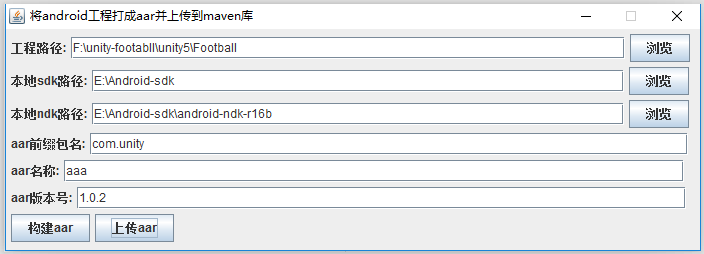
备注:有时候会出现渲染加载不出来的问题,可以修改下布局的创建顺序,改为创建一个控件就马上加载
unity打成aar上传到maven库的工具的更多相关文章
- aar上传maven库工具
需求:本地aar文件上传到maven库 参考我之前的博客gradle上传本地文件到远程maven库(nexus服务器) 下面是java图形化工具代码 package com.jinkejoy.buil ...
- 用eclipse怎样将本地的项目打成jar包上传到maven仓库
使用maven的项目中,有时需要把本地的项目打成jar包上传到mevan仓库. 操作如下: 前提:pom文件中配置好远程库的地址,否则会报错 1.将maven 中的settings文件配置好用户名和密 ...
- Maven系列(二) -- 将开源库上传到maven仓库私服
前言 之前简单说了下Maven的搭建,现在跟大家说一下如何将自己的aar传到我们新搭建的maven仓库里面,接下来我们就从最基本的新建一个library开始讲述整个流程,话不多说,让我们把愉快的开始吧 ...
- Github开源Java项目(Disconf)上传到Maven Central Repository方法详细介绍
最近我做了一个开源项目 Disconf:Distributed Configuration Management Platform(分布式配置管理平台) ,简单来说,就是为所有业务平台系统管理配置文件 ...
- 多个module实体类集合打一个jar包并上传至远程库
本章内容主要分享多个module中的实体类集合生成到一个jar包中,并且发布到远程库:这里采用maven-assembly-plugin插件的功能来操作打包,内容不长却贴近实战切值得拥有,主要节点内容 ...
- DropzoneJS 可以拖拽上传的js库
介绍 可以拖拽上传的 js库 网址 http://www.dropzonejs.com/ 同类类库 1.jquery.fileupload http://blueimp.github.io/jQu ...
- Taurus.MVC-Java 版本打包上传到Maven中央仓库(详细过程):1、JIRA账号注册
文章目录: Taurus.MVC-Java 版本打包上传到Maven中央仓库(详细过程):1.JIRA账号注册 Taurus.MVC-Java 版本打包上传到Maven中央仓库(详细过程):2.PGP ...
- Taurus.MVC-Java 版本打包上传到Maven中央仓库(详细过程):2、PGP下载安装与密钥生成发布
文章目录: Taurus.MVC-Java 版本打包上传到Maven中央仓库(详细过程):1.JIRA账号注册 Taurus.MVC-Java 版本打包上传到Maven中央仓库(详细过程):2.PGP ...
- Taurus.MVC-Java 版本打包上传到Maven中央仓库(详细过程):3、Maven独立插件安装与settings.xml配置
文章目录: Taurus.MVC-Java 版本打包上传到Maven中央仓库(详细过程):1.JIRA账号注册 Taurus.MVC-Java 版本打包上传到Maven中央仓库(详细过程):2.PGP ...
随机推荐
- LuoGu P2420 让我们异或吧
其实......这就是个SB题,本来看到这个题,和树上路径有关 于是--我就欣喜地打了一个树剖上去,结果嘞,异或两遍等于没异或 所以这题和LCA屁关系都没有,所以这题就是个树上DFS!!!! 所以它为 ...
- vue-cli 3配置接口代理
vue.config.js vue.config.js是一个可选的配置文件,新建该文件,存放在项目根目录(将自动加载)中 // 作为配置文件,直接导出配置对象即可 module.exports = { ...
- Vue.extend和Vue.component的联系与差异
extend 是构造一个组件的语法器. 你给它参数 他给你一个组件 然后这个组件 你可以作用到Vue.component 这个全局注册方法里, 也可以在任意vue模板里使用apple组件 var ap ...
- nodejs之koa-router与koa-body搭配使用
简介 koa需要搭配中间件来做接口更方便,使用Koa-body & Koa-router 使用 koa2 创建接口,处理post请求 const koa=require("koa&q ...
- Django将默认的SQLite更换为MySQL
1.注释默认的SQLite3配置: blogproject/settings.py ''' DATABASES = { 'default': { 'ENGINE': 'django.db.backen ...
- MySQL5.7.20报错Access denied for user 'root'@'localhost' (using password: NO)
在centos6.8上源码安装了MySQL5.7.20,进入mysql的时候报错如下: 解决办法如下: 在mysql的配置文件内加入: vim /etc/my.cnf skip-grant-tabl ...
- ajax----发送异步请求的步骤
1)获取(创建)Ajax对象:获取XMLHttpRequest对象2)创建请求:调用xhr的open方法3)在发送请求之前需要设置回调函数:绑定指定xhr的onreadystatechange事件4) ...
- Mysql 5.7 CentOS 7 安装MHA
Table of Contents 1. MHA简介 1.1. 功能 1.2. MHA切换逻辑 1.3. 工具 2. 环境 2.1. 软件 2.2. 环境 3. Mysql 主从复制 3.1. Mys ...
- docker 给none镜像打镜像
1.遇到none的镜像打tag方式: docker tag + docker ID + 命名:版本名 案例:docker tag 41b7307026c0 gitlab:test 这就 ...
- 目标检测算法SSD之训练自己的数据集
目标检测算法SSD之训练自己的数据集 prerequesties 预备知识/前提条件 下载和配置了最新SSD代码 git clone https://github.com/weiliu89/caffe ...