
自动化测试基础篇--Selenium发送测试报告邮件
来自:https://www.cnblogs.com/sanzangTst/p/8377870.html
发邮件需要用到python两个模块,smtplib和email,这俩模块是python自带的,只需import即可使用。smtplib模块主要负责发送邮件,email模块主要负责构造邮件。其中MIMEText()定义邮件正文,Header()定义邮件标题。MIMEMulipart模块构造带附件。
Selenium发送邮件流程:
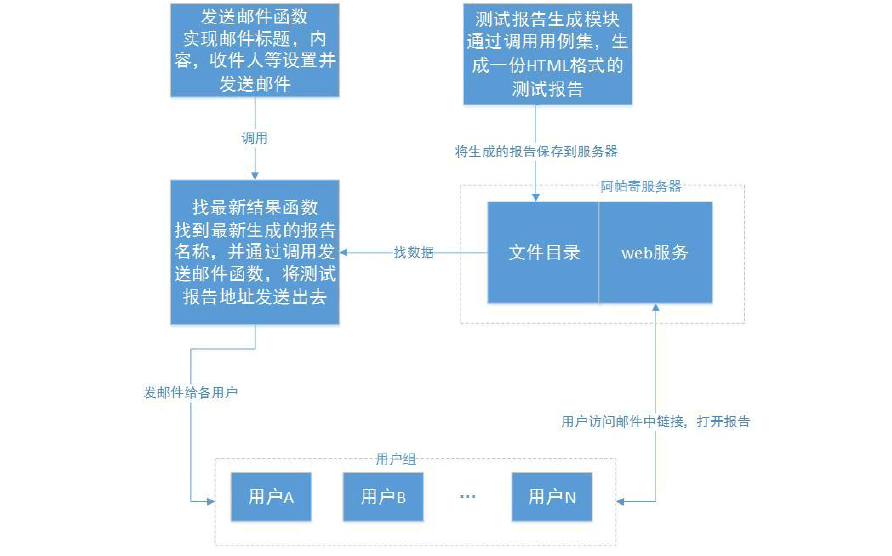
一、网易邮箱
Selenium发送邮件步骤:
1、导入smtplib和email模块;
2、准备发邮件的参数,每个邮箱的发件服务器都不一样,以163为例,百度搜到发件服务器为:smtp.163.com;
3、接下来就是写邮件的主题和正文内容,正文这里用html格式的;
4、最后调用发件服务。
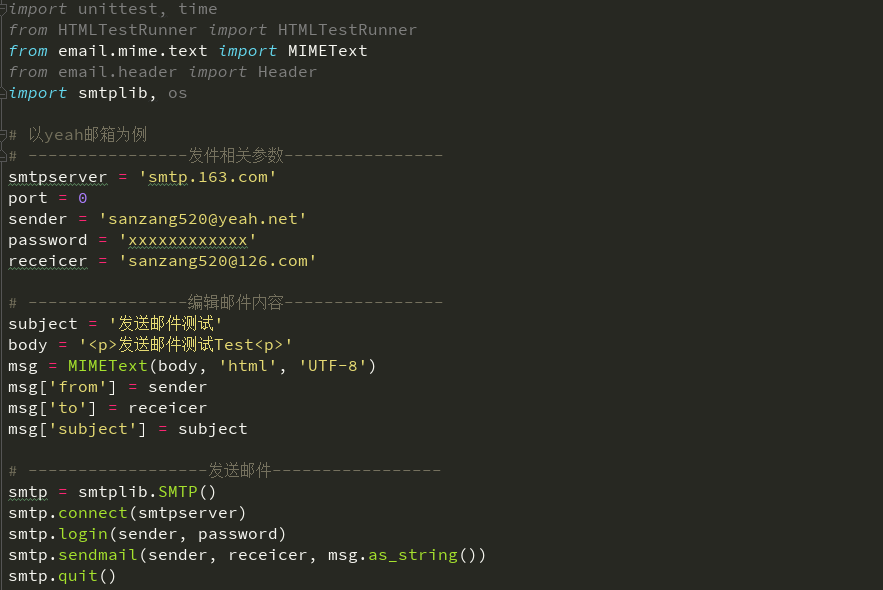
5、参考代码

import smtplib

from email.mime.text import MIMEText

from email.mime.application import MIMEApplication

from email.mime.multipart import MIMEMultipart

# 以yeah邮箱为例

# ----------------发件相关参数----------------

smtpserver = 'smtp.163.com'

port = 0

sender = 'sanzang520@yeah.net'

password = 'xxxxxxxxxxxx'

receicer = 'sanzang520@126.com'

# ----------------编辑邮件内容----------------

subject = '发送邮件测试'

body = '<p>发送邮件测试Test<p>'

msg = MIMEText(body, 'html', 'UTF-8')

msg['from'] = sender

msg['to'] = receicer

msg['subject'] = subject

# ------------------发送邮件-----------------

smtp = smtplib.SMTP()

smtp.connect(smtpserver)

smtp.login(sender, password)

smtp.sendmail(sender, receicer, msg.as_string())

smtp.quit()
二、腾讯邮箱
Selenium发送邮件步骤:
1、导入smtplib和email模块;
2、腾讯邮箱是需要SSL认证的,找到QQ邮箱授权码,打开QQ邮箱-设置-账号-POP3开启服务-开启;
3、发验证短信获取授权码,照着提示发个短信,如何点我已发送,就会收到授权码;
4、收到授权码后复制,保存下来,这个就可以当QQ邮箱的密码;
5、接下来就是写邮件的主题和正文内容,正文这里用html格式的;
6、最后调用发件服务。
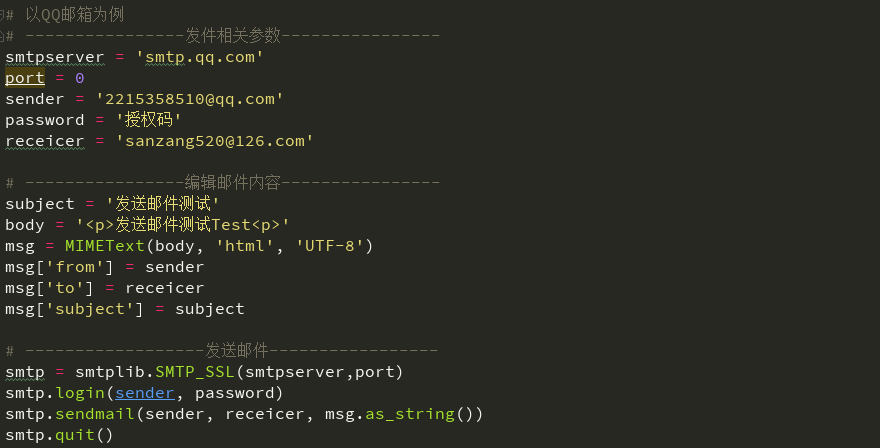
7、参考代码
import smtplib

from email.mime.text import MIMEText

from email.mime.application import MIMEApplication

from email.mime.multipart import MIMEMultipart

# 以QQ邮箱为例

# ----------------发件相关参数----------------

smtpserver = 'smtp.qq.com'

port = 0

sender = '2215358510@qq.com'

password = '授权码'

receicer = 'sanzang520@126.com'

# ----------------编辑邮件内容----------------

subject = '发送邮件测试'

body = '<p>发送邮件测试Test<p>'

msg = MIMEText(body, 'html', 'UTF-8')

msg['from'] = sender

msg['to'] = receicer

msg['subject'] = subject

# ------------------发送邮件-----------------

smtp = smtplib.SMTP_SSL(smtpserver,port)

smtp.login(sender, password)

smtp.sendmail(sender, receicer, msg.as_string())

smtp.quit()
三、同时兼容网易类和腾讯类邮箱
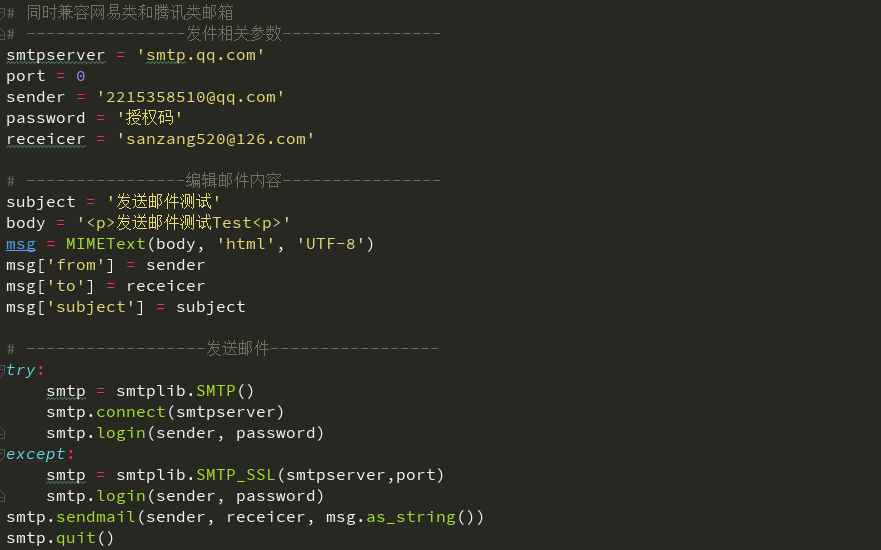
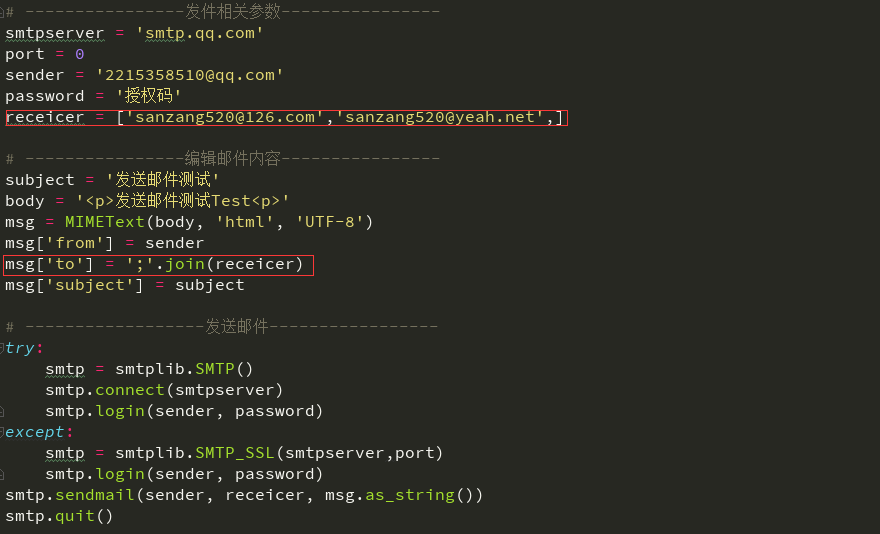
四、多个收件人
1、把receiver参数改成list对象,单个多个都是可以收到的;
2、msg["to"]这个参数不能用list了,得先把receiver参数转化成字符串。
五、发送附件
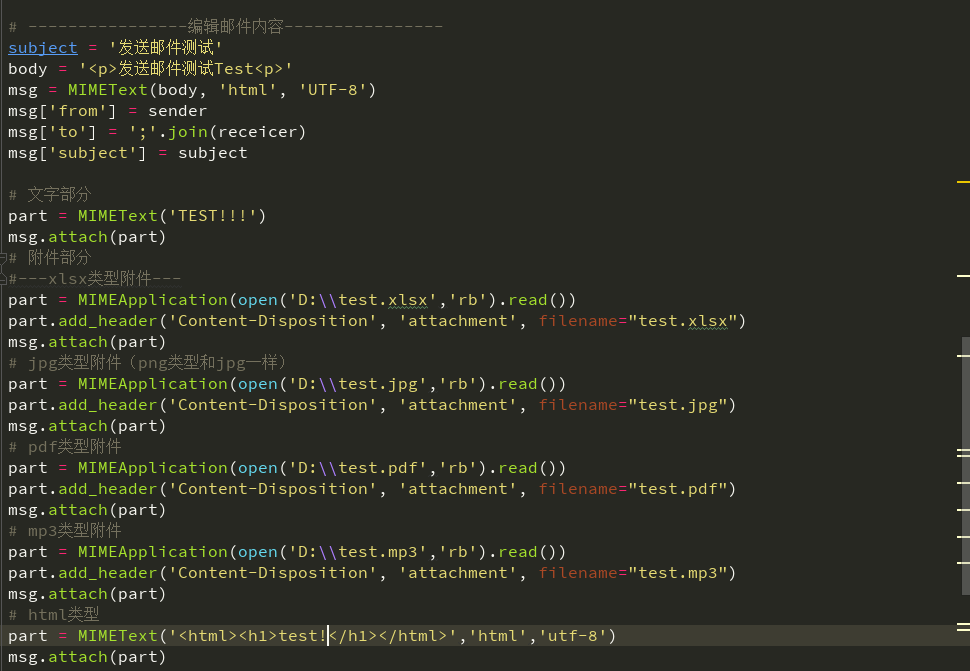
六、参考代码
#!/usr/bin/env python

# -*- coding: utf-8 -*-

# @Author  : chen

# @File    : c.py

# @Software: PyCharm

import smtplib

from email.mime.text import MIMEText

from email.mime.application import MIMEApplication

from email.mime.multipart import MIMEMultipart

# 同时兼容网易类和腾讯类邮箱

# ----------------发件相关参数----------------

smtpserver = 'smtp.qq.com'

port = 0

sender = '2215358510@qq.com'

password = '授权码'

receicer = ['sanzang520@126.com','sanzang520@yeah.net',]

# ----------------编辑邮件内容----------------

subject = '发送邮件测试'

body = '<p>发送邮件测试Test<p>'

msg = MIMEText(body, 'html', 'UTF-8')

msg['from'] = sender

msg['to'] = ';'.join(receicer)

msg['subject'] = subject

# 文字部分

part = MIMEText('TEST!!!')

msg.attach(part)

# 附件部分

#---xlsx类型附件---

part = MIMEApplication(open('D:\\test.xlsx','rb').read())

part.add_header('Content-Disposition', 'attachment', filename="test.xlsx")

msg.attach(part)

# jpg类型附件(png类型和jpg一样)

part = MIMEApplication(open('D:\\test.jpg','rb').read())

part.add_header('Content-Disposition', 'attachment', filename="test.jpg")

msg.attach(part)

# pdf类型附件

part = MIMEApplication(open('D:\\test.pdf','rb').read())

part.add_header('Content-Disposition', 'attachment', filename="test.pdf")

msg.attach(part)

# mp3类型附件

part = MIMEApplication(open('D:\\test.mp3','rb').read())

part.add_header('Content-Disposition', 'attachment', filename="test.mp3")

msg.attach(part)

# html类型

part = MIMEText('<html><h1>test!</h1></html>','html','utf-8')

msg.attach(part)

# ------------------发送邮件-----------------

try:

    smtp = smtplib.SMTP()

    smtp.connect(smtpserver)

    smtp.login(sender, password)

except:

    smtp = smtplib.SMTP_SSL(smtpserver,port)

    smtp.login(sender, password)

smtp.sendmail(sender, receicer, msg.as_string())

smtp.quit()
自动化测试基础篇--Selenium发送测试报告邮件的更多相关文章
- 自动化测试基础篇--Selenium unittest生成测试报告(HTMLTestRunner)
如何生成HTMLTestRunner测试报告.接上篇文章,对于unittest框架,运行后,测试结果不便于查看,同时多个case存在的时候,可能会导致case result记录不正确的情况. 为此,引 ...
- 自动化测试基础篇--Selenium简单的163邮箱登录实例
摘自https://www.cnblogs.com/sanzangTst/p/7472556.html 前面几篇内容一直讲解Selenium Python的基本使用方法.学习了什么是selenium: ...
- 自动化测试基础篇--Selenium元素定位
摘自https://www.cnblogs.com/sanzangTst/p/7457111.html 一.Selenium元素定位的重要性: Web自动化测试的操作:获取UI页面的元素,对元素进行操 ...
- 自动化测试基础篇--Selenium框架设计(POM)
一.自动化测试框架 感谢木棉花的漂泊分享,内容转自链接:http://www.cnblogs.com/fengyiru6369/p/8053035.html 1.什么是自动化测试框架 简单来说,自动化 ...
- 自动化测试基础篇--Selenium文件上传send_keys
摘自https://www.cnblogs.com/sanzangTst/p/8358165.html 文件上传是web页面上很常见的一个功能,自动化成功中操作起来却不是那么简单. 一般分两个场景:一 ...
- 自动化测试基础篇--Selenium鼠标键盘事件
摘自https://www.cnblogs.com/sanzangTst/p/7477382.html 前面几篇文章我们学习了怎么定位元素,同时通过实例也展示了怎么切换到iframe,怎么输入用户名和 ...
- 自动化测试基础篇--Selenium简介
摘自https://www.cnblogs.com/sanzangTst/p/7452636.html 一.软件开发的一般流程 二.什么叫软件测试? 软件测试(英语:Software Testing) ...
- 自动化测试基础篇--Selenium Python环境搭建
学习selenium python需要的工具: 1.浏览器 2.Python 3.Selenium 4.FireBug(Firefox) 5.chromedriver.IEDriverServer.g ...
- 引用 自动化测试基础篇--Selenium简介
原文链接:http://www.cnblogs.com/sanzangTst/p/7452636.html 鸣谢参藏法师 一.软件开发的一般流程 二.什么叫软件测试? 软件测试(英语:Software ...
随机推荐
- 【Python开发】Python中数据分析环境的搭建
注:无论是任何一门语言,刚开始入门的时候,语言运行环境的搭建都是一件不轻松的事情. Python的运行环境 要运行或写Python代码,就需要Python的运行环境,主要的Python有以下三类: 原 ...
- 【Go】优雅的读取http请求或响应的数据
[Go]优雅的读取http请求或响应的数据 原文链接:https://blog.thinkeridea.com/201901/go/you_ya_de_du_qu_http_qing_qiu_huo_ ...
- Docker在Linux上运行NetCore系列(一)配置运行DotNetCore控制台
转发请注明此文章作者与路径,请尊重原著,违者必究. 系列文章:https://www.cnblogs.com/alunchen/p/10121379.html 本篇文章操作系统信息 Linux:ubu ...
- [转]git commit之后,想撤销commit
本文转自:http://www.cnblogs.com/lfxiao/p/9378763.html 写完代码后,我们一般这样 git add . //添加所有文件 git commit -m &quo ...
- 建立多页面vue.js项目
介绍 根据需求,我们希望建立一个多页面的vue.js项目,如何改造单页面vue.js项目为多页面项目?跟着我的步伐看下去吧. 1.创建单页面vue.js项目 简单的记录一下创建步骤: --安装cnpm ...
- C#线程安全类型
1.IProducerConsumerCollection (线程安全接口) 此接口的所有实现必须都启用此接口的所有成员,若要从多个线程同时使用. using System; using System ...
- c# 判断3个数是否连续最优式子
Math.Abs((own - two) * (two - there) * + ) ==
- Centos7.6安装Oracle数据库
一.安装Oracle前准备 1.创建运行oracle数据库的系统用户和用户组 [humf@localhost ~]$ su root #切换到root Password: [root@localhos ...
- Redis常用命令与配置
常用命令 测试客户端与服务器是否正常连接:ping ( 补:返回pong表示成功 ) 正则获取键:keys pattern 判断一个键是否存在:exists key 删除一个键:del key 获 ...
- python爬虫scrapy项目详解(关注、持续更新)
python爬虫scrapy项目(一) 爬取目标:腾讯招聘网站(起始url:https://hr.tencent.com/position.php?keywords=&tid=0&st ...