
elementUI vue upload完整示例
elementUI 和vue 还有axios +java的完整示例, 代码敲了很久, 累死了, 以后用就直接复制了 ,很值吧!!!
1.html
<!DOCTYPE html>

<html >

<head>

    <meta charset="UTF-8">

    <title>导入</title>

    <link rel="stylesheet" href="https://unpkg.com/element-ui/lib/theme-chalk/index.css">

</head>

<body>

<div id="myUpload">

<el-button type="primary" size="mini" @click="uploadFile">导入</el-button>

<!--上传-->

<el-dialog title="上传" width="40%" :visible.sync="uploadTemplateDialog">

    <el-row>

        <el-col :span="22">

            <el-upload class="upload-demo"

                       ref="upload"

                       action=""

                       :accept="acceptFileType"

                       :limit="1"

                       :on-exceed="handleExceed"

                       :before-upload="beforeUpload"

                       :on-preview="handlePreview"

                       :on-remove="handleRemove"

                       :file-list="fileList"

                       :auto-upload="false">

                <el-button slot="trigger" size="small" type="primary">选取Excel格式文件</el-button>

                <div slot="tip" class="el-upload_tip">只能上传.xls文件,且不超过1M</div>

            </el-upload>

        </el-col>

    </el-row>

    <span slot="footer" class="dialog-footer">

        <el-button @click="submitUpload" type="primary" size="mini" :loading="uploadLoading" > 确定上传</el-button>

        <el-button @click="uploadTemplateDialog=false" size="mini">取消</el-button>

    </span>

</el-dialog>

</div>

<script src="https://cdn.jsdelivr.net/npm/vue"></script>

<script src="https://unpkg.com/element-ui@2.6.1/lib/index.js"></script>

<script src="https://unpkg.com/axios/dist/axios.min.js"></script>

<script >

    new Vue({

        el:'#myUpload',

        data:function(){

            return{

                uploadTemplateDialog:false,

                fileList:[],

                uploadLoading:false,

                acceptFileType:'.xls',

                downLoadLoading:'',

            }

        },

        //钩子函数,页面加载执行

        created:function(){

        },

        //钩子函数,页面加载完成后执行

        mounted(){

        },

        //函数方法

        methods:{

            uploadFile(){

                this.uploadLoading=false;

                var that=this;

                this.fileList=[];

                this.uploadTemplateDialog=true;

                setTimeout(function(){

                    that.$refs.upload.clearFiles();

                },100);

            },

            handleExceed(files,fileList){

                this.$message.warning('只能选择1个文件!');

            },

            submitUpload(){

                this.uploadLoading=true;

                var that=this;

                setTimeout(function () {

                    if(that.$refs.upload.$children[0].fileList.length==1){

                        that.$refs.upload.submit();

                    }else{

                        that.uploadLoading=false;

                        that.$message({

                            type:'error',

                            showClose:true,

                            duration:3000,

                            message:'请选择文件!'

                        });

                    };

                },100);

            },

            handleRemove(file,fileList){

                //console.log(file,fileList);

            },

            handlePreview(file){

                //console.log(file);

            },

            beforeUpload(file){

                var that=this;

                //文件类型

                var fileName=file.name.substring(file.name.lastIndexOf('.')+1);

                if(fileName!='xls'){

                    that.uploadTemplateDialog=false;

                    that.$message({

                        type:'error',

                        showClose:true,

                        duration:3000,

                        message:'文件类型不是.xls文件!'

                    });

                    return false;

                }

                //读取文件大小

                var fileSize=file.size;

                console.log(fileSize);

                if(fileSize>1048576){

                    that.uploadTemplateDialog=false;

                    that.$message({

                        type:'error',

                        showClose:true,

                        duration:3000,

                        message:'文件大于1M!'

                    });

                    return false;

                }

                that.downloadLoading=that.$loading({

                    lock:true,

                    text:'数据导入中...',

                    spinner:'el-icon-loading',

                    background:'rgba(0,0,0,0.7)'

                });

                let fd=new FormData();

                fd.append('file',file);

                fd.append('_t1',new Date());

                axios({

                    method:'post',

                    url:'/upload/'+new Date().getTime(),

                    data:fd,

                    headers:{"Content-Type":"multipart/form-data;boundary="+new Date().getTime()}

                }).then(rsp=>{

                    that.downloadLoading.close();

                    that.uploadLoading=false;

                    let resp=rsp.data

                    if(resp.resultCode==200){

                        that.uploadTemplateDialog=false;

                        that.$message.success(resp.resultMsg);

                        //that.queryData();//更新数据

                    }else{

                        that.uploadTemplateDialog=false;

                        that.$message({

                            type:'error',

                            showClose:true,

                            duration:60000,

                            message:resp.resultMsg

                        });

                    }

                }).catch(error=> {

                    that.downloadLoading.close();

                    that.uploadLoading=false;

                    that.uploadTemplateDialog=false;

                    that.$message({

                        type:'error',

                        showClose:true,

                        duration:60000,

                        message:'请求失败! error:'+error

                    });

                })

                return false;

            }

        }

    })

</script>

</body>

</html>
2.java
@RequestMapping(value="/upload/{time}",method={RequestMethod.POST})

@ResponseBody

public HttpResult upload(@PathVariable("time") String time,@RequestParam("file") MultipartFile file,HttpServlet request){

        String fileName=file.getOriginalFilename();

        String prefix=fileName.substring(filename.lastIndexOf(".")+1); // 后缀: "xls"

        String path=request.getServletContext().getRealPath(File.separator+"myFile");

        String date=String.valueOf(new Date().getTime());

        if(!new File(path).exists()){

            new File(path).mkdir();

        }

        File file2=new File(path+File.separator+date+"_"+fileName);

        file.transferTo(files);

        return HttpResult.ok();

}
3.效果图

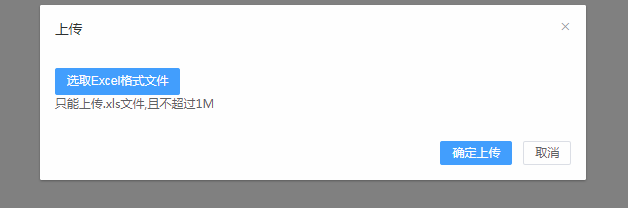
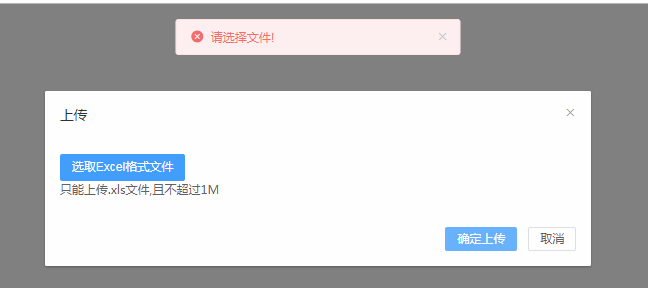

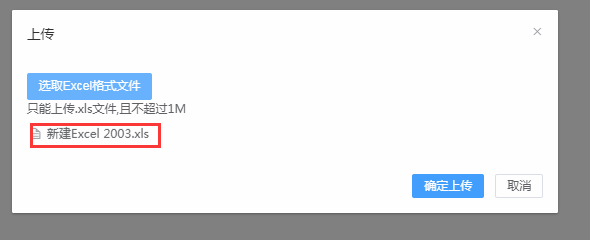
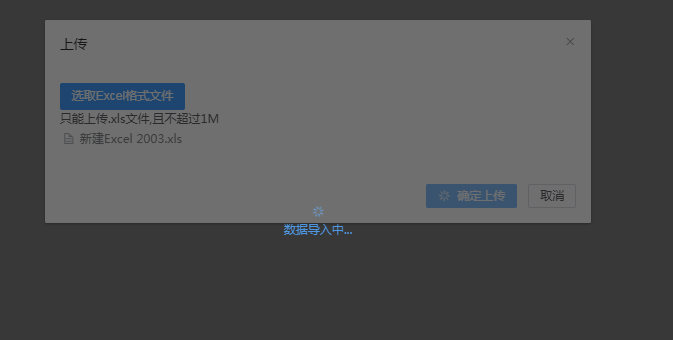

效果图还是不错的吧, 后台java 我就截取了一段代码, 大家可以自己发挥, 前端基本都完整了, 可以完全套用, 大家给个意见吧!!!
elementUI vue upload完整示例的更多相关文章
- element-ui(vue)upload组件的http-request方法的使用
element-ui(vue)upload组件的http-request方法的使用 官方文档: http-request方法有一个默认的参数 content content 是一个object对象:里 ...
- elementUI vue tree input 懒加载 输入下拉树型示例 点击其他区域关闭自定义div
<!DOCTYPE html> <html lang="zh"> <head> <meta charset="UTF-8&quo ...
- 【原创】SpringBoot & SpringCloud 快速入门学习笔记(完整示例)
[原创]SpringBoot & SpringCloud 快速入门学习笔记(完整示例) 1月前在系统的学习SpringBoot和SpringCloud,同时整理了快速入门示例,方便能针对每个知 ...
- asp.net mvc5 使用百度ueditor 本编辑器完整示例(下)配置上传播放视频
通过 asp.net mvc5 使用百度ueditor 本编辑器完整示例(上)介绍,可以上传图片到服务器了,也可以上传小的视频文件,并且由百度编辑器自动加入html5<video>标签播放 ...
- 【第四篇】ASP.NET MVC快速入门之完整示例(MVC5+EF6)
目录 [第一篇]ASP.NET MVC快速入门之数据库操作(MVC5+EF6) [第二篇]ASP.NET MVC快速入门之数据注解(MVC5+EF6) [第三篇]ASP.NET MVC快速入门之安全策 ...
- WCF服务开发与调用的完整示例
WCF服务开发与调用的完整示例 开发工具:VS2008 开发语言:C# 开发内容:简单的权限管理系统 第一步.建立WCF服务库 点击确定,将建立一个WCF 服务库示例程序,自动生成一个包括IServi ...
- springmvc 项目完整示例06 日志–log4j 参数详细解析 log4j如何配置
Log4j由三个重要的组件构成: 日志信息的优先级 日志信息的输出目的地 日志信息的输出格式 日志信息的优先级从高到低有ERROR.WARN. INFO.DEBUG,分别用来指定这条日志信息的重要程度 ...
- C连接MySQL数据库开发之Linux环境完整示例演示(增、删、改、查)
一.开发环境 ReadHat6.3 32位.mysql5.6.15.gcc4.4.6 二.编译 gcc -I/usr/include/mysql -L/usr/lib -lmysqlclient ma ...
- Struts 2.3.4.1完整示例
[系统环境]Windows 7 Ultimate 64 Bit [开发环境]JDK1.6.21,Tomcat6.0.35,MyEclipse10 [其他环境]Struts2.3.4.1 [项目描述]S ...
随机推荐
- HBuilder+eclipse开发:使用ajax异步传值生成首字母索引
使用ajax异步传值生成首字母索引大致有以下几个步骤: 1.服务器端使用servlet提取出数据库里的数据; 2.使用首字母工具类对数据进处理得到首字母; 3.再将首字母和数据一一对应存入json数组 ...
- [node.js] fs.renameSync()报错
初学node.js,跟着node入门,操作了一遍.在最后一步,上传图片并显示时遇到报错 fs.js: throw err; ^ Error: ENOENT: no such file or direc ...
- Robot Framework - Tips
01 - 使用robot本身的API Robot Framework的版本发展是向下包容,建议尽量使用robot本身的API. 例如:通过导入logger.py(...\Lib\site-packag ...
- iOS学习——iOS开发小知识点集合
在iOS学习和开发过程中,经常会遇到一些很小的知识点和问题,一两句话就可以解释清楚了,这样的知识点写一篇随笔又没有必要,但是又想mark一下,以备不时之需,所以就有了本文.后面遇到一些小的知识点会不断 ...
- Jade是变体的HTML
在这段HTML代码中,div 包含了一个 a 元素与一段没有标记包围的文本.若要用Jade表述这段HTML,div 元素和 a 元素都可以用前面所述的方法实现,但剩下的那个没有标记包围的文本就不能用前 ...
- 关于git 指令
命令行操作(由于是Linux命令行下的普通用户,都是在$级别下操作): 一. 本机配置 添加用户 git config –global user.name “XX” git config –gloab ...
- Centos7静默安装Weblogic12C
1.前言 WebLogic是美国Oracle公司出品的一个application server,确切的说是一个基于JAVAEE架构的中间件,WebLogic是用于开发.集成.部署和管理大型分布式W ...
- Java集合框架总结—超详细-适合面试
Java集合框架总结—超详细-适合面试 一.精简: A.概念汇总 1.Java的集合类主要由两个接口派生而出:Collection和Map,Collection和Map是Java集合框架的根接口, ...
- 代理模式(静态代理、JDK动态代理原理分析、CGLIB动态代理)
代理模式 代理模式是设计模式之一,为一个对象提供一个替身或者占位符以控制对这个对象的访问,它给目标对象提供一个代理对象,由代理对象控制对目标对象的访问. 那么为什么要使用代理模式呢? 1.隔离,客户端 ...
- IDEA添加Git项目
1.进入主页面IntelliJ IDEA (如果不知道如何进入主页面,在加载项目是点击“Cancel”按钮 ) 2.点击“Check out from Version Control” ,选择“Git ...