
获取WebApplicationContext的几种方式
加载WebApplicationContext的方式
WebApplicationContext是ApplicationContext的子接口,纵观Spring框架的几种容器,BeanFactory作为顶级的接口,是所有IOC容器的最上层接口,顾名思义WebApplicationContext是依赖于Web容器的一个Spring的IOC容器。前提条件是web容器启动后这个容器才能启动。那么如何借助web容器来启动Spring web的上下文?
第一种方式:我们可以通过org.springframework.web.context.ContextLoaderServlet;第二种式:org.springframework.web.context.ContextLoaderListener.
这两种方式有什么不同呢?listener完全是观察者的设计,仅仅执行的是监听的任务,而servlet的启动要稍微延迟一些,启动的前后顺序是有影像的。所以我认为listener更好用一些,实际开发中的框架配置中也是listener更多一些,这一点大家应该有所体会。
配置如下:
 <context-param>

 <param-name>contextConfigLocation</param-name>

 <param-value>/WEB-INF/applicationContext.xml</param-value>

 </context-param>

 <listener>

 <listener-class>org.springframework.web.context.ContextLoaderListener</listener-class>

 </listener>
上面那一种是Spring Web容器放在classpath下的任何路径的配置,如果是放在web.xml约定的配置,则可以省略context-param的配置
通过查看ContextLoaderListener的源代码可以发现它的类的结构如下图所示:
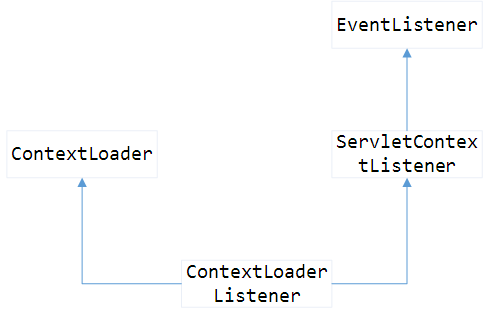
通过上图可以发现ContextLoaderListener继承了ContextLoader类以及实现了ServletContextListener接口,ServletContextListener又实现了EvenListener接口,所以这个监听器具有事件监听的功能,并且是监听了web容器,web容器启动马上加载执行。ContextLoader感觉更像是执行加载web容器的一个小小的core组件,负责执行加载web容器的逻辑。下面重点来说一说这个。
public void contextInitialized(ServletContextEvent event) {
     //首先先获取ContextLoader对象

        this.contextLoader = createContextLoader();

        if (this.contextLoader == null) {

            this.contextLoader = this;

        }
     //通过servletContext对象去加载WebApplicationContext

        this.contextLoader.initWebApplicationContext(event.getServletContext());

    }
initWebApplicationContext的主要代码:
public WebApplicationContext initWebApplicationContext(ServletContext servletContext) {
     //去servlet容器中去寻找org.springframework.web.context.WebApplicationContext.root作为key的value,也就是webApplicationContext对象

        if (servletContext.getAttribute(WebApplicationContext.ROOT_WEB_APPLICATION_CONTEXT_ATTRIBUTE) != null) {

            throw new IllegalStateException(

                    "Cannot initialize context because there is already a root application context present - " +

                    "check whether you have multiple ContextLoader* definitions in your web.xml!");

        }

        Log logger = LogFactory.getLog(ContextLoader.class);

        servletContext.log("Initializing Spring root WebApplicationContext");

        if (logger.isInfoEnabled()) {

            logger.info("Root WebApplicationContext: initialization started");

        }

        long startTime = System.currentTimeMillis();

        try {

            // Store context in local instance variable, to guarantee that

            // it is available on ServletContext shutdown.

            if (this.context == null) {

                this.context = createWebApplicationContext(servletContext);

            }

            if (this.context instanceof ConfigurableWebApplicationContext) {

                configureAndRefreshWebApplicationContext((ConfigurableWebApplicationContext)this.context, servletContext);

            }
        //将ApplicationContext放入ServletContext中,其key为<WebApplicationContext.ROOT_WEB_APPLICATION_CONTEXT_ATTRIBUTE

            servletContext.setAttribute(WebApplicationContext.ROOT_WEB_APPLICATION_CONTEXT_ATTRIBUTE, this.context);


       //将ApplicationContext放入ContextLoader的全局静态常量Map中,其中key为:Thread.currentThread().getContextClassLoader()即当前线程类加载器

            ClassLoader ccl = Thread.currentThread().getContextClassLoader();

            if (ccl == ContextLoader.class.getClassLoader()) {

                currentContext = this.context;

            }

            else if (ccl != null) {

                currentContextPerThread.put(ccl, this.context);

            }

            if (logger.isDebugEnabled()) {

                logger.debug("Published root WebApplicationContext as ServletContext attribute with name [" +

                        WebApplicationContext.ROOT_WEB_APPLICATION_CONTEXT_ATTRIBUTE + "]");

            }

            if (logger.isInfoEnabled()) {

                long elapsedTime = System.currentTimeMillis() - startTime;

                logger.info("Root WebApplicationContext: initialization completed in " + elapsedTime + " ms");

            }

            return this.context;

        }

        catch (RuntimeException ex) {

            logger.error("Context initialization failed", ex);

            servletContext.setAttribute(WebApplicationContext.ROOT_WEB_APPLICATION_CONTEXT_ATTRIBUTE, ex);

            throw ex;

        }

        catch (Error err) {

            logger.error("Context initialization failed", err);

            servletContext.setAttribute(WebApplicationContext.ROOT_WEB_APPLICATION_CONTEXT_ATTRIBUTE, err);

            throw err;

        }

    }
从上面的代码大家应该明白了Spring初始化之后,将ApplicationContext存到在了两个地方(servletContext中和currentContextPerThread中),那么是不是意味着我们可以通过两种方式取得ApplicationContext?
第一种获取方式:
request.getSession().getServletContext().getAttribute("org.springframework.web.context.WebApplicationContext.ROOT")
这样确实可以获取,但是如果需要我们自己去这样获取的话,未免Spring也太low了吧?那样会辜负Spring作为web开发第一核心框架的地位的。话不多说,其实Spring已经给我们提供接口了:
在WebApplicationContextUtils类中有一个静态方法:
 public static WebApplicationContext getRequiredWebApplicationContext(ServletContext sc)

             throws IllegalStateException {

         WebApplicationContext wac = getWebApplicationContext(sc);

         if (wac == null) {

             throw new IllegalStateException("No WebApplicationContext found: no ContextLoaderListener registered?");

         }

         return wac;

     }
 public static WebApplicationContext getWebApplicationContext(ServletContext sc) {

         return getWebApplicationContext(sc, WebApplicationContext.ROOT_WEB_APPLICATION_CONTEXT_ATTRIBUTE);

     }
通过执行上面的方法可以获取WebApplicationContext对象。
第二种方法:
借用ApplicationContextAware,ApplicationContext的帮助类能够自动装载ApplicationContext,只要你将某个类实现这个接口,并将这个实现类在Spring配置文件中进行配置,Spring会自动帮你进行注入 ApplicationContext.ApplicationContextAware的代码结构如下:
 public interface ApplicationContextAware {

         void setApplicationContext(ApplicationContext applicationContext) throws BeansException;

 }
就这一个接口。可以这样简单的实现一个ApplicationContextHelper类:
 public class ApplicationHelper implements ApplicationContextAware {

     private ApplicationContext applicationContext;

     public void setApplicationContext(ApplicationContext applicationContext)

             throws BeansException {

             this.applicationContext = applicationContext;

     }

     public  ApplicationContext getApplicationContext(){

         return this.applicationContext;

     }

 }
通过ApplicationHelper我们就可以获得咱们想要的AppilcationContext类了。
这是我对如何获取Spring Web上下文的一个理解。
获取WebApplicationContext的几种方式的更多相关文章
- spring 获取 WebApplicationContext的几种方法
spring 获取 WebApplicationContext的几种方法 使用ContextLoader WebApplicationContext webApplicationContext = C ...
- 获取Type的三种方式
using System;using UnityEngine; public class Type_Test : MonoBehaviour{ private void Awake() { ...
- java动态获取WebService的两种方式(复杂参数类型)
java动态获取WebService的两种方式(复杂参数类型) 第一种: @Override public OrderSearchListRes searchOrderList(Order_Fligh ...
- AngularJS中获取数据源的几种方式
在AngularJS中,可以从$rootScope中获取数据源,也可以把获取数据的逻辑封装在service中,然后注入到app.run函数中,或者注入到controller中.本篇就来整理获取数据的几 ...
- java 获取时间戳的三种方式
java 获取时间戳的三种方式 CreationTime--2018年7月13日16点29分 Author:Marydon 1.实现方式 方式一:推荐使用 System.currentTimeMi ...
- 【Struts2】Struts2获取session的三种方式
1.Map<String,Object> map = ActionContext.getContext().getSession(); 2.HttpSession session = S ...
- js获取时间戳的三种方式
js获取时间戳的三种方式 CreateTime--2018年5月23日08:44:10 Author:Marydon // 方式一:推荐使用 var timestamp=new Date().ge ...
- Struts2(四.注册时检查用户名是否存在及Action获取数据的三种方式)
一.功能 1.用户注册页面 <%@ page language="java" contentType="text/html; charset=UTF-8" ...
- HTTP获取信息的四种方式
HTTP 从网络获取信息的四种方式 GET GET指代你在浏览器中输入网址,浏览网站时做的事.例如,我们使用 http://www.baidu.com 的时候,可以将GET想象成他说:"hi ...
随机推荐
- asp.net core 依赖注入几种常见情况
先读一篇注入入门 全面理解 ASP.NET Core 依赖注入, 学习一下基本使用 然后学习一招, 不使用接口规范, 直接写功能类, 一般情况下可以用来做单例. 参考https://www.cnblo ...
- Java 学习笔记 反射与迭代器
反射 使用反射获得类 Class cls = Class.forName("全类名") //包括包名 Class cls = xx.Class;//xx代表类名 使用反射获得构造方 ...
- 【JDK和Open JDK】平常使用的JDK和Open JDK有什么区别
注意到这个问题,是在CentOS7上安装JDK的时候,查找相关的资料,发现安装JDK之前都需要检查或卸载系统上原生的Open JDK,这才引起了注意. 到了这里,引用查到的一篇说明. 转自:http: ...
- C#设计模式之十外观模式(Facade Pattern)【结构型】
一.引言 快12点半了,要开始今天的写作了.很快,转眼设计模式已经写了十个了,今天我们要讲[结构型]设计模式的第五个模式,该模式是[外观模式],英文名称是:Facade Pattern.我们先从名字上 ...
- C#设计模式之十三模板方法模式(Template Method Pattern)【行为型】
一.引言 “结构型”的设计模式已经写完了,从今天我们开始讲“行为型”设计模式.现在我们开始讲[行为型]设计模式的第一个模式,该模式是[模板方法],英文名称是:Template Method Patte ...
- Spring Boot依赖引入的多种方式
使用Spring Boot开发,不可避免的会面临Maven依赖包版本的管理. 有如下几种方式可以管理Spring Boot的版本. 使用parent继承 <?xml version=" ...
- Python面试题之Python面试题汇总
在这篇文章中: Python基础篇 1:为什么学习Python 2:通过什么途径学习Python 3:谈谈对Python和其他语言的区别 Python的优势: 4:简述解释型和编译型编程语言 5:Py ...
- CSS样式—— 字体、元素的垂直水平居中
1.CSS样式与HTML中标签属性的区别: 标签的属性是采用 属性名=“属性值” 表示的 CSS样式是采用名值对 属性名:属性值: 表示的 2.内联元素(行内元素)与块元素 (1)内联元素及其特点: ...
- 苹果8plus怎么录屏视频
现在越来越多的手机控,不管在什么地方,什么时候,都是低头看手机的居多,因为手机信息量太大了,一部手机就可以了解最新咨询,但是作为苹果8plus怎么录制手机屏幕,你们知道吗?今天就和大家一起分享苹果8p ...
- 性能测试 基于Python结合InfluxDB及Grafana图表实时采集Linux多主机或Docker容器性能数据
基于Python结合InfluxDB及Grafana图表实时采集Linux多主机性能数据 by:授客 QQ:1033553122 实现功能 1 测试环境 1 环境搭建 3 使用前提 3 使用方法 ...