
小峰mybatis(4)mybatis使用注解配置sql映射器
一、基本映射语句:
@Inert
@Update
@Delete
@Select
二、结果集映射语句
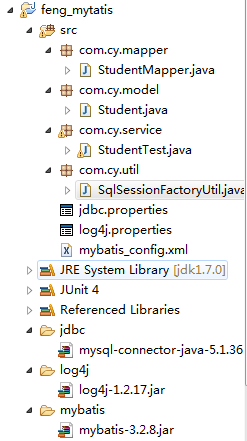
项目结够:
Student.java model实体类:
package com.cy.model;

public class Student{

    private Integer id;

    private String name;

    private Integer age;

    public Student(){

    }

    public Student(String name, Integer age){

        this.name = name;

        this.age = age;

    }

    public Integer getId() {

        return id;

    }

    public void setId(Integer id) {

        this.id = id;

    }

    public String getName() {

        return name;

    }

    public void setName(String name) {

        this.name = name;

    }

    public Integer getAge() {

        return age;

    }

    public void setAge(Integer age) {

        this.age = age;

    }

    @Override

    public String toString() {

        return "Student [id=" + id + ", name=" + name + ", age=" + age + "]";

    }

}
mybatis-config.xml:
<?xml version="1.0" encoding="UTF-8" ?>

<!DOCTYPE configuration

PUBLIC "-//mybatis.org//DTD Config 3.0//EN"

"http://mybatis.org/dtd/mybatis-3-config.dtd">

<configuration>

    <properties resource="jdbc.properties"/>

    <!-- 别名 -->

    <typeAliases>

        <package name="com.cy.model"/>

    </typeAliases>

    <environments default="development">

        <environment id="development">

            <transactionManager type="JDBC" />

                <dataSource type="POOLED">

                    <property name="driver" value="${jdbc.driverClassName}" />

                    <property name="url" value="${jdbc.url}" />

                    <property name="username" value="${jdbc.username}" />

                    <property name="password" value="${jdbc.password}" />

                </dataSource>

        </environment>

        <environment id="test">

            <transactionManager type="JDBC" />

            <dataSource type="POOLED">

                <property name="driver" value="${jdbc.driverClassName}" />

                <property name="url" value="${jdbc.url}" />

                <property name="username" value="${jdbc.username}" />

                <property name="password" value="${jdbc.password}" />

            </dataSource>

        </environment>

    </environments>

    <mappers>

        <package name="com.cy.mapper"/>

    </mappers>

</configuration>
StudentMapper.java 接口:
package com.cy.mapper;

import java.util.List;

import org.apache.ibatis.annotations.Delete;

import org.apache.ibatis.annotations.Insert;

import org.apache.ibatis.annotations.Result;

import org.apache.ibatis.annotations.Results;

import org.apache.ibatis.annotations.Update;

import org.apache.ibatis.annotations.Select;

import com.cy.model.Student;

public interface StudentMapper {

    //插入

    @Insert("insert into t_student values(null, #{name}, #{age})")

    public int inertStudent(Student student);

    //更新

    @Update("update t_student set name=#{name}, age=#{age} where id = #{id}")

    public int updateStudent(Student stu);

    //删除

    @Delete("delete from t_student where id=#{id}")

    public int deleteStudent(int id);

    //根据id查找学生

    @Select("select * from t_student where id=#{id}")

    public Student getStudentById(Integer id);

    //查询所有学生  结果集映射  id主键列

    @Select("select * from t_student")

    @Results(

            {

                @Result(id=true,column="id",property="id"),

                @Result(column="name",property="name"),

                @Result(column="age",property="age")

            }

    )

    public List<Student> findStudents();

}
测试代码StudentTest.java:
package com.cy.service;

import java.util.List;

import org.apache.ibatis.session.SqlSession;

import org.apache.log4j.Logger;

import org.junit.After;

import org.junit.Before;

import org.junit.Test;

import com.cy.mapper.StudentMapper;

import com.cy.model.Student;

import com.cy.util.SqlSessionFactoryUtil;

public class StudentTest {

    private static Logger logger = Logger.getLogger(StudentTest.class);

    private SqlSession sqlSession=null;

    private StudentMapper studentMapper=null;

    @Before

    public void setUp() throws Exception {

        sqlSession=SqlSessionFactoryUtil.openSession();

        studentMapper=sqlSession.getMapper(StudentMapper.class);

    }

    @After

    public void tearDown() throws Exception {

        sqlSession.close();

    }

    @Test

    public void testInsertStudent() {

        logger.info("测试insertStudent");

        Student stu = new Student("cpp", 12);

        int count = studentMapper.inertStudent(stu);

        sqlSession.commit();

    }

    @Test

    public void testUpdateStudent() {

        logger.info("测试updateStudent");

        Student stu = new Student("cppp", 13);

        stu.setId(14);

        int count = studentMapper.updateStudent(stu);

        sqlSession.commit();

    }

    @Test

    public void testDeleteStudent() {

        logger.info("测试删除学生");

        int count = studentMapper.deleteStudent(14);

        sqlSession.commit();

    }

    @Test

    public void testGetById(){

        logger.info("根据id查找学生");

        Student stu = studentMapper.getStudentById(1);

        System.out.println(stu);

    }

    @Test

    public void testFindStudent() {

        logger.info("测试查询所有学生");

        List<Student> students = studentMapper.findStudents();

        for(Student student : students){

            System.out.println(student);

        }

    }

}
三、使用注解 一对一映射:


package com.cy.model;

public class Student{

    private Integer id;

    private String name;

    private Integer age;

    private Address address;

    public Student(){

    }

    public Student(String name, Integer age){

        this.name = name;

        this.age = age;

    }

    public Integer getId() {

        return id;

    }

    public void setId(Integer id) {

        this.id = id;

    }

    public String getName() {

        return name;

    }

    public void setName(String name) {

        this.name = name;

    }

    public Integer getAge() {

        return age;

    }

    public void setAge(Integer age) {

        this.age = age;

    }

    public Address getAddress() {

        return address;

    }

    public void setAddress(Address address) {

        this.address = address;

    }

    @Override

    public String toString() {

        return "Student [id=" + id + ", name=" + name + ", age=" + age

                + ", address=" + address + "]";

    }

}
Address.java 实体:
package com.cy.model;

public class Address {

    private Integer id;

    private String sheng;

    private String shi;

    private String qu;

    public Integer getId() {

        return id;

    }

    public void setId(Integer id) {

        this.id = id;

    }

    public String getSheng() {

        return sheng;

    }

    public void setSheng(String sheng) {

        this.sheng = sheng;

    }

    public String getShi() {

        return shi;

    }

    public void setShi(String shi) {

        this.shi = shi;

    }

    public String getQu() {

        return qu;

    }

    public void setQu(String qu) {

        this.qu = qu;

    }

    @Override

    public String toString() {

        return "Address [id=" + id + ", sheng=" + sheng + ", shi=" + shi

                + ", qu=" + qu + "]";

    }

}
StudentMapper.java接口:
//查询学生,带地址

    @Select("select * from t_student where id=#{id}")

    @Results(

            {

                @Result(id=true,column="id",property="id"),

                @Result(column="name",property="name"),

                @Result(column="age",property="age"),

                @Result(column="addressId",property="address",one=@One(select="com.cy.mapper.AddressMapper.findById"))

            }

    )

    public Student findStudentWithAddress(int id);
AddressMapper.java接口:
public interface AddressMapper {

    @Select("select * from t_address where id=#{id}")

    public Address findById(Integer id);

}
mybatis的实现是:在查找学生的时候,将addressId,传到AddressMapper.findById方法,根据这个addressId查找address;
测试代码:
@Test

    public void testFindStudentWithAddress() {

        logger.info("测试学生,带地址");

        Student student = studentMapper.findStudentWithAddress(15);

        System.out.println(student);

    }
console打印:

四、使用注解,一对多映射
package com.cy.model;

public class Student{

    private Integer id;

    private String name;

    private Integer age;

    private Address address;

    private Grade grade;

    public Student(){

    }

    public Student(String name, Integer age){

        this.name = name;

        this.age = age;

    }

    public Integer getId() {

        return id;

    }

    public void setId(Integer id) {

        this.id = id;

    }

    public String getName() {

        return name;

    }

    public void setName(String name) {

        this.name = name;

    }

    public Integer getAge() {

        return age;

    }

    public void setAge(Integer age) {

        this.age = age;

    }

    public Address getAddress() {

        return address;

    }

    public void setAddress(Address address) {

        this.address = address;

    }

    public Grade getGrade() {

        return grade;

    }

    public void setGrade(Grade grade) {

        this.grade = grade;

    }

    @Override

    public String toString() {

        return "Student [id=" + id + ", name=" + name + ", age=" + age

                + ", address=" + address + ", grade=" + grade + "]";

    }

}
Grade.java:
package com.cy.model;

import java.util.List;

public class Grade {

    private Integer id;

    private String gradeName;

    private List<Student> students;

    public Integer getId() {

        return id;

    }

    public void setId(Integer id) {

        this.id = id;

    }

    public String getGradeName() {

        return gradeName;

    }

    public void setGradeName(String gradeName) {

        this.gradeName = gradeName;

    }

    public List<Student> getStudents() {

        return students;

    }

    public void setStudents(List<Student> students) {

        this.students = students;

    }

    @Override

    public String toString() {

        return "Grade [id=" + id + ", gradeName=" + gradeName +"]";

    }

}
数据库中表,t_student:

t_grade:

1)根据id查找年级,将年级下的学生也查出来:
GradeMapper.java:
public interface GradeMapper {

    //根据id查找年级,将年级下的学生也查出来

    @Select("select * from t_grade where id = #{id}")

    @Results(

            {

                @Result(id=true,column="id",property="id"),

                @Result(column="gradeName",property="gradeName"),

                @Result(column="id",property="students",many=@Many(select="com.cy.mapper.StudentMapper.findStudentByGradeId"))

            }

    )

    public Grade findById(Integer id);

}
StudentMapper.java:
//根据年级查找学生

    @Select("select * from t_student where gradeId=#{gradeId}")

    @Results(

            {

                @Result(id=true,column="id",property="id"),

                @Result(column="name",property="name"),

                @Result(column="age",property="age"),

                @Result(column="addressId",property="address",one=@One(select="com.cy.mapper.AddressMapper.findById"))

            }

    )

    public Student findStudentByGradeId(int gradeId);
测试代码:
//根据id查找年级,将年级下的学生也查出来

    @Test

    public void testFindGradeWithStudents() {

        logger.info("根据id查询年级(带学生)");

        Grade grade=gradeMapper.findById(1);

        System.out.println(grade);

        List<Student> studentList=grade.getStudents();

        for(Student student:studentList){

            System.out.println(student);

        }

    }
结果:

2)根据id查询学生,将年级信息也查出来:
StudentMapper.java:
//根据id查询学生带地址   和 年级

    @Select("select * from t_student where id=#{id}")

    @Results(

            {

                @Result(id=true,column="id",property="id"),

                @Result(column="name",property="name"),

                @Result(column="age",property="age"),

                @Result(column="addressId",property="address",one=@One(select="com.cy.mapper.AddressMapper.findById")),

                @Result(column="gradeId",property="grade",one=@One(select="com.cy.mapper.GradeMapper.findById"))

            }

    )

    public Student findStudentWithAddressAndGrade(int id);
GradeMapper.java中的findById和上面1)中一样;
测试代码:
//根据id查询学生,带地址和年级

    @Test

    public void testSelectStudentWithAddressAndGrade() {

        logger.info("根据id查询学生(带地址、年级)");

        Student student=studentMapper.findStudentWithAddressAndGrade(1);

        System.out.println(student);

    }
打印结果:

小峰mybatis(4)mybatis使用注解配置sql映射器的更多相关文章
- MyBatis 3(中文版) 第四章 使用注解配置SQL映射器
本章将涵盖以下话题: l 在映射器Mapper接口上使用注解 l 映射语句 @Insert,@Update,@Delete,@SeelctStatements l 结果映射 一对一映射 一对多映射 l ...
- MyBatis 3 使用注解配置SQL映射器
l 在映射器Mapper接口上使用注解 l 映射语句 @Insert,@Update,@Delete,@SeelctStatements l 结果映射 一对一映射 一对多映射 l 动态SQL @Sel ...
- 使用注解配置SQL映射器
在上一章,我们看到了我们是怎样在映射器Mapper XML配置文件中配置映射语句的.MyBatis也支持使用注解来配置映射语句.当我们使用基于注解的映射器接口时,我们不再需要在XML配置文件中配置了. ...
- Mybatis基于接口注解配置SQL映射器(一)
上文已经讲解了基于XML配置的SQL映射器,在XML配置的基础上MyBatis提供了简单的Java注解,使得我们可以不配置XML格式的Mapper文件,也能方便的编写简单的数据库操作代码. Mybat ...
- 小峰mybatis(5)mybatis使用注解配置sql映射器--动态sql
一.使用注解配置映射器 动态sql: 用的并不是很多,了解下: Student.java 实体bean: package com.cy.model; public class Student{ pri ...
- Mybatis基于接口注解配置SQL映射器(二)
Mybatis之增强型注解 MyBatis提供了简单的Java注解,使得我们可以不配置XML格式的Mapper文件,也能方便的编写简单的数据库操作代码.但是注解对动态SQL的支持一直差强人意,即使My ...
- Java Persistence with MyBatis 3(中文版) 第三章 使用XML配置SQL映射器
关系型数据库和SQL是经受时间考验和验证的数据存储机制.和其他的ORM 框架如Hibernate不同,MyBatis鼓励开发者可以直接使用数据库,而不是将其对开发者隐藏,因为这样可以充分发挥数据库服务 ...
- Mybatis基于XML配置SQL映射器(二)
Mybatis之XML注解 之前已经讲到通过 mybatis-generator 生成mapper映射接口和相关的映射配置文件: 下面我们将详细的讲解具体内容 首先我们新建映射接口文档 sysUse ...
- Mybatis基于XML配置SQL映射器(一)
Durid和Mybatis开发环境搭建 SpringBoot搭建基于Spring+SpringMvc+Mybatis的REST服务(http://www.cnblogs.com/nbfujx/p/76 ...
随机推荐
- 《Python》 内置函数补充、匿名函数、递归初识
一.内置函数补充: 1.数据结构相关(24): 列表和元祖(2):list.tuple list:将一个可迭代对象转化成列表(如果是字典,默认将key作为列表的元素). tuple:将一个可迭代对象转 ...
- JavaScript世界的一等公民 - 函数
简介 在很多传统语言(C/C++/Java/C#等)中,函数都是作为一个二等公民存在,你只能用语言的关键字声明一个函数然后调用它,如果需要把函数作为参数传给另一个函数,或是赋值给一个本地变量,又或是作 ...
- 0117 面向对象OOP有关方法、类、构造方法及权限修饰符的练习
public class juxing { //编写一个矩形类,将长与宽作为矩形类的属性,在构造方法中将长.宽初始化,定义一个成员方法求此矩形面积 int chang; int kuan; int m ...
- Tomcat服务器启动失败:Could not publish server configuration for Tomcat v8.0 Server at localhost. Multiple Contexts have a path of
在eclipse中使用Tomcat8.0时,出现了如下错误: 解决办法: 在建立Tomcat服务时,eclipse会自动生成一个Servers的项目. 在这个项目中,找到你部署项目的服务文件夹. 在这 ...
- utf-8和Unicode的区别
链接 utf-8和Unicode到底有什么区别?是存储方式不同?编码方式不同?它们看起来似乎很相似,但是实际上他们并不是同一个层次的概念 要想先讲清楚他们的区别,首先应该讲讲Unicode的来由. 众 ...
- 新手小白Linux(Centos6.5)部署java web项目(mysql5.7安装及相关操作)
一.安装 参考:https://dev.mysql.com/doc/refman/5.7/en/linux-installation-yum-repo.html # 检测系统中是否安装了mysql y ...
- POJ 3253 Fence Repair STL 优先队列
这题做完后觉得很水,主要的想法就是逆过程思考,原题是截断,可以想成是拼装,一共有n根木棍,最后要拼成一根完整的,每两根小的拼成一根大的,拼成后的木棍长度就是费用,要求费用最少.显然的是一共会拼接n-1 ...
- Arpa’s obvious problem and Mehrdad’s terrible solution 思维
There are some beautiful girls in Arpa’s land as mentioned before. Once Arpa came up with an obvious ...
- hdu 5184 类卡特兰数+逆元
BC # 32 1003 题意:定义了括号的合法排列方式,给出一个排列的前一段,问能组成多少种合法的排列. 这道题和鹏神研究卡特兰数的推导和在这题中的结论式的推导: 首先就是如何理解从题意演变到卡特兰 ...
- JS校验 if (! temp_var) {} //拦截 ''和 undefined
if (! aaa) {} //拦截 ' ' 和 undefined 和 0 不拦截null