
http接口测试工具——RESTClient
摘要: RESTClient是用java Swing编写的基于http协议的接口测试工具,工具比较灵巧,便于做接口的调试,源码在官网上可以下到,感兴趣的可以研究一下
WizTools.org RESTClient is a Java Swing application for testing RESTful web services. It might be used for testing other HTTP communications too. This is a short introduction of this tool explaining its various features.
The First Step
RESTClient can be downloaded from http://code.google.com/p/rest-client/downloads/list. It is a single Jar file. To run it, you need to have Java 5 installed. After downloading, Windows users need to double-click to start the application. Non-Windows users, fire up your command prompt/shell, and issue:
$ java -jar restclient-2.1-jar-with-dependencies.jar
The UI
Once it is started, you will see this UI:

As seen in the screenshot, the UI is divided into two sections. The top portion has the HTTP request details and the bottom portion has the HTTP response details. To get started, just enter the value “http://wiztools.org/” in the URL field. Now press the green “>>” button near to the URL field. You should find the response details in the Response section of the UI.
RESTful Web services Example
Now we will use RESTClient to learn how it can be used to test a RESTful web services. We will take the example of social bookmarking site BibSonomy.org for example. If you do not have an account with this site, please sign up for a free account. The REST API of this service is documented in this page: http://www.bibsonomy.org/help/doc/api.html. For using this service, you have to request API key here: http://www.bibsonomy.org/help/doc/gettingaccess.html.
Once you get the API key, you are ready to start! Fire up RESTClient. We will do the following operations on BibSonomy.org:
List all the posts you made
Create a post (bookmark entry)
Change post
Delete post
Before we start trying out the features of BibSonomy.org, you have to understand the authentication mechanism of this site. In the authentication tab, make sure you give:
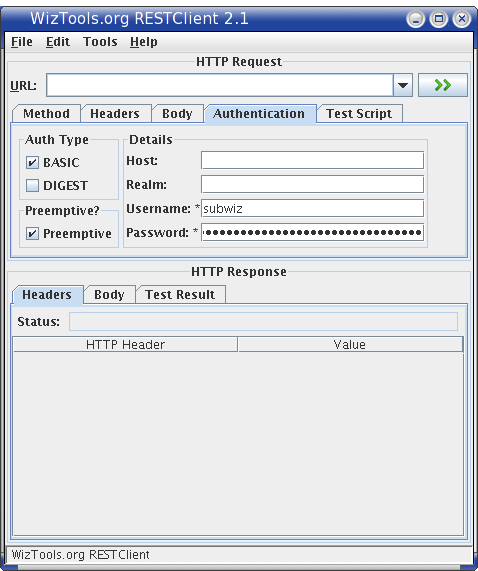
BASIC authentication method should be selected.
Preemptive can be selected (not mandatory). Having this selected will send the authentication details to the server even before the server challenges for it.
Give your BibSonomy username and API key as the password.
Now we jump on to the operations. All the operations will require that this authentication detail to be configured.
Operation 1: List all the posts you made
To list all the posts you have made, enter this URL in the URL box:
http://www.bibsonomy.org/api/posts?user=subwiz&resourcetype=bookmark
(Note: Replace all mentions of `subwiz' with your BibSonomy.org userid. `subwiz' is the author's BibSonomy.org userid.)
Make sure you have entered the authentication details as mentioned. Now with the method entered as GET, hit the green “>>” button.
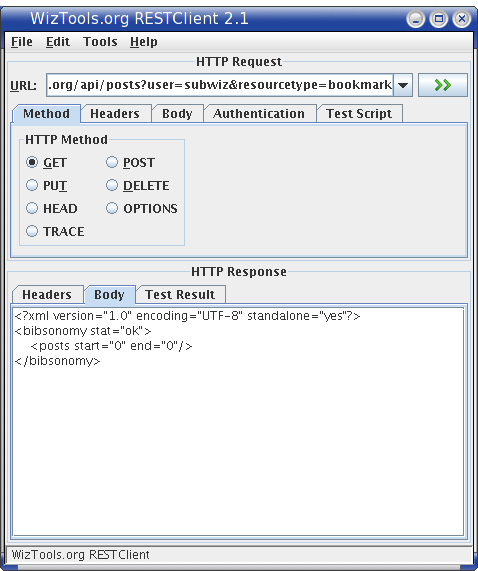
As you see in the body tab of the Response section, it has returned an XML saying that this user does not have any posts yet. We will be using Operation 1 further down in the tutorial to see the status of our additions, updations and deletions.
Operation 2: Create a post
To create a post, you have to hit this URL:
http://www.bibsonomy.org/api/users/subwiz/posts
The HTTP method to be used is POST for create operation. Make sure you select this option in the Method tab.
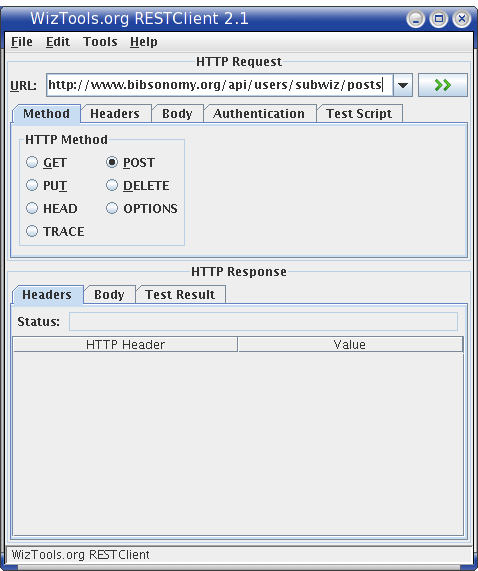
After selecting the POST method, the Body tab controls get enabled. Body is supported only for POST and PUT methods. In the Body tab, add the bookmark post detail in the following format:
<?xml version="1.0"?>

<bibsonomy>

  <post description="WizTools.org OpenSource">

    <user name="subwiz"/>

    <tag name="opensource"/>

    <tag name="java"/>

    <group name="public"/>

    <bookmark url="http://wiztools.org/" title="WizTools.org"/>

  </post>

</bibsonomy>
Make sure you change the content-type to application/xml and charset to UTF-8 (click the Edit button near to the content-type/charset text field to change). Finally, it should look like: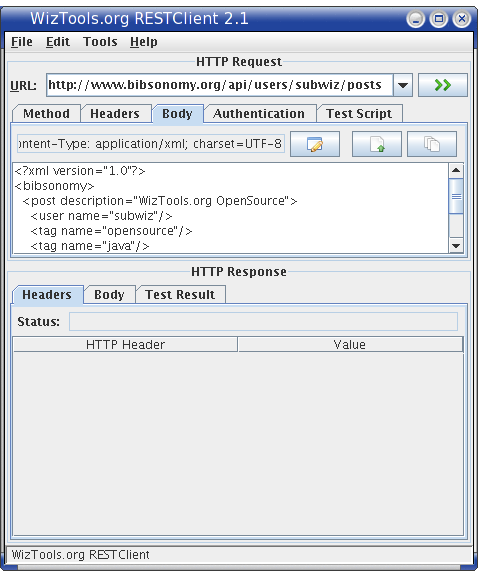
Now execute the request by pressing the “>>” button. The response screen should be something similar to:
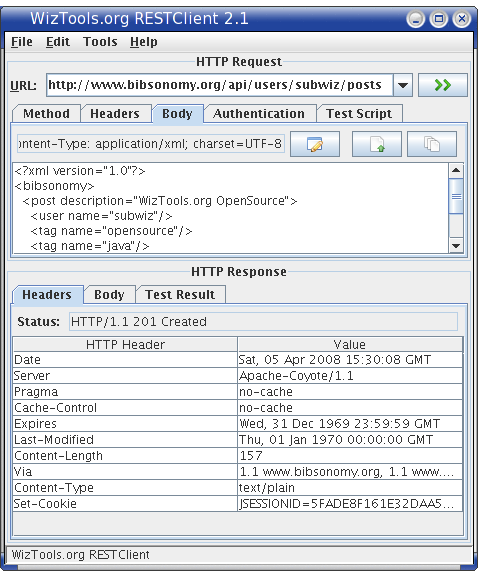
and:

Response status 201 means success. Make note of the hash returned (which in our case is: 03fb1f5d1634e4bd72e6ccdc0cdafcc2) in the body of the response. This will be needed for the next operation. Now perform Operation 1 to see your new post getting displayed.
Operation 3: Change post
The URL for updating a existing post is:
http://www.bibsonomy.org/api/users/subwiz/posts/03fb1f5d1634e4bd72e6ccdc0cdafcc2
For updating a post with new/changed data, HTTP PUT method is used. Select PUT from the Methods tab, and enter in the body text:
<?xml version="1.0"?>

<bibsonomy>

  <post description="WizTools.org OpenSource">

    <user name="subwiz"/>

    <tag name="opensource"/>

    <tag name="java"/>

    <tag name="REST"/>

    <bookmark url="http://wiztools.org/" title="WizTools.org--OpenSource Software"

              intrahash="03fb1f5d1634e4bd72e6ccdc0cdafcc2"

              interhash="03fb1f5d1634e4bd72e6ccdc0cdafcc2"/>

  </post>

</bibsonomy>
As you see, we have added a new tag REST and updated the title. Also remember to set the Content-type and charset to application/xml and UTF-8 respectively. Execute the request, and performOperation 1 to validate.
Operation 4: Delete post
The final operation is the DELETE operation. The URL for this is:
http://www.bibsonomy.org/api/users/subwiz/posts/03fb1f5d1634e4bd72e6ccdc0cdafcc2
From the Methods tab, select DELETE. If the DELETE operation is successful, the Response status code will be 200 OK. Perform Operation 1 to validate.

Testing Using RESTClient
Another interesting feature in RESTClient is the ability to attach test scripts written in Groovy with each request. More on this is covered in the tutorial at the site.
Persisting Request et all
RESTClient also supports persisting request, response and request-response combination. This helps in record and playback support. These options are available in the File menu.
What Else?
RESTClient has been developed with active input from the REST-Discuss community. If you have any request (both bugs and features), just file a issue.
Topics:
原文地址:https://dzone.com/articles/wiztoolsorg-restclient-21-rele
restclient 3.6.1
Downloads
http接口测试工具——RESTClient的更多相关文章
- 如何使用火狐下的两款接口测试工具RESTClient和HttpRequester发送post请求
Chrome下有著名的Postman,那火狐也有它的左膀右臂,那就是RESTClient和HttpRequester.这两款工具都是火狐的插件,主要用来模拟发送HTTP请求,HTTP请求最常用的两种方 ...
- 火狐浏览器安装接口测试工具RESTClient方法
- PCB WebAPI 接口测试工具与接口文档生成
我们自己写WebAPI或调用对方系统提供的WebAPI时,测试WebAPI接口工具用哪些工具呢. 这里将3种WebAPI常用到的工具使用说明.主要是讲对第3种WebApiTestClientWebAp ...
- RESTful测试工具RESTClient
1.简介 RESTClient是一个用于测试RESTful Web服务的客户端, 是用Java Swing编写的基于Http协议的接口测试工具, 它可以向服务器发送各种Http请求,并显示服务器响应. ...
- C#进阶系列——WebApi 接口测试工具:WebApiTestClient
前言:这两天在整WebApi的服务,由于调用方是Android客户端,Android开发人员也不懂C#语法,API里面的接口也不能直接给他们看,没办法,只有整个详细一点的文档呗.由于接口个数有点多,每 ...
- postman接口测试工具3.0版本的坑
今天用postman接口测试工具3.0版本被坑,找了半天,原来postman这个新版本有个坑啊 下面的get参数,第一行不管你填不填,都是无效的,可能是postman的一个bug吧
- Remoting接口测试工具
动手写一个Remoting接口测试工具 基于.NET开发分布式系统,经常用到Remoting技术.在测试驱动开发流行的今天,如果针对分布式系统中的每个Remoting接口的每个方法都要写详细的测试脚本 ...
- python接口自动化(四)--接口测试工具介绍(详解)
简介 “工欲善其事必先利其器”,通过前边几篇文章的介绍,大家大致对接口有了进一步的认识.那么接下来让我们看看接口测试的工具有哪些. 目前,市场上有很多支持接口测试的工具.利用工具进行接口测试,能够提供 ...
- Jmeter、Postman 、 loadrunner SoapUI 接口测试工具
一. loadrunner 简称 LR 二. Jmeter 1.安装包:apache-jmeter-4.0.tgz 解压.学会此工具的使用 和POSTman 一样的. 2.本机测试:双击apa ...
随机推荐
- Linux:挂载
挂载
- mysql-5.6.17-win32安装
下载免安装压缩文件http://dev.mysql.com/downloads/mysql/ 解压到自定义目录,我这里演示的是D:\wamp\mysql\ 复制根目录下的my-default.in ...
- Windows 下python的tab自动补全
方法一:安装一个ipython就OK啦,而且关键字还能高亮显示呢 一.打开cmd,输入pip3 install ipython联网安装 二.安装成功后,cmd里运行ipython,成功啦. 方法二:写 ...
- 新手小白Linux(Centos6.5)部署java web项目(mongodb4.0.2安装及相关操作)
红帽企业或CentOS的Linux上安装MongoDB的社区版: https://docs.mongodb.com/manual/tutorial/install-mongodb-on-red-hat ...
- 【opencv基础】测量运行时间的函数getTickCount/getCPUTickCount/getTickFrequency
函数的计算结果类型是double,单位是秒. 要使用更精确的计时,就需要使用getCPUTickCount(),不过现代计算机CPU的频率会随着负载而变化所以没大有必要使用该函数,可以参看函数的介绍[ ...
- 【机器学习算法】Boostrapping算法
参考 1.AdaBoost从原理到实现: 完
- EasyTouch基本用法
EasyTouch基本用法 本文提供全流程,中文翻译.Chinar坚持将简单的生活方式,带给世人!(拥有更好的阅读体验 -- 高分辨率用户请根据需求调整网页缩放比例) 1 hierarchy (层次面 ...
- php-fpm简介
What is PHP-FPM? PHP-FPM (FastCGI Process Manager) is an alternative PHP FastCGI implementation with ...
- CODEFORCES 340 XOR and Favorite Number 莫队模板题
原来我直接学的是假的莫队 原题: Bob has a favorite number k and ai of length n. Now he asks you to answer m queries ...
- ehci及其伴随ohci主机控制器驱动分析
1. 正常插入 插上U盘产生中断调用usb_hcd_irq: usb_hcd_irq ehci_irq usb_hcd_resume_root_hub queue_work(pm_wq, &h ...