
Python3.5+SQL+Prometheus+Grafana报表/监控
#coding=utf-8
import sys
import pymysql
import os
from prometheus_client import Gauge,start_http_server
import time
#v_host=os.popen('echo $HOSTNAME')
#hostname=v_host.read()
#hstname="".join(hostname)
#print(hostname.strip())
class MySQL_Status_Output:
def __init__(self,host,port,user,password):
try:
self.db = pymysql.connect(host=host,port=port,user=user,password=password)
except Exception as e:
print('Database Connection Error')
print(e)
def mysql_select_colum_sql(self,sql):
try:
self.cursor = self.db.cursor(cursor = pymysql.cursors.DictCursor)
self.cursor.execute(sql)
v_result=self.cursor.fetchall()
return v_result
except Exception as e:
print('SQL Result One Column Error')
print(e)
def mysql_select_sql(self,sql):
try:
self.cursor = self.db.cursor()
self.cursor.execute(sql)
col=self.cursor.description
v_result=self.cursor.fetchall()
return v_result,col
except Exception as e:
print('SQL Result More Column Error')
print(e)
def close_db(self):
self.db.close()
try:
pro_db = MySQL_Status_Output('127.0.0.1',3306,'dbadmin','dbadmin')
ccpay_sql = pro_db.mysql_select_colum_sql(sql_exec)
pro_db.close_db()
#print('输出行数为:',len(ccpay_sql))
if int(len(ccpay_sql))==1:
for i in range(len(ccpay_sql)):
c=ccpay_sql[i]
a=list(c.keys())
for j in range(len(a)):
print(a[j],':',c.get(a[j]))
ccpayGauge.labels(mylabelname=a[j]).set(c.get(a[j]))
else:
pass
except Exception as e:
print('One Colum ccpayGauge Error')
print(e)
try:
pro_db = MySQL_Status_Output('127.0.0.1',3306,'dbadmin','dbadmin')
ccpay_sql,col_name = pro_db.mysql_select_sql(sql_exec)
if int(len(ccpay_sql))>1:
bs_name=[]
for i in range(len(ccpay_sql)):
bs_name.append(ccpay_sql[i][0])
print(bs_name)
for bsname in range(len(bs_name)):
col_name_list=[]
for i in range(len(col_name)):
col_name_list.append(col_name[i][0])
col_name_tuple=tuple(col_name_list)
ccpay_value_list=[]
for j in range(len(ccpay_sql)):
if ccpay_sql[j][0]==bs_name[bsname]:
ccpay_value_list=ccpay_sql[j]
me=dict(zip(col_name_tuple,ccpay_value_list))
for key in me:
bn=str(bs_name[bsname]+key)
bkey=str(me[key])
if str(bs_name[bsname])==str(bkey):
#print(bs_name[bsname])
pass
else:
print(bn,':',bkey)
ccpayGauge.labels(mylabelname=bn).set(bkey)
except Exception as e:
print('More Colums ccpayGauge Error')
print(e)
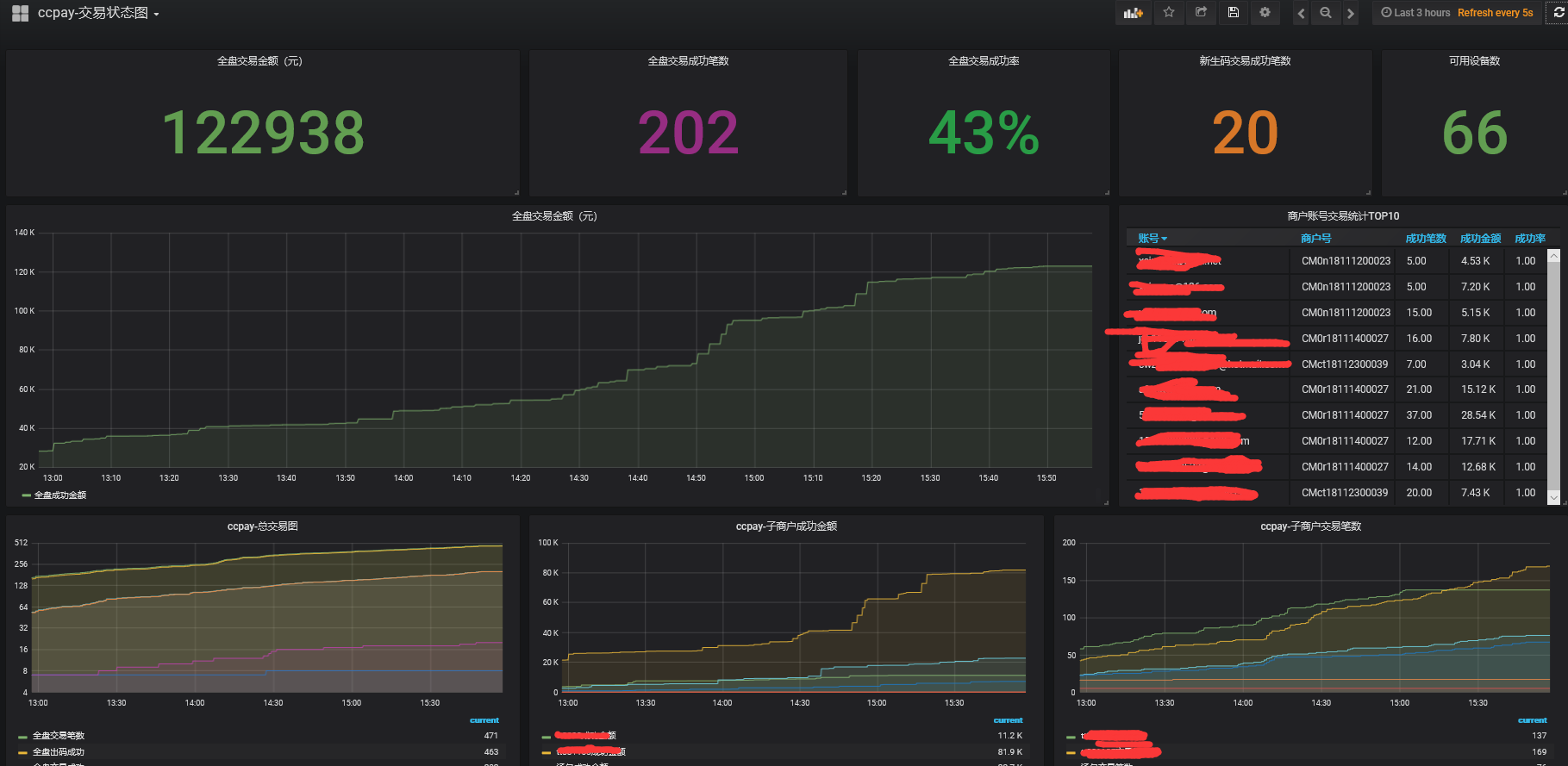
start_http_server(9500)
ccpayGauge = Gauge('ccpayGauge','Description of gauge', ['mylabelname'])
while True:
time.sleep(60)
try:
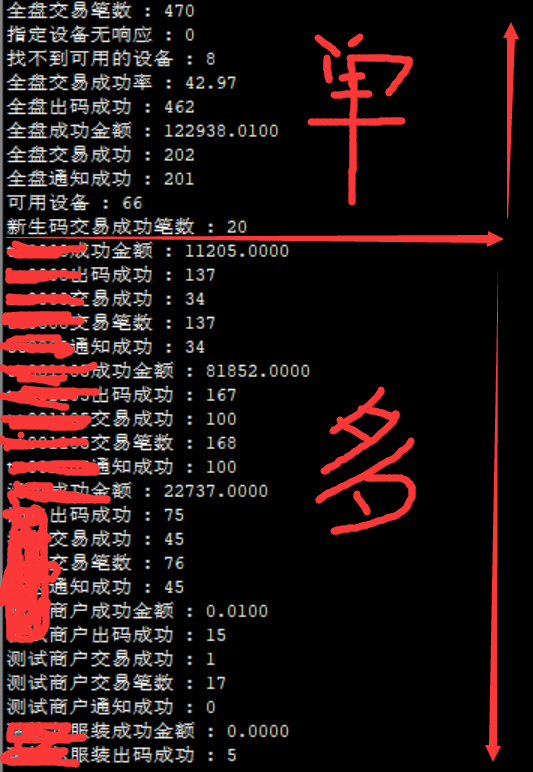
ccpay_sql_one_exec(" select count(1) '全盘交易笔数',count(case when trade_status !='FAILED' then 1 else null end) '全盘出码成功',count(case when trade_status ='SUCCESS' then 1 else null end) '全盘交易成功',count(case when notify_status ='SUCCESS' then 1 else null end) '全盘通知成功',sum(case when trade_status ='SUCCESS' then TRADE_AMOUNT else null end)/100 '全盘成功金额',count(case when trade_status ='FAILED' and trade_errmsg = '指定设备无响应' then 1 else null end) '指定设备无响应',count(case when trade_status ='FAILED' and trade_errmsg = '找不到可用的设备' then 1 else null end) '找不到可用的设备',TRUNCATE(count(case when trade_status ='SUCCESS' then 1 else null end)*100/count(1),2) '全盘交易成功率' from ifpay_ccpay.trade_info where CREATE_TIME > curdate() ")
ccpay_sql_one_exec(" select count(1) '可用设备' from ifpay_ccpay.machine where ENABLE_STATUS = '1' ")
ccpay_sql_one_exec(" select count(distinct qrcode_url.qrcode_num) '新生码交易成功笔数' from ifpay_ccpay.trade_info inner join ifpay_ccpay.qrcode_url on trade_info.qrcode_num=qrcode_url.qrcode_num where trade_status='SUCCESS' and date(trade_info.create_time)=date(current_date()) and date(trade_info.create_time)=date(qrcode_url.created_date) ")
ccpay_sql_more_exec(" select MERCHANT_name '商户名称',total '交易笔数',qrcode '出码成功',success '交易成功',notify '通知成功',(case when amount is null then 0 else amount end) '成功金额' from (select a.MERCHANT_name MERCHANT_name,count(1) total,count(case when trade_status !='FAILED' then 1 else null end) qrcode,count(case when trade_status ='SUCCESS' then 1 else null end) success,count(case when notify_status ='SUCCESS' then 1 else null end) notify,sum(case when trade_status ='SUCCESS' then TRADE_AMOUNT else null end)/100 amount from ifpay_ccpay.trade_info,ifpay_ccpay.merchant a where MERCHANT_NO=a.MERCHANT_id and CREATE_TIME > curdate() group by a.MERCHANT_name) a ")
except Exception as e:
print('Is Wrong')
print(e)
Python3.5+SQL+Prometheus+Grafana报表/监控的更多相关文章
- Spring Boot 微服务应用集成Prometheus + Grafana 实现监控告警
Spring Boot 微服务应用集成Prometheus + Grafana 实现监控告警 一.添加依赖 1.1 Actuator 的 /prometheus端点 二.Prometheus 配置 部 ...
- Prometheus+Grafana企业监控系统
Prometheus+Grafana企业监控系统 作者 刘畅 实验配置: 主机名称 Ip地址 controlnode 172.16.1.70/24 slavenode1 172.16.1.71/24 ...
- go-zero docker-compose 搭建课件服务(七):prometheus+grafana服务监控
0.转载 go-zero docker-compose 搭建课件服务(七):prometheus+grafana服务监控 0.1源码地址 https://github.com/liuyuede123/ ...
- Prometheus+Grafana搭建监控系统
之前在业务中遇到服务器负载过高问题,由于没有监控,一直没发现,直到业务方反馈网站打开速度慢,才发现问题.这样显得开发很被动.所以是时候搭建一套监控系统了. 由于是业余时间自己捯饬,所以神马业务层面的监 ...
- prometheus+grafana实现监控过程的整体流程
prometheus安装较为简单,下面会省略安装步骤: 一.服务器启动 Prometheus启动 ./prometheus --config.file=prometheus.yml Grafana启动 ...
- Prometheus+Grafana+kafka_exporter监控kafka
Prometheus+Grafana+kafka_exporter搭建监控系统监控kafka 一.Prometheus+Grafana+kafka_exporter搭建监控系统监控kafka 1.1K ...
- 基于Centos7.4搭建prometheus+grafana+altertManger监控Spring Boot微服务(docker版)
目的:给我们项目的微服务应用都加上监控告警.在这之前你需要将 Spring Boot Actuator引入 本章主要介绍 如何集成监控告警系统Prometheus 和图形化界面Grafana 如何自定 ...
- k8s实战之部署Prometheus+Grafana可视化监控告警平台
写在前面 之前部署web网站的时候,架构图中有一环节是监控部分,并且搭建一套有效的监控平台对于运维来说非常之重要,只有这样才能更有效率的保证我们的服务器和服务的稳定运行,常见的开源监控软件有好几种,如 ...
- Kubernetes prometheus+grafana k8s 监控
参考: https://www.cnblogs.com/terrycy/p/10058944.html https://www.cnblogs.com/weiBlog/p/10629966.html ...
随机推荐
- startActivityForResult( )用法
一.与startActivity( )的不同之处 1, startActivity( ) 仅仅是跳转到目标页面,若是想跳回当前页面,则必须再使用一次startActivity( ). 2, start ...
- UNIX系统的显示时间何时会到尽头
本文转载自:http://www.cnblogs.com/dfcao/p/expertCprogramming_intr0.html 本文分为三个小块: 一.UNIX系统中时间的存储形式: 二. ti ...
- BZOJ 4552: [Tjoi2016&Heoi2016]排序 线段树 二分
目录 此代码是个假代码,只能糊弄luogu,以后再改,路过大佬也可以帮一下辣 update 10.6 此代码是个假代码,只能糊弄luogu,以后再改,路过大佬也可以帮一下辣 /* //fang zhi ...
- LightOJ - 1247 Matrix Game (Nim博弈)题解
题意: 给一个矩阵,每一次一个玩家可以从任意一行中选任意数量的格子并从中拿石头(但最后总数要大于等于1),问你谁赢 思路: 一开始以为只能一行拿一个... 将每一行石子数相加就转化为经典的Nim博弈 ...
- ios苹果机系统的1px显示解决方案
1px边框在iPhone高清屏下,其实会变成2个物理像素的边框. /* 解决一像素问题 */ .navigation:before{ content: ""; pointer-ev ...
- spoj MINSUB 单调栈+二分
题目链接:点击传送 MINSUB - Largest Submatrix no tags You are given an matrix M (consisting of nonnegative i ...
- ubuntu16.04上安装Java
1.下载jdk8 登录网址:http://www.oracle.com/technetwork/java/javase/downloads/jdk8-downloads-2133151.html 选择 ...
- c++ 容器填充指定长度(fill_n)
#include <iostream> // cout #include <algorithm> // fill_n #include <vector> // ve ...
- jekins,报错 stderr: Could not create directory '/usr/share/tomcat7/.ssh'. Failed to add the host to the list of
public key是在~/.ssh/id_rsa.pub,而private key是~/.ssh/id_rsa 设置的时候,Jenkins需要的是private key
- 一个很棒的Flutter学习资源列表
目录 文章 一开始 HOWTO文档 网站/博客 高级 视频 组件 演示 UI 材料设计 图片 地图 图表 导航 验证 文字和富文本 分析.流量统计 自动构建 风格样式 媒体 音频 视频 语音 存储 获 ...